
-20260403122245.webp&w=3840&q=75)
Windows 11 24H2 Forced Upgrade: Is Microsoft Really Updating Unmanaged PCs Automatically?
Yes. As of April 3, 2026, Microsoft says unmanaged Windows 11 Home and Pro devices on version 24H2 will automatically receive Windows 11 version 25H2.
Microsoft also states that Windows 11 24H2 Home and Pro reach end of updates on October 13, 2026, which explains why the company is pushing users forward now.
If your PC is not controlled by an IT department, this change is aimed at keeping it on a supported release with ongoing security updates.
Why this update is happening now
The short version is simple. Microsoft does not want a large pool of consumer PCs sitting too close to the end of support.
Once a Windows version falls out of support, those machines stop getting monthly security patches, fixes for known issues, and other servicing updates.
For Home and Pro users, that creates risk fast, especially when those systems are used for banking, remote work, or school.
This is why the Windows 11 24H2
forced upgrade story matters beyond the headline. It is not just about
convenience or a new feature wave.
It is about moving mainstream consumer devices to the currently supported release before the support clock runs out.
Microsoft says version 25H2 is now the latest Windows 11 version available, and it specifically says unmanaged 24H2 Home and Pro devices will receive that update automatically.
There is also a practical technical
reason. Microsoft notes that moving from 24H2 to 25H2 uses an enablement
package, which is basically a smaller switch-like update for many
already-present components on eligible systems that are current on recent
monthly updates.
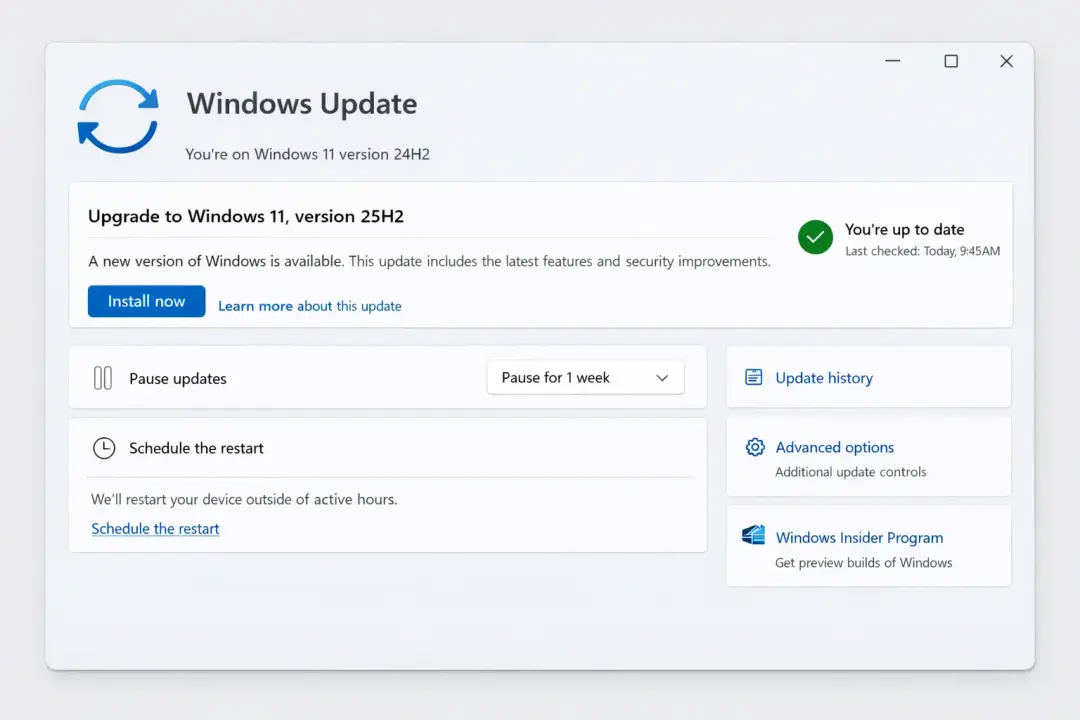
Who is affected by the Windows 11 24H2 forced upgrade
The main group is very specific: Home and Pro devices running Windows 11 24H2 that are not managed by IT departments.
That is Microsoft’s own wording. So the typical home laptop, family desktop, or small business PC that gets updates directly through the standard Windows Update experience is the most likely target.
That phrase, “unmanaged,” trips people up. In everyday terms, it means your PC is not being controlled by corporate update policies, Windows Server Update Services, or similar admin tools.
Microsoft’s documentation around Windows 11 25H2 explains that systems managed through Windows Update client policies, WSUS, Configuration Manager, or Intune are treated as managed for update purposes.
Those systems follow a different path because IT teams usually test and schedule feature updates on their own timeline.
So if you are a regular consumer, this news probably applies to you. If you work at a larger company and your device is locked down by IT, it probably does not, at least not in the same automatic way.
That difference matters because a lot of online discussion about forced updates mixes consumer PCs and enterprise fleets together, and they are not handled the same way.
What Microsoft is actually saying
This is where accuracy matters. A lot of people read headlines and assume Microsoft is instantly rebooting every computer in sight.
The official wording is more measured. Microsoft says unmanaged 24H2 Home and Pro devices will receive the Windows 11 25H2 update automatically, and users can still choose the time to restart or postpone the update.
That means the Windows 11 24H2 forced upgrade is real in the sense that the feature update is being pushed automatically to eligible unmanaged consumer devices. But it does not mean users lose every bit of control.
You may still be able to delay installation timing, pause updates for a limited period, or at least schedule the restart so it does not interrupt work at the worst possible moment.
Microsoft’s support guidance says Windows 11 users can pause updates from Settings > Windows Update, then choose the amount of time to pause. It also says you can schedule restarts more conveniently.
That distinction is worth keeping in mind. “Forced” in Windows coverage often means “automatically delivered unless blocked by a supported policy or hold,” not “your PC instantly upgrades with zero notice while you are typing an email.” Users still have some timing controls, just not complete veto power forever.
Why unmanaged users should pay attention
For many people, the emotional reaction is obvious. Nobody loves surprise updates. And if you have ever had a deadline, a spotty internet connection, or a laptop with barely enough storage, the phrase Windows 11 24H2 forced upgrade can feel like one more thing happening to you rather than for you.
Still, there is a real security argument behind it. Once Home and Pro editions of 24H2 hit the end of support on October 13, 2026, those devices will no longer receive monthly security and preview updates, known issue fixes, time zone changes, or technical support.
That is not a small detail. For millions of users, staying on a supported release is the difference between a maintained PC and one that slowly drifts into risk.
There is also a quieter benefit. Because 25H2 builds on 24H2 with an enablement package approach on updated systems, some users may experience a smoother transition than they expect. That does not guarantee a perfect rollout, of course.
Windows feature updates have a long history of being fine for most users and maddening for a smaller group. But the mechanics here suggest Microsoft is aiming for a more controlled transition than a full platform reset.
The catch: not every PC will get it at the same time
Even when Microsoft says a version is rolling out broadly, that does not always mean universal, same-day availability. Windows uses staged deployment, compatibility checks, and various safety systems.
One of the most important of these is the safeguard hold. Microsoft uses safeguard holds to block feature updates on devices with known compatibility problems until those issues are resolved.
This matters because the Windows 11 24H2 forced upgrade will not hit all eligible machines in one clean wave.
If your hardware, drivers, or specific setup are associated with a known issue, your device may be held back even while others move forward. That is a good thing. It is Microsoft’s way of not repeating the old habit of shipping the same update to every machine regardless of risk.
In real life, this means two people can own similar laptops and still see different behavior. One gets the update prompt this week.
The other waits because a driver, firmware combination, or specific hardware profile is under review. When users compare notes online, that difference often looks random. Usually, it is not. It is the rollout system doing its job, imperfectly but intentionally.
-20260403122246.webp&w=1080&q=75)
What users should do next
First, check your version. On Windows 11, go to Settings > System > About and look at the Windows specifications area. If you are on version 24H2 and you are using a personal Home or Pro device, you are in the group Microsoft is talking about. If your device belongs to a company or school, ask IT before doing anything. That is the easiest way to avoid confusion.
Second, back up important files. This is not dramatic advice. It is just smart. Even well-tested updates can expose low-storage problems, app conflicts, odd driver behavior, or startup glitches. A cloud backup, external drive, or even a quick copy of critical work folders is worth the few minutes it takes. One of the oldest lessons in Windows history is that updates usually go fine, until your machine decides to become the exception.
Third, use the controls Microsoft still gives you. If the timing is bad, Windows 11 lets you pause updates temporarily and schedule restarts more carefully. Microsoft’s support page spells out both options clearly. Pause is not forever, and eventually you must install the latest updates, but it can buy you breathing room before a trip, a client presentation, or exam week.
What this means for businesses and IT teams
The headline sounds consumer-focused, and mostly it is. But it also sends a message to IT teams. Microsoft is continuing to separate consumer update behavior from managed deployment behavior more clearly.
In its Windows 11 documentation, Microsoft says devices managed through update policies, WSUS, Configuration Manager, or Intune are treated as managed systems. Those systems are not simply swept into the consumer auto-upgrade lane.
That separation matters because enterprises care about pilot rings, app compatibility, compliance, and change windows. A home user might shrug off a reboot. A hospital workstation, factory terminal, or finance desktop cannot.
The auto-upgrade move for unmanaged PCs therefore looks less like overreach into enterprise control and more like Microsoft tightening the consumer support cycle while leaving formal management channels intact.
For small businesses, the lesson is a little sharper. If machines are effectively unmanaged, Microsoft may treat them like consumer endpoints. That is fine until a feature update arrives at a bad time.
Businesses that want tighter control should think seriously about proper device management instead of relying on the default Windows Update experience. It is one of those boring decisions that becomes very interesting the moment something breaks at 9:02 a.m. on Monday.
Is this update good news or bad news?
Honestly, it is both.
From a security and support standpoint, it is hard to argue against moving large numbers of ordinary PCs to a supported release before 24H2 ages out.
Microsoft is right about the core risk. Unsupported consumer systems become soft targets, and most people do not track lifecycle deadlines until after they matter.
From a user-control standpoint, the frustration is understandable. Many people hear Windows 11 24H2 forced upgrade and remember earlier update horror stories, slow restarts, driver issues, or surprise changes in settings.
That memory is real. Microsoft has improved a lot over the years, but trust in Windows Update is still uneven because users tend to remember the one bad update much longer than the twenty quiet ones.
The fair read is this: Microsoft is making a support-driven decision that is defensible, but users should still prepare rather than assume everything will go smoothly. That is not fearmongering. It is just the mature way to approach any large-scale operating system rollout.
FAQ
Is the Windows 11 24H2 forced upgrade official?
Yes. Microsoft’s Windows release health page says unmanaged Home and Pro devices on Windows 11 24H2 will automatically receive version 25H2.
Can I stop the Windows 11 24H2 forced upgrade completely?
Microsoft says you can postpone the update and choose the restart time, and Windows 11 also lets you pause updates temporarily. That is delay, not a permanent opt-out for supported consumer devices.
Are business PCs included?
Not in the same way if they are managed by IT. Microsoft documentation treats devices managed through update policies, WSUS, Configuration Manager, or Intune as managed systems.
Why is Microsoft doing this before October 2026?
Because Windows 11 24H2 Home and Pro support ends on October 13, 2026. Microsoft is moving users before that deadline so devices remain eligible for monthly security updates and other servicing.
Trusted source
For a fast external news summary, see the April 3, 2026 report from BleepingComputer, which matches Microsoft’s official release-health wording on the automatic rollout.
Hoplon Insight Box
What readers should do right now
- Check whether your PC is on Windows 11 24H2.
- Back up important files before the update arrives.
- If timing is bad, use Pause updates or Schedule restart.
- If you manage a small business fleet, consider proper update management so devices are not treated like ordinary unmanaged endpoints.
- Watch Microsoft’s release health dashboard if your device has unusual hardware or a known compatibility issue.
Final takeaway
The Windows 11 24H2 forced upgrade is not rumor, and it is not just another scary Windows headline. Microsoft has clearly said unmanaged Home and Pro devices on 24H2 will be moved to 25H2 automatically.
For most users, that is really about staying supported and secure before 24H2 hits its October 13, 2026 deadline. The smarter response is not panic. It is preparation. Back up your files, check your version, and use the update controls you still have while Microsoft handles the rollout.
You can also read these important cybersecurity news articles on our website.
· Apple Update,
For more, please visit our homepage and follow us on X (Twitter) and LinkedIn for more cybersecurity news and updates. Stay connected on YouTube, Facebook, and Instagram as well.





