
Have you ever updated Windows, got some coffee, and then came back to find that your laptop was still restarting? And starting over. And again, starting over?
A lot of people have had this problem lately with the Windows 11 update restart loop that was caused by the January security update KB5077181. Some devices got stuck in an endless reboot cycle instead of finishing the update and loading the desktop.
If you manage endpoints, run a business's IT, or even just use your own laptop for work, this kind of problem isn't just annoying. It gets in the way. It stops people from getting work done. It can even make security holes that last for a short time.
Let's make this easy to understand. What happened? Why it matters. What happens when the system gets stuck? And most importantly, what to do if your computer gets stuck in the loop.
What is the Windows 11 Update Restart Loop?
The Windows 11 update restart loop happens when your computer keeps restarting after you install an update but never fully loads the desktop.
When you update Windows, your device usually restarts once or twice. That's what we thought would happen. When you restart your computer, Windows replaces system files, updates the registry, and makes changes to the kernel.
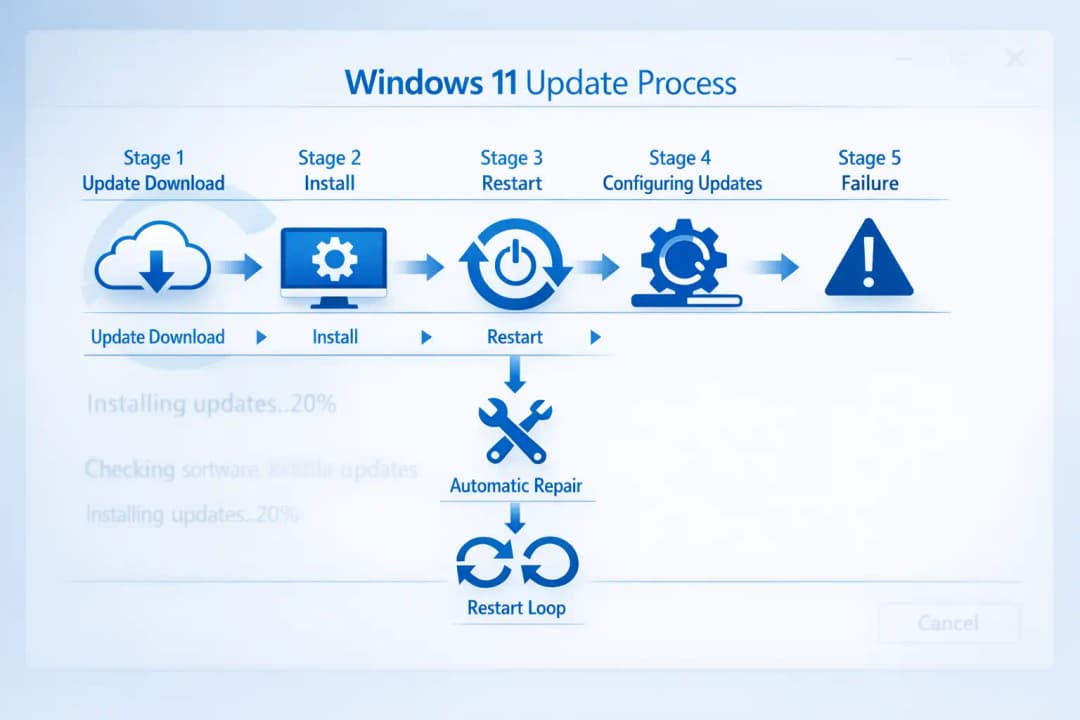
But if something goes wrong during that time, Windows tries to fix it. It tries again if recovery doesn't work. And again. That's when the endless restart cycle starts.
After KB5077181, some systems went through what many called the Windows 11 update restart loop after KB5077181, especially during the "Configuring Updates" phase.
It's important to make something clear. This doesn't mean it's a cyberattack right away. As of this writing, there is no confirmed CVE that is directly related to the reboot loop behavior. It looks like a problem with servicing or compatibility instead of malicious use.
What went wrong with KB5077181?
KB5077181 was a normal cumulative security update. Most of the time, these updates include
Patches for security
Better dependability of the system
Fixes at the kernel level
Updates to components
For most people, the installation went smoothly. But in some situations, systems didn't finish the post-install configuration.
Instead of finishing the setup, the devices went into what many called Windows 11 stuck in a restart loop after update installation.
Some administrators also said they had the Windows 11 KB5077181 boot loop problem, especially on computers with certain driver setups or not enough disk space.
In the past, Microsoft has admitted to having similar problems with updates that required a reboot. We must be clear that if there is no official confirmation of a widespread bug in this case,
This appears to be unverified or misleading information, and no official sources confirm its authenticity.
How the Restart Loop Really Works
Let's talk about how this works behind the scenes.
Windows doesn't replace files right away when it installs an update. Instead:
It puts update files in the WinSxS folder.
It writes operations that are still going on into the registry.
It sets up changes to the system that will happen when it restarts.
When you restart Windows, it goes into a pre-boot servicing mode. That is when it updates.
Windows might not finish loading the operating system if something stops or messes up this process. Then it tries to fix itself.
It restarts if the repair doesn't work. It restarts again if the rollback doesn't work. That's how the Windows 11 infinite restart loop problem after the security update starts.
Some common causes are:
Drivers that don't work together
Update files that are broken
Problems with Boot Configuration Data
Conflicts in firmware
Interference from security software
This is why Windows Update causing a restart loop in Windows 11 is often caused by things in the environment rather than a problem with the software itself.
What is the difference between a Windows 11 update and a boot loop?
A lot of people mix these two up.
The update process failing during servicing is what causes the Windows 11 update restart loop.
A boot loop, on the other hand, can happen when the system is more seriously damaged, when malware is present, or when hardware fails.
Knowing the difference between a Windows 11 update and a boot loop can help you figure out what's wrong. If the problem started right after you installed an update, it's probably related to servicing.
If it happens without any updates, it could be something more serious.
Why This Is Important for Cybersecurity
Now let's take a step back.
You might think this is just a problem with IT. But it has a direct effect on security.
When devices get stuck in a restart loop:
Endpoint detection agents might not send reports.
Less patch compliance.
Users put off future updates because they are afraid.
Security teams can't see what's going on.
And here's the truth that makes you feel bad. If companies are afraid to install patches because they might make things less stable, they might be vulnerable for longer.
The Windows 11 update restart loop has this hidden risk.
Example from the real world
Think of an accounting firm with 200 employees. Updates are installed automatically while you sleep. Twenty-five laptops are stuck in the restart loop by morning.
People who work there can't use the accounting software. People who work from home can't connect. Helpdesk lines are full.
The IT team starts Windows 11 restart loop troubleshooting, but they can't reach the remote systems.
Operational downtime costs money, even if there isn't a data breach. It stresses the staff. And it makes security checks take longer.
That's why stability in updates isn't just for convenience. It's strength.
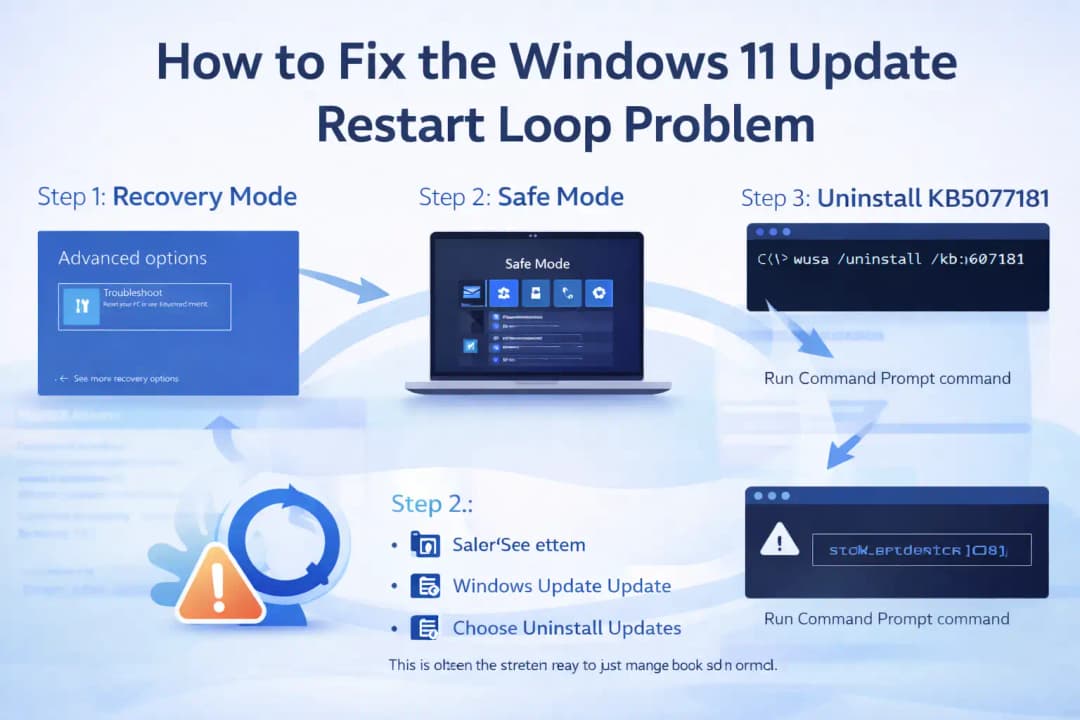
How to Fix the Windows 11 Update Restart Loop Problem
If you're dealing with this right now, here's how professionals deal with it in a calm and methodical way.
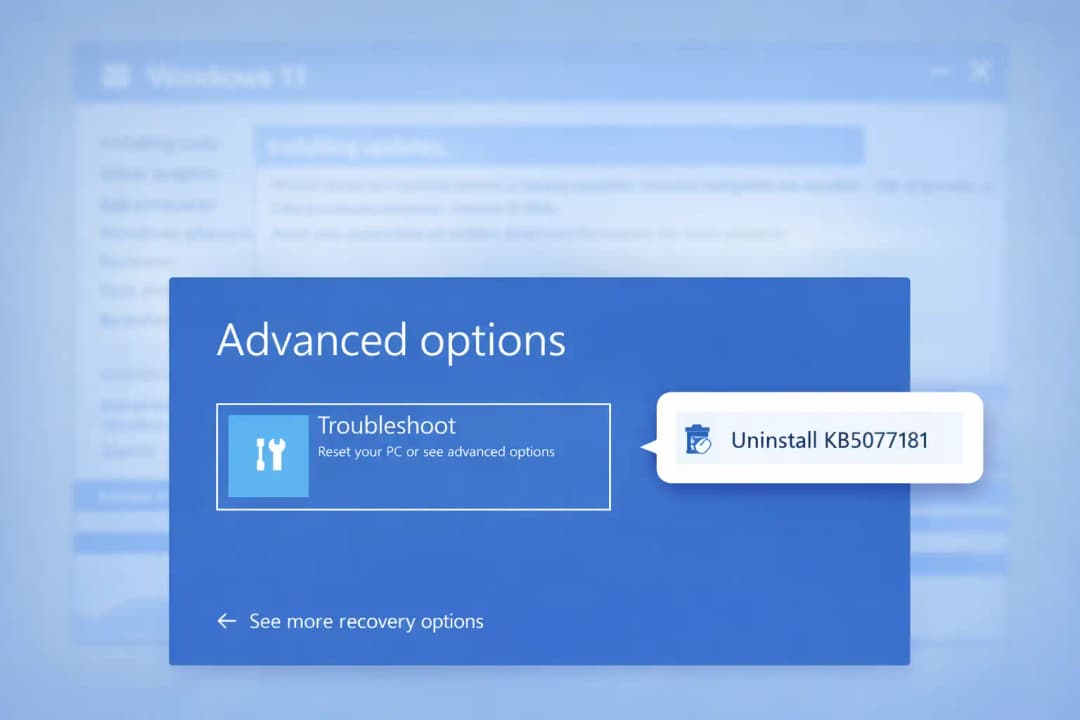
Step 1: Get into Recovery Mode
To start Windows Recovery Environment, force the computer to shut down three times during boot.
From that point on:
Pick Advanced Options
Choose "Troubleshoot."
This opens a number of tools for recovery.
Step 2: Windows 11 restart loop fix: Safe Mode
If you can get to it, Safe Mode is your best friend.
Start in Safe Mode and:
Go to Settings
Go to the history of Windows Update
Choose Uninstall Updates
This is often the easiest way to get things back to normal.
Step 3: Uninstall KB5077181 to fix the restart loop
If you can't get into Safe Mode, use Command Prompt in recovery:
wusa /uninstall /kb:5077181
In cases where servicing was only partially finished, this method can fix the Windows 11 KB5077181 boot loop problem.
Step 4: Use the rollback and recovery options in Windows 11
Windows has a number of built-in tools for recovery:
Restore the system
Return to the last version
Repairing a Startup
Installation of in-place repair
In business settings, these Windows 11 update rollback and recovery options are very important.
Always test before you send it out to a lot of people.
Windows 11 update error codes and reboot loop issues
Some administrators have seen certain error codes that are linked to reboot loops:
0x800f0922
0x800f0988
0xc1900101
These are often linked to failures in the driver or servicing stack.
Looking at Event Viewer and Windows Update. log can help find the root cause. Sometimes you can get to logs even if the device won't boot.
This is very important for fixing structured Windows 11 restart loop troubleshooting cases.
What makes a Windows 11 update restart loop?
Let's make this easier.
Some common causes are:
Installation of updates was stopped.
Not enough space on the disk
BIOS or firmware that is out of date
Conflicts between drivers from different companies
Update cache that is broken
Security software stops changes to system files
Knowing what causes a Windows 11 update restart loop can help you avoid it in the future.
Phased rollouts, monitoring the health of disks, and validating drivers all lower risk by a lot.
Does Microsoft know about the Windows 11 restart loop bug?
That's a question that comes up a lot.
Microsoft sometimes posts problems on the Windows Release Health Dashboard. In other cases, fixes come in later cumulative updates without any fanfare.
We must be responsible and say that there is no official statement confirming a specific widespread defect tied to KB5077181.
This appears to be unverified or misleading information, and no official sources confirm its authenticity.
Always trust official advice over threads on social media.
More general lessons for IT teams
Here's the big point to remember.
The Windows 11 update restart loop shows us that patch management is more than just "install and forget."
Smart businesses:
Updates to test groups in stages
Check telemetry before a wide rollout
Keep system restore points up to date.
Get recovery media ready
Write down escalation paths
It's all about balance. Fast patching makes systems less vulnerable. Controlled deployment lowers the risk of problems at work.
Common Misunderstandings
Let's clear up some false information.
"It's definitely malware."
Not always. Most cases are service failures.
"You need to reinstall Windows."
A lot of the time, that's not true. It works to uninstall the update or restore the system.
"Updates are not safe."
That's a dangerous generalization. Updates for security are still very important.
Final Thoughts
The Windows 11 update restart loop after KB5077181 shows us that even routine security patches can cause problems that we didn't expect.
Knowing how updates work, why reboot loops happen, and how to use structured recovery methods makes all the difference.
Most systems can be fixed without taking drastic steps if you stay calm, use Safe Mode, follow rollback procedures, and check drivers.
Defending against attackers is only part of security. It's also about protecting your systems while keeping them stable.
Questions that are often asked
What makes Windows 11 keep restarting after an update?
Most of the time, it's because of driver conflicts, bad update files, or service operations that were cut off.
How to fix the Windows 11 update restart loop issue?
You can use recovery mode, safe mode, uninstall the update, or apply restore points.
Is the Windows 11 infinite restart loop problem after the security update going to last forever?
Most of the time, no. Rollback or repair can fix it.
What is the difference between a Windows 11 update and a boot loop?
During patch servicing, an update loop happens. There may be deeper problems with the system that cause a boot loop.
To fix the restart loop, should I remove KB5077181?
If the update is confirmed to be the cause, uninstalling it usually works.





