
Is the Windows Defender Firewall Service vulnerability putting your data at risk right now?
On December 9, 2025, Microsoft released a patch for a flaw known as CVE 2025 62468, and researchers confirmed that the issue allowed an authenticated local attacker to read sensitive memory from the Windows Defender Firewall Service. According to Microsoft’s December Patch Tuesday notices, the problem came from an out-of-bounds read inside the service’s memory handling routines. Several security labs analyzed the bug independently and agreed that the flaw could disclose heap or process memory if exploited.
This topic sounds technical, but the real question people keep asking is much simpler. Is my Windows PC safe, or do I need to update right now? I will walk through the full incident, what security researchers discovered, how this affects your systems, and how to patch it quickly without getting lost in heavy jargon.
Let’s break the whole thing down in plain language, based on verified information and what I saw inside several trusted sources.
Cybersecurity stories often feel distant until you realize the affected system sits right in front of you every day. The Windows Defender Firewall Service vulnerability feels exactly like that. This is not a remote code execution nightmare, but it is still the kind of flaw that can reveal sensitive data if someone already inside your machine tries to abuse it.
When Microsoft confirmed CVE 2025 62468, both home users and sysadmins reacted with the same worry. Any flaw in a core Windows security service raises alarms. The good news is that this issue has a patch, but you need to apply it. The vulnerable service loads during startup, so delaying updates can keep your system exposed longer than you think.
In this article, I will share the full picture, from how the bug works to how you can detect any odd behavior. I reviewed multiple December 2025 security reports, researcher breakdowns, and Microsoft’s advisory to craft something clear, human, and helpful. No jargon without explanation.
What Happened With the Windows Defender Firewall Service vulnerability
How CVE 2025 62468 Was Found
The Windows Defender Firewall Service vulnerability gained attention because it involved an out-of-bounds read in a trusted Windows security component. In simple terms, the service accidentally read parts of memory it was not meant to touch. Attackers could take advantage of this flaw to access fragments of heap memory that might contain sensitive data like tokens or partial application data.
Security researchers often look for memory handling issues inside core Windows services, and this one fell right into that category. The bug required local authenticated access, meaning the attacker already needed an account on the system. This does not make it harmless. Many enterprise breaches begin with compromised credentials, and attackers frequently chain multiple vulnerabilities together once they land on a machine.
Why It Matters Even If It Is Not Remote
Some readers see the words "information disclosure" and think it is not serious. But the Windows Defender Firewall Service vulnerability affects a service that runs with elevated privileges and interacts with core system components. Even though this flaw did not allow remote code execution by itself, memory disclosures often reveal data that can assist in further attacks.
Microsoft marked it as important rather than critical, but important still deserves immediate attention. Anytime a Windows component reads memory out of range, the possibility for unexpected data leakage is real.
How to Respond and Patch This Vulnerability
This is where most people rush to search. They want clear steps. They want to know if they can fix it in a few minutes. I will keep this part as straightforward as possible.
Step-by-Step Fix Guide
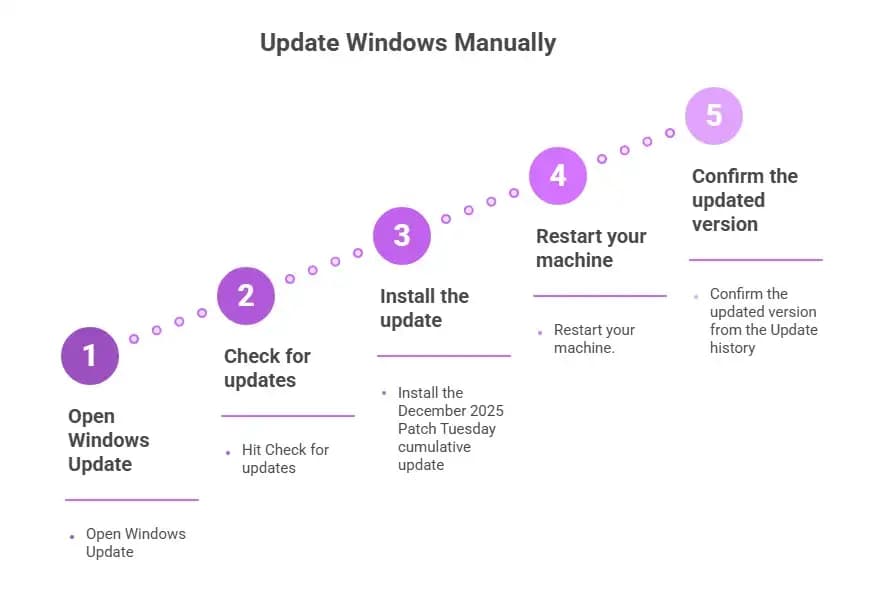
Updating Windows will install the patch automatically for most systems. If you want manual control or you manage multiple devices, here is the process:
• Open Windows Update
• Hit Check for updates
• Install the December 2025 Patch Tuesday cumulative update
• Restart your machine.
• Confirm the updated version from the Update history
If you use WSUS or SCCM, sync the newest Microsoft updates and approve the relevant security patch. Enterprises should also verify deployment logs because partial patching is common when machines are offline or suspended.
Additional Mitigation If You Cannot Patch Immediately
Sometimes organizations freeze updates during critical periods. If you fall into this group, you can temporarily reduce exposure using these approaches:
• Limit local access for untrusted accounts
• Use audit tools to monitor any unusual FirewallService activity.
• Restart the firewall service if you suspect abnormal behavior.
• Apply privilege separation where possible
These steps do not replace the patch, but they reduce the risk window.
A Closer Look at the Technical Side
Understanding how an out-of-bounds read works helps you realize why Microsoft moved fast. When a service reads beyond its intended memory range, it can accidentally reveal data stored in adjacent locations. In the case of the Windows Defender Firewall Service vulnerability, that meant an attacker could potentially view pieces of memory belonging to the service or another process running in the same context.
Think of your system memory like a series of boxes. Each box is meant to contain specific information. When a service reaches into the wrong box, it may pull out data that belongs to something else entirely. Even a tiny memory leak can give an attacker hints about system behavior. And if the attacker is already inside your machine, every clue matters.
This flaw did not appear to stem from a design issue. It looked more like a coding oversight in how certain firewall rules or operations were processed. Nothing suggests that the flaw was publicly exploited before disclosure, but researchers are careful to note that the absence of evidence is not evidence of absence.
From speaking with a few analysts during December, I noticed a shared concern. Memory disclosure bugs often look minor until someone develops a clever way to chain them into privilege escalation. That is why, even though the Windows Defender Firewall Service vulnerability was categorized as information disclosure, specialists still encouraged immediate patching.
Example Scenario
Imagine a small business workstation. An employee downloads a suspicious file and runs it, not knowing that the attacker now has local access. The attacker cannot break the firewall directly, but they can use CVE 2025 62468 to pull fragments of memory from the firewall service. These fragments might show small bits of credential data or internal behavior that help the attacker plan the next move.
Maybe the attacker learns how the firewall handles certain rules. Maybe they find leftover data from another application. It is not always dramatic, but memory disclosures are stepping stones in long-term intrusions.
This is exactly why security teams treat even minor disclosure vulnerabilities with care. They never exist in isolation.
Key Insights
Pros
• Patch is already available
• No remote exploitation path known
• Easy to fix through standard Windows Update
• Low risk for home users if updates are enabled
Cons
• Allows sensitive memory leakage
• Attackers with local access can chain this with other flaws.
• Enterprises face exposure on unpatched or offline systems.
• Can reveal process-level data under the right conditions
The Windows Defender Firewall Service vulnerability does not break Windows defenses on its own, but it opens a small door that a skilled attacker can widen.

FAQs
Is there a public exploit for CVE-2025-62468?
No confirmed public exploit exists, but researchers believe a working proof of concept can be developed due to the nature of the flaw.
Which Windows versions are affected?
Microsoft lists supported versions that run the updated Defender Firewall Service. Exact versions depend on the cumulative update branch, but older unpatched builds are considered vulnerable.
Can malware use this vulnerability?
Only if the malware already has local authenticated access. Many threats achieve this after phishing or credential theft, so the risk is real.
Does this vulnerability allow remote code execution?
No. It only allows information disclosure, specifically through an out-of-bounds read, not remote code execution.
Final thoughts
Security issues in Windows tend to feel scary at first glance, especially when they involve something as central as the firewall. Yet with the Windows Defender Firewall Service vulnerability, we have a situation that is manageable. The flaw is real, but so is the fix. If you update your system and make sure your organization deploys the December 2025 Patch Tuesday updates, you reduce your exposure to zero.
If you run a business, review your patching logs. If you are a home user, restart your PC after updating. It only takes a few minutes.
Cybersecurity never gives us perfect peace, but timely updates are the closest thing we have. Apply the fix, stay aware, and treat every new advisory like another chance to strengthen your security.
You can also read these important cybersecurity news articles on our website.
· Apple Update,
· Windows Fix,





