
Change Gmail Address: Can You Finally Replace Your Old @gmail.com Without Creating a New Account?
Yes, for some users, Google now officially allows you to change Gmail address settings and move from one @gmail.com address to another on the same Google account. The feature is rolling out gradually, so not everyone will see it yet. Google’s own help documentation confirms the option may be available if your account shows “Change Google Account email” under Personal info.
For years, the answer to this question was simple and frustrating: no, you could not change Gmail address details if your account ended in @gmail.com. You had to start over, create a new inbox, move data around, warn your contacts, and hope nothing broke. That old advice is now outdated. Google has quietly updated its help pages, and the shift matters because email addresses are not just inbox labels anymore. They are your sign-in, your public identity in shared files, and in many cases, the key that unlocks dozens of apps and services.
What changed and why people are paying attention
This update feels bigger than it sounds. An email address chosen in high school has a way of following people into job applications, bank accounts, apartment rentals, freelance invoices, and family group chats. A lot of users have been stuck with usernames that felt too childish, too random, or just no longer fit their life. Google’s new option finally gives those people a path to clean things up without abandoning the account itself.
The key detail is that Google is not simply letting people make a cosmetic edit. It is allowing eligible users to change Gmail address information tied to the main Google account email. According to Google’s help page, the old address becomes an alternate email, both the old and new addresses can still receive mail, and the data already stored in the account stays in place. That includes things like Gmail messages, photos, and other account content.
That is why this is different from older workarounds. Before this update, most “how to change Gmail address” guides were really about one of three things: changing the display name, adding a send-as alias, or creating a new account and forwarding mail. Those tricks were useful, but they were not the same as changing the actual Google Account email. Google’s latest documentation makes a real distinction here, and that is the part many articles miss.
The first thing users should understand
Not everyone can do this today.
That may be the most important sentence in the whole article. Google says the ability is “gradually rolling out,” and if the option does not appear in your settings, the feature may not be available for your account yet. So yes, you may now be able to change Gmail address details on an existing account, but that does not mean every Gmail user has instant access.
This matters for search intent because a lot of readers are going to land on articles with a simple expectation: “Tell me the steps.” The steps are important, but the availability check comes first. If you skip that, you end up with the most common frustration on the internet: following a tutorial perfectly and still not seeing the button everyone promised would be there.
How to change a Gmail address on an eligible Google Account
If your account has access, Google’s path is surprisingly direct.
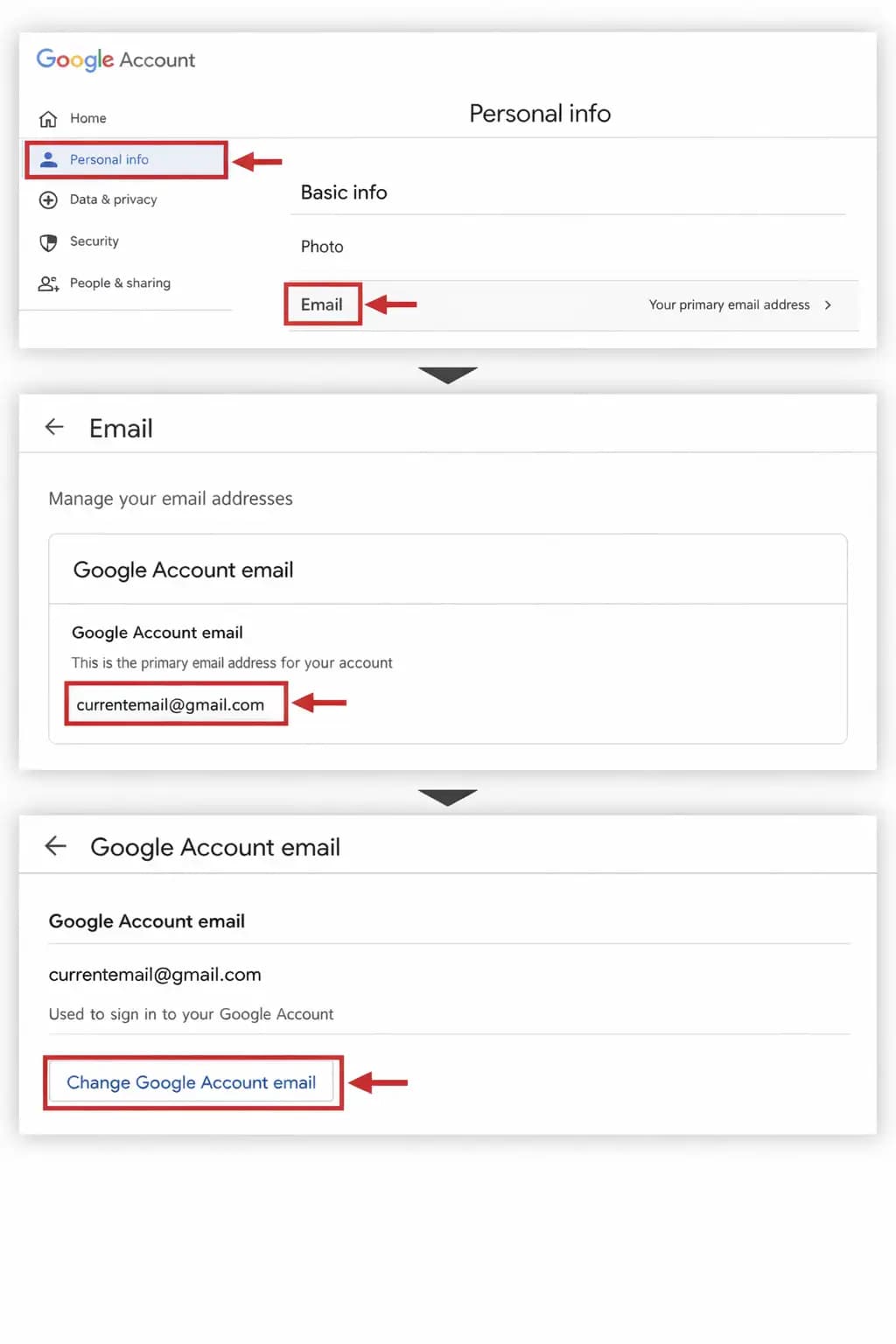
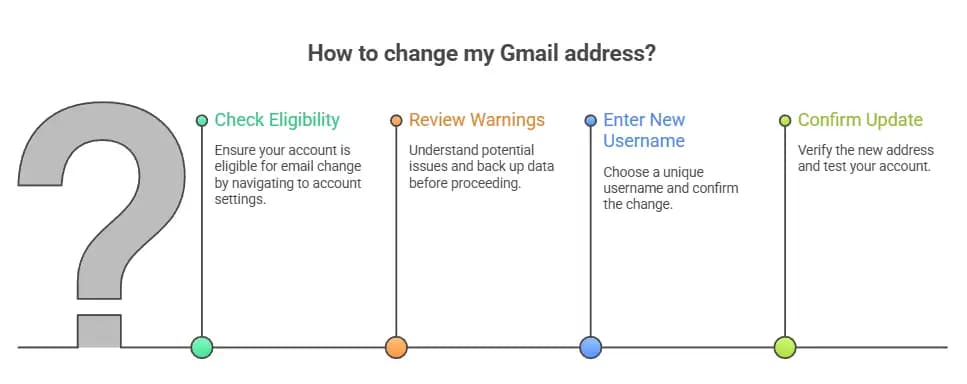
Step 1: Open your Google Account email settings.
Go to your Google Account and open the page for your account email. From there, click Personal info, then Email, then Google Account email. If you see the option labeled "Change Google Account email," your account is eligible to move forward.
Step 2: Review the warnings before you do anything.
Google advises users to check for possible issues before they change Gmail address settings. This is not fluff. It includes possible effects on Chromebooks, apps that use Sign in with Google, and some synced settings that may need to be recreated. Google also recommends backing up your data first, just in case.
That backup suggestion is worth taking seriously. Most changes go smoothly, but email is one of those services tied into everything. It is like changing the front door to your house. Even when the lock works perfectly, you still need to make sure everyone who should have a key still has one.
Step 3: Enter your new username.
Once you pass the eligibility and warning screens, you can enter the new username you want. It must be unique. Google says it cannot already belong to another account, and it also cannot be an address that was used before and later deleted. After that, click to confirm the change and follow the on-screen prompts.
Step 4: Confirm the update and test your account.
When the process is done, Google says your new Gmail address becomes the main account email and your previous Gmail address remains as an alternate email. In practice, that means this is not the same as wiping away the old identity entirely. Think of it more like moving to a new front-facing address while keeping the old mailbox route alive behind the scenes.
What happens after you change Gmail address settings?
This is where the update becomes genuinely useful.
Google says that when you change Gmail address information from one @gmail.com address to another, your previous address becomes an alternate email address. You still receive emails sent to both the old and new addresses. Your stored account data remains unaffected. You can also sign in to Google services with either address.
That last part is huge. It removes the fear of suddenly getting locked out of YouTube, Drive, Maps, or Play because you decided to modernize an old username. For people with a long digital history tied to one Google Account, this is the difference between a manageable update and a weekend-long migration headache.
Still, there is an important catch. Old appearances of your email are not rewritten everywhere retroactively. Google notes that older Calendar events, for example, may still display the previous address. So while you can change Gmail address details going forward, the internet will not magically rewrite history for you.
The limits Google puts on this feature
This is not a rename button you can play with every month.
Google says you can change back to your previous Google Account email at any time, but creating a new Gmail address on the account is limited. You can only create a new @gmail.com address once every 12 months and only three times total. Google also says you cannot delete the newly created address afterward.
That limit feels intentional. It protects the account system from abuse, confusion, and impersonation tricks. It also pushes users to think carefully before they change Gmail address settings. If you have three chances across the lifetime of the account, this is not something to do casually while half-awake on a Sunday afternoon.
What this does not mean
A lot of confusion around this topic comes from mixing up similar Gmail features.
You could already change your display name. You could already add alternate emails in some cases. You could already send mail from another address or alias through Gmail settings. None of that was the same as changing the actual Google Account email that ends in @gmail.com. Google’s support pages separate these options clearly, and that distinction is important for both users and publishers writing about the feature.
So if you are reading an older guide that talks about “just create an alias” or “change the name people see,” understand that it is solving a different problem. An alias is useful. A display name tweak is useful. But neither one fully changes Gmail address credentials the way this new account-level option can for eligible users.
Real-world impact for users
This update looks small on paper, but it solves some very real problems.
Maybe someone made a Gmail account at 14 and ended up carrying a joke username into adult life. Maybe someone changed their name and did not want a deadname attached to every shared Drive file and login prompt. Maybe a freelancer wanted a more credible address without rebuilding years of Google data from scratch. These are not edge cases. They are the normal ways digital identity drifts out of sync with real life.
There is also a trust angle. People often hesitate to email a business, landlord, or recruiter from an address that sounds unserious. The ability to change Gmail address settings on the same account means users can improve how they present themselves without breaking the services and history attached to the account. It is practical, not cosmetic.
Risks and friction points you should not ignore
Even a welcome feature can create messy side effects.
Google warns that some services and features may need attention after you change Gmail address settings. If you use Sign in with Google on non-Google sites, you should review those accounts. If you use a Chromebook, Google specifically says there are steps you should take first. Some app settings may reset, similar to signing in on a new device.
This is the part many shallow articles skip. The update keeps your core Google data, yes. But your broader digital life may still depend on the old address being recognized by third-party platforms. So after the switch, it is smart to check banking apps, shopping accounts, newsletters, developer tools, and work platforms one by one. Boring advice, maybe. But it is the kind that saves people from unpleasant surprises.
Why this topic matters beyond Gmail
Email is still one of the basic building blocks of online identity. Research from The Radicati Group says worldwide email users were expected to grow from over 4.3 billion in 2023 to over 4.8 billion by 2027. In other words, email is not fading into irrelevance. It is still the account layer beneath everything from streaming subscriptions to government portals.
That is exactly why a feature like this gets attention. It touches a tool people use every day, but it also affects account recovery, security alerts, app sign-ins, and how your identity appears across Google products. When a company as large as Google changes a long-standing account rule, the impact ripples far beyond a single inbox.
What users should do next
If you want to change Gmail address details, start by checking whether your account shows the option in Google Account settings. Do not assume the feature is live for you just because an article says it exists. Google’s own documentation says availability can vary during rollout.
If the option is available, back up important data first, review any linked apps or sign-in dependencies, and choose your new username carefully. Since Google limits how often you can create a new Gmail address on the account, this is one of those rare internet settings changes where being a little cautious is actually the smart move.
If the option is not there yet, the honest answer is simple: wait. You can still use temporary workarounds like aliases or display-name changes, but those are not the same as this new official account-level method.
FAQ
Can I change my Gmail address without creating a new account?
Yes, some users now can. Google’s official help page says eligible accounts with a @gmail.com address may be able to switch to a new @gmail.com address on the same account. The feature is still rolling out, so the option may not appear for everyone yet.
Will I lose my emails if I change Gmail address settings?
Google says no. Your saved account data is not affected, and that includes existing messages and other account content. Emails sent to your old or new Gmail address should still appear in the same inbox.
Can people still email my old Gmail address?
Yes. Google says your previous Gmail address becomes an alternate email address, and you will still receive emails sent to both the old and new addresses.
How many times can I change my Gmail address?
Google says you can only create a new @gmail.com address once every 12 months and three times total for the account.
Hoplon Insight Box
What smart users should do before changing their Gmail address
-
Take screenshots of your current account email, recovery email, and phone settings.
-
Back up key data if you use Android, Chrome sync, Contacts, Photos, or a Chromebook.
-
Make a list of important apps that use Sign in with Google.
-
Notify banks, clients, schools, or admin portals if they use your old email as a contact or recovery address.
-
Choose a username that will still make sense years from now, not just this week.
-
Trusted sources
Google’s official help documentation confirms the feature, explains the gradual rollout, and lists the change limits and side effects.
Google’s Gmail help page on aliases remains useful for users who do not yet see the new account-level option.
The Radicati Group’s email market research helps explain why an email identity change matters at scale.
Final takeaway
For years, the web kept giving the same disappointing answer to anyone searching for "change Gmail address: you cannot do it. That answer is no longer universally true. Google now officially says some users can replace their main @gmail.com on the same account, keep their data, and continue receiving mail sent to the old address. But the rollout is gradual, the limits are strict, and the surrounding account cleanup still matters.
So the best version of the story is not “Google made it easy for everyone overnight.” It is this: Google finally opened the door, but you still need to check whether your account has the key.
If you want, I can turn this into a cleaner publisher format next with a table of contents, schema-ready FAQ block, and WordPress meta fields.
address":
You can also read these important cybersecurity news articles on our website.
· Apple Update,
· Synology Issue,
· TikTok Warning
· Chrome Update,
· WordPress Issue.
· Apple OS update
For more, please visit our homepage and follow us on X (Twitter) and LinkedIn for more cybersecurity news and updates. Stay connected on YouTube, Facebook, and Instagram as well.





