
The rise of fake VS Code alerts and GitHub malware campaigns shows that developers don't trust platforms like GitHub as much as they should. A security alert that looks harmless could actually be a carefully planned trap that takes advantage of that trust.
These attacks use social engineering and environments that look real to trick people, which makes them much more convincing than regular phishing attempts.
In the last few months, attackers have turned their attention to developers as high-value targets. They do this by sending fake alerts, fake updates, and fake discussions to spread malware without anyone knowing. This article explains how the attack works, why it works, and what developers often forget to do until it's too late.
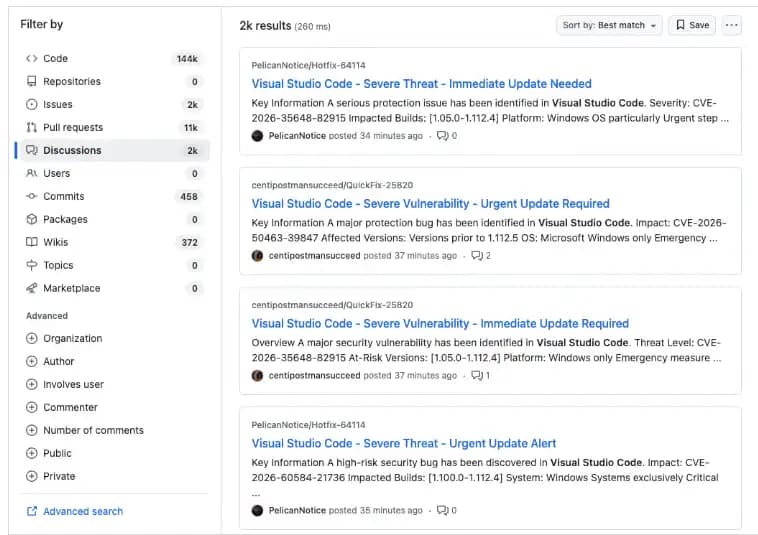 Fake security alerts on GitHub Discussions
Source: Socket
What Are GitHub Alerts That Aren't Real?
Fake VSCode Alerts: GitHub Malware Explained
These attacks put fake security warnings right in the middle of GitHub project discussions. The messages are made to look like official alerts about vulnerabilities, and they often use the following:
- Words that make it sound urgent, like "critical issue" or "immediate fix needed"
- Fake vulnerability identifiers
- Technical language that sounds like real advice
- People using fake names to act like maintainers or security researchers
The goal is simple: make people panic and feel like they need to act quickly without checking.
This method uses GitHub's own messaging system, which makes it seem real, unlike regular phishing emails.
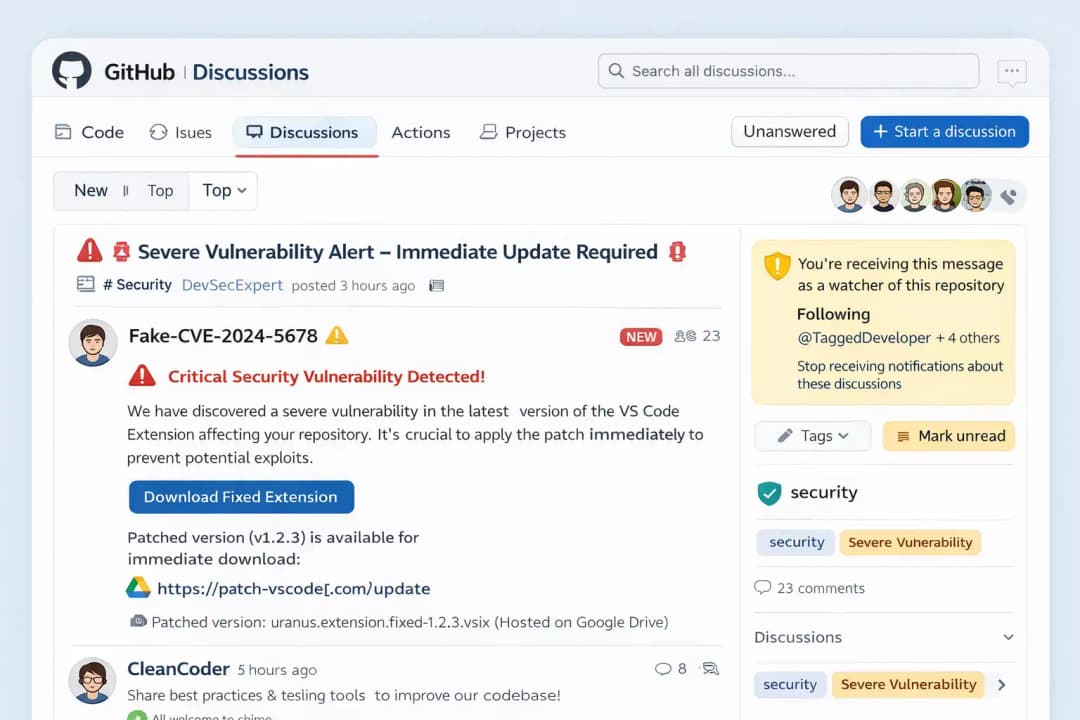
How the GitHub Malware Campaign Works
A Step-by-Step Attack Chain
The attack follows a well-organized and highly automated plan:
- Attackers make or use GitHub accounts that aren't very active
- They put fake security alerts on thousands of repositories
- GitHub sends messages to people who watch and contribute to projects
- Developers get alerts by email or through notifications on the platform
- The victims click on the "fix" or "update" link that was sent to them
- The process of sending malware starts quietly
The size and speed of this are what make it dangerous. Thousands of posts can show up in a matter of minutes and reach a huge audience right away.
Hidden Technical Process and Malware Delivery Flow
How the JavaScript Tracking Payload Works
After a developer clicks the link, the process gets more complicated and harder to find.
The system doesn't deliver malware right away; instead, it:
- Takes users through several steps
- Loads a script that gets information about the device and browser
- Keeps track of:
- Operating system
- Time zone
- Settings for language
- Information about the browser
This data is sent back to a server that is far away.
An Explanation of the Traffic Filtering System
This stage acts as a filter, making sure that only real people can move on.
It helps attackers:
- Stay away from security researchers
- Get around systems that automatically find things
- Go after victims with a lot of money
The final payload is only sent to certain users, which makes it harder to figure out or stop the attack.
Different Kinds of Malware That Attack Developers
The second-stage payload isn't always easy to see, but it usually includes the following:
- Credential stealers that steal GitHub tokens and API keys
- Remote access tools (RATs) let you take full control of a system
- Crypto wallet thieves who go after stored assets
- Session hijackers take over browser sessions
These tools are meant to be used for a long time, not to cause damage right away.
Why This Attack Is More Dangerous Than It Seems
A Strategy for Targeting Developers
Developers are not just random victims. People are going after them because they have:
- Access to systems for making things
- Repositories that are sensitive
- Credentials for deployment
- Permissions at the organization level
This makes one hacked device a way into a supply chain attack.
Why Links to Google Drive Look Safe
One important thing that this campaign does is host files on safe sites like Google Drive.
This works because:
- Users think these platforms are safe
- The link doesn't seem fishy
- It gets around basic security filters
This gives people a false sense of safety, which makes them more likely to succeed.
Real Patterns Behind This Campaign
This attack was planned. It follows a plan that is both coordinated and large-scale:
- Thousands of posts that are almost the same in different places
- Systems for posting automatically
- Tagging a lot of users at once
- Using GitHub's notification system to reach more people
Some of the same methods have been used in past attacks, such as:
- Fake alerts asking for OAuth permissions
- Spam pull requests that take you to phishing pages
This shows a clear pattern: attackers are using developer workflows as weapons.
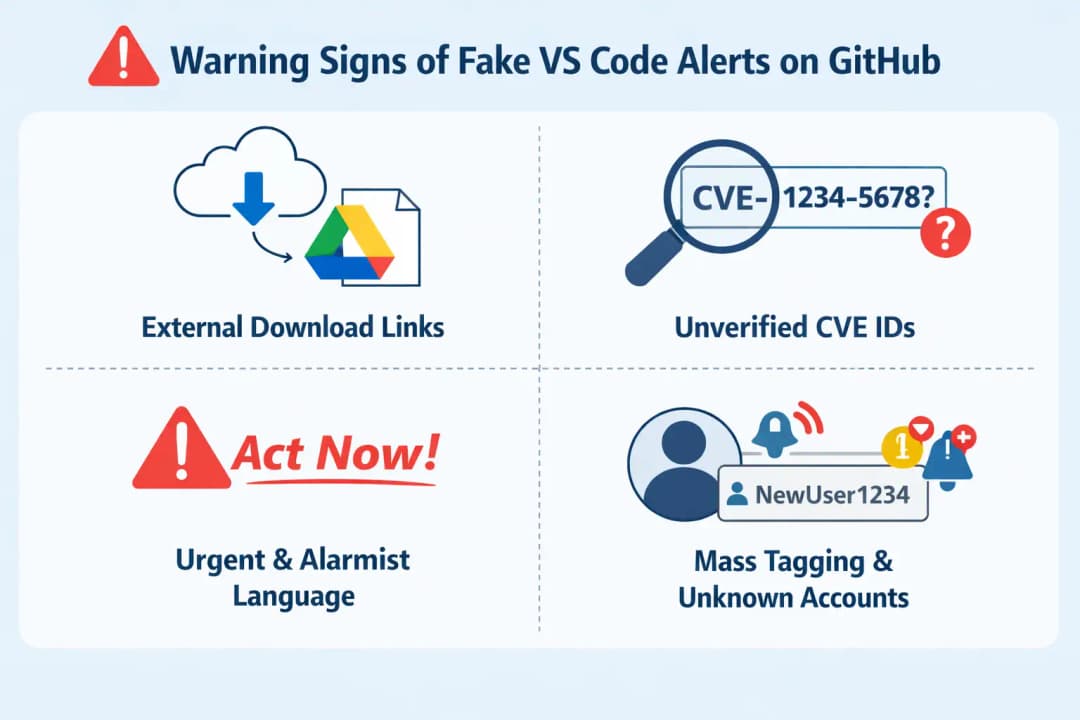
Red Flags That Developers Keep Ignoring
A lot of developers fall for these scams because the signs are hard to see.
Keep an eye out for:
- Links to downloads from outside sources instead of official ones
- IDs of vulnerabilities that haven't been checked
- Language that is too urgent
- Alerts showing up in projects that aren't related
- Accounts that aren't known to be posting security updates
Checking for a few seconds can save you a lot of trouble.
How to Keep GitHub Malware from Hitting You
Developers need to be proactive about security.
Important Steps to Protect Yourself:
- Only get software from official sources
- Check the details of the vulnerability in reliable databases
- Don't click on links in GitHub discussions
- Turn on two-factor authentication
- Keep an eye on what happens on your GitHub account
- Use tools for endpoint security
Best Ways to Do Things:
- Take a break before responding to urgent alerts
- Check information from more than one source
- Don't run scripts or extensions that you don't know about
What to Do If You Already Clicked the Link
It's very important to act right away.
- Unplug from the internet
- Scan the whole system
- Take away GitHub tokens and access keys
- Change every password
- Look over what you've done with your account
- Get rid of any extensions that look suspicious
A quick response can help a lot.
Questions and Answers
Are GitHub alerts for VS Code real or fake?
Not all alerts are fake, but a lot of recent campaigns have had fake alerts. Always check before you do anything.
How do fake GitHub alerts get malware to spread?
They trick people into clicking on bad links that look like updates, which lets malware download without being seen.
Is it possible to use GitHub notifications for phishing?
Yes. Hackers send phishing messages directly to developers through GitHub's notification system.
What will happen if I click on a fake VS Code alert?
Tracking scripts may send you to a different site, where you may be exposed to malware that steals data.
How to avoid getting scammed by VS Code malware?
Stick to official sources, double-check alerts, and don't act on urgent messages until you get confirmation.
You can also read these important cybersecurity news articles on our website.
· Apple Update,
For more, please visit our homepage and follow us on X (Twitter) and LinkedIn for more cybersecurity news and updates. Stay connected on YouTube, Facebook, and Instagram as well.





