Did Microsoft release an emergency update to fix Windows activation errors?
Yes. On November 13, 2026, Microsoft released several out-of-band (OOB) updates to address a licensing and activation problem introduced by the November 2026 Windows security update. The issue can cause certain operations performed through the Software Licensing Management Tool (SLMGR) to fail with error 0x80041008 (Invalid parameter).
The problem mainly affects enterprise environments that use command-line tools or automated processes to manage Windows licenses and Key Management Service (KMS) activation. Microsoft says devices that were already activated remain activated.
This distinction matters. The update
addresses a specific software licensing management failure. It does not
represent a general fix for every Windows activation error.
Table of Contents
- Background and November 2026 update
- Affected Windows versions
- Technical breakdown of SLMGR
- Understanding common activation error codes
- Enterprise remediation strategy
- Patch management and business impact
- Key takeaways
- Frequently asked questions
TL;DR: Quick Summary
- What happened: Microsoft released out-of-band updates on November 13, 2026, to fix Windows licensing operations that could fail with error 0x80041008.
- Who is affected: A limited number of enterprise devices using SLMGR commands or automated KMS and product-key management processes after installing the November security update.
- What to do: Identify the affected Windows version, install its matching OOB update, and verify that licensing operations work correctly.
Primary reference: Microsoft Support, November 13, 2026 OOB release documentation.
Background: Why the November 2026 Windows Licensing Issue Matters
What happened after the November 10 security update?
The problem began after Microsoft released its November 10, 2026 security updates. The updates included fixes for supported Windows versions, but Microsoft later documented a problem affecting certain licensing operations.
The affected component was the Software Licensing Management Tool, commonly known as SLMGR. Windows administrators use this tool to manage product keys, activation settings, and volume licensing configurations.
Microsoft identified error 0x80041008, described as an invalid parameter error. The problem could appear when administrators ran certain SLMGR commands to configure KMS activation or install a product key.
For an organization managing hundreds of Windows computers, this can become an operational issue. An automated deployment process may attempt to configure activation on several devices. If the licensing command fails, the deployment process may not complete as expected.
Microsoft's November 13 update specifically addresses this problem. It does not indicate that every Windows installation lost its activation status.
Which Windows versions are affected?
Microsoft published separate cumulative OOB updates for the affected Windows versions.
The following table identifies the relevant packages based on Microsoft's November 13 release documentation.
|
Windows version |
OOB update |
Release date |
|
Windows Server 2025 |
KB5136489 |
November 13, 2026 |
|
Windows Server 2022 |
KB5136487 |
November 13, 2026 |
|
Windows Server 2019 |
KB5136490 |
November 13, 2026 |
|
Windows 11 version 23H2 |
KB5136483 |
November 13, 2026 |
|
Windows 10 version 22H2 ESU |
KB5136493 |
November 13, 2026 |
|
Windows 10 Enterprise LTSC 2021 |
KB5136493 |
November 13, 2026 |
|
Windows 10 Enterprise LTSC 2019 |
KB5136490 |
November 13, 2026 |
Important: These packages are not interchangeable. Administrators must select the update that matches their operating system and servicing requirements.
Sources: Microsoft's Windows 11 OOB release
What does out-of-band mean?
An out-of-band update is a Windows update released outside Microsoft's normal monthly update schedule.
Microsoft generally releases cumulative security updates on the second Tuesday of each month. However, some problems require a fix before the next scheduled release.
An OOB update can address an important software regression, an urgent security problem, or another issue that cannot reasonably wait for the next monthly update.
There is one important distinction: an OOB update is not automatically a security patch. The November 13, 2026 packages discussed here are classified as non-security updates.
Microsoft also explains that optional non-security OOB updates may require administrators to take action. Their availability depends on the deployment channel and the specific KB package.
For managed environments, this matters because an update may not appear automatically in an existing deployment workflow.
Reference: Microsoft's Windows out-of-band update guidance.
Technical Breakdown: How the Windows Licensing Error Works
Understanding SLMGR and Windows activation
Windows uses a licensing system to determine whether an installed copy of the operating system has a valid activation status.
The Software Protection Platform manages important licensing functions. SLMGR provides administrators with a command-line interface to interact with that system.
The tool supports several administrative operations, including:
- Checking the current Windows activation status.
- Installing a valid product key.
- Configuring a KMS client.
- Initiating an activation request.
- Managing licensing information.
For example, an IT administrator may use SLMGR when preparing a Windows image for deployment.
The administrator installs the operating system, applies organizational settings, and configures the appropriate licensing method. The process may run manually or through an automated deployment system.
If a licensing command fails, the deployment workflow may stop at the activation stage.
This is where the November issue becomes relevant.
What is Key Management Service (KMS)?
Key Management Service (KMS) is a Microsoft volume activation method designed for organizations managing multiple Windows installations.
Instead of activating every computer separately through an individual retail activation process, an organization can use an internal KMS host to manage activation requests.
The general structure looks like
this:
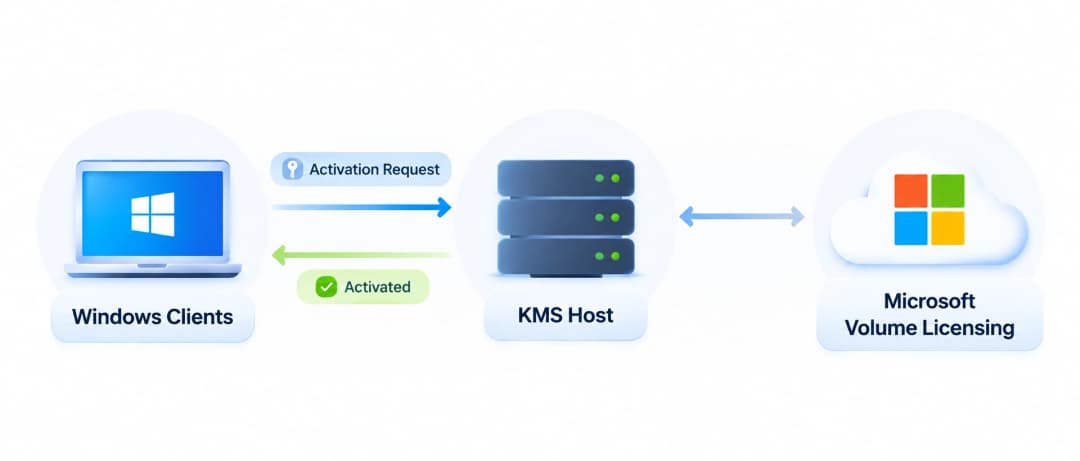
How enterprise KMS activation works
Windows client devices
Employee computers and company workstations
Activation requests
KMS host server
Manages volume activation requests
Licensing validation
Microsoft volume licensing framework
Supports the organization's licensing arrangement
A KMS client must communicate with an appropriate KMS host to complete activation. Network connectivity, DNS configuration, and the correct licensing setup all matter.
A failure in this process can prevent a device from completing activation, even when the organization has a valid licensing agreement.
Microsoft documents several possible causes of KMS activation problems, including unavailable KMS hosts, incorrect DNS records, network restrictions, and time synchronization issues.
However, the November 2026 issue is different. It involves certain SLMGR operations failing after the November security update.
Why did error 0x80041008 appear?
Microsoft identified error 0x80041008 as an invalid parameter error associated with certain Windows licensing operations.
The documented issue primarily affected organizations using commands or automated processes to:
- Configure KMS activation.
- Install Windows product keys.
- Manage Windows licensing settings.
Microsoft specifically identified failures involving SLMGR commands such as slmgr.vbs /skms-domain and slmgr.vbs /ipk in its November 10 update documentation.
The distinction between an activation failure and an already activated device is important.
A computer that had completed activation before the problem occurred did not automatically lose its activated status. Microsoft explicitly stated that previously activated devices remained activated.
The risk was greater for devices that still needed licensing configuration or activation-related operations.
A realistic enterprise scenario
Consider a company with several office locations and a centralized Windows deployment process.
Its IT department maintains a standard Windows installation image. When a new computer joins the company, an automated process applies organizational settings and configures volume activation.
The deployment system relies on SLMGR to install the appropriate key and configure the activation environment.
After the November 10 update, certain licensing commands may return an invalid parameter error.
The deployment team might initially suspect a network problem or an expired license. However, neither assumption necessarily explains the failure.
A better investigation starts with the update history.
The administrator checks:
- Whether the affected Windows update was installed.
- Whether the device is running a supported affected Windows version.
- Whether the failure occurs during an SLMGR licensing operation.
- Whether the device was already activated before the update.
- Whether the applicable November 13 OOB package has been installed.
This scenario illustrates why update history should be part of Windows activation troubleshooting. A licensing error that appears immediately after a cumulative update may have a different cause from an older KMS connectivity problem.
This is an illustrative enterprise scenario, not a documented customer incident or a claim of firsthand testing.
What does the error look like?
The following is an illustrative diagnostic record, not a copied Microsoft event log.
Component: Software Licensing Management Tool
Operation: Windows licensing configuration
Result: Failed
Error code: 0x80041008
Description: Invalid parameter
Investigation:
- Check installed Windows updates.
- Identify the failed licensing operation.
- Verify the Windows edition and licensing method.
- Check the applicable Microsoft OOB update.
The purpose of this record is to show which details an administrator should collect.
An error code alone does not establish the root cause. The operating system version, update history, licensing configuration, and failed command all provide useful context.
Windows Activation Errors: Understanding Other Common Error Codes
The November 2026 incident has attracted attention because it involves Windows activation and licensing. However, administrators should not confuse its error code with other activation problems.
Several Windows activation errors existed before this incident. They have different causes and require different troubleshooting approaches.
Microsoft's official activation documentation provides explanations for many of these codes.
|
Error code |
General meaning |
Investigation direction |
|
0x80041008 |
Invalid parameter in the documented November 2026 SLMGR issue |
Check the November OOB update |
|
0xC004F074 |
KMS host cannot be contacted |
Check KMS connectivity and DNS |
|
0xC004F050 |
Product key is invalid |
Verify key and Windows edition |
|
0xC004C008 |
Activation server reports that the key cannot be used |
Review activation and licensing status |
|
0xC004F038 |
KMS activation count is insufficient |
Review KMS activation configuration |
|
0xC004F014 |
Product key is unavailable |
Check the installed licensing key |
These errors should not be treated as interchangeable. Installing the November OOB update does not automatically resolve unrelated licensing problems.
Windows activation error code 0xC004F074
The windows activation error code 0xc004f074 usually indicates that the Windows client cannot contact an available KMS host.
A company may encounter this issue after a network change, DNS modification, or KMS server outage.
Microsoft identifies several possible causes:
- The KMS host is unavailable.
- Network traffic between the client and KMS host is blocked.
- An incorrect KMS DNS record points to an unavailable server.
- The Software Protection Platform service on the KMS host is not running.
Administrators should review the Application event log and inspect the KMS configuration before changing product keys.
This is a traditional KMS connectivity problem. It is not the same as the November 2026 0x80041008 issue.
Windows activation error code 0xC004F050
The windows activation error code 0xc004f050 indicates that the Software Protection Service considers the supplied product key invalid.
One possible explanation is an edition mismatch. For example, an organization may attempt to apply a key that does not match the installed Windows edition.
The correct response is to verify the organization's licensing records and the Windows edition before attempting another activation.
Repeatedly entering different product keys without checking the licensing configuration can make the investigation harder.
Windows activation error code 0xC004C008
The windows activation error code 0xc004c008 indicates that the activation server has determined that the specified product key cannot be used.
Microsoft associates this code with activation restrictions involving the key.
Administrators should verify the key's licensing status and activation eligibility through the appropriate Microsoft licensing channel.
Windows activation error code 0xC004F213
The windows activation error 0xc004f213 is associated with Windows reporting that no product key was found on the device.
This may occur when a system does not have the expected product key information.
Before changing the licensing configuration, check whether the device uses a digital license, an embedded OEM key, or an organization's volume activation method.
Windows activation error code 0xC004F211
The windows activation error code 0xc004f211 is associated with a hardware change that affects Windows activation.
For example, an organization may replace a motherboard during a workstation repair. Windows may then require activation again because the hardware configuration has changed.
The appropriate recovery process depends on the original license and how Windows was activated.
Windows activation error code 0x803FA067
The windows activation error code 0x803fa067 is another code users may encounter during Windows activation or edition-related changes.
Administrators should verify the Windows edition, activation method, and licensing eligibility before applying a new key or changing the installation.
It should not be assumed that this code is related to the November 2026 SLMGR regression.
Official reference: Microsoft's Windows activation error code documentation.
Actionable Remediation: How IT Teams Should Address the November 2026 Issue
The first priority is to identify whether the affected device actually experienced the documented failure.
Installing every available Windows update without checking applicability is not a good deployment strategy. A better approach combines update verification, licensing checks, controlled deployment, and post-installation validation.
Step 1: Identify affected Windows devices
Start by collecting the Windows version, edition, build number, and installed update history.
On a Windows computer, open Command Prompt and run:
winver
This displays the installed Windows version and OS build.
Administrators can also inspect the operating system through PowerShell:
Get-ComputerInfo |
Select-Object WindowsProductName, WindowsVersion, OsBuildNumber
Compare the results against Microsoft's November 13 release documentation.
Do not assume that every Windows 10 or Windows 11 installation is affected. Microsoft listed specific operating system versions and editions for these packages.
Step 2: Review the licensing configuration
The next step is to understand how the organization activates Windows.
Common licensing methods include:
- Digital license: Windows activation associated with a device or Microsoft account, depending on the licensing arrangement.
- OEM activation: Windows licensing supplied with a computer by its manufacturer.
- Retail product key: A product key associated with an eligible retail license.
- KMS activation: Centralized volume activation managed by an organization's KMS infrastructure.
- MAK activation: Multiple Activation Key licensing, used for volume activation within its permitted activation limits.
This distinction matters because the November issue primarily concerns certain SLMGR operations.
A computer using a licensing method that does not require the affected commands may not experience the documented problem.
Step 3: Install the correct November 13 OOB update
Once the affected Windows version has been identified, obtain its matching update from Microsoft's official documentation or the Microsoft Update Catalog.
For Windows 11 version 23H2, Microsoft lists KB5136483.
For Windows Server 2025, the corresponding package is KB5136489.
For Windows Server 2022, use KB5136487.
Windows 10 ESU and Enterprise LTSC 2021 use KB5136493. Windows Server 2019 and Windows 10 Enterprise LTSC 2019 use KB5136490.
For managed environments, administrators should check the release-specific installation requirements before deployment.
The update channel also matters:
- Windows 11 version 23H2 offers the update through Windows Update and the Microsoft Update Catalog.
- Several Windows Server and Windows 10 packages are available through the Microsoft Update Catalog.
- Managed deployment systems may require administrators to import and approve Catalog-only updates.
Microsoft provides the exact availability information in each KB article.
Step 4: Test the update before broad deployment
A production environment should not receive an untested update simply because it addresses a known problem.
Start with a small group of representative devices.
Include systems that use the same Windows edition, licensing method, and deployment workflow as the affected production devices.
After installing the package, verify:
- The update appears in the installed update history.
- The operating system reports the expected build.
- Windows activation status remains correct.
- The previously failing licensing operation completes successfully.
- Automated deployment processes continue to work.
- No unexpected application or system issues appear.
This approach helps IT teams identify deployment problems before they affect a larger device group.
Step 5: Verify activation status
Administrators can use Microsoft's built-in licensing utility to review activation information.
For a status check, open an elevated Command Prompt and run:
slmgr.vbs /xpr
This displays the activation expiration information.
Another useful command is:
slmgr.vbs /dlv
It displays detailed licensing information.
These commands are intended for diagnosis. They should not be confused with the specific configuration commands affected by the November issue.
If the system still reports an activation problem, compare the output with the organization's licensing records and Microsoft's troubleshooting documentation.
Step 6: Review deployment automation
The November issue is particularly relevant to organizations that rely on scripts and automated deployment systems.
An administrator may have a working process that installs Windows, configures licensing, and prepares devices for employees.
However, if the process depends on an affected SLMGR operation, it may fail even when the device itself is otherwise functioning.
Review the relevant deployment logs and identify where the licensing operation failed.
Check whether:
- The automation process runs the affected SLMGR commands.
- The command executes against the correct Windows edition.
- The system has the required licensing configuration.
- The applicable OOB update has been installed.
- The deployment process reports errors correctly.
After the update, repeat the affected workflow in a controlled environment.
Do not treat a successful Windows boot as proof that licensing automation is working correctly.
Step 7: Document the resolution
Keep a record of the affected device groups, installed KB packages, previous error messages, and post-update validation results.
This information can help the support team identify recurring problems.
It also gives security and IT leadership a clearer picture of the organization's update status.
A simple tracking structure can include:
|
Field |
Information to record |
|
Device name |
Internal asset identifier |
|
Windows version |
Installed OS edition and version |
|
Previous update |
November 10, 2026 security update |
|
Observed error |
0x80041008, if applicable |
|
Corrective update |
Matching November 13 OOB KB |
|
Activation status |
Verified result |
|
Deployment status |
Successful, failed, or pending |
This is especially useful for organizations with distributed workforces and multiple Windows environments.

Comparing Windows Activation Troubleshooting Approaches
Different activation problems require different responses. The following comparison helps administrators avoid applying an unrelated fix.
|
Situation |
Recommended investigation |
Appropriate response |
|
Error 0x80041008 after November update |
Review SLMGR operations and installed KB |
Apply the matching OOB update |
|
Error 0xC004F074 |
Check KMS availability, DNS, and connectivity |
Restore KMS communication |
|
Error 0xC004F050 |
Verify product key and Windows edition |
Correct the licensing mismatch |
|
Error 0xC004C008 |
Review key activation eligibility |
Contact the licensing administrator |
|
Error 0xC004F211 |
Review recent hardware changes |
Follow Microsoft's reactivation process |
|
Missing product key |
Check the device's licensing method |
Restore the appropriate license configuration |
The important lesson is that an error code should guide the investigation, not determine the solution by itself.
What This Update Means for Business Security and IT Operations
Why licensing problems deserve attention
Windows activation is often treated as a routine administrative task. In a business environment, however, licensing configuration is part of the wider endpoint management process.
An organization may depend on automated deployment to prepare new employee devices, replace damaged computers, or rebuild workstations after maintenance.
If licensing operations fail, those workflows may require manual intervention.
That can increase support workload and delay device provisioning. It may also create inconsistent configurations if administrators use different workarounds across departments.
The November issue highlights the importance of testing Windows updates against existing IT automation.
The connection between patch management and operational resilience
Patch management involves more than installing the latest available package.
IT teams must understand what an update changes, which systems it affects, and whether existing business processes remain functional.
Microsoft's November 2026 incident provides a practical example.
The November 10 security update introduced a documented licensing regression for certain operations. Microsoft then published a separate non-security OOB update on November 13.
This sequence illustrates why organizations need a repeatable update management process.
A mature process should include:
- Asset and operating system inventory.
- Update applicability checks.
- Controlled deployment groups.
- Licensing and application validation.
- Centralized update reporting.
- Documented recovery procedures.
CISA's general vulnerability management guidance also emphasizes timely security updates and effective asset management. However, the November licensing regression itself should not be described as a vulnerability or security breach. Microsoft documented it as a software functionality issue.
Does this update fix every Microsoft Windows error?
No.
The update addresses a specific problem involving certain licensing and activation operations performed through SLMGR.
It does not automatically resolve unrelated Windows issues, including:
- Microsoft Windows DistributedCOM errors.
- Microsoft Windows DistributedCOM error 10016.
- Microsoft Windows CAPI2 errors.
- Microsoft Windows CrossDevice errors.
- General Windows Update failures.
- Older Windows XP error messages.
- Unrelated application or driver failures.
These issues involve different Windows components.
For example, DistributedCOM event 10016 concerns Distributed Component Object Model permissions and activation behavior. It should not be confused with a Windows product activation failure.
Likewise, CAPI2 events relate to Windows cryptographic services and certificate-related operations.
A Microsoft Windows error message should always be investigated in its actual technical context. The presence of several errors in Event Viewer does not establish that they share one cause.
Microsoft's Recommended Approach to Enterprise Update Management
Microsoft's OOB update documentation provides an important point for administrators: the correct deployment method depends on the update's release channel.
For example, a non-security OOB package may be optional through Windows Update. An organization using Windows Server Update Services (WSUS) or Microsoft Configuration Manager may need to obtain a Catalog-only package separately.
This creates a practical challenge for IT teams. An update can be publicly available without automatically appearing in every organization's existing deployment system.
Administrators should therefore check three things before assuming that a package is missing:
- Whether the specific KB is available through the organization's update channel.
- Whether the package requires manual import from the Microsoft Update Catalog.
- Whether the device meets the update's prerequisites.
Microsoft also explains that cumulative updates include previous applicable improvements. Administrators generally do not need to uninstall earlier cumulative updates before installing a newer applicable package.
Key Takeaways for CISOs and IT Administrators
The November 2026 licensing incident offers several practical lessons.
- Check the exact error code. Error 0x80041008 is the documented issue addressed by the November 13 OOB packages.
- Identify affected systems. The problem primarily affects certain enterprise licensing workflows.
- Do not assume activation was lost. Microsoft confirms that devices already activated remained activated.
- Choose the correct KB package. Windows versions and editions have different update packages.
- Test before broad deployment. Validate activation and automation workflows in a controlled group.
- Keep licensing records. Document product-key management, KMS configuration, and deployment results.
- Separate unrelated errors. Older Windows activation codes and Event Viewer errors require their own investigation.
What Should Organizations Do Next?
Microsoft's November 13, 2026 out-of-band release addresses a specific licensing regression introduced by the November security update.
The problem mainly affects enterprise administrators who depend on SLMGR commands and automated processes to configure KMS activation, install product keys, or manage Windows licensing.
Organizations should identify affected devices, confirm the applicable Windows version, and install the matching OOB package. They should then verify activation status and repeat the licensing operations that previously failed.
There is no reason to assume that every Windows computer has lost activation. Microsoft explicitly confirms that previously activated devices remained activated.
The broader lesson is straightforward: Windows update management needs proper testing, monitoring, and verification. A successful update installation does not always mean every administrative workflow is functioning as expected.
For organizations managing large Windows environments, regular licensing reviews and structured patch management can help reduce unnecessary disruption.
How Hoplon InfoSec Can Help
Hoplon InfoSec can help organizations investigate Windows activation failures, review affected systems, and assess Windows licensing configurations. Its security team can also support patch management, update validation, and endpoint monitoring to reduce operational disruption and maintain a reliable IT environment.
Frequently Asked Questions
1. What is the latest Microsoft update for Windows activation errors in November 2026?
Microsoft released several out-of-band updates on November 13, 2026, including KB5136483 for Windows 11 version 23H2 and KB5136489 for Windows Server 2025. These packages address the SLMGR licensing issue associated with error 0x80041008.
2. Does Windows activation error 0x80041008 mean my Windows license is invalid?
No. In this incident, error 0x80041008 indicates an invalid parameter during certain licensing operations. It does not automatically mean that the Windows license is invalid or that an already activated device has lost activation.
3. How do I fix Windows activation errors after the November 2026 update?
First, identify the Windows version and the exact error code. If the issue matches Microsoft's documented SLMGR regression, install the applicable November 13 OOB update and verify that the licensing operation works afterward.
4. Will the November 13 update fix error 0xC004F074?
Not necessarily. Error 0xC004F074 usually indicates that a KMS client cannot contact its activation server. This requires a separate investigation of KMS availability, DNS records, and network connectivity.
Official Sources and Further Reading
The following primary references support the technical details and recommendations in this article.
- Microsoft: November 13, 2026 Windows 11 OOB update, KB5136483
- Microsoft: November 13, 2026 Windows Server 2025 OOB update, KB5136489
- Microsoft Learn: Error 0xC004F074 when activating Windows
- Microsoft: November 10, 2026 Windows Server 2025 security update, KB5131080
Research and attribution note: Microsoft's own release notes are the primary evidence for this incident. No independently verified research-firm quotation or incident-specific industry statistic has been established here, so none is attributed to Gartner, Verizon, or another research organization.
Author Bio and Review
Author: Mohammed Talukder is the Co-Founder and CEO of Hoplon InfoSec, with over 16 years of experience in cybersecurity and technology. His expertise includes offensive security, vulnerability management, cyber risk management, and incident response. His professional credentials include CISM, CISA, CEH, and CompTIA PenTest+. He has also received Infosys recognition awards for his professional contributions. He shares practical cybersecurity insights to help organizations strengthen their security posture.
Technical reviewer: Gazi Mahmud, Co-Founder and CIO of Hoplon InfoSec LLC, cybersecurity leader, and CISM & CISA certified professional with expertise in cyber risk management, security governance, compliance, and incident response.
Publication date: November 16, 2026
Last updated: November 16, 2026