How do Apple Secure Exclaves prevent hidden camera and microphone access?
On November 12, 2026, Apple explained how its new security architecture isolates sensitive sensor data from the main operating system. The technology creates a separate environment for processing camera and microphone input, limiting what other software can access.
The announcement addresses an important privacy challenge. Modern devices increasingly use microphones and cameras in the background to recognize voices, identify people, and support intelligent features. However, users need assurance that these activities do not expose private conversations or images to unrelated applications.
Apple's approach combines hardware-supported memory isolation, a dedicated microkernel, restricted communication channels, and independently protected privacy indicators.
The result is a security boundary designed to keep raw sensor data isolated even when other parts of the operating system face compromise.
TL;DR: Key Takeaways
- Apple Secure Exclaves process sensitive camera and microphone data in isolated environments, separate from the main operating system.
- A dedicated Exclave Indicator Controller helps ensure that users receive a visible indication before full sensor data becomes available to the main OS.
- Apple combines memory protection, Secure IPC, a specialized microkernel, and formal verification to strengthen the architecture.
1. What Happened? Apple's New Approach to Camera and Microphone Security
On November 12, 2026, Apple's Security Engineering and Architecture and Core Operating Systems teams published a technical explanation titled Secure Exclaves and Ambient Sensing.
The announcement describes a new architecture built into Apple silicon. Its purpose is to protect sensitive information collected through cameras and microphones while allowing devices to support background intelligence features.
Apple identifies several applications for the technology:
- Person recognition on Apple HomeView.
- Siri Recap.
- Live Rewind.
- Ambient voice recognition.
- Camera and microphone privacy indicators on supported devices.
Apple also confirmed that the architecture protects on-screen camera and microphone indicators on iPhone 18 Pro, iPhone 18 Pro Max, and iPhone Duo.
The company says Secure Exclaves prevent the main operating system, applications, and Apple itself from accessing data processed inside the isolated environment.
Why Does This Matter?
Consider a device that continuously listens for a voice command.
The microphone must process sound before the device can recognize a wake word. However, this creates a privacy concern. If the operating system receives unrestricted access to every audio sample, a compromised component could potentially expose sensitive information.
Traditional permission systems help control which applications can access sensors. However, they do not necessarily provide complete protection against a compromised operating system.
Apple's new architecture introduces another security boundary.
Instead of sending all background sensor data to the main operating system, the device processes it inside a separate environment. Only approved information can cross that boundary.
This changes how sensitive sensor operations are protected.
2. What Are Apple Secure Exclaves?
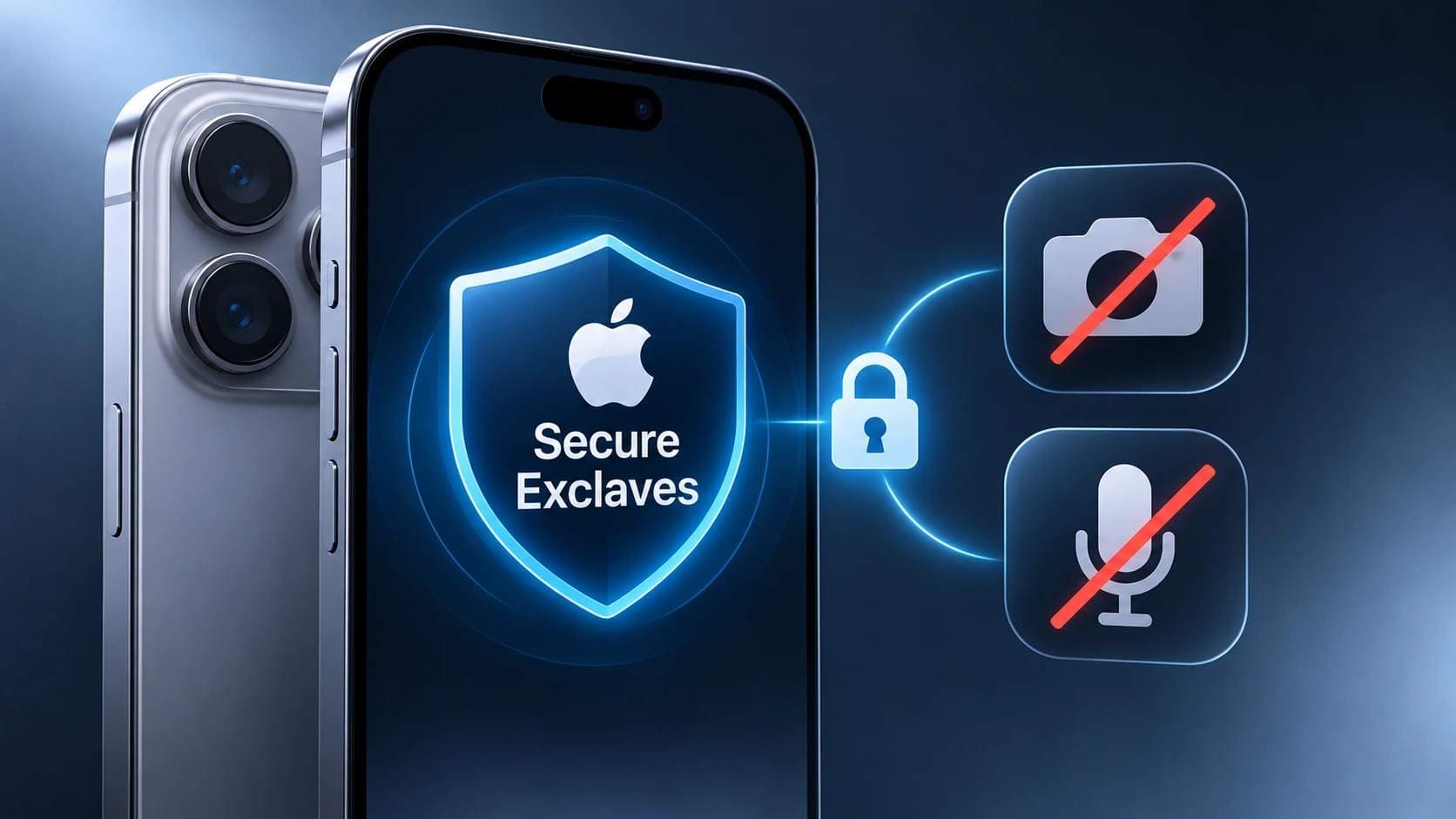
Apple Secure Exclaves are isolated computing environments designed to process sensitive camera and microphone information without exposing raw sensor data to the main operating system.
They run separately from the main OS and use dedicated memory protections and restricted communication mechanisms.
Think of a company with two departments.
One department handles confidential documents. Another manages everyday business operations. The second department receives only the information it needs, not unrestricted access to every confidential file.
Secure Exclaves follow a similar principle.
The isolated environment handles sensitive sensor information. The main operating system receives limited results needed to activate device features.
For example, when HomeView recognizes an enrolled person, the main OS can receive information about that recognition without receiving the original camera images or microphone recordings.
Apple describes this as a combination of three main security requirements:
- Isolation: The main OS cannot extract or modify data inside an exclave.
- Controlled communication: Only approved information can cross the security boundary.
- Secure indication: Users receive a reliable indication when full sensor access becomes active.
These controls work together rather than relying on one security feature.
Secure Exclave vs. Apple's Traditional Secure Enclave
One important distinction deserves attention.
The Secure Enclave Processor (SEP) and Secure Exclaves are related technologies, but they are not interchangeable.
|
Feature |
Secure Enclave |
Secure Exclaves |
|
Main purpose |
Protect sensitive cryptographic and authentication operations |
Protect sensitive sensor processing |
|
Primary use |
Face ID-related security, key management, and protected data |
Camera and microphone processing |
|
Architecture |
Dedicated security subsystem |
Isolated runtimes using a specialized microkernel |
|
Main security goal |
Protect sensitive credentials and operations |
Prevent raw sensor data from reaching the main OS |
|
Communication |
Restricted communication with other system components |
Secure IPC with tightly controlled interfaces |
The distinction matters because an organization evaluating Apple's security should understand which component protects which type of information.
Apple's Secure Exclaves architecture uses an Apple-customized version of the L4 microkernel, which was originally developed for security-sensitive deployments, including the Secure Enclave Processor.
3. How Does Apple Secure Exclave Work?
The most important feature of this architecture is its separation from the main operating system.
An iPhone or another supported device does not need to send every camera frame or audio sample to the main OS to perform background recognition.
Instead, sensitive processing takes place within isolated environments.
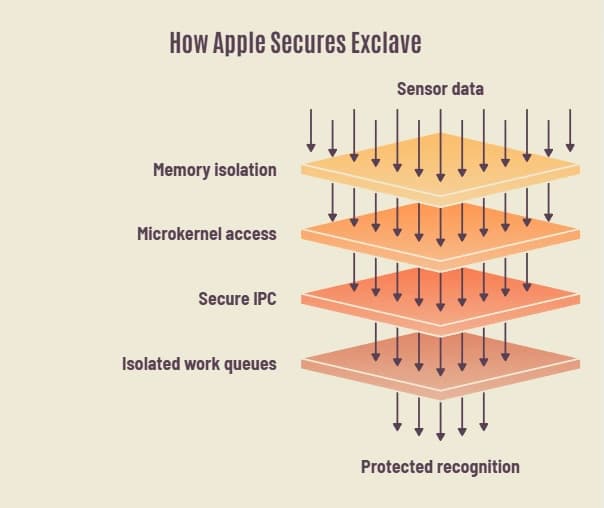
Apple explains the architecture through several interconnected technologies.
3.1 Hardware-Supported Memory Isolation
Memory isolation is one of the foundations of the system.
Normally, an operating system manages memory permissions and controls which software components can access different memory regions.
However, relying entirely on the main operating system creates a security concern. If an attacker gains sufficient kernel-level privileges, they may attempt to manipulate memory permissions.
Apple addresses this through the Secure Page Table Monitor (SPTM).
The SPTM operates at a higher privilege level than the main OS kernel. It manages page tables and enforces memory access policies.
A page table is a structure that controls how software accesses physical memory.
The SPTM ensures that Secure Exclaves have a separate memory view. The main OS cannot simply change permissions to access their protected memory.
This is important because even a compromised kernel should not automatically gain access to isolated sensor data.
Apple also uses hardware-supported memory protection to strengthen these boundaries.
3.2 A Dedicated Microkernel Controls Access
Apple uses a customized L4 microkernel to manage Secure Exclaves.
A microkernel is a small operating system kernel that handles only essential functions. Other services operate separately, reducing the amount of code that must be trusted.
The exclaves microkernel follows a capability-based security model.
In simple terms, software does not automatically receive permission to access another component.
It needs an explicitly granted capability.
For example, a camera-processing component cannot freely communicate with an unrelated service just because both run on the same device.
This limits unnecessary communication and reduces the potential impact of a compromised component.
Apple also applies formal verification to parts of the microkernel. This process uses mathematical methods to check whether specific software implementations follow their defined security properties.
However, formal verification does not mean that every part of the operating system is mathematically proven secure. Apple describes its verification efforts as incremental.
3.3 Secure IPC Restricts Data Sharing
Isolation alone is not enough.
The main operating system still needs certain information to provide useful features.
For example, a device may need to know whether someone is nearby or whether a wake word has been detected.
Apple addresses this through Secure Inter-Process Communication (Secure IPC).
Traditional IPC allows different software processes to exchange information. Secure IPC introduces tightly controlled communication interfaces for exclaves.
Apple says these interfaces are written in Swift and designed to allow only authorized information to pass between components.
Each interface that sends information from an exclave to the main OS undergoes an audit to ensure that it exposes only the minimum metadata needed.
This creates a restricted communication path rather than unrestricted access to sensitive sensor streams.
3.4 The Apple Neural Engine Gets Isolated Work Queues
Modern face and voice recognition features need considerable processing power.
A security architecture that protects data but cannot handle demanding workloads would limit the usefulness of the technology.
Apple addresses this by extending the Apple Neural Engine (ANE) with isolated workload queues.
These queues allow sensitive machine learning tasks to run without exposing their working data to the main operating system.
Apple also uses memory filters to protect the queues.
When the system switches from an isolated queue to a standard queue, it flushes local storage to help prevent information leaks between workloads.
This allows sensitive recognition operations to use dedicated machine learning hardware while preserving memory isolation.
4. How Apple Prevents Hidden Camera and Microphone Access
One of the most significant parts of Apple's announcement concerns privacy indicators.
Most iPhone users are familiar with the colored indicator dots that appear when an application uses the camera or microphone.
However, there is a technical challenge.
If the main operating system controls both sensor access and the privacy indicator, a compromised operating system could potentially interfere with the indicator itself.
Apple's architecture introduces an independent security mechanism.
Understanding the Exclave Indicator Controller
The Exclave Indicator Controller (EIC) acts as a gatekeeper for full sensor access.
Before camera or microphone data can move into the main operating system, the controller checks whether the appropriate indicator has been activated and displayed for a sufficient amount of time.
For devices with physical LED indicators, the controller can directly manage the LED.
For supported iPhones, an additional secure display component checks whether the indicator pixels have actually been rendered correctly.
This includes checking:
- Indicator color and shape.
- Display duration.
- Minimum brightness.
- Whether nearby pixels obscure the indicator.
The system also accounts for display features such as Night Shift.
This is an important difference from a conventional software notification. The architecture checks the actual display output rather than simply trusting that the operating system requested an indicator.
Ambient Mode vs. Active Mode
Apple's architecture uses two operating modes.
|
Security feature |
Ambient mode |
Active mode |
|
Main purpose |
Background detection |
Full sensor interaction |
|
Sensor processing |
Inside Secure Exclaves |
Sensor data can be released to the main OS |
|
Data sharing |
Limited metadata |
Authorized sensor data |
|
Privacy indicator |
Not required for background recognition |
Required |
|
Example |
Detecting a potential Siri wake word |
Active Siri microphone session |
This distinction helps solve an important usability problem.
A microphone that listens for a wake word does not necessarily need to expose its complete audio stream to the main operating system.
However, when a user starts a full Siri session, the system needs to provide broader microphone access.
Secure Exclaves are designed to control that transition.
5. Real Technical Example: How Siri Microphone Access Works
Apple's technical documentation provides a detailed explanation of the wake-word detection process on iPhone 18 Pro.
This example shows how several security components cooperate.

Step 1: Background Audio Detection
The Always-On Processor (AOP) continuously monitors microphone input for possible wake-word activity.
It performs an initial detection process without immediately providing the full audio stream to the main operating system.
Step 2: Secure Audio Processing
When the AOP detects a possible wake word, it wakes the main processor and sends the audio buffer to the audio exclave.
The audio exclave performs echo cancellation to improve the audio signal.
Step 3: Wake-Word Confirmation
The processed audio moves to the Siri exclave.
A more advanced model checks whether the user actually said the wake words.
At this stage, the main OS receives a notification that Siri should wake up, not unrestricted access to the background audio.
Step 4: Indicator Verification
The Siri daemon requests microphone access.
The audio driver asks the user interface to display the microphone indicator.
The Exclave Indicator Controller then requests verification from the secure display exclave.
Step 5: Active Microphone Access
The secure display component checks the rendered indicator.
If the required conditions are satisfied, the controller allows the audio transfer.
Apple also specifies that the microphone indicator remains visible until the active session ends, with a minimum display duration of three seconds.
This is a particularly useful example of security enforcement because the indicator check is part of the sensor-access process itself.
6. Apple HomeView: A Practical Example of Secure Camera Processing
Apple's HomeView provides another useful example of the architecture.
The device uses camera and microphone input to recognize enrolled household members.
Apple says HomeView can support up to six people with individual face and voice profiles.
The recognition process works through several isolated components.

First, the person-recognition exclave loads the enrolled recognition models and identity database from secure storage.
The camera exclave then processes incoming camera frames. It detects faces and prepares the information for further analysis.
At the same time, the audio exclaves process microphone input.
The person-recognition component combines the resulting face and voice information to determine whether an enrolled person is present.
The main operating system receives limited metadata, including:
- Person identifier.
- Position.
- Confidence level.
It does not receive the original camera images or audio data from this recognition process.
This allows HomeView to provide personalized features without making the raw sensor stream available to the broader operating system.
Apple's support documentation also explains that face and voice profiles are end-to-end encrypted and stored in iCloud for synchronization across supported devices.
The recognition process itself takes place inside Secure Exclaves, and the raw sensor data is discarded after processing.
7. What Security Risks Does This Architecture Address?
Secure Exclaves address several important security concerns.
They do not eliminate every possible attack, but they introduce additional protection against unauthorized access to sensitive sensor information.
|
Security risk |
How Secure Exclaves help |
|
Main OS compromise |
Separate memory boundaries protect exclave data |
|
Unauthorized memory access |
SPTM enforces memory permissions |
|
Unnecessary data exposure |
Secure IPC restricts information sharing |
|
Indicator manipulation |
Independent indicator verification protects visibility |
|
Cross-component compromise |
Capability-based permissions limit communication |
|
Machine learning data leakage |
Isolated ANE queues protect sensitive workloads |
Protection Against Kernel-Level Attacks
A kernel compromise is especially serious because the kernel manages important operating system functions.
An attacker with kernel-level privileges may attempt to access memory or interfere with security controls.
Apple's architecture reduces this risk by placing sensitive sensor processing outside the main OS security boundary.
However, this does not establish that every possible hardware, firmware, or physical attack is prevented.
Protection Against Unauthorized Sensor Access
The EIC creates an additional control before full sensor data becomes available to the main OS.
This makes the indicator part of the security architecture rather than treating it as a simple visual notification.
Reduced Exposure of Sensitive Information
A system that only shares a recognition result exposes less information than one that provides unrestricted access to raw audio and video.
This follows the principle of data minimization.
It is particularly relevant for devices that continuously process environmental information.
8. What Are the Limitations of Apple Secure Exclaves?
A strong security architecture should also be evaluated by understanding what it does not guarantee.
Apple's announcement describes significant protections, but it does not establish that every form of surveillance or unauthorized sensor access is impossible.
Several limitations deserve attention.
First, protection depends on supported hardware and software. The announced features are associated with specific Apple products. Users should not assume that every iPhone or Apple device includes the same implementation.
Second, application permissions still matter. Secure Exclaves do not replace application privacy controls or remove the need to review microphone and camera permissions.
Third, the architecture does not prevent every form of malware. It is designed to protect isolated sensor processing. It does not mean that compromised applications cannot cause other security problems.
Fourth, formal verification has limits. Apple applies mathematical verification to parts of the microkernel. Its documentation describes this work as incremental rather than complete.
Finally, implementation details remain important. Hardware security depends on the correct interaction of silicon, firmware, drivers, and software. A weakness outside the verified components may still create risk.
These distinctions matter when assessing claims such as whether Apple is completely secure or whether hidden camera access is now impossible.
Neither conclusion is supported by Apple's announcement.
9. What Should iPhone Users and IT Administrators Do?
The new architecture provides another layer of protection, but users and organizations should continue following basic security practices.
Here are practical steps worth maintaining.
For Individual iPhone Users
- Keep iOS updated. Install security updates when Apple releases them.
- Review application permissions. Check which applications have access to the camera and microphone.
- Pay attention to privacy indicators. Investigate unexpected camera or microphone activity.
- Remove unnecessary applications. Avoid keeping applications that you no longer use.
- Use strong authentication. Protect your Apple Account with strong authentication and a secure device passcode.
- Review connected devices. Check which devices and applications have access to your account.
For Businesses and IT Administrators
Organizations managing Apple devices should consider a broader endpoint security strategy.
- Maintain centralized device management.
- Enforce operating system update policies.
- Review application permissions and approved software.
- Apply mobile device management (MDM) policies.
- Monitor suspicious account and device activity.
- Establish procedures for reporting suspected privacy incidents.
- Review the security requirements of third-party applications.
For organizations handling sensitive customer information, camera and microphone permissions should be included in mobile device security assessments.
Comparing Different Security Approaches
|
Security approach |
Primary protection |
Main limitation |
|
Application permissions |
Controls app access to sensors |
Depends on OS enforcement |
|
Privacy indicators |
Alerts users to active sensor access |
Conventional indicators may depend on software |
|
Secure Exclaves |
Isolates sensitive sensor processing |
Available only on supported implementations |
|
Hardware memory isolation |
Protects sensitive memory regions |
Does not eliminate every hardware risk |
|
MDM policies |
Centralizes device configuration |
Cannot independently guarantee endpoint security |
These technologies work best as complementary controls. No single feature should be treated as a complete security strategy.
10. What Makes Apple's Approach Technically Significant?
The most interesting part of Apple's announcement is how it combines multiple security boundaries.
Many security systems focus on controlling who can access a resource. Apple's architecture also focuses on controlling what information can leave the environment where that resource is processed.
That distinction is important.
For example, consider a company using a smart display to recognize employees entering a meeting room.
The device may need to identify a recognized employee to display the correct calendar or personal settings. It does not necessarily need to provide the complete video stream to the main operating system.
By processing the sensitive information inside an isolated environment, the system can return a limited recognition result.
This is a practical application of least privilege and data minimization.
Another important detail is the independent indicator verification mechanism.
A privacy indicator has limited value if the same compromised software that requests sensor access can freely hide it. By placing indicator verification within a separate security boundary, Apple makes the indicator part of the authorization process.
The architecture therefore addresses two different questions:
- Can the main OS access sensitive background sensor data?
- Can the main OS obtain full sensor access without displaying the required privacy indicator?
Apple's design aims to restrict both.
11. What This Means for the Future of Mobile Device Security
Ambient computing is becoming more common.
Devices increasingly rely on microphones, cameras, and machine learning to understand their surroundings and respond to user activity.
This creates a difficult security requirement.
The more useful these features become, the more sensitive information devices may need to process.
Secure Exclaves offer one architectural response: keep sensitive processing isolated and share only the information required by other system components.
This approach may also influence how security teams evaluate future connected devices.
For example, when reviewing an intelligent endpoint, organizations should consider:
- Whether sensor processing happens locally or remotely.
- Whether raw sensor information is exposed to the main operating system.
- Whether memory isolation is enforced independently.
- Whether sensor indicators are protected from software manipulation.
- Whether communication between isolated components is restricted.
- Whether security claims are supported by technical documentation.
These questions apply beyond smartphones. They are relevant to smart displays, connected devices, workplace collaboration systems, and other products that use ambient sensing.
Apple's announcement provides a useful example of how hardware and software security can work together to reduce unnecessary exposure of sensitive information.
12. Hoplon Insight: What Security Teams Should Learn From This Architecture
Security insight: Protect the data before it reaches the operating system.
Apple's architecture highlights an important security principle: sensitive information should remain inside a protected processing environment whenever possible.
Security teams can apply this principle when evaluating mobile endpoints and connected devices.
Recommended security priorities:
- Assess how devices isolate sensitive information.
- Review access controls for microphones and cameras.
- Evaluate hardware-backed security capabilities.
- Check whether security indicators have independent enforcement.
- Include mobile endpoints in broader security assessments.
- Verify vendor security claims against technical documentation.
Important consideration: A device's advertised security features should never replace independent security testing, access reviews, and ongoing vulnerabilitymanagement.
Frequently Asked Questions
1. What is Apple Secure Exclave?
Apple Secure Exclaves are isolated computing environments that process sensitive camera and microphone data separately from the main operating system. They restrict access to raw sensor information and share only approved metadata.
2. How does Apple Secure Enclave work?
The traditional Secure Enclave Processor protects sensitive security operations, including cryptographic and authentication-related functions. Secure Exclaves use a separate isolated runtime to protect camera and microphone processing.
3. Can Secure Exclaves prevent hidden camera and microphone access?
They are designed to prevent the main operating system from accessing protected background sensor data and to enforce visible indicators before full sensor access is released. However, they do not guarantee protection against every possible attack.
4. Which Apple devices support Secure Exclaves?
Apple identifies HomeView, iPhone 18 Pro, iPhone 18 Pro Max, iPhone Duo, and MacBook Neo among the products using Secure Exclaves for specific sensor processing and indicator protections. Exact capabilities depend on the device and feature.
A New Security Boundary for Camera and Microphone Privacy
Apple's November 12 announcement highlights an important development in mobile security.
Modern devices need to process more environmental information to support voice recognition, personalization, and intelligent features. That creates new challenges for protecting private audio and video.
Apple Secure Exclaves address this challenge by separating sensitive sensor processing from the main operating system. Hardware-supported memory isolation, restricted communication, a dedicated microkernel, and secure indicator verification work together to protect that boundary.
The architecture does not make an iPhone immune to every security threat. However, it provides a stronger way to protect background sensor processing and make full sensor access more transparent to users.
For businesses and security professionals, the broader lesson is clear: privacy protection should be built into the architecture of a device, not left entirely to application permissions.
Author Bio and Review
Technical reviewer: Mohammed Talukder is the Co-Founder and CEO of Hoplon InfoSec, with over 16 years of experience in cybersecurity and technology. His expertise includes offensive security, vulnerability management, cyber risk management, and incident response. His professional credentials include CISM, CISA, CEH, and CompTIA PenTest+. He has also received Infosys recognition awards for his professional contributions. He shares practical cybersecurity insights to help organizations strengthen their security posture.
Technical reviewer: Gazi Mahmud, Co-Founder and CIO of Hoplon InfoSec LLC, cybersecurity leader, and CISM & CISA certified professional with expertise in cyber risk management, security governance, compliance, and incident response.
Official References and Research Sources
The following sources support the technical explanations and product details in this article.
- Apple Security Research: Secure Exclaves and Ambient Sensing. Primary technical source, November 12, 2026.
- Apple Support: About Face and Voice Recognition on Apple HomeView. Official explanation of recognition and privacy protections.
- Apple Newsroom: Meet Apple HomeView. Product announcement and hardware security information.
- Apple Newsroom:
Apple HomeView Available Today. Product
availability announcement