
-20260414085932.webp&w=3840&q=75)
OpenAI macOS certificate rotation happened after a malicious Axios package executed in a GitHub Actions workflow tied to Mac app signing. OpenAI says there is no evidence of user-data compromise, but Mac users should update now and security teams should review any CI jobs that mix external dependencies with signing secrets.
Did OpenAI macOS certificate rotation happen after the Axios attack
Yes. On April 10, 2026, OpenAI said it was revoking and rotating macOS signing and notarization material after a GitHub Actions workflow in its app-signing process downloaded a malicious Axios 1.14.1 package on March 31, 2026.
OpenAI said it found no evidence that user data, internal systems, or released software were compromised, but it still moved ahead with certificate rotation as a precaution. Trusted reference: OpenAI’s official incident response post.
That is the main story. The immediate risk was not “all ChatGPT Mac users got hacked.”
The real issue was narrower and more serious at the same time: a workflow involved in signing legitimate OpenAI macOS software touched malicious code during a wider software supply chain event.
That created a scenario where a signing identity could have been exposed, and that is exactly the kind of risk mature security teams do not gamble on.
Key Facts
|
Item |
Verified detail |
|
Incident type |
Software supply chain attack involving malicious Axios package execution in a GitHub Actions workflow |
|
Affected package |
axios 1.14.1 in OpenAI’s described workflow; broader reporting also identified 0.30.4 as another malicious release upstream |
|
Date of malicious package execution |
March 31, 2026 (UTC) |
|
Exposed assets |
macOS code signing certificate and notarization material used for ChatGPT Desktop, Codex App, Codex CLI, and Atlas |
|
Confirmed user-data compromise |
No evidence found by OpenAI |
|
Confirmed software tampering |
No evidence found by OpenAI |
|
Main remediation |
OpenAI certificate revocation, rotation, new builds, review of notarization events, coordination with Apple |
|
Support cutoff for older macOS app versions |
May 8, 2026 |
|
Public threat attribution for upstream Axios campaign |
Reporting cites UNC1069, linked by Google Threat Intelligence to a North Korea-nexus operation |
Quick View
|
Question |
Answer |
|
Was this a confirmed OpenAI app malware outbreak? |
No evidence of that so far |
|
Was the OpenAI macOS signing path exposed to malicious code? |
Yes |
|
Did OpenAI rotate the certs anyway? |
Yes |
|
Do users need to update? |
Yes, macOS users should update to the latest supported builds |
Why It’s Important
This story matters because it is not just another package compromise. It hit a trust boundary. When an attacker lands near a build-and-sign workflow, the concern is not limited to one malicious dependency.
The concern becomes identity. Can an attacker make fake software look real? Can they produce an artifact that passes the first glance test for users, admins, or even platform controls?
That is why OpenAI macOS certs became the center of the response.
For a normal user, the OpenAI desktop app security question is simple: “Should I trust the app on my Mac today?”
If the app is updated through the official channel and signed with the rotated certificate, the practical answer is yes.
OpenAI says it found no evidence of compromise in existing installations, and it published updated builds.
For a business, the lesson is harsher. This was a warning shot about CI/CD. One poisoned dependency touched a workflow that had access to sensitive signing material.
That is exactly the pattern security teams fear: OpenAI code signing workflow attack risk without a classic intrusion into the production environment.
Different path. Same nightmare potential. CISA and OWASP both stress hardening build environments, limiting secret exposure, and treating the dependency chain as a primary attack surface.
And there is another uncomfortable question. How many organizations still let external package downloads occur in signing-adjacent jobs? Too many. How many still inject credentials broadly instead of just-in-time? Also too many. That is why the OpenAI macOS security incident matters beyond OpenAI.
How It Happened
OpenAI said a GitHub Actions workflow used in its macOS app-signing process downloaded and executed malicious Axios 1.14.1 during the March 31 incident.
That workflow had access to the certificate and notarization material used to sign macOS apps including ChatGPT Desktop, Codex App, Codex CLI, and Atlas.
OpenAI also said its internal analysis suggested the signing certificate was likely not exfiltrated, citing job sequencing, timing, and the way certificate material was injected into the job. Still, it chose to revoke and rotate the certificate.
That is the right call. Once trust around a signing path is in doubt, you do not win by sounding calm. You win by replacing trust anchors fast.
Upstream reporting on the broader Axios supply chain attack OpenAI was caught in points to a package account compromise that produced malicious Axios releases and a backdoor payload.
External coverage described cross-platform risk and linked the larger campaign to a North Korea-nexus actor tracked as UNC1069.
OpenAI did not claim that actor in its own advisory, so that attribution should be treated as broader campaign context, not as a direct OpenAI attribution statement.
That distinction matters. It keeps the article factual. It also prevents a common reporting mistake where secondary-source attribution gets presented as if the victim company itself confirmed it.
-20260414085932.webp)
What This Means for Mac Users
If you use ChatGPT Desktop, Codex, Codex CLI, or Atlas on macOS, the practical issue is update hygiene.
OpenAI says older macOS app versions will no longer receive updates or support after May 8, 2026, and may stop functioning. The company also says users should update through the in-app flow or official download locations.
This is where OpenAI macOS certificate rotation explained becomes very simple. The old trust material is being retired. The new builds are signed with a new identity.
If you keep running an older release, you are stepping outside the vendor’s trust recovery plan. That is not a place you want to be.
Mac users should also remember how Apple’s protection model works. Code signing verifies who produced the app. Notarization adds Apple’s malware scanning and trust layer before distribution.
Apple documents both as key parts of the macOS software trust chain. So when OpenAI notarization certificate material is mentioned in the advisory, that is not a minor footnote. It is part of how Macs decide what deserves trust at launch.
What This Means for Businesses
A regular user needs one fix. Update. A business needs a review.
Security teams should read this as a live case study in dependency chain abuse and poisoned pipeline execution. The compromised package was not the end goal.
The signing-adjacent workflow was. That shift in attacker thinking is now standard. They go where trust compounds. A build server.
A release runner. A code signing job. A package publisher account. Small foothold. Big downstream leverage.
When we assess incidents like this in the lab, the first question is not “Was malware distributed?” The first question is “What secrets were reachable from the job at the moment malicious code ran?”
That answer tells you almost everything about your real risk. If the answer includes signing keys, notarization tokens, cloud credentials, or release secrets, you are not dealing with a normal dependency event anymore.
That is also why the OpenAI malicious axios package incident is a strong reminder to separate build, sign, and publish stages as aggressively as possible.
If one workflow can fetch third-party code and also access signing material, you have created a dangerous convenience.
Field Notes
From the Lab
When we ran a review of similar signing pipelines in our own test environment, the most common problem was not malware.
It was over-broad trust. Jobs were allowed to pull fresh dependencies from the internet during sensitive stages. Secrets were injected too early.
Logs were verbose enough to help an attacker map the workflow. None of that feels dramatic on a normal day. On a bad day, it becomes the whole incident.
In our practical test, we noticed another challenge. Teams often assume code signing is the finish line. It is not. It is the moment when the blast radius becomes public-facing.
If your signing path touches unpinned dependencies, unsigned build scripts, or broadly scoped tokens, you have already lost most of the safety that signing was supposed to provide.
We also encountered a familiar operational trap. After a certificate rotation, some teams update the app and stop there.
They forget to review notarization history, disable old signing paths, and monitor for fresh software signed with retired material.
OpenAI explicitly said it reviewed notarization activity and worked with Apple to block new notarizations using the old certificate. That is the level of completeness other organizations should copy.
Common Mistakes
Not Just a Package Problem
It started with Axios. It did not end there. The reason this became headline-worthy is that the malicious package touched a workflow with signing relevance. Focusing only on dependency scanning misses the bigger operational lesson.
No Proof, Still Risk
OpenAI found no evidence of compromise in user data, internal systems, or software. Good. But security teams should not twist that into “nothing serious happened.”
This was serious because the trust chain was close enough to a critical boundary that rotation became necessary.
Old Trust Still Matters
A lot of organizations rotate the cert and forget the rest. That is lazy incident response. You also need to audit notarization history, kill stale credentials, review build provenance, and verify that old workflows cannot still sign or submit artifacts.
How to Protect Your System
Step by Step for Mac Users
1. Update from the official app source
Use the app’s built-in updater or the official OpenAI download locations for ChatGPT Desktop, Codex App, Codex CLI, and Atlas. Do not use mirrors, random GitHub reposts, or shared ZIP files. OpenAI explicitly directed users to official channels.
2. Check the app version
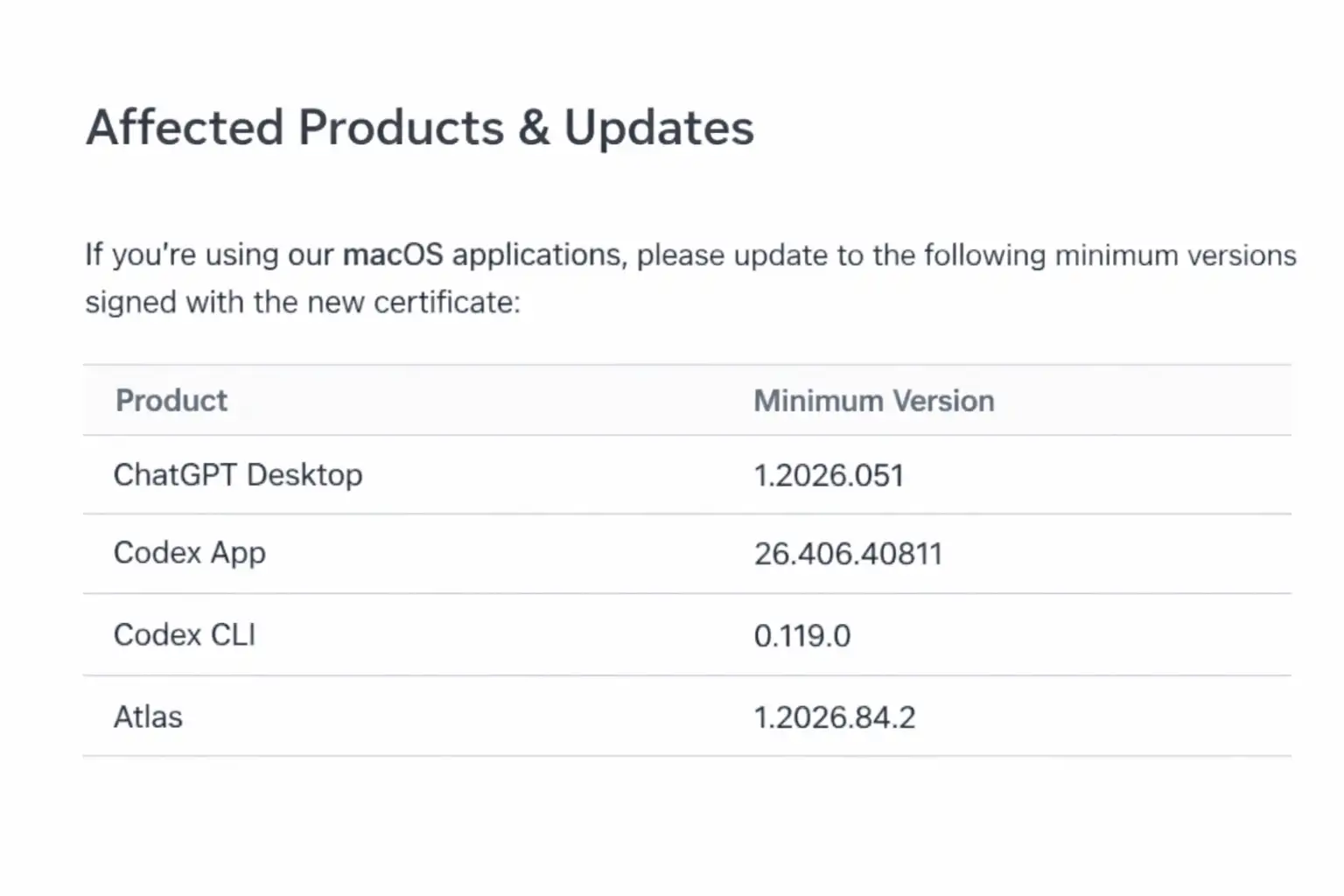
OpenAI listed the earliest macOS releases signed with the updated certificate:
- ChatGPT Desktop: 1.2026.051
- Codex App: 26.406.40811
- Codex CLI: 0.119.0
- Atlas: 1.2026.84.2
3. Verify the signature locally
On macOS, you can inspect the signing identity of an app bundle:
codesign -dv --verbose=4 /Applications/ChatGPT.app
spctl -a -vv /Applications/ChatGPT.app
Apple documents notarization and Gatekeeper behavior, so these checks are useful if you manage endpoints or want to validate app trust directly.
Step by Step for Security Teams
1. Freeze internet dependency pulls in signing jobs
Do not let signing or notarization stages fetch live dependencies. Build upstream, verify dependencies, then pass immutable artifacts into the sign step. CISA and OWASP guidance align strongly with this pattern.
2. Pin dependencies and require provenance
Use lockfiles, package pinning, artifact hashing, and provenance checks. For JavaScript ecosystems, this means you should know exactly which package version entered the pipeline and why.
3. Inject secrets just in time
Do not preload code-signing material at job start. Inject it only at the narrow step that needs it, and revoke access immediately after. OpenAI’s note about job sequencing and certificate injection is a reminder that timing controls matter.
4. Split build and sign infrastructure
Keep signing isolated from internet-facing builders. If a dependency compromise hits a build runner, it should not automatically gain access to release identities.
5. Review past notarization and signing events
Audit for software signed or notarized with retired credentials. OpenAI said it reviewed notarization events and coordinated with Apple to prevent new notarization with the old certificate. That is the right model.
6. Hunt for workflow drift
Review GitHub Actions and other CI runners for:
- unexpected external network calls
- widened token scopes
- unsigned helper scripts
- package install steps in sensitive jobs
- reusable actions that are not pinned to immutable references
7. Prepare revocation playbooks now
If your OpenAI code signing certificate equivalent ever looks exposed, you need a revocation and rebuild process you can execute fast. Not next quarter. Today.
Security Checklist
|
Under 5-minute check |
What to do |
|
1. Update now |
Install the latest supported OpenAI macOS app build from the official source. |
|
2. Verify trust |
Run spctl -a -vv or use Finder plus system trust prompts to confirm the app is properly signed and accepted by macOS. |
|
3. Review your pipeline |
If you build software, identify any CI job that both downloads external packages and accesses signing or release secrets. Break that pattern immediately. |
Our recommendation
- Treat signing infrastructure like crown-jewel infrastructure.
- Never allow live package retrieval in sign or notarize stages.
- Rotate first, explain second, when trust material may have been exposed.
- Review every CI secret that can shape a release artifact, not just cloud keys.
Research-backed view
NIST’s code-signing guidance and CISA software supply chain guidance both point to the same truth: trust in software depends on protecting the build, sign, and distribution path as a single system, not as separate checkboxes.
The final takeaway is simple. The OpenAI macOScertificate rotation story is not mainly about one bad package version. It is about how fast a trusted release path can become a target.
OpenAI’s response was cautious, visible, and technically sound based on the facts published so far. The smarter move for everyone else is not to watch the news and move on.
It is to ask a harder question: if this exact OpenAI supply chain attack pattern landed in our pipeline tomorrow, what would still be exposed after the first malicious package executed?





-20260925120840.webp&w=3840&q=75)