| Content Summary | Details |
|---|---|
| Topic | RedWing MaaS, a Telegram based Android banking malware rental service |
| Who should read this | General Android users, banking customers, students, security teams, enterprises, and fintech professionals |
| What you will learn | How RedWing works, what permissions it abuses, how it spreads, how it compares to similar malware, and how to protect yourself |
| Confidence level | Some details come from confirmed mobile threat research, others are still developing and are labeled as such |
| Last updated | July 2026 |
| Reading time | Around 18 to 20 minutes |
What is RedWing MaaS?
RedWing MaaS is a name being used in mobile threat research to describe an Android banking malware operation that is marketed and sold through Telegram as a ready made rental service. Instead of writing malicious code themselves, buyers pay for access to a working kit and simply choose their targets. That is the whole idea behind Android Malware as a Service. Someone builds the tool once, then rents it out to dozens of people who may never have written a line of code in their life.
The Telegram based rental model matters because it lowers the skill barrier so much that almost anyone with a small budget and bad intentions can run a mobile banking fraud campaign. Banking customers, crypto holders, enterprises, and financial institutions all sit in the blast radius, because the malware is built to slide past a phone's defenses using permission abuse rather than a technical exploit in Android itself.
Key Takeaways
Before going deep into the technical weeds, here is the shape of the threat in a few plain sentences.
RedWing is rented out like a subscription product, not sold as a one time build. It usually reaches victims through phishing links and fake app store pages rather than the real Google Play Store. Once installed, it depends heavily on sideloading and convincing the user to hand over permissions, not on breaking Android's underlying code.
It can abuse Accessibility services, SMS access, notification listening, screen overlays, and remote control features to commit fraud while the phone owner has no idea anything is wrong. This whole pattern is a good example of what security researchers call on device fraud, where the crime happens using the victim's own trusted session instead of a stolen password alone.
Because of that, security teams are increasingly told to watch behavior patterns rather than chase app names, since app names and icons change constantly in this kind of operation.
RedWing at a Glance
| Fact | Details | Why It Matters |
|---|---|---|
| Malware name | RedWing | Helps security teams and users search for accurate information |
| Category | Android Malware as a Service, Android banking malware | Explains the business model behind the threat |
| Distribution method | Phishing links and fake app store pages | Shows where the danger actually begins |
| Sales model | Telegram based rental or subscription service | Explains why so many unrelated fraud campaigns can look similar |
| Primary risk | Mobile banking fraud and credential theft | Sets the stakes for banking and fintech users |
| Main abuse points | Accessibility, SMS, overlays, notifications, remote control | Identifies exactly what to monitor for detection |
| Target type | Banking, crypto, and financial apps | Clarifies who should pay closest attention |
| Detection challenge | Custom droppers, reskinned apps, need for behavior based detection | Explains why traditional antivirus signatures often miss it |
| Attribution note | Reported links to other malware families should be read as suspected, not confirmed | Keeps the reporting accurate and fair |
Why RedWing Matters for Mobile Banking Security
A phone used to be a simple communication device. Now, for most people, it is the front door to their bank account, their crypto wallet, and their entire financial identity. That shift is exactly why mobile banking has become such a high value target for fraudsters. RedWing is a clear symptom of that shift.
What makes this category of threat different from an old fashioned password thief is that attackers are not just stealing a login anymore. They are hijacking the victim's own phone session, the one the bank already trusts, and using it to move money while looking completely legitimate on the other end. A rental model like RedWing's MaaS setup means someone does not need advanced hacking skills to run this kind of operation. They only need a subscription, a Telegram account, and a willingness to target people.
This is also why RedWing is not just a piece of malware sitting on someone's phone. It is a working example of a cybercrime service model, where the tool itself is a product, complete with support channels and updates, sold the same way a legitimate software company might sell access to its platform. Banks, fintechs, crypto exchanges, large enterprises, and everyday individual users are all exposed here, because the malware does not discriminate much once it lands on a device.
What is Malware as a Service?
If none of this sounds familiar yet, here is the plain language version.
Malware as a Service, often shortened to MaaS, is a business model where someone builds a malicious tool once and then rents or sells access to it, the same way a company might sell software subscriptions. Instead of every attacker needing deep coding skills, they simply pay a fee and get a working kit.
That kit usually includes a builder to customize the malicious app, an admin panel to manage infected devices, a setup guide, sometimes a video tutorial, and occasionally a referral discount for bringing in new buyers.
This is a genuinely dangerous shift because it turns cybercrime into something closer to a franchise. A traditional standalone piece of malware needed one skilled developer behind it. A malware rental service can be run by that same developer while dozens or hundreds of much less skilled buyers use the tool independently, each running their own small fraud operation.
Telegram has become a popular home for this kind of underground service for a few practical reasons. Channels can be created and abandoned quickly, communication is fast, and it is much harder for investigators to track a rental business hiding inside ordinary chat channels compared to a dedicated dark web marketplace. That combination of speed and low visibility is part of why Telegram based malware services are difficult to track and shut down for good.
RedWing Discovery and Research Background
Serious mobile threat research on Android banking malware over the past couple of years has come largely from teams like Zimperium zLabs, who have published detailed work on a long list of Android banking trojans and rental based RATs, including a subscription driven remote access tool called Oblivion that was sold for a few hundred dollars a month with lifetime access options.
Reports describing RedWing point to a Telegram based rental setup with a similar shape to that earlier Oblivion pattern, including automated permission handling, fake app store style installation pages, and a control panel for managing infected devices. It is fair to say RedWing appears similar to Oblivion in its business model and general technique, since both rely on a rental structure and Accessibility abuse rather than a device exploit.
It would not be accurate to say RedWing is confirmed to be a direct successor or rebrand of Oblivion, because that kind of attribution needs verified technical evidence from the researchers who analyzed the samples directly, not just a resemblance in tactics.
What can be said with confidence is that RedWing sits inside a broader wave of Android Malware as a Service activity that has been growing steadily, and that the mobile threat research community continues to update its understanding of these campaigns as new samples surface. What remains less certain, including exact operator identity, precise victim counts, and full technical attribution to any single group, should be treated as still developing.
How RedWing Infection Starts
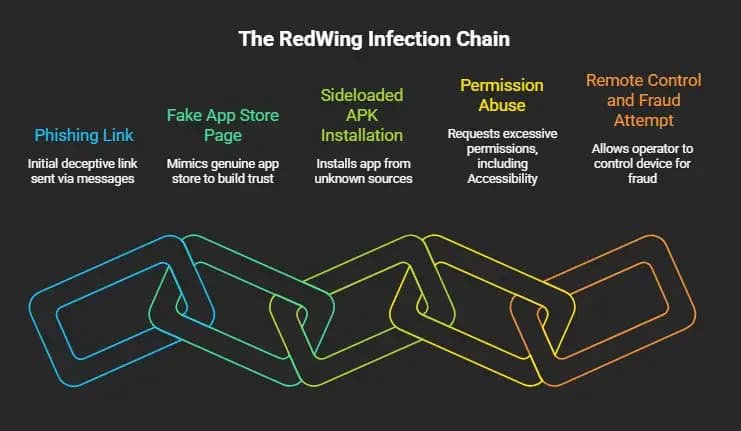
Every RedWing style infection tends to follow a familiar shape, even when the specific app names and lures change from one campaign to the next.
Step 1: Phishing Link. The chain usually begins with a link sent through SMS, email, or a messaging app, often dressed up as an urgent bank notice, a delivery update, or a too good to be true offer.
Step 2: Fake App Store Page. Clicking that link leads to a page designed to look like a genuine app store listing, complete with a familiar layout, a fake rating, and a fabricated download count meant to build instant trust.
Step 3: Sideloaded APK Installation. Because the app never comes from the real Google Play Store, the victim is walked through enabling installation from unknown sources, which is the sideloading step that lets RedWing land on the device in the first place.
Step 4: Permission Abuse. Once installed, the app requests a string of permissions, often disguised as a routine setup step, ending with Accessibility access, which is the single most powerful permission an Android banking trojan can get.
Step 5: Remote Control and Fraud Attempt. With Accessibility granted, the malware can silently approve further permissions, read what appears on screen, intercept messages, and eventually hand an operator remote control over the device to attempt banking fraud.
A simple way to picture the whole attack chain is this sequence: phishing link leads to fake app store page, which leads to a sideloaded app, which leads to permission abuse, which leads to device control, which leads to banking fraud.
Why Fake App Store Pages Work
It is worth pausing on why so many otherwise careful people fall for this. Fake app store pages are not crude anymore. They are built to mirror the exact fonts, icons, and layout of a real store listing, right down to fabricated ratings and reviews that look completely ordinary at a glance.
Attackers also lean on urgency and trust manipulation, framing the download as a mandatory security update or a limited time offer, which pushes people to act before they stop to think. This is textbook social engineering, and it works because most users approve permission requests out of habit rather than careful review, a pattern security researchers sometimes call permission fatigue.
Add sideloading into the mix, where the phone's own built in app vetting is bypassed entirely, and the risk compounds fast. This is exactly why avoiding APK installation from anywhere outside the official store is one of the single most effective habits an Android user can build.
Android Permissions Abused by RedWing
This is the technical heart of how RedWing style malware actually operates on a device.
| Permission | Legitimate Use | How Malware Abuses It | Warning Sign | What Users Should Do |
|---|---|---|---|---|
| Accessibility Service | Helps users with disabilities interact with apps | Reads screen content, automates taps, silently approves further permissions | An app unrelated to accessibility asks for this permission | Never grant Accessibility to an app that has no clear accessibility purpose |
| Default SMS handler | Lets a messaging app manage texts | Reads incoming OTP codes before the user even sees them | A random app asks to become your default SMS app | Only allow trusted, well known messaging apps to hold this role |
| Notification access | Lets useful apps like smartwatches mirror alerts | Reads banking alerts and one time codes as they arrive | An unfamiliar app requests notification access | Review notification access permissions in settings regularly |
| Battery optimization exemption | Keeps important apps like messaging running in the background | Keeps the malware alive and persistent even after reboot | A newly installed app asks to be excluded from battery optimization | Deny this request unless the app is a well known service you trust |
| Overlay permission | Lets legitimate apps draw over other screens, like a chat bubble | Places a fake login screen over your real banking app | A login screen behaves oddly or appears where it should not | Check which apps have overlay permission in system settings |
| Camera and microphone access | Needed for calls, photos, and video apps | Used for surveillance or to capture sensitive information | A utility app with no obvious reason asks for camera or mic access | Deny access unless the app's function clearly requires it |
| Files, contacts, call logs, location | Needed by apps that genuinely manage this data | Harvested for further targeting or fraud preparation | A simple app requests broad access to personal data | Ask whether the app truly needs this level of access before approving |
RedWing Capabilities Explained
Once RedWing has the permissions it wants, here is what it is reported to be able to do, organized by category.
Banking and Crypto Credential Theft. The malware can display a convincing fake login overlay directly on top of a real banking or crypto app, capturing whatever the victim types before quietly closing and letting the real app open normally.
OTP and MFA Interception. Because it can read SMS content and screen text through Accessibility, RedWing style malware can grab one time passcodes the moment they arrive, defeating a layer of protection people often assume is unbreakable.
Remote Control and Live Screen Streaming. With the right permissions in place, an operator can view a live feed of the victim's screen and even control it directly, which is what allows a criminal to complete a fraudulent transaction as if they were the account holder.
Call Forwarding and Phone Verification Abuse. Some reporting suggests this category of malware can redirect incoming calls, which matters because banks sometimes use a phone call for identity verification. It is important to describe this at a high level only, since going into operational detail would risk turning an explanation into a how to guide, and that is not something responsible security content should ever do.
Surveillance and Data Theft. Beyond banking specific abuse, camera, microphone, contact, file, and location access can all be pulled together to build a fuller picture of the victim for future targeting.
Botnet and DDoS Style Abuse. Some Android RAT families in this broader category have been observed contributing device resources toward larger coordinated traffic abuse, turning individual infected phones into part of a bigger criminal infrastructure.
What is On Device Fraud?
This term comes up constantly in modern mobile banking security conversations, and it deserves its own clear explanation.
On device fraud describes a situation where the fraud itself happens using the victim's own phone and their own already logged in banking session, rather than an attacker using stolen credentials from a completely separate device. This matters enormously for fraud detection, because the bank's systems see a transaction coming from the customer's usual device, their usual location, and their usual app session, all of which normally look like strong trust signals.
| Fraud Type | How It Works | Risk Level | Why It Matters |
|---|---|---|---|
| Password theft | Attacker steals a login from a different device | Moderate | Bank can often flag the unfamiliar device |
| OTP theft | Attacker intercepts a one time code | High | Defeats a key layer of two factor authentication bypass protection |
| Session abuse | Attacker rides along on an already authenticated session | High | Bypasses login checks entirely |
| On device fraud | Attacker uses the victim's own device and session together | Very high | Looks completely normal to standard fraud detection systems |
| Remote controlled transaction fraud | Attacker directly operates the victim's phone to complete a transfer | Very high | The victim's own trusted fingerprint approves the fraud |
RedWing Targeting Model
One reason this kind of malware is so hard to pin down is that its targeting is not fixed. Buyers of a rental service like this can typically choose which apps they want to watch, meaning the exact list of banking, crypto, or financial apps being targeted in a given campaign can shift from one operator to another. Accessibility based watching can be configured to trigger on a chosen set of apps, while overlay targets are often managed through the operator's own control panel rather than being hardcoded into the malware itself.
This flexibility is exactly why any published target list should be read as a snapshot in time rather than a permanent fact. Banking, crypto, and other financial apps remain the highest risk category simply because that is where the money is, but the specific list can and does change as campaigns evolve.
Geographic and Attribution Context
It is tempting to want a clean answer about who is behind RedWing and where the operators are based, but responsible reporting has to resist that temptation until the evidence genuinely supports it.
Some public reporting on similar Android banking rental services has pointed toward activity connected to markets where Russian language cybercrime forums and financial fraud operations have historically been prominent. Where that kind of connection is mentioned for RedWing specifically, it should be treated as a suspected pattern rather than a confirmed fact, and phrased with language like evidence suggests or appears linked rather than a flat statement of certainty.
| Claim | Confidence Level | Writing Recommendation |
|---|---|---|
| RedWing is sold through Telegram as a rental service | Reasonably well supported by available reporting | Can be stated directly |
| RedWing shares tactical similarity with Oblivion | Reasonably well supported | Use appears similar to, not confirmed as |
| RedWing is operated by a specific named group or region | Not independently confirmed | Use evidence suggests or reported links, avoid definitive claims |
| Exact number of victims or financial losses | Not available in verified public reporting | Avoid inventing a figure, note that data needs verification |
RedWing vs Similar Android Banking Malware
Putting RedWing next to other recently reported Android banking malware families helps show the bigger pattern rather than treating it as an isolated event.
| Malware | Model | Main Capability | Target Area | Similarity | Difference |
|---|---|---|---|---|---|
| RedWing | Telegram rental MaaS | Overlay theft, OTP interception, remote control | Banking and crypto apps | Rental model, Accessibility abuse | Distributed and marketed specifically through Telegram |
| Oblivion | Subscription based RAT, sold on forums | Automated permission bypass, full remote control | Banking, crypto, general device takeover | Subscription pricing, Accessibility automation | Broader device takeover focus beyond banking alone |
| Fantasy Hub | Reported Android RAT | Remote access and surveillance | Financial and personal data | Remote access model | Different distribution and lure pattern reported by researchers |
| Albiriox | Reported Android banking malware | Credential theft, overlay attacks | Banking apps | Overlay based credential theft | Distinct campaign infrastructure |
| Klopatra | Reported Android banking malware | Remote control and overlay fraud | Banking apps | Remote control, on device fraud pattern | Separate reported origin and distribution chain |
Across this comparison table, a few broader industry trends stand out clearly. The MaaS trend keeps lowering the skill barrier for entry. The remote control trend keeps shifting fraud from stolen passwords toward full device takeover.
The overlay attack trend keeps using fake login screens as the simplest and most reliable way to steal credentials. And the on device fraud trend keeps making detection harder because everything looks like it is coming from a trusted source. It is worth being clear that none of these malware families should be assumed to share the same operator or the same actor unless a researcher has verified that link directly.
Why Conventional Security Tools May Miss RedWing
A lot of people assume that having antivirus installed means they are covered. With this category of malware, that assumption often does not hold up.
Custom app builders let operators generate a fresh, reskinned version of the dropper for every single campaign, which means the file itself looks different each time even though the behavior underneath stays the same. Overlay targets and app names can be changed from the control panel without touching the core code, and obfuscation techniques make static analysis, meaning scanning the file itself without running it, unreliable.
This is exactly why static detection versus behavioral detection has become such an important distinction in mobile security circles. An app's name is a weak indicator because it is trivial to change. What actually matters is what the app does once it is running, which is why behavior is the stronger signal that modern mobile threat detection increasingly relies on.
Detection Guide for Security Teams
For SOC analysts, mobile security teams, and anyone responsible for enterprise device fleets, here are the signals worth building alerts and playbooks around.
Device Level Detection Signals. Watch for installation from unknown sources being enabled, a hidden or missing app icon after installation, unusual battery drain tied to persistence tricks, and MDM compliance failures on managed devices.
Permission Based Detection Signals. Flag any suspicious Accessibility permission grant, an unexpected default SMS handler change, notification access granted to an unfamiliar app, and screen capture or remote access behavior appearing outside of expected apps.
Network and Phishing Indicators. Track connections to suspicious fake app store domains, unusual outbound traffic patterns tied to newly installed apps, and phishing infrastructure that mimics legitimate banking or app store branding.
SOC and MDM Monitoring Tips. Correlate call forwarding anomalies with recent app installs, integrate mobile threat defense alerts into your existing SOC workflow, and map observed behavior against MITRE ATT&CK Mobile techniques for consistent internal reporting. If your team plans to use specific published IOCs tied to RedWing, verify them against a primary research source before operationalizing them, since threat indicators can go stale or get misattributed quickly in fast moving reporting.
Protection Guide for Individual Android Users
If you are an everyday Android user or a student reading this to understand the risk better, here is the practical version.
Before Installing Any Android App. Only install from the official Google Play Store, never from a link sent through SMS, Telegram, or WhatsApp, and keep the unknown sources setting disabled unless you have a specific, trusted reason to turn it on temporarily.
Permissions You Should Never Approve Blindly. Be extremely cautious about granting Accessibility access to any app that is not a genuine accessibility tool, avoid making an unfamiliar app your default SMS handler, and review which apps have notification and overlay permissions every so often.
Red Flags After Installing an App. Watch for a missing app icon, unexpected battery drain, banking apps behaving strangely, or notifications that seem delayed or altered.
What Banking Users Should Do Immediately. Keep Google Play Protect turned on, keep your Android version updated, enable banking alerts for every transaction, and contact your bank the moment something feels off rather than waiting to see if it resolves itself.
A short before installing checklist looks like this: confirm the app is from the official store, check the developer name, read recent reviews critically, and avoid anything promoted through a random link. A short after suspicious install checklist looks like this: check permissions granted, look for a hidden icon, and consider a security scan. A short banking safety checklist looks like this: enable transaction alerts, use official banking apps only, and never approve a permission you do not understand.
Enterprise and BYOD Protection
Organizations carry a different kind of exposure here, especially with bring your own device policies in place.
Blocking sideloading entirely on managed devices through MDM or MAM policy removes one of RedWing's easiest entry points. Security teams should specifically flag Accessibility permission misuse and monitor default SMS role changes as high priority alerts. A dedicated mobile threat defense tool adds a layer of behavior based detection that traditional endpoint tools were never designed to provide on mobile operating systems.
Conditional access tied to device compliance checks means a device showing risky behavior can be automatically blocked from reaching sensitive corporate systems. None of this replaces basic security awareness training, since a well informed employee who recognizes a phishing lure is still the strongest first line of defense inside any BYOD policy.
Banking and Fintech Security Recommendations
For banks and fintech companies reading this as part of their own fraud prevention work, the recommendations shift toward risk signals rather than user education alone.
Risk based authentication that adjusts required verification steps based on device and session risk is far more effective against on device fraud than a single fixed OTP step. Device integrity checks and session anomaly detection can catch a device that looks trusted on paper but is behaving strangely underneath. Screen sharing detection and overlay risk monitoring specifically target the exact techniques RedWing style malware relies on.
Transaction behavior analysis and velocity checks catch unusual patterns even when every individual signal looks normal in isolation. Alongside all of this, customer education delivered directly inside the banking app, paired with a clear fraud support escalation flow, closes the loop between detection and an actual human response when something goes wrong.
Common Myths About RedWing and Android Banking Malware
| Myth | Reality | What Users Should Know |
|---|---|---|
| Only rooted phones are at risk | Unrooted phones are targeted constantly through permission abuse, not root exploits | Rooting is not the deciding factor here |
| Antivirus will catch everything | Reskinned and obfuscated apps often bypass signature based detection | Behavior based protection matters more than a single scan |
| An OTP means my account is fully safe | Malware with Accessibility access can intercept OTPs in real time | OTPs are one layer, not a complete guarantee |
| An official looking app page means it is safe | Fake app store pages are built specifically to look official | Always verify you are on the real Google Play Store |
| If the app icon disappears, the threat is gone | A hidden icon is often a persistence technique, not removal | Investigate further rather than assuming it is resolved |
| Only one country or one bank is affected | Rental based campaigns can be pointed at many regions and institutions | Targeting can shift depending on the buyer |
| Banking apps are directly hacked every time | Most fraud here comes from device and permission abuse, not breaking into the bank's systems | The weak point is usually the device, not the bank's servers |
What to Do If You Think Your Android Phone is Infected
Immediate Steps. Do not open your banking app, and if possible, disconnect from the internet temporarily to cut off any active remote control session.
Banking Account Safety Steps. From a separate trusted device, change your banking passwords, contact your bank directly, and ask them to freeze or review any suspicious transactions immediately.
Device Cleanup Steps. Check your carrier for any unusual call forwarding status, review recently granted app permissions, boot into safe mode if your device supports it, and uninstall any suspicious apps you find.
When to Contact Your Bank or Security Team. If you manage a work device, report the situation to your organization's security team right away. In serious cases, a factory reset followed by restoring only from a trusted backup is the safest path forward.
Final Takeaway
RedWing is not just one more malware sample to file away and forget. It is a working example of how Android banking fraud has become a commercial service, one where the technical skill needed to run a serious fraud campaign keeps shrinking while the potential damage keeps growing. Almost everything about whether an attack succeeds still comes down to a handful of very human moments, clicking a phishing link, sideloading an app that should never have been trusted, and granting a permission without asking why it is needed.
For individual users, the advice is refreshingly simple even if it is not always easy to follow consistently, avoid unknown APKs and treat dangerous permissions like Accessibility with real suspicion. For enterprises, the priority is watching mobile behavior and permission abuse rather than relying on app names or static signatures alone.
For banks and fintechs, the path forward runs through better device risk and session risk detection, since the fraud increasingly hides inside a session that looks completely legitimate. Across every audience, one idea keeps repeating itself throughout this whole picture, behavior matters more than app names, and that single shift in thinking may be the most useful protection anyone can carry away from this guide.
References:
RedWing als Telegram Mietmodell: Android Bankbetrug ohne Exploit