Clicked on a Phishing Link? Here’s What to Do Now
clicked on a phishing link ? Close the suspicious page and stop interacting with it. Don't enter passwords, verification codes, payment details, or other personal information. Check whether anything downloaded, then take the next steps based on what happened. If you entered a password, secure that account. If you installed something suspicious, investigate the device. If it happened at work, tell IT or your security team.
A phishing link can lead to a fake sign-in page, a fraudulent payment form, or a malicious download. Opening the page alone does not prove your device was hacked. What matters is what happened after you clicked.
What to Do Immediately After Clicking a Phishing Link
Start with these steps:
Stop interacting with the page. Close the tab. Don't click its warnings, call a phone number it displays, or grant additional permissions.
Check your downloads. If a file appeared unexpectedly, don't open it. If you already ran it, see the malware section below.
Remember what you shared. Did you type a password, enter a one-time code, approve a sign-in, provide card details, or install an app?
Secure any exposed account. Open the real service yourself, preferably from a trusted device if you suspect malware. Change compromised passwords and review account activity.
Use updated security software when malware is a concern. Scan the device if a file ran, something was installed, or you notice suspicious behavior.
Report workplace incidents promptly. Your organization's IT or security team may need to preserve evidence and investigate access.
If the page only loaded and you entered nothing, you may not need every step above. Use the table to find the action that fits your situation.
What Happened After You Clicked?
| What happened | Main concern | What to do first |
|---|---|---|
| The page opened, but you entered nothing | Possible download or browser-based threat | Close it, check downloads and permissions, and update your device |
| You typed a password | Someone may try to access the account | Change that password on the real website, review sign-ins, and secure sessions |
| You reused that password elsewhere | Other accounts could also be exposed | Change the same password everywhere you used it |
| You entered an authentication code or approved a sign-in | An attacker may have gained an authenticated session | Review and revoke suspicious sessions; contact the provider or IT team |
| You downloaded and ran software | Malware or unauthorized remote access | Stop using the device for sensitive tasks; investigate and isolate it if compromise is suspected |
| You shared card or banking information | Unauthorized transactions | Contact the bank or card issuer through an official channel |
| You shared identity information | Identity misuse | Follow relevant identity-theft recovery guidance in your country |
| You clicked using a work device or account | Possible organizational exposure | Report the message and what happened to IT/security |
I Clicked a Phishing Link but Didn't Enter Anything. Am I Safe?
Your risk is generally different from someone who entered a password or installed software, but a click isn't a guarantee of safety. Some malicious pages attempt downloads or exploit weaknesses in outdated software. Others simply wait for you to type information into a convincing form.
If you only opened the page:
Close it and avoid returning to check whether it was a scam.
Review your browser's recent downloads. Don't open unfamiliar files to investigate.
Update your browser, operating system, and security software.
If you clicked Allow on a notification or other permission request, review that site's browser permissions and remove anything you don't recognize.
Run a trusted security scan if a download, installation, or device behavior gives you reason to suspect malware.
You do not have to reset every password simply because a page loaded. Focus on accounts whose information you entered, accounts showing suspicious activity, or accounts potentially exposed by malware.
What If I Entered My Password on the Fake Website?
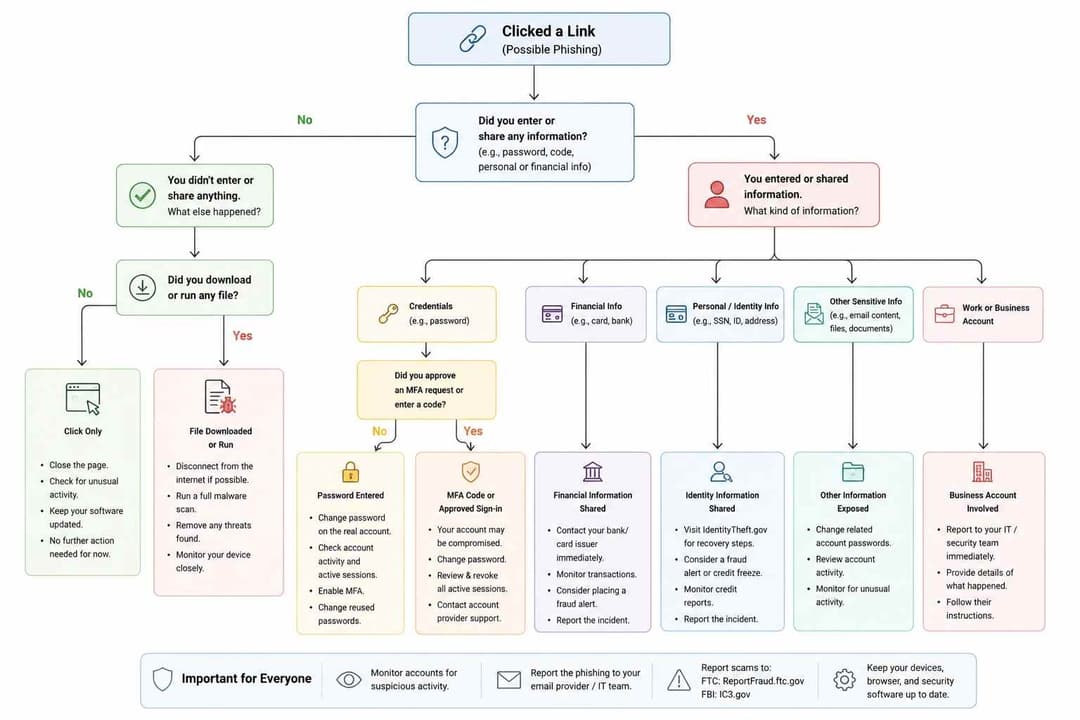
Treat that password as exposed, even if the page showed an error or redirected you somewhere else.
Go directly to the legitimate service using a bookmarked address or by typing the correct website address yourself. If the device might be infected, use another trusted device to secure your account.
Change the password immediately. If you used it on other websites, replace it there too with a different, unique password for each account. Then:
Check recent sign-ins and devices you don't recognize.
Sign out unfamiliar sessions where the provider allows it.
Review recovery email addresses, phone numbers, and authentication methods for unwanted changes.
Turn on multifactor authentication (MFA). Where supported, consider a passkey or security key that is designed to resist phishing.
If you lost access to the account, follow the provider's official account-recovery process instead of a recovery link sent by the suspicious message.
For email accounts, check forwarding settings and inbox rules as well. An attacker who gets into a mailbox may set messages to forward elsewhere or hide security warnings. Google and Microsoft both document these types of account checks.
What If I Entered an MFA Code or Approved a Login?
Changing the password is important, but it may not be enough by itself.
Some phishing attacks trick people into approving access or capture an authenticated session. If you entered a one-time verification code, approved a sign-in you didn't start, or authorized an unfamiliar app, open the provider's security settings and review recent activity, sessions, and connected applications.
Revoke suspicious sessions or app access using the provider's available controls. Check whether someone added a new authentication method or changed account recovery details. For a work, administrator, or single sign-on (SSO) account, tell the security team immediately; they may need to revoke tokens and inspect sign-in logs.
What If a File Downloaded or I Installed Something?
Downloading a file is not the same as running it. If the file downloaded but you did not open it, do not run it now. A work user should preserve relevant information and follow IT instructions rather than deleting potential evidence.
If you opened a suspicious attachment, installed an app, allowed remote access, or notice unexpected changes on the device:
Stop using the device for banking, email, and other sensitive sign-ins until it has been assessed.
When an active compromise is suspected, disconnecting the device from the network can help limit further access. For a managed work device, follow your organization's incident-response instructions.
Update trusted security software and run the recommended malware scan or remediation process.
If malware is found or the device cannot be trusted, get assistance from your IT team, device manufacturer, or a qualified security professional.
Change exposed passwords from a trusted device and review accounts for unusual activity.
A clean scan is useful, but it cannot guarantee that every possible threat has been ruled out.
What If I Clicked the Phishing Link on My iPhone or Android Phone?
The same first question applies: Did you only view a page, or did you enter information, approve access, or install something? A phone isn't automatically compromised because a suspicious page opened.
On iPhone, close the page, keep iOS updated, and secure any account information you entered. If a page persuaded you to install a configuration profile, review Settings → General → VPN & Device Management for unfamiliar profiles. Do not remove a work or school management profile without checking with its administrator.
On Android, close the page, update Android and your browser, and review any apps you installed because of the message. Google's Play Protect can scan apps for potentially harmful behavior. If you entered a password or code, secure that account using the official app or website.
On either device, ignore follow-up messages that claim you must pay for an urgent virus removal. Use the device maker's official support guidance if you suspect an infection.
What If I Shared Credit Card, Bank, or Personal Details?
Contact your bank or card issuer immediately using the number on your card, an official app, or another contact method you already trust. Tell them what information you shared and ask whether they recommend blocking the card, replacing credentials, or reviewing transactions.
Check your account for unfamiliar activity and keep records of suspicious transactions. If you disclosed identity information, follow the recovery process available in your country. In the United States, the FTC's IdentityTheft.gov offers recovery steps based on what was exposed.
If you transferred money to a scammer, contact the payment provider as soon as possible. Recovery depends on the payment method and circumstances; no provider can guarantee a reversal.
How Can I Tell Whether the Phishing Link Compromised My Account or Device?
Look for evidence rather than assuming that every unusual behavior proves a breach. Warning signs can include:
Logins from unfamiliar devices or places.
Unexpected password-reset emails or newly added recovery methods.
Messages sent from your account that you didn't write.
Unknown email forwarding rules or changes to inbox settings.
New browser extensions, apps, or device-management profiles you didn't approve.
Browser redirects, persistent unwanted pop-ups, or unusual security alerts.
Bank or card transactions you don't recognize.
These signs deserve investigation, but their absence does not prove an account or device is clean. If the device is behaving suspiciously or a privileged account was involved, seek appropriate help.
I Clicked a Phishing Link at Work. What Should I Tell IT?
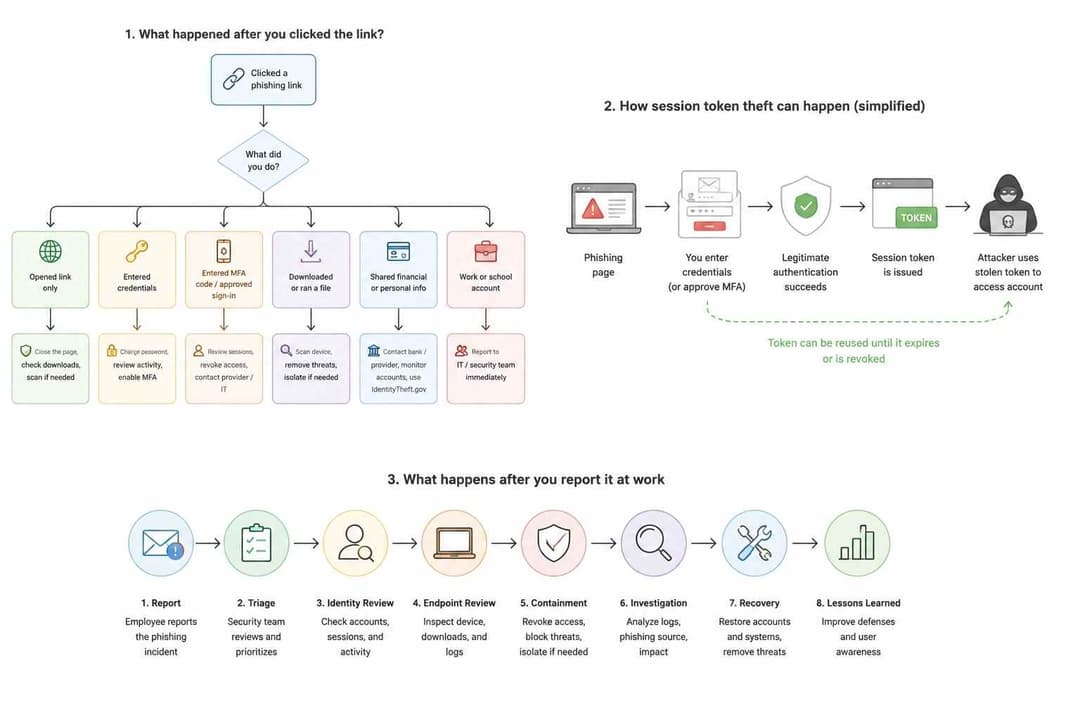
Report it as soon as possible, even if you think nothing happened. It is easier for a security team to assess a fresh incident when the original message and timeline are still available.
Include the suspicious email or message, the link, the approximate time you clicked, the device and account involved, whether you entered credentials or approved MFA, and whether anything downloaded or ran. Mention any unusual alerts or activity afterward.
Don't forward the suspicious link to coworkers as a warning, repeatedly open the page, or wipe the device on your own. Follow your organization's reporting and evidence-handling process.
For business accounts, investigators may need to review sign-in logs, sessions, email rules, connected apps, endpoint activity, and possible access to company data. Finance, administrator, developer, and SSO accounts warrant particular attention because of the systems they may reach.
How to Report a Phishing Link
Reporting helps email providers and security teams identify suspicious campaigns.
Use the Report phishing or Report junk feature in the email or messaging app.
Tell the real company being impersonated, using its official reporting channel when available.
In the United States, the FTC accepts reports at ReportFraud.ftc.gov. The FTC also advises forwarding phishing emails to reportphishing@apwg.org and scam texts to 7726 (SPAM) where supported.
If you lost money or suffered cyber-enabled fraud, consider a report to your local authorities. U.S. victims can also consult the FBI's Internet Crime Complaint Center.
If the incident involves work, use your company's reporting process before taking investigative steps yourself.
How Businesses Should Respond to a Suspected Phishing Compromise
For an organization, a phishing incident may extend beyond one password. Attackers with access to an email or cloud identity may attempt to read business messages, create forwarding rules, request fraudulent payments, or access connected systems.
A practical response starts by establishing what the employee actually did and which account or device was involved. Depending on the evidence, the security team can contain affected sessions or endpoints, preserve logs, assess the scope of access, remove unauthorized changes, and restore trusted operations. Not every click needs a full forensic investigation, but signs of account takeover, malware, or sensitive-data exposure justify deeper review.
NIST's SP 800-61 Revision 3 provides a framework for incorporating incident response into an organization's wider cybersecurity risk management.
How Hoplon Infosec Can Help
If a phishing click has developed into a suspected business compromise, Hoplon Infosec currently lists Incident Readiness & Response Recovery among its services. The published service scope includes incident-response planning, technical readiness assessment, containment and investigation support, and recovery and remediation.
Incident response and recovery services
For incidents where the organization needs to determine what occurred and preserve electronic evidence, Hoplon also publishes a Digital Forensics & Incident Investigation service.
Digital forensics and incident investigation
Organizations that are not dealing with an active compromise but want to identify weaknesses in endpoints, networks, identity, cloud, policy, and people can also review Hoplon's cybersecurity assessment offering.
If the incident involves a company device, business email account, SSO identity, administrator account, malware, or sensitive organizational data, document what happened and contact your internal security team first. If additional incident-response expertise is required, Hoplon's verified incident-response service is a relevant next step.
Frequently Asked Questions
Can clicking a phishing link hack my phone or computer without entering anything?
It is possible for a malicious page to exploit a software weakness or trigger a harmful download. But opening a link doesn't automatically mean a successful hack. Check what happened after the click, update your software, and investigate downloads or abnormal behavior.
Do I need to disconnect from Wi-Fi immediately?
Not after every accidental click. Disconnecting can be useful if malware ran or an active compromise is suspected. If you only opened a page and entered nothing, start by closing it and checking for downloads. On a work device, follow your security team's instructions.
What if I typed only my email address?
An email address alone is different from disclosing a password. Be alert for targeted follow-up messages, but don't assume that typing an email address gave someone access to your inbox. Secure the account if you also shared a password or notice suspicious activity.
Is changing my password enough after phishing?
Not always. Also check sign-in activity, sessions, recovery details, and connected applications. If an attacker obtained an authenticated session or changed account settings, a password change alone may not resolve every form of access.
What if I clicked the link several days ago?
The next steps still depend on what happened. Secure any account information you entered, inspect recent activity and transactions, check the device for suspicious downloads or software, and report a workplace incident even if some time has passed.
Will deleting the email or clearing browser history remove a phishing threat?
No. Deleting a message or browser history does not undo a password disclosure, revoke an attacker session, or remove installed malware. Deal with the actual exposure first.
When Should You Get Professional Incident-Response Help?
Professional support may be appropriate if a business account was taken over, malware or remote access is suspected, company data may have been exposed, multiple users were targeted, or the organization cannot determine what the attacker accessed.
Hoplon Infosec's Incident Readiness & Response Recovery service covers incident-response planning, investigation and containment support, and recovery and remediation. Organizations that need to preserve and analyze electronic evidence can also explore Digital Forensics & Incident Investigation. For preventive reviews of security controls, Hoplon offers a Cyber Security Assessment.
If this happened at work, report the incident to your internal IT or security team first. If the team identifies a potential compromise that requires outside expertise, Hoplon can help assess the next response steps.
Related Articles:
- social engineering scams targeting employees
- Gmail phishing and AI prompt injection
- weaponized voicemail phishing attacks
- email security practices
- root causes of data breaches
- practical online security guide
- FreeDrain phishing attacks