Can a legitimate ChatGPT page lead someone into a malware infection? Security researchers have documented a campaign showing how that can happen when attackers abuse Custom GPTs and social engineering.
Huntress researchers reported on September 28, 2026 that attackers created Custom GPTs designed to look like legitimate ChatGPT offerings. In some observed cases, sponsored Google Search results brought users to one of these GPTs on the real ChatGPT domain. The GPT then directed visitors to a supposed backup site where a ClickFix lure tried to persuade them to run a malicious command.
That action started a multi-stage ChatGPT malware infection chain involving PowerShell, a malicious MSI installer, DLL sideloading, persistence mechanisms, and ultimately a remote access trojan, or RAT.
The important distinction is that ChatGPT itself was not the malware. Attackers were abusing trust in legitimate platforms to persuade people to perform the action that started the infection.
What Happened in the ChatGPT Malware Campaign?
The campaign combines several techniques that are individually familiar to security teams but become more convincing when placed behind trusted brands.
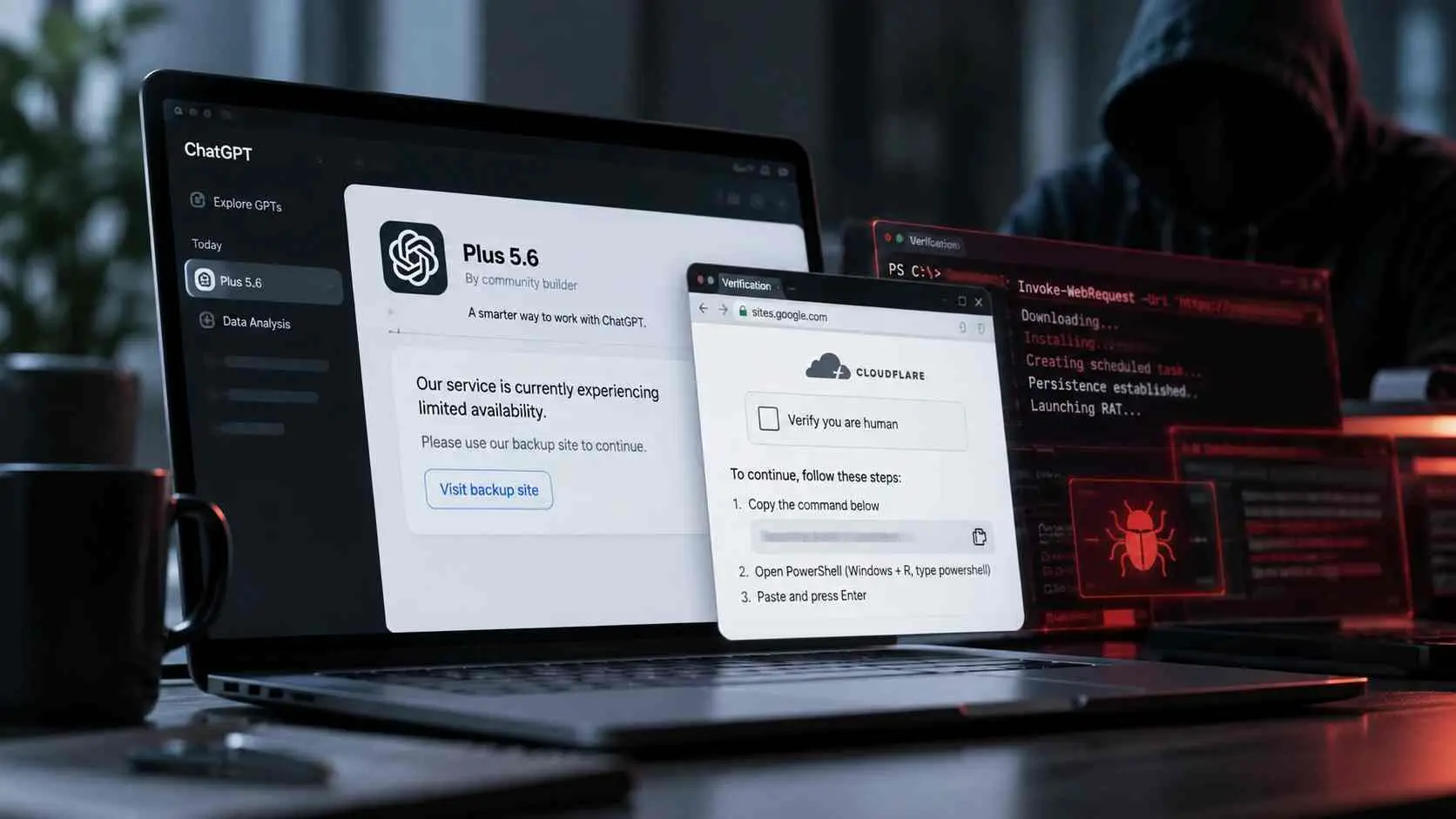
Huntress found two attacker-created Custom GPTs associated with the campaign. One was called "Plus 5.6," a name that could easily be mistaken by an unfamiliar user for an official ChatGPT model. The page itself lived on the legitimate ChatGPT website and identified its creator as a community builder.
When a target interacted with the malicious GPT, it produced a fake service availability notice. The message claimed that the primary service had limited availability and directed the user toward a "backup domain."
That destination was a Google Sites page designed to resemble a verification page. It used ChatGPT and Cloudflare branding and presented a ClickFix lure. Instead of completing an ordinary CAPTCHA, the visitor was instructed to copy and execute a command.
Huntress said its SOC handled at least 40 incidents associated with the Google Sites domain used in the campaign. Two of those incidents were specifically confirmed as originating through Custom GPTs. The distinction matters because the broader incident count should not be interpreted as 40 confirmed Custom GPT infections.
Huntress reported the first malicious GPT to OpenAI, and it had been removed by September 25. Researchers found another GPT associated with the campaign on September 27.
Attack Overview
The easiest way to understand the campaign is to separate the trusted entry point from the actual malware delivery mechanism.
|
Attack Component |
Role in the Campaign |
|
Sponsored search result |
In some cases, directed users toward the lure |
|
Malicious Custom GPT |
Impersonated a legitimate ChatGPT offering |
|
Google Sites page |
Hosted the fake verification experience |
|
ClickFix lure |
Persuaded the victim to execute a command |
|
PowerShell |
Downloaded and launched the next stage |
|
Malicious MSI |
Installed components needed for the infection |
|
DLL sideloading |
Used legitimate signed software to help execute malicious code |
|
Persistence |
Allowed malicious components to return after interruption |
|
RAT |
Provided extensive remote access capabilities |
The unusual part of this ChatGPT malware attack is therefore not a previously unknown Windows vulnerability. The attack depends heavily on convincing the victim to execute the initial command.
Why This Attack Is Different From Ordinary Phishing
Traditional malware delivery often follows a recognizable pattern:
Phishing email → malicious attachment → execution → malware
This campaign can look very different:
Search result → real ChatGPT domain → attacker-created GPT → trusted-looking external page → fake verification → user executes command → malware
The browser may initially show a legitimate ChatGPT address. That can lower a user's suspicion.
The lesson is simple but important. A legitimate domain confirms where a page is hosted. It does not automatically establish that every piece of user-created content on that platform is trustworthy.
What Are ChatGPT Custom GPTs?
Custom GPTs are customized versions of ChatGPT built for particular tasks. A builder can configure instructions, knowledge, and supported capabilities so the GPT behaves like a specialized assistant.
That flexibility has legitimate uses. It also creates a trust problem when users do not distinguish between the platform hosting a GPT and the third party responsible for creating it.
In this campaign, the attackers exploited that distinction. The malicious GPT existed on a genuine ChatGPT page, but the content and external direction came from the attacker-created GPT.
Legitimate GPT vs. Malicious GPT
|
Legitimate Use |
Malicious Abuse |
|
Helps complete a defined task |
Attempts to manipulate the visitor |
|
Provides useful information |
Provides deceptive instructions |
|
Uses external resources for a legitimate purpose |
Redirects users toward attacker infrastructure |
|
Clearly represents its purpose |
May impersonate an official product or service |
|
Does not require suspicious system commands |
May attempt to trigger code execution |
A Custom GPT requesting that you visit an external website is not automatically malicious. Context matters. A major warning sign appears when an unfamiliar GPT sends you to another page that asks you to execute terminal, PowerShell, Run dialog, or other system commands.
Why Are Attackers Targeting Trusted AI Platforms?
The technical malware is only one part of the attack. The other part is trust.
Brand Trust
People increasingly use conversational tools as everyday software. A page hosted on a familiar domain can feel safer than a random website.
Attackers can exploit that assumption. Instead of convincing someone that an obviously unfamiliar domain is trustworthy, they can begin the journey inside a platform the user already recognizes.
Better Social Engineering
A chatbot creates an interactive experience. Instructions coming from an apparent assistant can feel more contextual than instructions in a spam email.
In this campaign, the message did not immediately say, "install this file." It presented a service problem and offered an apparent solution.
That matters because ClickFix attacks are built around making a dangerous action look like ordinary troubleshooting.
Human Problem-Solving Behavior
A fake CAPTCHA or technical error gives the victim a small problem to solve.
The attacker then supplies the "solution."
Microsoft has previously documented how ClickFix campaigns exploit this behavior by instructing users to paste commands into Windows Run, Terminal, or PowerShell. The attacker does not always need to exploit software directly if the victim can be persuaded to start the malicious process.
How Were Victims Reached?
Sponsored Search Results
Huntress observed cases where users searched Google for "chatgpt" and clicked a sponsored result.
The resulting URL contained Google Ads tracking parameters, supporting the researchers' conclusion that advertising was involved in those observed paths.
The dangerous part was what happened next. The advertisement could lead to a real chatgpt.com page containing the attacker-created GPT.
This is a form of malvertising, where paid advertising is abused to place a malicious or deceptive destination in front of users.
The Malicious Custom GPT
The GPT was titled "Plus 5.6." Huntress found that interacting with it produced a service availability message directing the visitor to a backup location.
That external location was hosted on Google Sites.
Again, this created another layer of apparent legitimacy. The victim moved from one recognizable platform to another before encountering the malicious instructions.
What is a ClickFix Attack?
ClickFix is a social engineering technique that tricks a person into executing malicious code under the impression that they are fixing an error, completing a verification step, or solving another routine problem.
MITRE ATT&CK now tracks this behavior under T1204.004, User Execution: Malicious Copy and Paste.
The central idea is straightforward:
- The victim encounters a fake problem or verification request.
- The page provides instructions that supposedly solve it.
- A malicious command is copied or presented to the victim.
- The victim opens Windows Run, Terminal, or PowerShell.
- The victim pastes and executes the command.
- The command begins the malware infection.
This approach is dangerous because the victim becomes part of the execution process.
Microsoft has documented ClickFix campaigns that combine fake CAPTCHA prompts, impersonation, malvertising, and other delivery methods. Proofpoint has also observed ClickFix being used to deliver several different malware families.
In other words, ClickFix is not unique to this ChatGPT malware campaign. What is notable here is the use of a malicious Custom GPT as part of the trust chain leading into it.
The Complete ClickFix Infection Chain
Huntress described a considerably more complex infection chain than the short download-and-run pattern commonly seen in ClickFix campaigns.
Step 1: The Victim Reaches the Malicious Custom GPT
In observed cases, a sponsored search result could bring the victim to the "Plus 5.6" Custom GPT.
Because the page was hosted on ChatGPT's real domain, an ordinary domain check alone would not reveal the social engineering risk.
Step 2: The GPT Presents a Fake Service Problem
The GPT returned a service availability notice claiming that the main service was experiencing limited availability.
It then provided a supposed backup option.
This gave the external link a reason to exist. The victim was not simply told to leave ChatGPT. The redirect was framed as a solution to a service problem.
Step 3: The Victim Reaches the ClickFix Page
The linked Google Sites page imitated a Cloudflare-style verification process.
Instead of performing a normal browser-based human verification, the page instructed the visitor to copy and run a command.
This is the point where the attack moves from deceptive content toward local code execution.
Step 4: PowerShell Starts the Infection
The observed command launched PowerShell and retrieved an obfuscated script.
PowerShell is a legitimate Windows administration and automation tool. Its presence on a system does not indicate malware.
Attackers abuse it because it can download content, execute scripts, and interact deeply with Windows. Security professionals often describe abuse of legitimate system utilities as "living off the land."
The command used in this campaign was designed to retrieve a script into the Windows temporary directory and execute it.
For safety, the operational command is not reproduced here.
Step 5: A Malicious MSI is Installed
The downloaded script eventually retrieved and silently installed a malicious MSI package identified by Huntress as ISOSimple.msi.
MSI is the standard Windows Installer package format. Like PowerShell, MSI itself is legitimate.
The security issue is what the malicious installer contains and executes.
Huntress found that the package presented itself as an "Advanced Printer Configuration Reader." It installed into the user's local application data area and contained a large collection of files, most of which were legitimate or harmless components used to make the package appear ordinary.
Step 6: DLL Sideloading Hides the Next Stage
One of the most interesting parts of this ChatGPT malware chain is its use of DLL sideloading.
A simple analogy helps.
Imagine a trusted employee entering a secure building. Someone secretly replaces one of the folders the employee is expected to collect after entering. The security guard recognizes the employee, but the contents of the folder are no longer trustworthy.
DLL sideloading works on a related principle. A legitimate application loads a DLL that it expects to find in a particular location. Attackers place or modify a DLL so that the trusted application loads malicious code.
The first version analyzed by Huntress used a legitimate Canon-signed COTFileReadApp.exe. The surrounding chain caused it to load modified and malicious components.
The fact that the executable was legitimately signed did not make the entire directory or execution chain legitimate.
Step 7: Persistence Keeps the Infection Alive
The first version established two persistence mechanisms, according to Huntress:
- A user Run registry key
- A scheduled task
Both used the name Canon Configuration Reader.
Persistence means the attacker is attempting to make malicious code return after events such as login, restart, or interruption.
This detail is particularly important for incident response. Removing one downloaded file does not necessarily remove an infection if persistence has already been established elsewhere.
Step 8: Hidden Layers Unpack the RAT
Huntress found multiple layers intended to conceal the final payload.
In the first analyzed version, a malicious helper extracted an encrypted loader from a .wav file. The loader then accessed a custom encrypted archive called monitor.raw, which contained additional configuration and the final RAT.
The researchers stressed that the .wav technique was not traditional audio steganography. Rather than carefully hiding information inside normal audio samples, the attackers had placed encrypted data inside part of the file.
A later version changed the packaging. It replaced the Canon host with a legitimate Stardock-signed executable and changed how the loader was concealed, while Huntress reported that the final RAT itself remained the same.
This illustrates why defenders should focus on behavior rather than a single filename or vendor name.
Attack Flow at a Glance
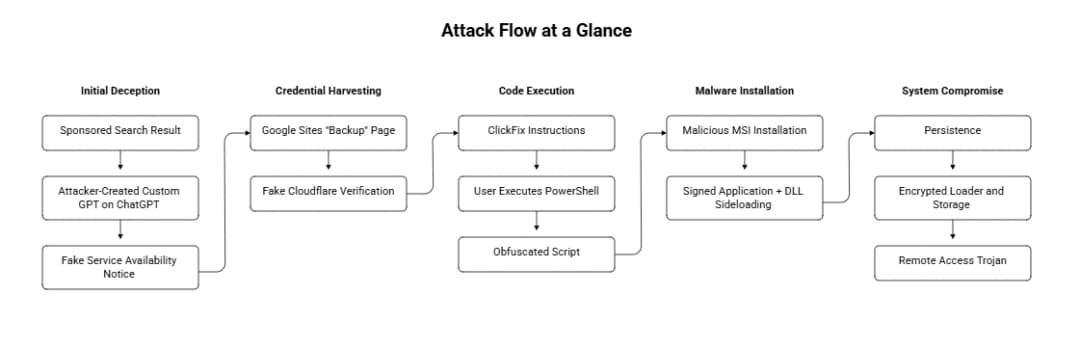
The crucial transition happens at the ClickFix stage. Until the victim executes the command, the deceptive pages are primarily social engineering. The copied command turns deception into local code execution.
What is RAT Malware?
RAT stands for Remote Access Trojan.
A RAT is malware designed to give an attacker remote capabilities on a compromised computer. What those capabilities include depends on the particular RAT.
Huntress's analysis of the payload in this campaign found extensive functionality. The researchers recovered strings indicating remote desktop and screen broadcasting capabilities, camera and audio access, file management, browser interaction, system reconnaissance, and the ability to deploy additional payloads.
The malware could also collect information about the infected system, including installed security products, Microsoft Defender status, network adapters, software, Windows features, and hardware information.
That makes the final stage much more serious than a fake browser message. Once the RAT is operating successfully, the attacker may have a powerful foothold on the endpoint.
What Could the Attackers Access?
The precise consequences depend on what the attacker does after infection and what information is available on the compromised machine.
For an individual, exposed resources could include browser sessions, files, credentials, and other information accessible from the infected endpoint.
For a business, a compromised employee computer may create broader concerns. The endpoint could contain internal files, authenticated browser sessions, corporate credentials, or access to other services.
Huntress also found that the RAT was capable of executing additional payload types. That means the initial RAT should be treated as a potential starting point for further malicious activity rather than the guaranteed final action.
How the RAT Communicates
Huntress found that the RAT supported DNS-over-HTTPS through well-known public resolvers.
DNS-over-HTTPS, commonly shortened to DoH, is a legitimate technology that encrypts DNS queries inside HTTPS traffic.
The security challenge is that malware can abuse the same mechanism. Huntress noted that the C2 address itself was not recovered from the analyzed files and proposed several possibilities for where it might be stored or obtained.
That uncertainty is worth preserving. There is not enough evidence in the published research to state exactly how the RAT obtained its final C2 address.
The Attack Changed After Discovery
The campaign did not remain static.
After the first Custom GPT was taken down, Huntress found another one associated with the same campaign. Researchers also analyzed a second malware variant.
Version one used a Canon-signed application in the sideloading chain. Version two switched to Stardock's DeElevate64.exe and a modified related DLL.
The later version also changed its delivery process. Huntress reported additional obfuscation, retries during downloading, removal of Mark-of-the-Web from the MSI, and sandbox-related checks.
Mark-of-the-Web is metadata Windows applies to files obtained from the internet. Windows and security features can use it when deciding whether to display warnings or apply additional scrutiny.
Removing it can therefore reduce some of the visible signs that a file originated online.
The larger lesson is that a detection rule built only around "Canon" would be fragile. Attackers can change the legitimate software they abuse while retaining the underlying behavior.
The most direct standardized mapping for the ClickFix portion is:
|
Observed Behavior |
MITRE ATT&CK |
|
User copies and executes malicious content |
T1204.004, Malicious Copy and Paste |
|
PowerShell execution |
T1059.001, PowerShell |
|
Registry Run key persistence |
T1547.001, Registry Run Keys / Startup Folder |
|
Scheduled task persistence |
T1053.005, Scheduled Task |
|
DLL sideloading |
T1574.002, DLL Side-Loading |
MITRE specifically describes ClickFix under T1204.004 as a technique in which users are socially engineered into copying and pasting malicious code into a command or scripting interpreter.
This mapping is useful because it focuses defenders on behavior rather than the branding used by a particular campaign.
Indicators of Compromise
Huntress published a larger IOC set for defenders. A few high-value indicators are summarized below in defanged form.
|
Indicator |
Context |
|
sites[.]google[.]com/view/antibot172881 |
Observed ClickFix lure |
|
96.62.224[.]81 |
Observed script/MSI infrastructure |
|
45.140.205[.]28 |
Payload server seen in a related incident |
|
ISOSimple.msi |
Malicious installer name |
|
Canon Configuration Reader |
Observed Run value and scheduled task name |
|
monitor.raw |
Encrypted storage used by analyzed V1 chain |
|
COTFileReadApp.exe |
Legitimate Canon-signed binary abused by V1 |
A critical caution applies to COTFileReadApp.exe: Huntress identifies it as a legitimate Canon-signed file that was abused by the campaign. It should not be treated as inherently malicious or globally blocked simply because attackers incorporated it into this chain.
Hashes, filenames, domains, and IP addresses can also change quickly. Behavior-based detection should complement IOC matching.
How to Detect This ChatGPT Malware Attack
For an ordinary user, the most useful detection happens before infection.
Treat these behaviors as strong warning signs:
- An AI assistant unexpectedly tells you to use a "backup" website
- A CAPTCHA asks you to open Windows Run or PowerShell
- A website tells you to paste a command into Terminal
- A verification process requires system-level commands
- An unfamiliar GPT claims to represent a new official product but is identified as community-created
Security teams have additional telemetry available.
Look for suspicious combinations such as PowerShell retrieving remote content, PowerShell followed by msiexec, GUID-like MSI names in temporary directories, signed applications running from unusual user directories, unfamiliar DLLs beside signed applications, suspicious Run keys, and scheduled tasks created around the same time.
Microsoft also recommends investigating Windows Run history for suspicious command-line tools and download utilities when responding to possible ClickFix activity.
No single indicator proves compromise. The process tree, command line, file path, network activity, and timing should be considered together.
-20260930172916.webp&w=1080&q=75 "Chatgpt malware")
What Should You Do If You Executed the Command?
If you encountered the lure but did not execute the supplied command, the infection chain described by Huntress may not have started. Close the page and avoid returning to the suspicious GPT or external site.
If you did execute the command, treat the device as potentially compromised.
- Disconnect the affected computer from the network. This can limit additional communication while the incident is assessed.
- Do not use the potentially infected machine to change important passwords. Use a known-clean device instead.
- Run updated endpoint security scans. Microsoft notes that malware infections can leave files and system changes behind even after a threat is detected.
- Review important accounts and active sessions. If credentials or browser sessions may have been exposed, revoke sessions and rotate relevant credentials from a clean device.
- For corporate systems, contact the security or IT team immediately. A RAT infection should be investigated beyond simply deleting the visible installer.
- Review persistence and related endpoint activity. In this campaign, Huntress observed both a Run key and a scheduled task.
A confirmed RAT compromise may justify full endpoint containment, forensic review, credential rotation, and potentially rebuilding the affected system according to the organization's incident response procedures.
How to Prevent ClickFix and Custom GPT Malware Attacks
For Individual Users
The strongest rule is simple: a website should not need you to paste an unexplained command into PowerShell, Terminal, Command Prompt, or Windows Run merely to prove that you are human.
Do not assume a page is safe solely because the domain belongs to a familiar company.
When using community-created GPTs, check who created the GPT and treat external links with the same caution you would apply to links from any third party.
Keep Windows, browsers, and security software updated. These measures will not eliminate social engineering, but they improve the layers of protection available if something goes wrong.
For Businesses
Organizations should treat public AI tools as part of their security awareness model.
Training should specifically cover fake CAPTCHA and ClickFix attacks. "Do not open suspicious attachments" is no longer enough when attackers can persuade users to execute commands manually.
Endpoint monitoring should focus on suspicious process relationships and behaviors. PowerShell launching downloads, msiexec activity from unusual locations, signed applications loading unexpected DLLs, and persistence appearing immediately afterward deserve attention.
Least privilege can also reduce the damage available to an attacker, although this campaign demonstrates that user-level execution can still be dangerous.
Is ChatGPT Itself Malware or Unsafe?
No. The incident does not show that ChatGPT itself is malware.
The documented issue is abuse of a legitimate user-created feature and the trust surrounding it.
The attacker-controlled GPT acted as a social engineering layer. The malware infection occurred after the victim was redirected externally and persuaded to execute malicious instructions on the local computer.
This distinction matters because describing the campaign simply as "ChatGPT infects computers" would misrepresent the research.
A better security lesson is that legitimate platforms can host or route users toward malicious user-generated content. Trust should therefore apply to both the platform and the specific content or creator being interacted with.
Why This Campaign Matters for Businesses
The campaign exposes a growing gap between how employees perceive AI tools and how security teams traditionally model web threats.
An employee may be cautious about an unknown email attachment but much less suspicious of instructions displayed after visiting ChatGPT through Google.
That shift in context is valuable to attackers.
The ChatGPT malware campaign also demonstrates why domain reputation alone is not enough. Several steps in the observed path involved recognizable services before the malicious code executed locally.
For defenders, the endpoint remains an important source of truth. Even when the beginning of the journey looks legitimate, unusual command execution and persistence behavior can reveal what follows.
Lessons From the Attack
The first lesson is that trust is transferable. If attackers can place their instructions inside or behind a trusted platform, some users may transfer their trust in the platform to the instructions.
The second is that social engineering and technical evasion increasingly work together. ClickFix gets the victim to execute the first command. Obfuscation, signed binaries, DLL sideloading, encrypted storage, and persistence then make the later stages harder to analyze and stop.
The third is that defenders should not build their response around a single filename. Huntress observed the campaign change from a Canon-based sideloading chain to a Stardock-based version while retaining core behavior.
Behavior survives rebranding.
What This Could Mean for Future AI-Related Threats
This campaign does not prove that every AI platform will become a major malware channel, and it would be speculative to predict the scale of future attacks.
It does, however, demonstrate a practical technique attackers can use: place deceptive user-generated content inside a trusted AI experience, then move the victim toward an external action.
Security teams should therefore think about AI security beyond prompt injection and data leakage. Human trust in AI-generated instructions is itself part of the attack surface.
As AI assistants become more deeply integrated into daily workflows, verifying who created an assistant, where its links lead, and what actions it asks a user to perform will become increasingly important.
Hoplon Infosec Insight
The most important control in this incident sits at the boundary between browser activity and endpoint execution.
A website asking someone to open Windows Run or PowerShell and paste an unexplained command should trigger immediate suspicion. Security awareness programs should explicitly teach this behavior instead of relying only on older warnings about attachments and phishing links.
For organizations, endpoint visibility is equally important. The transition from browser interaction to PowerShell, MSI execution, DLL sideloading, persistence, and unusual outbound communication creates multiple opportunities for detection even when the original lure appears on a trusted platform.
For readers looking at this incident from an enterprise security perspective, endpoint protection is especially relevant because the damaging stages occur on the user's device after the social engineering succeeds.
Frequently Asked Questions
What is the ChatGPT Custom GPT malware attack?
It is a campaign documented by Huntress in September 2026 in which attackers used malicious Custom GPTs to impersonate legitimate ChatGPT offerings. Victims could be redirected to a fake verification page that used ClickFix instructions to persuade them to execute PowerShell, eventually delivering a remote access trojan.
Can a Custom GPT directly install malware on my computer?
The campaign documented by Huntress relied on social engineering rather than the GPT silently installing the RAT by itself. The malicious GPT redirected users to an external page, where ClickFix instructions attempted to convince them to execute a command. That user action started the local infection chain.
What is ClickFix?
ClickFix is a social engineering technique that presents a fake problem, CAPTCHA, or verification process and tells the victim to copy and execute a command. MITRE ATT&CK tracks malicious copy-and-paste execution as T1204.004.
What is a RAT?
A RAT, or Remote Access Trojan, is malware that provides remote capabilities on an infected computer. The RAT analyzed in this campaign included extensive remote control, reconnaissance, file management, browser interaction, surveillance, and additional payload execution functionality.
How can I recognize a fake ClickFix CAPTCHA?
A major warning sign is a CAPTCHA or verification page asking you to open Windows Run, Terminal, PowerShell, or Command Prompt and paste a command. Ordinary human-verification challenges should not require unexplained system-level command execution.
Is ChatGPT safe to use after this incident?
The research does not establish that ChatGPT itself is malware. It documents abuse of attacker-created Custom GPTs and external infrastructure. Users should distinguish official services from community-created GPTs and carefully evaluate external links or instructions that request local command execution.
Final Takeaway
The ChatGPT malware campaign is significant because the first part of the attack can look trustworthy.
A victim may start with a Google search, land on the legitimate ChatGPT domain, interact with what appears to be an AI product, and then move to another recognizable hosting platform. The danger becomes clear only when the fake verification process asks the user to execute a command.
From there, the campaign becomes highly technical. PowerShell retrieves an obfuscated script, an MSI installs the next components, legitimate signed applications are abused for DLL sideloading, persistence mechanisms keep the chain alive, and hidden payload layers eventually expose a capable RAT.
The best defense begins much earlier.
Do not treat a familiar domain as proof that every creator or instruction on it is trustworthy. And when a website asks you to paste an unexplained command into your operating system to "fix" or "verify" something, stop before executing it.
That small decision can prevent the
entire infection chain.
Source:
Microsoft ClickFix Research
Read More Articles