
Windows 11 KB5124008 Domain Trust Failure: Cause, Errors and Fix
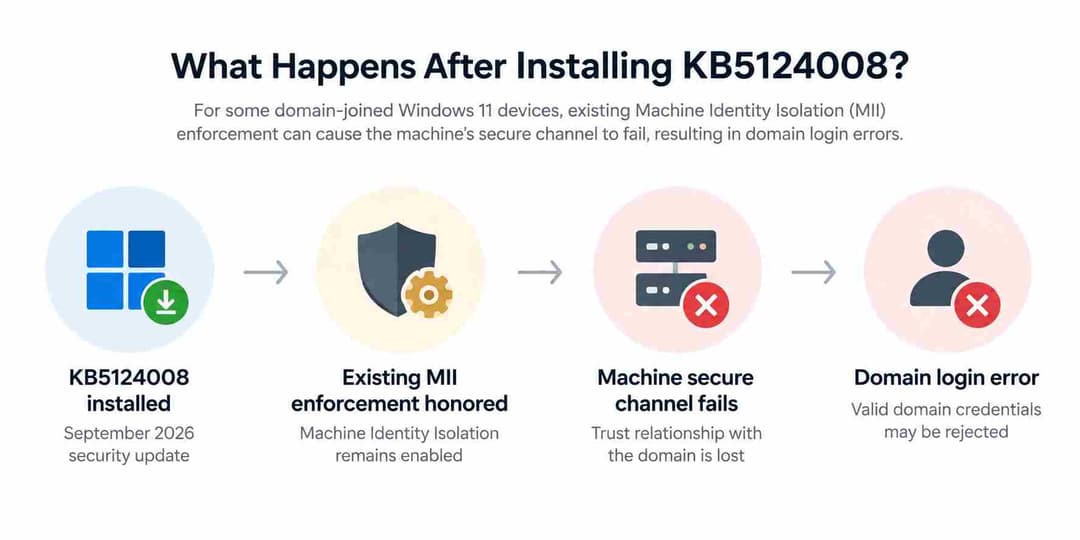
Microsoft has confirmed that the September 2026 Windows 11 security update KB5124008 can cause some domain-joined devices to lose their secure trust relationship with an on-premises Active Directory domain.
Affected users may enter valid domain credentials and still be unable to sign in, receiving a message that the trust relationship between the device and the domain has failed. Microsoft currently lists the issue as Mitigated and says a future Windows update will temporarily prevent Machine Identity Isolation enforcement while improvements are made.
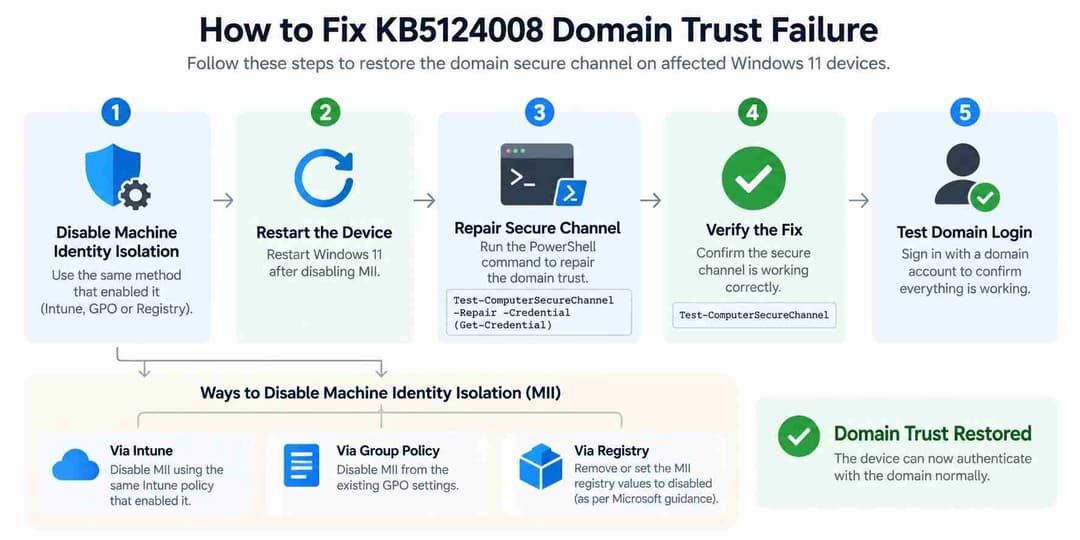
Quick Fix: Microsoft recommends disabling Machine Identity Isolation using the same management method that enabled it, restarting the affected Windows device, and then repairing the domain secure channel with PowerShell.
Test-ComputerSecureChannel -Repair -Credential (Get-Credential)
For organizations managing large Windows fleets, this incident is another reason to stage cumulative updates before wide deployment. Hoplon Infosec covered similar enterprise patch-management considerations in its guide to the Windows 11 June 2026 updates.
KB5124008 Domain Trust Issue at a Glance
|
DetailCurrent Information |
|
|
Update |
KB5124008 |
|
Release date |
September 8, 2026 |
|
Windows 11 builds |
26200.9445 and 26100.9445 |
|
Main problem |
Domain secure-channel/trust failure |
|
Affected clients |
Windows 11 24H2, 25H2 and 26H1 |
|
Environment involved |
On-premises Active Directory |
|
Security feature involved |
Machine Identity Isolation |
|
Microsoft status |
Mitigated |
|
Current workaround |
Disable MII, restart, repair secure channel |
|
Future resolution |
Microsoft plans a future Windows update |
KB5124008 is a cumulative Windows security update released on September 8, 2026. Microsoft's official KB5124008 release notes list the update for Windows 11 24H2 and 25H2, while Windows Release Health includes 26H1 among the affected client platforms for this specific domain-trust issue.
What Happens After Installing KB5124008?
The failure does not affect every Windows device.
Microsoft says the problem involves some Credential Guard-protected machine accounts connected to on-premises Active Directory. When the issue occurs, the client can lose the secure channel used to maintain its trust relationship with the domain.
Valid Domain Credentials May Be Rejected
The most visible symptom is an interactive login failure.
A user may enter the correct domain username and password but receive a message indicating that the trust relationship between the workstation and the domain has failed.
In administrator-reported cases, users have also seen:
“The user name or password is incorrect”
even though the supplied domain credentials were valid.
That makes this issue easy to misdiagnose as an incorrect password, user-account problem, or ordinary Active Directory lockout.
Cached Credentials May Still Work
Microsoft says offline sign-in with previously cached credentials may continue working.
That distinction matters. A user being able to sign in while disconnected from the network does not prove that the workstation still has a healthy domain relationship.
Network Authentication May Still Work
One of the more useful observations from the original Microsoft Q&A reproduction was that some types of network authentication continued working even while interactive domain sign-in and the machine secure channel were failing.
The administrator reported successfully authenticating with the same credentials using:
net use \\DC\IPC$
while the affected workstation still failed its secure-channel tests.
This is an important diagnostic clue.
If network authentication works but interactive domain logon and the machine trust relationship fail, the user's password itself may not be the underlying problem. Administrators should investigate the workstation's machine-account trust and secure channel.
This behavior was reported by administrators troubleshooting the incident and should be treated as field evidence rather than a symptom that Microsoft says must appear on every affected device.
Domain Controllers Are Not Listed as Affected Platforms
Microsoft lists the affected platform as Windows client, not Windows Server.
AD replication and Active Directory services running on domain controllers are not affected by this specific issue. The failure occurs in the trust relationship between the affected Windows client and the domain.
This is an important distinction for administrators troubleshooting large environments: do not assume a failed workstation trust means Active Directory itself is down.
A Real-World Reproduction of the KB5124008 Failure
One of the first detailed incident reports came from an administrator managing Windows 11 25H2 domain-joined workstations.
The reported environment included:
- Windows 11 25H2 clients running build 26200.9445
- KB5124008 installed on the clients
- Two Windows Server 2019 domain controllers
- A single Active Directory domain
- Windows Server 2016 Active Directory Domain Functional Level
- Deployment through WSUS and SmartDeploy
The administrator reported eventually reproducing the issue on six machines.
The observed sequence was highly repeatable:
- The Windows 11 computer was joined to the domain and authentication worked normally.
- KB5124008 was installed.
- The computer restarted.
- The secure channel failed and interactive logon stopped working.
- Removing the update and rebuilding domain membership restored operation.
- Installing KB5124008 again caused the failure to return.
This real-world reproduction helped narrow the investigation away from an ordinary password or domain-controller outage and toward the Windows client configuration involved in machine authentication.
The report is useful evidence, but it represents one administrator's environment. Microsoft's later release-health documentation provides the authoritative explanation of the broader issue.
Why KB5124008 Breaks Active Directory Domain Trust
The core of the problem is Machine Identity Isolation, a security capability associated with Credential Guard.
Understanding that feature makes the failure much easier to troubleshoot.
What is Machine Identity Isolation?
A domain-joined Windows computer has its own machine account and secret, which it uses when authenticating itself to Active Directory.
Machine Identity Isolation is designed to provide stronger protection for these machine credentials through Credential Guard and virtualization-based isolation.
Microsoft describes the feature as a way to move machine-account credential protection into Credential Guard so machine authentication can benefit from a more isolated security boundary.
In enforcement mode, the protected machine secret can be isolated from the normal Local Security Authority environment. This reduces exposure of sensitive machine-account credentials but also means authentication depends on the protected workflow functioning correctly.
This type of endpoint credential protection fits into the broader security controls explained in Hoplon Infosec's guide to modern endpoint security, where identity, device state, policy enforcement and endpoint monitoring all contribute to the security of enterprise systems.
What Changed With KB5124008?
This is where some early reports created confusion.
KB5124008 does not simply turn Machine Identity Isolation enforcement on for every Windows 11 computer.
Microsoft's current explanation is more specific: KB5124008 and later updates enable Machine Identity Isolation functionality, but the update does not directly enable enforcement. Instead, Windows begins honoring existing or policy-provisioned settings that already enabled Machine Identity Isolation enforcement.
That distinction matters.
Administrators should therefore investigate how the policy was configured before the update rather than assuming KB5124008 randomly created a new enforcement policy.
Why Windows Server 2025 Domain Functional Level Matters
Microsoft says Machine Identity Isolation is supported for environments connected to domain controllers operating at Windows Server 2025 Domain Functional Level or above.
Environments below that level should disable the feature.
The important phrase here is Domain Functional Level, not simply the operating system version installed on one domain controller.
For example, seeing a Windows Server 2025 domain controller in Active Directory does not by itself prove that the domain is operating at Windows Server 2025 functional level.
That is why administrators should verify the actual Active Directory functional level before deciding that the environment supports Machine Identity Isolation enforcement.

How to Verify the KB5124008 Domain Trust Problem
Do not immediately remove the computer from the domain.
First verify whether you are actually dealing with the KB5124008 secure-channel issue.
Step 1: Confirm KB5124008 Is Installed
Open an elevated PowerShell session and run:
Get-HotFix -Id KB5124008
You can also check:
Settings → Windows Update → Update history
If KB5124008 or a later cumulative update is installed, continue with the secure-channel checks.
Organizations that centrally deploy updates through Intune, SCCM or WSUS should also check deployment history. Hoplon's coverage of the Windows Server Update Services security flaw is a useful reminder that update infrastructure itself should be monitored and maintained as part of the enterprise security environment.
Step 2: Test the Domain Secure Channel
Run:
Test-ComputerSecureChannel
A healthy domain-member workstation normally returns:
True
A broken secure channel returns:
False
Microsoft's official Test-ComputerSecureChannel documentation confirms that the command tests the trust relationship between a local computer and its domain and can also attempt to repair a failed channel.
This command should be run on a domain-member computer, not a domain controller. Microsoft warns that running it against a domain controller can produce false-positive results.
Step 3: Check the Secure Channel With NLTest
Administrators can also query the domain secure channel using:
nltest /sc_query:yourdomain.local
Some administrator reports related to this incident have observed:
ERROR_NO_TRUST_LSA_SECRET (1786)
Treat that error as a useful diagnostic clue rather than proof by itself. The stronger evidence is the combination of a relevant Windows update, an unhealthy secure channel, and the Machine Identity Isolation configuration.
Step 4: Examine Domain Controller Security Events
The original administrator reproduction also documented useful forensic evidence on the domain controller.
Reported Security Event details included:
Event ID: 4625
Account: HOST$
Logon Type: 3
Authentication Package: NTLM
Status: 0xC000006D
Sub-status: 0xC000006A
The computer account appears in the familiar HOST$ format rather than as an ordinary user account.
These Event 4625 details can help administrators correlate workstation trust failures with machine-account authentication attempts.
However, they should not be treated as a mandatory signature for every affected endpoint. Reports in the same troubleshooting thread also described cases where failed authentication did not produce the expected domain-controller log entry.
Use Event Viewer as one piece of the investigation rather than as the only test.
Step 5: Check Machine Identity Isolation
Microsoft identifies two relevant registry locations:
HKLM\SYSTEM\CurrentControlSet\Control\Lsa\MachineIdentityIsolation
and:
HKLM\SOFTWARE\Policies\Microsoft\Windows\DeviceGuard\MachineIdentityIsolation
Machine Identity Isolation policy values include:
0 = Disabled
1 = Audit mode
2 = Enforcement mode
Microsoft's Device Guard policy documentation defines 0 as disabled, 1 as audit mode and 2 as enforcement mode.
For this specific KB5124008 workaround, Microsoft currently instructs administrators who find MachineIdentityIsolation = 2 in a registry-managed configuration to set it to 0.
Before Blaming KB5124008, Rule Out Common Domain Problems
A failed secure channel can have causes unrelated to KB5124008.
The administrator who published the original reproducible case documented several common problems that had already been checked and ruled out.
These included:
- Duplicate machine SIDs
- DNS and domain-controller discovery problems
- Active Directory replication failures
- Significant client/DC time skew
- User or machine account lockouts
- General domain-controller health issues
- Netlogon service problems
- KDC service problems
- DNS service problems
- NTDS service problems
Reported checks included successful domain-controller discovery, clean replication results, less than one second of time skew, no relevant account lockout and clean domain-controller diagnostics.
This does not mean every organization must reproduce the exact same checklist before acting.
It does mean administrators should avoid assuming that every Test-ComputerSecureChannel = False result after September 2026 is automatically the KB5124008 Machine Identity Isolation issue.
A stronger diagnosis combines:
update state + symptoms + secure-channel test + MII configuration + AD environment + normal domain-health checks.
Fixing Windows 11 Domain Trust Failure
How to Fix KB5124008 Domain Trust Failure
The correct remediation depends on how Machine Identity Isolation was originally configured.
Microsoft specifically recommends disabling it through the same management mechanism that enabled it.
That prevents a centrally managed policy from simply restoring the problematic setting after a local registry change.
Solution Matrix
|
EnvironmentRecommended Action |
|
|
Machine Identity Isolation managed by Intune |
Disable through Intune |
|
Managed through Group Policy |
Disable through the responsible GPO |
|
Configured directly in Registry |
Change applicable value from 2 to 0 |
|
MII has been disabled |
Restart the Windows device |
|
Secure channel remains broken |
Run PowerShell secure-channel repair |
|
Repair succeeds |
Verify it returns True and test domain login |
|
Repair fails |
Investigate machine account/password state |
|
Standard repair still fails |
Consider a controlled domain rejoin as a last resort |
|
Large enterprise fleet |
Test mitigation on a pilot group before broad rollout |
Solution 1: Registry-Based Fix
If Machine Identity Isolation was configured directly through the registry, first back up the registry and confirm which key is controlling the setting.
Check:
HKLM\SYSTEM\CurrentControlSet\Control\Lsa\MachineIdentityIsolation
and:
HKLM\SOFTWARE\Policies\Microsoft\Windows\DeviceGuard\MachineIdentityIsolation
If the applicable Microsoft-documented value is:
MachineIdentityIsolation = 2
change it to:
MachineIdentityIsolation = 0
Then restart the computer.
Registry changes should be handled carefully, especially across a large fleet. Microsoft explicitly recommends backing up the registry before applying this workaround.
Solution 2: Disable Machine Identity Isolation Through Group Policy
If your organization enabled the feature through Group Policy, modify the responsible GPO instead of relying only on a local registry edit.
Relevant Machine Identity Isolation settings are under the Windows Device Guard policy area.
After the updated policy reaches the affected endpoint, restart the device before repairing the secure channel.
This is important because editing only the local registry while an Active Directory GPO continues to enforce the old configuration can cause the setting to return.
In the original administrator investigation, the organization disabled the configuration through both Group Policy and its Intune security baseline and also reported forcing the registry value to 0 when the policy change did not appear to update the endpoint as expected.
That is useful real-world troubleshooting evidence, but administrators should still use their own policy hierarchy and Microsoft's supported configuration guidance rather than blindly reproducing another organization's setup.
Patch-policy governance becomes especially important during incidents like this. Hoplon's analysis of the Microsoft June 2026 Patch Tuesday release discusses the value of staged enterprise deployment rather than pushing major security changes to every production endpoint at once.
Solution 3: Disable It Through Microsoft Intune
If Machine Identity Isolation was enabled through Intune, disable it through the corresponding Intune policy.
Do not treat the local registry as the primary source of truth on an Intune-managed endpoint.
A configuration profile or security baseline can reapply centrally controlled values after the device synchronizes.
Once the policy is corrected, restart the endpoint.
For organizations managing hundreds or thousands of devices, centralized visibility is also important for identifying which systems actually received the affected update. Hoplon's endpoint security protection services focus on centrally managed endpoint controls, monitoring and policy enforcement across business devices.
Solution 4: Repair the Domain Secure Channel
After Machine Identity Isolation is disabled and the computer has restarted, open PowerShell as Administrator.
Run:
Test-ComputerSecureChannel -Repair -Credential (Get-Credential)
Enter credentials that have permission to perform the repair.
Then verify the result:
Test-ComputerSecureChannel
A successful repair should return:
True
Microsoft says the -Repair parameter removes and rebuilds the channel established through the Netlogon service.
After the secure channel is restored, test normal domain authentication.
You can also perform an additional validation with:
nltest /sc_query:yourdomain.local
Using both tools can provide stronger confirmation that the endpoint has regained a healthy relationship with the domain before it is returned to normal production use.
Advanced Recovery: Reset the Machine Account Password
Some administrators investigating this incident also attempted to reset the computer's machine-account password before repairing the secure channel.
An example command is:
Reset-ComputerMachinePassword -Server <DomainController> -Credential (Get-Credential)
This can then be followed by:
Test-ComputerSecureChannel -Repair -Credential (Get-Credential)
This should be considered an advanced recovery step, not a replacement for Microsoft's primary KB5124008 mitigation.
The official sequence remains:
disable Machine Identity Isolation → restart → repair the secure channel.
Machine-password reset behavior has varied between reported environments, so administrators should understand the impact before applying it broadly.
Solution 5: Domain Rejoin as a Last Resort
Do not make domain rejoin the first response.
Microsoft's current KB5124008 workaround is to disable Machine Identity Isolation, restart the endpoint and repair the secure channel.
If that process still fails, administrators can investigate the computer account, machine password state, replication health and domain connectivity before deciding whether a controlled unjoin/rejoin is appropriate.
A domain rejoin has more operational impact and should therefore be treated as an escalation step, not the standard KB5124008 fix.
Recovery Can Vary Between Environments
Administrator reports show that recovery has not been identical on every affected machine.
In the original reproducible environment, attempts to use:
Reset-ComputerMachinePassword
and:
Test-ComputerSecureChannel -Repair
were initially reported as insufficient, and a complete domain leave/rejoin was required.
Other administrators in the same Microsoft Q&A discussion reported that:
Test-ComputerSecureChannel -Repair
was enough to restore affected machines without performing a full domain rejoin.
This variation is important.
A repair command succeeding in one organization does not guarantee that every affected endpoint will recover the same way.
Start with Microsoft's current supported mitigation, validate the result, and escalate only when necessary.
The Configuration Paradox: Why the Problem Appeared After the Update
One of the most confusing parts of this incident is that some administrators may not remember actively enabling Machine Identity Isolation immediately before the failure.
That does not mean KB5124008 necessarily created an enforcement policy by itself.
Microsoft says the update causes Windows to begin honoring existing or policy-provisioned enforcement settings.
In practical terms, a policy or configuration that existed without producing an obvious problem before September's update can suddenly become operationally significant after the update starts honoring it.
That is the configuration paradox administrators should investigate.
Instead of asking only:
“What did KB5124008 change?”
also ask:
“What Machine Identity Isolation policy already existed in this environment?”
That question can dramatically shorten the troubleshooting process.
Does KB5129195 Fix the KB5124008 Domain Trust Problem?
Not according to Microsoft's current Windows Release Health status.
The September 14 out-of-band update KB5129195 resolved other problems associated with September updates, including the Hyper-V/Plan9 host-folder issue and Remote Desktop Services problems.
However, Microsoft continues to list the domain secure-trust problem separately as Mitigated, with the Machine Identity Isolation workaround and a future Windows update planned.
So administrators should not assume installing KB5129195 automatically restores broken domain trust.
Administrator testing published in Microsoft Q&A also reported installing the out-of-band update on a system where Machine Identity Isolation had not been disabled and finding that the domain-trust problem remained.
This distinction matters because Windows servicing incidents can contain several unrelated bugs under the same cumulative-update timeline. Hoplon previously covered another enterprise update issue involving WUSA and Windows network-share update deployment, where understanding the exact failure path was equally important.
Should You Uninstall KB5124008?
Microsoft's current workaround does not tell administrators to uninstall KB5124008.
The official mitigation is:
- Disable Machine Identity Isolation using the original management method.
- Restart the device.
- Repair the secure channel.
KB5124008 is also a security update, so removing it creates a different risk: losing security fixes included in the cumulative release.
That does not mean rollback can never be appropriate. It means rollback should be a controlled risk decision based on your environment, testing, security exposure and recovery options—not a blanket recommendation.
This is the same principle behind mature vulnerability management: remediation decisions should consider actual exposure, business impact and whether the proposed fix introduces another risk.
Preserve Local Administrator or Windows LAPS Access
A domain-trust failure can create a difficult recovery situation if administrators rely entirely on domain credentials.
If interactive domain authentication no longer works, technicians may need a trusted local administrator account to access the endpoint and apply the remediation.
Before deploying the update broadly across enterprise systems, confirm that appropriate recovery access exists.
For organizations using Windows LAPS, make sure authorized administrators can retrieve the required local administrator credentials according to company policy.
One administrator participating in the Microsoft Q&A troubleshooting thread described using LAPS to access an affected endpoint, change the Machine Identity Isolation configuration and repair the secure channel.
This is a practical incident-response precaution rather than a requirement unique to KB5124008.
Enterprise Deployment Recommendations
Organizations that have not yet deployed the September update to every endpoint should avoid treating the incident as an all-or-nothing decision.
A controlled rollout can reduce the operational impact of unexpected authentication failures.
Use a Pilot Group First
Deploy security updates first to a representative sample of systems covering:
- Different Windows 11 versions
- Different organizational units
- Different policy baselines
- Different hardware groups
- Remote and office users
- Different Active Directory sites
The administrator who documented the original reproducible case paused fleet deployment after confirming the same failure on multiple machines.
Audit Machine Identity Isolation Before Broad Deployment
Check whether Machine Identity Isolation is being configured through:
- Microsoft Intune
- Group Policy
- Local policy
- Registry configuration
- Existing endpoint security baselines
Do not assume that “Not recently changed” means the setting is irrelevant. Microsoft's explanation makes existing or policy-provisioned enforcement particularly important.
Confirm Recovery Access
Before updating large device groups:
- Confirm local administrator access
- Verify Windows LAPS recovery where applicable
- Document emergency access procedures
- Make sure technicians can access remote endpoints if domain sign-in fails
Validate the Fix Before Returning the Endpoint to Production
After mitigation, administrators should confirm:
Test-ComputerSecureChannel
returns:
True
Then check:
nltest /sc_query:yourdomain.local
and test a live domain sign-in.
Do not assume that changing the registry value alone proves that the machine-account relationship has been restored.
What IT Administrators Should Do Now
For organizations running domain-joined Windows 11 endpoints, the practical response is straightforward:
- Identify Windows 11 endpoints that received KB5124008 or later cumulative updates.
- Prioritize systems experiencing domain authentication or trust failures.
- Confirm that DNS, time synchronization, replication and general domain health are not creating a separate trust problem.
- Run Test-ComputerSecureChannel.
- Use nltest or relevant event logs when additional diagnostics are needed.
- Check how Machine Identity Isolation is configured.
- Verify whether the Active Directory environment meets the Windows Server 2025 Domain Functional Level requirement.
- Disable unsupported Machine Identity Isolation enforcement through Intune, Group Policy or Registry as appropriate.
- Restart the affected endpoint.
- Run the Microsoft secure-channel repair command.
- Confirm Test-ComputerSecureChannel returns True.
- Validate the secure channel with nltest where appropriate.
- Test live domain authentication.
- Escalate to machine-password reset or controlled domain rejoin only when normal recovery fails.
- Preserve local administrator or LAPS access for endpoints that could lose domain authentication.
- Use pilot deployments before expanding the update across large fleets.
- Monitor Microsoft's Windows Release Health page for the future update.
Organizations should also document which policy created the Machine Identity Isolation configuration. Fixing the immediate workstation is useful; understanding why the policy reached that workstation prevents the same problem from returning.
Frequently Asked Questions
Does KB5124008 break Active Directory domain trust?
It can on affected Windows 11 devices. Microsoft has confirmed that some Credential Guard-protected machine accounts can lose their secure channel with an on-premises Active Directory domain after KB5124008 or later updates.
Which Windows versions are affected?
Microsoft currently lists Windows 11 versions 24H2, 25H2 and 26H1 as affected client platforms for this issue.
Are Windows Server domain controllers affected?
Microsoft lists Server: None for this specific issue and says AD replication and AD services on domain controllers are not affected.
Why can cached credentials still work?
Cached credentials allow a previously authenticated user to sign in without completing a live domain authentication. Microsoft says offline sign-in using previously cached credentials may continue working even when the secure channel has failed.
Can network authentication work while interactive login fails?
Administrator reports indicate that it can. In the original reproduction, authentication to \\DC\IPC$ using the same credentials succeeded even while interactive domain login and the workstation secure channel were failing.
That behavior is useful diagnostic evidence but should not be expected on every affected system.
What is ERROR_NO_TRUST_LSA_SECRET 1786?
It is an error administrators have observed when querying the broken secure channel with nltest.
In the KB5124008 incident, it can support a diagnosis of a machine-account trust problem when combined with other evidence such as a failed Test-ComputerSecureChannel check and relevant Machine Identity Isolation configuration.
What does MachineIdentityIsolation value 2 mean?
Value 2 represents Machine Identity Isolation enforcement mode. Microsoft's current workaround tells registry-managed affected systems with value 2 to change it to 0, which disables the feature.
What is Event ID 4625 in this incident?
Event ID 4625 represents a failed logon event.
The original KB5124008 administrator reproduction reported Event 4625 for the computer account with Logon Type 3, NTLM authentication, Status 0xC000006D and Sub-status 0xC000006A.
It should be used as supporting forensic evidence rather than a mandatory indicator for every affected computer.
How do I know whether the domain secure channel is broken?
On a domain-member Windows computer, run:
Test-ComputerSecureChannel
True means the channel is working; False means the test failed.
Does KB5129195 fix the domain trust issue?
Microsoft does not currently list KB5129195 as the resolution for this specific problem. Windows Release Health continues to list the domain trust issue as mitigated with a manual workaround and a future Windows update planned.
Do I have to remove and rejoin every affected computer?
Not as the first step. Microsoft's current workaround is to disable Machine Identity Isolation, restart the endpoint and repair its secure channel.
Some administrator reports required a full domain rejoin, while others recovered successfully with Test-ComputerSecureChannel -Repair.
A controlled domain rejoin should therefore be considered only if normal repair and further investigation fail.
Should I reset the machine password?
It can be considered as an advanced troubleshooting step if normal secure-channel recovery fails.
However, it is not Microsoft's primary KB5124008 mitigation. Start with disabling unsupported Machine Identity Isolation enforcement, restart the device and run the supported secure-channel repair workflow.
Is Microsoft permanently fixing the problem?
Not yet, based on the current release-health entry. Microsoft says it plans to address the issue in a future Windows update by temporarily preventing Machine Identity Isolation enforcement while improvements are made to the feature.
Final Thoughts
The KB5124008 domain trust problem is not a general Active Directory outage and it does not affect every Windows 11 endpoint.
The issue occurs in a specific combination of Windows updates, Credential Guard-protected machine accounts, Machine Identity Isolation enforcement and unsupported Active Directory functional-level conditions.
For administrators, the safest troubleshooting path is to verify before making disruptive changes:
Confirm the update → rule out ordinary AD problems → test the secure channel → inspect Machine Identity Isolation → verify the domain environment → disable unsupported enforcement → restart → repair → validate.
Real-world reports also show why administrators should retain recovery options. Some affected systems recovered with a simple secure-channel repair after Machine Identity Isolation was disabled, while others required deeper machine-account recovery or a complete domain rejoin.
Most importantly, do not rely on early reports claiming that KB5124008 simply forces Machine Identity Isolation on every device. Microsoft's current explanation is more precise: the update causes Windows to honor existing or policy-provisioned enforcement settings.
As Microsoft prepares a future Windows update, enterprise teams should continue monitoring release health, audit Machine Identity Isolation settings, preserve local recovery access and keep affected systems under controlled change management.
For businesses managing large
Windows fleets, patching is only one part of the problem. Endpoint visibility,
policy control, staged deployment and verified remediation are what prevent one
configuration change from becoming an organization-wide outage.
Related Articles:
· KB5124008 VPN Issue: Fix Always-On VPN Connection Failures
· Windows 11 KB5094126 & KB5093998 June 2026 Update
· Windows WUSA Network Share Update Bug Finally Fixed
· Microsoft June 2026 Patch Tuesday: 200 Flaws & 3 Zero-Days
· Windows Server Update Services (WSUS) Vulnerability
· Windows 11 Cumulative Update: Security & Risks
· Windows 11 Update Emergency Fix for KB5079391 Install Failures





