Citrix NetScaler administrators are facing a serious security situation after two zero-day vulnerabilities affecting Citrix NetScaler ADC and NetScaler Gateway were reported as actively exploited.
The vulnerabilities, tracked as CVE-2026-88771 and CVE-2026-88772, are affecting Citrix NetScaler ADC and NetScaler Gateway deployments. Security authorities reported active exploitation and CISA added the vulnerabilities to its Known Exploited Vulnerabilities (KEV) Catalog, noting organizations ought to give priority to remediation.
Security teams should review official guidance from:
- Citrix Security Support Portal
- CISA Known Exploited Vulnerabilities Catalog
- NIST National Vulnerability Database 6]
In this article we explain:
- What happened?
- The danger of Citrix NetScaler RCE vulnerabilities
- How attackers could exploit vulnerable devices
- How organizations can investigate potential compromise
- What security teams should be doing now
- How to harden NetScaler security after remediation
This guide goes beyond what you would read in a typical vulnerability news report and provides security teams with the technical details of the vulnerability, as well as the practical steps for responding when a Citrix NetScaler appliance is found to be exposed.
Key Findings
|
Finding |
Details |
|
Affected Technology |
Citrix NetScaler ADC and NetScaler Gateway |
|
Vulnerability IDs |
CVE-2026-88771 and CVE-2026-88772 |
|
Attack Type |
Remote Code Execution (RCE) and related exploitation risks |
|
Exploitation Status |
Active exploitation reported |
|
Primary Risk |
Unauthorized access to internet-facing enterprise infrastructure |
|
Recommended Action |
Review official Citrix guidance, investigate exposure, and apply available fixes |
Organizations should verify their environment against official vendor guidance from the Citrix Security Bulletin, along with vulnerability information available through the NIST National Vulnerability Database.
What Was the Outcome of the Citrix NetScaler Zero-Day Vulnerability?
Citrix NetScaler products are usually deployed at the edge of enterprise networks. They offer services including:
- Remote access security
- VPN access
- Distribution of application
- Log in as user
- Traffic management
These systems are often exposed to the internet and are therefore often targeted by attackers as an initial foothold into corporate environments.
In this case, security teams discovered that two vulnerabilities impacting NetScaler ADC and NetScaler Gateway were being exploited before many organizations had completed patching. The primary concern is that a successful exploit could allow execution of arbitrary commands on affected systems.
Why Does This Matter for Organizations?
A vulnerable NetScaler appliance is not just another server. It often sits between:
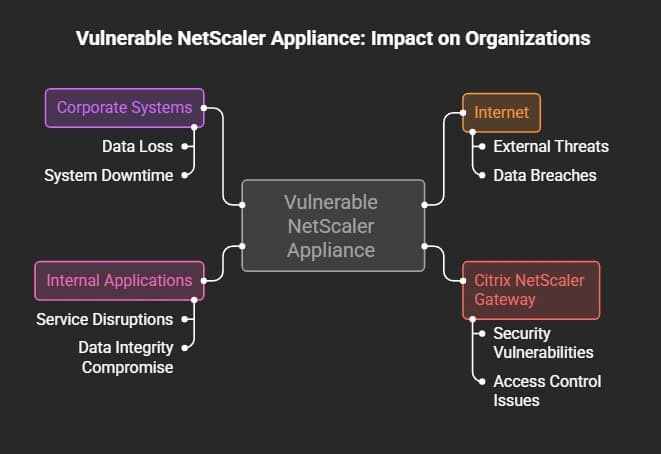
That makes it a pretty good security barrier. For example, an attacker that has compromised an internet-facing gateway might:
- Attempts to gain unauthorized access
- Critical systems in the open
- Malicious tools installation
- Additional attempts to compromise the network
The real effect depends on:
- Network infrastructure
- Access Control
- Identity Protection
- Monitoring ability
- Segmenting Tactics
Organizations looking to strengthen their security architecture should also review Zero Trust Security Framework.
Technical Breakdown: Understanding CVE-2026-88771 and CVE-2026-88772
What Are These Vulnerabilities?
The two main vulnerabilities associated with this incident are:
- CVE-2026-88771
- CVE-2026-88772
A CVE identifier is a standardized reference used to track publicly disclosed vulnerabilities. Security teams use CVE records to:
- Identify affected products
- Track remediation progress
- Coordinate vulnerability management
Security teams can verify vulnerability records through the official NIST CVE Database and vendor security advisories before making remediation decisions.
CVE Table
|
CVE |
Impact |
Severity |
Fix |
|
CVE-2026-88771 |
Remote Code Execution vulnerability affecting NetScaler ADC/Gateway |
Critical (CVSS 4.0: 9.5 reported by security researchers) |
Upgrade to fixed Citrix build |
|
CVE-2026-88772 |
Memory overflow vulnerability that may lead to RCE or DoS under certain conditions |
Critical (CVSS 4.0: 9.5 reported by security researchers) |
Upgrade to fixed Citrix build |
Note: Organizations should always verify severity and affected versions directly from Citrix and CVE/NVD records before making remediation decisions.
What is Remote Code Execution (RCE)?
Remote Code Execution is when someone can run commands on a computer system from a distant location.
Here’s a simple example:
Think of a building with a locked door. Usually:
- Only employees with access cards can enter
- Security checks who is trying to get in
An RCE flaw is like finding a secret way into the building without needing a card or permission. This lets someone take control of the inside without being allowed to. For a business device like NetScaler, this kind of weakness can be very risky because the device might be connected to important parts of the network.
How Does the Attack Work?
The exact exploitation method depends on the vulnerability and attacker technique. At a high level, the attack flow looks like this:
-20260928131454.webp&w=1080&q=75 "Citrix NetScaler")
Security teams should avoid assuming a specific attacker technique unless confirmed by Citrix or trusted researchers.
Affected Products and Versions
Organizations should check their setups using the official Citrix security advice. Products that are known to be affected include:
- Citrix NetScaler ADC
- Citrix NetScaler Gateway
To find out which builds are affected and which versions are fixed, organizations should look at the official Citrix Security Bulletin before making any updates.
Why Did CISA Issue an Immediate Warning?
Active Exploitation Changes the Priority
A vulnerability becomes a bigger problem when attackers are already using it. Normally, companies have time to think about regular software updates.
But things change when:
- Exploitation is confirmed
- Systems that are connected to the internet are affected
- Attackers might already be inside the network
CISA added this vulnerability to its KEV catalog because there were reports of active exploitation.
Understanding the CISA KEV Catalog
The Known Exploited Vulnerabilities (KEV) catalog lists vulnerabilities that have been used in the real world. For security teams, KEV entries help with:
- Deciding when to apply patches
- Assessing risks
- Planning responses to security incidents
Being in the KEV catalog does not mean every organization has been attacked. It means the issue needs quick attention. Organizations can check for KEV updates directly through the official source:
CISA Known Exploited Vulnerabilities Catalog
Possible Blast Radius
If a NetScaler device is hacked, it can lead to several dangers like:
- Unauthorized Access: Hackers might try to get into:
- Remote access tools
- Internal software programs
- Services that handle user logins and passwords
- Persistence: Hackers could work to keep control by:
- Changing system settings without permission
- Adding harmful files
- Creating other ways to enter the system
- Lateral Movement: Once they get inside, hackers might try to move around the network to access more parts. This depends on:
- How well the network is separated into sections
- Controls for access with special rights
- How well user identities are protected
- How well the system is being watched and checked
For organizations building stronger defenses against these risks, reviewing:
can help create a repeatable remediation process.
How to Check If Your Citrix NetScaler Was Compromised
Applying patches is very important, but organizations should also check if attackers might have already gained access to the system before the patches were applied. A system that has been patched does not automatically mean it was not already compromised.
Security teams should think of fixing the vulnerability as two separate steps:
- Fix the problem
- Look into whether the system was accessed before the fix was made.
This approach aligns with standard incident response practices, where organizations verify whether unauthorized activity occurred before assuming the environment is secure.
1. Review NetScaler Logs
Security teams should check NetScaler logs for signs of something wrong, such as:
- Requests that don’t seem right
- IP addresses that are unfamiliar
- Administrator actions that are unexpected
- Changes to settings that are suspicious
Example: Use the command grep "pattern" /var/log/ns.log to find relevant entries.
The way you investigate should fit your setup, your logging settings, and the official Citrix recommendations. If you’re digging deeper, also look at your incident response plan to make sure you’re properly recording how you find, look into, and fix issues.
2. Look for Strange System Activity
Check for:
- Processes that don’t belong
- Files that are not expected
- New user accounts
- Unexpected changes to system settings
Compare what’s happening now with what is normal for your system. Important areas to check include:
- Actions taken by administrators
- User login attempts
- Changes to system configurations
- Behavior that doesn’t match usual patterns
A single strange event doesn’t prove a system has been taken over. You need to look at several different clues to be sure.
3. Watch the Network for Strange Behavior
Check for:
- Outbound connections that shouldn’t be there
- Large data being sent out
- Communication with unknown outside sources
- Login attempts that are not normal
Network monitoring can help spot:
- Attempts to steal data
- Unauthorized remote access
- Suspicious communication patterns
Don’t rely on just one sign. A proper investigation needs to look at logs, system activity, and network behavior together.
Ultimate Solution and Mitigation Guide
A Citrix NetScaler zero-day attack isn’t fixed just by installing a patch. A full response should include:
- Determining if the system is affected
- Installing the official security patch
- Looking for signs of a possible breach
- Making your system more secure
Follow Citrix’s official security guidance and don’t rely only on information from third parties.
Step 1: Install the Official Citrix Security Patch
The main action is to upgrade your NetScaler devices to a version that fixes the problem. Before you upgrade, make sure you:
- Know what version you are currently using
- Know if your version is affected
- Know which version is the fix
- Know the upgrade requirements
Always double-check from the official Citrix security notice before you start.
1. Find All NetScaler Devices
Make a list of:
- NetScaler ADC devices that face the internet
- NetScaler Gateway setups
- The versions of the appliances
- The current firmware or build number
Many security issues aren’t solved because companies don’t have full knowledge of their devices. Creating a good asset list is also important for:
2. Check Your Current Version
Before updating:
- Look up the current build number
- Compare it with the Citrix security advisory
- Make sure your device is affected
Don’t assume it’s affected without checking. Always refer back to the official Citrix documentation.
3. Make a Backup Before Upgrading
Before you make changes:
- Backup your configuration files
- Note down current settings
- Know how to roll back if needed
A backup helps teams recover quickly if something goes wrong.
4. Apply the Fixed Version
Once you know the right update:
- Schedule the upgrade
- Follow the Citrix upgrade instructions
- Watch the system after the patch is applied
Even after patching, keep an eye on things because patching fixes the problem but doesn’t prove that previous access didn’t happen.
For organizations looking to improve their response, refer to:
· Patch Management Best Practices
Step 2: Temporary Risk Reduction Measures
If fixing the problem right away isn't possible, organizations need to lower their risk while getting ready to fix it. Possible temporary security steps include:
Limit Unneeded Internet Access
Check:
- Firewall rules
- Public access needs
- Admin access
Only necessary services should stay open.
Secure Admin Access
The management interface shouldn’t be exposed to the public internet unless needed. Recommended steps:
- Block admin access to certain IP addresses
- Use a VPN for admin tasks
- Set up access-control lists (ACLs)
- Use strong passwords and authentication
Increase Monitoring
During the response, watch for:
- New login attempts
- Weird admin actions
- Sudden changes in settings
- Strange traffic patterns
Step 3: Network Isolation and Segmentation
A secure network setup limits damage if a device on the edge gets hacked. Recommended setup:
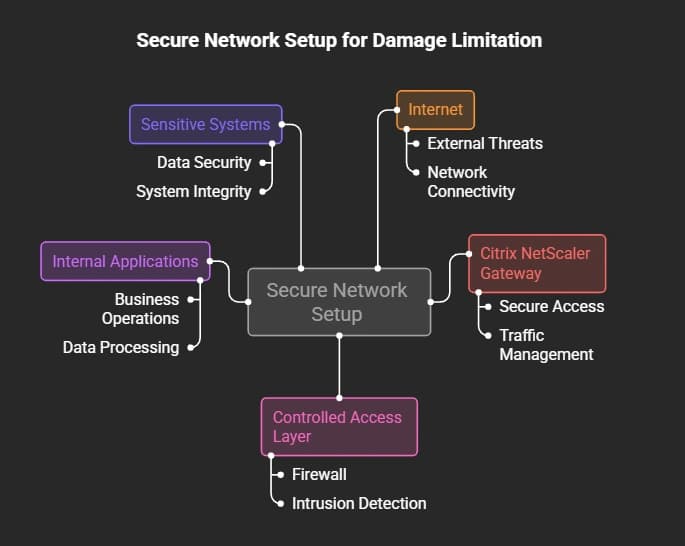
Security teams should not allow a single broken device to give full access to the whole network. Network segmentation is important for lowering the risk of:
- Using stolen credentials
- Malware spreading
- Attackers moving through the network
Citrix NetScaler Security Hardening After Fixing the Problem
Fixing the problem addresses the current risk. Hardening helps prevent future issues.
1. Enable Strong Authentication and MFA
MFA adds another level of security beyond passwords. For remote access systems, MFA helps reduce risks from:
- Stolen passwords
- Reusing passwords
- Phishing attacks
MFA doesn’t replace patching, but it improves account security.
2. Check Privileged Access
Admins should regularly check:
- Who has admin rights
- If accounts still need those rights
- If any accounts are inactive
Use the principle of least privilege: Users should only have the access they need.
3. Monitor NetScaler Gateway Activity
Keep an eye on:
- Login events
- Admin actions
- Changes to configurations
- Suspicious activity
Good visibility helps teams spot issues early.
4. Keep Up with Vulnerability Checks
A strong process for managing vulnerabilities includes:
- Finding all systems
- Ranking risks
- Regular scans
- Tracking patches
- Checking that fixes worked
Other related practices like:
- Vulnerability Management
- Best practices for patching
help organizations create a consistent response plan instead of dealing with big problems after they happen.
Long-Term Cybersecurity Tips for NetScaler Environments
General security advice isn’t enough for devices like NetScaler. Organizations should focus on security steps that are specific to ADC and Gateway setups.
1. Follow Zero Trust Security Rules
Zero Trust means no one is trusted automatically, not even users inside the network. For NetScaler setups:
- Check every access request
- Limit admin rights
- Watch user activity
- Protect important resources with segments
2. Make ADC and Gateway More Secure
Security teams should check:
- How much the system is exposed to the internet
- Rules for admin access
- Settings for authentication
- Security of configurations
- Logging setup
Hardening helps block unnecessary ways for attacks.
3. Improve Security Monitoring
A strong monitoring plan includes:
- Centralized logs
- Security alerts
- Regular checkups
- Processes for responding to incidents
Logs are only useful if teams actively look at and act on threats.
4. Get Ready for Ransomware
Hacked remote access tools are often targets because they allow attackers to move deeper into the network. Organizations should use:
- Network segmentation
- Endpoint protection
- Backup plans
- Incident response plans
Related resource:
Frequently Asked Questions (FAQ)
What is the Citrix NetScaler zero-day vulnerability?
The Citrix NetScaler zero-day vulnerability refers to security problems in Citrix NetScaler ADC and NetScaler Gateway that have been used in real attacks. These issues are noted with CVE numbers and require companies to look at what the vendor says about fixing them.
Is the Citrix NetScaler RCE vulnerability being actively used?
Yes. Security experts and researchers have found that these issues are being used in attacks. Companies should treat any internet-facing NetScaler devices as a priority and follow Citrix's official advice on how to fix them.
How can organizations check if their Citrix NetScaler has been compromised?
Organizations should:
- Look at NetScaler logs
- Watch for strange admin activity
- Check for odd configuration changes
- Look into network activity
- Compare what they find with security guidelines
One sign alone doesn’t prove a problem. A full check uses several pieces of evidence.
Does applying a patch remove attackers that are already inside?
No. A security update fixes the problem, but it doesn’t automatically get rid of someone who may have already gotten in before the update. After fixing the issue, companies should consider:
- Checking logs
- Looking into any incidents
- Reviewing credentials
- Keeping an eye on security
Should organizations make Citrix NetScaler management interfaces available on the public internet?
Usually, management interfaces should not be open to the public internet unless needed. Companies should use security steps like:
- Limiting access
- Using a VPN for admin tasks
- Setting up strong authentication
- Controlling network access
What Organizations Should Do Now
The Citrix NetScaler zero-day incident shows how important it is to keep internet-facing systems secure.
The most important steps are:
- Find out which NetScaler systems are affected.
- Look at the official security guidance from Citrix.
- Apply the latest security updates.
- Check if a breach happened before the update.
- Make the system more secure by strengthening it and monitoring it better.
A security patch fixes the immediate issue, but strong defense needs visibility, control, and a solid security process.
Need Help Reviewing Your Security?
If your company uses internet-facing systems and needs help with checking for risks, watching for security issues, or preparing for attacks, working with a trusted cybersecurity expert can help find problems and improve how well your systems are protected.
Hoplon Infosec can support organizations that need professional cybersecurity guidance, vulnerability assessment, and security improvement strategies.