-20260918120903.webp&w=3840&q=75)
The Anatomy of the Fake T-Mobile Rewards Expiry Text Scam: A Technical and Practical Guide
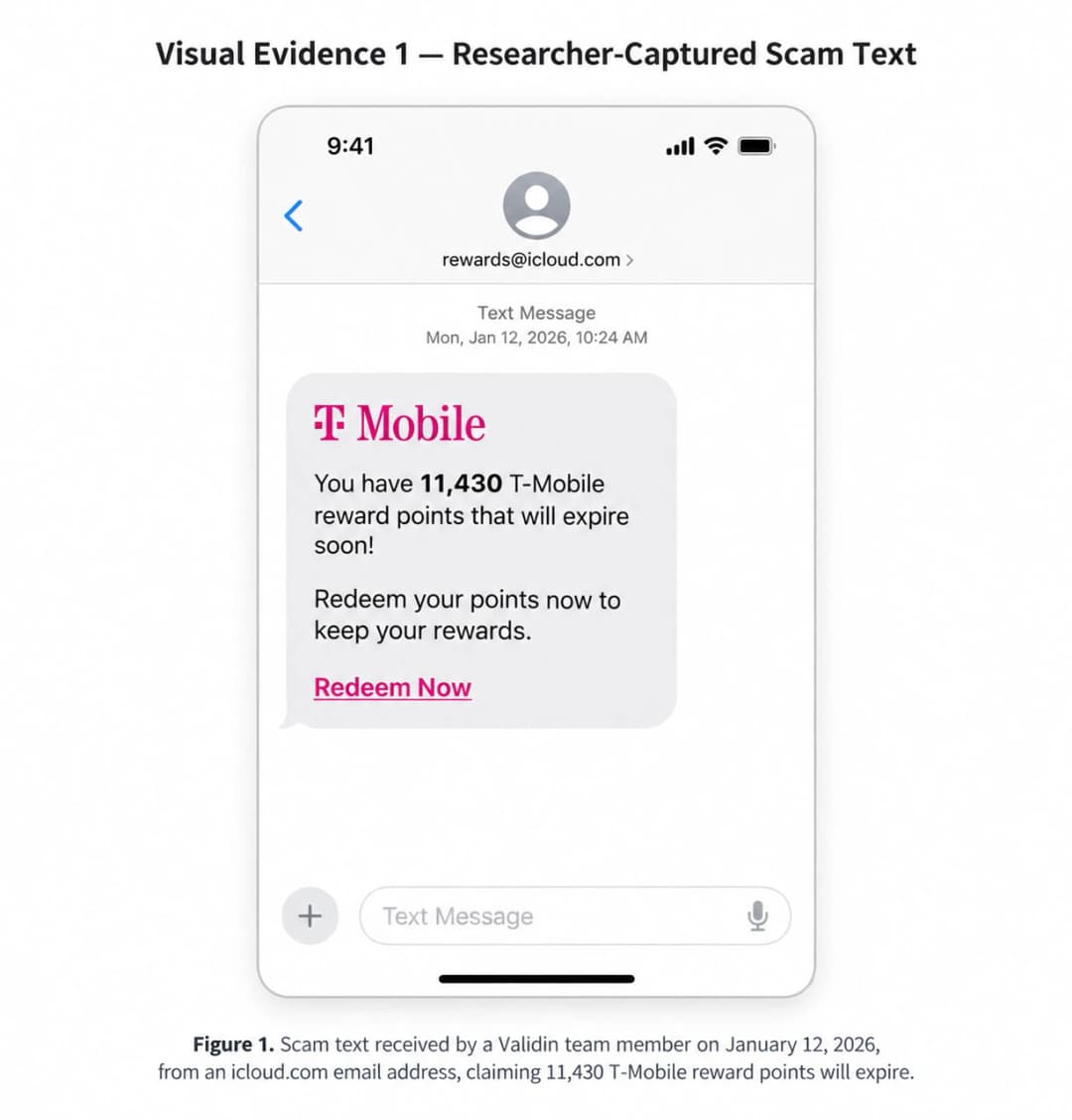
A text message says you have thousands of T-Mobile Rewards points. The points are supposedly about to expire, perhaps tonight or tomorrow, and a convenient link promises to let you redeem them for headphones, gift cards, electronics, bill credits, or another reward.
Do not use that link.
Security researchers have documented an active smishing campaign built around exactly this scenario. Malwarebytes reported on September 17, 2026 that it had been monitoring a large T-Mobile rewards phishing operation since early May. Researchers identified more than 1,000 closely related message templates and at least 81 domains used during four months of monitoring. The messages rotate point balances, expiration dates, wording, and malicious domains while preserving the same basic story: act immediately or lose your rewards.
There is an important detail that many scam warnings oversimplify: T-Mobile does have legitimate rewards in some contexts. For example, eligible T-Mobile Visa cardholders can earn T-Mobile Rewards. But T-Mobile's current official documentation states that those rewards do not expire for the life of the T-Mobile Visa account.
That means the correct lesson is not simply:
"T-Mobile has no rewards."
The safer and more accurate rule is:
Never trust an unsolicited rewards message merely because it mentions a real T-Mobile product or benefit. Verify the claim independently through T-Life, T-Mobile.com, or another known official T-Mobile channel before taking action.
This campaign is also a useful real-world example of smishing, or phishing delivered through text messaging. For readers who want the broader attack model, Hoplon's detailed guide explains how modern SMS phishing can move from a simple message to credential, card, PII, and authentication-data theft. Read Hoplon's Smishing Attacks guide
Is the T-Mobile Rewards Expiry Text a Scam?
The T-Mobile rewards-expiry messages documented in the 2026 campaign are phishing texts, commonly called smishing, phishing delivered through SMS or other mobile messaging channels.
The attacker creates a believable problem:
"Your rewards are about to expire."
Then the message presents an immediate solution:
"Redeem them here before you lose them."
The link does not need to look obviously criminal.
Recent campaign infrastructure deliberately places the T-Mobile brand at the beginning of attacker-controlled domain names, producing URLs such as:
t-mobile.biktpw[.]top/pay
t-mobile.qscizj[.]top/pay
t-mobile.vmnqsu[.]top/pay
These domains were among indicators documented by Malwarebytes. None is t-mobile.com.
Earlier 2026 research from Validin documented similar infrastructure using patterns such as:
t-mobile.vgyva[.]icu
t-mobile.cfdlrw[.]icu
t-mobile.fxcmsx[.]icu
Validin described DGA-like naming behavior across carrier-themed domains and found related phishing pages using a /pay route to collect payment-card information.
What is the Attacker Trying to Achieve?
Depending on the phishing kit and page shown to a victim, the objective may include:
- collecting a name, email address, phone number, and mailing address;
- stealing debit or credit-card information;
- obtaining login credentials;
- convincing the victim to submit verification codes;
- enabling follow-on identity theft or account fraud;
- collecting enough personal information to make later scams more convincing.
A June 2026 BBB Scam Tracker report describes one victim being shown a realistic rewards catalogue containing products such as AirPods and headphones. After selecting a reward, the site requested the victim's name, email, phone number, address, a shipping option, and then credit-card information. The report states that a card-fraud alert stopped the transaction. BBB also makes clear that Scam Tracker entries are based on victim or potential-victim reports, so they should be treated as reported experiences rather than independently verified forensic findings.
The 30-Second Response
If you have the message in front of you right now:
- Do not tap the redemption link.
- Do not reply to the suspicious sender.
- Open T-Life yourself or manually type t-mobile.com.
- Check whether the claimed reward or account notice exists there.
- Forward the suspicious message to 7726 (SPAM) if you are a T-Mobile customer.
- Block or report the sender using your messaging app.
- If you already entered information, follow the scenario-based incident-response steps later in this guide.
T-Mobile specifically tells customers to report suspicious SMS messages by forwarding them to 7726. Messages reported this way are sent for analysis to help identify spam, fraud, and malware operations.
Why the T-Mobile Rewards Smishing Campaign Works
The effectiveness of this scam is not mainly about advanced malware.
Its first weapon is decision pressure.
Understanding this psychological layer matters because the attacker is trying to influence the victim's behavior before any credentials or payment data are entered.
For a deeper explanation of how urgency, impersonation, authority, and emotional pressure are used across cyberattacks, see Hoplon's broader analysis of social-engineering behavior. Read Social Engineering Attacks: The Human Exploit.
Urgency and Scarcity: "Use It Now or Lose It"
A recipient who believes 18,400 points will disappear tonight is encouraged to make a decision before checking whether the underlying claim is true.
This combines two powerful ideas:
Urgency: You supposedly have only hours to act.
Scarcity or loss: Something valuable will supposedly disappear permanently.
The psychological question changes from:
"Is this message legitimate?"
to:
"Can I redeem these points before I lose them?"
That change in attention matters.
Malwarebytes observed messages that used invented balances, imminent expiration dates, and language saying unused points could not be recovered. Researchers found more than 1,000 related message templates. The core lure stayed consistent while salutations, headings, point totals, dates, and wording changed.
The FTC separately warned consumers in April 2026 about reward-point phishing texts using the same general pressure tactic: click immediately to preserve supposedly expiring points. The FTC recommends independently opening the real company's website or app instead of using the link in the text.
Authority Bias: Why the T-Mobile Name Matters
The scam does not introduce an unknown company and immediately ask for a credit card.
Instead, it borrows a brand millions of consumers already recognize.
A familiar logo, familiar magenta color scheme, telecom terminology, an account-style message, and a believable "Rewards & Benefits" workflow can reduce skepticism.
A victim may reason:
- "T-Mobile already has my phone number."
- "I am a T-Mobile customer."
- "The message knows about rewards."
- "The website looks like T-Mobile."
- "Maybe this really is part of my account."
None of those observations proves authenticity.
A phishing site can copy or imitate publicly visible:
- logos;
- fonts;
- colors;
- navigation structures;
- buttons;
- product images;
- login panels;
- account terminology;
- checkout pages;
- loading animations.
Visual similarity is relatively easy to reproduce.
Control of the legitimate domain is much harder to fake.
The Reward Mechanism: Positive Phishing
Not every phishing scam starts with fear.
Some start with opportunity.
A free item, unexpected points, a discount, bill credit, upgrade, gift, or loyalty benefit can create excitement before suspicion.
This produces an effective sequence:
Reward: "You have something valuable."
Deadline: "You are about to lose it."
Low-friction action: "Tap this link."
Small final payment: "Just pay shipping."
That final stage matters.
A demand for hundreds of dollars may immediately trigger suspicion.
A shipping fee of only a few dollars may feel normal for a supposedly free reward.
A January 2026 BBB report described a fake T-Mobile rewards site that offered rewards before requesting shipping information and credit/debit-card details.
Step-by-Step Technical Anatomy of the Attack
The campaign is easiest to understand as a chain:
Smishing message → urgency → malicious domain → fake rewards interface → data collection → payment/identity risk
Each phase answers a different security question.
Phase 1: Delivery - How the Smishing Message Reaches the Phone
Smishing is phishing delivered through SMS or similar mobile-messaging channels.
The delivery stage has one job:
Create enough credibility and urgency to make the recipient interact.
Does the Sender Have to Spoof T-Mobile's Phone Number?
No.
Available evidence does not establish sender-ID spoofing as the primary delivery mechanism for this specific rewards campaign.
Researchers have observed multiple delivery patterns.
Validin documented a January 2026 sample received from an icloud[.]com email address. The researcher later received additional related messages from different email addresses.
BBB reports have also documented T-Mobile-themed reward messages associated with ordinary-looking telephone numbers.
A suspicious message may therefore arrive from:
- an unfamiliar mobile number;
- a normal-looking 10-digit number;
- an email-to-text sender;
- another unexpected messaging identity.
A legitimate-looking sender name should not be treated as proof either.
What About Short Codes?
A short code is not automatically suspicious.
T-Mobile legitimately uses short codes for account alerts, campaigns, and self-service functions.
Therefore this rule is wrong:
"Short code = scam."
The correct approach is:
Sender identity is only one signal. Verify both the message and the destination independently.
How Do Attackers Get Messages Past Spam Filters?
For this particular campaign, researchers directly documented message variation and rapidly rotating infrastructure.
Malwarebytes found more than 1,000 closely related templates with different greetings, balances, expiration dates, headings, and other superficial elements.
The FCC has also warned more generally that scam messages can contain unusual formatting and misspellings intended to evade filtering systems.
However, there is not enough evidence in the current T-Mobile campaign research to state that techniques such as:
- zero-width Unicode characters;
- Unicode homoglyphs;
- shortened URLs;
- deliberate invisible characters
were central features of this specific campaign.
Those techniques exist in phishing generally, but should not be attributed to this campaign without supporting evidence.
This distinction is important:
Possible phishing technique ≠ confirmed campaign technique.
Phase 2: The Malicious Infrastructure
This is where the campaign becomes technically interesting.
The Most Important URL Lesson: Read Domains From Right to Left
Consider:
t-mobile.biktpw[.]top/pay
Many users see:
t-mobile
and stop evaluating.
But t-mobile is not the registered T-Mobile domain here.
The structure is:
- .top - top-level domain
- biktpw - domain beneath .top
- t-mobile - attacker-controlled subdomain
- /pay - URL path
The legitimate brand name appearing on the left does not mean T-Mobile owns the address.
The same problem appears in examples such as:
t-mobile.qscizj[.]top/pay
t-mobile.vmnqsu[.]top/pay
t-mobile.vgyva[.]icu
The operator controlling the parent domain can create almost any subdomain label before it.
Malwarebytes documented numerous examples following the .top pattern, while Validin observed structurally related carrier-themed .icu and .cc infrastructure.
Important Terminology: Typosquatting vs. Brand-Impersonating Subdomains
Not every malicious domain in this campaign is technically a classic typosquat.
Typosquatting often involves registering a misspelled or visually similar version of a legitimate domain.
For example:
t-moblie-example[.]com
The campaign examples documented here often use a different method:
Brand name as a subdomain on an unrelated attacker-controlled parent domain.
Example:
t-mobile.randomletters[.]top
The broader category is still brand impersonation / look-alike infrastructure, but using the precise term makes the technical explanation stronger.
Why Random-Looking Domain Names?
Rotating infrastructure gives phishing operators several advantages:
- a reported domain can be abandoned quickly;
- a new domain can replace it;
- reputation systems have less time to accumulate evidence;
- defenders must identify patterns rather than block only one URL;
- different waves can use different infrastructure.
Malwarebytes stated that URLs in the campaign were very short-lived and identified at least 81 domains over four months.
Validin independently observed carrier-themed domains with random five- or six-character components and described the structure as suggesting DGA-like behavior.
Researchers developed the following hunting pattern:
/^(t-mobile|att|verizon)\.([a-z]{5,6})\.(icu|cc)$/
to identify structurally similar infrastructure.
This does not prove every domain matching that regex belongs to the same threat actor.
Infrastructure attribution should consider several signals together, such as:
- hosting;
- DNS history;
- registrar;
- page behavior;
- certificates;
- code similarities;
- redirects;
- response hashes;
- campaign timing.
-20260918115417.webp&w=1080&q=75 "T-Mobile rewards points scam")
Why Does the Fake Page Look So Convincing?
A phishing operator does not need access to T-Mobile's internal systems to build a convincing imitation.
Public-facing assets can be copied, approximated, or recreated:
- T-Mobile-style branding;
- familiar colors;
- logos;
- layout;
- product imagery;
- buttons;
- fonts;
- account wording;
- rewards catalogues;
- shipping options;
- payment forms.
Validin documented a fake carrier-rewards page associated with the campaign infrastructure that collected payment-card information.
A June BBB report describes a page that appeared legitimate to the reporting user, displayed a rewards balance, showed products including AirPods Pro and Sony headphones, requested PII, displayed shipping tiers, and then presented a card-processing page.
A polished design answers only:
"Does this site look professional?"
It does not answer:
"Who owns this domain?"
-20260918115700.webp&w=1080&q=75 "T-Mobile rewards points scam")
Phase 3: The Data-Harvesting Loop
It is important to distinguish confirmed campaign behavior from advanced phishing techniques that are possible but not confirmed in this specific campaign.
Step A: PII Harvesting
PII means personally identifiable information, information that identifies or helps identify an individual.
Confirmed reports associated with T-Mobile-themed reward pages include requests for data such as:
- name;
- phone number;
- email address;
- physical address;
- shipping details.
The June BBB Scam Tracker account describes this sequence directly.
Why would an attacker want information that seems less sensitive than a password?
Because PII can support:
- identity fraud;
- more convincing follow-up phishing;
- account-recovery attempts;
- social-engineering calls;
- financial fraud;
- credential-reset attempts;
- data enrichment for future targeting.
Step B: Financial Extraction
One of the clearest confirmed objectives in the documented campaign is payment-card collection.
The victim may be told:
- the reward itself is free;
- only shipping must be paid;
- a small handling fee is required;
- payment details are needed to complete redemption.
The low amount helps reduce suspicion.
Validin reported that the fake rewards site it investigated collected payment-card details.
The June BBB report describes a $0.99 slow-shipping option before the victim reached the credit-card processing stage.
This is a classic example of using a small, plausible transaction to obtain financially valuable data.
Step C: T-Mobile Account Credential Harvesting
An account-focused phishing page may ask for:
- phone number;
- email address;
- T-Mobile ID;
- password.
Malwarebytes specifically warns recipients not to submit login credentials after following a link in an unsolicited message.
If a password is stolen, the attacker may try:
- the T-Mobile account itself;
- password-reset workflows;
- other services where the same password was reused;
- email accounts;
- financial services;
- social networks;
- cloud applications.
Password reuse turns a single phishing incident into a broader account-security problem.
Hoplon's overview of the wider phishing ecosystem explains how fake login pages, smishing, spear phishing, and related techniques can be used to capture passwords or lead to account compromise. Read Hoplon's Phishing Attack Types guide
Step D: OTP and Verification-Code Theft
An OTP, one-time password-is a temporary authentication code.
A malicious page might ask for a code using wording such as:
- "Verify your identity."
- "Complete redemption."
- "Confirm shipping."
- "Secure your account."
- "Enter the verification code we sent."
Malwarebytes advises users not to submit verification codes after following unsolicited links.
A code request can be particularly dangerous if an attacker is simultaneously attempting to sign in, reset an account, or authorize another action.
Is Reverse-Proxy Phishing Confirmed in This T-Mobile Campaign?
No confirmed evidence reviewed for this article establishes that the documented T-Mobile rewards campaign uses a reverse-proxy phishing platform to bypass T-Mobile MFA.
That distinction is important.
What is Reverse-Proxy or AiTM Phishing?
Adversary-in-the-middle (AiTM) phishing is an advanced technique in which attacker-controlled infrastructure is placed between a victim and a legitimate authentication process.
In a reverse-proxy-style attack, credentials and authentication responses can be relayed to the real service in real time.
The attacker may attempt to obtain:
- username;
- password;
- MFA response;
- authentication code;
- session cookie.
Microsoft has documented AiTM campaigns in which attackers intercept credentials and MFA responses and obtain session cookies that can later be replayed.
This is technically different from a simple static phishing form.
Is That What the T-Mobile Rewards Site Is Doing?
The evidence reviewed here does not prove it.
For the T-Mobile rewards campaign, confirmed evidence includes:
- fake reward-expiry messages;
- malicious links;
- rotating look-alike domains;
- fake rewards interfaces;
- PII requests;
- shipping information;
- payment-card harvesting;
- warnings from researchers not to submit login credentials or verification codes.
Therefore:
Treat OTP and credential requests as dangerous, but do not attribute a specific reverse-proxy MFA-bypass mechanism to this campaign unless direct technical evidence establishes it.
This distinction avoids overstating the threat while still explaining the advanced technique readers may encounter in other phishing campaigns.
Real Evidence From the 2026 Campaign
The strongest way to understand this campaign is to compare researcher observations, victim reports, and later large-scale telemetry.
January 12, 2026 - Researcher-Captured Sample
Validin reports that one of its team members personally received a T-Mobile rewards phishing message on January 12, 2026.
The text arrived from an icloud[.]com email address and claimed that T-Mobile reward points were about to expire.
Following the link led to a fake carrier rewards site associated with a kit designed to collect payment-card details.
What Should Readers Notice?
The message uses several credibility-building elements:
- a specific points balance rather than "you have points";
- an exact expiration date;
- formal customer-service language;
- permanent-loss wording;
- a direct redemption link;
- a reason to act immediately.
The message does not need perfect grammar.
It needs to make delay feel costly.
January 12 BBB Report - Fake Rewards and Shipping Flow
A separate January BBB Scam Tracker report describes a T-Mobile impersonation page that allegedly displayed a user's supposed rewards balance, presented reward options, requested shipping information, and then asked for credit/debit-card details to pay for shipping.
Again, BBB reports are user-submitted accounts. They are useful as real-world observations but should not be presented as forensic confirmation by BBB.
April 27, 2026 - 14,309 Points
A BBB Scam Tracker report dated April 27 describes a message claiming that 14,309 T-Mobile Rewards points would expire that day.
The message advertised:
- multi-brand digital gift cards;
- electronics discounts;
- monthly-bill credit.
Its "official redemption platform" used:
t-mobile.converselyfvm[.]top/pay
That is not the legitimate t-mobile.com domain.
June 3, 2026 - 18,400 Points and Reward Catalogue
A June BBB report describes a message claiming that the recipient had roughly 18,400 reward points.
After clicking, the reporter says the page appeared legitimate and displayed items including:
- AirPods Pro;
- Sony WH-1000XM5 headphones;
- a coffee press;
- other rewards.
The next page requested:
- name;
- email;
- phone number;
- mailing address.
The flow then presented several shipping tiers, including a $0.99 option, before reaching a credit-card processing page. The reporter states that a credit-card fraud alert stopped the transaction.
September 17, 2026 - Malwarebytes Campaign Findings
Malwarebytes later published broader telemetry covering a large T-Mobile rewards phishing campaign it had monitored since early May.
Researchers reported:
- more than 1,000 related templates with semantic similarity of at least 0.60;
- 199 particularly close variants with similarity of at least 0.95;
- substantial spikes in detections;
- at least 81 domains over four months;
- rotating domains following recognizable naming structures.
The available evidence therefore shows persistent T-Mobile rewards-themed phishing activity across 2026.
However, it would be inaccurate to claim from this evidence alone that every January, April, June, and September observation belongs to one specific threat actor.
That level of attribution would require stronger infrastructure, operational, malware, identity, or law-enforcement evidence.
-20260918115958.webp&w=1080&q=75)
How to Spot a Fake T-Mobile Rewards Text
No single warning sign is perfect.
The strongest detection strategy combines multiple signals.
|
Signal |
Potentially Legitimate |
Strong Phishing Warning |
|
Sender |
Known T-Mobile channel |
Random number, unexpected email sender, unfamiliar identity |
|
Message context |
Expected account information |
Unexpected reward plus urgent deadline |
|
Personalization |
Matches something verifiable in official account |
Generic greeting plus invented-looking balance |
|
Link |
Official domain independently verified |
t-mobile.randomletters[.]top or another unrelated domain |
|
Requested action |
Open official app/account normally |
Click immediately or lose reward |
|
Sensitive data |
Entered after independently opening legitimate service |
Password, card, SSN, or OTP requested after SMS link |
|
Reward status |
Visible in T-Life/account |
Appears only through text link |
|
Payment |
Known official checkout flow |
Tiny "shipping fee" for supposedly free prize |
Sender Anomalies
A message arriving from an email address is a warning sign when you expected a carrier account alert.
Validin's January example arrived from an iCloud email address.
But sender format alone is not enough.
T-Mobile also uses legitimate messaging channels and short codes.
Always evaluate the sender, content, destination, and requested action together.
URL Obfuscation and Look-Alike Domains
The domain is often the strongest clue.
Before opening a link, ask:
What is the actual registered domain?
These are not equivalent:
t-mobile.com
t-mobile.com/account
t-mobile.example[.]top/pay
The third address belongs under example.top, not T-Mobile.
Be cautious with:
- misspelled domains;
- extra words;
- unfamiliar top-level domains;
- random character strings;
- hidden redirects;
- URL shorteners where the final destination is unclear;
- domains where the brand appears only as a subdomain.
Does HTTPS or the Padlock Mean a Site is Safe?
No.
HTTPS indicates that the browser connection to that particular domain is encrypted.
It does not prove:
- the domain belongs to T-Mobile;
- the operator is trustworthy;
- the page is legitimate;
- the service has been reviewed by T-Mobile.
A phishing site can use HTTPS too.
The domain must still be verified.
Grammar and Formatting Clues
Poor spelling or awkward grammar can be warning signs.
But they are weak evidence on their own.
Modern phishing messages can contain:
- clean grammar;
- polished formatting;
- realistic branding;
- natural English;
- professional customer-service wording.
Malwarebytes observed formal but generic salutations such as "Dear T-Mobile Customer," "Dear Valued Customer," and similar phrases.
The stronger pattern is:
unexpected message + urgency + reward + suspicious domain + sensitive-data request
Genuine vs. Phishing T-Mobile Text: Practical Comparison
|
Check |
Genuine/Expected Behavior |
Phishing Pattern |
|
Reward verification |
Can be checked independently in official account/app |
Exists only after following SMS link |
|
Domain |
Legitimate T-Mobile domain |
Unrelated domain with t-mobile added to front |
|
Deadline |
Terms can be verified |
"Expires today/tonight" pressure |
|
Login |
User independently opens official service |
Login requested through unsolicited link |
|
Verification code |
User knows what action generated it |
Code requested after suspicious link |
|
Payment |
Expected official transaction |
Small shipping/handling charge for "free" reward |
|
PII |
Submitted through authenticated official workflow |
Requested by unexpected rewards page |
|
Reporting |
Official T-Mobile support available |
Sender pressures immediate action |
Does T-Mobile Really Have Rewards, and Do They Expire?
This question requires a precise answer.
T-Mobile currently offers T-Mobile Rewards associated with the T-Mobile Visa for eligible cardholders.
T-Mobile's official Visa page states that rewards do not expire for the life of the T-Mobile Visa account. The company also says rewards can be viewed and redeemed through T-Life.
Therefore:
Do not publish the claim that T-Mobile has no rewards program at all.
That would be inaccurate in 2026.
At the same time, it would also be too broad to say that no T-Mobile promotion or benefit can ever have an expiration date.
Different:
- offers;
- promotions;
- credits;
- benefits;
- campaigns
may have their own terms.
The safe process is:
- Ignore the link in the message.
- Open T-Life yourself or manually navigate to T-Mobile.com.
- Sign in through the legitimate service.
- Check whether the claimed benefit appears in the account.
- Review the actual terms.
- If the message remains unclear, contact T-Mobile using a known official channel.
The FTC recommends the same verification model for reward-expiry texts generally: find the company's real website or app yourself rather than relying on the message link.
What to Do If You Clicked the T-Mobile Phishing Link
The correct response depends on what happened after the click.
Simply opening a webpage is not the same incident as:
- entering a password;
- entering a card;
- giving away an OTP;
- installing an app;
- downloading a file;
- entering an SSN;
- approving a login.
Hoplon's incident-response guide makes the same distinction: a phishing page opening in the browser does not by itself prove that an account or device has been compromised. Read Hoplon's Clicked on a Phishing Link response guide
Scenario A: "I Clicked the Link but Didn't Type Anything"
Do this:
- Close the page.
- Do not revisit the site.
- Check your browser's downloads.
- Delete unexpected downloaded files without opening them.
- Review whether you installed an app, profile, extension, or configuration.
- Update the phone's operating system.
- Update the browser.
- Update security software if you use it.
- Run an appropriate security scan if something may have downloaded.
- Report/delete the original text.
The FTC notes that phishing links may be used to steal information or deliver harmful software, and recommends keeping devices updated because security updates can provide protection against known vulnerabilities.
For broader mobile hardening, browser safety, application risk, malicious links, permissions, unsafe networks, and mobile account exposure, see Hoplon's mobile security guide. Read the Mobile Internet Security Guide
Did the Website Automatically Steal All My Cookies?
Do not assume that.
Loading a phishing page does not prove that unrelated authenticated sessions were automatically stolen.
Risk changes substantially if:
- something downloaded;
- you installed something;
- you granted device/browser permissions;
- you installed a configuration profile;
- the browser/device contained an exploitable vulnerability;
- you entered authentication information.
If none of those occurred, the situation is still worth monitoring, but it is not equivalent to a confirmed credential or session compromise.
Scenario B: "I Entered My T-Mobile Login Credentials"
Treat the password as compromised.
Do not return to the phishing site.
Instead:
- Open a clean browser session or T-Life.
- Navigate to T-Mobile independently.
- Change the T-Mobile ID password immediately.
- Replace the password anywhere else you reused it.
- Review account information.
- Review security settings.
- Check for unauthorized changes or suspicious activity.
- Contact T-Mobile if you see anything unexpected.
- Enable stronger authentication options available for the account.
- Consider activating SIM Protection and Port Out Protection where eligible.
Password reuse is especially important.
If the same password was used for:
- email;
- banking;
- social media;
- cloud services;
- work accounts,
those accounts may also require password changes.
Should I Use Google Authenticator Instead of SMS?
T-Mobile currently provides a Google Authenticator two-step verification setup for T-Mobile ID accounts.
CISA recommends using the strongest available MFA option and advises organizations to move toward phishing-resistant MFA for sensitive systems.
However:
This article should not claim that ordinary T-Mobile ID accounts universally support hardware security keys unless T-Mobile officially documents that feature.
Official evidence reviewed for this article supports Google Authenticator, but is not sufficient to make a general hardware-key-support claim for standard T-Mobile ID authentication.
For enterprise systems that do support FIDO or hardware-backed authentication, phishing-resistant MFA provides stronger protection than manually entered SMS codes.
Scenario C: "I Entered an OTP or Verification Code"
Treat this more seriously than a password-only exposure.
A valid OTP request may indicate that someone is attempting an action in real time.
Immediately:
- Change the affected password through the legitimate service.
- Contact the provider if the OTP related to account recovery, password reset, SIM changes, or another sensitive action.
- Review authentication methods.
- Remove unfamiliar recovery information.
- Remove unauthorized MFA methods.
- Review signed-in devices or active sessions where possible.
- Review account-profile changes.
- Enable account-takeover protections.
- If a workplace identity is involved, notify your IT/security team immediately.
In an actual AiTM/session-theft incident, changing only the password may not be sufficient because a stolen authenticated session token could remain usable until revoked or expired. Microsoft has documented this problem in AiTM phishing campaigns.
Again:
That advanced AiTM mechanism has not been confirmed as the mechanism used by this T-Mobile rewards campaign.
Scenario D: "I Entered My Credit Card Information"
Contact the card issuer or bank using:
- the number printed on the physical card;
- the institution's official mobile app;
- its manually verified website.
Tell the fraud department that the card details were entered into a phishing website.
Depending on the financial institution's assessment, it may:
- lock the card;
- replace the card;
- issue a new card number;
- monitor transactions;
- dispute unauthorized charges;
- place additional fraud controls on the account.
Do not wait for a large fraudulent charge before reporting the exposure.
Continue monitoring account activity after the card is secured.
Scenario E: "I Gave Them My SSN, DOB, or Other Sensitive PII"
This moves the incident from ordinary phishing into potential identity-theft territory.
Freeze Your Credit
A security freeze restricts access to a credit file and can make it more difficult for an identity thief to open new credit accounts in your name.
The FTC advises consumers to place freezes separately with:
- Equifax;
- Experian;
- TransUnion.
Credit freezes are free.
Consider a Fraud Alert
A fraud alert tells businesses checking a credit file that they should take additional steps to verify identity before extending new credit.
An initial fraud alert can be requested through one nationwide credit bureau, which then notifies the others under the applicable process.
Use IdentityTheft.gov When Appropriate
If personal information is actually being misused, the FTC's IdentityTheft.gov service can provide a recovery plan and an FTC Identity Theft Report where applicable.
Protect Your T-Mobile Account Against SIM-Swap and Port-Out Fraud
If enough account and personal information is exposed, another concern is unauthorized control of the phone number.
A hijacked number can be especially serious when other services still rely on SMS for:
- authentication;
- recovery;
- password resets;
- security notifications.
SIM Protection
T-Mobile currently describes SIM Protection as a free security feature designed to protect eligible postpaid accounts from common unauthorized SIM-change scenarios.
Port Out Protection
T-Mobile also offers Port Out Protection, which blocks unauthorized attempts to transfer protected lines to another carrier until the protection is properly removed.
These protections do not replace strong account authentication, but they can reduce specific telecom-account risks.
T-Mobile's Official Reporting Process
T-Mobile encourages customers to report unsolicited suspicious messages.
For all-device reporting through 7726:
- Forward the suspicious message to 7726.
- Do not edit the original message or add commentary.
- If your device does not provide a Forward option, copy the text into a new message addressed to 7726.
- T-Mobile says it will send a confirmation after receiving the report.
- Block/report the sender through iOS or Android when appropriate.
T-Mobile says reported messages are passed to a Security Center that helps identify spam, fraud, and malware operations.
Reporting does not guarantee that every phishing domain will disappear immediately.
It adds useful data that carriers and security systems can use for investigation and filtering.
Should You Reply "STOP"?
For a legitimate service you knowingly subscribed to, replying STOP is a normal opt-out mechanism.
For a suspected phishing message, do not engage.
The FCC has advised consumers not to respond to suspicious texts, including messages asking recipients to reply STOP. The concern is that engagement can confirm an actively monitored number and does not establish that the sender is legitimate.
Therefore:
Known legitimate subscription: STOP may be appropriate.
Suspected phishing text: report and block it instead.
Can the Text Hack My Phone Without Me Clicking?
Receiving a conventional phishing text is not the same as being hacked.
The T-Mobile rewards campaign described in the current research is documented as a phishing-link operation intended to move recipients to fraudulent websites.
That is different from a zero-click vulnerability, where specially crafted content exploits a software flaw without ordinary user interaction.
Nothing in the campaign evidence reviewed for this article establishes that these T-Mobile reward texts are exploiting a zero-click vulnerability.
Therefore:
Simply receiving the documented rewards-expiry text does not, by itself, prove that the phone was compromised.
Still:
- keep the phone updated;
- keep browsers updated;
- review suspicious downloads;
- investigate unexpected behavior;
- focus incident response on the actions actually taken after receiving the text.
Why Did the Message Know I Use T-Mobile?
It may not have known.
Large phishing campaigns can send messages broadly.
A person who actually uses T-Mobile may interpret the coincidence as evidence that the attacker specifically knew their carrier.
But that is not necessarily true.
Malwarebytes found more than 1,000 related templates and noted the use of generic salutations such as:
- "Dear Customer";
- "Dear T-Mobile Customer";
- "Dear Valued Customer";
- similar generic variants.
Invented point balances and template variables can make mass messages feel personalized.
Carrier-specific targeting could also arise from other data sources in some scams, but the available evidence here is not sufficient to claim that every recipient was selected from a verified T-Mobile customer database.
Why Do Scammers Keep Changing Domains?
One blocked URL should not be able to stop an entire campaign.
Rapid domain rotation helps attackers:
- replace blocked infrastructure;
- reduce reliance on a single domain;
- stay ahead of simple deny lists;
- separate campaign waves;
- evade reputation systems long enough to reach victims.
Malwarebytes reported at least 81 domains over four months.
Validin's research demonstrates how defenders can move beyond individual domains by analyzing patterns across:
- naming;
- host responses;
- registration history;
- registrar data;
- DNS activity;
- URL routes;
- response hashes;
- page behavior.
Enterprise and Carrier-Level Mitigation
This is not only a consumer problem.
Employees use phones for:
- corporate email;
- Microsoft 365;
- Google Workspace;
- VPN authentication;
- administrator access;
- password resets;
- banking and financial apps;
- MFA;
- customer communication;
- collaboration platforms;
- cloud systems.
A successful smishing incident can therefore become an enterprise identity or account-security incident.
Hoplon's analysis of employee-focused social-engineering attacks explains why ordinary-looking, urgent communication can become an initial-access path into business systems. Read Social Engineering Scams: How Employee Login Theft Works
Recommended Enterprise Controls
Organizations should consider:
- mobile threat defense;
- URL filtering;
- DNS and web reputation;
- phishing-resistant MFA where supported;
- password managers and unique credentials;
- conditional access;
- mobile/device telemetry;
- identity threat detection;
- SIEM/SOAR monitoring;
- rapid account-session revocation;
- security awareness training;
- phishing simulation;
- simple employee reporting channels;
- defined incident-response procedures.
CISA recommends MFA for business systems and advises organizations to use the strongest available methods, particularly phishing-resistant MFA for sensitive access.
Organizations managing mobile devices can also use mobile threat-defense controls to detect phishing links, risky applications, compromised operating-system states, and other mobile risks. Explore Hoplon Mobile Security & Threat Defense
For organizations building a broader anti-phishing program around email, identity monitoring, post-delivery protection, URL analysis, and employee simulations, Hoplon also provides a dedicated security framework for those controls. Explore Hoplon Email Security & Anti-Phishing Solutions
STIR/SHAKEN: Why It Does Not Solve This SMS Problem
STIR/SHAKEN is frequently discussed when spoofing is mentioned, but applying it directly to this SMS campaign would be technically misleading.
STIR/SHAKEN is fundamentally a voice caller-ID authentication framework.
It was designed to help service providers authenticate caller-ID information associated with IP-based voice calls.
The FCC has explicitly stated that STIR/SHAKEN standards do not support text messages in the same way they support voice caller authentication.
Therefore:
"STIR/SHAKEN failed to stop this phishing SMS" is not the correct technical explanation.
SMS requires separate anti-abuse mechanisms, including:
- sender and campaign controls;
- reputation systems;
- spam detection;
- carrier filtering;
- messaging registration;
- URL intelligence;
- user reporting;
- number blocking;
- domain blocking;
- behavioral analysis.
The FCC has separately developed rules and requirements aimed at blocking certain illegal or highly suspicious robotext traffic.
The broader lesson is:
Voice authentication controls and SMS anti-abuse controls are related telecom defenses, but they are not the same technical system.
Network-Level Blocklists and Phishing-Infrastructure Detection
Attackers rotate domains because defenders block them.
Defenders therefore look for shared characteristics, not just exact URLs.
Useful indicators may include:
- domain naming structure;
- domain age;
- DNS history;
- nameservers;
- registration patterns;
- registrar;
- hosting;
- TLS/certificate characteristics;
- page content;
- HTML fingerprints;
- favicons;
- response hashes;
- URL paths;
- redirect chains;
- shared scripts;
- message-template similarity.
Validin's campaign work demonstrates this investigative approach.
Researchers began with known malicious domains and then pivoted using infrastructure characteristics and a regex designed to identify similar carrier-themed domains.
Malwarebytes likewise reported that despite rapid domain rotation, the campaign followed a recognizable pattern that its protection technology could block.
Does Reporting a Domain Instantly Remove It?
Not necessarily.
After discovery, a malicious domain might be:
- added to a security-product blocklist;
- flagged by browsers;
- submitted to threat-intelligence feeds;
- reported to hosting providers;
- reported to a registrar;
- filtered by network/security products;
- investigated by abuse teams;
- eventually suspended or taken down.
Meanwhile, attackers may switch to another domain.
That is why effective defense combines:
takedown + filtering + threat intelligence + user reporting + infrastructure-pattern detection
rather than depending on a single deny list.
Official and Expert Guidance
The strongest sources reviewed for this article converge on the same defensive behavior.
Malwarebytes' campaign research advises recipients not to follow links in unsolicited messages and instead independently open the alleged sender's real website or app.
T-Mobile tells customers not to provide sensitive personal or account information in response to unsolicited communications and advises customers to initiate contact through known reliable channels. It also tells T-Mobile and Metro customers to forward suspicious SMS messages to 7726.
The FTC gives nearly identical advice for expiring-rewards texts: do not use the link in the message; independently visit the real company website or app and check the reward status.
These sources converge on one useful principle:
A message can tell you what to investigate, but it should not control how you reach the account or service.
Frequently Asked Questions
Is the T-Mobile rewards points expiry text a scam?
The T-Mobile rewards-expiry texts documented in the 2026 campaign are phishing messages designed to send recipients to fake reward sites. Do not use the link in the text. Open T-Life or T-Mobile.com independently to verify your account, and forward suspicious T-Mobile texts to 7726.
Is the T-Mobile Rewards Points Expiry Text Real?
The messages documented in the 2026 phishing campaign are fraudulent.
Malwarebytes documented a large operation using invented point balances, imminent expiration dates, and rotating phishing domains.
Verify any genuine benefit independently through T-Life or T-Mobile.com.
Does T-Mobile Actually Have Reward Points?
T-Mobile does have T-Mobile Rewards associated with its Visa card for eligible customers.
Therefore, "T-Mobile never has rewards" is not an accurate phishing test.
Do T-Mobile Visa Rewards Expire?
T-Mobile currently states that rewards do not expire for the life of the T-Mobile Visa account.
That directly contradicts the fake campaign's central claim that the victim's supposed reward balance must be redeemed immediately or permanently lost.
Does T-Mobile Ever Text Customers?
T-Mobile sends legitimate customer communications and uses recognized messaging channels.
Therefore:
"I received a T-Mobile-looking text" does not prove fraud.
Likewise:
"It looks like it came from T-Mobile" does not prove legitimacy.
Verify the action independently.
Does T-Mobile Ever Text About Expiring Rewards?
It would be inaccurate to claim that no T-Mobile promotion can ever contain an expiration date.
Different benefits and promotions can have different terms.
What can be verified is narrower:
Official T-Mobile Visa Rewards are currently described by T-Mobile as not expiring for the life of the card account.
If a text claims that a reward balance expires today, verify the claim directly through the official app or site.
How Can I Tell If a T-Mobile Link is Real or Fake?
Read the actual domain.
t-mobile.com
is very different from:
t-mobile.randomletters[.]top
In the second example, the brand name is merely being used as a subdomain on unrelated infrastructure.
Can HTTPS or a Padlock Prove a Site Is Genuine?
No.
HTTPS means your browser has an encrypted connection to that domain.
It does not prove that the company you intended to visit owns that domain.
What Happens If I Only Clicked the Link?
A click alone does not prove compromise.
Close the page, check for downloads or installations, update your browser/device, and investigate anything unusual.
Risk becomes greater if you:
- entered information;
- downloaded a file;
- installed something;
- approved permissions;
- submitted authentication data.
What Happens If I Entered My Password?
Change the password immediately through the legitimate service.
Replace the password anywhere else it was reused and review the account for unauthorized activity.
What Happens If I Entered an OTP?
Secure the account immediately.
Review:
- active sessions;
- MFA configuration;
- recovery methods;
- security settings;
- account changes.
If the account belongs to an employer, notify IT/security.
What If I Entered My Credit Card?
Contact the issuing bank or card company through a known official channel immediately.
Explain that the card information was entered into a phishing page.
Follow the institution's fraud-response instructions and monitor transactions.
What If I Entered My Social Security Number?
Consider:
- freezing your credit with all three nationwide credit bureaus;
- placing an appropriate fraud alert;
- using IdentityTheft.gov if identity misuse has occurred.
Should I Reply STOP?
Do not reply STOP to a message you suspect is phishing.
A legitimate subscription may use STOP normally, but interacting with an unknown scam sender is unnecessary and can confirm that the number is active.
Report and block instead.
Where Do I Report the Text?
T-Mobile customers can forward suspicious SMS messages to:
7726 (SPAM).
You can also use appropriate FTC/FCC reporting channels for suspected fraud or illegal text activity.
Can the SMS Hack My Phone Without a Click?
The T-Mobile rewards campaign reviewed here is documented as a phishing-link operation.
There is no evidence in the sources reviewed for this article that these reward messages exploit a zero-click vulnerability.
Receiving the text alone does not prove compromise.
Why Did the Message Know I Use T-Mobile?
It may not have known.
Large campaigns can reach both relevant and irrelevant recipients.
Generic greetings and invented balances can make mass messages feel personally targeted.
Why Do Scammers Keep Changing Domains?
Rotating domains reduces dependence on one URL.
When one is reported, blocked, or develops a bad reputation, another can replace it.
Malwarebytes identified at least 81 domains in four months of monitoring.
Is t-mobile.something.top Owned by T-Mobile?
Not merely because t-mobile appears at the beginning.
The registered domain structure matters.
A brand name can be inserted into a subdomain on infrastructure controlled by someone else.
Is a Small Shipping Fee Safe?
No.
A small fee can be part of the social-engineering strategy.
A documented BBB report described a $0.99 shipping option immediately before a credit-card submission stage.
The amount being small does not make the payment page legitimate.
Can a Fake T-Mobile Page Look Exactly Like the Real Site?
It can look highly convincing.
Logos, colors, text styles, product images, buttons, and page structures can be copied or recreated.
The domain and verified origin matter more than visual appearance.
Is Every T-Mobile Rewards Scam Part of the Same Hacker Group?
There is not enough evidence in the reviewed sources to make that attribution.
Researchers have documented related infrastructure and similar lures, but similarity alone does not prove that every observed message or site is operated by a single threat actor.
Final Security Checklist
If you receive a T-Mobile rewards-expiry message:
- Do not follow its link.
- Do not reply to a suspicious sender.
- Do not submit a password.
- Do not submit an OTP or verification code.
- Do not submit card information.
- Do not submit an SSN or other sensitive PII.
- Open T-Life or T-Mobile.com independently.
- Confirm whether the reward actually exists.
- Read the real domain carefully.
- Forward suspicious T-Mobile texts to 7726.
- Block/report the sender.
- Keep your phone and browser updated.
If you already interacted:
Clicked only:
Close the page, check downloads, verify that nothing was installed, update the
device, and scan where appropriate.
Entered a password:
Change it immediately and replace any reused passwords.
Entered an OTP:
Secure the account and review sessions, MFA, recovery options, and other
security settings.
Entered card information:
Contact the financial institution's fraud department.
Entered sensitive identity
information:
Consider credit freezes, fraud alerts, and IdentityTheft.gov where appropriate.
T-Mobile account may be exposed:
Review authentication settings, enable available protections such as SIM
Protection and Port Out Protection where eligible, and contact T-Mobile if
suspicious changes appear.
Work device or company account
involved:
Notify your organization's IT or security team immediately.
Conclusion
The fake T-Mobile rewards-expiry campaign succeeds because it creates a believable moment of urgency around a familiar brand.
The message does not need to hack the phone first.
It needs the recipient to believe three things:
I have a reward.
I am about to lose it.
This link is the fastest way to save it.
Break that sequence.
Do not let an unsolicited message determine where you authenticate, where you provide payment information, or how quickly you make a security-sensitive decision.
The most important technical clue is often the simplest one:
the real domain.
The most important behavioral defense is equally simple:
When a text creates urgency, leave the text. Open the company's official app or website yourself and verify the claim independently.
That habit breaks the central mechanism behind this phishing campaign.
Protect employees from mobile phishing before one text becomes an account compromise.
Hoplon Infosec helps organizations
strengthen mobile threat defense, phishing detection, identity protection, and
incident response across modern business environments.
official reference:
T-Mobile Scam & Spam Support
FTC Expiring Reward Points Warning
T-Mobile Online Safety Resources
Read More Articles
OpenAI GPT-5.4 Launch: Reasoning and Coding AI
Google DeepMind AI Security Warning
Mobile Security and Antivirus Protection
Tsundere Botnet Abuse and Security Risks
YouTube Security Vulnerability
This content is for cybersecurity awareness and educational guidance only. The images are visual recreations inspired by reported real-world incidents and are not real screenshots, forensic evidence, or proof of any specific incident.