
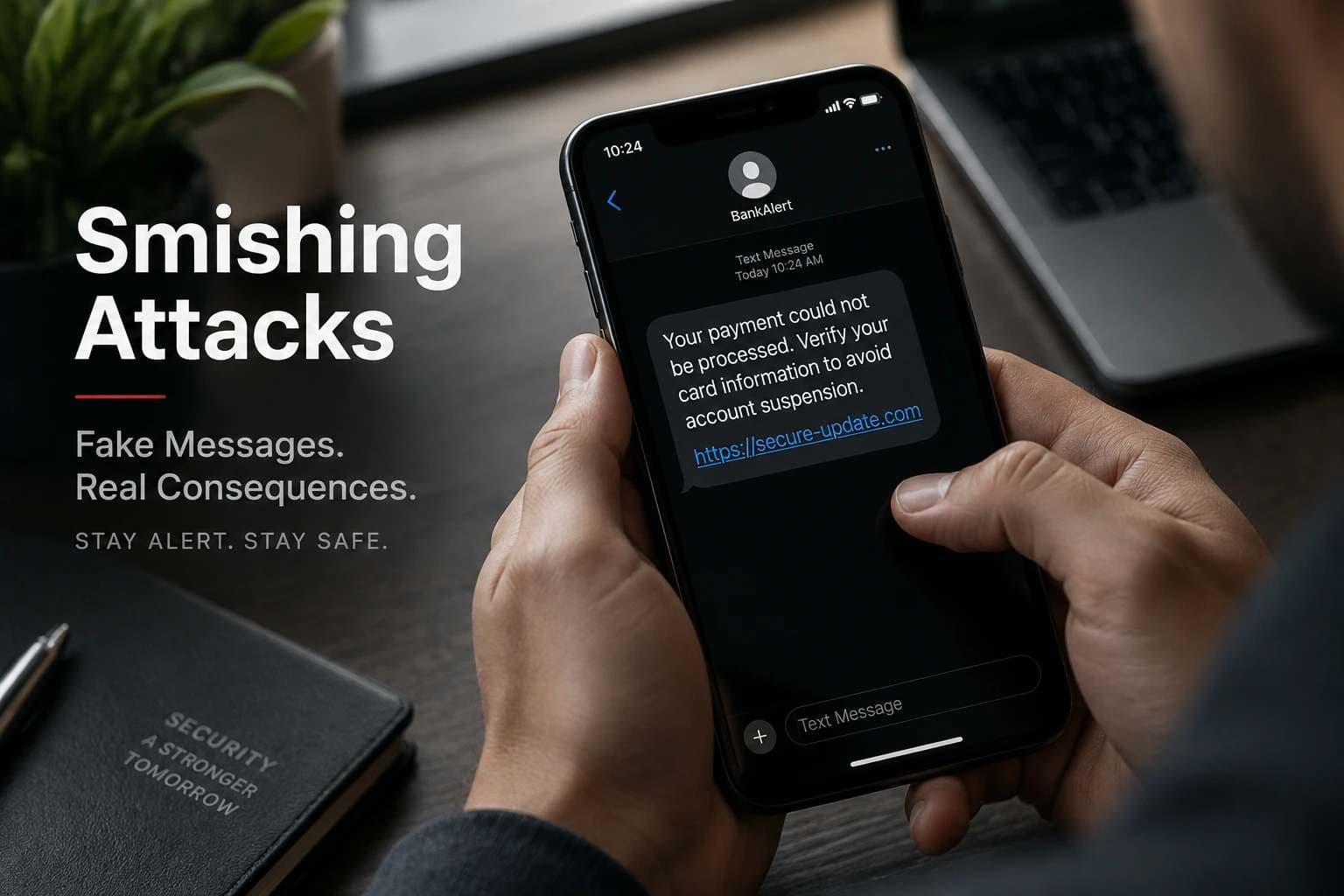
How Real-Time Smishing Attacks Capture Credentials, Card Details, and OTP Codes
Yes, modern smishing attacks can go far beyond fake text messages. Advanced phishing campaigns can use malicious websites, phishing kits, and interactive phishing infrastructure to collect information while victims interact with fake pages. Depending on the campaign, attackers may target card details, login credentials, personal information, and authentication codes.
A person receives a normal-looking text message.
It says:
“Your payment could not be processed. Verify your card information to avoid account suspension.”
The message appears to come from a trusted company.
There is a familiar logo.
The language looks professional.
The link opens a website that looks almost identical to the real service.
Nothing feels unusual.
The victim enters their card number.
Then their email address.
Then their password.
A few seconds later, the website asks for an OTP to “complete verification.”
Most people believe the danger begins only after pressing the final submit button.
But advanced smishing attacks can work differently.
In some modern phishing operations, the fake website itself becomes part of the attack platform. Information entered by the victim can be transmitted to attacker-controlled infrastructure during the interaction, allowing criminals to collect valuable data and potentially coordinate the next stage of an attack.
This changes the security problem.
The question is no longer only:
“Did I click a suspicious SMS link?”
The bigger question becomes:
“What happens after I enter my information into a website I cannot trust?”
Key Findings
· Smishing is a form of phishing delivered through SMS or mobile messaging channels.
· Modern smishing campaigns can combine social engineering with sophisticated phishing infrastructure.
· Attackers may use fake websites to collect credentials, payment information, personal information, and authentication data.
· A realistic-looking website does not prove that the service is legitimate.
· OTPs can protect accounts against some threats, but they cannot prevent users from being manipulated into entering valid codes into fake websites.
· Manual OTP entry is not considered phishing-resistant authentication under current NIST guidance because an attacker can potentially relay the authenticator output to the legitimate service.
· Phishing-resistant authentication is designed to prevent authentication secrets or valid authenticator outputs from being disclosed to an impostor verifier without relying entirely on the user's ability to recognize the phishing attempt.
The Evolution of Smishing: From Fake Messages to Real-Time Phishing
Traditional smishing attacks were often simple.
An attacker sent thousands of messages:
· “Your bank account needs verification.”
· “Your package delivery failed.”
· “Your account will be locked.”
· “Claim your refund now.”
The goal was straightforward:
Get the victim to click a link and submit information.
However, attackers have continued improving their methods.
Modern SMS phishing attacks can involve:
· Professionally designed fake websites
· Automated phishing kits
· Real-time communication between attacker and phishing infrastructure
· Collection of multiple data points during one session
· Attempts to bypass security controls
· Social engineering designed to keep victims engaged throughout the interaction
Security researchers have documented phishing frameworks capable of creating interactive phishing sessions in which attackers can collect credentials and authentication information from victims. Cisco Talos, for example, has analyzed phishing infrastructure designed for real-time interaction and data collection.
The important difference is this:
A basic phishing page may simply wait for the victim to submit information.
A more advanced phishing operation can actively manage the victim's session and collect information throughout the interaction.
This is closely connected to the broader problem of social engineering, where attackers manipulate trust, urgency, fear, or routine behavior rather than relying only on a technical vulnerability. Organizations can learn more about these tactics in social engineering attacks and prevention guidance.
How Real-Time Smishing Attacks Work
A modern smishing campaign usually follows a carefully planned attack chain.
The SMS message is only the first step.
-20260916181829.webp&w=1080&q=75)
The complete process often looks like this:
Fake SMS Message ↓Victim Opens Malicious Link ↓Fake Website Loads ↓Victim Enters Sensitive Information ↓Attacker Receives Data ↓Fake Verification / OTP Request ↓Account Compromise AttemptEach stage is designed to build trust and reduce suspicion.
Step 1: Attackers Create a Convincing SMS Lure
The first challenge for attackers is getting attention.
Most people ignore random messages.
That is why attackers use situations that create urgency.
Common themes include:
Financial Problems
Examples:
· “Suspicious transaction detected.”
· “Your card has been temporarily blocked.”
· “Payment verification required.”
Financial messages work because people naturally want to protect their money.
Delivery Problems
Examples:
· “Your parcel is waiting.”
· “Delivery failed. Update your address.”
These messages take advantage of online shopping habits.
Account Security Alerts
Examples:
· “Unusual login detected.”
· “Verify your account immediately.”
The attacker creates fear that something bad will happen if the user does not act quickly.
This technique is called social engineering.
Instead of breaking a technical system first, attackers manipulate human decision-making.
A well-designed awareness program should therefore teach employees to recognize urgency, unexpected requests, impersonation, and suspicious links.
For a broader explanation of how attackers exploit human behavior, see social engineering attacks and how to spot and prevent them.
Step 2: The Victim Is Redirected to a Fake Website
After clicking the link, the victim usually sees a website designed to look legitimate.
Attackers often copy:
· Brand logos
· Fonts
· Colors
· Login layouts
· Payment pages
· Familiar wording
· Verification workflows
The purpose is not only visual similarity.
The purpose is psychological trust.
A victim who believes they are interacting with a real company is more likely to provide sensitive information.
A fake banking page may request:
· Username
· Password
· Card number
· Expiration date
· CVV or security code
· Phone number
A fake delivery page may request:
· Name
· Address
· Payment information
The information requested depends on the attacker's objective.
This is why users should not treat a professional-looking design as proof that a website is authentic.
For a broader breakdown of phishing methods, including smishing, fake login pages, QR phishing, vishing, and other variants, see phishing attack types.
Step 3: How Attackers Can Capture Information During Data Entry
This is where advanced smishing attacks become more concerning.
Many people imagine a keylogger as malware installed directly on a computer or phone.
That is only one possible method.
In browser-based phishing attacks, the malicious webpage itself can be designed to capture information entered into forms on that page.
For example:
Card Number:4532 XXXX XXXX XXXX Password:********The website may transmit the information entered into those fields to attacker-controlled infrastructure.
The victim may believe they are simply completing a normal verification process.
But the attacker may already have access to the submitted information.
Advanced phishing frameworks can add another layer by allowing attackers to interact with phishing sessions and collect information during the victim's activity.
This distinction is important:
A malicious website collecting information entered into its own forms is not the same thing as malware-based keylogging.
Why This Attack Method Is More Dangerous Than Traditional Phishing
Traditional phishing often depends on one major mistake:
The victim submits information.
Advanced smishing attacks can attempt to control the entire experience:
1. Create trust
2. Guide the victim through fake verification
3. Collect multiple information points
4. Request authentication codes
5. Attempt account takeover
The attacker is not only trying to obtain one piece of information.
They are attempting to manage the victim's decision-making process from the initial message through the final verification step.
How Smishing Attackers Steal OTPs and Abuse Trust-Based Security
Attackers usually do not need to “break” OTP technology directly. Instead, they can trick users into entering valid authentication codes into fake websites or use real-time phishing techniques to capture information during an active authentication process.
This is one of the biggest misunderstandings about modern OTP theft attacks.
Many users think:
“My account has OTP protection, so even if my password is stolen, attackers cannot access it.”
That assumption is only partially true.
OTP adds another security layer, but it depends on how the authentication process works and whether the user is interacting with the legitimate service.
If a victim enters an OTP into a fake banking page controlled by an attacker, the attacker may be able to use that valid code during a real login attempt.
The problem is not necessarily that OTP technology has failed.
The problem is that the user may have unknowingly provided a valid authentication output to the wrong party.
How OTP Theft Works in a Real-Time Smishing Attack
A modern smishing campaign targeting authentication information may follow this process:
Step 1: Attacker Creates a Fake Login or Payment Flow
The attacker builds a website that copies a legitimate service.
For example:
A fake banking page may ask for:
1. Login information
2. Card details
3. Security verification
4. OTP confirmation
Each step is designed to appear normal.
Step 2: Victim Enters Account Information
The victim enters:
· Username
· Password
· Card information
The attacker receives the information through the phishing infrastructure.
Step 3: Attacker Starts a Real Login Session
After obtaining credentials, attackers may attempt to access the real account.
The legitimate service may then send an authentication code to the victim.
The victim may believe the OTP is required for the previous verification step.
Step 4: Victim Enters the OTP Into the Fake Website
The fake website says:
“Enter the verification code to complete security confirmation.”
The victim enters the code.
The attacker receives the OTP and may attempt to use it immediately.
Why Timing Matters
Real-time phishing can be particularly dangerous because authentication codes are usually short-lived.
Attackers need speed.
A phishing framework that allows rapid communication between the victim's session and attacker infrastructure can increase the opportunity for an authentication code to be abused.
The exact effectiveness depends on the service, authentication protocol, session controls, timing, and other security measures.
Why SMS-Based Authentication Has Limitations
SMS-based OTP remains widely used because it is simple and accessible.
However, security guidance recognizes that different authentication methods have different security characteristics.
Possible risks associated with SMS-based authentication can include:
· SIM swapping
· Phone number compromise
· Social engineering
· Real-time phishing
· User disclosure of authentication codes
For higher-risk systems, organizations should evaluate stronger authentication approaches, including phishing-resistant authentication.
Inside Advanced Phishing Frameworks
Traditional phishing pages are often simple.
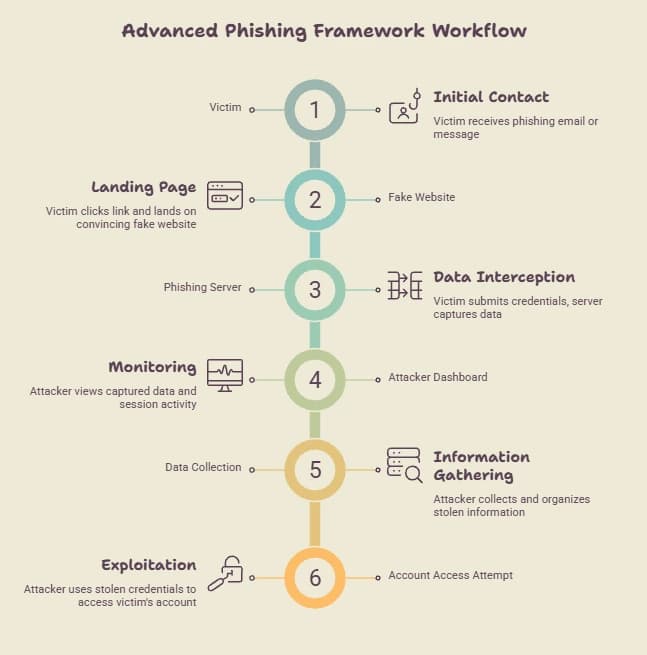
They may work like this:
Victim enters data ↓Form submission ↓Attacker receives informationAdvanced phishing infrastructure can be more complex.
A modern phishing operation may include:
Victim ↓Fake Website ↓Phishing Server ↓Attacker Dashboard ↓Real-Time Session Monitoring ↓Data Collection ↓Account Access AttemptThe phishing page becomes part of a complete attack system.
This does not mean every smishing campaign uses such infrastructure. Attack complexity varies considerably. The important point is that phishing can involve more than a static fake page.
What is a Phishing Kit?
A phishing kit is a collection of tools and resources that helps attackers create phishing campaigns.
A kit may include:
· Fake website templates
· Login page copies
· Data collection scripts
· Administration panels
· Communication components
Some phishing kits are sold or distributed as ready-made services, lowering the technical skill required to launch certain phishing campaigns.
This has contributed to the growth of phishing-as-a-service, or PhaaS, models.
The Role of Command-and-Control Infrastructure
Advanced phishing campaigns can rely on attacker-controlled infrastructure.
This may include:
· Web servers
· Databases
· Admin panels
· Communication channels
The attacker may use this infrastructure to:
· Receive stolen information
· Monitor victims
· Update phishing pages
· Manage multiple campaigns
· Coordinate activity during an active session
The infrastructure behind the attack can therefore be much more sophisticated than the victim realizes.
Smishing Attack Lifecycle: A Complete Technical View
Understanding the complete lifecycle helps security teams identify where defenses can work.
Stage 1: Target Selection
Attackers identify potential victims.
Targets may include:
· Consumers
· Employees
· Financial users
· High-value accounts
Information may come from:
· Public sources
· Previous data leaks
· Purchased lists
· Random targeting
Stage 2: Social Engineering Message
The attacker creates a believable message.
The goal is to create enough urgency that the victim acts without verification.
Common themes include:
· Account problems
· Payment issues
· Security alerts
· Delivery problems
Stage 3: Victim Interaction
The victim:
· Opens the message
· Clicks the link
· Visits the fake website
At this point, trust manipulation becomes the main attack method.
Stage 4: Information Collection
The attacker attempts to collect:
· Credentials
· Payment details
· Personal information
· Authentication codes
Stage 5: Account Compromise Attempt
The attacker may attempt:
· Unauthorized login
· Financial fraud
· Identity misuse
· Additional social engineering
· Access to connected services
Smishing vs Traditional Phishing vs Malware
|
Attack TypeMain Delivery MethodPrimary Goal |
||
|
Phishing |
Email or web pages |
Steal credentials and information |
|
Smishing |
SMS or mobile messages |
Trick users through mobile communication |
|
Malware |
Malicious software |
Gain access, monitor activity, or steal data |
|
Real-time phishing |
Interactive fake websites |
Capture information during user interaction |
These categories can overlap. For example, a smishing message can direct a victim to a phishing website, while another campaign may combine phishing with malware delivery.
The Difference Between Keylogging and Web-Based Data Capture
The phrase “hackers can watch every keystroke” can create confusion.
There are different ways attackers may collect information.
Keylogging Malware
A keylogger is software designed to record keyboard input.
It may operate on:
· Computers
· Mobile devices
This generally requires malware installation or some form of device compromise.
Web-Based Phishing Data Capture
A fake website may collect information entered into its own forms.
In this case:
· The victim is interacting with a malicious webpage.
· The attacker receives information submitted through that webpage.
· No traditional keylogger may be required.
This difference matters because users often assume:
“If my phone has no malware, I am completely safe.”
That is not always true.
A convincing fake website can still steal information if the user provides it.
This is why the more precise description is web-based data capture rather than automatically calling every phishing form a keylogger.
Why Businesses Should Take Advanced Smishing Seriously
For organizations, smishing is not only a consumer problem.
Employees increasingly use:
· Mobile devices
· Cloud applications
· Remote access systems
· Corporate communication platforms
· Mobile authentication applications
A successful smishing attack against one employee can become an entry point for:
· Credential theft
· Business email compromise
· Unauthorized access attempts
· Data exposure
· Further social engineering
Security awareness must therefore include mobile-based social engineering threats.
A broader mobile security program can also address risks involving mobile devices, malicious applications, phishing links, insecure configurations, and other mobile attack surfaces.
Organizations can learn more about these controls through mobile security and threat defense solutions.
How Businesses Can Protect Against Advanced Smishing Attacks
Organizations can reduce smishing risk by combining employee awareness, stronger authentication, mobile security controls, verification procedures, and clear incident response processes.
No single security tool can completely eliminate social engineering risk because these attacks target human decision-making as much as technical systems.
Many businesses focus heavily on email phishing but underestimate SMS-based threats.
That creates a security gap.
Employees may receive suspicious emails on company systems, but they also receive messages on personal phones that may be connected to:
· Work accounts
· Cloud applications
· Corporate communication tools
· Authentication systems
A single successful smishing attack can become the starting point for a larger security incident.
1. Build Smishing Awareness Into Security Training
Traditional security awareness programs often focus on email phishing.
Modern programs should also teach employees about:
· SMS phishing attacks
· Fake mobile websites
· QR code phishing
· Social engineering through messaging apps
· OTP and authentication abuse
· Brand impersonation
· Urgency-based scams
Employees should understand that attackers often create urgency intentionally.
A message saying:
“Your account will be closed within 30 minutes”
is designed to prevent careful thinking.
A trained employee should pause and verify before taking action.
Security awareness should also cover what employees should do after a mistake. Fear of reporting can allow attackers more time to use exposed information.
2. Establish a Verification Process for Suspicious Requests
Businesses should create simple verification rules.
Before employees:
· Enter credentials
· Approve payments
· Share authentication codes
· Open unexpected links
· Provide sensitive information
they should verify the request through an independent channel.
Examples:
Instead of clicking a payment link:
· Open the official company website manually.
· Contact the organization through a known phone number.
· Verify the request internally.
· Use a trusted application rather than an unexpected message link.
The goal is to break the attacker's control over the conversation.
3. Use Stronger Authentication Methods
Authentication is one of the most important defenses against account compromise.
However, organizations should understand that not all authentication methods provide the same protection.
SMS-based OTP can help prevent some unauthorized access attempts, but it does not protect users who willingly enter codes into attacker-controlled pages.
For sensitive systems, organizations should evaluate stronger options, including:
· Hardware security keys
· Passkeys
· Phishing-resistant authentication methods
· Cryptographic authenticators
The important distinction is that phishing-resistant authentication is designed to bind authentication to the legitimate verifier or authentication session rather than relying only on a user manually recognizing a fake website.
4. Improve Mobile Device Security
Because smishing attacks target mobile users, device security matters.
Organizations should consider:
Regular Updates
Keep:
· Operating systems
· Applications
· Security tools
updated.
Security updates often address known vulnerabilities.
Application Control
Employees should avoid installing applications from:
· Unknown websites
· Unexpected links
· Unverified sources
Unknown applications can introduce additional security risks.
Mobile Device Management
Organizations with company-managed devices can use mobile device management, or MDM, solutions to:
· Enforce security policies
· Control applications
· Manage device access
· Support incident response
· Apply configuration standards
Mobile security should not be treated as a separate issue from identity security. The phone may be the device used to receive authentication messages, access cloud systems, and approve sensitive actions.
For organizations that develop or operate mobile applications, mobile application security testing can help identify weaknesses across application code, storage, network communication, APIs, and related attack surfaces.
5. Create a Clear Reporting Process
One reason smishing attacks can succeed is delayed reporting.
Employees may think:
· “It was probably nothing.”
· “I already clicked, so it is too late.”
· “I do not want to report a mistake.”
This delay gives attackers more time.
A good reporting process should make it easy for employees to:
· Report suspicious messages
· Share screenshots
· Report clicked links
· Request security assistance
· Report exposed credentials or authentication codes
Fast reporting allows security teams to investigate and respond.
What Should You Do If You Clicked a Smishing Link?
If you clicked a suspicious smishing link, act quickly.
Do not continue interacting with the page, and do not provide additional information.
The response depends on what happened after the link was opened.
A link opening in a browser does not by itself prove that an account or device was compromised. The situation becomes more serious if credentials, payment information, authentication codes, or other sensitive data were entered, or if something was downloaded or installed.
For a detailed response checklist, see Clicked on a Phishing Link? What to Do Now.
Step 1: Close the Website
Do not continue entering information.
Avoid downloading anything the page suggests.
Do not approve unexpected authentication requests.
Step 2: Change Exposed Credentials
If you entered:
· Username
· Password
· Login information
change the password immediately through the legitimate service.
If the same password is used elsewhere, update those accounts too.
Use unique passwords for important accounts and consider a password manager where appropriate.
Step 3: Contact Financial Institutions
If you entered:
· Card details
· Banking information
· Payment information
contact your bank or payment provider through an official channel.
They can advise on monitoring or protective actions.
Do not use the phone number or contact information supplied by the suspicious message.
Step 4: Check Your Device
If you installed an application:
· Remove suspicious apps.
· Review application permissions.
· Update the device and security software.
· Run appropriate security checks.
· Contact your organization's IT or security team if the device is used for work.
If no application was installed and the only action was opening the link, the appropriate response can be different.
Step 5: Report the Attack
Reporting helps organizations identify active campaigns.
In the United States, consumers can report fraud attempts through the FTC reporting system.
For work accounts or company devices, report the incident to the organization's security or IT team as quickly as possible.
How Security Teams Can Detect Smishing-Related Risks
Security teams should monitor both technical and human indicators.
Important areas include:
Identity Monitoring
Look for:
· Suspicious login attempts
· Impossible travel activity
· Unusual authentication patterns
· Unexpected password changes
· New device registrations
· Abnormal session activity
User Reports
Employee reports can reveal:
· Active phishing campaigns
· Targeted attacks
· Brand impersonation attempts
· Repeated messages targeting multiple employees
· Suspicious domains and links
Threat Intelligence
Security teams can monitor:
· Malicious domains
· Known phishing infrastructure
· Brand impersonation campaigns
· Newly registered suspicious domains
· Indicators connected to known campaigns
Mobile and Endpoint Visibility
Organizations should also consider whether mobile and endpoint security controls can identify:
· Suspicious applications
· Unusual device behavior
· Risky configurations
· Unauthorized changes
· Potential compromise indicators
Common Mistakes That Increase Smishing Risk
Mistake 1: Trusting Messages Because They Look Professional
Attackers invest time creating realistic pages.
Visual quality does not prove authenticity.
A copied logo, familiar color scheme, or professional-looking login screen can all be reproduced.
Mistake 2: Believing OTP Means Complete Protection
OTP protects against some attacks.
It does not protect against users entering valid codes into attacker-controlled pages.
Mistake 3: Acting Under Pressure
Urgency is one of the attacker's strongest tools.
A short pause can prevent a serious mistake.
Instead of reacting immediately, verify the request through a trusted channel.
Mistake 4: Using the Same Password Everywhere
If a phishing attack exposes one password, password reuse can increase the damage.
Use unique passwords and password managers where appropriate.
Frequently Asked Questions About Smishing Attacks
Can smishing attacks steal OTP codes?
Yes.
Attackers can attempt to steal OTP codes by creating fake verification pages or using real-time phishing methods that trick victims into entering authentication codes.
The OTP itself may still work correctly. The problem is that the victim unknowingly provides the authentication output to the attacker.
Can hackers really see what I type?
It depends on the attack method.
Some malware-based attacks use keylogging techniques.
Other phishing attacks collect information entered into malicious websites.
Advanced phishing frameworks may allow attackers to monitor victim sessions and collect information during interaction.
However, a phishing website collecting information entered into its own forms should not automatically be described as a traditional keylogger.
Is smishing more dangerous than email phishing?
Neither method is always more dangerous.
The risk depends on:
· Attack quality
· Victim awareness
· Information targeted
· Authentication controls
· Device security
· Detection and response capabilities
Smishing can be effective because people often respond quickly to mobile messages.
Can antivirus software stop all smishing attacks?
No.
Security software can help detect some malicious activity, but it cannot completely prevent social engineering.
A user can still be tricked into entering information on a fake website.
That is why technical controls should be combined with user awareness, identity security, verification procedures, and incident response.
How can companies test smishing awareness?
Organizations can use:
· Security awareness training
· Controlled phishing simulations
· Employee education programs
· Authorized social engineering assessments
· Incident reporting exercises
Testing should be performed responsibly and with appropriate authorization.
Protecting Your Organization From Smishing Requires More Than Blocking Messages
Modern smishing attacks show an important security reality:
The attacker does not always need to break a system.
Sometimes they only need to convince a person to trust the wrong message.
Effective protection requires multiple layers:
· Educated employees
· Strong authentication
· Secure devices
· Clear verification procedures
· Clear reporting processes
· Security monitoring
· Fast incident response
· Continuous security improvement
Organizations should evaluate their current exposure and ensure employees understand how modern social engineering attacks operate.
For organizations that need a broader technical review, penetration testing methods can help security teams understand how controlled testing can identify weaknesses across applications, networks, identities, and systems.
How Hoplon InfoSec Can Help
Organizations facing increasing phishing and social engineering risks may benefit from professional cybersecurity support focused on identifying weaknesses and improving defensive readiness.
Hoplon InfoSec provides security services and products covering areas such as penetration testing, mobile security, endpoint security, and broader cybersecurity assessments.
Its mobile security and threat defense solutions are particularly relevant for organizations whose employees and customers depend heavily on mobile devices.
For organizations that develop mobile applications, mobile application security testing can help identify weaknesses across application code, storage, network communication, APIs, and related mobile attack surfaces.
For broader security exposure, [penetration testing] can help organizations identify weaknesses through controlled security testing.
For organizations dealing with phishing and human-focused attacks, security awareness and social engineering assessments can help identify where employees may be vulnerable to manipulation.
The goal is not simply to block suspicious messages.
The goal is to understand where a successful smishing attack could lead and strengthen the controls around identity, devices, applications, employees, and sensitive data.
Final Takeaway
Smishing is no longer just a fake text message problem.
Modern attackers can combine psychological manipulation with technical infrastructure to create realistic phishing experiences that capture valuable information, including credentials, payment details, personal information, and authentication data.
The strongest defense is not a single tool.
It is a combination of:
· Awareness
· Verification
· Strong authentication
· Secure devices
· Unique credentials
· Phishing-resistant authentication where appropriate
· Fast reporting
· Fast response
A suspicious message should not be treated as a small inconvenience.
It should be treated as a possible entry point into a larger security risk.
The key lesson is simple:
Do not judge a website by how real it looks. Verify who is asking for your information, use trusted access paths, and never assume that an OTP alone makes a phishing attack harmless.





