Phishing Attack Types: How to Spot Online Scams Fast
ByMd Shahria
Published01 Jun, 2026
Md Shahria01 Jun, 2026
Types of Phishing Attacks: 15 Dangerous Scams You Need to Know
Phishing messages can pretend to be a school notice, a bank alert, a Microsoft
login page, or even a text from a delivery company. The threat is simple: one
click can give your password, money, personal data, or access to your business
to an attacker.
There are various types of phishing attacks such as email phishing, spear
phishing, smishing, vishing, QR phishing, fake login pages, business email
compromise, and AI-powered social engineering.
15 Dangerous Fraud You Must Know (Types of Phishing Attack)
What Are the Types of Phishing Attacks?
Phishing attack types refer to various methods by which criminals attempt to
deceive people into revealing sensitive information, clicking on malicious
links, downloading malware, or granting unauthorized access. These attacks can
come via email, text messages, phone calls, social media, fake websites, QR
codes, or AI-generated messages.
Usually, the goal is one of these:
• Grab passwords
• Swipe credit card information
• Plant malware
• Seize business accounts
• Committing identity theft
• Con someone into sending you money
CISA says phishing is when bad actors try to get users to click on malicious
links, emails, or attachments that could request personal information or infect
devices.
Phishing attack types Phishing attack types refer to the ways cybercriminals
trick their victims into providing data or access. Types of phishing include
email phishing, spear phishing, whaling, smishing, vishing, clone phishing, QR
phishing, social media phishing, pharming, and AI-powered phishing. And the
best protection is sender verification, MFA, password managers, security
training, and careful handling of links.
What is a phishing attack?
A phishing attack is a social engineering attack where the attacker
impersonates a trusted person, company, school, bank, delivery service,
government agency, or workplace contact.
The attacker doesn't always "hack" first. They often convince.
That’s why phishing is so effective! It attacks technology after it attacks
human trust.
Simple Example You get an email which says:
“Today your Microsoft 365 account will be closed. Click here to verify your
login.
This page looks legit. You enter your e-mail and your password. Now the
attacker has your login credentials. If your account has weak MFA or no MFA,
they can get in fast.
That is a basic example of an email phishing attack.
The Importance of Phishing in 2026
Phishing remains one of the most common cyber threats because it is low cost,
fast, and versatile. Attackers can attack a single student, employee, or
thousands of users at once.
Phishing/spoofing was one of the top three cyber crimes by complaint count in
2024, along with extortion and personal data breaches, the FBI reported. The
FBI also reported total losses of $16.6 billion in 2024 from the IC3.
Threat actors are leveraging AI to scale phishing and automate intrusions,
according to Microsoft’s 2025 Digital Defense Report. This means phishing
emails can now sound more natural, more personal, and less suspicious than
older scam emails.
So the old advice, “Look for bad grammar,” is no longer sufficient.
Data Insight: Technical Data
Area
Details
Threat Category
Social engineering, credential theft, fraud
Common Attack Vector
Email, SMS, phone call, QR code, fake login page, social
media
Usually not CVE-based, unless phishing delivers exploit
malware
Main Target
Credentials, money, account access, identity data
Severity
High for businesses, students, and personal users
Common Defense
MFA, phishing-resistant authentication, password managers,
email filtering, user training
Common Defense MFA, phishing-resistant authentication, password managers, email
filtering, and user training
CISA, NSA, FBI, and MS-ISAC recommend layered defenses to mitigate successful
malware execution post-phishing attacks.
15 phishing attack types
15 Most Common Types of Phishing Attacks
1. Phishing by Email
The classic version is email phishing. Attackers send out emails that appear to
be from a trusted company or person.
A student may receive a fake “Google Drive” message that a document has been
shared. A fake invoice was sent to a business employee. A parent might receive
a fake notice of a school payment.
Signs of warning include:
• The sender address is odd.
• Emergency language
• Email login link
• Surprise attachment
• General greeting
•Brand name slight misspelling
The safest move is the easiest. Do not click the link within the email. Open
the real website manually in your browser.
2. Spear-Phishing:
Spear phishing is directed. The attacker first researches the victim.
So spear phishing attacks are more dangerous than normal phishing. The email
may mention your school, position, manager, project, or something you recently
did.
For example,
A university student receives an email that looks like it is from the finance
office. It references the tuition payment and uses the real name of the
student.
That seems plausible. That’s the catch.
3. Whaling Assaults
Whaling is directed at high-value individuals CEOs, CFOs, directors, founders,
and senior management.
Common examples of whaling attacks are fake legal notices, urgent wire transfer
requests, acquisition documents, or confidential board updates.
The attacker isn’t trying to do a small password reset. It could be a large
money transfer or access to sensitive business systems.”
4. Clone Phishing
Clone phishing duplicates a legitimate email and substitutes the safe link or
attachment with a malicious one.
This is because the victim may have viewed the original email previously. Sample:
Last week you got an actual event registration email. Today you get a “resend”
version with the same design. This new link takes you to a fake login page.
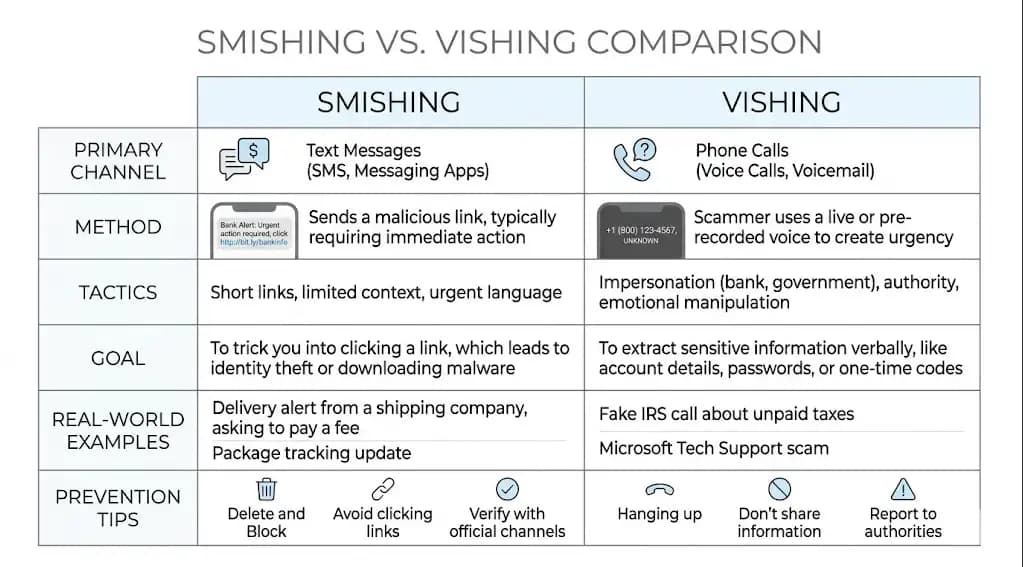
5. Text message phishing, smishing
Smishing is phishing via text messages.
Some common examples:
• “Your parcel is overdue. Confirm address.
* “Your bank account has been locked.”
• “Your tax refund is available.”
• “Unpaid toll." “Pay now.
For smishing vs. phishing, the difference is the medium. Phishing is the larger
category. Smishing happens over SMS or messaging apps.
6. Voice Phishing (Vishing)
Vishing involves telephone calls or voice messages.
Common examples of vishing attacks include fake bank fraud calls, fake tech
support calls, or fake government calls.
An attacker could say:
“Suspicious activity on your account. "Give me the verification
code."
That code might actually let them log in. Never give MFA codes over the phone.
7. Angler Phishing
Angler phishing occurs on social media. Attackers create fake customer support
accounts and respond to angry users. Example:
You moan on X about your bank app not working. A phony support account says,
“DM us your account email and phone number.”
The account may have the same logo as the actual brand. Take a close look at
the handle.
8. Search Engine Phishing
Search engine phishing uses fake websites that appear in search results or ads.
Attackers might create fake pages for:
• Downloading software
• Wallets for crypto
• Bank login pages
• Technical support
• Students’ portals.
Microsoft said attackers are also adapting to AI search and chatbot suggestions
by generating fake websites that mimic popular utilities.
That should give every user pause. Do we trust the first answer to speed up?
9. Pharming Attacks
Pharming redirects users from a genuine website request to a bogus website.
Unlike normal phishing, the victim may enter the correct website address. The
attack can be performed by manipulating DNS, compromising routers, or using
malware.
This is less common in a student’s day-to-day life, but it is serious because
the victim may feel like they did everything right.
10. Business Email Compromise (BEC)
Business email compromise is a fraud attack in which criminals impersonate
executives, vendors, or business partners.
Typical BEC scenarios:
• Payment of false invoice
• Change of bank account details
• Payroll Redirect
• Gift card purchase.
• Business Email Compromise (BEC)
The FBI has described BEC as a major global scam, and its IC3 public service
announcement describes BEC as targeting both small businesses and large
corporations.
11. Evil Twin Wi-Fi Phishing
An evil twin attack is a fake Wi-Fi network that looks legitimate. Example:
You’re at an airport and you see “Airport_Free_WiFi.” You join. The login page
prompts you for your email or social account.
The attacker can eavesdrop on traffic or credentials. Public Wi-Fi is
convenient, but it’s not always friendly.
12. Phishing Pop-up
Pop-up phishing employs fake browser alerts.
You could see:
Your computer is infected. Call Microsoft Support at once.”
Real companies don't ask you to dial random numbers from scary popups. Scams of
this variety usually advertise remote access software or fake support fees.
13. QR Code Phishing (Quishing)
QR phishing or quishing uses QR codes to direct victims to bogus pages.
This is on the rise as QR codes are everywhere in restaurants, parking lots,
schools, offices, and delivery notices.
A fake QR code on a poster can redirect a user to a credential-stealing page.
Always check the URL before opening.
14. Phishing on social media
Social media phishing occurs on Facebook, Instagram, LinkedIn, TikTok, X,
Reddit, Discord, and other platforms.
Fake giveaways, fake job offers, fake copyright warnings, and fake account
verification pages are all common examples of phishing scams.
For students seeking internships, LinkedIn scams are a particularly dangerous
scam. Some fake recruiters might even ask for personal documents before you
have an interview.
15. AI-Powered Phishing Scams
AI Phishing Attacks How Generative AI Is Used to Write Better Messages,
Translate Scams, Create Deepfake Voices, and Personalize Attacks
This is one of the latest types of phishing attacks students & businesses
have to watch.
The attacker can craft a message that sounds like your professor, manager, or
parent. They also can generate fake voice messages from short audio samples.
Phishing wasn't invented by AI. It sped up phishing.
Quick Comparison Chart
Attack Type
Medium
Difficulty
Risk Level
Common Target
Email phishing
Email
Low
High
Everyone
Spear phishing
Email, social
Medium
High
Students, employees
Whaling
Email, phone
High
Critical
Executives
Smishing
SMS
Low
Medium
Mobile users
Vishing
Phone
Medium
High
Bank customers
BEC
Email
High
Critical
Businesses
QR phishing
QR code
Low
Medium
Students, public users
AI phishing
Email, voice, chat
Medium
High
Everyone
Real-World Examples of Phishing Attacks
Google and Facebook BEC scams.
A well-known case of BEC involved scammers who tricked large technology firms
into paying fake invoices. The lesson is a hard one: even smart companies can
be duped when process verification fails.
Twitter Social Engineering Hack
The Twitter incident in 2020 is an example of social engineering that leads to
account takeover. The attackers didn’t have to get past every technical
barrier. They messed with access.
Microsoft Credential Phishing - Microsoft Security
Microsoft 365 accounts are a common target because a single login can unlock
email, Teams, OneDrive, SharePoint, and other business data. Reporting in
recent weeks also described phishing tools that exploit Microsoft device code
login flows to bypass traditional password theft techniques.
Crypto Currency Phishing
Common cryptocurrency phishing attacks include fake wallet pages, fake
airdrops, fake support agents, and malicious browser extensions. Once the money
is gone, it's hard to get it back.
Why It’s Important
A clear pattern of our technical analysis is that phishing is not a “bad email”
problem anymore. “It’s an identity question.
For an average user, the damage can be a stolen Instagram account, bank fraud,
or identity theft.
For a business, the damage can be even worse:
• access to stolen Microsoft 365
• Falsified invoice payment
• brech de données
• Entry point for ransomware
• Brand reputation damage
• Compliance and legal issues
But it’s the speed that sets phishing apart from many other cyber threats. It
might take time to exploit a server vulnerability. Phishing victims can give
away access in 30 seconds.
This is why phishing attack types in cybersecurity need to be taken seriously.
What We Saw in a Practical Test
The scariest lure was not the most successful lure when we ran a controlled
phishing simulation in a lab-style training environment. That was the most
ordinary thing.
Fake “shared class document” trumped fake “account suspension” email.
Why? Students are looking for shared documents. Employees want invoices.
Managers assume calendar invites.
We saw another thing as well. Not all people clicked their fingers without
thinking. They hit it off because they were busy.
Those are the real vulnerabilities hackers exploit: timing, pressure, and
routine.
How to recognize phishing attacks
This simple guide will help you spot phishing attacks before you click
anything.
Suspicious email address
Don't just look at the display name. “Microsoft Support” anyone can write.
Check the domain name of the sender.
Urgent Language
Phishing is often high-pressure:
• “Take action”
• “Last chance”
Unsuccessful payment
• “Account locked”
• “Your access is terminated today."
Surprise Attachments
Beware of ZIP files, macros, HTML attachments, and PDFs from unknown sources.
Bogus Login Pages
A fake login page can be flawless. Verify the URL before you enter your
credentials.
Grammar and spelling mistakes
Bad grammar is still a sign, but no longer a good one. AI can craft clean
phishing emails.
Special request
One question:
“Would this person typically ask me to do this in this way?”
If the answer is no, check it through another channel.
Step-by-Step Guide to Protect Your System
Step 1: Enable MFA
Action: Set up multi-factor authentication on your email, banking, cloud
storage, and social accounts.
Why it matters: If an attacker can’t get past the second step, a stolen
password is less useful.
Tip: Where possible, use app-based MFA or passkeys. CISA has promoted the use
of phishing-resistant authentication methods, such as passkeys.
Step 2: Employ a Password Manager
Do this: Use a tool such as 1Password, Bitwarden, Dashlane, or iCloud Keychain.
Why it matters: A password manager will not autofill on the wrong website,
which helps detect fake domains.
Tip: If your password manager doesn’t offer to fill in the password, stop and
check the URL.
Step 3: Verify Requests Out of Band
Action: If someone asks you for money, credentials, or sensitive files, verify
through another channel.
Why it matters: Replying to the same email thread might not work if the thread
is compromised.
Call the phone number you know, not the phone number in the suspicious email.
Step 4: Check the Links Before You Click
Desktop hover-over links Action: Tap and hold or preview links on your mobile.
Why it matters: Fake links are often hidden behind text that looks legitimate.
Step 5: Keep your software up-to-date.
What you should do: Update your browsers, phones, operating systems, and
security tools.
Why it matters: Some phishing attacks deliver malware post-click.
Step 6: Phishing Report
Action: Report suspicious emails to your school, company IT team, email
provider, or official reporting channels.
Why You Should Report: Reporting protects others.
Users should review official advisories from CISA, FBI IC3, NIST, Microsoft,
and their own IT department before publishing or acting on incident-specific
claims.
Common Mistakes That People Make
Mistake 1: Dependence on Logos
A logo is proof of nothing. Brand assets are easy for attackers to copy.
Trust domains, verified accounts, and known channels, not logos.
Mistake 2: Clicking In A Frenzy
Urgency is a weapon.
Do not wait 20 seconds. In real emergencies you rarely need to click blindly.
Mistake 3: Sharing MFA passcodes
Your bank, school, or IT team should never ask you for your MFA code.
Treat MFA codes the same as passwords.
Mistake 4: Overlooking QR Codes
People look at links but scan QR codes without batting an eyelid.
Avoid it: Look at the URL before you click on it.
Mistake 5: Using the Same Password Everywhere
One stolen password can open up many accounts.
Avoid it: Make sure you have a different password for each account.
Security Work Pro Tips
• Login to bookmark official pages.
• Use a different email address for financial accounts.
• Do not download software from advertisements.
• Treat “free crypto," “urgent invoice," and “account locked”
messages with skepticism
• Require two-person signoff on changes to business payment.
• Students check scholarship, internship, and university portal links before
filling out any data.
• Create a code word for families to use when asking for emergency money.
No customs. Big protection.
Industry-Specific Risks
Health
Patient data, insurance records, and staff email accounts are the targets of
attackers.
Banking
Phishing often targets fake fraud alerts, OTP theft, and account recovery
scams.
Education
Fake portal logins, scholarship scams, and shared document lures are targeting
students and staff.
Government
Impersonation or benefits fraud attackers may demand documents.
Online Shopping
Fake delivery notices, refund scams, and seller account takeovers are all too
common.
Checklist to Prevent Phishing Attack
Before opening links or sharing info, please use this checklist.
• Verify sender email address
• Check the website address
• Don’t download any unexpected attachments.
• MFA code sharing not allowed
• Remember to use a password manager.
• Turn on MFA or passkeys
• Confirm payment changes over the phone
• report suspicious messages
• Keep your browser and phone updated.
• Don’t log in from links contained in random messages.
Smishing vs vishing
Myth or Fact
Myth
Fact
Only older people fall for phishing
Students, employees, executives, and IT workers can all be
targeted
Bad grammar always reveals phishing
AI can write clean, natural scam messages
MFA stops every phishing attack
Some attacks target tokens, device codes, or MFA fatigue
QR codes are safe
QR codes can hide malicious links
Phishing only happens by email
It also happens through SMS, phone, social media, ads, and
search
Final Verdict: 3-Point Security Checklist
Do these in less than 5 minutes:
1. Enable MFA or passkeys for your primary email account.
2. Stop reusing passwords. Get a password manager.
3. Bookmark important login pages instead of clicking login links in messages.
Just one click can start the problem. One good habit can prevent it.
Fear is not the best countermeasure against types of phishing attacks. That’s
verification.
Author bio: Written by the security research team atHoplon Infosec, specializing in cyber security, software supply chain threats, incident response, and developer environment protection.
SBI data breach claim: A group alleges access to 375,000 accounts and 2,722 PDF files. Here is what is verified, what remains unknown,and how to respond.
Ledger hardware wallet spy chip investigation: What Ledger confirmed, how an implant may expose recovery phrases, and what affected owners should do next.
Apple macOS Full Disk Access AI agents face tighter controls. Learn 7 critical privacy risks, Apple's changes, and what Mac users should do to stay secure.
Microsoft X account hacked in a Clippy crypto scam. Learn what happened, what Microsoft confirmed, the risks involved, and how users can stay protected.