-20260925120840.webp&w=3840&q=75)
MacSync has changed again.
In September 2026, Kaspersky researchers documented a new MacSync infection chain that uses something most Mac users would never connect with malware: a public iCloud Calendar.
In at least one analyzed sample, MacSync downloaded data from a public iCloud calendar, sent that data into the macOS zsh shell, and eventually used attacker-controlled commands inside the calendar data to retrieve another malicious application. The infection then continued through several stages before installing an information stealer and a persistent backdoor.
This does not mean attackers discovered an iCloud Calendar vulnerability. The available research shows abuse of legitimate Apple-hosted infrastructure as part of a malware delivery chain.
That difference matters.
A defender cannot simply assume that traffic is safe because the destination belongs to Apple. At the same time, normal iCloud traffic should not be treated as malicious just because MacSync has abused it. Detection needs context: which process contacted iCloud, what it downloaded, what ran next, and whether shell commands or new applications appeared afterward.
For anyone who has followed earlier MacSync attacks, this campaign also shows how quickly the malware is changing. Previous campaigns relied heavily on AppleScript, fake apps, ClickFix pages, and Terminal commands. The new chain adds native binary droppers, Swift and Objective-C payloads, an unusual PAM-based password-checking method, multiple persistence methods, and a backdoor disguised as Finder.
For background on earlier versions, see Hoplon Infosec's coverage of MacSync and Gatekeeper abuse and the earlier MacSync ClickFix attack chain.
Why the New MacSync Attack Matters
The most interesting part of the September 2026 MacSync campaign is not simply that another macOS stealer exists.
It is how the malware reaches its next stage.
Kaspersky found that one MacSync downloader contained a link to a public calendar hosted through caldav.icloud.com. After retrieving the calendar, the downloader started zsh -s and fed the calendar content to the shell line by line.
Most calendar text is not valid shell syntax, so much of it fails.
The important part appears after the calendar's DESCRIPTION: field. That section contains attacker-controlled commands that the shell can execute. Those commands eventually download another archive from iCloud containing an .APP bundle used in the next stage of the infection.
This is important for defenders because an old-fashioned domain block list is not enough to understand the activity.
The relevant question becomes:
Why is this process connecting to iCloud, and what happens immediately afterward?
If an unknown application retrieves calendar data, passes it into zsh, removes macOS quarantine attributes from another downloaded application, applies an ad-hoc signature, and executes it, that chain deserves investigation even though one part of the network traffic goes through legitimate Apple infrastructure.
This is one reason modern Mac security cannot depend only on whether a website, certificate, or cloud service looks familiar.
Apple itself uses several layers of protection in macOS, including Gatekeeper, Notarization, and XProtect. But social engineering and abuse of trusted services can create attack paths that require defenders to look at behavior as well as reputation.
The Evolution of MacSync
MacSync is not a completely new malware family.
According to Kaspersky's detailed September 2026 report, the malware was first advertised on underground markets in 2025 as Mac.c. Its developers later renamed it MacSync.
Early versions were mainly built with AppleScript and showed strong similarities to the AMOS, or Atomic macOS Stealer, family.
Over time, however, MacSync started developing its own features, including persistent backdoor capabilities.
That evolution can be simplified like this:
Earlier MacSync
AppleScript-heavy malware
→ social engineering
→ fake software or ClickFix
→ shell commands
→ credential and wallet theft
Newer MacSync
Malicious DMG
→ binary loaders and droppers
→ iCloud-assisted delivery in at least one sample
→ encrypted payload stages
→ Swift infostealer
→ Objective-C backdoor
→ several persistence methods
Kaspersky says the developers have significantly changed their payload-delivery approach, moving away from relying mainly on script-based droppers toward compiled binary components. The final malicious modules analyzed by Kaspersky include a Swift-based infostealer and an Objective-C backdoor.
This change should not automatically be described as "undetectable." Using Swift or Objective-C does not make malware invisible by itself.
What it does show is that MacSync's architecture is becoming more complex.
Earlier campaigns also used different delivery methods.
Microsoft has documented MacSync being distributed through macOS ClickFix campaigns where users are told to paste attacker-provided commands into Terminal. Microsoft later observed changing infrastructure and recurring MacSync behavior involving shell execution, credential collection, temporary staging, and data exfiltration.
Hoplon Infosec has covered similar social-engineering techniques in its guides to fake CAPTCHA and ClickFix attacks on Mac and fake Homebrew websites targeting macOS users.
The September MacSync chain is different because the attackers are not depending only on the older "paste this command into Terminal" model.
They have added a deeper malware-driven delivery chain.
The MacSync Attack Kill-Chain: Step by Step
Understanding the infection is easier if we separate it into stages.
Step 1: Initial Lure
The attacker first needs the victim to start the infection.
MacSync is offered as malware-as-a-service, which means different operators can use different delivery methods.
Kaspersky has seen it distributed as free or cracked software and as fake new applications. In the September campaign, researchers found MacSync pretending to be a nonexistent cryptocurrency wallet called Toria.
The attackers created a website for Toria and promoted the fake wallet through X and Telegram.
The new infection chain begins with a malicious DMG image.
MacSync has also appeared in other campaigns involving ClickFix pages, fake Homebrew downloads, disk-management utilities, and other software-installation lures. Those older campaigns are useful background, but they should not be confused with the exact iCloud-based chain analyzed in September.
Another real-world example came from Huntress. In a separate MacSync incident, a victim searching for instructions to install Claude on a Mac clicked a sponsored result and eventually followed malicious Terminal instructions. Huntress reconstructed a multi-stage MacSync stealer and RAT chain from that infection.
Hoplon previously covered a related MacSync delivery case involving malicious Claude-related Google Ads on macOS.
The common lesson is simple:
A familiar product name does not make the installer or instructions trustworthy.
Step 2: The iCloud Calendar Trick
This is the most unusual part of the new chain.
When the malicious application starts, it checks whether its bundle has Apple's com.apple.quarantine extended attribute. If present, it runs a command to remove the application's extended attributes.
It then decrypts a hidden URL stored inside the malware.
In some samples, that URL led to attacker-controlled infrastructure.
But in at least one analyzed sample, it pointed to a public iCloud calendar hosted through:
caldav.icloud.com
The downloader retrieves the calendar data.
It then creates an anonymous pipe and starts:
zsh -s
Here, zsh is the default command shell used on modern versions of macOS.
The -s option tells zsh to read commands from standard input.
MacSync sends the downloaded calendar data into that input one line at a time.
This is sometimes called piping.
In simple terms:
Calendar data → input pipe → zsh shell
Most calendar lines are not commands.
Fields containing normal calendar information therefore produce errors when zsh tries to interpret them.
Eventually, however, the shell reaches attacker-controlled content placed after the:
DESCRIPTION:
field.
Those lines contain commands that zsh can understand.
The shell executes them.
That is the trick.
Is the .ics file itself malware?
Not in the normal sense.
An .ics file is simply a standard calendar-data format.
The danger comes from MacSync deliberately treating attacker-controlled calendar content as shell input.
The calendar is being used as a delivery container inside an already malicious process.
Kaspersky's report does not establish that opening an ordinary .ics file in Apple Calendar causes this infection.
It also does not describe exploitation of a vulnerability in iCloud Calendar.
That distinction is important because calling this an "iCloud zero-day" or "Calendar exploit" would overstate the evidence.
Step 3: Payload Delivery
Once the command stored through the calendar stage runs, it retrieves a .TAR.GZ archive from iCloud.
Inside that archive is another .APP bundle.
The downloader then:
- extracts the application;
- removes quarantine-related attributes;
- gives it an ad-hoc code signature;
- executes it.
That application is another dropper.
A dropper is a small malicious program whose main job is to unpack or install another malicious component.
The infection continues through several more stages.
Kaspersky found encrypted executables, additional droppers, anti-debugging checks, shell scripts, and payload decryption before the main MacSync modules are finally launched. One dropper checks for signs of a virtual machine and uses PT_DENY_ATTACH to interfere with debuggers.
Later in the chain, MacSync downloads two main modules:
- the infostealer;
- the backdoor.
The downloaded archives have their extended attributes removed and are signed with ad-hoc signatures before execution.
The infostealer runs first and collects data.
The backdoor is then installed with persistence so it can continue operating after the original stealing stage has finished.
Simplified attack flow
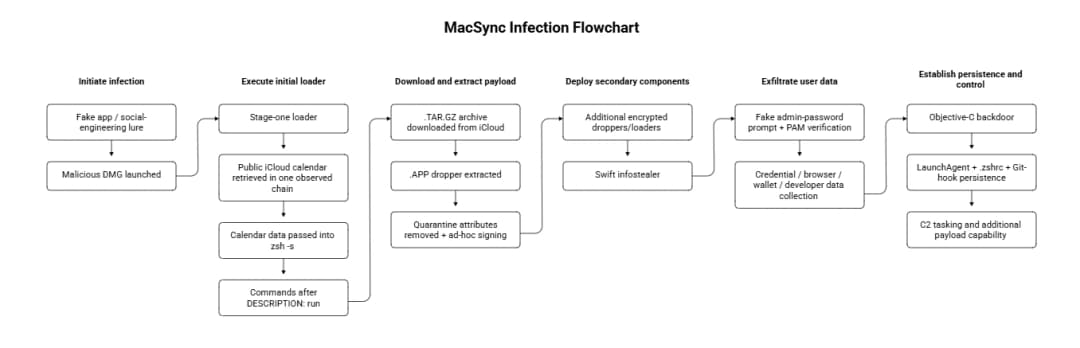
The PAM API Password Trick
MacSync's password handling is another important change.
Older macOS stealers often use the dscl command-line utility to test whether a password entered by the victim is correct.
The new MacSync infostealer uses a different method.
It shows the user a password window designed to match the fake application being impersonated. After the victim enters the password, MacSync verifies it through Apple's Pluggable Authentication Modules, or PAM, API.
PAM is not malware.
It is a legitimate authentication framework used by Unix-like systems, including macOS.
The important point is that the attacker is abusing a legitimate authentication interface to confirm that the password captured through the fake prompt is valid.
So it is more accurate to say:
The fake prompt captures the password, while PAM helps MacSync verify that the password is correct.
Kaspersky described PAM-based verification as a fairly new technique in macOS malware. Its researchers said they first observed the technique in the wild in July 2026 in a malware family called PamStealer.
Jamf Threat Labs documented PamStealer on July 2, 2026. That malware also used macOS PAM to validate a victim's login password.
After MacSync receives the password, it displays another fake window designed to look like a system message saying that the application is corrupted and offering to move it to Trash.
That message gives the victim a believable explanation for why the fake application failed.
From the user's point of view, the app simply appears broken.
From the attacker's point of view, the important work may already have happened.
What Does MacSync Steal?
MacSync is not limited to one password or one browser.
Kaspersky found that the new stealer collects information from browsers, cryptocurrency software, developer tools, system files, and communication applications.
Crypto-related data
MacSync can collect data from cryptocurrency wallet applications and browser wallet extensions.
The backdoor also contains a command named:
deploy_ledger
Kaspersky's analysis indicates that this command is designed to replace an installed Ledger wallet application with a version supplied by the attackers' server.
There is an important limitation here.
Kaspersky did not possess the AppleScript delivered for every backdoor command, so some command behavior was reconstructed from command names and telemetry.
In a separate MacSync investigation, Huntress found extensive cryptocurrency targeting, including roughly 60 wallet-related browser extensions, around 21 desktop wallet applications, and trojanized wallet companion applications designed to collect recovery phrases.
Those numbers should not automatically be applied to every MacSync build, including the September Kaspersky samples. MacSync operators can use different versions and delivery chains.
Developer files
The new MacSync variant searches for several types of developer and infrastructure data, including:
- SSH configuration;
- AWS configuration;
- Kubernetes configuration;
- Git configuration;
- ZSH configuration;
- Bash and ZSH command history.
This is particularly important for business environments.
A compromised developer Mac may contain more than personal information.
It can hold SSH keys, cloud configuration, repository credentials, shell history, and other data connected to corporate systems.
Microsoft's separate MacSync investigation also confirmed collection activity involving browser information, Keychain material, local credentials, SSH credentials, cloud credentials, and sensitive local files.
Browser and system data
Kaspersky's new samples also target:
- browser history;
- browser cookies;
- saved logins and passwords;
- browser Local State files;
- crypto-wallet extension data;
- Telegram data;
- Mac login information;
- the Keychain file;
- installed applications;
- running processes;
- device model and hardware details;
- device UUID;
- the current user's profile picture.
Browser cookies deserve special attention.
A stolen authenticated session can sometimes be useful to an attacker even when the victim later changes a password, depending on how the affected service manages sessions.
That is why incident response should include session revocation, not only password replacement.
For comparison with another recent Mac stealer, Hoplon's AmnesiaStealer analysis explains how modern macOS infostealers also target browser, Keychain, Telegram, and session data.
How MacSync Survives on a Mac
Stealing data once is dangerous.
Maintaining access after the first stage is worse.
Kaspersky found that the new MacSync backdoor creates a backup under:
$HOME/Library/Application Support/System
The malware creates this directory itself; Kaspersky notes that it is not a default macOS directory.
The backdoor then disguises itself as Finder and establishes persistence in several ways.
1. LaunchAgent Persistence
MacSync creates a LaunchAgent named:
com.apple.finder.agent
A LaunchAgent is a normal macOS mechanism for starting programs in a user's session.
Legitimate applications use LaunchAgents.
Malware can also abuse them.
In this case, MacSync uses the LaunchAgent to help start its backdoor automatically.
Simply killing the malicious process may therefore not solve the problem.
The persistence mechanism can start it again.
2. .zshrc Profile Injection
MacSync also places a command inside the user's:
.zshrc
file.
.zshrc is a configuration file used by the ZSH shell.
Commands placed there can run when an interactive ZSH session starts.
MacSync uses this mechanism to launch a script called .repair-run.
The repair script checks whether the backdoor files still exist.
If files are missing, it can restore them from a backup and recreate or reload the malicious LaunchAgent.
This creates a recovery mechanism for the malware.
Deleting only one visible component may therefore leave enough pieces behind to restore it.
3. Global Git Hooks
The third persistence method is especially relevant to developers.
Kaspersky found MacSync adding similar repair commands to global Git:
pre-commit
and:
post-checkout
hooks.
A Git hook is a script that runs automatically when a particular Git action occurs.
For example, a pre-commit hook can execute before a commit.
MacSync abuses these hooks to run its .repair-run script and help restore persistence.
There is one important correction to make here:
Kaspersky's report does not show that these hooks automatically inject MacSync into other Git projects or spread the malware through committed source code.
The confirmed role in the analyzed samples is persistence and repair.
Treating this as a confirmed Git-based worm or supply-chain propagation method would go beyond the available evidence.
This distinction is especially important because other macOS threats really have targeted development projects. Hoplon's guide to XCSSET malware targeting macOS developers covers a different malware family with project-focused behavior.
Hiding the persistence alert
MacSync goes further.
The repair script terminates several macOS notification-related processes, including NotificationCenter, while setting up persistence.
Kaspersky says this is done to stop the user from seeing notifications about the new LaunchAgent.
That means defenders should not assume that the absence of a visible macOS alert means no persistence was created.
Complete Defense and Removal Guide
There is no single setting that makes a Mac immune to MacSync.
Protection works best when users and security teams reduce both the social-engineering risk and the post-execution risk.
Do not blindly run Terminal commands
This remains one of the most useful defenses.
Do not copy and run commands from:
- unfamiliar download pages;
- fake CAPTCHA screens;
- random forum replies;
- sponsored software-installation guides;
- shared chats you have not verified;
- unexpected "fix your Mac" instructions.
Microsoft specifically recommends educating users not to paste or run Terminal commands from untrusted websites, messages, apps, files, or phone instructions.
Modern versions of macOS also include additional warnings around suspicious Terminal paste behavior, but user judgment still matters.
Download applications from trusted sources
Apple says macOS uses several overlapping security controls, including Gatekeeper, Notarization, and XProtect.
Gatekeeper checks applications downloaded from outside the App Store and helps determine whether they come from an identified developer, are properly notarized, and have been modified. XProtect provides additional malware detection and remediation.
These protections are useful, but they do not make every file with a professional-looking interface safe.
Verify the real vendor website before downloading developer tools, crypto software, wallets, or utilities.
Check unfamiliar Calendar subscriptions, but understand the limitation
Reviewing unexpected calendar subscriptions is reasonable security hygiene.
However, it is important not to misunderstand how the September MacSync sample worked.
Kaspersky did not report that the malware needed to subscribe the victim's Calendar app to a malicious calendar.
The downloader itself fetched a public iCloud calendar URL and passed the returned data into zsh.
Therefore:
Removing an unknown Calendar subscription is not a confirmed MacSync removal method.
If MacSync is already running, the important task is finding and removing the malware and its persistence mechanisms.
Audit LaunchAgents
Security teams investigating a suspected infection should review user LaunchAgents, especially unexpected entries or entries pointing to unusual locations.
Kaspersky specifically identified:
com.apple.finder.agent
in the new campaign.
A filename alone should not be the only detection signal because malware can change names between campaigns.
Look at the executable path, file origin, signature, creation time, related processes, and network behavior.
Check .zshrc
Review the user's .zshrc for commands that were not intentionally added.
MacSync uses .zshrc to execute its repair mechanism when ZSH starts.
Developers often have long shell configuration files, so unfamiliar commands can be easy to miss.
Compare the file against a known-good copy or version history when possible.
Audit Git hooks
Developers should inspect global Git hook configuration as well as hooks inside important repositories.
Look for unexpected commands that launch files from suspicious locations.
Kaspersky identified abuse of global pre-commit and post-checkout hooks in the latest MacSync samples.
Again, the confirmed purpose here is persistence.
The report does not establish automatic repository-to-repository propagation.
Use updated endpoint protection
Apple's built-in XProtect should remain enabled and updated.
Organizations may also use a reputable EDR or endpoint security product capable of monitoring shell activity, process creation, credential-store access, unusual application execution, and outbound connections.
Microsoft recommends monitoring unusual Terminal, ZSH, AppleScript, curl, Base64, archive creation, temporary staging, Keychain access, and suspicious exfiltration behavior when defending against MacSync.
Hoplon's broader analysis of macOS security threats and SOC visibility gaps explains why these behavior-based signals matter in managed environments.
If you think the Mac is already infected
Treat it as a possible credential compromise, not only a malware-cleanup problem.
A sensible response sequence is:
- Disconnect the affected Mac from networks where practical.
- Contact your security or IT team if the device belongs to an organization.
- Run an updated endpoint-security scan.
- Investigate LaunchAgents, shell profiles, Git hooks, suspicious application directories, temporary files, and related processes.
- Check for evidence of data collection or exfiltration.
- From a separate trusted device, change credentials that may have been exposed.
- Revoke active web sessions and authentication tokens where supported.
- Review SSH keys, cloud credentials, developer tokens, Git credentials, and crypto accounts if they existed on the affected Mac.
- Replace exposed secrets instead of assuming malware removal makes previously stolen credentials safe.
- For a confirmed compromise, consider rebuilding or restoring the system from a known-clean state according to your organization's incident-response process.
Microsoft's malware guidance for MacSync also recommends disconnecting an affected device, scanning it with an updated security product, reviewing persistence, changing exposed passwords, enabling MFA, and considering recovery from a known-clean backup for confirmed infections.
For businesses, the investigation should extend beyond the Mac itself if the device stored access to cloud infrastructure, source repositories, production systems, or company accounts.
MacSync Infection Flowchart and Indicators of Compromise
MacSync Infection Flowchart
A simple infographic for the article could show:
-20260925115727.webp&w=1080&q=75 "MacSync Malware")
Confirmed MacSync IoCs From Kaspersky
Kaspersky published indicators for multiple stages of the September 2026 MacSync chain. Examples include:
|
Component |
Indicator |
|
Stage-one loader |
26a0f7cdb9f7dc5ace9a40af825b1538 |
|
Stage-one loader |
2d69812584269699fade26622e6490c5 |
|
Malicious calendar |
3ded1d71a822b53b12c3b67bcaf633f5 |
|
Stage-three dropper |
781ce50001d4b449600afa347c9b0208 |
|
Repair script |
7212229c85852c3bffaf9740002b2f39 |
|
Infostealer |
c53d0ea45dbc622afb7f16ea3eec78bc |
|
Backdoor |
fc3ba5ed282d77127efd0b0f2403531b |
Kaspersky also listed infrastructure connected to the campaign, including the fake Toria application and attacker-controlled domains.
Hashes and domains are useful for investigation, but they should not be treated as permanent detection rules.
Malware operators can rebuild files and rotate infrastructure.
Behavior such as unusual shell execution, quarantine removal, unexpected LaunchAgents, modifications to .zshrc, global Git-hook changes, credential-store access, temporary data staging, and suspicious outbound uploads can remain useful even after individual IoCs change.
Final Takeaway
The biggest lesson from the new MacSync campaign is not that iCloud Calendar has become dangerous.
The real issue is that attackers are combining trusted infrastructure with malicious local execution.
In one observed chain, a public iCloud calendar became an intermediate delivery channel. MacSync then used zsh, multiple droppers, encrypted payload stages, a Swift infostealer, and an Objective-C backdoor to build a much deeper infection than a simple one-time password stealer.
It also shows why developers and crypto users remain valuable targets. Their Macs may hold browser sessions, Keychain data, SSH keys, cloud credentials, Git configuration, wallet information, and access to systems far beyond one laptop.
For individual users, the safest habit remains straightforward: do not run unknown Terminal commands or install software from unverified sources.
For security teams, domain reputation alone is not enough. Follow the behavior from initial execution to shell activity, credential access, persistence, staging, and outbound communication.
That is where the real MacSync story is.
If MacSync or another macOS infostealer may have run on a business device, removing the visible application is only one part of the response.
The bigger questions are whether credentials were stolen, whether persistent access remains, whether data left the system, and whether the affected account or device gave an attacker access to other business resources.
Hoplon Infosec's Incident Readiness, Response and Recovery service is relevant when an organization needs help containing an active incident, determining its scope, investigating compromised systems, and planning recovery.
For a suspected MacSync incident, preserve evidence where possible and avoid making unnecessary changes to a managed endpoint before your security team has reviewed it.
No security service can guarantee that an organization will never experience an incident. The goal is to respond quickly, understand what happened, close confirmed access paths, and restore systems safely.