_compressed-20260817145942.webp&w=3840&q=75)
AmnesiaStealer Mac malware- Hijacks Mac Browser Sessions
A new Mac malware called AmnesiaStealer is spreading through a fake GitHub download page. The page tells users to paste a command into Terminal, and that command starts the infection.
Once running, the malware can collect passwords, keychain files, browser data, Apple Notes, Telegram data, and selected documents. It also has a separate module that can copy a Chromium browser profile and control that copy in the background.
Jamf Threat Labs discovered the malware and published its technical findings on August 13, 2026. Hoplon Infosec reviewed that research to explain what was confirmed, what failed during testing, and what users and security teams should pay attention to.
What is AmnesiaStealer?
AmnesiaStealer is a multi-stage information stealer built for macOS. Its main payload and remote browser module are written in Rust.
The attack has three parts: a shell script that starts the infection, the main stealer, and a second module called stream_module that can be downloaded later for browser control.
|
Detail |
Confirmed Finding |
|
Malware |
AmnesiaStealer |
|
Platform |
macOS |
|
Delivery |
Fake GitHub page and Terminal command |
|
Data targeted |
Passwords, keychains, browser data, Notes, Telegram, files |
|
Stage 1 browser scope |
16 Chromium-family browsers |
|
Remote browser module |
7 Chromium-family browsers |
|
Browser control |
Chrome DevTools Protocol |
|
Original research |
Jamf Threat Labs |
|
Report date |
August 13, 2026 |
The Fake GitHub Page
The infection begins on github.aoitour[.]com.
The site copies parts of GitHub’s dark design, uses the Octocat logo, and shows a false “Verified Publisher” badge. A visitor could easily think they are looking at a normal software page.
But there is no regular Mac installer.
Instead, the page asks the user to open Terminal, paste a command, press Return, and enter the Mac password. That is the ClickFix part of the attack: the victim is talked into running the harmful command themselves.
The same fake GitHub-style page was also seen in campaigns involving Atomic Stealer and MacSync, according to the original research.

What Runs After the Terminal Command?
The copied command starts a shell script. That script downloads a password-protected ZIP archive into /tmp.
The archive password found in the analyzed sample was:
dulin
After extraction, the malware is moved to a hidden Apple-looking filename. The script makes it executable, gives it an ad-hoc signature, removes its quarantine information, and launches it in the background.
It also removes temporary files and tries to clear shell history.
The Stage 1 payload is a universal Mach-O file, so the analyzed build contains code for both Intel and Apple Silicon Macs.
A Fake Installer Asks for the Password
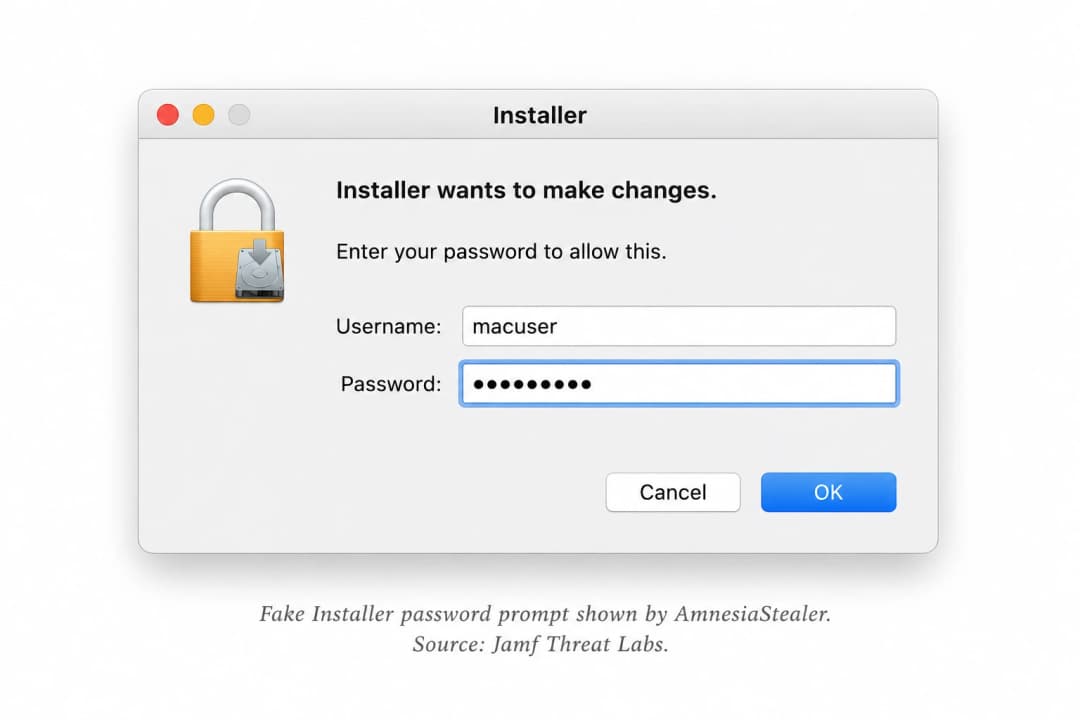
One of the first things the malware can do is show a macOS-style password window titled “Installer.”
The prompt says the installer wants to make changes. If the victim enters a password, the malware checks it locally with dscl.
A wrong password brings up another prompt.
A correct one can then be reused for administrator commands and to unlock the login keychain.
The password is also written to disk in readable form. One of the paths identified in the research is:
~/.pwd
For an investigator, that file is worth checking on a Mac suspected of being infected.
What the Malware Collects
AmnesiaStealer gathers information from several parts of the Mac, not just the browser.
System details can include the macOS version, hardware information, serial data, installed apps, public IP address, ISP, ASN, city, region, country, coordinates, and time zone.
The malware also goes after login and data-protection keychain files.
Apple Notes data and selected Telegram session files are included in its collection routines. It checks Desktop, Documents, and Downloads for selected file types such as TXT, PDF, RTF, DOC, CSV, JPG, PNG, wallet files, and key files.
Chromium Browsers Are a Major Target
Stage 1 has code for 16 Chromium-family browsers, including Chrome, Brave, Arc, and Microsoft Edge.
It checks the Default profile as well as Profile 1 through Profile 3. Cookies, saved logins, browsing history, bookmarks, web data, browser settings, and extensions are among the files it looks for.
The analyzed build also contained a cryptocurrency clipboard feature covering ten crypto asset types.
That part was turned off in the sample that was tested, and the replacement wallet addresses were empty. Active crypto-address replacement was not confirmed in that build.
Hidden Browser Control
The second stage changes the nature of the attack.
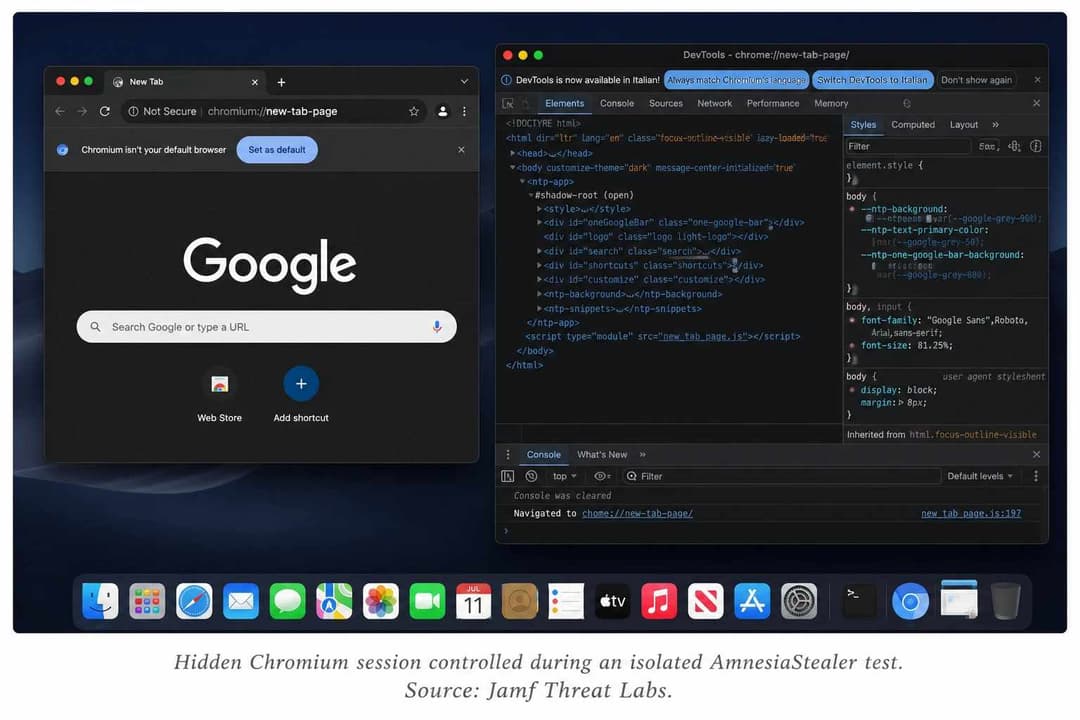
After receiving a remote_stream command, the main malware can download another Rust-based component called stream_module.
That module supports Chrome, Brave, Microsoft Edge, Arc, Opera, Vivaldi, and Chromium.
Rather than working directly inside the browser window the victim can see, it copies the browser profile to:
~/.local/share/.stream/profiles/<browser>
That copy may contain cookies, login databases, Local Storage, Session Storage, IndexedDB, preferences, and other session data.
The browser is then started in headless mode. In plain terms, it runs without opening a normal browser window on the victim’s screen.
During controlled testing, researchers were able to type, move the mouse, scroll, change pages, and manage tabs. The test also produced a live screen feed at about three frames per second.
Chrome DevTools Protocol Handles the Control
The browser module uses the Chrome DevTools Protocol, or CDP.
CDP is a normal Chromium feature used by developers and testers. In this case, the malware uses it to send commands to the hidden browser.
Those commands include opening pages, moving between tabs, typing, scrolling, mouse actions, and cookie export.
The research team tested these features in an isolated virtual machine using its own copy of the malware and a throwaway Chrome profile.
Cookie Export Worked on macOS 26
One of the more important test results involved browser cookies.
The hidden browser module can ask Chromium for cookies through CDP and save them in a Netscape-format cookie file.
In the macOS 26 test, that method returned readable cookie values. The browser had already decrypted the cookies for normal use, so CDP could request them from the running session.
A second method, which tried to change cookie encryption directly inside the browser database, did not work in the same test.
So the successful result came from asking the running browser for its cookies, not from rewriting the database.

A Risky Safe Storage Fallback
There is another browser-related feature for macOS 26 and later.
If AmnesiaStealer cannot recover the normal Chrome Safe Storage key, it has a fallback that removes the old Safe Storage entry and creates a new one with a password known to the attacker.
Old passwords and cookies may become unreadable after that change because they were encrypted with the earlier key.
The researchers describe this fallback as destructive.
Older macOS Tricks Did Not Work Normally
Some code inside AmnesiaStealer relies on older methods.
One of them uses an APFS snapshot technique linked to CVE-2020-9771 in an attempt to reach protected Safari data.
Under normal macOS 26 test conditions, it did not collect the Safari cookies it was looking for.
When the test was repeated from a process that already had Full Disk Access, the protected files could be read.
Another attempt tried to replace the macOS TCC.db privacy database. That also failed in the test system.
Those older methods were present in the malware, but the lab results do not support calling them working macOS 26 bypasses.
Staying on the Mac
AmnesiaStealer can create a LaunchDaemon so it starts again in the background.
A LaunchDaemon is a normal macOS system service. The malware gives its own entry a name that looks close to an Apple crash-reporting service:
com.apple.ReportCrash.agent_<digits>
The related file is stored at:
/Library/LaunchDaemons/com.apple.ReportCrash.agent_<digits>.plist
Inside the plist, the research found settings such as KeepAlive, RunAtLoad, and SessionCreate.
That path gives defenders another local artifact to check.
Where the Collected Data Goes
Before anything is uploaded, the malware creates a randomly named folder under /tmp.
Browser files, passwords, wallet data, Notes, Telegram data, documents, system details, and other collected items are placed there. The folder is then packed into a ZIP archive with the macOS ditto tool.
The command-and-control setup uses different paths for different jobs.
/api/bot/join handles registration, /api/bot/actions is used to check for tasks, and /send/ is used for uploaded data.
An operator login page called Amnesia Panel was also found on the same system. That backend is where the Amnesia name comes from.
Related Samples Appeared Earlier
The August report was not the first time related builds had appeared.
The published IOC list includes samples first submitted to VirusTotal on April 1, 2026. Earlier delivery domains were also linked through the same general command structure.
Those records show that related builds were already circulating before the August report.
They do not tell us that every earlier build had the same full feature set as the one examined later.
Main Indicators to Check
If a security team is looking for signs of this activity, the published indicators give a practical starting point:
- Fake GitHub site: github.aoitour[.]com
- Observed C2 host: debug.allllowef[.]space
- Related domain: news.allllowef[.]space
- Earlier infrastructure: shlyapadulina[.]space
- Stage 1 SHA-256: de5748aac4a4d4cb48cf050652679e6bc49eda33d9ffaa0d280b578122fab55a
- Stage 2 SHA-256: e853748ca8f9a5a9168263617409a9039ab09f4ffc7d860374c1e3b0b67b31a5
- Password file: ~/.pwd
- C2 file: ~/.chost
- Browser profile copy: ~/.local/share/.stream/profiles/<browser>
- LaunchDaemon: /Library/LaunchDaemons/com.apple.ReportCrash.agent_<digits>.plist
The original report also includes Cloudflare IP addresses seen with the fake landing page.
Those are shared Cloudflare addresses, not dedicated AmnesiaStealer servers. Blocking them only because they appeared in this case could also affect unrelated services.
Hoplon Infosec Review: What Users Should Pay Attention To
The easiest place to stop this attack is before the Terminal command ever runs.
A download page asking you to paste an unfamiliar command into Terminal deserves extra checking, even when the page looks polished or uses a familiar brand.
For Mac software, go back to the developer’s real website or another trusted source instead of relying on the page that gave you the command. Apple gives the same basic advice: get software from sources you trust and be careful with downloaded scripts.
Keeping macOS and browsers current is useful too. Some of the older methods inside AmnesiaStealer failed under the protections present in macOS 26.
That does not remove the whole risk.
The tested sample could still collect passwords and keychain data, copy Chromium files, control a hidden browser, and export readable cookies through CDP.
On a company-managed Mac, the published hashes, domains, ~/.pwd file, cloned browser folder, and crash-reporter-style LaunchDaemon are sensible places to start checking.
And if someone entered a real password into a prompt they later believe was fake, that password should be changed. CISA gives the same advice when credentials may have been exposed through phishing.
Source Attribution
The malware discovery, reverse engineering, controlled tests, screenshots, hashes, domains, and technical findings in this report come from Jamf Threat Labs.
Hoplon Infosec’s role here is to review those published findings and explain what they mean for users and security teams.
Primary source: Jamf Threat Labs - AmnesiaStealer macOS Infostealer ClickFix Research
Supporting guidance: Apple macOS security documentation and CISA phishing guidance.
You might also enjoy these articles from our blog:
TeamViewer DEX DoS Vulnerability
Mobile Payment Security Solutions in 2026
Penetration Testing Assessment
Fake GrubHub Emails Crypto Scam