VS Code Extension Update Delay Protects Developers
ByMd Shahria
Published08 Jun, 2026
Md Shahria08 Jun, 2026
Microsoft is working on a new safety feature for Visual Studio Code that might help developers avoid risky extension updates before they become widespread. Starting with VS Code 1.123, extensions will wait two hours before automatically updating to a newly published version when automatic updates are enabled.
Two hours can sound small at first. But in software supply chain security, even a little delay can be a big difference. Attacks often follow closely after the release of a malicious package or extension. A short delay provides security teams, researchers, marketplace systems and users with more time to identify suspicious behavior before the update silently reaches thousands of developer machines.
Why is Microsoft holding back VS Code extension updates
For a long time, developers have thought of IDE extensions as useful productivity tools. They install formatters, AI assistants, database tools, cloud plugins, language packs, debugging helpers without a thought.
But that trust is now a security threat.
But a VS Code extension is more than just a little visual add-on. It can have access to project files, environment variables, source code, terminals, credentials, and developer workflows in many cases. An attacker who compromises an extension update may get that update to run inside a developer's machine before anyone notices.
Microsoft has also added a two-hour cool down period before the auto-update begins. Microsoft says that with automatic updates turned on, new versions of extensions are automatically updated two hours after they are published to add protection against problematic or potentially compromised releases.
This isn’t going to stop every attack. But it does give defenders a small but crucial window to catch bad releases early.
How the New VS Code Extension Update Lag Works
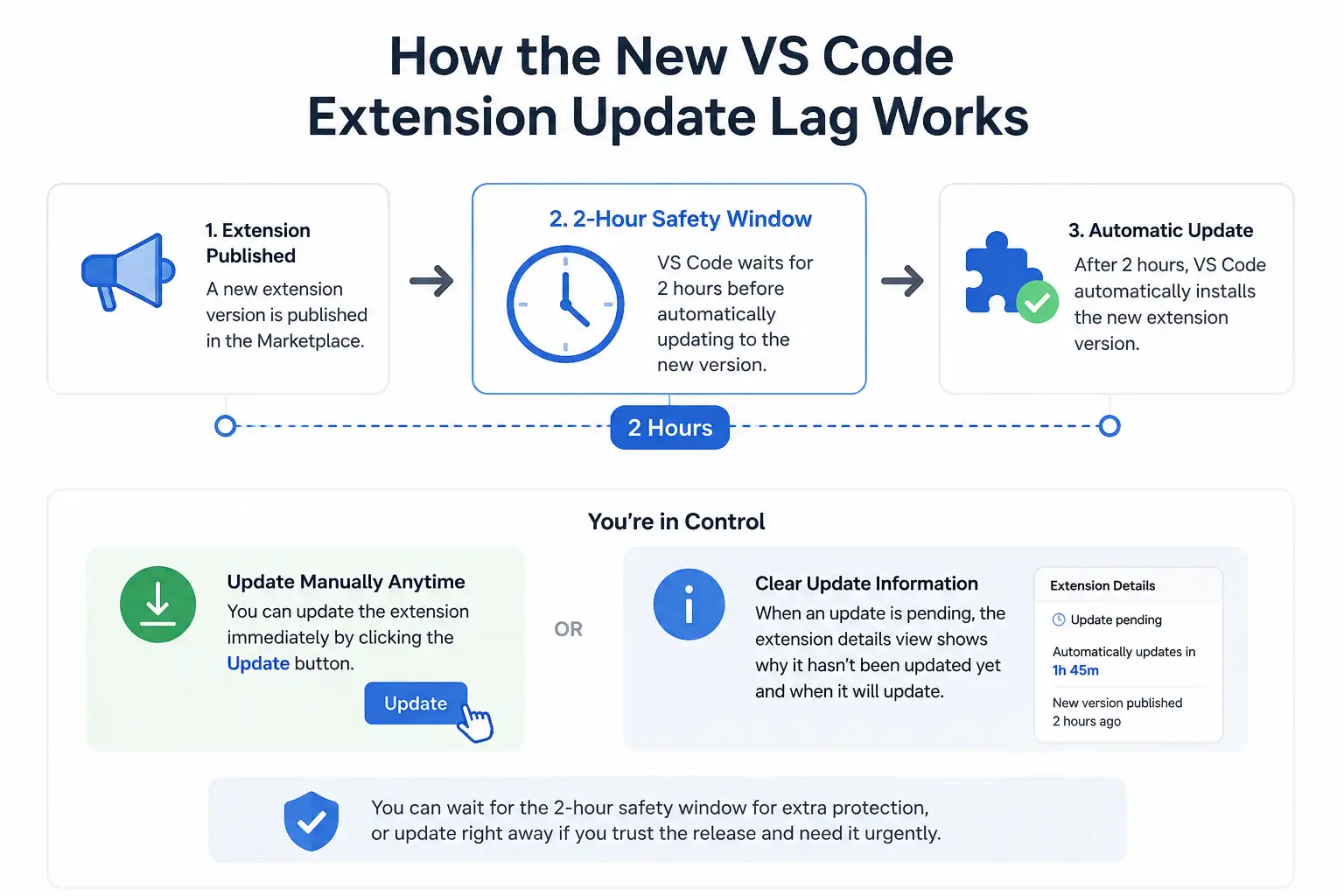
VS Code does not automatically update to a new version of the extension as soon as it is published. Instead, VS Code waits for two hours and then installs the update automatically.
Users can still update manually at any time by clicking the Update button . Microsoft also says that when an extension update is pending, the extension details view will also indicate why it has not been updated yet, and when the automatic update will happen.
So developers aren’t losing control. They can wait for the safety window, or they can update right away if they trust the release and need it urgently.
Trusted Publishers Will Not Be Subject to Delay
One important point to note: this delay doesn’t apply to all extensions.
And trusted publishers like Microsoft, GitHub, and OpenAI will keep updating extensions in real-time.
This leads to a practical equilibrium. Microsoft is trying to contain the risk from broader marketplace updates without holding back extensions from publishers it already considers very trusted.
But watch out, organizations. "Trusted publisher" does not mean "no risk". It simply means that the update path is viewed as less risky than unknown or less established publishers.
Two Hours: Why It Matters in Supply Chain Attacks
Modern software supply chain attacks are often about speed.
An attacker could publish a malicious update, wait for it to be auto-installed, steal tokens or source code, and disappear before the package or extension is removed. Sometimes the damage occurs within minutes.
The two hour delay is meant to cut down on the early exposure window. If a malicious release is detected quickly and taken down, many users may not receive it through automatic updates.
This is much like what package managers do today in other ecosystems. RubyGems has just added a feature to Bundler 4.0.13 where you can opt-in to a cooldown on installing newly published versions of gems. Other ecosystems, like Bun, npm, pnpm, and Yarn, have also added similar controls.
Some examples are:
Ecosystem
Security Delay Feature
Bun
minimumReleaseAge
npm
min-release-age
pnpm
minimumReleaseAge
Yarn
npmMinimalAgeGate
RubyGems / Bundler
Cooldown setting
The Bigger Security Story: Developer Tools Are Now Targets
This update isn’t just about VS Code. This reflects a larger shift in cybersecurity.
Developers are a common target for attackers, who are increasingly targeting developer environments, because developers often have access to sensitive code, cloud credentials, API keys, CI/CD pipelines, internal systems, and production infrastructure.
A developer machine that’s been compromised can be a doorway into an entire organization.
That’s why extension security matters.
A malicious extension could potentially:
• Open project files and source code
• Steal API keys or secret
• Access to terminal operations
• Modify code silently
• Exfiltrate credentials
• Deployed to developer teams
• Build bridge into CI/CD pipelines
This is why Microsoft’s update should be seen as a supply chain defense, and not just a minor VS code feature.
What it means for developers
The change is mostly automatic for individual developers. If you’re using VS Code with extension auto-updates enabled, most extension updates will now wait for two hours before installing.
But developers should still be safe :
•Always install extensions from reputable publishers
• Look at extension popularity and permissions
• Steer clear of random extensions with few reviews or unclear ownership
• Delete extensions you don't use
• Manual updates only when needed
• Look out for odd behavior following extension updates
• Keep VS Code itself up to date The most important habit is simple: don’t assume IDE extensions are benign. They are part of your software supply line.
Implications for business and security teams
Now is a good time for companies to take a look at the security of developer workstations.
Security teams shouldn’t have to wait two hours for Microsoft. They should also have internal controls around what extensions developers can install .
Suggested actions include:
Area
Recommended Action
Extension governance
Maintain an approved extension list
Developer security
Monitor unusual extension behavior
Secrets protection
Scan repositories and local configs for exposed keys
Endpoint security
Use EDR on developer machines
Update control
Test critical extensions before broad rollout
Awareness
Train developers on extension-based supply chain risks
This delay does not apply to manual refreshes
An important limitation is.
The two-hour waiting period can be skipped if the developer wants to click Update immediately. Microsoft lets users manually update extensions whenever they want to.
So that feature reduces the chance of automatic updates, but doesn’t eliminate the chance of risky human behavior. Developers who update all the extensions they use quickly might still be vulnerable to the newly released malicious versions.
To mitigate that risk, organizations may need internal policy, training or device management controls.
Delays may not trip up slow-burn attacks
Another limitation is that not all malicious extensions are detected in a two hour window.
Some attackers create malware that is silent, or that launches at a later time, or only attacks certain users. A two hour delay may defeat fast-detected malicious releases, but may not defeat stealthy campaigns.
So this update is useful, but it is not a full fix.
The stronger approach is layered security: extensions review, endpoints monitoring, secrets scanning, behavior detection, and education of developers.
Expert Opinion
Microsoft's delay in updating its VS Code extension is a practical and smart security improvement. This doesn’t make the extension ecosystem 100% safe, but it does reduce the risk of immediate, widespread exposure to newly released malicious updates.
And the bigger message is clear: developer tools are now part of the attack surface.
Companies have historically been very focused on production servers, cloud infrastructure and web applications. Today’s attackers are also looking at IDEs, package managers, browser extensions, AI coding tools, and build systems.
The compromise of a developer’s laptop can be the first step in a much larger compromise.
How Hoplon Infosec Can Help You
Hoplon Infosec assists companies in reducing the risks in their software supply chain, evaluating developer environments, the use of extensions, exposure of endpoints, security of CI/CD and risks of credential leakage.
Our team can assist you:
• Review risky extensions in VS Code
• Create a sanctioned extension policy
• Reveal exposed secrets in developer workflows
• Protect developer laptops and endpoints
• Evaluate CI/CD and software supply chain risks
• Train teams to spot malicious developer tools
Tomorrow’s big breach, today’s security control can stop it.
Concluding Summary
New VS Code extension update delay from Microsoft adds two hours waiting period before most extensions updated automatically. The idea is to limit the exposure to malicious or compromised extensions before they gain traction.
It’s a good step for developer security but it’s not an end-all defense. Developers and organizations should continue to be cautious when reviewing extensions, avoid unnecessary tools, watch for suspicious behavior and treat IDE extensions as a piece of the software supply chain.
Microsoft X account hacked in a Clippy crypto scam. Learn what happened, what Microsoft confirmed, the risks involved, and how users can stay protected.
acSync malware abuses public iCloud calendars to deliver macOS payloads. See how the attack works, what it steals, how it persists, and how to respond.
CLOSEDQUORUM malware uses four AI models to vote on attack actions. See how multi-LLM C2 works, what it steals, and how defenders can detect attacks early.
Fake T-Mobile rewards expiry texts are leading users to phishing sites. Learn how the scam works, red flags to spot, and what to do if you clicked one.




-20260925120840.webp&w=3840&q=75)

-20260918120903.webp&w=3840&q=75)