
Did Microsoft release an emergency Windows 11 update to fix recent install problems?
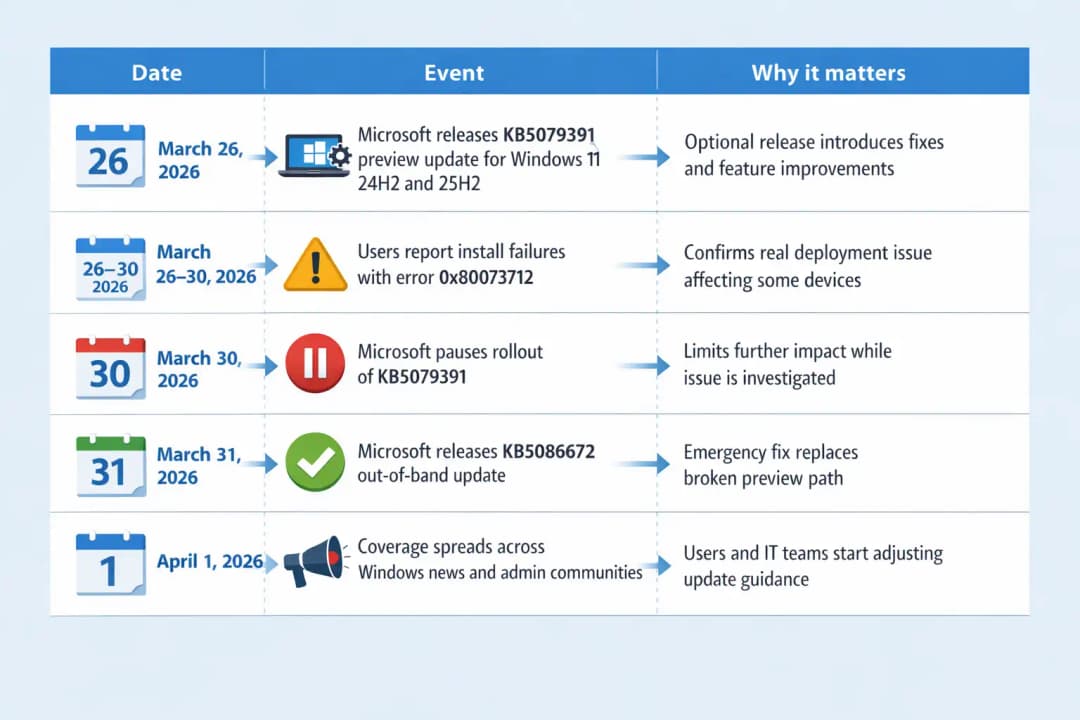
Yes. On March 31, 2026, Microsoft released KB5086672, an out-of-band update for Windows 11 versions 24H2 and 25H2 after the optional preview update KB5079391 triggered installation failures with error 0x80073712 on some systems.
Microsoft said the new release supersedes earlier updates and includes the installation fix along with previous March protections and improvements. The issue mattered because affected users were trying to install a preview release and instead ran into missing or problematic update-file errors.
If you follow Windows patch news closely, this is the kind of story that makes you pause for a second. Preview updates are supposed to give people an early look at fixes and refinements. Instead, this one turned into a reminder that even optional releases can go sideways fast when update servicing breaks in the real world.
What happened with this Windows 11 update?
Microsoft first released KB5079391 as an optional non-security preview update for Windows 11 versions 24H2 and 25H2. It was not a mandatory Patch Tuesday security release. It was more of a test lane, the place where Microsoft usually ships upcoming fixes and feature refinements before they become part of broader monthly servicing.
According to reporting and Microsoft documentation, the update included 29 changes, with improvements touching areas such as Smart App Control and display behavior.
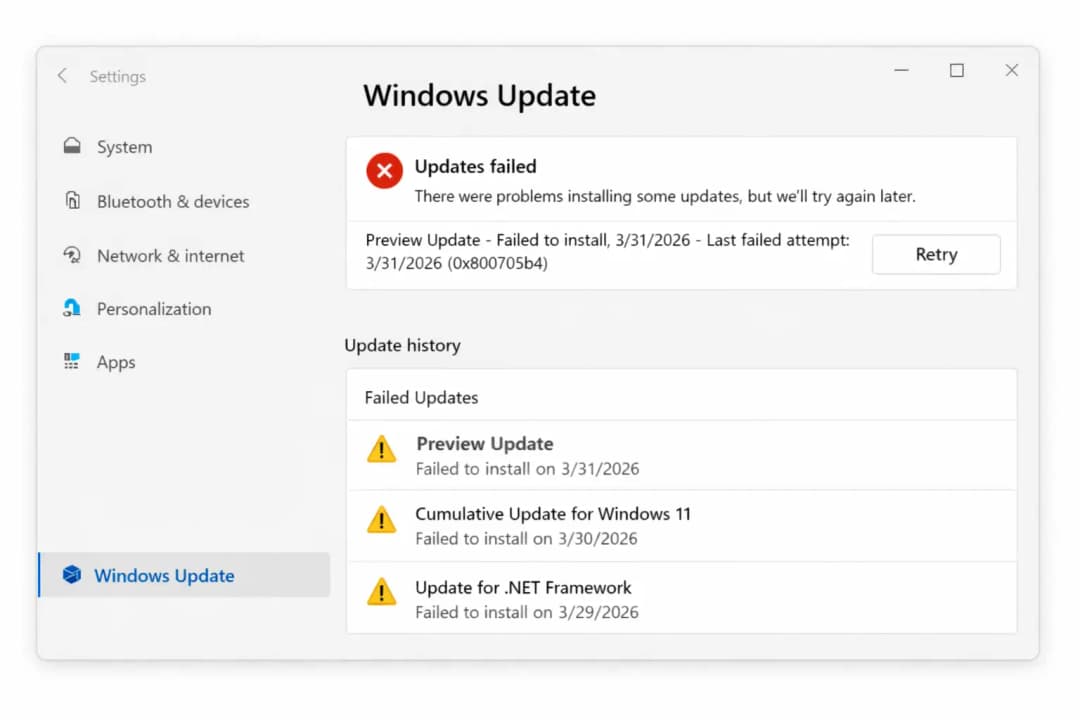
Then came the problem. Soon after rollout, some users began seeing a failed installation message saying that update files were missing or had problems, followed by error code 0x80073712.
That is the kind of code ordinary users do not memorize, but the experience is familiar: Windows tries, stalls, retries, and leaves people wondering whether they should click again or back away slowly.
Microsoft responded by pausing availability of the faulty preview release. That part matters because it tells us the company did not just acknowledge the problem quietly in a forum reply. It limited exposure through Windows Update while it investigated, which is often the fastest way to stop a bad optional release from spreading further.
Why KB5086672 matters right now
The new Windows 11 update, KB5086672, is important because it is not just a tiny patch taped over the issue. Microsoft said the out-of-band release supersedes previous updates for affected Windows 11 24H2 and 25H2 systems and includes protections and improvements from the March 2026 security and preview releases, plus the installation fix itself. In plain English, this is the cleanup release meant to replace the broken path users were on.
That changes the user decision tree. People who ran into KB5079391 trouble do not need to keep wrestling with the old preview package. They need the newer release path. For users with “Get the latest updates as soon as they’re available” turned on, Microsoft said the emergency fix may appear automatically once it becomes available for that device. Others can go into Settings, open Windows Update, and choose Download & install if it is offered.
This also lands in a broader reliability moment for Microsoft. Just days earlier, Microsoft had already addressed another Windows 11 issue involving Microsoft account sign-ins in apps like Teams Free and other Microsoft services. That issue appears in Microsoft’s resolved-issues documentation, which shows it was tied to March 2026 updates and later resolved. Put simply, this has been a busy stretch for Windows servicing teams.
Which systems are affected?
The affected systems are Windows 11 version 24H2 and version 25H2 devices that were offered the optional preview release KB5079391. The reporting and Microsoft documentation both point to those two versions specifically.
Not every Windows 11 PC was necessarily hit. This was tied to an optional preview update, which already narrows the scope compared with a mandatory security release.
Users who do not install previews, or who leave the newest optional experiences alone until Patch Tuesday, may never have seen the issue at all. That is one reason preview releases still matter for testing. They expose edge cases before a wider release wave.
There is also a practical distinction between affected and merely concerned users. If your machine updated normally and you are not seeing failed install attempts or missing-file messages, you may only need to keep checking official channels rather than take any drastic action. Panic is rarely a productive update strategy.
The technical detail behind the failure
The most visible technical detail in this Windows 11 update incident is the install error 0x80073712, shown when some systems attempted to install KB5079391. Microsoft and BleepingComputer both documented the same user-facing symptom: Windows reporting that some update files were missing or had problems.
Microsoft has not publicly published a deep root-cause postmortem explaining exactly which package component, dependency chain, or servicing condition caused the fault.
That means any dramatic explanation beyond the documented installation issue would be speculation. And in update stories like this, speculation is where a lot of bad content starts. A trustworthy article has to stop where the verified facts stop.
What we can say with confidence is that Microsoft treated the matter as serious enough to pause rollout and ship an out-of-band replacement update. Companies do not usually do that for cosmetic bugs. They do it when the update experience itself has become unreliable enough to require immediate correction.
Incident timeline
What users should do next
If you hit the failed install message for KB5079391, the safest move is to stop retrying that older preview path blindly and check whether KB5086672 is now offered through Windows Update. Microsoft specifically said the new out-of-band release is intended to address the installation issue and supersede previous updates.
If the emergency Windows 11 update does not appear immediately, that does not automatically mean something is wrong. Rollouts can be staged by device eligibility, configuration, and service timing. Microsoft’s general guidance for Windows updates remains straightforward: go to Settings > Windows Update, select Check for updates, and install what is offered for your device.
For IT teams, the more useful lesson is procedural. Optional previews should stay in controlled rings, especially when they touch broad system components. A failed preview is inconvenient on a home PC. In a business fleet, it becomes a ticket storm. Every admin knows that one. Monday starts with one user saying “My update failed,” and by lunch it is somehow twenty-three machines and a Slack channel full of screenshots.
Step-by-step recovery path
1. Check whether you were actually offered KB5079391.
If you never saw the preview release, you may not need to do anything beyond normal update hygiene.
2. Open Windows Update
Go to Settings > Windows Update and choose Check for updates. Microsoft’s current support guidance still centers on this as the standard path for receiving available releases.
3. Look for KB5086672
If the emergency fix is offered, install that release instead of chasing the older problematic preview. Microsoft said KB5086672 supersedes previous updates for affected versions.
4. Restart if prompted.
Many cumulative and out-of-band updates require a restart to finalize servicing changes.
5. Monitor official release health.
If the issue continues, check Microsoft’s Windows release health pages for current status and resolved issues before assuming a device-specific failure.
The bigger reliability story behind this Windows 11 update
One patch problem does not prove Windows Update is broken as a platform. But back-to-back emergency fixes do affect confidence. When users hear “out-of-band update” more than once in a short period, they start translating it into something less polite, like “the patch for the patch.” That is not great branding, even if the engineering response is fast.
At the same time, Microsoft’s handling here was fairly clear by industry standards. The company acknowledged the pause, limited the broken rollout, and issued a replacement update quickly. That is better than the worst-case alternative, where a flawed update lingers for days while users piece together answers from scattered forum posts.
There is another practical takeaway too. Preview updates are optional for a reason. Power users like them. IT pros often test them. Curious home users sometimes install them because the button is there and it feels productive. But unless you need the fixes right away, waiting for the next standard cumulative release is often the calmer path.
FAQ
Why is my Windows 11 update failing with 0x80073712?
The recent reports tie that error to installation failures involving the optional preview update KB5079391 on Windows 11 24H2 and 25H2. Microsoft later released KB5086672 to address the issue.
What is KB5086672?
KB5086672 is an out-of-band Windows 11 update released on March 31, 2026, to fix installation issues related to KB5079391. Microsoft says it supersedes previous updates and includes earlier protections and improvements.
Should I install KB5079391 now?
Microsoft paused rollout of KB5079391 because of installation error 0x80073712. For affected users, the newer path is KB5086672, not repeated attempts to force the older preview.
How do I get the fix?
Open Settings > Windows Update, select Check for updates, and install the update offered for your device. Microsoft says some users may receive KB5086672 automatically, especially if they have the latest-updates option enabled.
Hoplon Insight Box
Recommendations
If you are a home user, avoid optional preview updates unless you specifically need the fixes.
If you are an admin, keep preview patches in test rings and watch Microsoft release health before broad approval.
If KB5079391 failed on your PC, check for KB5086672 instead of repeatedly retrying the old package.
Use official Microsoft support pages as the source of truth when update stories move quickly.
Trusted sources
Microsoft Support and Windows release health documentation on KB5079391, KB5086672 availability, and Windows update guidance.
Research firm quote note.
I could not verify a directly relevant research-firm quote about this specific KB5086672 incident from a primary source today, so I have not invented one. That is the safer call.
Final takeaway
This Windows 11 update story is not about a catastrophic Windows failure. It is about something more familiar and, in its own way, more annoying: an optional preview patch that stumbled during installation, got pulled, and then needed an emergency replacement.
Microsoft moved fairly quickly with KB5086672, which is the part that matters most for users trying to get back to normal.
The practical lesson is simple. If you love testing preview releases, keep doing it with your eyes open. If you just want a stable PC, patience is still one of the best update strategies ever invented. And honestly, that advice ages better than most patches.
If you want, I can turn this into a cleaner CMS-ready version with a shorter intro, schema FAQ block, and publication-ready formatting.
You can also read these important cybersecurity news articles on our website.
· Apple Update,
For more, please visit our homepage and follow us on X (Twitter) and LinkedIn for more cybersecurity news and updates. Stay connected on YouTube, Facebook, and Instagram as well.





