
Adobe Commerce CVE-2025-54236 patch
It didn’t take long for news of the SessionReaper flaw to spread. It was like telling a lot of digital store owners that a paperclip could get around the locks on their front doors. That kind of weakness makes people act differently right away. People who had never used a command line before suddenly wanted to know what a CVE was and if their store was next.
The problem with online shopping sites is that they are too big. One mistake can affect thousands of businesses, from a small store that sells handmade candles to a global electronics reseller. It wasn’t unreasonable for people to panic when they found out that hackers could get into customer accounts with a simple API bug. This wasn’t just a problem that scientists thought about in a lab report. It was a problem that could hurt sales, trust, and reputations in a flash.
What does SessionReaper mean in simple terms?
When security researchers give a flaw a dramatic name, it’s usually to get people to pay attention. The name “SessionReaper” is easy to remember because it tells you what the danger is. Sessions are short-term keys that show a user is logged in. If a criminal can get those sessions, they can pretend to be a customer without stealing their password. That is why this bug hit home so hard.
It’s like borrowing a library card from someone. You can check out books in their name with it. Now think about how great it would be if their library card also worked at their bank or at home. In an online store, a session token means that. If someone steals that token, they become the customer. That is why security companies called CVE-2025-54236 an open door to account takeover.
A simple explanation of how CVE-2025-54236 works
The official reports say that the problem is “improper input validation” in the Web API ServiceInputProcessor. In simpler terms, it means that the software trusted too much. It took in data that it should have turned down. An attacker can take advantage of that trust to make a special request that tricks the platform into giving access that it shouldn’t.
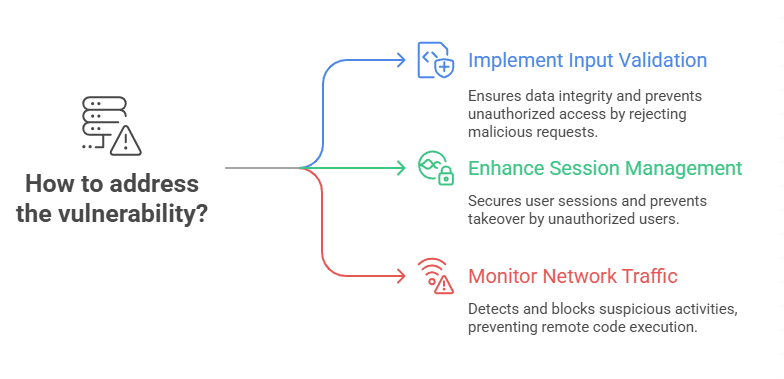
It’s not about hackers guessing passwords. Instead, it’s about taking advantage of a flaw in the way the store’s brain handles requests. Once that weakness is used, sessions can be taken over, and in some cases, code can be run from afar. This makes the attack quick, easy to scale, and very appealing for automated campaigns. This flaw could be used without anyone knowing about it, unlike scams that need a person to click a link.
Which versions and deployments are in danger?
Adobe said that many versions of Adobe Commerce and Magento Open Source are not safe. Merchants who are using 2.4.x releases without the hotfix are especially at risk. Check the build numbers for both on-premise and cloud deployments. Some companies thought that cloud hosting would automatically keep their data safe, but that’s not always the case.
Extensions and modules from other companies make things even worse. A lot of stores add features to help with shipping, loyalty programs, or marketing. Those add-ons often use the same APIs that are now being looked at. A store could be patched at the core but still be unstable because of an old extension. That is why the vendor told merchants to carefully test integrations after they had applied the fix.
Why the vulnerability is more dangerous than usual
Not every bug gets the “critical” label, but this one did for two reasons. First, the attack can happen from a distance and without any action from the user. That means a criminal could hit thousands of stores all at once with an automated attack. Second, researchers found that in some situations, the bug could be used to run code remotely, which is the worst thing that could happen to any e-commerce site.
There was also something else that made things more complicated. Before everyone could get the official Adobe Commerce CVE-2025-54236 patch, there were early signs of the vulnerability. That gave bad people more time to try out different ways to exploit the system. The longer it takes to find and fix a bug, the more likely it is that working exploits will be shared on underground forums.
What Adobe said: The emergency hotfix and APSB25-88
Adobe doesn’t often rush out security updates outside of its normal schedule, but this was one of those times. The company sent out advisory APSB25-88, which included a hotfix package that could be used with supported versions. The hotfix fixed how constructor parameters were handled and made type checks in the Web API more strict.
This wasn’t just a technical fix. It was also a sign. Adobe wanted all merchants to understand how serious the situation was. When a business tells you to patch right away, it means something. The APSB25-88 release notes make it clear that merchants could be very vulnerable if they don’t install this update.
Signs that your store may already be a target
The hard part about session hijacking is that it often leaves behind small traces. Store owners might not notice anything until customers complain about strange orders or changes to their accounts that weren’t made by them. Logs might show strange API traffic spikes, repeated requests to reset passwords, or logins from places that don’t make sense.
Some businesses said that small test purchases, usually of low-value items, were showing up in their systems. This is a common strategy: attackers first check access by making small purchases before trying to commit bigger fraud. Anyone who sees this pattern should not think it’s just a random glitch. It could be a sign that someone is trying to take advantage of you.
Quick steps to help busy teams
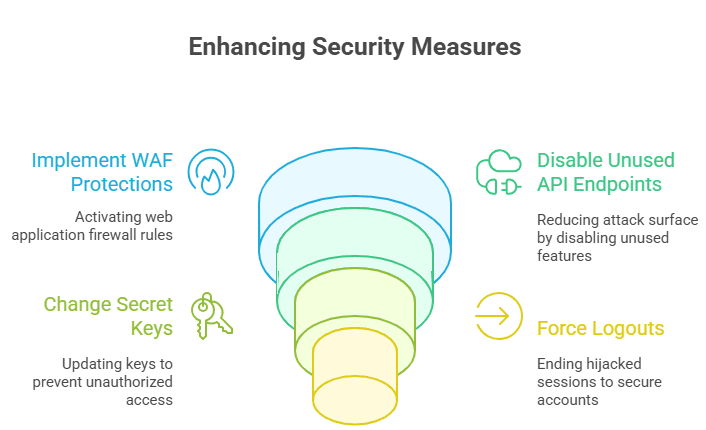
Not all stores have a team of people who work on security full-time. A lot of them are small businesses that depend on managed services or IT help on a part-time basis. The best thing for them to do is turn on web application firewall protections right away. A number of companies, such as Fastly and Sansec, released emergency WAF rules to stop common exploit attempts.
Disabling API endpoints that aren’t needed is another quick step. Turn off any features you aren’t using until the Adobe Commerce CVE-2025-54236 patch is installed. Changing secret keys and forcing logouts can also end sessions that have already been hijacked. These steps won’t fix the problem for good, but they can buy you some time.
Patch walkthrough: real steps to make the fix work
It’s never as easy as clicking to apply a hotfix. It needs to be planned ahead of time. Make a full backup of your application and database files first. Put the APSB25-88 hotfix in a staging environment that is as close to production as possible. Go through important tasks like user registration, checkout, and third-party integrations. Push the update live only after that.
Merchants who didn’t test have often had to deal with unexpected downtime. A checkout system that doesn’t work is just as bad as one that is used. Taking a few extra hours to check the patch can save customers days of frustration. Keep in mind that the patch fixes the problem, but it doesn’t guarantee that everything will work smoothly unless you test it thoroughly.
WAFs and compensating controls are temporary shields.
Patching is the best way to fix things, but temporary shields can help keep you safe. A tuned WAF can block bad payloads that take advantage of bad input validation. Rate limiting API calls also slows down scripts that hit the endpoints a lot. These steps don’t stop every attack, but they make it more expensive for attackers.
Other ways to make up for this are shortening session lifetimes, only allowing administrators to access certain IP ranges, and keeping an eye out for strange login activity. These steps are like sandbags in a flood. They won’t stop the water forever, but they will give you enough time to protect important things until the repair crew gets there.
What to look for after you apply the patch
The first step is patching. After you apply the hotfix, check your logs to see if there were any signs of exploitation before the update. Look for strange user accounts, orders that don’t make sense, or changes to administrative rights. Attackers who got in may try to make secret backdoors that stay open even after the patch.
Another important step is to change your credentials. You should change your API keys, database passwords, and session secrets. Even if you can’t see any compromise, you should still think that sensitive tokens may have been exposed. An audit and new credentials make it easier to start over.
List of things developers need to do: safer patterns and API hardening
This event is a lesson in secure design for developers. APIs should never trust data that comes in. You should check the type, range, and length of each parameter. It’s safer to use explicit object mapping than to let constructors be flexible. The Adobe Commerce CVE-2025-54236 patch made things safer for types, and developers should do the same with their own modules.
Automated tests should have cases where endpoints get bad data. A system that acts in ways you don’t expect is a red flag. Fixing problems after they happen is not enough for security. It means putting up guardrails to keep those problems from happening in the first place.
How to test the fix without breaking production:
It can be stressful to test a fix for a security problem that is already happening. Sometimes, merchants try to check patches by running exploit code directly on live systems. This is dangerous and not needed. It’s safer to make a staging clone with real data and test it there.
After applying the APSB25-88 hotfix, go through your most important workflows in staging. Look over the checkout processes, payment gateways, and integrations. Make a note of the results and compare them to how things worked before the patch. Deploy to production with confidence once everything is working. If you really need to test security, don’t just use random scripts from the internet; hire a trusted penetration tester instead.
Short case study-style example and realistic scenarios
Think about a clothing store in your area that uses an older version of Magento Open Source. They put off updates because the developer quit. Bots were already scanning their site when SessionReaper became public. Accounts of customers showed strange activity within a few hours. The team found hundreds of small fake orders, and each one took time and money to look into.
On the other hand, a competing store fixed the problem in less than a day. They still saw probing traffic, but the exploit attempts didn’t work because the system had been updated. Their customers never saw a problem. The difference was in how quickly they acted. In security, being unsure can be worse than being weak.
Last things to do and next steps for store owners
Here’s a quick summary:
1. Read Adobe’s APSB25-88 bulletin.
2. Make a backup of your store and install the hotfix.
3. Try it out in staging before going live.
4. While patching, use WAF and other controls to make up for it.
5. Keep audit logs and change sensitive passwords.
Think of this event as a turning point. Make sure to include security updates in your regular maintenance plan. Keep getting vendor alerts. You might also want to set up a monitoring service that lets you know when new CVEs are released. You can’t just do security once. It is a habit that you do all the time to keep your store and customers safe.
Final Thoughts
The story of SessionReaper is another reminder that trust is important in business. Customers want their accounts and information to be safe. The Adobe Commerce CVE-2025-54236 patch is more than just a technical update. It is a way to get that trust back. Don’t wait if you own a store. Fix the problem now, do a full audit, and use what you learned from this to make the future stronger.
At Hoplon Infosec, we specialize in Web Application Security Testing that uncovers hidden flaws before attackers do. Our experts simulate real-world attacks on your commerce platforms, APIs, and custom extensions to reveal weak points and recommend fixes. By partnering with us, you can strengthen your store’s defenses, protect customer accounts, and ensure that critical vulnerabilities like SessionReaper never put your business at risk.





