

Apple Backports CoreGraphics Vulnerability Fix: A Technical Guide to CVE-2026-86950
Executive Summary
Apple released iOS 18.7.11 and iPadOS 18.7.11 on October 26, 2026. These updates bring a fix for CVE-2026-86950 to supported devices running Apple's older operating system branch. The flaw affects CoreGraphics, a framework that handles graphics and related data. Apple warns that processing a crafted file may allow arbitrary code execution.
Here are the main points:
- Threat: CVE-2026-86950 is an out-of-bounds write vulnerability. Apple reports possible exploitation in highly sophisticated attacks against specific targets.
- Affected devices: Supported devices include the iPhone XS, iPhone XS Max, iPhone XR, and seventh-generation iPad, along with other compatible iPads.
- Immediate action: Install the latest compatible Apple security update. Verify the installed version and review any device that cannot receive the fix.
The U.S. Cybersecurity and Infrastructure Security Agency (CISA) added this vulnerability to its Known Exploited Vulnerabilities catalog on September 29, 2026. This adds independent government confirmation that the flaw meets the catalog's exploitation criteria.
Table of Contents
- Key Facts and Verified Status
- What Happened and Why It Matters
- How the CoreGraphics Vulnerability Works
- Affected Devices and Security Updates
- Diagnostic Checks and Technical Analysis
- Remediation and Hardening
- Detection and Security Monitoring
- Security Framework Mapping
- Frequently Asked Questions
- Technical References and Author Information
Key Facts and Verified Status
|
Item |
Verified information |
|
Vulnerability |
CVE-2026-86950 |
|
Component |
Apple CoreGraphics |
|
Weakness |
Out-of-bounds write |
|
Potential impact |
Arbitrary code execution when processing a maliciously crafted file |
|
Older-branch fix |
iOS 18.7.11 and iPadOS 18.7.11 |
|
Initial listed fixes |
iOS 26.7.1, iPadOS 26.7.1, macOS Sequoia 15.8.1, and macOS Tahoe 26.7.1 |
|
CISA catalog date |
September 29, 2026 |
|
Publicly confirmed target count |
Not disclosed in the cited advisories |
|
Confirmed delivery method |
Not disclosed in the cited advisories |
Sources: Apple's iOS 18.7.11 advisory, Apple's iOS 26.7.1 advisory, and CISA's catalog announcement.
Confirmed Facts Versus Unknown Details
Confirmed: Apple describes an out-of-bounds write flaw and says improved bounds checking fixes it. The company also reports possible exploitation in sophisticated attacks against specific targets. CISA later added the vulnerability to its known-exploited catalog.
Not publicly established by these sources: the exact malicious file format, the full exploit chain, the number of victims, and the identity of the targeted individuals. Do not present these details as known facts without additional reliable evidence.
This distinction matters for incident response. Security teams need enough information to act quickly, but they should not treat assumptions as forensic findings.
What Happened and Why It Matters
Apple first listed fixes for CVE-2026-86950 in its September 28, 2026, security releases. Those releases included iOS 26.7.1, iPadOS 26.7.1, macOS Sequoia 15.8.1, and macOS Tahoe 26.7.1. Apple released iOS 18.7.11 and iPadOS 18.7.11 on October 26, extending the fix to supported devices on the older branch.
This later release matters because an older device may not support a newer major operating system. A backport lets Apple deliver a security correction through a compatible software branch.
Why CISA's Warning Matters
CISA added CVE-2026-86950 to its Known Exploited Vulnerabilities catalog on September 29. The catalog tracks vulnerabilities with evidence of exploitation in real-world attacks. CISA encourages organizations to use it when setting patch priorities.
This does not mean every device running an older version has been compromised. It means organizations should treat the issue as a known security risk and avoid unnecessary delays.
For a small business, an employee's iPhone may provide access to email, cloud files, business contacts, and sign-in approvals. A flaw in a mobile operating system can therefore affect more than the phone itself. The actual business impact depends on the user's access and the controls around each account.
How the CoreGraphics Vulnerability Works
CoreGraphics is an Apple framework that supports graphics tasks. Software uses it to work with visual content and related data. Like any software that handles input, it must check that data stays within valid memory limits.
CVE-2026-86950 involves an out-of-bounds write, a memory safety flaw. This occurs when software writes data beyond the memory area intended for that operation. The error may corrupt memory and, under the right conditions, allow an attacker to run unauthorized code.
Apple says improved bounds checking fixes this flaw. Its public advisory does not describe the complete exploit chain.
What is the Attack Path?
The following flow explains the general risk. It is not a confirmed reconstruction of the reported attack.
1. A device receives a crafted file
The file contains data designed to trigger a software flaw.
2. Software processes the file
CoreGraphics handles the relevant data.
3. An invalid memory write may occur
The flaw may affect how the program handles memory.
4. Code execution may follow
Successful exploitation could let an attacker run unauthorized instructions.
Conceptual diagram based on Apple's vulnerability description. It does not show a verified exploit chain.
What Does Arbitrary Code Execution Mean?
Arbitrary code execution means an attacker may cause a program to run instructions that its developer did not intend. The resulting impact depends on the program's permissions and the security controls around it.
This term does not automatically mean an attacker gains full control of the device. Further access may depend on other flaws, permissions, or security barriers. However, code execution remains a serious risk and warrants prompt patching.
Does This Count as a Zero-Day?
The term zero-day usually refers to a flaw that attackers exploit before a vendor has released a fix. Apple reports possible exploitation before its relevant fixes, but the term needs careful use when describing the timeline.
For this incident, the most precise description is a vulnerability that Apple says may have been exploited in targeted attacks and that now has published fixes. This wording reflects the vendor's statement without adding claims about the attackers' exact knowledge or timeline.
Affected Devices and Security Updates
Apple's October 26 advisory lists the following devices for the iOS 18.7.11 and iPadOS 18.7.11 release.
|
Device group |
Examples listed by Apple |
Action |
|
Older iPhones |
iPhone XS, XS Max, XR |
Check for the applicable update |
|
iPads |
iPad 7th generation, iPad Air 4th generation and later, iPad 9th generation and later, iPad mini 6th generation and later |
Check the version offered for the exact model |
|
Newer iPhones and iPads |
Compatible devices on newer supported software branches |
Install the latest compatible release |
The listed models do not all run the same operating system branch. Apple also published later releases for its newer software lines. Always check the latest version Apple offers for your exact device instead of relying on a version number copied from another model.
How to Check and Update an iPhone or iPad
- Open Settings.
- Tap General.
- Select Software Update.
- Wait for the device to check for updates.
- Read the version details and install the latest compatible release.
- Return to Software Update after installation to check for further updates.
If your employer manages the device, follow its approved update process. Contact the IT team if the update does not appear or the installation fails.
Do not assume that an older device is protected because it still works normally. A device can operate as expected while its software still contains a security flaw.
Diagnostic Checks and Technical Analysis
A sound security review starts with verified device information. It does not require an exploit or a risky test file.
1. Record the Installed Software Version
On each iPhone or iPad, open Settings → General → About. Record the model name and software version in your approved inventory system.
Compare the installed version with Apple's current security advisory for that device. Do not rely only on the device's age or the date of its last restart.
2. Verify the Update Through Device Management
If your organization uses mobile device management (MDM), review the reported operating system version for each enrolled device. Confirm that the management platform has received recent device data.
MDM reports can become stale when a device remains offline or fails to check in. For that reason, distinguish between a device that has confirmed the required version and one whose status is unknown.
3. Review Security Events When Needed
A missing patch alone does not prove compromise. If other evidence raises concern, review available account, identity, and device records under your incident response policy.
Look for unusual sign-in activity, unexpected changes to account security settings, and other events that match the organization's threat model. These signs are not specific proof of CVE-2026-86950, and normal logs may not reveal exploitation of a mobile operating system flaw.
Lab Testing and Evidence Limits
No controlled lab reproduction or forensic examination was performed for this article. Apple's public advisory does not provide enough detail to reproduce the reported attack reliably. A claim of successful testing, a specific exploit log, or a confirmed technical root cause beyond Apple's description would therefore be unsupported.
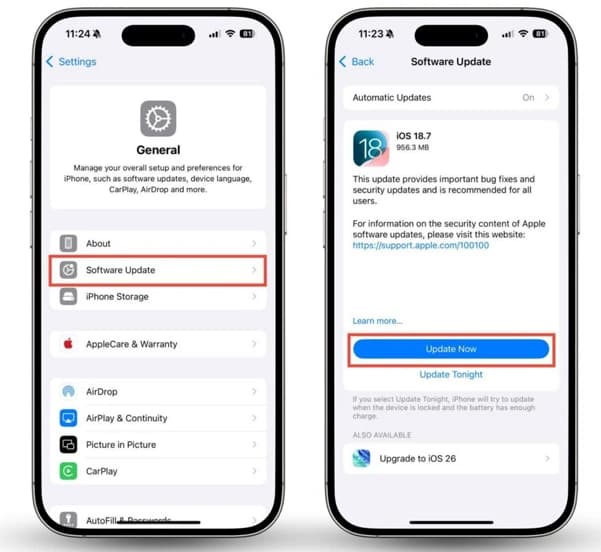
Check the installed iOS version and apply the latest compatible security update. Alt text: iPhone software update settings showing where users check for available iOS security updates.
Source: clario.co
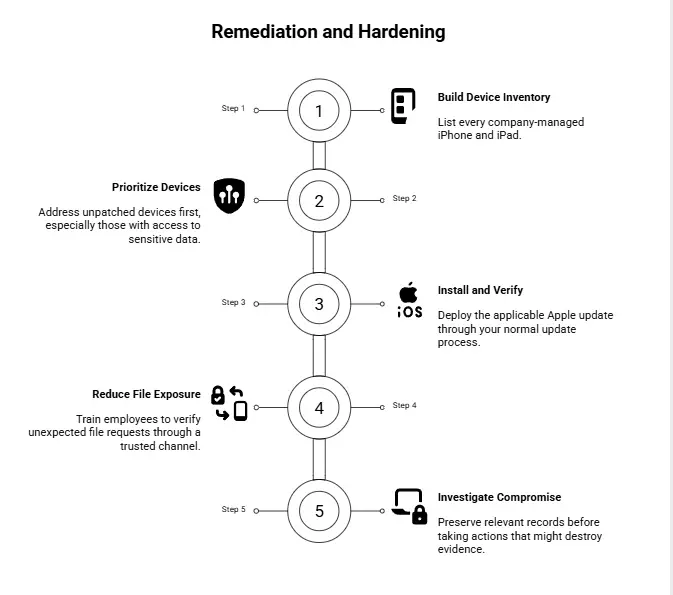
Remediation and Hardening
The best response combines prompt patching with device inventory and access controls. No single secondary safeguard replaces Apple's security fix.
Step 1: Build an Accurate Device Inventory
List every company-managed iPhone and iPad. Record each model, operating system version, assigned user, and last check-in date.
Include personal devices that access company systems where policy and law permit. An incomplete inventory can leave vulnerable devices outside the patch process.
Step 2: Prioritize Devices by Risk
Address unpatched devices first, especially those with access to sensitive data. Give added attention to users who face a higher risk of targeted attacks.
Use CISA's Known Exploited Vulnerabilities catalog as one input to your patch priorities. Consider business impact and device access, too.
Step 3: Install and Verify the Fix
Deploy the applicable Apple update through your normal update process. Confirm the installed version after deployment.
If the device cannot receive the required update, assess whether it should retain access to company data. Restrict access or replace the device when the remaining risk is not acceptable.
Step 4: Reduce Exposure to Malicious Files
Train employees to verify unexpected file requests through a trusted channel. Encourage them to avoid unneeded downloads from unknown sources.
These steps may reduce some risks, but they cannot block every exploit. Apple has not publicly confirmed the precise delivery method for this vulnerability.
Step 5: Investigate Credible Signs of Compromise
If other evidence suggests a device may be compromised, follow your incident response plan. Preserve relevant records before taking actions that might destroy evidence.
A patch fixes the known software flaw. It does not prove that no attacker accessed the device before installation.
Comparing Defensive Options
|
Mitigation strategy |
Expected performance impact |
Complexity |
Effectiveness |
|
Install Apple's update |
Usually low, though restart and app compatibility may affect users |
Low to moderate |
Directly addresses the known flaw |
|
Use MDM for inventory and compliance |
Requires enrollment, reporting, and routine administration |
Moderate |
Improves patch visibility |
|
Restrict access from unpatched devices |
May block some users from business apps |
Moderate |
Reduces exposure to company systems |
|
Train users about suspicious files |
Requires time and ongoing reminders |
Low to moderate |
Supports safer file handling |
|
Replace unsupported devices |
May require new hardware and migration work |
Moderate to high |
Removes reliance on unavailable updates |
|
Conduct incident response |
Depends on the scope of the investigation |
High when specialist analysis is needed |
Helps assess and contain suspected compromise |
These impact estimates are qualitative. Actual costs and performance effects depend on the organization's setup.
Detection and Security Monitoring
Security teams should not expect a standard network rule to detect every attempt to exploit CVE-2026-86950. Apple has not published a complete exploit signature or a confirmed list of attack indicators in the cited advisory.
The most reliable first step is to track patch status. Add investigation signals when credible evidence of compromise appears.
Recommended Monitoring Controls
|
Control |
What to monitor |
Limitation |
|
MDM compliance reporting |
Device model, OS version, update status, last check-in |
Reports may be stale or incomplete |
|
Identity monitoring |
Unusual sign-ins, new devices, account recovery changes |
These events are not specific to this vulnerability |
|
Endpoint and device records |
Available security alerts and unusual behavior |
iOS visibility depends on the tools and permissions available |
|
Help desk reporting |
Unexpected device behavior or suspicious file reports |
User reports require further validation |
|
Patch exception tracking |
Devices without the fix and assigned owners |
Tracking alone does not stop exploitation |
Example Compliance Query
If your device inventory uses SQL, a report can identify devices that need review. The following example uses placeholder table and field names. It is not a ready-to-run query for a specific MDM platform.
SELECT device_id, model, os_version, last_check_in
FROM device_inventory
WHERE patch_status <> 'verified'
OR last_check_in < :approved_cutoff;
Replace the table, field names, and cutoff parameter with values from your approved system. Validate the report against known devices before using it for compliance decisions.
Performance and accuracy: This query has no direct effect on iPhone performance because it reads inventory records. Its accuracy depends on the freshness and quality of those records.
Should Teams Add a Suricata or Sigma Rule?
Not without a reliable detection pattern.
Suricata inspects network traffic, while Sigma provides a common format for describing log detection rules. Neither tool can reliably identify this vulnerability from a generic event alone. A rule based on unsupported indicators could create false alerts while missing real attacks.
Use vendor-supported indicators if trustworthy ones become available. Until then, prioritize patch compliance and investigate events that match broader evidence of compromise.
Security Framework Mapping
Security frameworks help teams turn a technical advisory into a repeatable process. The mappings below are relevant to patching and device management. They do not establish that the vulnerability belongs to a specific MITRE ATT&CK technique or OWASP category.
NIST SP 800-53
Two controls offer useful guidance:
- SI-2, Flaw Remediation: Track security flaws, apply fixes, and verify remediation.
- CM-8, System Component Inventory: Maintain an accurate inventory of systems and components.
These controls support a practical response to this incident. Teams should consult the NIST SP 800-53 control catalog for the official wording and implementation details.
Apple's advisory does not provide enough technical detail to assign a specific MITRE ATT&CK technique to the reported exploitation with confidence. Likewise, OWASP categories mainly address application security risks and do not directly classify every operating system memory flaw.
Do not assign a technique ID simply because a vulnerability may lead to code execution. Map observed behavior only when reliable technical evidence supports that mapping.
Severity and CVSS
The NIST National Vulnerability Database currently shows no NIST-assigned base score in its cited entry. It displays a score of 8.8, High, attributed to CISA's enrichment data.
For that reason, describe 8.8 as the score attributed to CISA's data, not as an independent NIST assessment. Always check the current record before publishing severity claims.
Technical References and Further Reading
Use these sources for verification and ongoing updates.
- Apple's iOS 18.7.11 and iPadOS 18.7.11 advisory: Official security details
- Apple's iOS 26.7.1 and iPadOS 26.7.1 advisory: Earlier security release
- CISA's exploitation notice: Known Exploited Vulnerabilities announcement
Related Hoplon InfoSec Resources
For teams that need a broader vulnerability management process, these resources may help:
- Risk-Based Vulnerability Management: Learn how asset discovery, risk ranking, and fix verification support ongoing vulnerability management.
- Hoplon InfoSec Services: Review available security services, including vulnerability management and cyber threat intelligence.
These links provide general service information. They do not indicate that Hoplon InfoSec investigated or reproduced this specific Apple vulnerability.
Final Recommendations
The Apple Backports CoreGraphics Vulnerability Fix closes a known memory safety flaw on supported older devices. Apple's warning and CISA's catalog entry make prompt patching the right priority.
For individuals, check for the latest compatible update. For IT teams, verify device compliance, track exceptions, and investigate credible signs of compromise. Use confirmed evidence, keep records, and avoid claiming more han the available facts support.
The key lesson is simple: an update only reduces risk when the right devices receive it and the organization verifies the result.
Author Bio and Review
Author: Mohammed Talukder is the Co-Founder and CEO of Hoplon InfoSec, with over 16 years of experience in cybersecurity and technology. His expertise includes offensive security, vulnerability management, cyber risk management, and incident response. His professional credentials include CISM, CISA, CEH, and CompTIA PenTest+. He has also received Infosys recognition awards for his professional contributions. He shares practical cybersecurity insights to help organizations strengthen their security posture.
Technical reviewer: Gazi Mahmud, Co-Founder and CIO of Hoplon InfoSec LLC, cybersecurity leader, and CISM & CISA certified professional with expertise in cyber risk management, security governance, compliance, and incident response.
This article draws on Apple's official security advisories, CISA's Known Exploited Vulnerabilities catalog, and NIST vulnerability records. We have distinguished confirmed facts from unverified details and have not claimed independent lab testing. Security information may change as vendors release new guidance, so readers should check official sources for the latest updates.





