Fake ChatGPT Malware:How Yoba Infects Fake AI Apps on WindowsCan
a Signed ChatGPT Installer Infect Your Computer?
Can a Signed ChatGPT Installer Infect Your Computer?
Yes. A genuine digital signature does not make an entire download package safe.
On October 27, 2026, Check Point Research disclosed a malware campaign called Yoba. Attackers used fake ChatGPT and Claude desktop downloads to spread malicious Windows components.
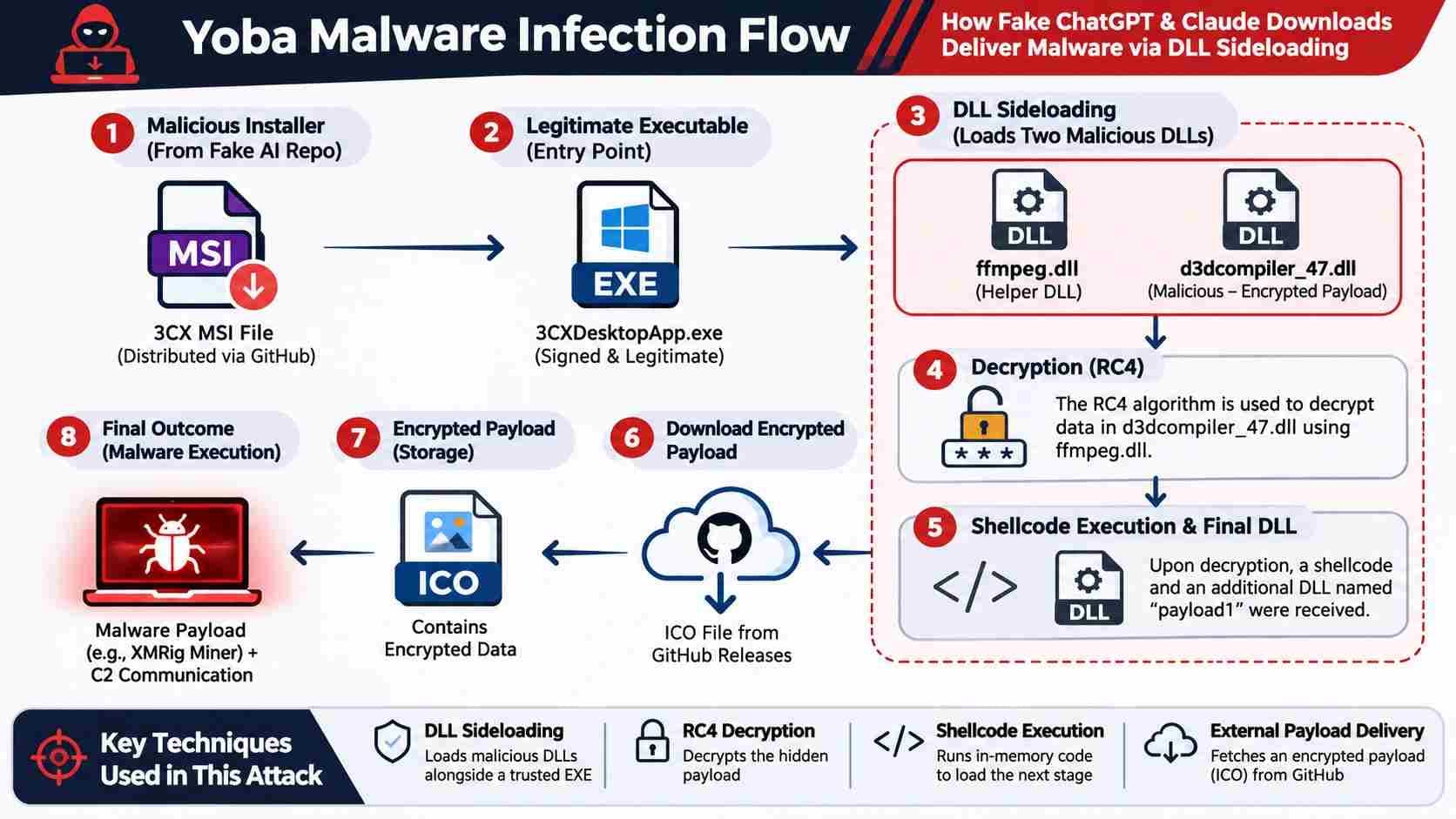
The campaign abused legitimate, digitally signed OpenAI and Anthropic executables. Attackers placed a malicious DLL beside each executable. Windows then loaded the harmful DLL through a technique called DLL sideloading.
The observed infection chain delivered an XMRig cryptocurrency miner. However, researchers also found that YobaLoader could retrieve other Windows executables and PowerShell scripts.
The main concern is software trust. Users may trust a signed installer without checking the ZIP package around it.
What You Need to Know
- Threat: Yoba uses fake ChatGPT and Claude downloads to spread malware.
- Infection method: A malicious winmm.dll loads beside a genuine signed executable.
- Observed impact: Researchers identified XMRig 6.26.0 cryptocurrency mining.
- Immediate action: Avoid unverified downloads and investigate suspicious installers, DLLs, and scheduled tasks.
Table of Contents
- Quick Facts
- What Is Yoba Malware?
- Yoba Malware Campaign Timeline
- How Fake AI Downloads Spread Malware
- Why Signed Applications Can Load Malware
- YobaDropper Technical Analysis
- YobaLoader and Command-and-Control
- What Happens After Infection?
- How to Check Your Windows PC
- SOC Threat Hunting Guide
- Indicators of Compromise
- Incident Response and Recovery
- Yoba Malware Evolution
- How to Download ChatGPT and Claude Safely
- MITRE ATT&CK Mapping
- Frequently Asked Questions
- Ask the Expert
- Final Takeaways
Quick Facts
The following table separates confirmed findings from information that remains uncertain.
|
Category |
Research findings |
Status |
|
Malware name |
Yoba |
Confirmed |
|
Research disclosure |
October 27, 2026 |
Confirmed |
|
Initial repository activity |
July 16, 2026 |
Confirmed |
|
Malicious ZIP releases |
August 30 to September 4, 2026 |
Confirmed |
|
Target platforms |
Windows |
Confirmed |
|
Fake applications |
ChatGPT and Claude-themed downloads |
Confirmed |
|
Main malicious DLL |
winmm.dll |
Confirmed |
|
Infection technique |
DLL sideloading |
Confirmed |
|
Persistence |
Windows scheduled tasks |
Confirmed |
|
Observed final payload |
XMRig 6.26.0 |
Confirmed |
|
Credential theft |
No supporting evidence in the cited report |
Unconfirmed |
|
Official vendor compromise |
No evidence found by Check Point |
Not confirmed |
|
Current campaign activity |
No reliable confirmation after the cited disclosure |
Unconfirmed |
Important: A missing confirmation does not prove that an activity never happened. It means available research does not establish that claim.
1. What is Yoba Malware?
Yoba is a Windows malware campaign that uses fake AI software downloads. Check Point Research identified two main components:
- YobaDropper: The first-stage component that starts the infection chain.
- YobaLoader: The second-stage component that contacts external services and retrieves additional payloads.
The researchers found both components inside fake AI application packages. These packages used genuine signed executables from OpenAI and Anthropic.
The attackers relied on DLL sideloading to execute their malicious code. They also used several methods to make analysis harder.
YobaDropper vs. YobaLoader vs. XMRig
|
Component |
Main purpose |
Observed behavior |
|
YobaDropper |
Initial execution |
Checks the host process and deploys another component |
|
YobaLoader |
Payload delivery |
Uses Telegram, DNS-over-HTTPS, and Catbox |
|
XMRig |
Cryptocurrency mining |
Uses infected computer resources |
These components perform different jobs.
The dropper starts the process. The loader obtains the next payload. XMRig performs the observed mining activity.
Is Yoba a Miner or a Malware Loader?
Yoba is better understood as a malware delivery chain.
The researchers observed XMRig as the final payload in the analyzed campaign. However, YobaLoader supports other Windows executable and PowerShell payloads.
This distinction matters for incident response. Removing a miner alone may not remove the underlying loader or persistence mechanism.
2. Yoba Malware Campaign Timeline
Check Point's technical report provides useful evidence about the campaign's development. The available timeline also helps separate early activity from later fake AI downloads.
|
Date |
Observed activity |
Evidence |
|
Early June 2026 |
Earlier Cursor-themed Yoba variant |
Confirmed by retrospective analysis |
|
July 16, 2026 |
First identified ChatGPT-themed repository activity |
Confirmed |
|
August 30, 2026 |
First ChatGPT-themed malicious ZIP release |
Confirmed |
|
August 31, 2026 |
Claude-themed malicious ZIP release |
Confirmed |
|
September 4, 2026 |
GPT-6 Astra-themed malicious ZIP release |
Confirmed |
|
October 27, 2026 |
Check Point publishes its research |
Confirmed |
Early Variants in June 2026
The researchers identified an earlier YobaDropper variant from June 2026. That version used a fake Cursor AI coding application as its lure.
The older variant also used a different persistence method. It created a Startup folder shortcut rather than relying on the later scheduled-task method.
Fake GitHub Repositories in July
The first identified ChatGPT-themed repository appeared on July 16. It advertised a supposed GPT-5.6 Sol desktop application.
Later projects promoted GPT-6 Astra and Claude Opus downloads.
Malicious Releases in August and September
The attackers uploaded their malicious ZIP packages between August 30 and September 4.
The packages included genuine signed executables and malicious DLL files. Their presence on GitHub gave the downloads a familiar appearance.
Research Disclosure in October
Check Point published its technical analysis on October 27.
The report documents the infection chain, payload delivery methods, earlier variants, and indicators of compromise.
Is the campaign still active?
The cited report confirms earlier campaign activity. It does not establish whether the operators continue distributing the same packages today.
Organizations should monitor new indicators and check current threat intelligence before making blocking decisions.
3. How Fake AI Downloads Spread Malware
The campaign exploited a common user habit. People often search Google or GitHub when they want desktop software.
Attackers used that behavior to make fake applications appear trustworthy.
Fake ChatGPT and Claude Applications
The malicious projects promoted supposed desktop applications with names such as:
- GPT-5.6 Sol
- GPT-6 Astra
- Claude Opus
These names appeared in GitHub repositories and related landing pages.
The pages described the supposed applications and linked to ZIP downloads. Those archives contained the malicious components.
GitHub Repository Impersonation
GitHub hosts legitimate open-source projects and software releases. However, the platform does not guarantee that every uploaded project is safe.
In this campaign, attackers used GitHub repositories and GitHub Pages. They used these services to present fake software as legitimate downloads.
A familiar hosting platform does not prove that a file is trustworthy.
Suspected SEO Poisoning
Check Point found that several malicious projects appeared prominently in Google results.
The researchers considered this behavior consistent with SEO poisoning. This technique uses search-focused pages to push harmful content toward users.
They did not find evidence of artificially inflated repository stars or forks.
This finding matters because users may trust a search result without checking its publisher.
Malicious ZIP Delivery
The downloaded archives combined several files.
Some files supported the appearance of a normal application package. Others played a role in the infection chain.
The most important finding was the combination of a signed Setup.exe and malicious winmm.dll.
4. Why Signed Applications Can Load Malware
Digital signatures help users verify software publishers and file integrity.
However, a signature applies to a specific signed file. It does not automatically verify every file inside its download package.
That distinction explains how Yoba abused trusted applications.
Understanding Digital Signatures
A digital signature helps establish two things:
- The file came from the identified signing publisher.
- The signed file has not changed since signing.
A valid signature does not certify unrelated files in the same directory.
In the Yoba campaign, the attackers used genuine signed OpenAI and Anthropic executables. The malicious DLL remained a separate file.

How DLL Sideloading Works
Windows applications often depend on Dynamic Link Libraries, or DLLs.
These libraries provide functions that applications need to run. Windows searches for required libraries through defined loading rules.
Attackers can abuse those rules by placing a harmful DLL where an application may load it.
The signed executable may remain genuine. The malicious library supplies the unwanted code.
MITRE ATT&CK classifies this behavior as T1574.001, Hijack Execution Flow: DLL.
Why This Technique Creates Detection Challenges
A security tool may trust the executable's publisher. That trust can create a blind spot when the application loads an unexpected library.
Security teams should examine the full process chain.
They should check:
- Executable signature and publisher.
- DLL file location.
- DLL signature and hash.
- Parent and child process relationships.
- Files created during execution.
- New scheduled tasks.
- Unexpected network connections.
Trust the complete execution chain, not only the main executable.
5. YobaDropper Technical Analysis
Check Point identified winmm.dll as the main YobaDropper component.
The file imitated a legitimate Windows multimedia library. Its exported functions contained mostly empty code.
Researchers found 180 exports with return instructions and NOP operations. The DLL entry point contained the meaningful execution logic.
Host Process Verification
The dropper checked the name of its host process.
It used the DJB2 hashing algorithm and compared the result against a hardcoded value.
The expected process name was Setup.exe. This check helped prevent normal execution inside some analysis environments.
Long Sleep Delays
The researchers identified an unusual delay mechanism.
When the expected process check failed, the DLL performed 200,000 sleep iterations. Each iteration used a 5,500-millisecond delay.
The total delay reached approximately 12.73 days.
This behavior can confuse automated sandbox systems. A short analysis window may end before the malware continues.
Regional Language Checks
YobaDropper also examined Windows keyboard language settings.
The later variant excluded several language groups associated with CIS countries. This included Russian, Belarusian, Kazakh, and Uzbek.
Check Point described this behavior as a regional filtering mechanism.
MITRE maps similar behavior to T1614.001, System Language Discovery.
Administrator Privileges
The dropper checked whether the current process had administrator rights.
Without those privileges, it displayed an administrator request and stopped its execution.
This creates a serious risk for users who grant elevated access to unknown installers.
Never grant administrator rights just because an installer requests them.
Persistence Through Scheduled Tasks
The later Yoba variant created a directory under:
C:\ProgramData\WMProcess
It placed a legitimate Windows executable and malicious DLL together. It then created a scheduled task to launch the executable after startup.
The task used a Microsoft-related author name and a Windows Media Player description. It also used the Local System account.
These details made the task look more legitimate than its actual purpose.
6. YobaLoader and Command-and-Control
YobaLoader handles communication and payload retrieval.
Its network behavior shows why simple domain blocking may not provide enough protection.
Telegram Profile Image
The loader contacted a Telegram channel named yoba_fanclub.
It retrieved the channel's profile image. The malware then used the image's final 50 bytes as input for its domain generation process.
This approach allowed the operator to change the generated domain by changing the image.
Domain Generation Algorithm
A Domain Generation Algorithm, or DGA, creates domains through programmed rules.
YobaLoader used lists of adjectives, nouns, and verbs. It also added a number between zero and 999.
The resulting domain followed this general structure:
adjective-noun-verb-number.dedyn.io
This approach made static domain blocking less reliable.
MITRE identifies this behavior as T1568.002, Domain Generation Algorithms.
Google DNS-over-HTTPS
YobaLoader used Google's DNS-over-HTTPS service to request TXT records.
DNS-over-HTTPS encrypts DNS queries inside HTTPS traffic. This protects normal DNS privacy, but attackers can also abuse it.
The loader retrieved encoded task information through the DNS response.
MITRE maps DNS-based command communication to T1071.004, Application Layer Protocol: DNS.
Ed25519 and AES
The loader used two cryptographic mechanisms during payload retrieval.
- Ed25519: Verified the signature of the received command.
- AES: Decrypted the returned data and payload.
The researchers identified AES in ECB mode within this implementation.
These mechanisms helped the malware validate and process its external instructions. Their presence does not make the communication trustworthy.
Catbox Payload Delivery
After processing the DNS response, YobaLoader retrieved an encrypted payload from Catbox.
Check Point identified the payload delivery service and documented the associated sample.
The observed final payload was XMRig 6.26.0.
Detection Challenges
The loader used several services that may also appear in normal business traffic.
These included:
- Telegram.
- Google DNS-over-HTTPS.
- Catbox.
- Tor.
- HTTPS connections.
Blocking every service could disrupt legitimate work. Security teams should correlate network activity with process behavior and endpoint events.
7. What Happens After Infection?
The observed infection chain ultimately deployed a cryptocurrency miner.
However, the loader's broader capabilities create additional risk.
XMRig Deployment
Check Point identified XMRig version 6.26.0 as the final payload.
XMRig is a cryptocurrency mining program. Attackers can abuse it to use another person's computing resources.
MITRE classifies unauthorized use of computing resources for mining as T1496.001, Compute Hijacking.
Tor and SOCKS5
The observed miner communicated with a mining endpoint through a local Tor SOCKS5 proxy.
Tor helped route the mining traffic through its network. This made direct network attribution harder.
The report also documented the use of a TLS-enabled onion mining endpoint.
Hidden Mining Activity
The researchers found that the miner could monitor user activity.
It could pause mining while users actively used their computers. This behavior could reduce obvious performance symptoms.
Possible System Symptoms
An infected computer may show:
- Unexpected CPU usage.
- Higher electricity consumption.
- Excessive fan activity.
- Slower application performance.
- Unknown scheduled tasks.
- Unexpected background processes.
These symptoms do not prove a Yoba infection. Other software and hardware issues can produce similar behavior.
Confirmed vs. Unconfirmed Impacts
|
Potential impact |
Evidence |
|
Cryptocurrency mining |
Confirmed |
|
Unauthorized CPU usage |
Confirmed through miner behavior |
|
Tor-based mining communication |
Confirmed |
|
Ability to retrieve other payload types |
Confirmed capability |
|
Password theft |
Not established |
|
Financial account compromise |
Not established |
|
Personal document theft |
Not established |
|
Ransomware deployment |
Not established |
Do not describe Yoba as a confirmed password stealer or ransomware family. The available Check Point research does not establish those claims.
8. Did Your Download Expose Your PC?
Your exposure depends on what you did with the downloaded package.
Downloading a suspicious ZIP does not automatically prove infection. Running the installer creates a much greater concern.
Use this table to assess the situation.
|
Your action |
Exposure assessment |
Recommended response |
|
Visited a suspicious page |
Lower risk |
Close the page and avoid downloads |
|
Downloaded the ZIP |
File exposure |
Delete or quarantine it without opening |
|
Extracted the ZIP |
Increased exposure |
Scan the extracted files |
|
Executed Setup.exe |
High concern |
Start an endpoint security investigation |
|
Granted administrator rights |
Critical concern |
Isolate the computer and investigate promptly |
What If You Only Visited the Website?
A normal page visit does not establish a Yoba infection.
Close the page and avoid interacting with its download links. Check your browser's download history if you clicked anything.
What If You Downloaded the ZIP?
Do not execute the installer.
Ask your security software to scan the archive. Preserve its filename and available metadata for investigation.
What If You Ran the Installer?
Treat the computer as potentially compromised.
Do not assume that closing the application stops the infection. The malware may have created additional files and scheduled tasks.
If the computer belongs to an organization, contact its IT or security team.
9. How to Check Your Windows PC
You can perform several read-only checks on Windows. These commands help identify suspicious artifacts.
Important: These checks cannot prove that a computer is clean. They also cannot replace professional malware analysis.
Do not execute suspicious files to test them.
Check Suspicious Directories
The research identified this directory:
C:\ProgramData\WMProcess
You can check whether it exists with PowerShell:
Test-Path "C:\ProgramData\WMProcess"
If the directory exists, inspect its contents without launching anything:
Get-ChildItem "C:\ProgramData\WMProcess" -Force
The directory's presence alone does not prove infection. An authorized investigation must examine its contents and history.
Inspect Scheduled Tasks
Yoba used scheduled tasks for persistence.
Run this read-only command:
Get-ScheduledTask |
Where-Object {
$_.TaskName -match "WMP|Media|DeviceMetadata"
} |
Select-Object TaskName, TaskPath, State
Check the complete task configuration before drawing conclusions.
Pay attention to unusual executable paths, task authors, and startup triggers.
Examine Running Processes
Use this command to review current processes:
Get-Process |
Sort-Object CPU -Descending |
Select-Object -First 15 Name, Id, CPU
Look for unexpected resource use.
A process name alone cannot establish whether malware exists. Check its file path, signature, parent process, and network behavior.
Verify File Signatures
Windows provides a built-in PowerShell command for signature checks.
Get-AuthenticodeSignature "C:\Path\To\File.exe" |
Format-List Status, StatusMessage, SignerCertificate
Replace the example path with the file you want to inspect.
A valid signature confirms the status of that specific file. It does not verify nearby DLLs.
Compare File Hashes
Calculate SHA-256 hashes with this command:
Get-FileHash "C:\Path\To\File.dll" -Algorithm SHA256
Compare the result with trusted threat intelligence records.
Do not treat a hash mismatch as proof of safety. Malware authors can change files and produce new hashes.
Run Security Scans
Use an updated, trusted endpoint security product.
For Microsoft Defender, review its current protection status and run an appropriate scan.
For enterprise devices, follow your organization's approved investigation process.
A clean scan does not guarantee that every malicious component has disappeared.

10. SOC Threat Hunting Guide
Security teams should investigate the complete execution chain.
A useful investigation connects file creation, process execution, DLL loading, persistence, and network activity.
Looking at one event alone may miss the attack.
Required Telemetry
Collect these data sources where available:
|
Data source |
What it helps identify |
|
Windows Security logs |
Account and system activity |
|
Sysmon Event ID 1 |
Process creation |
|
Sysmon Event ID 3 |
Network connections |
|
Sysmon Event ID 7 |
DLL and image loading |
|
Sysmon Event ID 11 |
File creation |
|
Sysmon Event IDs 12 to 14 |
Registry changes |
|
Sysmon Event ID 22 |
DNS queries |
|
Task Scheduler logs |
Scheduled-task activity |
|
EDR telemetry |
Process and endpoint behavior |
Microsoft documents these Sysmon event types and their collection settings.
Investigate Suspicious DLL Loads
Start by examining DLL load events.
Look for signed applications that load libraries from unexpected directories.
A particularly useful investigation pattern is:
- A newly downloaded Setup.exe starts.
- The process loads winmm.dll from its own directory.
- The directory contains an unfamiliar DLL.
- A new scheduled task appears shortly afterward.
This combination deserves investigation. It does not independently confirm Yoba.
Investigate Scheduled Tasks
Review task creation events and their associated commands.
Look for unusual tasks that launch executables from ProgramData or other nonstandard directories.
Compare task metadata against known company software.
Do not trust a task simply because its author field contains Microsoft's name.
Network Behavior Analysis
Correlate DNS and network events with endpoint activity.
Investigate unusual combinations such as:
- Google DoH requests from unexpected desktop processes.
- Telegram requests from unknown applications.
- Catbox downloads without an approved business reason.
- Tor connections from ordinary employee workstations.
- DNS TXT activity followed by unknown executable creation.
A single connection to these services does not establish malicious activity.
Example SIEM Hunting Logic
The following Splunk-style example is an illustrative starting point. It assumes Sysmon Event ID 7 data uses the standard Image and ImageLoaded fields.
index=windows EventCode=7
Image="*\\Setup.exe"
ImageLoaded="*\\winmm.dll"
| table _time host Image ImageLoaded
This query searches for a specific DLL-loading pattern.
It may miss renamed files or different execution paths. It may also return legitimate applications.
Expand the search to include file paths, hashes, and process relationships.
Scheduled-Task Investigation
A second query can identify task creation events:
index=windows EventCode=4698
| table _time host SubjectUserName TaskName
This example assumes Windows Security auditing records event 4698.
Correlate each new task with its executable path and creation time.
XMRig Detection
Search endpoint telemetry for the XMRig process name and known sample hashes.
Also examine processes with sustained CPU use and unusual outbound connections.
Do not rely on process names alone. Attackers can rename legitimate programs and malicious payloads.
False Positives and Rule Validation
Every detection rule has limitations.
For example:
- Legitimate applications may load local DLL files.
- Developers may use Telegram for normal communication.
- Some business systems may use DNS-over-HTTPS.
- Approved software may create scheduled tasks.
- High CPU usage may come from normal workloads.
Validate every rule against known-good systems before production deployment.
Defensive Rule Performance
|
Detection method |
Performance impact |
Main limitation |
|
Sysmon Event ID 7 |
Potentially high event volume |
Requires careful filtering |
|
Scheduled-task monitoring |
Usually manageable |
Legitimate software creates tasks |
|
File hash monitoring |
Low collection overhead |
Changes to files create new hashes |
|
DNS monitoring |
Depends on query volume |
Encrypted DNS limits network visibility |
|
EDR behavior detection |
Depends on endpoint configuration |
May generate false positives |
|
Application allowlisting |
Policy and administration overhead |
Can block approved software |
Microsoft notes that Sysmon image-load logging is disabled by default. It can also create high event volume.
11. Indicators of Compromise
Indicators of Compromise, or IOCs, help security teams identify suspicious activity.
Check Point published several hashes, filenames, repositories, and network indicators.
The following values come from its October 27 technical report.
Check Point Research
Yoba Hashes
The published table contains 40-character hexadecimal digests. Check Point labels them as hashes without specifying their algorithm in that table.
Do not automatically label them SHA-256. Verify each digest against the original threat intelligence record.
|
Artifact |
Published digest |
|
ZIP sample 1 |
332e3b685e375aa44a5ec98511fc53be821df46a |
|
ZIP sample 2 |
c2b986704406d47dd88ee4e2fcffebc854ff2ce4 |
|
Signed executable 1 |
163c81187d8024123912c3c12d905fd5210afcb3 |
|
Signed executable 2 |
65a3ac8f341ae04982005fd2c4e83627a68793a3 |
|
YobaDropper 1 |
17e8639a00bb32b10cb9cf0d292e9441456ce4bb |
|
YobaDropper 2 |
20238b36645fc63139a76b19a480c6a9166472fa |
|
YobaDropper 3 |
4ea5b71202b69fc27b06ef9ee3f6f51d6f7b8586 |
|
YobaDropper 4 |
60aece343959a2e1840f6aaeffa38b73ed21af2c |
|
YobaDropper 5 |
8777db31d8df78f36e4544a132d843dfb2a0f026 |
YobaLoader Hashes
The research also identifies these loader-related digests.
|
Artifact |
Published digest |
|
Loader 1 |
22661f4bada8167fa0f410b75e53184998990abb |
|
Loader 2 |
2ecb5548e9774a3d05e8669e8414dcc366929b79 |
|
Loader 3 |
3fef1af3664429e621d3e0f9408cb5102ef02b84 |
|
Loader 4 |
55043ea6d102670c014e2be5a8197e70b7c201cb |
|
Loader 5 |
79e87a6df59d68b2dbd2c43950df5663d671007c |
|
Loader 6 |
7dfcee02732ed89f1ddf25d1689863c26de3df15 |
|
Loader 7 |
bead5748d813a9828ddb7603a32e52aa15349768 |
|
Loader 8 |
cf90c4599257e76984a199d98b1fd082b820a54d |
|
Loader 9 |
eeedc5c9007d7f01808285e0ae0c0b451bdba003 |
File and Directory Artifacts
Investigate these documented artifacts:
|
Indicator |
Research value |
|
Main dropper DLL |
winmm.dll |
|
Secondary loader DLL |
wmpdui.dll |
|
Persistence directory |
C:\ProgramData\WMProcess |
|
Scheduled task |
Windows Media Player-themed task |
|
Earlier persistence folder |
%APPDATA%\Microsaft Difendir |
|
Earlier DLL |
mswsock.dll |
|
Earlier executable |
msdtc.exe |
The earlier variant used a Startup folder shortcut with a misleading Defender-related name.
Network Indicators
Check Point documented these indicators:
|
Type |
Indicator |
|
Telegram channel |
t[.]me/yoba_fanclub |
|
DNS domain |
dedyn[.]io |
|
Payload host |
files.catbox[.]moe |
|
Mining traffic |
Tor-based onion endpoint |
|
Observed Tor bridge IP |
51.89.228[.]250 |
|
Observed Tor bridge IP |
51.89.231[.]85 |
Treat these as historical research indicators, not a complete list of current infrastructure.
Domains and IP addresses can change. Some hosting services also support legitimate users.
Repository Indicators
The research identified these fake project locations:
- github.com/gpt-5-6/sol-free-desktop
- gpt-5-6.github.io
- github.com/gpt-6-astra/gpt-6-astra.github.io
- gpt-6-astra.github.io
- github.com/opus-5-0/opus-5-0.github.io
- opus-5-0.github.io
Use the original Check Point report to verify the complete IOC set before deploying blocks.
YARA Detection
Check Point also published YARA rules for YobaDropper and YobaLoader.
These rules provide a starting point for file-based threat hunting. However, signature-based detection can miss modified samples.
Use behavioral detection alongside file signatures.
Do not rely on one IOC to declare a system clean.
12. Incident Response and Recovery
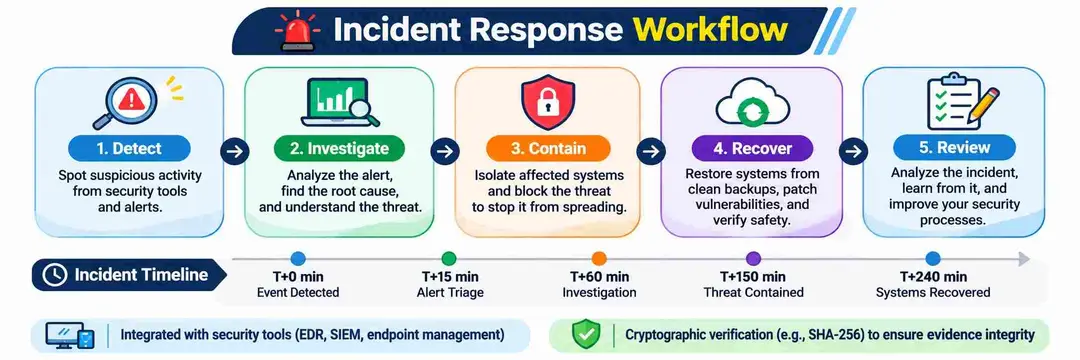
A suspected infection requires a structured response.
The priority is to limit further activity, protect business accounts, and preserve useful evidence.
NIST SP 800-61 Rev. 3 provides current guidance for cybersecurity incident response. It connects incident handling with broader cybersecurity risk management.
Step 1: Contain the Suspected Device
If an employee runs a suspicious installer:
- Disconnect the affected device from business networks.
- Stop access to shared drives where appropriate.
- Notify the internal security team.
- Record the device name and affected user.
- Preserve relevant security alerts and logs.
Avoid immediately deleting suspicious files. They may contain evidence that helps investigators understand the incident.
Step 2: Assess Elevated Execution
Determine whether the user granted administrator permissions.
Check whether the suspicious process ran with elevated rights.
Review scheduled tasks, process activity, and file creation events. Also check for unexpected system-level changes.
Step 3: Preserve Evidence
Collect relevant information before making major system changes.
Useful evidence includes:
- Original ZIP archives.
- File hashes.
- File creation timestamps.
- Windows event logs.
- Sysmon records.
- Scheduled-task definitions.
- EDR investigation reports.
- DNS and network logs.
Maintain evidence handling records. Limit access to authorized investigators.
Step 4: Investigate Other Devices
For business environments, search for matching indicators across all managed endpoints.
Prioritize devices that downloaded the same archive or contacted related infrastructure.
Review whether employees shared the installer through company messaging tools or shared folders.
Step 5: Eradicate and Recover
After the investigation confirms the infection:
- Remove malicious components.
- Remove unauthorized scheduled tasks.
- Check for additional persistence.
- Restore affected systems from trusted sources.
- Install current security updates.
- Validate endpoint protection.
- Monitor restored systems.
For systems with confirmed administrative compromise, a clean operating system rebuild may offer greater confidence than manual file removal.
Step 6: Review Credential Exposure
The published Yoba research confirms cryptocurrency mining. It does not establish password theft.
Still, incident responders should assess whether other suspicious activity occurred.
If investigators find evidence of credential exposure, reset affected credentials from a trusted device. Revoke active sessions and review multifactor authentication settings.
Step 7: Prevent Reinfection
Update software installation policies.
Require approved download sources and publisher verification. Restrict administrator access to users who need it.
Also review endpoint application controls and software inventory processes.
13. Yoba Malware Evolution
The earlier and later variants share several core behaviors. However, Check Point found meaningful changes in their execution methods.
|
Feature |
Earlier variant |
Later variant |
|
Fake software lure |
Cursor AI |
ChatGPT and Claude |
|
Host process |
Cursor.exe |
Setup.exe |
|
Initial unpacking |
Base64 and XOR |
XOR |
|
Persistence |
Startup shortcut |
Scheduled task |
|
Language filtering |
Russia |
Multiple CIS regions |
|
DGA domain extension |
.aber.ir |
.dedyn.io |
|
Anti-analysis |
More extensive |
Several earlier checks removed |
Changes in the Initial Execution Chain
The early variant used Base64 decoding before XOR decryption.
Later versions removed the Base64 stage. This simplified the unpacking process.
The newer variant also changed its persistence method.
Changes in Anti-Analysis
The early loader included anti-debugging and virtual machine checks.
The later version removed several of those checks. It retained other techniques, including host process verification.
This shows that malware developers can change their methods over time.
Security teams should not depend only on old hashes or filenames. Behavioral detection provides additional coverage when samples change.
14. How to Download ChatGPT and Claude Safely
The safest approach is to start from the software publisher's official website.
Avoid third-party downloads that claim to offer special or unreleased desktop versions.
Official Download Sources
ChatGPT
Official desktop and mobile downloads
Open official ChatGPT download page
Claude
Official desktop installation guidance
Open Anthropic installation guide
Verify the Publisher
Before installing software:
- Check the website's domain.
- Confirm the download comes from the publisher.
- Review the executable's digital signature.
- Check the file's hash when the publisher provides one.
- Scan the downloaded file.
- Review any administrator permission request.
Remember that a valid signature does not guarantee that the surrounding download package is safe.
Check GitHub Repositories Carefully
GitHub is a useful platform for software development. However, attackers can also create malicious repositories.
Before downloading a release, review:
- Repository ownership.
- Project history.
- Release history.
- Source code availability.
- Publisher references.
- Independent security reports.
A high star count does not prove software safety.
Enterprise Software Policies
Businesses should create clear software installation rules.
Useful controls include:
- Approved software catalogs.
- Application allowlisting.
- Least-privilege access.
- Endpoint detection and response.
- Centralized software inventory.
- Download monitoring.
- Regular security awareness training.
These controls reduce the chance of unauthorized software execution.
15. MITRE ATT&CK Mapping
MITRE ATT&CK helps security teams describe observed attacker behavior through standard technique identifiers.
The following mapping connects Yoba's documented behavior with relevant techniques.
|
Technique ID |
Technique |
Relevance to Yoba |
|
T1574.001 |
DLL Side-Loading |
Malicious DLL loaded by signed executable |
|
T1053.005 |
Scheduled Task |
Persistence after system startup |
|
T1614.001 |
System Language Discovery |
Regional language checks |
|
T1568.002 |
Domain Generation Algorithms |
Dynamic domain generation |
|
T1071.004 |
DNS |
DNS-based task communication |
|
T1496.001 |
Compute Hijacking |
Unauthorized cryptocurrency mining |
|
T1105 |
Ingress Tool Transfer |
Downloading additional payloads |
|
T1036 |
Masquerading |
Disguised task and system-related artifacts |
|
T1027 |
Obfuscated Files or Information |
Encrypted strings and payloads |
|
T1059.001 |
PowerShell |
Supported PowerShell payload execution |
Relevant OWASP Classification
The closest relevant category is OWASP Top 10:2025 A08, Software or Data Integrity Failures.
This category covers situations where systems trust software or data without proper integrity checks.
The Yoba campaign illustrates the risk of trusting one signed executable while ignoring other files in its package.
This is a conceptual mapping, not a claim that Yoba exploited an OWASP-defined application vulnerability.
Relevant NIST Security Controls
Organizations can also align their defenses with these NIST SP 800-53 controls:
|
Control |
Security purpose |
Application |
|
AC-6 |
Least Privilege |
Restrict administrator access |
|
CM-7 |
Least Functionality |
Limit unauthorized software |
|
SI-3 |
Malicious Code Protection |
Scan and protect endpoints |
|
AU-2 |
Event Logging |
Collect relevant security events |
|
IR-4 |
Incident Handling |
Contain and investigate infections |
These are recommended control alignments. They are not claims of formal compliance or certification.
Detection Coverage
A strong detection plan should connect several events.
For example:
- A user downloads an unfamiliar ZIP.
- The user executes its signed installer.
- The installer loads an unexpected DLL.
- The process creates files under ProgramData.
- A new scheduled task appears.
- The system contacts unusual external services.
This sequence provides more useful context than an isolated antivirus alert.
16. Frequently Asked Questions
1. What is Yoba malware?
Yoba is a Windows malware campaign that uses fake ChatGPT and Claude downloads. It uses DLL sideloading to deploy additional malware, including an observed XMRig cryptocurrency miner.
2. Are official ChatGPT and Claude applications compromised?
Check Point found no evidence that OpenAI or Anthropic systems were compromised. Attackers abused genuine signed executables inside malicious download packages.
3. Can Yoba steal passwords?
The published research does not confirm password theft or credential stealing. Security teams should still investigate possible secondary activity after an infection.
4. Can Windows Defender detect Yoba?
An updated security product may detect some known samples or suspicious behavior. However, no single antivirus scan guarantees detection or complete removal.
17. Ask the Expert
These questions address practical concerns from IT administrators and business owners.
Should businesses block all GitHub downloads?
Not necessarily. GitHub supports legitimate development and software distribution, so blanket blocking may disrupt business operations. Use approved repositories, application controls, and publisher verification instead.
Is a digitally signed installer always safe?
No. A digital signature validates the signed file, not every DLL or other component beside it. Review the complete package and its execution behavior.
Can removing winmm.dll fix an infected computer?
Deleting one DLL does not guarantee complete removal. Investigators must also check persistence, additional payloads, scheduled tasks, and related system changes.
What should a company do after discovering Yoba?
Isolate the affected device and preserve investigation evidence. Then investigate related endpoints, remove confirmed malicious components, and restore systems through a trusted process.
18.Final Thoughts
The Yoba malware campaign is a reminder that even a genuine digital signature does not guarantee that an entire software package is safe. Fake ChatGPT and Claude downloads can use trusted-looking files to make malicious software appear legitimate.
Before installing any AI application, download it from the official website and check the files included in the installer. If you suspect an infection, investigate the affected device, remove malicious components, and review any signs of unauthorized activity.
For businesses, protecting endpoints and identifying security weaknesses early are essential parts of a strong cybersecurity strategy. Hoplon InfoSec helps organizations strengthen their security through Endpoint Security, Penetration Testing, and other Cybersecurity Services.
If your organization needs help reviewing its security posture or protecting its systems, contact the Hoplon InfoSec security team to discuss your requirements.
Technical References and Research Sources
The following sources support the technical findings and defensive recommendations.
Primary Research and Incident Coverage
- Check Point Research: Tricks from the Past Deployed via Signed ChatGPT and Claude Binaries. October 27, 2026. Primary technical investigation.
- Check Point: Yoba Malware Targets ChatGPT and Claude Users. Campaign overview.
- eSecurity Planet: Fake ChatGPT and Claude GitHub Downloads. Campaign timeline and infection chain.
Authoritative Security References
MITRE ATT&CK T1574.001: DLL Side-Loading.
Microsoft Sysmon Documentation.
NIST SP 800-61 Rev. 3: Incident Response.
OWASP Top 10:2025 A08: Software or Data Integrity Failures.
Hoplon Insight: What Security Teams Should Prioritize
Our editorial recommendations based on the documented Yoba behavior:
- Verify complete software packages. Do not rely on the main executable's signature alone.
- Monitor DLL loading. Investigate trusted applications loading libraries from unusual directories.
- Audit scheduled tasks. Review new tasks that execute from nonstandard paths.
- Control administrator access. Prevent ordinary users from installing unapproved software with elevated rights.
- Correlate network events. Connect DNS, process, file, and endpoint activity.
- Review software sources. Maintain a trusted software catalog for employees.
These recommendations address the observed infection chain. They do not guarantee prevention of every malware variant.
Author Bio and Review
Author: Mohammed Talukder is the Co-Founder and CEO of Hoplon InfoSec, with over 16 years of experience in cybersecurity and technology. His expertise includes offensive security, vulnerability management, cyber risk management, and incident response. His professional credentials include CISM, CISA, CEH, and CompTIA PenTest+. He has also received Infosys recognition awards for his professional contributions. He shares practical cybersecurity insights to help organizations strengthen their security posture.
Technical reviewer: Gazi Mahmud, Co-Founder and CIO of Hoplon InfoSec LLC, cybersecurity leader, and CISM & CISA certified professional with expertise in cyber risk management, security governance, compliance, and incident response.
Published: November 3, 2026
Last Updated: November 3, 2026
Company Information
Official company contact page
United States Headquarters
1415 West 22nd Street, Tower Floor, Oak Brook, IL 60523, USA
Bangladesh Office
House 83, Road 6, Block-C, Banani, Dhaka, Bangladesh
Contact: info@hoploninfosec.com
Address details are listed on the company's official contact page
This article draws on Check Point Research's October 27, 2026 investigation and relevant security documentation.Our editorial approach separates confirmed findings from unverified claims. We do not present theoretical payload capabilities as confirmed infections.The article does not claim independent malware execution, laboratory reproduction, or original sample analysis. The diagnostic commands serve as defensive examples.We will review the article when researchers publish new technical findings or verified indicators.