What Did Microsoft Announce About Windows Server 2028 on November 17, 2026?
Microsoft announced Windows Server 2028 on November 17, 2026, and opened its Public Preview through the Windows Server Insider Program. The biggest security change is Hardened Server Core, which enables hundreds of protective settings from the first boot. The new approach aims to reduce weak configurations, protect administrator credentials, restrict network access, and improve security monitoring.
The announcement also covers virtual machine protection, post-quantum cryptography, storage performance, and enterprise management. However, this is still a preview release. Some planned security controls have not reached the current build.
Quick Summary
- Hardened security by default: Server Core starts with hundreds of security settings enabled. These cover authentication, encryption, network access, administrative privileges, and system auditing.
- New infrastructure features: Microsoft is introducing Trusted Launch improvements, Confidential VM support, modern storage options, and investments in post-quantum cryptography.
- Preview limitations: Windows Server 2028 is available for testing, but Microsoft has not announced its final general availability date. NTLM blocking and several hardware-backed protections remain under development.
Why Does Windows Server 2028 Matter?
The growing security problem facing enterprise servers
Enterprise servers hold some of an organization's most valuable resources. These include employee records, customer information, business applications, authentication services, databases, and shared files.
A compromised server can affect more than one application. If attackers gain access to a server connected to Active Directory, they may find opportunities to move toward other systems, depending on the network design and account permissions.
The initial server configuration plays an important role here. An unnecessary open port, weak authentication method, or excessive administrator permission can create an avoidable security weakness.
Traditionally, organizations have relied on security baselines, Group Policy, configuration scripts, and endpoint management tools to harden newly installed servers. These controls are useful, but they require proper planning and consistent application.
The problem becomes more difficult when an organization manages hundreds of servers across multiple locations. Different administrators may use different deployment processes. Some systems receive security updates quickly, while others remain on older configurations.
Microsoft's new approach attempts to reduce this initial configuration gap.
What does the latest breach research tell us?
The security concerns behind Microsoft's announcement are consistent with findings from the Verizon 2025 Data Breach Investigations Report.
The report analyzed more than 22,000 security incidents, including 12,195 confirmed data breaches. It found that exploitation of vulnerabilities as an initial access method increased by 34%, reaching 20% of breaches.
The report also found that only about 54% of perimeter-device vulnerabilities were fully remediated. The median time required for remediation was 32 days.
These findings matter for server administrators. An organization can have modern security software and still face significant exposure if it does not manage vulnerabilities and system configurations properly.
A hardened operating system cannot eliminate these risks. However, reducing unnecessary services, restricting authentication, and improving monitoring can make an environment more difficult to compromise.
Research reference: Verizon 2025 Data Breach Investigations Report
Why secure-by-default server configuration matters
Consider a company deploying a new server to support its internal applications.
The installation completes successfully. However, the IT team still needs to configure firewall rules, authentication policies, remote management, audit settings, and encryption requirements.
If the server becomes accessible before these tasks are complete, it may operate with weaker protections than the organization intended.
This is a configuration management problem, not necessarily a software vulnerability.
The secure-by-default model changes the starting point. Instead of beginning with a broadly compatible configuration and adding security controls later, Windows Server 2028 starts with a more restrictive configuration.
Administrators can then make carefully reviewed exceptions when a business application requires them.
Windows Server 2028 Security: What Has Changed?
Microsoft's November 17 announcement describes a new hardened configuration for Server Core. The initial preview includes hundreds of security settings aligned with established security benchmarks, including CIS and DISA STIG.
The important distinction is that these settings are active from the first boot. Administrators do not need to complete a separate hardening project before the baseline takes effect.
Here are the main security areas Microsoft has identified.
1. Stronger identity and authentication protection
Identity security is one of the most important parts of server protection.
An administrator account can provide access to sensitive services, business applications, and other connected systems. If attackers obtain and reuse privileged credentials, the impact can extend beyond the original server.
The hardened configuration strengthens several identity-related controls.
Microsoft identifies the following changes:
- Kerberos is preferred over NTLM authentication.
- Local Security Authority Subsystem Service (LSASS) receives additional protection.
- Strong password requirements are enforced.
- Account lockout protections are enabled.
- Consumer account sign-in is restricted.
LSASS is a Windows process that manages important authentication functions. Protecting it helps make credential theft more difficult.
Kerberos also plays an important role in domain environments. It provides ticket-based authentication and helps reduce dependence on older authentication methods.
However, administrators should not assume that all NTLM authentication has already been removed. Microsoft explicitly lists NTLM blocking as a protection planned for a future preview.
This distinction matters when evaluating the actual security state of the current build.
2. Stronger network security and reduced exposure
A server does not need to communicate with every device or service on a network.
Every unnecessary connection creates another opportunity for misconfiguration or unauthorized access.
Microsoft's hardened configuration strengthens network controls through several changes:
|
Security control |
What it does |
Security benefit |
|
Windows Firewall |
Remains enabled across network profiles |
Reduces unnecessary inbound access |
|
SMB signing |
Requires signed SMB communication |
Helps prevent message tampering |
|
SMB encryption |
Protects supported file-sharing traffic |
Reduces exposure to network interception |
|
Legacy name resolution restrictions |
Disables older resolution methods |
Reduces certain network-based risks |
|
Unauthenticated RPC restrictions |
Limits insecure remote procedure calls |
Reduces unnecessary remote access |
|
Secure remote management |
Restricts insecure management protocols |
Protects administrative communication |
Server Message Block (SMB) is the protocol Windows uses for file and printer sharing.
SMB signing helps verify that network messages have not been modified during transmission. SMB encryption adds confidentiality by protecting the contents of supported file-sharing traffic.
These protections are particularly relevant to environments that share files across multiple servers.
However, organizations should review older file servers and third-party applications before migration. Systems that rely on unsupported or outdated communication methods may stop working when stronger defaults take effect.
3. Modern cryptography and post-quantum preparation
Encryption protects information while it travels between systems and helps secure sensitive data.
Windows Server 2028 introduces further changes to the cryptographic configuration.
Microsoft identifies:
- Modern TLS cipher suites.
- Hybrid post-quantum key exchange using ML-KEM.
- Stronger protection for stored cryptographic keys.
- Restrictions on outdated cryptographic options.
ML-KEM stands for Module-Lattice-Based Key-Encapsulation Mechanism. It is a post-quantum cryptographic standard designed to help establish secure shared keys.
The reason this matters is the potential future impact of quantum computing on some widely used public-key cryptographic methods.
Organizations that store sensitive information for many years need to consider whether their encryption systems will remain suitable over time.
However, the presence of ML-KEM in the preview does not mean every application, connection, or third-party system automatically supports post-quantum cryptography.
Compatibility and cryptographic negotiation still require testing.
4. Stronger administrative privilege controls
Excessive administrator privileges increase the potential damage caused by compromised accounts.
For example, an application installer should not automatically receive unrestricted administrative access simply because it runs on a server.
Microsoft's hardened configuration introduces tighter privilege controls.
These include:
- Requiring administrator approval for elevation.
- Keeping powerful privileges restricted to Administrators.
- Preventing Guest account sign-in.
- Restricting installers from elevating themselves automatically.
The purpose is to limit unnecessary privilege escalation.
This approach follows the principle of least privilege. Each user, service, and application should receive only the permissions needed for its assigned responsibilities.
For IT teams, this also means reviewing service accounts and scheduled tasks before migration. A system that depends on broad administrative permissions may require changes.
5. Platform integrity and code protection
Windows Server 2028 also strengthens protections around system integrity.
Microsoft identifies stricter signature validation and restrictions on the code permitted during the sign-in process.
The hardened configuration also includes paging file encryption.
The paging file is a storage area Windows uses when it needs to move some memory contents from RAM to disk. Protecting it helps reduce exposure of sensitive information stored outside physical memory.
These controls help strengthen the operating system's protection against unauthorized code and access.
However, some additional hardware-backed protections are not included in the current hardened preview. Microsoft lists Secure Boot and DMA protection requirements, as well as kernel shadow stacks, among the features still being developed.
This is an important limitation for organizations evaluating the preview.
6. More secure remote administration
Remote administration is essential for distributed IT environments. Administrators need to manage servers without always accessing the physical machine.
However, remote management services can become an entry point when they use weak authentication or unencrypted communication.
Microsoft has strengthened several remote access defaults.
|
Component |
Hardened configuration |
|
Remote Desktop Protocol |
Network Level Authentication and TLS |
|
WinRM Basic authentication |
Disabled |
|
WinRM Digest authentication |
Disabled |
|
Unencrypted WinRM traffic |
Disabled |
|
PowerShell logging |
Script block logging enabled |
|
Security auditing |
More detailed audit coverage |
Windows Remote Management (WinRM) allows administrators and management tools to communicate with Windows systems remotely.
Disabling weaker authentication methods reduces the number of insecure options available to remote management connections.
PowerShell script block logging also improves visibility into commands executed through PowerShell.
This is valuable during security investigations because administrators can review activity that might otherwise be difficult to reconstruct.
How Hardened Server Core Works
A different approach to security configuration
The most important change is how Windows Server applies its hardened defaults.
Microsoft explains that supported settings are delivered through policy values, commonly in the Windows policy registry area:
HKLM\SOFTWARE\Policies
Policy-controlled values take precedence over ordinary local configuration.
This prevents a local script, installer, or configuration command from silently weakening a protected setting.
For example, suppose an administrator attempts to enable WinRM Basic authentication through a local configuration change.
If the hardened policy controls that setting, Windows refuses the change until the relevant policy is modified.
This creates an important security boundary between local application settings and the intended server security configuration.
It also reduces the risk of accidental configuration drift.
Understanding OSConfig and policy management
OSConfig is Microsoft's configuration management approach for applying and maintaining security baselines.
Microsoft explains that administrators can use OSConfig, Group Policy, or another supported management tool to manage the relevant security settings.
However, organizations should avoid allowing multiple management systems to control the same settings without a clear ownership model.
For example, an organization might use Group Policy to manage server authentication settings while another tool attempts to change the same values.
Conflicting configuration ownership can produce unexpected results.
A practical approach is to define one authoritative management method for each security control and monitor the resulting configuration.
How administrators can evaluate the hardened state
Microsoft includes a PowerShell module named MSHardenedPolicyEval in the current preview.
It provides commands to evaluate, apply, and restore hardened settings.
One example from Microsoft's announcement is:
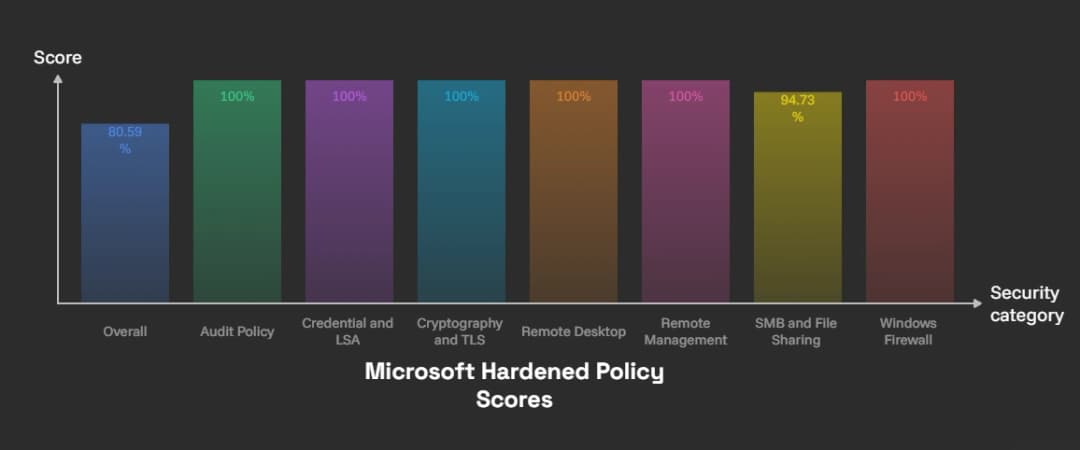
Get-MSHardenedPolicyScore | Format-Table Name, PassingPolicyCount, PolicyCount, Score
This command produces a score across different security categories.
Microsoft's published example showed the following results:
|
Security category |
Passing policies |
Total policies |
Score |
|
Overall |
191 |
237 |
80.59% |
|
Audit Policy |
17 |
17 |
100% |
|
Credential and LSA Protection |
3 |
3 |
100% |
|
Cryptography and TLS |
3 |
3 |
100% |
|
Remote Desktop |
11 |
11 |
100% |
|
Remote Management |
6 |
6 |
100% |
|
SMB and File Sharing |
18 |
19 |
94.73% |
|
Windows Firewall |
30 |
30 |
100% |
Important: These figures are Microsoft's example output from its preview announcement. They are not independent security test results or a guarantee of protection.
Microsoft also warns that the scoring tool is still being refined. Some settings are not yet measured, some scores depend on optional components, and certain domain controller configurations may show unmet requirements even when settings are applied.
Therefore, a score below 100% does not automatically indicate an exploitable weakness. Administrators must review the underlying settings and the tool's limitations.
What is Still Missing From the Current Preview?
The announcement describes substantial security improvements, but Microsoft has also identified protections that are not yet included in the current hardened configuration.
These include:
|
Planned protection |
Current preview status |
|
NTLM blocking |
Not yet hardened |
|
Secure Boot and DMA protection requirements |
Planned for future previews |
|
Kernel shadow stacks |
Planned for future previews |
|
Print security hardening |
Still under development |
|
Additional RPC hardening |
Still under development |
|
Windows Protected Print |
Planned |
|
Additional security settings |
Future updates |
This distinction is important for security teams.
The announcement should not be interpreted as confirmation that every planned protection is already active.
Organizations should evaluate the exact build they install and review Microsoft's preview documentation before making security decisions.
Windows Server 2028 Features Beyond Security
Although security is the main focus of this announcement, Microsoft is also introducing changes to infrastructure performance and management.
Trusted Launch and Confidential VM support
Virtual machines are important in modern enterprise environments. However, protecting the guest operating system alone is not enough.
The underlying boot process and virtual machine platform also matter.
Microsoft says Trusted Launch extends boot integrity protection across virtual machine fleets.
Confidential VM support is also part of the new release's direction. Microsoft describes this as an early step toward supporting integrity-protected runtimes on supported confidential virtual machine hardware.
These capabilities are relevant to organizations that run sensitive applications in virtualized environments.
However, hardware requirements and supported configurations will affect availability.
Native NVMe storage and improved performance
Storage performance can influence application response times, database workloads, and virtualization operations.
Microsoft is introducing native NVMe storage enabled by default, alongside NVMe over TCP and RDMA transport options.
It is also adding the ability to boot from ReFS.
These changes aim to improve the use of modern storage hardware in enterprise environments.
Organizations should still test storage controllers, drivers, backup software, and monitoring systems against the preview before evaluating production migration.
Improved enterprise management
Managing a large server environment requires more than remote access to individual machines.
Microsoft is extending Intune management to eligible, persistent Windows Server installations in preview.
This brings configuration, compliance, application, and update management workflows into a more unified management experience.
Microsoft also announced that Windows Admin Center Virtualization Mode is generally available.
These changes may help IT teams manage distributed infrastructure more consistently, although the suitability of each management option depends on the organization's environment and licensing.
Windows Server 2028 vs. Windows Server 2025
One of the most common questions following the announcement is whether the new release represents a major security improvement over Windows Server 2025.
The answer requires some context.
Windows Server 2025 already includes important security capabilities. These include SMB signing requirements, security baselines, and additional protections for authentication and network communication.
Windows Server 2028 builds on that direction by making a broader hardened configuration the starting point for Server Core.
|
Area |
Windows Server 2025 |
Windows Server 2028 preview |
|
Security baseline |
Available through OSConfig |
New hardened Server Core configuration |
|
Security defaults |
Several protections enabled by default |
Hundreds of hardened settings from first boot |
|
SMB signing |
Required by default for supported connections |
Included in hardened configuration |
|
Authentication |
Existing Kerberos and NTLM security controls |
Stronger defaults, with NTLM blocking planned |
|
LSASS protection |
Available through existing security controls |
Included in hardened configuration |
|
Post-quantum cryptography |
Not the main focus of the cited baseline |
Hybrid ML-KEM key exchange identified |
|
Virtual machine security |
Existing Hyper-V security capabilities |
Trusted Launch expansion and Confidential VM support |
|
Storage |
Existing NVMe capabilities |
Native NVMe and additional transport improvements |
|
Release status |
Generally available |
Public Preview |
The comparison does not mean that Windows Server 2025 is insecure.
It already provides several modern security protections. The main difference is the broader hardened starting configuration announced for Windows Server 2028.
Organizations should compare actual capabilities, supported hardware, and application compatibility rather than relying on version numbers alone.
Real-World Enterprise Scenario: Why Hardened Defaults Matter
Consider a medium-sized organization operating several Windows servers.
One server manages internal file sharing. Another hosts a business application. A third supports identity-related services.
The organization has a security policy, but its deployment process relies on administrators applying additional configurations after installation.
During a busy deployment period, one server enters service before the full hardening checklist is complete.
The server may have unnecessary remote access settings or older authentication dependencies. The security team might not discover these differences until a later configuration review.
This is a realistic operational risk, although it is an illustrative scenario rather than a documented Windows Server 2028 incident.
A hardened starting configuration can reduce this gap.
However, it does not remove the need for monitoring, patching, access reviews, or application testing.
The organization must still confirm that the server's security settings match its business requirements.
What should the security team examine?
A practical review should cover:
- Identity: Check privileged accounts, authentication methods, service accounts, and account lockout policies.
- Network: Review firewall rules, SMB requirements, remote access, and unnecessary services.
- Applications: Identify dependencies on legacy protocols and older authentication methods.
- Administration: Confirm that management tools support the new security defaults.
- Monitoring: Verify that security events and PowerShell activity reach the organization's monitoring platform.
- Recovery: Confirm that backup and restoration procedures work with the new configuration.
This type of review helps organizations identify compatibility problems before they affect business operations.
Windows Server 2028 Security: Recommended Migration and Mitigation Strategy
The public preview gives IT teams an opportunity to evaluate the new security model before general availability.
A controlled assessment is more useful than immediately replacing existing servers.
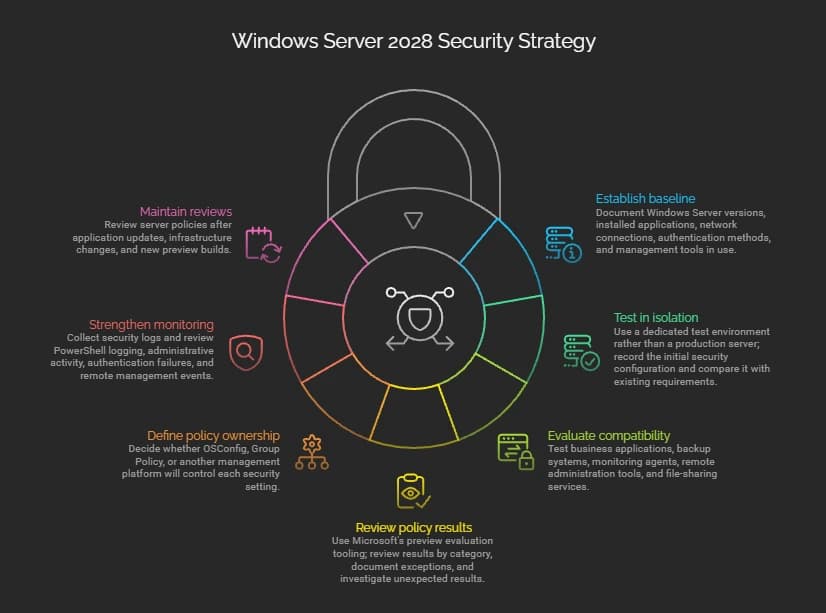
Step 1: Establish a baseline of the current environment
Document the Windows Server versions, installed applications, network connections, authentication methods, and management tools in use.
Pay particular attention to systems that rely on older protocols.
A dependency inventory helps identify applications that might not work under the new hardened defaults.
Step 2: Test in an isolated environment
Use a dedicated test environment rather than a production server.
Install the preview on a supported virtual machine or physical test system.
Record the initial security configuration and compare it with the organization's existing requirements.
This helps administrators understand which controls are active and which still require additional configuration.
Step 3: Evaluate application compatibility
Test business applications, backup systems, monitoring agents, remote administration tools, and file-sharing services.
Pay particular attention to legacy authentication and remote management dependencies.
Do not weaken the entire server configuration to accommodate one outdated application.
Investigate the specific requirement and determine whether a safer alternative exists.
Step 4: Review hardened policy results
Use Microsoft's preview evaluation tooling to examine the security configuration.
Review the results by category instead of treating the overall percentage as the only measure of security.
Document exceptions and investigate any unexpected results.
Remember that the current evaluation tool has known limitations.
Step 5: Define policy ownership
Decide whether OSConfig, Group Policy, or another management platform will control each security setting.
Avoid overlapping management rules that can cause configuration conflicts.
Document approved exceptions and assign responsibility for reviewing them.
Step 6: Strengthen monitoring and incident response
Confirm that the organization collects the security logs needed to investigate suspicious activity.
Review PowerShell logging, administrative activity, authentication failures, and remote management events.
Ensure that monitoring alerts reach the correct IT or security team.
Step 7: Maintain regular security reviews
Security configuration is not a one-time task.
Review server policies after application updates, infrastructure changes, and new preview builds.
Once Windows Server 2028 reaches general availability, reassess the final feature set and supported configurations before planning production migration.
Comparison: Different Server Security Approaches
|
Approach |
Main advantage |
Main limitation |
Recommended use |
|
Default installation |
Simple deployment |
May require additional hardening |
Not sufficient as a complete security strategy |
|
Manual hardening |
Allows detailed customization |
Depends on consistent administrator work |
Environments with specific requirements |
|
Security baseline |
Standardizes important controls |
Compatibility testing is necessary |
Enterprise server environments |
|
Hardened Server Core |
Starts with restrictive security settings |
Legacy applications may need changes |
Suitable workloads after testing |
|
Continuous configuration monitoring |
Helps identify security drift |
Requires ongoing management |
All business-critical environments |
No single approach removes every security risk.
A strong server security program combines secure configuration, vulnerability management, access control, monitoring, and tested recovery procedures.
Windows Server 2028 Release Date, Preview, ISO, and Availability
Microsoft announced the public preview on November 17, 2026.
The current Hardened Server Core implementation is available beginning with Windows Server Insider Preview build 29706.
However, Microsoft has not confirmed the final general availability date in the announcement.
Here is what is currently known:
|
Search question |
Verified information |
|
Windows Server 2028 release date |
Public Preview announced November 17, 2026 |
|
Windows Server 2028 preview |
Available through the Windows Server Insider Program |
|
Windows Server 2028 beta |
Microsoft identifies the current channel as Public Preview, not a separately announced beta |
|
Windows Server 2028 ISO |
Server Core preview installation media is referenced by Microsoft |
|
Windows Server 2028 ISO download |
Access through the official Windows Server Insider preview resources |
|
Windows Server 2028 end of life |
Not announced |
|
Windows Server 2028 R2 |
No official announcement identified |
|
General availability |
Not yet confirmed |
Organizations should obtain preview installation media and documentation through Microsoft's official Insider resources.
Do not treat third-party download pages as authoritative sources for preview installation files.
Official resource: Windows Server 2028 Preview Resources
What Should Small Businesses and IT Administrators Do Now?
Smaller organizations may not have dedicated server security teams. They may also depend on older applications that are difficult to replace.
For these organizations, the most useful first step is to review their current server configuration.
Start by identifying systems that use outdated authentication, unrestricted remote access, weak service account permissions, or unnecessary network services.
Then review whether existing security policies are consistently applied.
Windows Server 2028 may reduce some of the work involved in establishing a secure server baseline. However, administrators still need to understand how the new defaults affect their applications.
For CISOs and IT managers, the preview also provides an opportunity to update server migration plans, review hardware requirements, and prepare for changes in cryptographic standards.
There is no need to rush a production upgrade based on an announcement alone. A documented compatibility assessment is a better starting point.
A Stronger Starting Point for Enterprise Server Security
Microsoft's Windows Server 2028 announcement introduces an important change in server security strategy.
Hardened Server Core starts with hundreds of protective settings enabled, reducing dependence on post-installation hardening. Improvements to authentication, network security, encryption, administrative controls, and auditing provide a stronger starting configuration.
However, the preview is still evolving. NTLM blocking, additional hardware-backed protections, and other planned controls are not yet complete.
Organizations should use this preview period to test application compatibility, review security policies, and identify configuration dependencies.
The most important takeaway is straightforward: a hardened default can reduce avoidable exposure, but it cannot replace responsible administration, continuous monitoring, vulnerability management, and tested recovery procedures.
Before adopting the new platform, organizations should evaluate their infrastructure and confirm that its security controls work with their actual business requirements.
Frequently Asked Questions
1. What is new in Windows Server 2028?
Windows Server 2028 introduces a hardened Server Core configuration, stronger authentication and network security defaults, post-quantum cryptography investments, Trusted Launch improvements, and modern storage capabilities. It is currently available in Public Preview.
2. When will Windows Server 2028 be released?
Microsoft announced its Public Preview on November 17, 2026. The final general availability date has not yet been confirmed in the official announcement.
3. Is Windows Server 2028 more secure than Windows Server 2025?
It introduces a broader hardened starting configuration for Server Core. However, Windows Server 2025 already includes several modern security protections, and the final comparison will depend on the completed Windows Server 2028 release.
4. Can organizations use Windows Server 2028 in production?
The current release is a preview intended for evaluation and feedback. Organizations should avoid treating preview software as a production-ready replacement and should wait for Microsoft's final release guidance.
Author Bio and Review
Author : Md Saiful Islam is a Security Engineer specializing in cybersecurity, network security, vulnerability assessment, penetration testing, incident response, and security compliance. She focuses on identifying security risks, strengthening defenses, and implementing secure solutions to protect organizations against evolving cyber threats.
Technical reviewer: Mohammed Talukder is the Co-Founder and CEO of Hoplon InfoSec, with over 16 years of experience in cybersecurity and technology. His expertise includes offensive security, vulnerability management, cyber risk management, and incident response. His professional credentials include CISM, CISA, CEH, and CompTIA PenTest+. He has also received Infosys recognition awards for his professional contributions. He shares practical cybersecurity insights to help organizations strengthen their security posture.
Technical reviewer: Gazi Mahmud, Co-Founder and CIO of Hoplon InfoSec LLC, cybersecurity leader, and CISM & CISA certified professional with expertise in cyber risk management, security governance, compliance, and incident response.
Read More Articles:
Windows Error Reporting vulnerability
Windows 11 24H2 forced upgrade