Chrome 158 Fixes 204 Security Issues, Including Critical Flaws
What happened? Why does Chrome 158 matter?
Google Chrome 158 addresses 204 security issues in its November 17, 2026 stable-channel release. The update includes six vulnerabilities rated Critical, affecting components such as WebView, GPU, Media, ANGLE, and WebAudio.
Some of these flaws involve memory safety problems that can create opportunities for code execution. Users and organizations running older Chrome builds should prioritize the update, verify that it has been installed, and restart their browsers.
TL;DR: Chrome 158 Security Update
- 204 security fixes: Google included 204 security fixes in Chrome 158 for Windows, macOS, and Linux.
- Six Critical issues: The update addresses serious memory safety vulnerabilities, including use-after-free, buffer overflow, and out-of-bounds write flaws.
- Immediate action: Users should update Chrome to the latest available stable build and restart the browser. IT teams should verify deployment across managed devices.
Table of Contents
- What Is the Chrome 158 Security Update?
- Why Does This Update Matter?
- Chrome 158 Vulnerabilities: What Google Fixed
- Understanding the Six Critical Vulnerabilities
- How These Browser Vulnerabilities Can Affect Users
- The Real Security Risk for Businesses
- How to Update Google Chrome 158
- Chrome 158 Security Checklist for IT Teams
- What Organizations Should Do Beyond Updating
- Frequently Asked Questions
1. What is the Chrome 158 Security Update?
Google released Chrome 158 for the stable channel on November 17, 2026. The release covers Windows, macOS, and Linux. Google says the update contains 204 security fixes.
The desktop release versions are:
|
Platform |
Chrome version |
|
Linux |
158.0.8127.36 |
|
Windows |
158.0.8127.36 / 158.0.8127.37 |
|
macOS |
158.0.8127.36 / 158.0.8127.37 |
|
Android |
158.0.8127.42 |
Google is distributing the desktop release gradually. Therefore, some devices may receive the update later than others.
The Android release includes the same security fixes as the corresponding desktop release unless Google specifies otherwise.
This matters because a browser update is only useful after the affected device receives and applies it. Seeing a release announcement does not mean every Chrome installation is already protected.
Why did Google release so many security fixes?
Modern browsers contain several interconnected systems. They process websites, display graphics, play audio and video, manage downloads, store information, and communicate with external services.
Each component introduces its own security risks.
A weakness in one part of the browser can affect the safety of the entire application. For example, a memory management error may allow an attacker to interfere with how the browser handles information.
The Chrome 158 release addresses problems across multiple components rather than a single isolated feature.
Google's release notes also show that researchers reported these problems over several months. Some reports came from Google's internal security work, while others came from external researchers.
This provides an important reminder: browser security requires continuous research, testing, and maintenance.
Official reference: Google Chrome Stable Channel Update, November 17, 2026.
2. Why Does This Update Matter?
A browser is one of the most frequently used applications on a business computer. Employees use it to access email, cloud platforms, financial systems, customer databases, administrative dashboards, and internal applications.
That makes browser security a practical business concern.
An outdated browser may contain known weaknesses that attackers can attempt to exploit. A malicious or compromised website can become a security concern when a vulnerable browser processes its content.
This does not mean every visit to a website will compromise a device. Exploitation depends on the specific vulnerability, the browser version, the operating environment, and other security protections.
However, organizations should not wait for evidence of an attack before addressing a serious security patch.
The growing importance of browser security
Browser security is closely connected to endpoint security.
Consider an employee who uses Chrome to access a company email account and a cloud-based business application. Both services may have strong authentication controls.
However, those controls do not eliminate vulnerabilities inside the employee's browser.
A compromised browser could affect the security of the local session, expose sensitive information, or create opportunities for further compromise, depending on the vulnerability and the attack conditions.
This is why browser updates belong in an organization's regular vulnerability management process.
The Chrome 158 release is a useful example of why security teams should monitor browser updates alongside operating system patches, endpoint protection alerts, and application security notices.
3. Chrome 158 Vulnerabilities: What Google Fixed
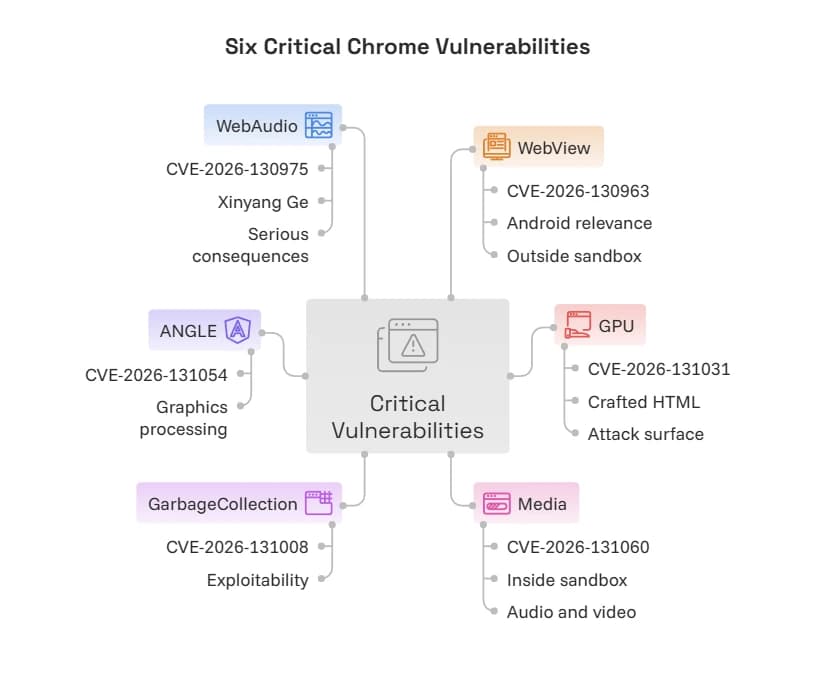
The 204 security fixes cover multiple browser components. Google specifically identifies six Critical vulnerabilities in its release announcement.
The six Critical CVEs are:
|
CVE identifier |
Affected component |
Reported vulnerability |
|
CVE-2026-130963 |
WebView |
Use-after-free |
|
CVE-2026-131031 |
GPU |
Out-of-bounds write |
|
CVE-2026-131060 |
Media |
Buffer overflow |
|
CVE-2026-131008 |
GarbageCollection |
Use-after-free |
|
CVE-2026-131054 |
ANGLE |
Out-of-bounds write |
|
CVE-2026-130975 |
WebAudio |
Use-after-free |
These entries are important because they affect components responsible for processing different types of browser content.
Some manage memory. Others handle graphics, media, or audio processing.
A vulnerability in one of these areas can create conditions that allow unauthorized actions within the browser's security boundaries.
What do the vulnerability types mean?
Understanding the technical terms helps explain why these fixes deserve attention.
Use-after-free
A use-after-free vulnerability occurs when software attempts to access memory after that memory has already been released.
This can cause unpredictable behavior. Depending on the conditions, an attacker may be able to influence the program's operation or execute unauthorized code.
Out-of-bounds write
An out-of-bounds write happens when software writes information outside the memory area allocated for a particular operation.
This can damage nearby memory and affect program stability or security.
Buffer overflow
A buffer overflow occurs when a program writes more information into a memory buffer than it can safely hold.
Depending on the circumstances, this can cause application crashes, memory corruption, or potentially unauthorized code execution.
These vulnerability classes are particularly important in browsers because browsers routinely process content received from websites and other external sources.
4. Understanding the Six Critical Vulnerabilities
The six Critical entries deserve separate attention because they affect different parts of Chrome.
Google's published descriptions provide the vulnerability identifiers, affected components, severity ratings, and researcher attribution.
The following analysis explains their significance without assuming that undocumented exploitation methods or attack campaigns exist.
CVE-2026-130963: Use-after-free in WebView
WebView is a component used to display web content inside applications.
A use-after-free issue in this component can create a memory safety problem when the browser processes certain content or application interactions.
Google classifies this vulnerability as Critical.
Tenable's advisory describes the issue as potentially allowing code execution outside the sandbox through crafted network traffic on affected Android Chrome installations.
This makes it particularly relevant to organizations that rely on Android devices for business communication and access to web applications.
CVE-2026-131031: Out-of-bounds write in GPU
Chrome uses GPU-related components to support graphics processing.
These components help render web pages and handle visual content.
An out-of-bounds write can cause memory corruption when software writes beyond an allocated memory boundary.
Google rates this issue Critical.
Tenable also identifies potential arbitrary code execution outside the browser sandbox through crafted HTML content on affected versions.
The important point for security teams is that graphics processing is part of the browser's attack surface. It should not be overlooked when assessing browser vulnerabilities.
CVE-2026-131060: Buffer overflow in Media
Chrome's Media component handles browser media operations.
This includes processing different forms of audio and video content.
A buffer overflow can occur when a component handles more data than its allocated memory can safely accommodate.
Google classifies CVE-2026-131060 as Critical.
Tenable describes the vulnerability as potentially allowing code execution inside the sandbox through crafted HTML content.
The distinction between code execution inside and outside the sandbox matters. A browser sandbox limits what compromised processes can access. It does not make an underlying vulnerability harmless.
CVE-2026-131008: Use-after-free in GarbageCollection
Memory management is essential to browser stability.
Chrome uses garbage collection to manage memory that applications no longer need.
A use-after-free problem in this component can cause the browser to reference memory that has already been released.
Google rates this vulnerability Critical.
The published release information does not provide enough detail to establish a specific real-world exploitation scenario. Therefore, its practical exploitability should not be overstated.
CVE-2026-131054: Out-of-bounds write in ANGLE
ANGLE is a graphics translation layer used by Chromium-based browsers.
It helps translate graphics operations into supported graphics interfaces.
An out-of-bounds write in this component can create memory corruption risks.
Google lists CVE-2026-131054 as Critical.
The vulnerability is particularly relevant to browser environments that rely heavily on graphics processing, although the precise impact depends on the affected build and execution conditions.
CVE-2026-130975: Use-after-free in WebAudio
WebAudio supports audio processing within web applications.
It allows websites to handle audio operations through browser-based functionality.
A use-after-free flaw in this component can create unsafe memory access conditions.
Google classifies CVE-2026-130975 as Critical and credits researcher Xinyang Ge with reporting it.
The issue reinforces a broader point: even browser features that appear unrelated to traditional security controls can contain vulnerabilities with serious consequences.
Are these vulnerabilities being actively exploited?
This distinction is essential.
Google's November 17 release announcement confirms the six Critical vulnerabilities and their security fixes. However, the announcement does not establish that these six flaws were being actively exploited in real-world attacks.
A Critical severity rating is not the same as confirmation of active exploitation.
Security teams should monitor official advisories and trusted vulnerability databases for additional information.
5. How These Browser Vulnerabilities Can Affect Users
A browser vulnerability can have different consequences depending on the affected component and the conditions required for exploitation.
For an ordinary user, the immediate concern is running an outdated browser that contains known security weaknesses.
For a business, the potential impact can extend beyond one workstation.
Consider an illustrative business scenario.
An employee uses Chrome to access a cloud-based customer management system. The browser also handles email, internal documents, and online payment services.
The company has endpoint protection and multi-factor authentication. However, the employee's browser has not received a recent security update.
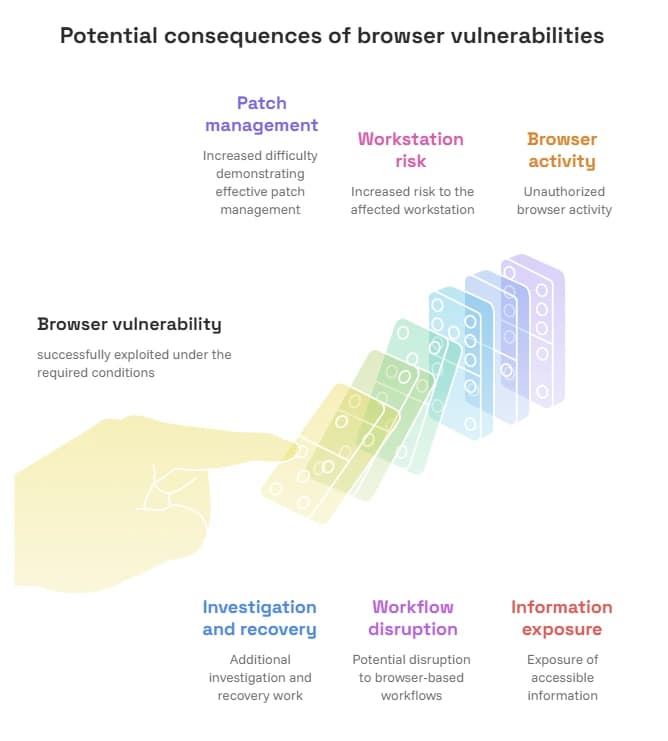
If a vulnerability is successfully exploited under the required conditions, the compromised browser process may create additional security risks.
The actual outcome would depend on the vulnerability, sandbox protections, operating system controls, and other defenses.
This is an illustrative scenario, not a documented Chrome 158 incident.
Potential business consequences
|
Risk area |
Possible consequence |
|
Browser integrity |
Unauthorized browser activity |
|
Confidentiality |
Exposure of accessible information |
|
Endpoint security |
Increased risk to the affected workstation |
|
Business applications |
Potential disruption to browser-based workflows |
|
Compliance |
Increased difficulty demonstrating effective patch management |
|
Incident response |
Additional investigation and recovery work |
Organizations should treat these as potential consequences, not confirmed outcomes of the six Chrome 158 vulnerabilities.
Why browser sandboxing is important
Chrome uses sandboxing to restrict what individual browser processes can access.
For example, a compromised renderer process should not automatically gain unrestricted access to the operating system.
This separation helps limit damage.
However, sandboxing is not a replacement for patching. Certain vulnerabilities may allow an attacker to cross security boundaries or weaken the protections that isolate browser processes.
That is why security teams should apply the update even when endpoint protection and browser isolation controls are already enabled.
6. The Real Security Risk for Businesses
For organizations, the main concern is not simply whether Chrome 158 is available.
It is whether every relevant device has received the security update.
A company may manage hundreds of endpoints across different departments, offices, and remote locations. Some employees use Windows, others use macOS, and some rely on Android devices.
This creates a visibility problem.
An IT administrator may know that the organization has an update policy, but that does not prove every device has installed the latest browser build.
Devices may remain outdated because they are offline, have pending restarts, follow restrictive update policies, or have stopped receiving updates.
Why delayed patching creates problems
Consider a company with several remote employees.
The IT team deploys a browser update policy. Most devices update successfully, but a few remain on an earlier version.
Without device-level reporting, those systems may go unnoticed.
This creates an inconsistent security environment.
The solution is to combine automated patch deployment with verification. Security teams should maintain an inventory of browser versions and investigate devices that do not meet the organization's update requirements.
For small businesses, even a simple browser inventory can improve visibility.
7. How to Update Google Chrome 158
Users should check for the latest stable update instead of assuming that automatic updates have already completed.
Update Chrome on Windows, macOS, and Linux
Follow these steps:
- Open Google Chrome.
- Select the three-dot menu in the upper-right corner.
- Open Help.
- Select About Google Chrome.
- Allow Chrome to check for available updates.
- If an update is available, allow the download to complete.
- Select Relaunch to apply the update.
After restarting, return to the About Chrome page and verify the installed version.
The expected desktop release builds are 158.0.8127.36 or 158.0.8127.37, depending on the platform and distribution.
Linux users may need to use their distribution's package manager to apply the update.
Official instructions: Google Chrome Help: Update Google Chrome.
Update Chrome on Android
Android users can check for the update through Google Play.
- Open Google Play Store.
- Select the profile icon.
- Open Manage apps and device.
- Check the available updates.
- Find Chrome.
- Select Update if the update is available.
Users can also check the installed version through Chrome's Settings and About Chrome section.
Google announced Android version 158.0.8127.42 on November 17, 2026. Its availability may vary during the rollout.
What if Chrome does not show the update?
Google distributes stable releases gradually.
Therefore, a device may not receive the update immediately.
Users should check again later and make sure automatic updates are enabled. Organizations should also review their update policies and confirm that managed devices can reach the required update services.
Avoid downloading browser installers from unfamiliar websites or third-party update advertisements.
8. Chrome 158 Security Checklist for IT Teams
A browser update should be treated as a managed security task, not an informal reminder.
IT administrators can use the following checklist to verify their organization's response.
|
Security task |
What to verify |
Priority |
|
Browser inventory |
Identify all managed Chrome installations |
High |
|
Version verification |
Check installed Chrome builds |
High |
|
Update deployment |
Confirm the latest stable update is applied |
High |
|
Browser restart |
Verify that pending updates are activated |
High |
|
Remote endpoints |
Check devices used outside the office |
High |
|
Update policies |
Confirm automatic updates are enabled |
High |
|
Extension review |
Review installed extensions and permissions |
Medium |
|
Security monitoring |
Investigate unusual endpoint activity |
High |
|
Compliance records |
Retain patch deployment evidence |
Medium |
Check browser versions across the organization
A centralized inventory helps identify devices that have not received the update.
Administrators should record:
- Device identifier
- Operating system
- Installed Chrome version
- Last successful update check
- Update installation status
- Pending restart status
- Assigned user or department, where appropriate
This makes it easier to identify devices that require attention.
Review Chrome enterprise update policies
Google provides update management options for organizations using Chrome Enterprise.
Administrators can manage update behavior, choose release channels, and control rollout timing.
Google recommends keeping automatic updates enabled so users receive security fixes as they become available.
Official documentation: Manage Chrome updates through Chrome Enterprise.
9. What Organizations Should Do Beyond Updating
Installing Chrome 158 is the immediate priority, but browser security requires more than a single update.
Organizations should use the release as an opportunity to review their broader endpoint and vulnerability management processes.
Maintain a regular patch management process
Security teams should maintain a documented process for identifying, testing, deploying, and verifying software updates.
This process should cover:
- Web browsers
- Operating systems
- Browser extensions
- Endpoint applications
- Security software
- Third-party applications
CISA recommends timely software updates, particularly for software exposed to internet-based threats.
Reference: CISA Software Updates Guidance.
Review browser extensions
Browser extensions can introduce additional security and privacy risks.
Organizations should review which extensions employees can install and which permissions those extensions receive.
Remove unnecessary extensions and restrict installations to approved business requirements.
Monitor endpoint activity
Endpoint monitoring can help security teams identify unusual activity that requires investigation.
For example, unexpected browser crashes, unusual process behavior, or security alerts involving browser-related processes may deserve further review.
These indicators do not independently prove exploitation. They should be assessed alongside other endpoint and network evidence.
Strengthen browser security policies
Organizations should review browser policies to reduce unnecessary exposure.
Useful measures include:
- Enabling automatic updates.
- Restricting unapproved extensions.
- Applying appropriate website access policies.
- Maintaining endpoint protection.
- Reviewing administrative privileges.
- Monitoring managed devices.
- Documenting patch compliance.
The objective is to reduce the likelihood that one browser weakness becomes a larger organizational security problem.
Wrap Up:Do Not Delay the Chrome 158 Security Update
The November 17 Chrome 158 release addresses 204 security issues, including six Critical vulnerabilities across important browser components.
The update matters because Chrome handles a large amount of everyday business activity. A browser vulnerability can create risks for users, endpoints, and business applications when the required exploitation conditions are present.
Users should check their installed versions and apply the latest stable update. IT teams should verify deployment across desktop and mobile devices rather than relying on update announcements alone.
The wider lesson is straightforward: browser patching should be a routine part of endpoint security, not a task reserved for major security incidents.
Frequently Asked Questions
1. How many security issues does Google Chrome 158 fix?
Google Chrome 158 includes 204 security fixes in its November 17, 2026 stable-channel release. Google also identifies six Critical vulnerabilities affecting components such as WebView, GPU, Media, ANGLE, and WebAudio.
2. Which are the critical vulnerabilities fixed in Chrome 158?
The six Critical CVEs are CVE-2026-130963, CVE-2026-131031, CVE-2026-131060, CVE-2026-131008, CVE-2026-131054, and CVE-2026-130975.
3. How do I check whether Google Chrome is updated?
Open Chrome, select the three-dot menu, navigate to Help, and choose About Google Chrome. Chrome will check for available updates and display the installed version.
4. Are the Chrome 158 vulnerabilities being actively exploited?
Google's November 17 release announcement does not confirm active exploitation of the six Critical vulnerabilities. Users should install the available security fixes and monitor official security advisories for further information.
Read More Articles:
Mobile Security 2025: Top 7 Antivirus Apps You Can Trust
X Suspended Twitter Account: Causes, Appeals & Recovery
Microsoft Teams Phishing Attack:Remote Access Scam Explained
SAP Security 2026: Risks, Best Practices & Checklist
Author Bio and Review
Technical reviewer: Mohammed Talukder is the Co-Founder and CEO of Hoplon InfoSec, with over 16 years of experience in cybersecurity and technology. His expertise includes offensive security, vulnerability management, cyber risk management, and incident response. His professional credentials include CISM, CISA, CEH, and CompTIA PenTest+. He has also received Infosys recognition awards for his professional contributions. He shares practical cybersecurity insights to help organizations strengthen their security posture.
Technical reviewer: Gazi Mahmud, Co-Founder and CIO of Hoplon InfoSec LLC, cybersecurity leader, and CISM & CISA certified professional with expertise in cyber risk management, security governance, compliance, and incident response.
Author: Sharfun Nahar Radia is a cybersecurity writer and analyst with over five years of experience covering emerging threats, vulnerabilities, and digital security trends. She holds professional certifications in cybersecurity, strengthening her expertise in security research and analysis.
Published: November 18, 2026
Last Updated: November 18, 2026