Microsoft Teams Phishing Attack: Fake IT Support Enables Remote Access and AD CS Abuse
Key Takeaways
- A Microsoft Teams phishing attack can begin with a fake IT support message or call from an external account.
- Attackers may persuade employees to approve a remote support session through Quick Assist or another remote access tool.
- Once inside a workstation, attackers may investigate the company network and look for weaknesses in Active Directory Certificate Services (AD CS).
- Microsoft documented two different certificate abuse paths: ESC1 in one case and PetitPotam with ESC8 in another.
- An authentication certificate can create a separate access path that may remain useful even after a password reset.
- Microsoft Defender alerts and fast device isolation helped stop further progression in the second case. In the first, an excluded privileged identity remained available and was later used for data access.
- Organizations should secure Teams external access, control remote support tools, review AD CS configurations, and prepare a certificate-aware incident response plan.
What is a Microsoft Teams Phishing Attack?
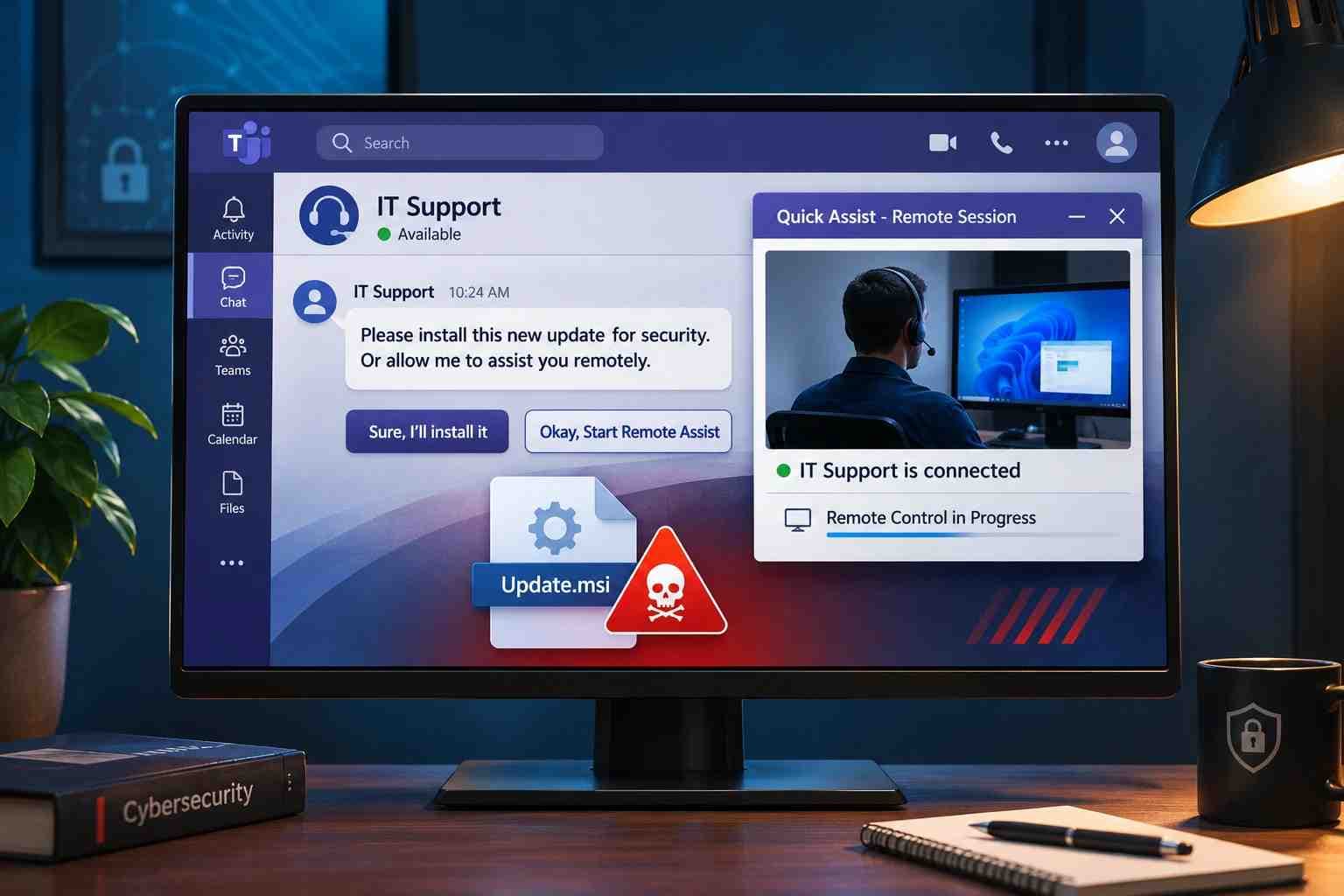
A Microsoft Teams phishing attack is a social engineering attempt in which an attacker uses Teams messages or calls to impersonate a trusted person, such as an IT administrator, help desk employee, or technical support agent.
The goal is to make an employee take an action that gives the attacker access. That action may involve accepting an external chat, joining a call, opening a remote support application, or approving a remote-control session.
Unlike traditional email phishing, this method uses a communication platform that employees may already trust for daily work. A message that appears to come from technical support can feel routine, especially when the caller claims to be fixing an account, updating a security setting, or resolving a device problem.
The risk does not stop at the remote session. In the incidents Microsoft investigated in October 2026, attackers used their access to examine the workstation and the organization's Active Directory Certificate Services environment. They then followed different paths to obtain authentication certificates for privileged identities.
The important distinction: Microsoft did not report a vulnerability in the Teams application as the cause of these incidents. The attackers relied on impersonation, user-approved remote access, and weaknesses in the organization's identity infrastructure.

How the Microsoft Teams Remote Access Scam Works
The attack usually starts with a believable support request. The attacker may use a display name that resembles an internal IT team or create an external tenant name that looks connected to the organization.
The conversation may claim that:
- An employee's account needs urgent verification.
- A security update must be installed.
- A device has a problem that IT needs to fix.
- A user must complete a support session to prevent account disruption.
The attacker then guides the employee toward a remote support session. If the employee approves access, the attacker may be able to interact with the workstation as though they were sitting in front of it.
Microsoft's October 30 investigation describes a shared sequence across two intrusions: Teams-based help desk impersonation, a user-approved remote support session, archive transfer and extraction, portable runtime execution, and discovery of the host and AD CS environment.

Microsoft Teams phishing attack flow
1. Fake IT support contact
An external account sends a Teams message or makes a call.
2. User-approved remote session
The employee is persuaded to use Quick Assist or another support tool.
3. Workstation access and discovery
The attacker examines the device and searches for paths into the organization.
4. AD CS weakness identified
The attacker looks for certificate-related security weaknesses.
5A. ESC1
A misconfigured certificate template can expose privileged identities.
5B. ESC8
An unprotected AD CS web enrollment service can be exposed to NTLM relay.
Simplified defensive overview based on Microsoft's October 2026 investigation. The two certificate paths are separate cases, not steps that always occur together.
What Happened in Microsoft's October 2026 Investigation?
On October 30, 2026, Microsoft Security Research published an investigation titled From help desk impersonation to AD CS abuse: Investigating ESC1 and ESC8 intrusion paths.
The report describes two human-operated intrusions. Both began with Teams messages or calls impersonating IT or help desk staff. Both involved users approving remote access, primarily through Quick Assist. After gaining access, the attackers staged portable runtimes and examined the environment for certificate-related weaknesses.
However, the two incidents followed different AD CS attack paths.
Case 1: ESC1 certificate template abuse
In the first case, the initial phishing wave targeted three user accounts and resulted in one compromised workstation.
The attacker examined the organization's AD CS environment and found a certificate template vulnerable to ESC1. This weakness allowed a requester to supply identity information under conditions that could permit a certificate to represent a privileged account.
Microsoft reported that the attacker obtained authentication certificates for privileged accounts and performed DCSync activity. Microsoft Defender's attack disruption restricted covered identities and blocked substantial follow-on activity. However, one privileged identity had been excluded from automated containment. That identity remained usable and was later involved in file-server access and data exfiltration.
This case highlights an important incident response lesson: security tools cannot fully contain an identity that has been excluded from the response process. Organizations need to review exclusions and make sure every affected account has a clear containment action.
Case 2: PetitPotam and ESC8
The second case followed a different route.
Microsoft reported that the attacker used PetitPotam to cause a Windows server to authenticate to an attacker-controlled system. The attacker then relayed the domain controller's NTLM authentication to an AD CS Web Enrollment service that lacked the required relay protections.
The attacker obtained a certificate for the domain controller account and used certificate-based Kerberos authentication, known as PKINIT, to obtain a ticket-granting ticket.
Microsoft Defender generated ESC8-related alerts. The customer then isolated the workstation associated with the activity. Microsoft reported that no further attack progression was observed after the isolation.
This case shows why a remote support incident should not be treated as an ordinary endpoint issue. Investigators may need to examine certificate issuance, domain controller authentication, and Kerberos activity as well as the original workstation.
Comparing the two cases
|
Investigation detail |
Case 1: ESC1 |
Case 2: ESC8 |
|
Initial access |
Teams help desk impersonation |
Teams help desk impersonation |
|
Remote access |
User-approved remote support |
User-approved remote support |
|
AD CS path |
Misconfigured certificate template |
NTLM relay to Web Enrollment |
|
Privileged identity involved |
Privileged user accounts |
Domain controller account |
|
Follow-on activity |
DCSync and data access |
Certificate-based Kerberos authentication |
|
Response |
Automated disruption restricted covered identities |
Defender alerts followed by customer-led device isolation |
|
Key lesson |
Review identity exclusions and certificate exposure |
Investigate and isolate the device, then review certificate and Kerberos activity |
The two cases should not be combined into one fixed attack sequence. ESC1 and ESC8 are different weaknesses, and the investigation describes them as separate paths.
Understanding the Technical Risks: Quick Assist, AD CS, ESC1, and ESC8
To understand why these incidents matter, it helps to separate the remote access problem from the certificate security problem.
Quick Assist can provide legitimate remote support. AD CS issues and manages digital certificates in a Windows environment. ESC1 and ESC8 describe security weaknesses involving certificate templates and certificate enrollment services.
An attacker who starts with a remote support session may look for weaknesses in these systems. The remote session is the entry point, while AD CS abuse can create a much more serious identity-level problem.
What is a Quick Assist remote access scam?
Quick Assist is a Microsoft tool that allows one person to receive remote assistance from another. It has legitimate uses in technical support, but users should only accept sessions from people whose identity and authorization they have verified.
In a social engineering attack, a fake support agent may persuade an employee to open Quick Assist and share or enter a connection code. The employee believes they are receiving help, but they may be giving an unknown person access to their device.
The risk is not that Quick Assist is automatically malicious. The risk is that a user may approve a remote session for someone who is not authorized to provide support.
Organizations should therefore manage remote assistance as a controlled support process. Employees should know which tools are approved, how to verify support staff, and how to report an unexpected remote access request.
What is Active Directory Certificate Services?
Active Directory Certificate Services (AD CS) is a Windows Server role that allows an organization to issue and manage digital certificates.
Certificates can support several security functions, including:
- User and computer authentication
- Secure communication
- Smart card authentication
- Certificate-based access to internal services
AD CS is an important part of an organization's identity infrastructure. A weak certificate template or enrollment service can create a path to identities that the requester should not be able to represent.
This is why an AD CS security review should include more than checking whether the certificate authority is running. Administrators also need to review certificate templates, enrollment permissions, issuance requirements, and web enrollment settings.
What is ESC1?
ESC1 is an AD CS misconfiguration involving a certificate template that allows a requester to provide identity information in a certificate request.
A risk can arise when several conditions exist together:
- The certificate template allows the requester to supply subject information.
- The template supports authentication.
- Enrollment permissions are too broad.
- Required approval or authorized signatures are not enforced.
Under these conditions, a user with limited permissions may be able to request a certificate that represents another identity, potentially including a privileged account.
The main issue is not simply that a certificate can be requested. It is that the template may allow the requester to influence which identity the certificate represents.
Why this matters: A certificate issued for a privileged identity can create an authentication path that does not depend on the original password. That means a password reset alone may not close the access path.
What is ESC8?
ESC8 involves NTLM relay exposure in AD CS Web Enrollment or related enrollment web services.
An AD CS web enrollment endpoint may become vulnerable when it accepts NTLM authentication without suitable protections, such as HTTPS and Extended Protection for Authentication (EPA).
In the October 2026 case, Microsoft described the attacker relaying a domain controller's NTLM authentication to an AD CS Web Enrollment service. The attacker then obtained a certificate for the domain controller account and used it for certificate-based Kerberos authentication.
Why this matters: The problem can extend beyond the original employee workstation. A certificate associated with a domain controller identity can have serious implications for the wider Windows domain.
ESC1 vs. ESC8: What is the difference?
|
Area |
ESC1 |
ESC8 |
|
Main weakness |
Misconfigured certificate template |
Insecure AD CS web enrollment endpoint |
|
Core issue |
Requester can supply identity information under unsafe conditions |
NTLM authentication can be relayed to an unprotected enrollment service |
|
Security impact |
Certificate may represent a privileged user |
Certificate may be issued for a relayed user or machine identity |
|
Main review area |
Template settings and enrollment permissions |
HTTPS, EPA, NTLM, and enrollment endpoints |
|
October 2026 case |
Privileged user certificates |
Domain controller certificate |
Why a Password Reset May Not Be Enough
A common response to a suspected account compromise is to reset the user's password. That is an important step, but it may not be sufficient when attackers have obtained authentication certificates.
Microsoft explains that an attacker may use an issued certificate independently of the password that was initially compromised. Reimaging the first workstation or resetting the affected user's password does not automatically revoke the certificate. It also does not invalidate Kerberos tickets that have already been issued.
A certificate-aware response should therefore include:
- Identifying certificates issued during the suspected compromise period.
- Reviewing the certificate owner, template, serial number, and thumbprint.
- Checking whether the certificate was used for authentication.
- Revoking unauthorized certificates.
- Publishing updated certificate revocation information.
- Reviewing active Kerberos tickets and related authentication activity.
- Resetting credentials and containing affected devices where appropriate.
These actions should be coordinated by the organization's identity and security teams. Certificate revocation, password resets, and Kerberos ticket response address different parts of the incident.
How to Detect a Microsoft Teams IT Support Impersonation Attack
A single suspicious Teams message does not prove that an organization has been compromised. Detection becomes more reliable when security teams connect activity across collaboration tools, endpoints, identity systems, and certificate services.
For example, an external Teams call may be harmless on its own. A remote support session followed by an unexpected archive extraction, a portable runtime launched from a user-writable folder, and unusual AD CS activity is much more concerning.
1. Review external Teams messages and calls
Look for:
- External accounts using internal IT or help desk names.
- Unexpected requests to join a support call.
- Messages that create urgency around account access or security updates.
- Users being asked to share a Quick Assist code or approve remote control.
- Teams warnings that identify a sender or call as suspicious.
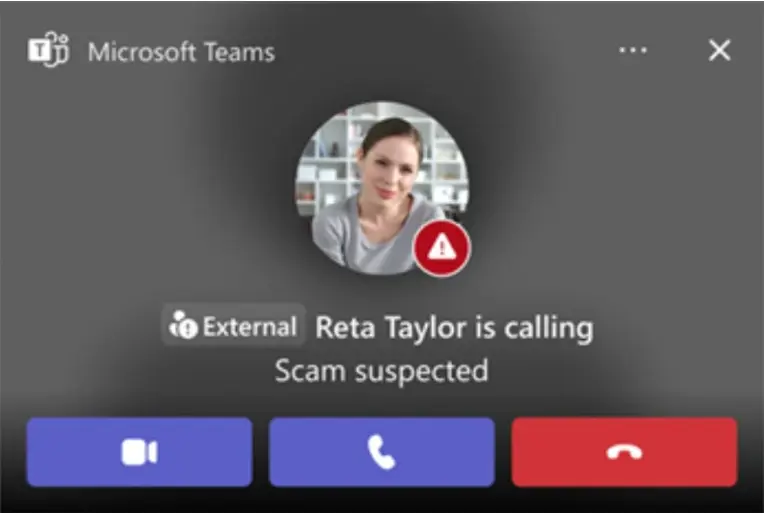
Microsoft Teams can display external contact and suspected scam warnings. Employees should verify the sender's name and email address, review the message, and accept an external conversation only when they trust the sender.
2. Review remote support activity
Security teams should investigate remote support sessions that were not opened through an approved support ticket or internal process.
Check:
- Which user approved the session?
- Which external person or organization initiated it?
- Which remote assistance tool was used?
- What processes started during or immediately after the session?
- Were archives, scripts, or installers introduced?
- Did the device connect to unusual internal systems afterward?
A legitimate support tool can be abused. The investigation should focus on the session context and the activity that followed, not simply the presence of the tool.
3. Look for unusual runtime execution
Microsoft's October report describes portable Python, Bun, and Java runtimes being used to execute attacker-controlled scripts from user-writable locations.
A runtime is not automatically suspicious. Developers and administrators may use these tools for legitimate work. The concern increases when an unfamiliar runtime starts from a newly created user-profile folder after an unverified support session.
Defenders should correlate:
- Original executable name and file metadata.
- File signer and product information.
- Executable path.
- Parent and child process relationships.
- Script files or unusual file extensions.
- Network connections initiated by the process.
- The user and device involved.
Microsoft specifically advises defenders not to rely on file names alone. A renamed executable may retain metadata identifying the original runtime.
4. Investigate AD CS and certificate activity
Review certificate requests and issuance records for activity that does not match normal business processes.
Important questions include:
- Which account requested the certificate?
- Which certificate template was used?
- Did the request contain unexpected subject or Subject Alternative Name values?
- Was the certificate issued to a privileged user or machine identity?
- Did the certificate appear in authentication activity shortly after issuance?
- Was a domain controller identity seen authenticating from an unexpected device?
For ESC8 investigations, correlate domain controller authentication, the source device, Web Enrollment access, certificate authority records, and PKINIT activity.
Microsoft Defender XDR investigation starting points
Microsoft's October report includes Advanced Hunting examples for Teams activity, portable runtime execution, network connections, and certificate-related alerts. The following queries are adapted from those investigation examples. They are intended for authorized defenders using Microsoft Defender XDR. Validate table fields and event availability in your own tenant before relying on the results. A match is an investigation lead, not proof of compromise.
Find external Teams contacts and impersonation signals:
CloudAppEvents
| where Timestamp > ago(7d)
| where Application == "Microsoft Teams"
| where
(ActionType == "ChatCreated" and IsExternalUser == true)
or ActionType in~ (
"TeamsImpersonationDetected",
"SecurityRiskInCallDetected"
)
| order by Timestamp desc
Review Bun or Java execution from KB-prefixed staging paths:
DeviceProcessEvents
| where Timestamp > ago(7d)
| where ProcessVersionInfoOriginalFileName =~ "bun.exe"
or FileName in~ ("bun.exe", "java.exe", "javaw.exe")
| where ProcessCommandLine contains ".js"
or ProcessCommandLine contains ".java"
| where FolderPath matches regex
@"(?i)\\AppData\\Roaming\\KB[0-9]+\\"
| order by Timestamp desc
Find certificate, NTLM relay, and PKINIT-related alerts:
AlertInfo
| where Timestamp > ago(7d)
| where
Title contains "NTLM relay"
or Title contains "Certificate Services"
or Title contains "PKINIT"
or Title contains "Kerberos ticket request"
| join kind=inner (
AlertEvidence
| where Timestamp > ago(7d)
) on AlertId
These examples follow Microsoft's published investigation guidance. Security teams should tune time ranges, confirm the available telemetry, and correlate results with endpoint, identity, and certificate records.
How Organizations Can Prevent Microsoft Teams Remote Access Scams
There is no single setting that can prevent every social engineering attempt. Organizations need controls across Teams, endpoints, remote support tools, user accounts, and certificate services.
1. Strengthen Microsoft Teams external access
Review external access and federation settings. Allow communication with external organizations only when there is a valid business need.
Recommended actions:
- Review which external domains can contact employees.
- Remove access that is no longer required.
- Train employees to check external sender labels.
- Make sure staff understand that an external caller claiming to be IT is not automatically trustworthy.
- Establish a clear process for reporting suspicious messages and calls.
Microsoft provides user-facing warnings for potentially suspicious external chats. Employees should verify the sender's identity and block or report contacts they cannot confirm.
2. Create a trusted IT support verification process
Employees should never have to guess whether a support request is genuine.
Create a simple process that everyone can follow:
- Ask employees to open support requests through the organization's approved help desk channel.
- Give IT staff a consistent way to verify their identity.
- Require employees to confirm unexpected support requests through a known internal phone number or service portal.
- Do not let an unsolicited Teams caller decide which remote support tool an employee should use.
- Keep a record of remote support sessions, including the employee, technician, device, reason, and time.
A simple rule can prevent confusion: IT staff should never ask employees to approve an unexpected remote session without a verifiable support request.
3. Control Quick Assist and other remote support tools
Remote support tools should be available only through approved workflows.
Organizations should:
- Define which remote support tools are permitted.
- Limit remote access to authorized support personnel.
- Monitor remote sessions and retain relevant logs.
- Review unexpected use of Quick Assist and third-party remote management tools.
- Alert when remote support software launches unusual scripts, installers, or portable runtimes.
- Use application control to restrict unapproved software and execution from user-writable locations.
Microsoft recommends restricting remote support software to approved products, operators, and workflows. It also recommends reviewing portable runtimes through their signer, original filename, metadata, path, and behavior.
4. Secure AD CS certificate templates against ESC1
IT and identity teams should review authentication-capable certificate templates.
Focus on:
- Whether users can supply subject information in certificate requests.
- Whether enrollment permissions are broader than necessary.
- Whether certificates can be used for client authentication.
- Whether manager approval or authorized signatures are required where appropriate.
- Whether privileged identities are exposed through unnecessary enrollment permissions.
Remove unnecessary enrollment rights and correct unsafe template settings. Microsoft Defender for Identity provides certificate security posture assessments that can help identify ESC1-related risks.
5. Protect AD CS Web Enrollment against ESC8
Organizations should inventory all AD CS Web Enrollment and Certificate Enrollment Web Service endpoints.
Recommended actions include:
- Remove enrollment endpoints that are no longer required.
- Require HTTPS for web enrollment.
- Enforce Extended Protection for Authentication (EPA).
- Review whether NTLM is required and disable it on enrollment services where operationally feasible.
- Validate changes in a controlled environment before applying them broadly.
- Review Microsoft's guidance for mitigating NTLM relay attacks against AD CS.
HTTPS and EPA serve different but complementary purposes. HTTPS protects the connection, while EPA helps protect authentication against relay attacks.
6. Review other AD CS weaknesses
A review should not stop after checking ESC1 and ESC8. Other certificate authority and template weaknesses may also create security exposure.
|
Risk |
What administrators should review |
|
ESC4 |
Certificate template ownership and permissions that allow unauthorized changes |
|
ESC7 |
Certificate authority permissions, including Manage CA and Manage Certificates rights |
|
ESC11 |
RPC certificate enrollment interface encryption and packet privacy requirements |
These are additional AD CS risks, not techniques Microsoft identified as the certificate paths used in the two October 2026 cases. Microsoft Defender for Identity documents assessments for these configurations.
7. Improve endpoint and identity protection
Endpoint and identity monitoring should work together.
Organizations should consider:
- Deploying endpoint detection and response on supported devices.
- Reviewing alerts for suspicious remote access and script execution.
- Restricting administrative privileges.
- Applying Conditional Access policies based on identity and device risk.
- Requiring strong multifactor authentication for important accounts.
- Limiting administrative access to approved devices.
- Reviewing privileged account exclusions from automated containment.
- Monitoring unusual authentication to domain controllers and certificate authorities.
MFA is valuable, but it should not
be treated as a complete solution to certificate abuse. The October
investigation shows why defenders also need to review certificate issuance and
certificate-based authentication.
Real-World Observation: Suspicious Microsoft Teams Contact and Workplace Access Issues
During a routine workplace experience, an unfamiliar account named "se433 Find me on Telegram' ..." contacted an employee through Microsoft Teams with a new message. Around the same period, a Microsoft application displayed a "Something went wrong" error and recommended refreshing the application.
Additionally, several employees at the same workplace reported that they could not join Teams using their accounts because they received a permission-related error. These events raised concerns about possible account security or access control issues.
However, no evidence was available to confirm that the incidents were connected or caused by a phishing attack. The situation highlights why organizations should investigate unexpected external contacts, review Teams access permissions, and examine Microsoft 365 sign-in and audit logs before determining whether an incident involves ordinary configuration problems or malicious activity.

(Source – Microsoft)
What Should You Do If an Employee Already Approved a Suspicious Remote Session?
If an employee has already granted remote access to someone they cannot verify, treat the event as a potential security incident. Do not assume that closing the Teams chat or remote support window has removed all access.
A response team should follow a documented process.
Immediate response checklist
- Contact the security or IT team. Report the Teams account, caller details, time of contact, and actions taken.
- Isolate the affected device. Follow the organization's incident response procedure to prevent further unauthorized activity while preserving evidence.
- Review the remote session. Identify the support tool, session time, user approval, and processes that ran during or after the session.
- Investigate endpoint activity. Check for unexpected downloads, archive extraction, installers, portable runtimes, scripts, and unusual network connections.
- Review affected identities. Identify accounts used on the device and check for unusual sign-ins or privilege-related activity.
- Investigate AD CS records. Look for suspicious certificate requests, unexpected templates, privileged identities, and unusual enrollment activity.
- Revoke unauthorized certificates. Identify issued certificates and coordinate revocation and publication of updated revocation information.
- Review Kerberos activity. Investigate certificate-based authentication and active tickets. A password reset or certificate revocation does not automatically invalidate tickets already issued.
- Review containment exclusions. Confirm that every affected device and identity has an appropriate containment action.
- Document and monitor. Preserve logs and evidence, record decisions, and monitor for further suspicious activity.
Microsoft's investigation emphasizes the need to correlate Teams interactions, remote access, endpoint activity, certificate records, and identity events. It also warns that certificate revocation and Kerberos ticket review are separate response tasks.
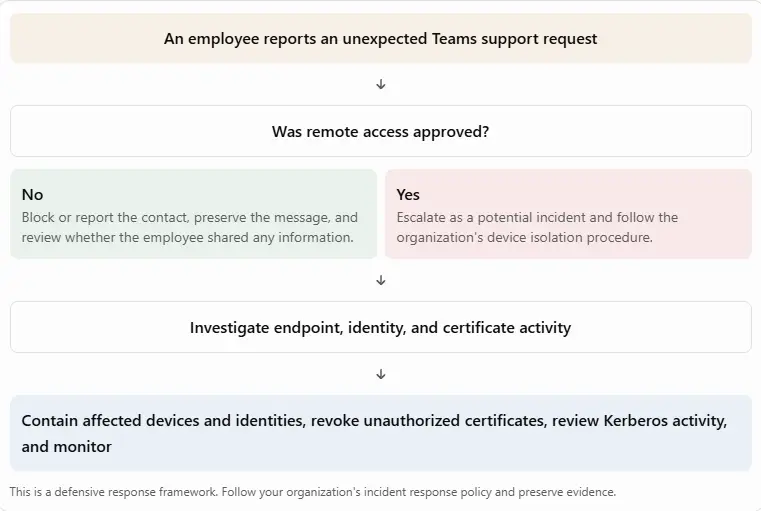
A practical incident response decision guide
An employee reports an unexpected Teams support request
Was remote access approved?
No
Block or report the contact, preserve the message, and review whether the employee shared any information.
Yes
Escalate as a potential incident and follow the organization's device isolation procedure.
Investigate endpoint, identity, and certificate activity
Contain affected devices and identities, revoke unauthorized certificates, review Kerberos activity, and monitor
This is a defensive response framework. Follow your organization's incident response policy and preserve evidence.
A Microsoft Teams Security Checklist for Small Businesses
Small businesses may not have a dedicated security operations center, but they can still reduce the risk of help desk impersonation.
|
Security action |
Why it matters |
|
Verify unexpected IT calls |
Helps prevent employees from trusting fake support staff |
|
Use an approved help desk channel |
Makes support requests easier to validate |
|
Limit external Teams communication |
Reduces unnecessary contact from unknown organizations |
|
Approve only trusted remote support sessions |
Reduces the risk of unauthorized device access |
|
Keep endpoint protection enabled |
Helps detect suspicious software and activity |
|
Restrict administrator accounts |
Limits the impact of a compromised employee device |
|
Review Microsoft 365 security alerts |
Helps identify suspicious collaboration and sign-in activity |
|
Audit AD CS if deployed |
Helps identify certificate template and enrollment weaknesses |
|
Test incident response procedures |
Helps teams respond quickly and consistently |
For small businesses without AD CS: The certificate-specific sections may not apply to your environment. You should still review Teams external access, remote support practices, endpoint protection, and account security.
MITRE ATT&CK Techniques Associated With the October 2026 Cases
The MITRE ATT&CK framework provides a common language for describing attacker behavior. Microsoft mapped several techniques to the activity it investigated.
|
Tactic |
Technique ID |
Technique |
Relevance |
|
Initial Access |
T1566.003 |
Spearphishing via Service |
Teams messages used for support impersonation |
|
Initial Access |
T1566.004 |
Spearphishing Voice |
Teams calls supported the social engineering |
|
Command and Control |
T1219 |
Remote Access Software |
Remote support software provided interactive access |
|
Execution |
T1059.003 |
Windows Command Shell |
Shell commands supported staging and discovery |
|
Execution |
T1059.007 |
JavaScript/JScript |
Portable Bun runtime executed JavaScript |
|
Defense Evasion |
T1036 |
Masquerading |
Update-themed staging and renamed runtime |
|
Discovery |
T1082 |
System Information Discovery |
Windows system information was collected |
|
Discovery |
T1016 |
System Network Configuration Discovery |
Network configuration was examined |
|
Discovery |
T1057 |
Process Discovery |
Running processes were enumerated |
|
Credential Access |
T1557 |
Adversary-in-the-Middle |
NTLM relay activity supported the ESC8 path |
|
Credential Access |
T1649 |
Steal or Forge Authentication Certificates |
Certificate issuance and certificate-based authentication |
These mappings describe activity reported by Microsoft. They should not be interpreted as proof that every Teams phishing incident uses all these techniques.
How This Activity Compares With Other Microsoft Research
Microsoft's October 30 investigation is not the first report to describe attackers impersonating IT support through collaboration tools.
In a separate September 2, 2026 report, Microsoft described a campaign in which threat actors used Teams external collaboration to impersonate IT staff, persuade users to grant remote access, and then use remote management software, a malicious MSI, and a Node.js-based implant.
That report also described reconnaissance and lateral movement toward enterprise systems. It is related context, but it is a separate investigation from the October ESC1 and ESC8 cases.
Microsoft also documented Quick Assist abuse in earlier social engineering activity. Its May 2024 research described attackers impersonating support staff and misusing remote assistance as part of a broader intrusion and ransomware chain. That earlier activity provides useful context for why remote support verification remains important.
The key point across these reports is that legitimate collaboration and support tools can become part of an attack when users are persuaded to trust an unverified person. The October 2026 investigation adds a deeper identity security concern: remote access can lead to AD CS abuse and certificate-based authentication.
Frequently Asked Questions
1. What is a Microsoft Teams phishing attack?
A Microsoft Teams phishing attack uses messages or calls to trick employees into trusting an attacker. The attacker may impersonate IT support and persuade the user to share information or approve remote access.
2. Can hackers use Microsoft Teams to gain remote access?
Yes. Microsoft reported incidents in which attackers impersonated help desk staff through Teams and persuaded users to approve remote support sessions, primarily through Quick Assist. The reported incidents relied on social engineering rather than a Teams software vulnerability.
Microsoft Security Blog
3. Is Quick Assist itself malware?
No. Quick Assist is a legitimate Microsoft remote assistance tool. The security risk occurs when a user grants access to an unverified person who is pretending to provide technical support.
4. What is a Microsoft Teams Quick Assist scam?
It is a social engineering attempt in which someone impersonates IT support and persuades an employee to open Quick Assist and approve a remote session. The attacker may then use that access to investigate the device or introduce unauthorized software.
5. What are ESC1 and ESC8 in AD CS?
ESC1 is a certificate template misconfiguration that can allow a requester to obtain an authentication certificate representing another identity under unsafe conditions. ESC8 involves NTLM relay exposure through inadequately protected AD CS Web Enrollment or related endpoints.
6. Does changing a password remove an attacker's certificate access?
Not necessarily. Microsoft explains that an authentication certificate may remain usable independently of the original password. A response team should investigate certificate issuance, revoke unauthorized certificates, and review active Kerberos tickets as separate actions.
7. How can employees identify fake IT support on Teams?
Employees should verify the sender's identity and email address, be careful with unexpected external calls, and never approve remote access just because someone claims to work for IT. They should confirm support requests through a known internal channel.
8. What should an employee do after approving a suspicious remote session?
They should immediately contact their organization's IT or security team. The organization should follow its incident response process, investigate the affected device and account, and review whether any unauthorized certificate or identity activity occurred.
9. Can Microsoft Defender help detect these attacks?
Microsoft's October investigation describes Defender alerts and investigation methods related to Teams impersonation, suspicious runtime activity, NTLM relay, AD CS certificate abuse, PKINIT, and DCSync. Detection depends on the products deployed, configuration, and available telemetry.
10. Are ESC1 and ESC8 Microsoft Teams vulnerabilities?
No. ESC1 and ESC8 are AD CS security weaknesses. Teams was used as the social engineering channel in the reported cases. Microsoft stated that the incidents did not exploit a vulnerability in Teams itself.
Hoplon Insight: Secure the Support Process, Not Just the Chat Platform
The October 2026 investigation highlights a security problem that organizations can easily overlook. Employees may be trained to recognize suspicious email links, but they may not apply the same caution to an unexpected Teams call from someone claiming to be IT support.
A remote support session can become the starting point for a much larger incident. If the affected workstation has access to internal systems, attackers may use that access to investigate accounts, devices, and identity infrastructure.
Organizations should therefore treat remote support as a privileged business process. Every session should have a verifiable purpose, an authorized operator, and an accountable record. Security teams should also review AD CS configurations and ensure that certificate issuance and authentication activity are monitored.
For organizations using Microsoft identity infrastructure, securing Teams alone is not enough. Endpoint security, identity protection, certificate controls, and a tested incident response plan must work together.
Conclusion
A Microsoft Teams phishing attack can begin with a simple message or phone call, but the consequences may extend far beyond the employee who receives it.
Microsoft's October 2026 investigation shows how fake IT support and user-approved remote access can lead to workstation compromise and, in some environments, AD CS certificate abuse. The two documented cases followed different paths: one involved ESC1 certificate template abuse, while the other involved PetitPotam and ESC8.
The most useful defenses are practical: verify support requests, control remote access, monitor endpoint behavior, audit AD CS, and prepare an incident response process that includes certificates and Kerberos activity.
Organizations should not assume that a password reset or device reimage is enough after a suspected certificate-related compromise. A complete investigation must identify every affected device and identity, review certificate issuance, and confirm that all access paths have been addressed.
Author Bio and Review
Author: Mohammed Talukder is the Co-Founder and CEO of Hoplon InfoSec, with over 16 years of experience in cybersecurity and technology. His expertise includes offensive security, vulnerability management, cyber risk management, and incident response. His professional credentials include CISM, CISA, CEH, and CompTIA PenTest+. He has also received Infosys recognition awards for his professional contributions. He shares practical cybersecurity insights to help organizations strengthen their security posture.
Technical reviewer: Gazi Mahmud, Co-Founder and CIO of Hoplon InfoSec LLC, cybersecurity leader, and CISM & CISA certified professional with expertise in cyber risk management, security governance, compliance, and incident response.
References
Use these as the primary source links in the published article's references section.
- Microsoft: From Help Desk Impersonation to AD CS Abuse, Investigating ESC1 and ESC8 Intrusion Paths. October 30, 2026.
- Microsoft Learn: Certificates Security Posture Assessment in Microsoft Defender for Identity.
- Microsoft Support: Prevent Spam or Phishing Attempts From External Chats in Microsoft Teams.
Read More Articles from Hoplon InfoSec
- Ransomware Delivered Through Microsoft Teams Voice Calls
- Payouts King Ransomware: BlackBasta Link and Attack Analysis
- Clicked on a Phishing Link? What to Do Now
This article is based on Microsoft Security Research published on October 30, 2026, alongside Microsoft support and security documentation. The two intrusion cases are described separately. The article does not claim that Microsoft Teams itself was exploited through a software vulnerability.