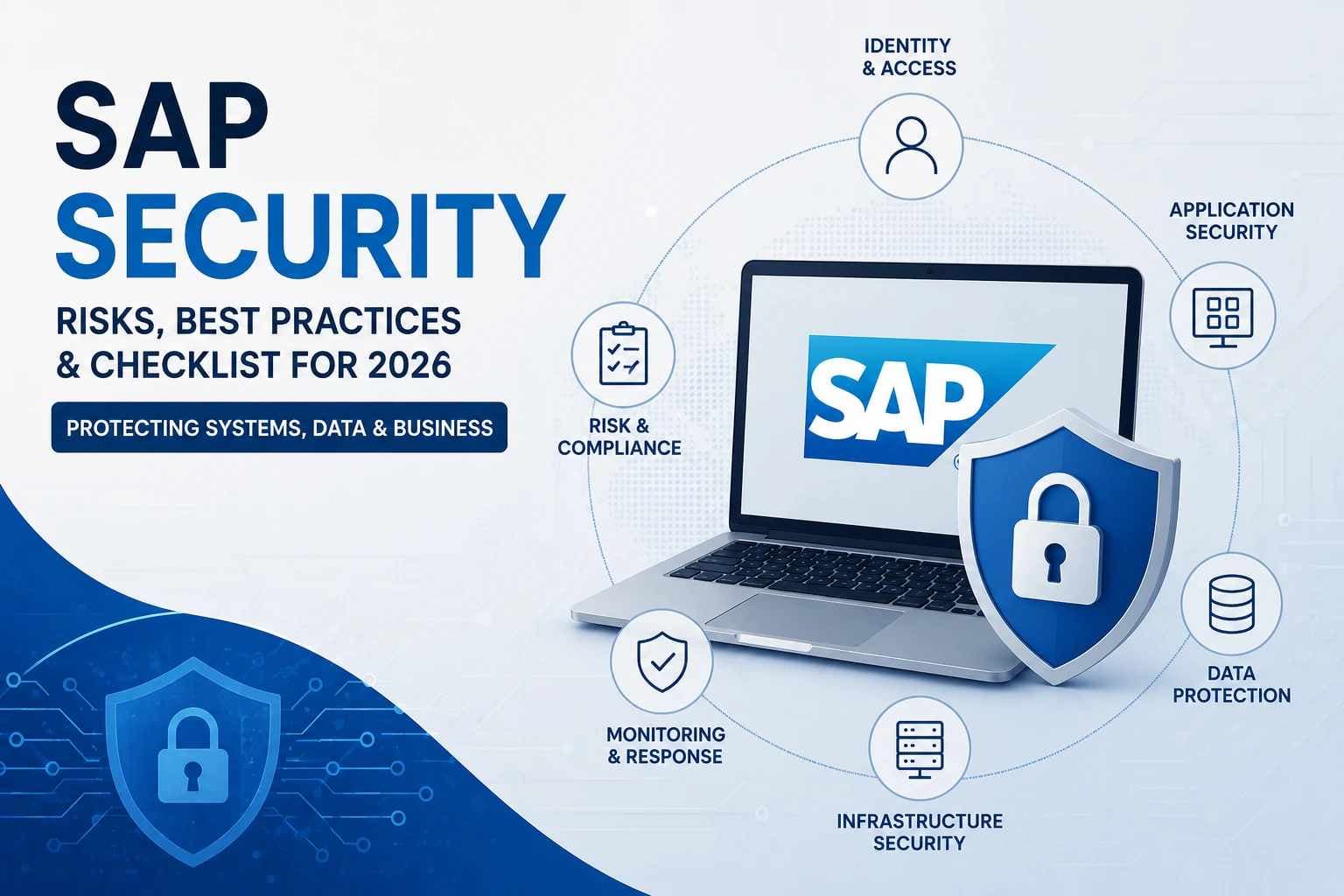
SAP security is the combination of access control, secure configuration, vulnerability management, monitoring, data protection, application security, and incident-response practices used to protect SAP systems and the business processes they support.
It is broader than user roles or SAP GRC alone. SAP's official security framework covers areas such as product security, identity and access management, infrastructure and platform security, tenant and data protection, monitoring and incident response, resilience, and recovery.
For organizations running finance, procurement, manufacturing, customer, HR, or supply-chain processes through SAP, that distinction matters. A weakness in an SAP environment may affect much more than one application. It can expose business data, privileged functions, connected systems, and workflows that the organization depends on every day.
This guide explains where SAP security risk comes from, which controls deserve the most attention, how cloud responsibility changes the security model, and how to build a practical SAP security assessment.
Key Findings
- SAP security is a multi-layer problem. Identity, application configuration, infrastructure, data, monitoring, and recovery all matter.
- SAP GRC is only part of the picture. Governance and access controls do not replace vulnerability management, hardening, monitoring, or incident response.
- Cloud SAP environments still leave important responsibilities with customers. SAP's official security guidance describes a shared-responsibility model between SAP, customers, and cloud providers.
- Patching must be treated as an ongoing operating process. SAP's August 2026 Security Patch Day included 28 new Security Notes and one GitHub security advisory.
- SAP security should connect with wider enterprise cybersecurity. Identity management, vulnerability management, monitoring, incident response, and cloud controls should not operate in isolation.
What is SAP Security?
SAP security protects SAP applications, identities, data, configurations, infrastructure, connections, and business processes against unauthorized access, misuse, vulnerabilities, and cyber threats.
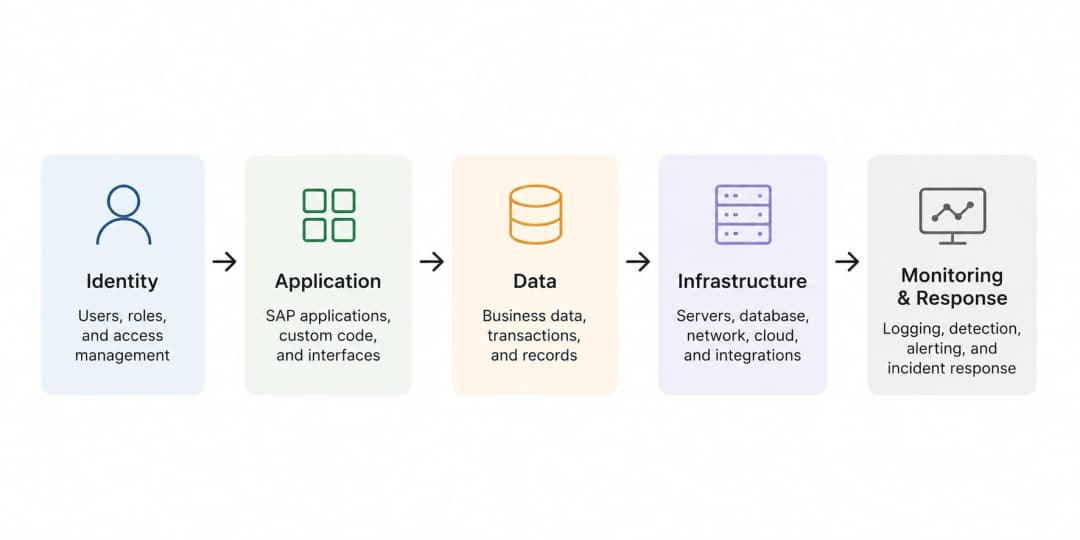
A practical SAP security program normally asks five basic questions:
- Who can access the SAP environment?
- What can each identity do after access is granted?
- Are the systems and applications securely configured and patched?
- Can suspicious or unauthorized activity be detected?
- Can the organization contain and recover from a security incident?
These questions reach across several technical teams.
An identity team may manage authentication. SAP administrators may manage roles and system settings. Infrastructure teams control operating systems, databases, networks, and cloud components. Developers create custom code and integrations. Security teams monitor vulnerabilities and incidents.
SAP security works best when those responsibilities connect.
What Does SAP Security Protect?
SAP security protects more than an application login.
Depending on the organization and SAP products in use, the security scope can include:
- User and administrator identities
- Roles and privileges
- Financial and operational data
- Business transactions
- SAP application servers
- Databases
- Cloud services
- APIs and interfaces
- Remote connections
- Custom code
- Third-party integrations
- Logs and audit records
- Backup and recovery processes
The exact scope depends on the SAP landscape. An on-premises environment does not have exactly the same architecture or operational responsibility as SAP S/4HANA Cloud or SAP Business Technology Platform.
That is why organizations should avoid treating SAP security as one universal checklist. Start with the products, deployment models, interfaces, and business processes that actually exist in your environment.
Why SAP Security Matters to the Business
SAP systems often sit close to business-critical functions. That means a security issue may create consequences outside the security team.
A compromised account may allow unauthorized transactions. An unpatched application could expose sensitive business data. Poorly controlled administrative privileges may allow changes that are difficult to detect. A vulnerable integration can provide a path from one environment into another.
The goal is not to suggest that every SAP weakness will become a breach. It will not.
The goal is to understand which weaknesses could affect important assets or processes and reduce those risks before they become incidents.
A structured cybersecurity risk assessment can help teams connect technical weaknesses to business impact instead of treating every security finding as equally urgent.
The Core Layers of SAP Security
A strong SAP security strategy uses multiple controls because no single protection solves every problem.
1. Identity and Access Management
Identity security answers two questions:
Who is the user?
What should that user be allowed to do?
Authentication confirms identity. Authorization determines permitted actions.
Important controls can include:
- Strong authentication
- Multi-factor authentication where supported and appropriate
- Single sign-on with controlled identity sources
- Role-based access
- Least privilege
- Privileged-account governance
- Joiner, mover, and leaver processes
- Periodic access reviews
- Separation between standard and administrative identities
- Monitoring of unusual access behavior
Identity decisions should be based on business need rather than convenience.
For example, someone who needs to view financial information may not need permission to change payment details. A technical administrator may require powerful access for specific work, but that does not automatically justify permanent unrestricted access.
Principles from Zero Trust architecture can support this approach. Access should be based on verified identity, appropriate authorization, context, and continued oversight rather than simply trusting someone because they are inside the corporate network.
2. Roles, Authorizations, and Segregation of Duties
SAP access should reflect what a person needs to perform their job.
Overly broad roles create two problems.
First, they increase the potential impact of mistakes, misuse, or account compromise.
Second, they can give one person enough authority to perform conflicting business actions.
Segregation of duties, often shortened to SoD, reduces this second risk.
A simple example is separating the ability to create a vendor from the ability to approve a payment to that vendor. The exact control depends on the organization's processes, but the underlying principle is consistent: one identity should not have unnecessary control over an entire sensitive transaction chain.
Review:
- High-privilege roles
- Emergency access
- Dormant users
- Shared accounts
- Technical and service accounts
- Role inheritance
- Conflicting permissions
- Users who changed departments
- Temporary privileges that were never removed
Do not assume that an old role design is still correct simply because it worked during implementation.
SAP Security vs SAP GRC vs Cybersecurity
These terms overlap, but they are not interchangeable.
|
Area |
Main Purpose |
Typical Focus |
|
SAP Security |
Protect the SAP environment |
Access, configuration, vulnerabilities, code, data, monitoring, infrastructure |
|
SAP GRC |
Governance, risk, and compliance processes |
Access governance, SoD, controls, compliance workflows |
|
Cybersecurity |
Protect the wider organization |
Identity, networks, endpoints, applications, cloud, monitoring, incident response |
SAP GRC can be an important part of SAP security, particularly for access governance and segregation of duties.
It does not eliminate the need to patch vulnerabilities, secure interfaces, harden systems, monitor suspicious activity, test applications, or prepare for incidents.
That broader distinction matters when assigning ownership. A GRC team cannot reasonably carry every technical security responsibility alone.
Common SAP Security Risks
SAP environments can be exposed through several different paths. The importance of each risk depends on the actual architecture, system version, deployment model, data, exposure, and compensating controls.
Excessive Privileges
Too much access increases the potential impact of mistakes, misuse, or account compromise.
Look for users who can perform sensitive actions outside their job requirements, administrators using privileged accounts for routine activity, and permissions that have accumulated over time.
Unpatched Vulnerabilities
Known vulnerabilities deserve structured review because published fixes only reduce risk after organizations identify affected systems and implement the relevant correction.
SAP's official August 2026 Security Patch Day bulletin reported 28 new Security Notes and one GitHub security advisory.
The presence of a high severity or CVSS score does not automatically prove that every organization is exploitable. Product version, configuration, exposure, prerequisites, and existing controls still matter.
A mature vulnerability management program should combine technical severity with asset importance, exposure, exploit conditions, business context, and remediation verification.
Weak or Inconsistent Configuration
Secure software can still be deployed insecurely.
Configuration reviews should examine unnecessary services, weak authentication settings, excessive permissions, exposed interfaces, logging, insecure communications, obsolete settings, and administrative controls.
The correct baseline depends on the product and environment. Avoid copying a generic hardening checklist without confirming that each setting applies to the SAP system being assessed.
Insecure Interfaces and Integrations
SAP rarely operates alone.
It may connect to:
- Identity platforms
- Databases
- Business partners
- Banking systems
- Cloud platforms
- APIs
- Middleware
- File-transfer services
- Legacy applications
- Custom applications
Every connection introduces another trust relationship.
Review which systems can communicate, how they authenticate, what data crosses the connection, what privileges the integration receives, and how activity is logged.
Strong network security controls can help reduce unnecessary exposure and restrict communication paths between critical systems.
Custom Code Weaknesses
Custom development can introduce vulnerabilities even when the underlying SAP platform is patched correctly.
Security review should consider:
- Missing authorization checks
- Unsafe input handling
- Injection risks
- Sensitive information exposure
- Hard-coded secrets
- Insecure API behavior
- Error handling
- Logging
- Dependency risk
- Transport and change controls
The goal is not to treat every custom component as unsafe. It is to ensure custom functionality receives the same security attention as other business-critical code.
A broader application security gap assessment can help teams check whether secure-development practices cover design, coding, testing, deployment, and maintenance.
Weak Monitoring
Prevention alone is not enough.
An organization also needs enough visibility to determine when something unusual happens.
Depending on the system and available telemetry, monitoring may include:
- Authentication events
- Privileged actions
- Security configuration changes
- Sensitive transactions
- Administrative activity
- User changes
- Failed access
- Application errors
- Interface activity
- Security events
- Changes to critical objects
Logs only become useful when somebody collects, retains, reviews, and acts on them.
SAP Risk-to-Control Matrix
|
Risk |
Practical Security Control |
What to Verify |
|
Compromised credentials |
Strong authentication and MFA where appropriate |
Privileged and remote access paths |
|
Excessive permissions |
Least privilege and role review |
High-risk users and administrative roles |
|
SoD conflicts |
Access governance |
Conflicting transaction capabilities |
|
Known vulnerabilities |
Security-note review and patch management |
Product, version, exposure, remediation status |
|
Weak configuration |
Secure baseline and hardening review |
Services, authentication, communication, logging |
|
Insecure integrations |
Restricted connectivity and strong authentication |
Trust relationships, data flow, service privileges |
|
Custom-code flaws |
Secure development and testing |
Authorization, input handling, secrets, dependencies |
|
Undetected misuse |
Centralized monitoring and alerting |
Logs, alert logic, ownership, escalation |
|
Incident escalation |
Tested incident-response process |
Containment and recovery procedures |
This table is a planning framework, not a substitute for product-specific SAP guidance.
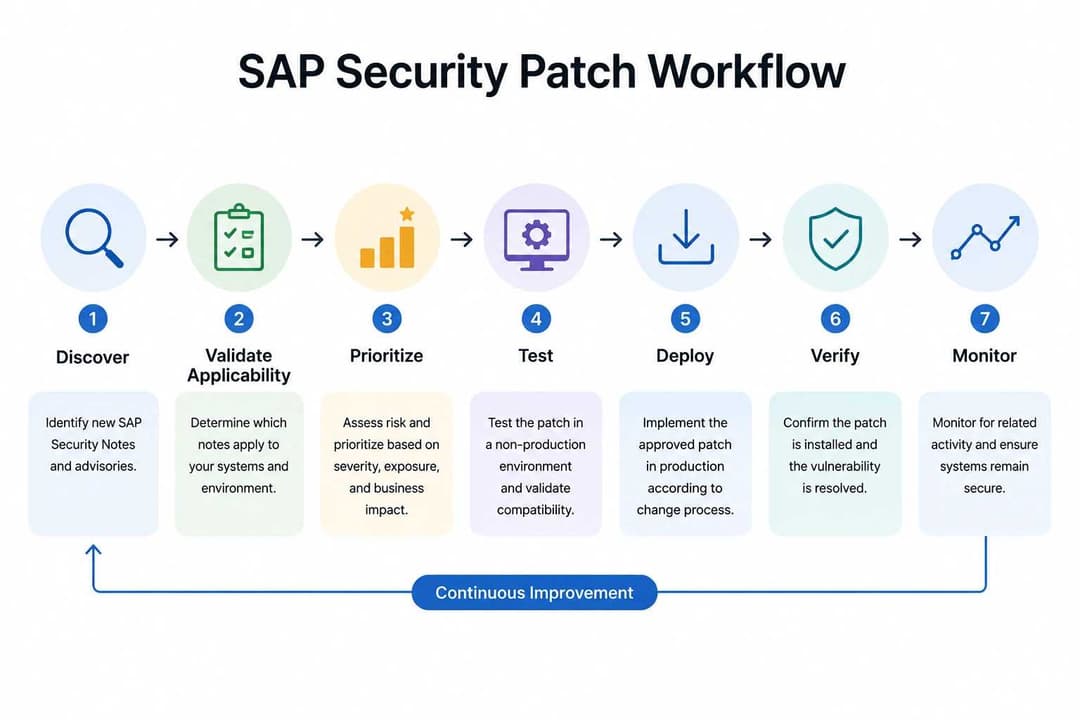
A Practical SAP Patch and Vulnerability Management Process
Patching should not begin with “install everything immediately” or “wait until the next maintenance cycle.”
A better process is risk-based.
Step 1: Maintain an Accurate SAP Asset Inventory
Record:
- SAP products
- System versions
- Components
- Internet exposure
- Business owners
- Technical owners
- Criticality
- Connected systems
- Maintenance status
Without accurate inventory data, teams may struggle to determine whether a Security Note affects them.
Step 2: Review Relevant Security Information
Identify newly published fixes and determine which products and versions are affected.
Do not rely on vulnerability headlines alone.
Step 3: Establish Applicability
Ask:
- Do we run the affected product?
- Is our version affected?
- Is the vulnerable component enabled?
- Is the attack path exposed?
- Are prerequisites present?
- Are compensating controls reducing risk?
Step 4: Prioritize
Use more than CVSS.
Consider:
- Severity
- Exploitability
- Exposure
- Business criticality
- Data sensitivity
- Privileges required
- Existing controls
- Operational consequence of compromise
Step 5: Test the Fix
SAP systems often support important business processes, so production changes should follow controlled testing and change-management procedures.
Step 6: Deploy
Apply approved corrections according to the organization's remediation priorities and maintenance process.
Step 7: Verify
A ticket marked “completed” is not proof that exposure is gone.
Confirm that:
- The correction is installed
- The correct system was updated
- The vulnerable version or setting is no longer present
- Security controls still operate correctly
- Business functions have not been unintentionally disrupted
Step 8: Monitor
Watch for suspicious activity related to the affected area before and after remediation.
This closes the loop between vulnerability management and detection.
Secure Configuration and Hardening
Hardening reduces unnecessary attack surface.
A good configuration review should answer:
What is enabled? Why is it enabled? Who can reach it? Who can administer it? Is the activity visible?
Review areas such as:
- Unnecessary services
- Administrative interfaces
- Authentication options
- Communications
- Interfaces
- Remote access
- High-risk privileges
- Logging
- Session behavior
- System-to-system trust
- Change controls
- Database and operating-system dependencies
Avoid treating hardening as a one-time deployment task.
Configurations change. New services are enabled. Integrations are added. Administrators change settings to solve operational problems.
That is why organizations need both a baseline and a way to detect drift from that baseline.
Protecting SAP Custom Applications and Code
Custom code is part of the SAP attack surface.
Development teams should build authorization and security checks into the design instead of waiting for testing at the end.
During Design
Document:
- Sensitive data
- Trust boundaries
- User types
- Required privileges
- External connections
- Abuse scenarios
During Development
Review:
- Authorization logic
- Input validation
- Sensitive output
- Secrets
- Error handling
- External calls
- Data access
- Security logging
Before Release
Use appropriate code review and security testing.
After Release
Monitor the application and repeat testing when meaningful changes occur.
Independent cybersecurity penetration testing can provide another layer of validation around exposed applications, infrastructure, APIs, and connected environments when the scope is appropriate.
Testing does not prove that software is permanently secure. It provides evidence about a defined scope at a particular point in time.
Monitoring, Detection, and Incident Response
SAP includes monitoring, detection, and incident response within its official security framework.
This matters because organizations can invest heavily in access control and patching while still lacking visibility when something suspicious happens.
A useful monitoring strategy starts by identifying behaviors that matter.
Examples include:
- Unexpected privileged access
- Sudden permission changes
- New administrative users
- Repeated failed authentication
- Unusual access times
- Unexpected high-value transactions
- Changes to security configuration
- Suspicious interface activity
- Access from unexpected sources
- Changes to critical objects
Do not alert on everything.
Alerts that generate large volumes of low-value noise are often ignored. Focus on activities connected to meaningful business or security risk.
Connect SAP Monitoring to the SOC
Where technically feasible, relevant SAP security events should reach the teams responsible for enterprise monitoring.
That may mean forwarding logs or alerts to a SIEM or another centralized monitoring platform.
The objective is context.
An identity alert, endpoint event, firewall event, and SAP administrative action may appear unrelated when reviewed separately. Correlation can help analysts determine whether they are connected.
Prepare Before an Incident Happens
An incident plan should clarify:
- Who owns the technical response?
- Who owns the affected business process?
- Which SAP administrators need to participate?
- Which logs must be preserved?
- How will compromised credentials be disabled?
- Can affected integrations be isolated?
- Who approves emergency changes?
- How will recovery be validated?
- How will the organization determine whether persistence remains?
Broader incident readiness, response, and recovery planning helps teams make these decisions before an active incident forces them to improvise.
SAP Security for S/4HANA, Fiori, BTP, and Cloud Environments
Modern SAP security cannot assume that every workload is a traditional on-premises application.
SAP S/4HANA
A security review should consider the complete deployment rather than only application roles.
Depending on the architecture and deployment model, review:
- User and privileged access
- Business roles
- Interfaces
- Data
- Administrative access
- Security configuration
- Patching responsibility
- Connected systems
- Logging
- Infrastructure dependencies
The exact controls vary between on-premises, private-cloud, and cloud-managed deployments.
SAP Fiori
Fiori can introduce user-facing applications and additional access paths.
Security teams should understand:
- Which applications are exposed
- Which users can access them
- How authentication works
- Which backend permissions support the application
- Whether unused functionality is enabled
- How activity is logged
Do not review the interface independently from the backend permissions that make its actions possible.
SAP BTP
BTP should be treated as a distinct cloud security scope rather than assumed to inherit every control from an on-premises SAP environment.
Review:
- Accounts and administrative access
- User and service identities
- Roles
- Applications
- Integrations
- APIs
- Secrets
- Network connections
- Logging
- Data access
- Third-party components
The exact review should follow the BTP services actually in use.
Cloud and RISE Environments
Moving SAP workloads to cloud infrastructure changes responsibility. It does not remove customer responsibility.
SAP's official cloud security guidance uses a shared-responsibility model. Depending on the service, customers retain responsibility for several solution-level controls such as configuration, identities, access, data usage, and aspects of monitoring.
That is one reason a broader cloud security strategy should accompany SAP-specific controls.
SAP Cloud Shared Responsibility: A Practical View
|
Area |
Customer Role |
SAP / Provider Role |
|
Business-user access |
Manage appropriate application access |
Provide platform capabilities |
|
Application configuration |
Configure securely |
Provide supported service |
|
Data access |
Control customer-data access |
Protect managed platform layers |
|
Application logs |
Review relevant logs |
Provide available logging capabilities |
|
Threat detection |
Monitor customer/application context |
Monitor managed platform context |
|
Physical infrastructure |
Normally not customer-managed in SaaS |
Provider responsibility |
|
Business risk decisions |
Customer responsibility |
Support through platform controls |
This table simplifies a model that can differ by SAP service and contract.
Always confirm the exact responsibility model for the specific service being used.
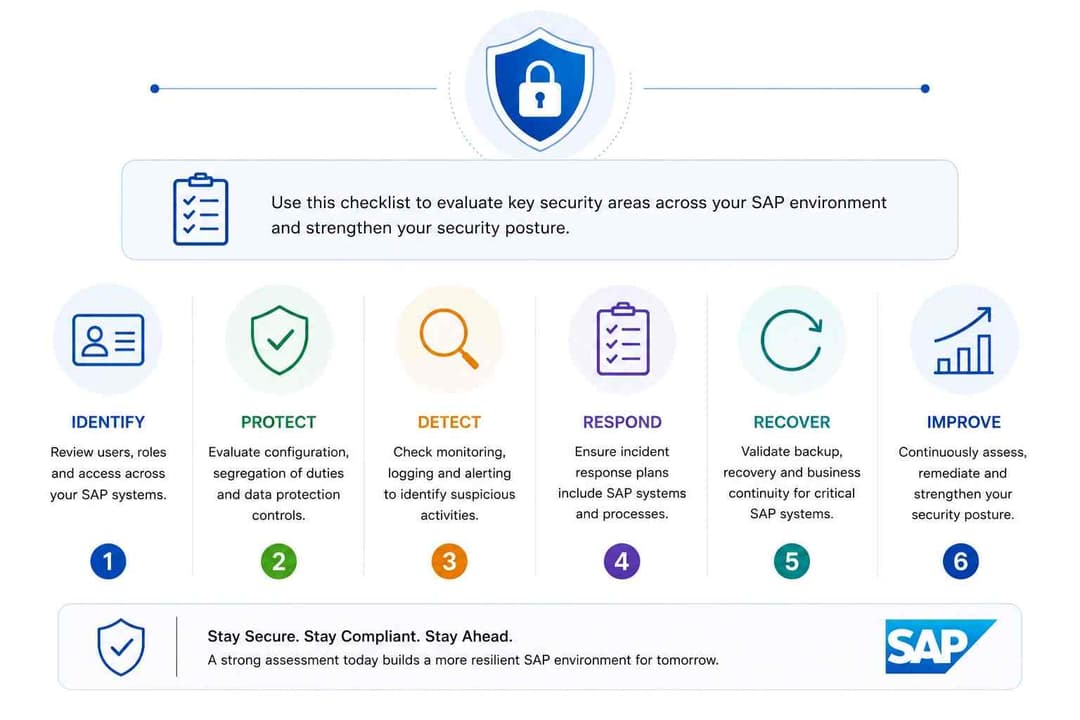
SAP Security Assessment Checklist
Use this checklist as a starting point. It is not a certification standard and does not guarantee security.
|
Security Area |
Questions to Ask |
Evidence to Review |
|
Asset Inventory |
Do we know every SAP system, version, component, and owner? |
CMDB, SAP inventory, architecture maps |
|
Criticality |
Which systems support critical processes? |
Business impact analysis |
|
Identity |
Are users linked to valid business identities? |
User directory, HR records |
|
Authentication |
Is strong authentication used for sensitive access? |
Authentication configuration |
|
Privileged Access |
Who has administrative privileges? |
Privileged-user reports |
|
Least Privilege |
Do users have only required permissions? |
Role reviews |
|
Segregation of Duties |
Can one user perform conflicting high-risk actions? |
Access-governance reports |
|
Dormant Accounts |
Are unused accounts disabled promptly? |
User activity reports |
|
Service Accounts |
Are non-human identities controlled and monitored? |
Service-account inventory |
|
Security Notes |
Is there a recurring review process? |
Patch records |
|
Vulnerability Management |
Are findings prioritized by actual risk? |
Vulnerability reports |
|
Configuration |
Are secure baselines defined and checked? |
Configuration reviews |
|
Interfaces |
Are SAP integrations known and restricted? |
Integration inventory |
|
Network Exposure |
Which SAP services are reachable and from where? |
Firewall and architecture data |
|
Encryption |
Is sensitive data appropriately protected? |
Configuration evidence |
|
Custom Code |
Is custom development security-reviewed? |
Review/testing records |
|
Logging |
Are important security events recorded? |
Logging configuration |
|
Monitoring |
Does someone investigate meaningful alerts? |
SIEM rules and workflow |
|
Incident Response |
Is SAP included in response planning? |
Playbooks |
|
Recovery |
Can the organization recover safely? |
Backup/recovery tests |
|
Cloud Responsibility |
Is control ownership clear? |
Responsibility matrix |
|
Change Management |
Are security-relevant changes controlled? |
Change records |
|
Third Parties |
Which suppliers or applications connect to SAP? |
Third-party inventory |
|
Validation |
Are remediated findings rechecked? |
Retest evidence |
How to Build a Sustainable SAP Security Program
A long list of findings is not a security program.
A sustainable program turns findings into repeatable decisions and ownership.
Step 1: Define the SAP Security Scope
List products, environments, hosting models, critical processes, interfaces, administrators, security owners, and third parties.
Step 2: Establish Ownership
Assign responsibility for IAM, role governance, patching, vulnerability management, infrastructure, network controls, application development, monitoring, incident response, and recovery.
Avoid situations where each team assumes another team owns the control.
Step 3: Assess the Current State
Review technical controls and business risk together.
A broader cybersecurity assessment can help organizations review security areas such as networks, identity, cloud controls, resilience, and incident readiness around critical systems.
Step 4: Prioritize
Rank remediation according to:
- Potential impact
- Exploitability
- Exposure
- System criticality
- Data sensitivity
- Privileges involved
- Existing safeguards
Step 5: Remediate
Assign an owner, required action, timeline, evidence requirement, and validation method.
Step 6: Monitor
Track new vulnerabilities, role changes, integrations, configuration drift, cloud services, unusual activity, and incomplete remediation.
Step 7: Validate
Retest meaningful findings.
A control should be considered effective only when there is reasonable evidence that it works as intended.
Step 8: Improve
Use lessons from assessments, security events, audits, patches, and architecture changes to improve the program.
For organizations building a broader cybersecurity risk-management structure, the official NIST Cybersecurity Framework 2.0 provides a high-level framework for understanding, prioritizing, and communicating cybersecurity outcomes.
When Should You Get Professional Security Help?
Professional support becomes useful when an organization cannot confidently answer basic questions about its SAP-connected security environment.
Examples include:
- The SAP inventory is incomplete
- Privileged access has not been reviewed
- Security findings remain unresolved
- Teams cannot determine which vulnerabilities affect production
- Cloud responsibilities are unclear
- Important interfaces have not been tested
- Logs exist but are not actively monitored
- Incident plans do not include SAP systems
- Independent validation is needed before a major change or audit
The goal of outside support should be clarity, evidence, prioritization, and practical remediation rather than fear-based claims.
Hoplon Infosec provides broader cybersecurity services including vulnerability management, penetration testing, security assessment, and incident readiness and response. These services may support the surrounding controls of an SAP environment where the engagement scope matches the organization's requirements.
This article does not claim that Hoplon Infosec provides a dedicated SAP-specialist consulting service unless that capability is separately verified.
Frequently Asked Questions
What is SAP security?
SAP security is the set of technical and organizational controls used to protect SAP identities, applications, data, infrastructure, configurations, integrations, and business processes from unauthorized access and cybersecurity risk.
Is SAP security the same as SAP GRC?
No. SAP GRC supports areas such as governance, access control, segregation of duties, and compliance processes. SAP security is broader and also covers vulnerability management, patching, secure configuration, application security, monitoring, infrastructure protection, and incident response.
Is SAP security only about roles and authorizations?
No. Access control is important, but SAP's official security framework also covers product security, infrastructure, data protection, monitoring, incident response, resilience, and other areas.
How should SAP vulnerabilities be prioritized?
Do not use severity alone. Evaluate the affected product and version, exposure, prerequisites, business criticality, exploit conditions, data at risk, privileges required, existing controls, and potential operational impact.
Does moving SAP to the cloud remove customer security responsibility?
No. SAP uses a shared-responsibility model. The exact responsibilities vary by service, so organizations should verify them against the official documentation and their specific service agreements.
Is penetration testing enough to secure SAP?
No. Testing can identify weaknesses within a defined scope, but it does not replace access governance, vulnerability management, secure configuration, code review, monitoring, or incident-response planning.
Sources and Methodology
This guide was prepared using current SAP security research and the strongest available official sources for important technical and time-sensitive claims.
For SAP's security framework and shared-responsibility guidance, the article uses the official SAP Security resource.
For current Patch Day information, it uses SAP's official August 2026 Security Patch Day bulletin.
For broader cybersecurity risk-management guidance, it references the official NIST Cybersecurity Framework 2.0.
Final SAP Security Priorities
If you are responsible for an SAP environment, start with five questions:
- Do we know exactly what SAP systems and interfaces we operate?
- Can we prove that access reflects current business need?
- Can we quickly determine whether a new SAP vulnerability affects us?
- Would we detect suspicious privileged or administrative activity?
- Do SAP, security, infrastructure, cloud, and business teams know who owns each response action?
If the answer to any of these is unclear, that uncertainty is a useful place to begin.
SAP security is not a product that gets installed once. It is an operating discipline built around visibility, controlled access, secure configuration, timely remediation, monitoring, and tested response.
The strongest program is the one that can repeatedly identify risk, decide what matters most, fix it, and verify that the fix actually worked.
Not sure where the highest-risk gaps are around your critical business systems?
Hoplon Infosec can help assess vulnerabilities, infrastructure exposure, cloud security, and incident readiness across your wider environment. Start with a scoped cybersecurity assessment to identify priority risks and build a practical remediation plan based on evidence.