

What happened in the GMO Desktop Cloud breach?
On October 28, 2026, Japan's GMO Internet Group launched a cybercrime bounty program offering up to 1 million dollars in total rewards for information that helps identify and arrest those behind the GMO Desktop Cloud breach.
The incident affected its Onamae.com Desktop Cloud service, which provides remote Windows environments used by some foreign exchange (FX) traders. GMO reported unauthorized access, customer data theft, and possible exposure of trading account credentials. The company also refused an extortion demand of approximately 8 billion yen.
What readers need to know
- The bounty: GMO offers up to 1 million dollars for qualifying information that leads to an arrest or an international wanted notice.
- The breach: GMO reported unauthorized access and customer information theft. It identified 26,739 servers as potentially affected, not as confirmed compromised systems.
- The priority: Affected customers should change trading passwords from a trusted device, end active sessions, review transactions, and follow official security updates.
Key facts about the incident
|
Detail |
Confirmed information |
|
Company |
GMO Internet Group and its subsidiary, GMO Internet, Inc. |
|
Affected service |
Onamae.com Desktop Cloud |
|
Initial discovery |
October 20, 2026 |
|
Service suspension |
Began October 21, 2026 |
|
Potentially affected servers |
26,739 |
|
Reported extortion demand |
Approximately 8 billion yen |
|
Bounty program |
Up to 1 million dollars in total |
|
Data exposure |
GMO confirmed unauthorized access and customer information theft |
|
Initial access method |
Not publicly confirmed in the available reports |
|
Ransomware status |
GMO had not confirmed ransomware on every customer device; its investigation continued |
|
Latest major development |
The attackers' data publication site was reported taken down on October 28 |
Sources: GMO's official incident notices, GMO Cybercrime Bounty, and The Hacker News report.
Important distinction: The figure of 26,739 refers to servers that GMO considered potentially affected. It does not establish that attackers compromised every server or stole data from every customer. The company also had not confirmed the full scope of the published information.
Table of contents
- Background and threat context
- What happened during the breach
- How the incident could affect FX traders
- What investigators know about the attack
- Technical analysis and detection
- Remediation and mitigation
- What the bounty program means
- Hoplon Insight
- Frequently asked questions
- Technical references
Background and threat context
Why this incident matters beyond Japan
Remote desktops let people use a Windows environment without keeping their work on a single physical computer. FX traders may use these systems to keep trading software available while managing accounts from another device.
That setup also creates a security risk. A remote desktop can hold trading software, saved passwords, browser sessions, personal files, and other sensitive data. If an attacker gains control of that environment, the consequences can reach beyond the hosting provider.
The GMO Desktop Cloud breach shows how a compromise of a service provider can create risks for its customers. A customer may use a trusted broker and a secure personal laptop, yet still face exposure if a separate hosted environment stores the customer's trading credentials.
What industry data tells us
The 2025 Verizon Data Breach Investigations Report analyzed more than 22,000 security incidents and 12,195 confirmed data breaches. It identified stolen credentials and vulnerability exploitation as leading initial access methods.
Relevant security benchmarks
22%
of breaches in the report involved credential abuse as a known initial access vector.
20%
involved exploitation of vulnerabilities as a known initial access vector.
Source: Verizon 2025 DBIR. These are broad industry findings, not measurements of the GMO incident.
These figures help explain why security teams must protect both identity and infrastructure. They do not prove that stolen credentials or a specific software flaw caused this incident.
The confirmed facts point to unauthorized access, malicious software found on some customer server environments, and theft of customer information. GMO has not publicly confirmed the initial entry method in the reports cited here.
What happened during the breach
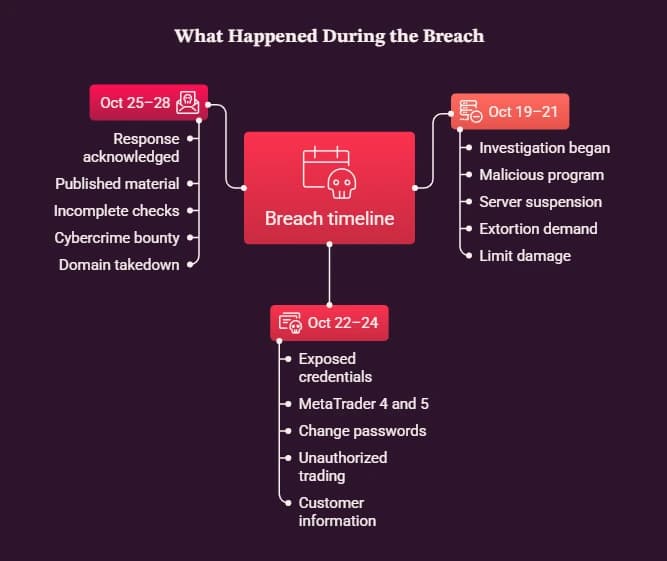
October 19 to October 21: Investigation and service shutdown
GMO's timeline states that the company began investigating after a customer inquiry on October 19. On October 20, it confirmed that a third party had installed a malicious program in some customer server environments.
On October 21, GMO began suspending servers across all service plans. It also received an extortion demand of approximately 8 billion yen and announced the incident.
The shutdown aimed to limit further damage while the company investigated. However, suspending a cloud service can disrupt legitimate business activity, especially when customers depend on it for time-sensitive work.
October 22 to October 24: Trading account concerns
On October 22, GMO warned that credentials stored on the servers could have been exposed. These included login details used by trading tools such as MetaTrader 4 and MetaTrader 5.
The company advised affected customers to change passwords and end active sessions. It also reported customer concerns about unauthorized trading activity. By October 24, GMO had confirmed unauthorized access to its service and the theft of customer information.
These details changed the incident from a hosting outage into a wider account security issue. Even after a provider disables compromised servers, credentials copied before the shutdown may remain useful to an attacker until the customer revokes or replaces them.
October 25 to October 28: Extortion, data publication, and the bounty
GMO's leadership publicly acknowledged that its response had not been fast or thorough enough. The company continued working with authorities and investigating the incident.
On October 27, people believed to be the attackers published material they claimed contained company and customer information. GMO said it was checking the material and warned people not to visit the site or spread its contents.
The company also reported that its investigation had not found malware on the customer devices it had finished checking, while stressing that the checks were incomplete.
On October 28, GMO announced the cybercrime bounty program, offering up to 1 million dollars for information that meets its stated conditions. The same day, reporting indicated that the attackers' publication domain and mirror sites had been taken down. A takedown does not establish that all copies of the stolen data have disappeared.
How the incident could affect FX traders
The key risk is the connection between a remote computing environment and a financial account. A hosted desktop may contain data that lets a user connect to a broker, manage trades, or access other services.
If an attacker obtains valid credentials, the attacker may try to use them outside the original environment. This risk can persist even when the compromised server is offline.
Potential consequences
- Unauthorized trading: An attacker may attempt to place or change trades if they obtain usable account access.
- Financial loss: Unauthorized activity can cause losses, fees, and time spent resolving disputes.
- Personal data exposure: Files stored in the hosted environment may contain information that customers did not expect to leave the system.
- Follow-up scams: Criminals may use incident details to send fake support messages or offer fraudulent recovery services.
- Password reuse risks: A password shared across services may expose accounts unrelated to the original cloud environment.
These are possible consequences of credential and data exposure, not a claim that every affected customer experienced each outcome. GMO and relevant brokers have described the risks and response measures in their incident updates.
What should customers check first?
Customers who used Onamae.com Desktop Cloud for trading should contact their broker through its official website or known support channel. They should ask the broker to review suspicious activity, revoke active sessions, and secure the account.
They should also change any password stored in the affected environment, especially if they reused it elsewhere. A password reset alone may not be enough if an attacker still has an active session or another valid authentication method.
What investigators know about the attack
The initial access method remains unconfirmed
As of October 28, the available reports did not establish how the attackers first entered the affected environment. GMO's investigation had identified malicious software on some customer servers, but that finding does not reveal how the software arrived.
The attackers reportedly claimed they exploited weaknesses in the service's design and administrative controls. Those claims included allegations about shared administrator access and customer drives being visible from hosted servers. GMO had not publicly verified these specific claims in the reporting available for this article.
Security teams should treat these claims as investigative leads, not confirmed technical findings. Assigning a specific CVE, naming a malware family, or declaring a particular exploit responsible without evidence would misrepresent the incident.
Confirmed facts versus unconfirmed claims
|
Question |
Current assessment |
|
Did unauthorized access occur? |
Confirmed by GMO |
|
Was customer information taken? |
Confirmed by GMO |
|
Were malicious programs found in some customer server environments? |
Confirmed by GMO |
|
Did all 26,739 potentially affected servers suffer a confirmed compromise? |
Not established |
|
Has GMO confirmed the original entry point? |
Not in the cited public reports |
|
Has GMO confirmed the attackers' claimed system weaknesses? |
Not in the cited reporting |
|
Did every customer device contain ransomware? |
No such finding was established |
|
Has every exposed record been identified? |
The full scope remained under review |
Why this uncertainty matters
A security incident often reveals its effects before investigators establish the full attack path. Teams may know that a system ran malicious software or that data left the environment without knowing whether the cause involved stolen administrator credentials, a vulnerable service, poor access controls, or several factors.
The right response is to preserve logs, compare system activity against known-good baselines, and record what the evidence supports. Investigators should keep confirmed facts separate from hypotheses until they can validate the findings.
Technical analysis and detection
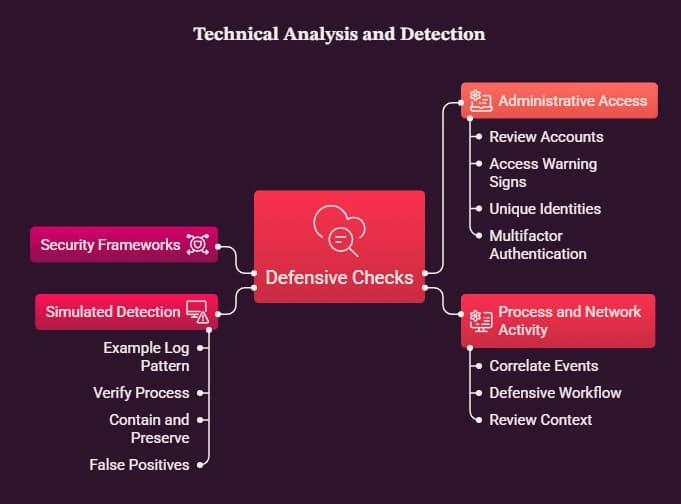
The GMO Desktop Cloud breach raises several practical questions for cloud providers and organizations that rely on hosted Windows systems. The following section outlines defensive checks. It does not claim to reproduce the incident or identify its exact exploit path.
1. Review administrative access
Administrators should identify every account that can manage remote desktops, virtual machines, storage, and service settings. They should check whether accounts have more access than their role requires.
Look for:
- Shared administrator accounts used by multiple people or systems.
- Logins from unusual locations or devices.
- New accounts created outside approved change windows.
- Sudden changes to remote access settings.
- Access to customer environments unrelated to an administrator's duties.
Use unique administrator identities and multifactor authentication wherever supported. Keep privileged access separate from routine browsing and email.
2. Examine suspicious process and network activity
Endpoint detection tools and Windows event logs can help teams identify unusual process launches, unexpected remote connections, and changes to security settings. Investigators should correlate these events with authentication logs and cloud control-plane records.
A useful defensive workflow includes:
- Record the affected system name and time range.
- Preserve relevant authentication and endpoint logs.
- Compare process activity with the approved software baseline.
- Review outbound connections and newly created scheduled tasks.
- Document each finding and its supporting evidence.
- Escalate suspicious activity to the incident response team.
Do not assume a single unusual event proves a compromise. Legitimate administrative tasks can produce alerts, so analysts should review surrounding events and known change records.
3. Use a safe, simulated detection example
The following example is illustrative. It is not an actual GMO log, and it does not identify the malware involved in the incident.
Example log pattern
timestamp: 2026-10-28T09:15:00Z
host: remote-desktop-01
event: unexpected_process_launch
user: privileged_account
parent_process: unknown_or_unapproved
action: investigate
The field values are placeholders for a hypothetical alert. They are not evidence from GMO's systems.
An analyst should verify the executable path, digital signature, parent process, user activity, and nearby network events. If the process is unauthorized, the team should contain the host under its incident response plan and preserve relevant evidence.
Operational limitation: Process monitoring can generate false positives when software updates, remote management tools, or approved scripts launch unfamiliar processes. Teams should tune alerts against an approved software inventory rather than suppressing alerts without review.
4. Map the response to recognized security frameworks
A framework can help teams organize their work. It cannot prove which technique an attacker used.
|
Framework |
Relevant area |
Practical application |
|
MITRE ATT&CK |
Credential Access and Valid Accounts |
Investigate whether stolen credentials or legitimate accounts enabled suspicious access. Do not assign a technique without evidence. |
|
NIST CSF 2.0 |
Detect, Respond, Recover |
Identify affected systems, manage the response, preserve evidence, and restore services only after appropriate checks. |
|
NIST SP 800-61 Rev. 3 |
Incident response |
Integrate preparation, detection, response, and recovery into the organization's broader risk management process. |
|
CISA ransomware guidance |
Containment and recovery |
Isolate affected systems, protect backups, and prioritize safe recovery. |
Sources: MITRE ATT&CK, NIST CSF 2.0, NIST incident response guidance, and CISA's ransomware guide.
No specific CVE or CVSS score should be assigned to the GMO incident without a confirmed vulnerability identifier and supporting evidence. The publicly reported facts do not establish one.
Remediation and mitigation
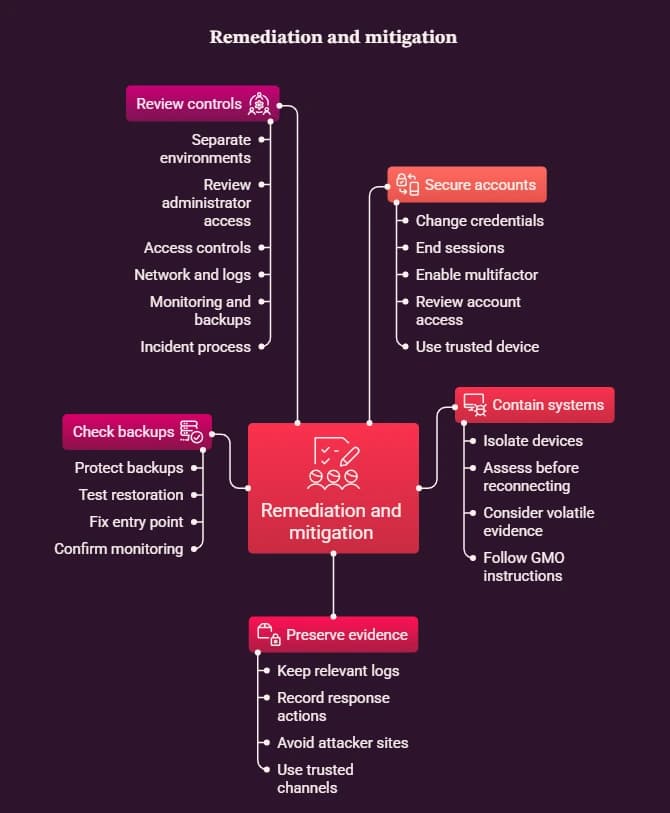
Organizations using remote desktops should treat this incident as a reason to review access controls, credential storage, monitoring, and recovery plans. The actions below apply broadly to similar environments. They are not a substitute for incident-specific instructions from GMO or a customer's broker.
Step 1: Secure accounts from a trusted device
Use a device that did not connect to the potentially affected remote desktop. Visit the broker's official site by typing its address or using a trusted bookmark.
- Change trading passwords and any other credentials stored in the affected environment.
- Change reused passwords on other services.
- End active sessions and revoke existing tokens where the service supports it.
- Enable multifactor authentication when available.
- Ask the broker to review unfamiliar trades and account access.
Do not use a potentially compromised computer to change passwords. Otherwise, malware on that computer may capture the new credentials.
Step 2: Contain potentially affected systems
If an organization suspects malware, its incident response team should isolate affected devices from the network. Avoid reconnecting them to production systems until qualified staff have assessed the risk.
CISA advises organizations to isolate affected systems promptly and coordinate containment. It also warns that powering off a system can destroy evidence held in volatile memory. Teams should consider the circumstances and their response plan before shutting down systems.
For this specific incident, customers should follow GMO's published instructions, including any directions to disconnect or shut down devices. Do not treat general guidance as a reason to override the provider's current incident instructions.
Step 3: Preserve evidence
Keep copies of relevant authentication logs, endpoint alerts, remote access records, and security notifications. Record timestamps and the actions taken by each responder.
Do not download leaked customer data or visit sites operated by the alleged attackers to gather evidence. Such activity can create further privacy and security risks. Use trusted incident response teams and appropriate law enforcement channels instead.
Step 4: Check backups before recovery
Maintain backups that attackers cannot change through ordinary administrator access. Test restoration procedures and verify that backup data remains usable.
Before returning a system to service, investigate the suspected entry point, remove unauthorized access, apply relevant fixes, and confirm that monitoring works. Restoring a clean backup without addressing the cause may allow the same intrusion to recur.
Step 5: Review cloud and remote desktop controls
Service providers and IT teams should assess whether their architecture separates customer environments effectively. They should also review how administrators authenticate and how they access customer data.
Recommended controls include:
- Unique privileged accounts and least-privilege access.
- Multifactor authentication for administrative access.
- Network segmentation between management systems and customer workloads.
- Centralized logs with restricted access and adequate retention.
- Endpoint monitoring for unexpected software and persistence mechanisms.
- Tested offline or immutable backups.
- A clear incident notification and recovery process.
These measures reduce risk, but no single control can guarantee that an incident will never occur.
Comparing mitigation approaches
|
Mitigation strategy |
Expected benefit |
Performance impact |
Complexity |
|
Multifactor authentication |
Makes stolen passwords less useful |
Small login delay |
Low to moderate |
|
Network segmentation |
Limits movement between systems |
May add routing and management overhead |
Moderate to high |
|
Endpoint detection and response |
Helps identify suspicious activity |
Can consume CPU and memory |
Moderate |
|
Centralized log monitoring |
Helps correlate events across systems |
Storage and processing costs |
Moderate |
|
Immutable backups |
Helps protect recovery copies from tampering |
Extra storage and restore time |
Moderate |
|
Least-privilege administration |
Reduces unnecessary access |
May add approval steps |
Moderate |
These are qualitative estimates, not measured results from the GMO environment. Actual overhead depends on system design, product choice, policy settings, and workload.
What the bounty program means
Why GMO is offering a reward
GMO's cybercrime bounty program aims to collect credible information that helps authorities identify and arrest people linked to the intrusion and related crimes. The maximum total reward is 1 million dollars, not an automatic payment to anyone who submits a tip.
The program sets specific conditions. Information must help lead to an arrest or an international wanted notice. GMO says tips may cover links between people, servers, domains, IP addresses, accounts, cryptocurrency addresses, and the movement of funds.
The program also excludes certain submissions. People involved in the crime, people who obtained information illegally, and GMO employees cannot qualify under the stated rules.
GMO warns tipsters not to access systems unlawfully, negotiate with attackers, pay them, or submit stolen credentials or malware.
How to avoid bounty-related scams
A public reward can attract fake investigators and fraudsters who claim they can recover leaked data or secure a payment. Anyone considering a tip should read the official terms before sharing information.
GMO identifies cybercrimebounty.gmo as the official program website. It warns that it will never request passwords, authentication codes, private keys, or fees. Do not send confidential business records to an unverified address.
Hoplon Insight: Lessons for cloud security teams
The GMO Desktop Cloud breach highlights a problem that many organizations overlook. A service can provide useful remote access while also becoming a concentration point for credentials, business data, and administrative privileges.
For IT leaders, the response should extend beyond changing passwords after an incident. Teams should test how well their security controls limit the damage if a cloud account or remote desktop becomes compromised.
Consider these priorities:
- Review trust boundaries: Check whether one administrator account can access many customer environments.
- Protect credentials: Avoid storing reusable passwords in remote desktops when safer authentication options exist.
- Monitor account behavior: Alert on unusual logins, unexpected privilege changes, and suspicious session activity.
- Test recovery plans: Confirm that teams can isolate affected systems and restore clean environments.
- Verify security controls: Use authorized assessments to find access control and configuration gaps before an attacker does.
Organizations that need help preparing for or handling an incident can review Hoplon InfoSec's incident response and recovery services, endpoint security services, and infrastructure penetration testing.
These services are examples of available security support, not evidence that Hoplon investigated this incident or that any particular product would have prevented it.
Final Thought
The GMO Desktop Cloud breach shows how an incident involving a remote computing service can create risks for customers who rely on it for financial activity. Unauthorized access and customer data theft are confirmed, but the full scope and initial entry method remain unresolved in the cited public reports.
The 1 million dollar bounty adds another part to the response by encouraging credible information that helps authorities identify those responsible. It does not replace the need to secure accounts, investigate the incident, and protect exposed data.
For affected customers, the immediate priorities are clear: use a trusted device to change credentials, revoke active sessions, review trading activity, and follow official updates. For businesses, the lasting lesson is to limit the access any single compromised system or account can provide.
Frequently asked questions
1. What is the GMO Desktop Cloud breach?
The incident involved unauthorized access to GMO Internet's Onamae.com Desktop Cloud service, malicious software on some customer server environments, and theft of customer information. The investigation had not publicly established the initial access method in the reports cited here.
2. Why is GMO offering a 1 million dollar bounty?
GMO is offering up to 1 million dollars in total rewards for information that helps identify and arrest those responsible for the attack and related crimes. Payment depends on the program's conditions, and submitting a tip does not guarantee a reward.
3. How many servers were potentially affected?
GMO identified 26,739 servers as potentially affected by the incident. This figure does not mean that investigators confirmed a compromise or data theft on every server.
4. What should affected customers do first?
Customers should change exposed trading passwords from a trusted device, terminate active sessions, enable multifactor authentication where available, and review their account activity. They should also follow the latest instructions from GMO and their broker.
Technical references
The following sources support the incident timeline, the company's response, and the defensive guidance in this article.
- GMO Cybercrime Bounty, official program rules
- NIST Cybersecurity Framework
- CISA StopRansomware guidance
Author and reviewer information
Author: Mohammed Talukder is the Co-Founder and CEO of Hoplon InfoSec, with over 16 years of experience in cybersecurity and technology. His expertise includes offensive security, vulnerability management, cyber risk management, and incident response. His professional credentials include CISM, CISA, CEH, and CompTIA PenTest+. He has also received Infosys recognition awards for his professional contributions. He shares practical cybersecurity insights to help organizations strengthen their security posture.
Technical reviewer: Gazi Mahmud, Co-Founder and CIO of Hoplon InfoSec LLC, cybersecurity leader, and CISM & CISA certified professional with expertise in cyber risk management, security governance, compliance, and incident response.
Published: October 28, 2026 | Last Updated: October 28, 2026
This article explains a reported cybersecurity incident and defensive security measures. Use the recommendations only on systems you own or have permission to protect. Do not visit suspected data leak sites, download stolen files, or contact alleged attackers.





