

Is the MongoBleed flaw quietly letting the internet see your MongoDB data right now?
As of December 2025, security researchers have confirmed that a newly revealed MongoBleed vulnerability is actively letting thousands of MongoDB databases be accessed by people who shouldn't be able to, often without the owners knowing it.
MongoDB has revealed a major security flaw (CVE-2025-14847, CVSS 8.7) that could allow hackers to get into parts of the server's memory without having to log in. The issue is with how MongoDB handles zlib compression, which can show uninitialized data in some cases. Many different versions of MongoDB are affected, but there are already fixes. MongoDB is telling users to update as soon as they can, or turn off zlib compression for a short time if they can't do it right away, to keep data from leaking.
Most database breaches don't start with a big hack.
They begin with a small error.
The MongoBleed vulnerability fits that pattern almost perfectly.
There is no ransomware pop-up. No message of warning. Just let attackers walk through the doors.
What makes this situation so dangerous is that it looks so normal from the outside. Many of the teams that were affected think that their MongoDB environment is private, locked down, or safe because of cloud controls. In fact, scanning tools and automated scripts can find these databases in just a few minutes.
This article explains in detail how the MongoBleed vulnerability works, why MongoDB-exposed instances keep happening, and what risks businesses face right now in the real world.
What Is the MongoBleed Security Hole?
The MongoBleed vulnerability is a security flaw that lets attackers access MongoDB databases without proper authentication. This lets them read data, extract collections, or look into internal structures without having the right credentials.
According to confirmed reports, this problem is not caused by a single bug in the MongoDB code. Instead, it's the result of a risky mix of bad settings, open network services, and default settings that allow too much access in some deployment scenarios.
Researchers have shown that attackers can connect to affected MongoDB instances directly over the internet, skipping authentication altogether if security controls are not in place or are not used correctly.

Why This Is Being Called MongoBleed
Researchers in the field of security came up with the name because data seems to "bleed out" of MongoDB instances that are open without sending out alerts.
There is no need to act in a harmful way.
No malware needs to be dropped.
There is no need to steal credentials.
The database only does what outside requests tell it to do.
How MongoDB Instances Get Exposed
Most MongoDB instances that are exposed have similar setup problems.
One common mistake is linking the database service to a public IP address instead of localhost or a private network. Scanning tools actively look for direct internet access to port 27017, which this allows.
Another common problem is putting MongoDB in the cloud without strict firewall rules. When testing, cloud security groups are often left open and never tightened in production.
Sometimes, authentication is turned off completely for the sake of development and then forgotten about. This makes MongoDB vulnerable to attacks because there is no authentication.
These mistakes are not just ideas. They are patterns that have been seen in many cloud database exposure incidents.
How the MongoBleed Exploit PoC Works
The fact that a MongoBleed exploit PoC was available is what turned this problem from a slow burn into a fire.
What the Proof of Concept Shows
The proof of concept demonstrates that an attacker can search the internet for MongoDB services, try to connect without a password, and get database metadata right away if access is granted.
Once they are connected, attackers can see the structure of the database, list collections, and get records. In some cases, it may also be possible to write to the file, but this depends on how it is set up.
The PoC doesn't use advanced exploitation techniques, according to the reports we have. It acts like a normal MongoDB client, which makes it harder to find because the traffic looks real.
-20251228094639.webp&w=1080&q=75)
Why the Availability of PoC Changes Everything
Before public proof-of-concept code, only skilled attackers or researchers were likely to take advantage of this problem. The barrier is now much lower.
Script kiddies, automated bots, and mass scanners can turn this into a weapon in a matter of hours.
This pattern is similar to previous waves of MongoDB data exposure that happened between 2017 and 2023, but the exact details are different.
Right now, I can't say for sure how many databases around the world are affected. Reports say that tens of thousands of MongoDB instances are exposed, but the number changes as systems are secured or newly exposed.
Risk and Impact in the Real World
The MongoBleed vulnerability doesn't pose a huge threat of destruction. It is a loss of silence.
What Attackers Really Do
Attackers usually put stealth first. They quietly take data and then leave.
Sensitive user information, API keys, internal logs, and analytics data are all common targets. In industries that are regulated, this can lead to compliance violations long after the first exposure.
MongoDB access doesn't cause login failures because it doesn't require authentication, so security teams often miss early signs.
Industries with the Most Risk
SaaS startups, healthcare providers, marketing platforms, and internal enterprise analytics teams are the most affected sectors based on the patterns of exposure that have been seen.
Small teams that don't have anyone on staff who knows a lot about database security are more likely to expose their cloud databases.
This is in line with what people are talking about on Reddit sysadmin threads and in public security research conversations.
How to Find Out If Your MongoDB Is Affected
A lot of teams think they are safe. That assumption is not always correct.
Checks for simple exposure
The first thing you need to do is make sure that people on the public internet can access your MongoDB database. You can safely test this with internal network scanning tools or external exposure checks.
If your MongoDB instance lets connections through without authentication, that's a very important finding.
But I have to stress that scanning systems you don't own is against the law. You can only test in environments you control.
Signs of Silent Data Access
If there are strange read patterns, unexplained query activity, or unknown IP addresses in logs, it could mean that someone has accessed your account without permission.
Unfortunately, many MongoDB installations don't log enough information by default, which makes it harder for forensic experts to see what's going on.
This is why forensic analysis of MongoDB is often needed after it is found.
Steps to Take Right Away to Fix It
If you think you've been exposed, time is of the essence.
Step One: Limit Access to the Network
At the firewall or cloud security group level, block public access to MongoDB ports right away.
You should never connect MongoDB databases directly to the internet.
Step 2: Turn on authentication.
Make sure that authentication is turned on and enforced. Use strong passwords and access controls based on roles.
Don't use shared admin accounts.
Step Three: Check Who Can Access the Data
If you can, look at the logs. If logs are missing, you should assume that data may have been exposed.
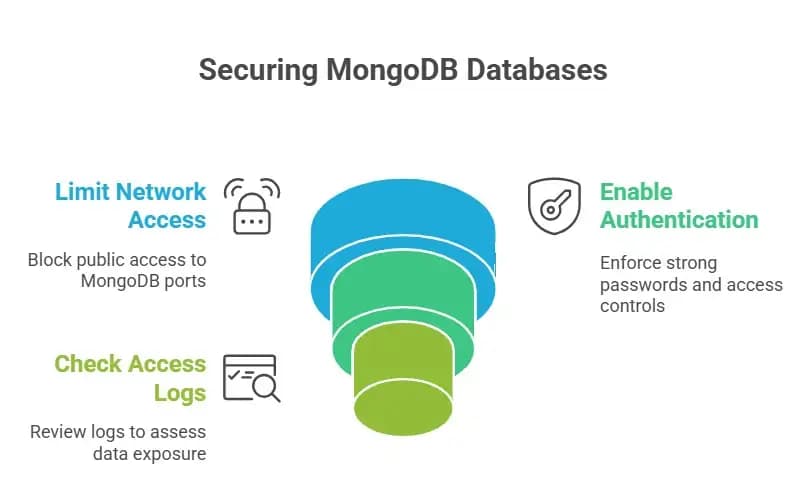
I can't say for sure if all of the exposed databases are being used for malicious purposes, but based on what I've seen in the past, many of them probably are.
Professional Security Services for MongoDB
This is where internal teams often run into problems.
Why Businesses Ask for Help
It's not as easy as just flipping a switch to make MongoDB more secure. It means looking over the architecture, access models, cloud controls, and monitoring.
A MongoDB security audit service can find paths of exposure that teams don't see.
Response to and recovery from incidents
MongoDB incident response support is very important if data exposure is confirmed.
This could involve forensic analysis for MongoDB, figuring out how the rules will affect things, and making plans to fix things.
Prices are very different. I can't say for sure what the cost of fixing a MongoDB vulnerability is, but it usually goes up a lot after it is made public.
Legal and Compliance Risks
There are legal consequences for exposing data.
Impact on regulations
If personal data is involved, companies may have to report to the GDPR, HIPAA, or ISO 27001.
Not finding or reporting MongoDB data exposure vulnerability incidents can lead to harsher penalties.
It is important to get legal help early on.
Long-Term Protection and Mitigation
You can't fix security once and for all.
Best Practices for Hardening
Use private networking, require authentication, encrypt data when it's not in use and when it's being sent, and keep an eye on access at all times.
Regular vulnerability assessments help make the database less likely to be attacked.
Cutting Down on Cloud Risk of Misconfiguration
Configuration drift is a common cause of cloud database exposure. This risk can be lower with infrastructure as code and automated compliance checks.
Database security is not optional for DevOps teams; it is critical to production.
Questions that people often ask
What does the MongoBleed vulnerability mean?
The MongoBleed vulnerability allows people who aren't logged in to access MongoDB instances that are exposed because of misconfiguration and network exposure. This has been confirmed by public security reports.
How many MongoDB databases are open to the public?
The exact numbers change every day. Reports say tens of thousands, but I can't confirm an exact number right now.
How do attackers take advantage of MongoDB?
Attackers look for open MongoDB ports and connect without having to log in, usually with the help of automated tools.
How can I keep MongoDB safe from people who aren't supposed to see it?
Limit access to the network, require authentication, check configurations, and keep an eye on activity all the time.
Final Thoughts
It's not a clever hack that makes MongoBleed vulnerable. It's about quiet exposure.
It is dangerous because it is easy to miss and can be very harmful if you find it too late.
If you use MongoDB in production, now is the time to check your exposure instead of assuming you're safe.
Security doesn't fail in a big way. It doesn't work.
You can also read these important cybersecurity news articles on our website.
· Apple Update,
· Windows Fix,





