
Content Summary
This article covers the complete technical breakdown of the Rokarolla Android banking trojan, discovered in June 2026 by Zimperium zLabs. It explains how the malware spreads through a two-stage dropper model, how it abuses Android Accessibility Services to steal credentials, how its HTML overlay attack works in real time, how it intercepts OTPs and blocks bank calls, and what defenders and everyday users can do right now. Includes MITRE ATT&CK mapping, a full IoC table with 35 SHA-256 hashes, a comparison against HOOK and other major trojans, and an expert FAQ section.
| Metric | Detail |
|---|---|
| Malware Name | Rokarolla |
| Discovered By | Zimperium zLabs (Vishnu Pratapagiri & Fernando Ortega) |
| Discovery Date | June 2026 |
| Named After | Its own C2 (Command-and-Control) infrastructure |
| Targeted Apps | 217 banking and cryptocurrency applications |
| Remote Commands | 137 (highest documented in 2026 Android banker landscape) |
| Distribution Method | Malicious websites, fake TikTok / Chrome / Google Play Protect APKs |
| Confirmed Distribution URL | hxxps[://]infocontablidades[.]it[.]com/ (defanged) |
| Google Play Presence | None confirmed (Google spokesperson verified) |
| Threat Group Attribution | None attributed as of publication |
What is the Rokarolla Android Banking Trojan, and why does it matter right now?
Is your banking app actually showing you the real login screen? If your Android phone is infected with the Rokarolla Android banking trojan, the answer might be no and you would have absolutely no way of knowing.
Discovered in June 2026 by security researchers Vishnu Pratapagiri and Fernando Ortega at Zimperium's zLabs division, Rokarolla is one of the most technically complete mobile fraud platforms documented this year. It is not a simple password stealer. It is closer to a full remote administration toolkit built specifically to silently own your phone while you go about your normal life.
What makes Rokarolla genuinely alarming is the scale. It targets 217 banking and cryptocurrency applications across multiple countries, operates with 137 remote commands surpassing the previous high-water mark of 107 set by the HOOK trojan, and is specifically engineered to defeat every protection that Android users are typically told to rely on, from Google Play Protect to two-factor authentication.
The name itself comes directly from its command-and-control (C2) server infrastructure, which is how the attackers send instructions to compromised devices. No threat group has been publicly attributed to this campaign yet. But the sophistication on display tells a clear story: whoever built this planned for a long-term, large-scale financial fraud operation.
How Rokarolla Spreads: The Two-Stage Dropper Android Malware Model
Most people assume they are safe as long as they do not click suspicious links. Rokarolla is designed to exploit the exact moment when a user thinks they are being responsible.
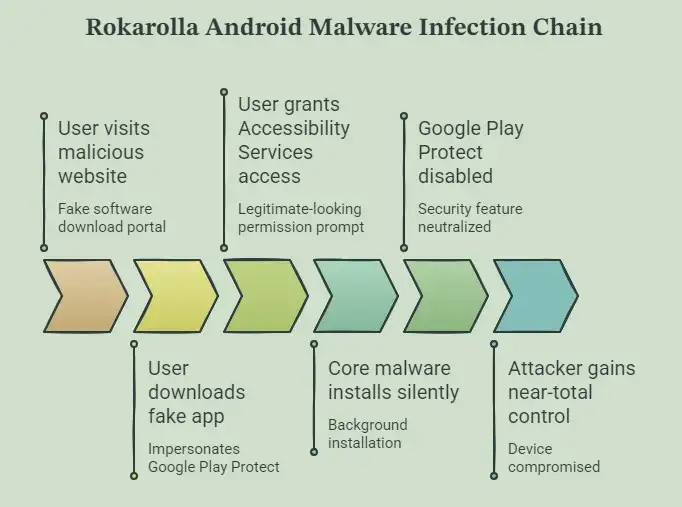
The infection starts when someone visits a malicious website crafted to look like a legitimate software download portal. These sites promote fake versions of TikTok, Google Chrome, and, in a particularly clever twist, Google Play Protect itself. The user thinks they are installing a security tool. They are actually installing the first stage of a two-stage dropper Android malware chain.
Stage 1: The Dropper
The dropper's only job is to get a foothold. It impersonates Google Play Protect during installation, which means every permission prompt it generates looks completely legitimate to the user. Most people would approve those permissions without a second thought. Once the dropper secures Accessibility Services access, it has everything it needs.
Stage 2: The Core Payload
The dropper silently installs the actual malware in the background. The second-stage payload then requests notification access, SMS handler privileges, and call management permissions. And then, in a move that reveals the attacker's thinking, one of the very first commands the core malware executes is disabling Google Play Protect, the security feature the dropper had just been impersonating to earn trust.
The full infection chain moves like this: the user visits a fake site, downloads what looks like a trusted app, grants Accessibility access, thinking it is a legitimate security request, the core malware installs silently, Play Protect is killed, and from that point forward the attacker has near-total control of the device.
There is no visible sign anything went wrong. The phone works normally. The apps open normally. But every sensitive action the user takes is being watched, recorded, and sent to an attacker's server.
The 137-Command Architecture: A Technical Deep-Dive Into Rokarolla Malware
Calling Rokarolla a banking trojan actually undersells it. With 137 documented remote commands, this is closer to a commercial spyware platform than a traditional credential stealer. For context, the HOOK trojan, previously one of the most sophisticated Android banking Trojans, operated with 107 commands. Rokarolla has 30 more.
When an infected device first connects to the C2 server, it sends a detailed telemetry beacon containing the device model, Android version, locale and language settings, battery status, available storage, installed applications, and system configuration. This data is processed to generate a unique botID for that victim, allowing operators to track and target specific devices over time.
The commands are organised into distinct functional categories.
Credential and Screen Harvesting:
liveoverlay16: triggers a live HTML overlay on a targeted banking app
sms_overlay_16: deploys a fake SMS application interface
call_overlay_16: displays a fake incoming call screen
start_keylogger: activates real-time keystroke capture
startuilogger: parses UI nodes to extract on-screen content
textextract: harvests visible text from the current screen
Device Control:
disable_calls: blocks all incoming calls entirely
calls_block: selectively blocks specific numbers, such as bank fraud lines
enable_calls: restores call functionality when needed
get_contact: extracts contacts from WhatsApp and the device address book
Surveillance: Screenshot capture commands handle periodic PNG creation, timestamping, compression, and silent exfiltration to C2 servers.
The C2 server responds to device queries with what researchers call the monitored_app_full list, a dataset linking installed app package names to status flags and overlay URLs. If a target app's status is marked "active", the malware downloads the corresponding fake HTML login page and stores it in a local SQLite database on the device. This local caching means the overlay attack works even when network connectivity is limited.
HTML Overlay Attack: How Rokarolla Steals Banking Credentials Without You Noticing
The HTML overlay attack is the centrepiece of Rokarolla's credential theft operation, and understanding how it works explains why so many victims never realise what happened.
Imagine you open your banking app on a normal afternoon. The login screen appears. You type your username and password, tap login, and nothing unusual seems to happen. What you do not know is that the screen you just typed into was not your bank's login page at all. It was a pixel-perfect HTML replica served by Rokarolla, hovering invisibly over the real app.
Here is the exact sequence of events from the malware's perspective:
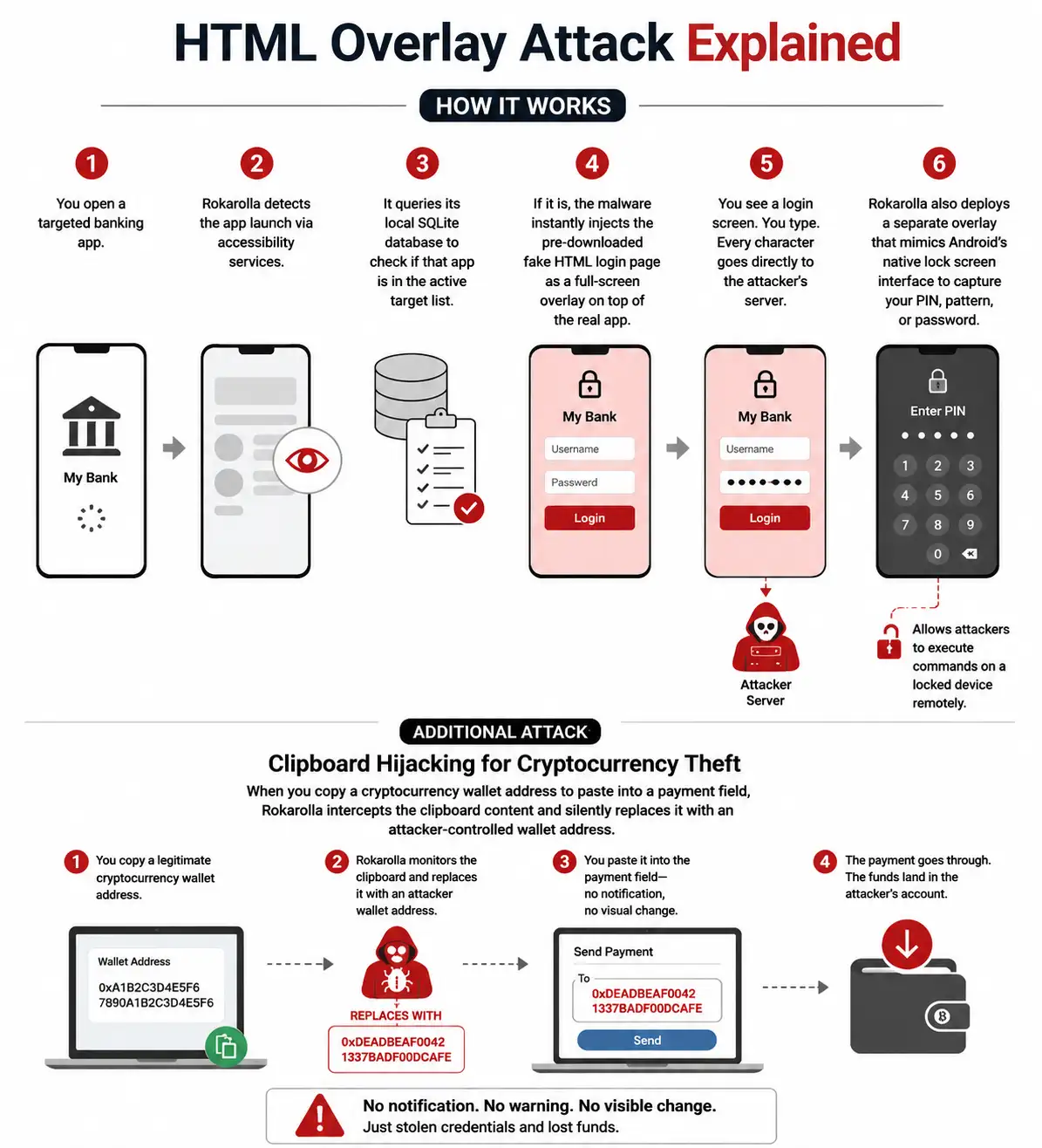
You open a targeted banking app. Rokarolla detects the app launch via accessibility services, which gives it visibility into every UI element on the screen. It queries its local SQLite database to check if that app is in the active target list.
If it is, the malware instantly injects the pre-downloaded fake HTML login page as a full-screen overlay on top of the real app. You see a login screen. You type. Every character goes directly to the attacker's server.
The attack does not stop at banking app credentials. Rokarolla deploys a separate overlay that mimics Android's own native lock screen interface. When you enter your PIN, pattern, or password to unlock your device, that information is captured too.
This is significant because it allows attackers to execute commands on a locked device remotely; the malware does not need you to be actively using the phone.
Clipboard Hijacking for Cryptocurrency Theft
For crypto users, there is an additional layer of attack that is genuinely difficult to defend against without understanding how it works. When you copy a cryptocurrency wallet address to paste into a payment field, Rokarolla intercepts the clipboard content and silently replaces it with an attacker-controlled wallet address. There is no notification, no visual change, nothing to suggest anything happened. The payment goes through. The funds land in the attacker's account.
SMS Interception, Call Blocking, and the 2FA Bypass Problem
Two-factor authentication is supposed to be the safety net. Even if an attacker steals your password, they still cannot access your account without that one-time passcode sent to your phone. Rokarolla was built specifically to cut that safety net.
The malware requests the role of default SMS handler on the infected device. This is not an obscure permission; Android asks users to confirm when an app wants to handle SMS, but because the dropper has already established trust by impersonating Google Play Protect, users are already primed to approve prompts.
Once it holds the default SMS handler role, Rokarolla reads every incoming message in real time. An OTP arrives, Rokarolla captures it before any notification is shown, and the attacker uses it to bypass your account's 2FA protection.
The malware can also send SMS messages on behalf of the victim, which has uses in lateral spread and fraud beyond the primary victim's accounts.
What makes the 2FA bypass even more effective is the call-blocking component. Banks often call customers when they detect suspicious login activity. If your bank tries to call you to warn you about an unauthorised access attempt, Rokarolla uses the disable_calls and calls_block commands to silently intercept or block that call. Your phone does not ring. You never hear the warning.
WhatsApp Contact Harvesting
Beyond banking fraud, Rokarolla also harvests contact data from WhatsApp specifically. The malware uses Accessibility Services to parse WhatsApp's UI node structure, comparing on-screen elements against a predefined list of WhatsApp interface terms, things like 'Chats', 'Calls', and 'New group' alongside standard time formats. This categorisation allows the get_contact command to systematically extract contact information from the app.
Surveillance Without a Trace: The Pseudo-VNC Screenshot Technique
Most Android malware that wants to monitor a victim's screen uses the MediaProjection API, which is the standard Android method for screen recording. There is a problem with that approach from an attacker's perspective: MediaProjection throws a visible system prompt asking the user for permission. Even the most inattentive user would notice a screen recording request appearing out of nowhere.
Rokarolla takes a different approach that security researchers have called a pseudo-VNC technique.
Instead of using MediaProjection, the malware uses Accessibility Services to capture periodic screenshots silently. Each screenshot is compressed to PNG format, stamped with a timestamp, and exfiltrated to C2 servers one frame at a time. Operators receive a near-real-time visual record of everything happening on the victim's device: no permission prompt, no visual indicator, nothing.
This approach is simpler and quieter than the live hidden VNC streaming used by other malware families like Klopatra. It trades real-time fluidity for complete invisibility, which from an operational security standpoint is probably the smarter trade.
| Screen Capture Method | User Visibility | Resource Load | Used By |
|---|---|---|---|
| MediaProjection | Visible system prompt | Medium | Standard screen recorders |
| Pseudo-VNC (Accessibility) | Completely invisible | Low | Rokarolla |
| Hidden VNC streaming | Invisible | High | Klopatra family |
Beyond screenshots, the surveillance stack includes real-time keylogging via start_keylogger, UI content extraction via startuilogger, full notification access, contact list exfiltration, and complete SMS history theft.
Stealth and Persistence: Why Rokarolla is So Hard to Catch
What separates Rokarolla from most Android banking trojans is not any single capability – it is the combination of stealth mechanisms working together to create a nearly undetectable presence on the device.
The malware hides its icon from the device's app drawer immediately after installation. There is no visible app entry to long-press and uninstall. It mutes all device audio and disables vibrations, which means bank security alert notifications make no sound.
It forces the device screen to stay on permanently so its automated background processes are never interrupted by a screen timeout. And it disables Google Play Protect, which was the primary automated defence most Android users relied on.
The persistence mechanisms go even deeper. Rokarolla maintains multiple fallback C2 domains and can receive new domain addresses dynamically, meaning that taking down one C2 server does essentially nothing to disrupt the operation.
The local SQLite database ensures phishing overlays work even offline. The default SMS and call handler roles embed the malware into core system functions that require deliberate, informed user action to reverse.
For defenders, one of the strongest early warning signals is any app gaining accessibility services access without a clear reason. That single permission drives virtually the entire attack chain. If accessibility access is denied, Rokarolla loses most of its capability.
MITRE ATT&CK Mapping
Zimperium published a full MITRE ATT&CK mapping for Rokarolla as part of their technical report. The full mapping is available in Zimperium's official GitHub repository.
| MITRE Tactic | Technique ID | Rokarolla Implementation |
|---|---|---|
| Initial Access | T1566.002 | Malicious websites with fake app downloads |
| Defense Evasion | T1036 | Dropper impersonates Google Play Protect |
| Defense Evasion | T1562 | Disables Google Play Protect post-install |
| Credential Access | T1056.001 | start_keylogger command |
| Credential Access | T1056.002 | HTML overlay on banking apps |
| Collection | T1113 | Pseudo-VNC via Accessibility Services |
| Collection | T1115 | Clipboard replacement for crypto theft |
| Collection | T1636.004 | Default SMS handler abuse |
| Command and Control | T1008 | Multiple fallback C2 domains |
| Persistence | T1546 | Accessibility Services event persistence |
Targeted App Ecosystem: What 217 Banking and Crypto Apps Mean in Practice
The 217 targeted applications span retail banking platforms, cryptocurrency exchanges, digital wallets, and social media apps used for contact harvesting. The geographic scope is international no single region is being exclusively targeted, which suggests the operators are running a broad, financially motivated campaign rather than a targeted attack on a specific market.
The confirmed example documented in zLabs research is Imagin Bank, with a screenshot of the fake overlay published in the technical report. But the target list is not static.
Because Rokarolla pulls its target list dynamically from the C2 server and stores HTML overlays locally, the operators can expand the list of targeted apps at any time without pushing a new malware update to infected devices. The scope of this attack can grow quietly while devices are already compromised.
This dynamic targeting architecture is a clear sign the people behind this built for long-term campaigns. They are not locked into a fixed target list. They can pivot, expand, and update as financial institutions change their apps or as new high-value targets emerge.
Rokarolla vs Other Android Banking Trojans
| Feature | Rokarolla | HOOK | Cerberus | SharkBot |
|---|---|---|---|---|
| Command Count | 137 | 107 | ~50 | ~30 |
| App Targets | 217 | 100+ | 90+ | ~22 |
| Screen Method | Accessibility Screenshots | MediaProjection/VNC | VNC | Screenshots |
| Dropper Disguise | Google Play Protect | Various | Various | Cleaner apps |
| Clipboard Hijack | Yes | Yes | No | No |
| Call Blocking | Yes | Partial | Yes | No |
| Dynamic C2 Update | Yes | Partial | No | No |
| Crypto Targeting | Yes | Yes | Limited | No |
| 2FA Bypass Method | SMS + Call Block | SMS only | SMS only | SMS only |
Rokarolla's 137 commands represent the highest documented command count in the 2026 Android banker landscape per Zimperium. The combination of dynamic targeting, call blocking alongside SMS interception, and the pseudo-VNC approach puts it in a different category from most of what has been publicly documented this year.
Detection Signals for Defenders and SOC Teams
For security teams managing mobile endpoints, Rokarolla leaves a number of behavioural signals that can be detected with the right monitoring in place.
Early Warning Indicators:
Unauthorised accessibility services registration by an unknown package name
Unexpected change to the default SMS or call handler
App icon absent from the launcher with no corresponding user uninstall action
Full-screen windows appearing above legitimate banking or financial applications
Unexpected SQLite database files containing HTML content inside an app's data directory
Network traffic to unknown domains carrying PNG files with embedded timestamps
Device audio or vibration programmatically muted by a background process
Screen staying on indefinitely with no active user session
Network-Level Detection Signals: The initial C2 beacon carries a device telemetry POST request containing model, Android version, locale, battery status, and installed app list. C2 responses returning a monitored_app_full list with package names and status flags are a strong indicator. Subsequent traffic may include HTML page downloads and exfiltration streams carrying PNG screenshots, SMS data, and keylog content.
For Enterprise and BYOD Environments:
Organisations running bring-your-own-device policies should treat Android phones as full-fledged high-risk endpoints, not secondary devices. Zimperium's Mobile Threat Defence (MTD) and zDefend products detect Rokarolla through behavioural AI analysis, specifically flagging unauthorised accessibility services usage and secondary payload sideloading. Any sideloaded APK from outside Google Play should be treated as an immediate investigation trigger, not a low-priority alert.
Protection Checklist: What Users and Organisations Should Do Now
For Individual Users:
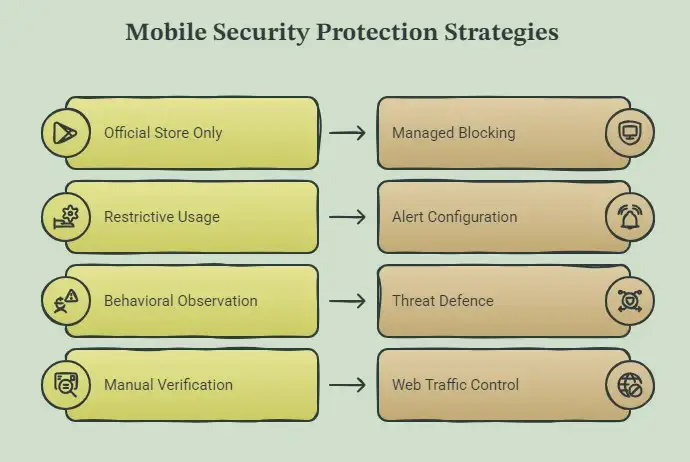
Install apps exclusively from the Google Play Store, with no exceptions for APKs from external websites, regardless of how legitimate the site appears
Never grant accessibility services to any app that is not a recognised, trusted assistive technology tool
Treat any permission request to become the default SMS or call handler as an immediate red flag, especially from newly installed apps.
If any app presents itself as Google Play Protect during installation and asks for elevated permissions, uninstall it immediately.
Keep Google Play Protect enabled at all times and check Settings > Accessibility regularly for unfamiliar entries
Monitor for unexplained battery drain, screen staying on without interaction, and banking apps displaying unfamiliar login screens
For crypto users: paste wallet addresses carefully and visually confirm the full address before confirming any transfer.
For Organisations:
Enforce mobile application management policies that block sideloading on enrolled Android devices
Deploy Mobile Threat Defence solutions on all employee devices, including personally owned devices with access to corporate resources
Integrate the Zimperium IoC list from their official GitHub repository into your SIEM and MISP platforms
Configure alerts for accessibility services grants from non-system apps and for Google Play Protect disabled events.
Apply web protection controls to block traffic to known malicious domains, including infocontablidades[.]it[.]com and structurally similar attacker-infrastructure domains.
Run mobile application security testing on any internal apps that might be spoofed by similar campaigns
Consider attack surface management to identify which mobile apps and endpoints are exposed in your environment.
Indicators of Compromise: Full IoC Table
All 35 SHA-256 hashes below are confirmed Rokarolla Android malware samples from Zimperium zLabs research. The fully updated IoC list, including domains and IP addresses, is available on Zimperium's official GitHub repository. Re-fang defanged indicators only within controlled threat intelligence platforms such as MISP, VirusTotal, or your SIEM.
Confirmed Malicious Distribution Domain (Defanged): hxxps[://]infocontablidades[.]it[.]com/ - verified malicious app distribution point
| Type | SHA-256 Hash | Description |
|---|---|---|
| SHA-256 | 890ecea4ebe4fea692ad36adf02abeb37c181cb7bdb6122cd52d9aaafe7d6cf3 | Rokarolla Android malware sample |
| SHA-256 | 1ba364113c4cec5542d1b2c76d7c163a66bdf90bc373256d5178f880f9742960 | Rokarolla Android malware sample |
| SHA-256 | d7d960ef10b08c472ad397b6fd9e9481338b2077c7c2f44d3dc2c65b19345ae0 | Rokarolla Android malware sample |
| SHA-256 | 57307ee8a3cda10730eacecaf789fab6f8771f9d29397e07c31a6bd4551bba10 | Rokarolla Android malware sample |
| SHA-256 | 3fae7ede2ef9c809b54504c3d78e5111d7fad0b522c707b8f6ff21015af79251 | Rokarolla Android malware sample |
| SHA-256 | fe41e6c1725f63582f022a17abe098e49338a78118a00ca87785b2fa0cf3dadf | Rokarolla Android malware sample |
| SHA-256 | be8573971b85fda81a2fac27adb7a3a9b2cf7e1d9bdf713361a725324d378d34 | Rokarolla Android malware sample |
| SHA-256 | 5139253b1f30b34ab3aa888aba175866fa1f82728ab07b999c24b49b191c3f68 | Rokarolla Android malware sample |
| SHA-256 | 43888be8debbbd74012484d4e4f9a1c70c2ff3970e0bf499c9aebba9776930a1 | Rokarolla Android malware sample |
| SHA-256 | a5e6763b09553691c8b42deefb725fa3b8c133a03a34cea87740b1f13d08bac3 | Rokarolla Android malware sample |
| SHA-256 | 1d3270a9141f8f16047799f1132633d72fd421b6c8f1878b5ef04ced6add4db8 | Rokarolla Android malware sample |
| SHA-256 | 62aef76c2d1897203649844b45317d9e1723819479a2b88ca4b3290ca9f4c9f0 | Rokarolla Android malware sample |
| SHA-256 | 48a3db92fac1ba9c218253576e09f42faabeaf48cf80663cf32e06b0a66e983d | Rokarolla Android malware sample |
| SHA-256 | 726095e56c693977b7796dc7cead2e2a49551d77d3f442aaa28997615ba07e99 | Rokarolla Android malware sample |
| SHA-256 | c3cfe522d2da15b033f65eb5377bf9e99be598dc4c21729e6f168dbc8f19540b | Rokarolla Android malware sample |
| SHA-256 | 3e25c28c5e93376683e841b7ad60f9383bb3bf831284a93a4aae798fc769d767 | Rokarolla Android malware sample |
| SHA-256 | 8d65e4df0ad369f491698437413afd1bd55fff309860f9cdecc778c9ac062282 | Rokarolla Android malware sample |
| SHA-256 | c08cd3f78c0edcced6b1a694284b6ed4a9e0422f469e07c702c4a8d1f6c186f4 | Rokarolla Android malware sample |
| SHA-256 | 696ef29f77a91aa91279c83088a07ab137d5049dc096ef862a35f9d890a552b3 | Rokarolla Android malware sample |
| SHA-256 | 8ddbcebe1014a645855986e85b2c54ee167baf1e9a0d74179faf81a5ee6878f4 | Rokarolla Android malware sample |
| SHA-256 | 1e4ed7e40608750cd0bfe96f5ed493a022b58ec54da2345336c522f7c78197af | Rokarolla Android malware sample |
| SHA-256 | c505353a6c58a21cb7b0343202e8629bee2f121f01c21dd8e0b61b7c55b77495 | Rokarolla Android malware sample |
| SHA-256 | aec2a36e8d68b23444348a7cec2d6ec287cb8810d1e190e04743645426ababb1 | Rokarolla Android malware sample |
| SHA-256 | f49be77b95cabd28d2dfe91786863576f6bd3f43a9d6de67a5b5851afe3aff9a | Rokarolla Android malware sample |
| SHA-256 | e76cbdf420540a18e2ddea02938acf3c4b4139f3511d314dca9781afe1e439bb | Rokarolla Android malware sample |
| SHA-256 | c3e324106803df27f5b6e0d49d2daf02d4cde396af4401f1ad29d78198e370b6 | Rokarolla Android malware sample |
| SHA-256 | ed036356fa2d3490d3ddb5ee7ae98bab80b505938f0199d9b10f12266f345896 | Rokarolla Android malware sample |
| SHA-256 | d6403ec82659eb62424bb1033615a8df27635080d02e438a4ee7e2334b1155f7 | Rokarolla Android malware sample |
| SHA-256 | c734a665f04eb9ab17047e65940fc35bad0221d59c2fc4fd0d170f2181514034 | Rokarolla Android malware sample |
| SHA-256 | e134cffcbe1fa8a861fd1f9a506f10ca5ff56cd5082360ef13d204676792e8bc | Rokarolla Android malware sample |
| SHA-256 | f0c18f045e3bb0193ef1169f5fa1abff7aa47e9a23da35cf67bbb9548a5e32c0 | Rokarolla Android malware sample |
| SHA-256 | f8cb375a4129358ad5881c29a6921fc1e5773028c0b31da83298f606118b185a | Rokarolla Android malware sample |
| SHA-256 | 3c304a1ac73590aaf94b62711a5f2fd0cbb863dab13aef6ec1eb156f4a7bd5b9 | Rokarolla Android malware sample |
| SHA-256 | 2eb80e5519fc6defcec8cc30a5cf4f75ee5ec8d2435759bb77c19826f1e20efb | Rokarolla Android malware sample |
| SHA-256 | 1f4c70cb317ffd25adc828fbac3bb8f07739e23111f7b7905926489fe35f8973 | Rokarolla Android malware sample |
Frequently Asked Questions
What is Rokarolla malware? Rokarolla is an Android banking trojan discovered in June 2026 by Zimperium zLabs researchers Vishnu Pratapagiri and Fernando Ortega. It is named after its own C2 server infrastructure and uses 137 remote commands to take near-total control of infected Android devices, targeting 217 banking and cryptocurrency applications in the process.
Is Rokarolla on Google Play? No. A Google spokesperson confirmed that no apps containing Rokarolla are present on Google Play as of the discovery date. The malware spreads exclusively through malicious third-party websites that impersonate legitimate app download portals.
How does Rokarolla steal OTP and 2FA codes? It requests the role of default SMS handler on the infected device, which allows it to read every incoming SMS message in real time – capturing one-time passcodes the moment they arrive. It simultaneously uses the disable_calls and calls_block commands to silently intercept or block any incoming fraud alert calls from the victim's bank, making 2FA effectively useless.
How does the HTML overlay attack actually work? When a targeted banking app is opened, Rokarolla detects the launch via Accessibility Services, retrieves a pre-stored fake HTML login page from a local SQLite database on the device, and injects it as a full-screen overlay covering the real app. The victim sees what looks like the real login screen and enters their credentials, which are sent directly to the attacker's C2 server.
How can I tell if my Android phone is infected with Rokarolla? Look for these signs: unexplained battery drain; the screen staying on with no interaction; unfamiliar entries under Settings > Accessibility; the default SMS app changing without your input; banking apps displaying login screens that look slightly different than usual; and cryptocurrency transfers arriving at wrong wallet addresses. If any of these appear together, treat it as a serious red flag.
How do Android Accessibility Services abuses work in this kind of malware? Android Accessibility Services was designed to help users with disabilities interact with apps. Once an app holds that permission, it gains visibility into every UI element on the screen, can simulate user taps, read on-screen content, parse app interfaces, and inject overlays. Rokarolla abuses this to silently monitor the screen, automate malicious actions, extract credentials, and deploy fake login pages without the user ever being prompted again after the initial grant.
What is the difference between Rokarolla and the HOOK trojan? Rokarolla operates with 137 commands versus HOOK's 107, targets more apps at 217 versus 100-plus, uses accessibility-based screenshot capture instead of MediaProjection or live VNC, and has a more resilient C2 architecture with multi-domain fallback and dynamic domain update capability. Both use HTML overlays and clipboard hijacking, but Rokarolla's call blocking combined with SMS interception makes its 2FA bypass more complete.
Hoplon Insight Box: Expert Recommendations
The single most important thing to understand about Rokarolla is that it is not exploiting a software vulnerability. There is no CVE, no patch, no update that fixes this. The attack depends entirely on the user granting one specific permission, Accessibility Services, to a malicious app.
Every other capability flows from that one grant. The overlays, the keylogger, the screenshot surveillance, and the clipboard hijacking – all of it requires accessibility access to function. This means the most effective defence in the world is also the simplest: treat any unexpected accessibility services request as an immediate threat, regardless of what the requesting app claims to be.
For organisations, Rokarolla is a strong reminder that mobile devices are no longer secondary endpoints. They are primary access points for financial services, corporate email, and sensitive data. Mobile security and threat defence solutions need to be part of every security programme, not an afterthought.
Endpoint security protection teams should add accessibility services monitoring to their mobile device management policies immediately. Vulnerability management programmes should extend their scope to include app permission anomalies as detectable risk indicators.
For users who want to understand their broader exposure, online threat exposure monitoring can surface indicators before an active compromise is even confirmed. And if you suspect a device is already compromised, incident response and recovery should be the next call, not a factory reset without forensic documentation.
What This Means for the Future of Mobile Security
Jason Soroko, senior fellow at certificate management firm Sectigo, described Rokarolla as turning the phone into a weapon against its own user. That framing captures something important about where mobile malware is heading.
The shift from simple credential theft to complete victim isolation, blocking calls, suppressing audio, disabling security tools, and hiding the app itself represents a professionalisation of mobile malware that mirrors commercial spyware platforms. The 137-command architecture, the dynamic targeting system, and the multi-domain C2 resilience: these are design choices made by people who understood operational security and planned for sustained, long-term campaigns.
What comes next is almost certainly worse. As smartphones become the primary access point for financial services, the attack surface they represent becomes more valuable to organised criminal groups. Each new Android banking trojan in the 2026 wave builds on the techniques documented in previous families, HOOK, Cerberus and SharkBot, and adds layers.
Cyber threat intelligence programmes that track mobile threat evolution will be essential for organisations trying to stay ahead of this. Red teaming exercises should now include mobile device compromise scenarios, not just network perimeter attacks.
The broader lesson from Rokarolla is that user education and technical controls have to work together. Technical solutions like MTD platforms detect behavioural anomalies. But no technology stops a user who has been convinced they are installing Google Play Protect from granting every permission the dropper asks for. Both layers matter.
Conclusion
The Rokarolla Android banking trojan is the clearest demonstration yet that mobile devices are fully mature targets for sophisticated, financially motivated threat actors. With 137 commands, 217 targeted apps, a two-stage dropper that impersonates Android's own security tooling, and a surveillance stack that covers everything from keystrokes to cryptocurrency payments, it represents a complete fraud platform more than a traditional piece of malware.
There is no patch. There is no vulnerability to fix. The defence is behavioural, on the user side, on the organisational side, and on the security tooling side. The Rokarolla Android banking trojan will not be the last of its kind, and the next iteration will almost certainly be more sophisticated.
The best time to understand this threat was before a device was compromised. For most people reading this, that window is still open.
Take Action Before Your Device Becomes a Threat
If you manage mobile security for your organisation or want to understand your current exposure to threats like Rokarolla, the Hoplon Infosec team can help. From mobile application security testing to digital forensic investigation for suspected compromises, the right support makes a measurable difference. Reach out to discuss how endpoint security protection services and attack surface management can be extended to cover the mobile endpoints that are increasingly at the centre of every major breach scenario.



-20260925120840.webp&w=3840&q=75)

-20260918120903.webp&w=3840&q=75)