
Azure CLI Password Spray Attack: How Hackers Are Slipping Past MFA Using an Old OAuth Trick
Content Summary: Between June 12 and June 26, 2026, security firm Huntress tracked a massive Azure CLI password spray attack that fired more than 81 million login attempts and broke into 78 accounts across 64 organizations. What made this campaign stand out was not the scale alone. It was the method.
Attackers used a deprecated OAuth flow called ROPC to slide right past Conditional Access Policies and multi factor authentication, even at companies that thought they were protected. This article breaks down exactly how the attack worked, why MFA did not stop it, and what your security team needs to fix today.
Quick Snapshot of the Incident
| Detail | Data |
|---|---|
| Attack window | June 12 to June 26, 2026 |
| Total login attempts | Over 81 million |
| Accounts compromised | 78 |
| Organizations affected | 64 |
| Source IP range | 2a0a:d683::/32 (IPv6) |
| Provider behind the IPs | LSHIY LLC, AS32167 |
| Exploited flow | ROPC, Resource Owner Password Credentials |
| Research credit | Huntress |
| Worst single day | June 22, with 30 identities across 23 businesses |
| Organizations with zero MFA policy | 8 |
| Typical daily compromise rate | 2 to 4 accounts, except June 19 which saw 12 |
| Industry wide spray surge | Roughly 155 times increase across Huntress protected tenants |
| Average failed attempts per tenant per month | About 1,964 |
Picture this for a second. You are running IT for a mid sized company. You have MFA switched on. Conditional Access is configured. On paper, you are covered. Then one morning you get an alert that someone logged into a finance account from an IP address in a totally different country, no MFA prompt ever fired. That is exactly what happened to dozens of companies this June, and it is worth understanding why, because it could just as easily happen to you.
What Actually Happened
Huntress, a cybersecurity research firm, spotted a wave of automated login attempts hitting Microsoft Azure accounts through the Azure command line interface. The attackers were not guessing randomly. They pulled from lists of previously breached username and password combinations, the kind that show up on the dark web after some unrelated data leak years earlier, and tried them against thousands of Azure tenants.
The scale was staggering. Over the course of two weeks, the attackers made more than 81 million login attempts. Out of that flood, 78 accounts across 64 organizations were successfully compromised. The targeting had nothing to do with industry or company size. It was purely about which passwords showed up most often on stolen credential lists.
Here is the part that should really make security teams sit up. Many of these organizations already had Conditional Access Policies in place, the kind of rule that is supposed to say something like, if someone logs in from an unfamiliar location, require a second factor before letting them through. That protection is exactly what Conditional Access is designed to enforce. Yet it did not stop this campaign.
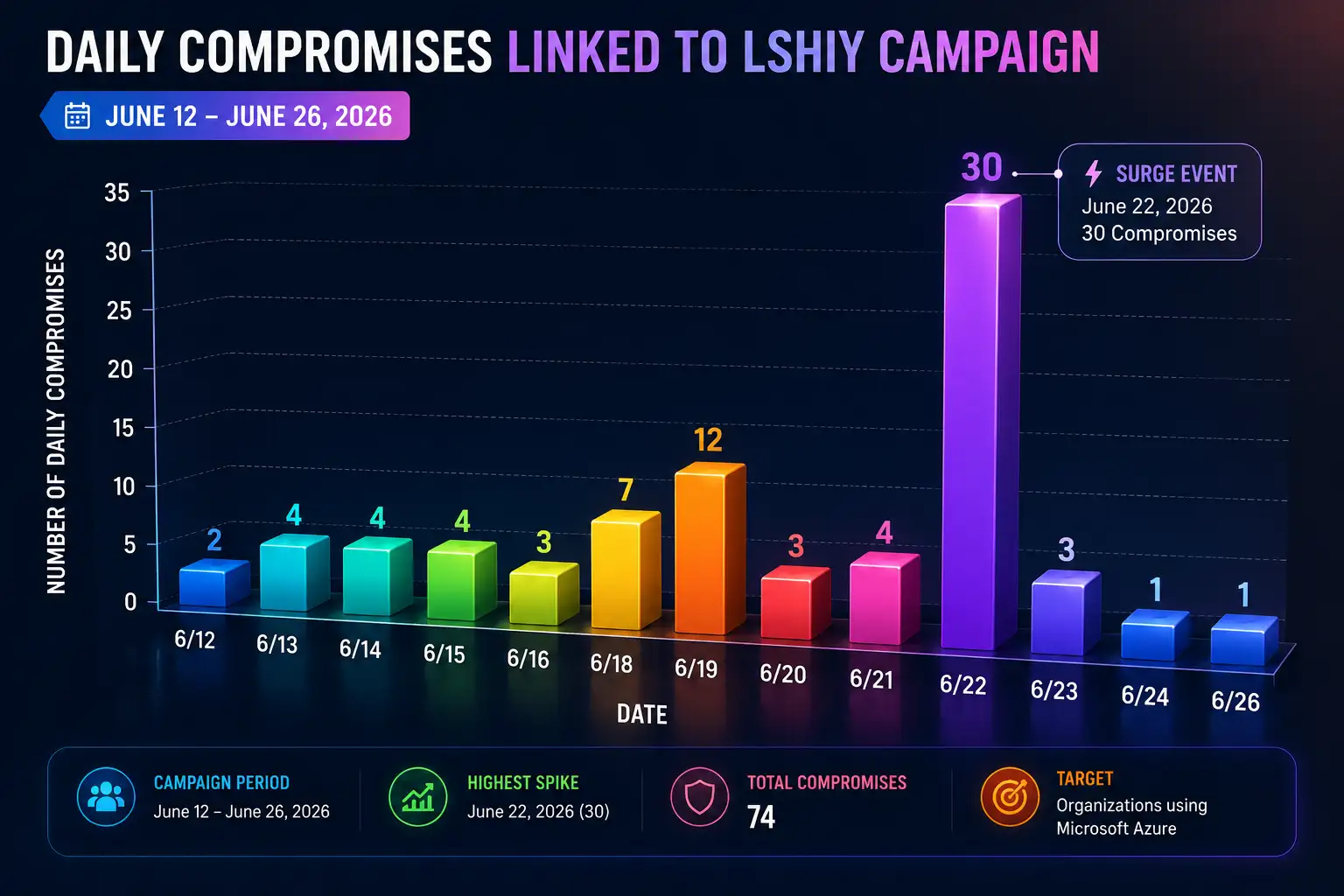
Daily compromises linked to LSHIY campaign
The Real Culprit, ROPC and Why It Breaks the Rules
The reason Conditional Access failed comes down to a legacy authentication method called ROPC, short for Resource Owner Password Credentials. It is part of the older OAuth 2.0 standard.
In plain terms, ROPC lets a user hand their username and password straight to an application. That application then forwards those credentials to Microsoft's servers and gets back an access token, all without the person ever seeing a login screen or typing anything into a browser. There is no interactive step, no pop up asking for a second factor, none of the usual back and forth you see when logging into a website.
Compare that to how most modern logins work today, through something called the Authorization Code Flow, where the user is redirected to a proper sign in page, enters credentials there, and can be prompted for MFA right in that flow. ROPC skips all of that. It was built years ago for older applications that could not support a browser based redirect, and Microsoft has openly said in its own documentation that ROPC requires a very high level of trust and carries risks not present in safer flows. It was officially deprecated when OAuth 2.1 came out.
Here is the technical root of the whole problem. Conditional Access Policies get enforced at what is called the authorization endpoint, the checkpoint a login normally passes through when a user is redirected to sign in interactively. ROPC never touches that checkpoint. The credentials go directly from app to token server, bypassing the very place where Conditional Access rules live. So even a company that built a solid looking policy on paper can still get walked around, simply because ROPC never shows up at the door where the guard is standing.
Below is a simple side by side to make this click.
| Login Flow | Interactive Screen | MFA Support | Where Conditional Access Applies |
|---|---|---|---|
| ROPC, legacy | No | Limited or incompatible | Can be bypassed entirely |
| Authorization Code Flow | Yes | Full support | Enforced at authorization endpoint |
| Device Code Flow | Yes | Full support | Enforced at authorization endpoint |
Why MFA Did Not Save These Companies
I want to be really clear about something, because it is easy to walk away from this story thinking MFA is broken. It is not. MFA still works exactly the way it is supposed to when it is configured correctly. The problem here was scope, not the technology itself.
Huntress found a handful of specific gaps that let attackers through even at companies with MFA active.
Some organizations only required MFA for certain applications instead of applying it to All Cloud Apps, which meant Azure CLI logins simply were not covered by the rule at all. Others limited MFA enforcement to specific user groups, like administrators only, leaving regular staff accounts wide open.
A few companies only triggered MFA when a login came from an unfamiliar or untrusted location, and attackers using cloud infrastructure can sometimes appear to originate from locations that do not immediately look suspicious. And in eight of the affected organizations, there was no MFA policy at all, which obviously left the door completely unlocked.
So the lesson is not throw out MFA. The lesson is that a security control is only as strong as its coverage. A lock on the front door does not help if the back door was never fitted with one.
How the Attackers Chose Their Targets
There was nothing personal about this campaign, and that is actually part of what makes it unsettling. The attackers were not researching specific companies or picking targets based on what they did for a living. They were working straight off password prevalence data pulled from previous breach dumps, the exact kind of thing that ends up circulating after any large scale data leak.
Old credentials that were never rotated became the weapon of choice. If your organization had an employee reuse a password that leaked somewhere else years ago, and nobody ever forced a reset, that password combination was sitting there ready to be tried.
Most of the traffic resolved back to United States based IP addresses, with a smaller share tracing to China, all funneled through infrastructure tied to a provider called LSHIY LLC under network number AS32167.
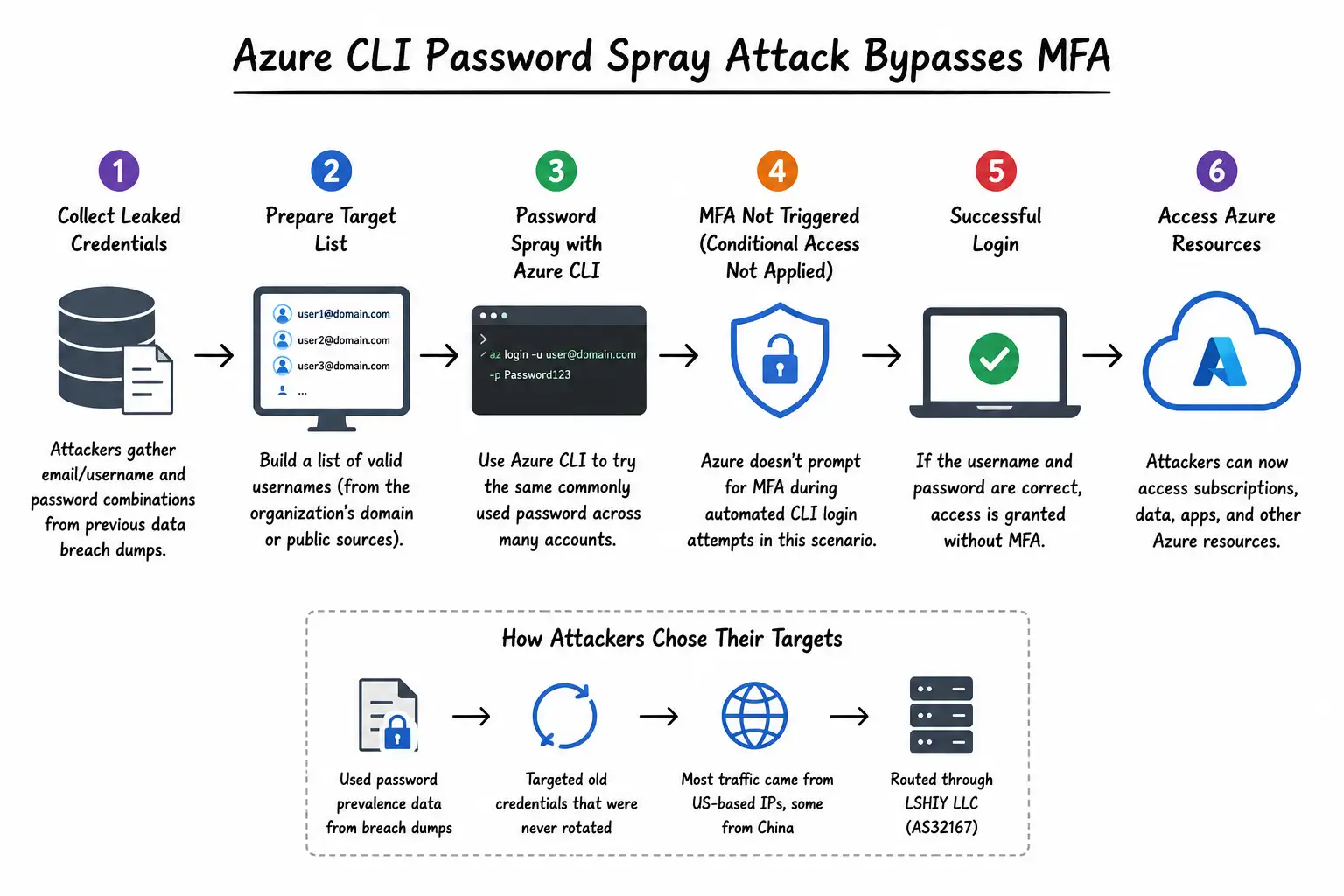
Azure CLI password spray attack process
The Attack Timeline, Day by Day
For most of the campaign, the pace was steady rather than explosive. Between June 12 and June 21, attackers compromised roughly two to four accounts per day, a slow drip that could easily blend into normal background noise on a busy network. June 19 broke that pattern slightly with 12 accounts compromised in a single day.
Then on June 22, everything spiked. Thirty identities across 23 separate businesses were compromised in one day alone. That kind of sudden jump usually signals one of two things, either the attackers scaled up their automated tooling, or they had just found a fresh batch of working credentials and were racing to use them before defenders caught on. Either way, the jump is a strong reminder that these campaigns rarely stay quiet and small forever.
What You Should Actually Do About It
If your organization uses Azure at all, this is worth treating as a checklist rather than background reading.
Require MFA across All Users, All Cloud Apps, and All Client App types inside your Conditional Access setup, not just a narrow slice of it. Restrict Azure CLI access for non admin users wherever it is not strictly needed. Prioritize your incident response around credential validity, meaning check which accounts are using stale or previously breached passwords first.
Force a rotation on any old or breached username and password combinations sitting in your directory. Audit your tenant for legacy authentication protocols, including ROPC, and disable or restrict them wherever they are not absolutely required for a specific application to function. And finally, stop assuming MFA equals safety on its own. Review your policy configuration on a regular schedule, because a policy that made sense two years ago might have blind spots today.
Beyond the checklist, this is also a good moment for organizations to lean on structured security testing rather than guessing where the gaps are. Services built around penetration testing and attack surface management can surface exactly these kinds of configuration blind spots before an attacker finds them first, and continuous vulnerability management helps catch stale credentials and legacy protocol exposure before they turn into a headline.
The Bigger Lesson Here
The real takeaway from this whole episode is not that Azure is insecure or that MFA has failed us. It is that security controls need to be configured with their actual coverage in mind, not just switched on and forgotten. A legacy protocol that bypasses the authorization endpoint is a structural weakness, and no amount of MFA policy language fixes that if the policy never gets a chance to fire in the first place.
For enterprise security teams, the practical implication is straightforward. Go check whether ROPC or any similarly old authentication flow is still active in your environment. If it is, ask why, and whether it can be turned off. Organizations that also run regular cyber resilience assessments and identity heavy gap assessments tend to catch this exact class of issue long before a researcher writes a report about them.
Frequently Asked Questions
What is ROPC flow in OAuth?
ROPC, or Resource Owner Password Credentials, is an older OAuth 2.0 method where a user gives their username and password directly to an application, which then trades those credentials for an access token without any interactive login screen. It was deprecated in OAuth 2.1 because it does not support modern protections like MFA properly.
Can MFA be bypassed on Azure?
Yes, if Conditional Access Policies are not scoped correctly. In this campaign, attackers used ROPC specifically because it does not pass through the authorization endpoint where MFA and Conditional Access rules are enforced, allowing them to slip past protections that looked solid on paper.
How is a password spray attack different from credential stuffing?
A password spray attack tries a small number of common or previously breached passwords across many different accounts, which helps attackers avoid account lockouts. Credential stuffing instead takes specific username and password pairs already known to be valid from one breach and tries them elsewhere, hoping people reused the same login.
How do I secure Azure CLI login?
Apply MFA to All Cloud Apps rather than a limited list, restrict Azure CLI usage for non admin accounts, disable legacy authentication flows like ROPC where possible, and rotate any old or breached credentials sitting in your directory.
Who is LSHIY LLC and AS32167?
LSHIY LLC is the internet infrastructure provider that controlled the IPv6 address range, 2a0a:d683::/32, from which the majority of this password spray traffic originated, operating under autonomous system number AS32167.
This article covers the full scope of the June 2026 Azure CLI password spray campaign reported by Huntress, including exact attack metrics, the technical mechanics of the ROPC OAuth flow, the specific Conditional Access misconfigurations that allowed attackers through despite MFA being active, the targeting methodology based on breached password prevalence, the day by day attack timeline, and a practical mitigation checklist for security teams running Azure environments.
Official Reference
Huntress, cybersecurity research report on the Azure CLI password spray campaign, June 2026. Microsoft Identity Platform documentation on the ROPC authentication flow and its deprecation under OAuth 2.1.
If your organization needs help closing these exact gaps, a proper penetration testing engagement combined with an attack surface management review can find legacy authentication exposure before attackers do. Teams unsure where to start can also request a cyber resilience assessment or a focused gap assessment to check whether Conditional Access policies actually cover every login path in use.
For ongoing monitoring once the immediate fixes are in place, vulnerability management and cyber threat intelligence services help catch the next campaign before it reaches 81 million attempts.
Reach out to a virtual CISO if your team needs hands on guidance turning this checklist into an actual policy rollout, because knowing the fix and actually deploying it safely across a live environment are two very different jobs.




-20260925120840.webp&w=3840&q=75)
