

Top Cybersecurity Threats Facing Oak Brook Businesses
|
Article Summary |
Details |
|
Search Intent |
Informational |
|
Target Audience |
Business owners, executives, IT managers, healthcare organizations, law firms, manufacturers, retailers, financial firms, and SMBs in Oak Brook |
|
Reading Time |
12 to 15 Minutes |
|
Main Takeaway |
Cyber attacks are no longer targeting only large enterprises. Every Oak Brook business is a potential target. Understanding today's biggest threats is the first step toward protecting your company. |
|
Best For |
Companies looking to reduce cyber risk and strengthen security posture |
A Small Mistake Nearly Cost an Oak Brook Business Everything
On what seemed like an ordinary Tuesday morning, an employee received an email that looked perfectly normal. It appeared to come from a long time supplier requesting an updated invoice.
The employee clicked the attachment.
Nothing happened.
Or so everyone thought.
Within hours, attackers quietly moved through the company's network. They gathered employee credentials, accessed financial records, and encrypted critical business files. Production stopped. Customers couldn't place orders. The company spent weeks recovering.
The scary part?
The attack wasn't sophisticated. It relied on a single human mistake.
Stories like this happen every day. Cybercriminals no longer focus only on Fortune 500 companies. Small and medium sized businesses throughout Oak Brook have become attractive targets because many have valuable data but fewer security resources.
If your business depends on email, cloud applications, online payments, customer information, or connected devices, cybersecurity is now a business priority, not just an IT responsibility.
Quick Answer
The top cybersecurity threats facing Oak Brook businesses include phishing attacks, ransomware, business email compromise, insider threats, cloud security misconfigurations, credential theft, AI powered scams, supply chain attacks, and vulnerabilities in remote work environments.
Businesses can significantly reduce risk by implementing employee security awareness training, multi factor authentication, endpoint protection, regular penetration testing, continuous monitoring, and an incident response plan. Organizations that invest in proactive cybersecurity are far more likely to stop attacks before they become costly breaches.
Key Takeaways
- Phishing remains the most common entry point for attackers.
- Ransomware can stop operations within hours.
- AI is making phishing emails and voice scams much more convincing.
- Cloud services improve productivity but introduce new security risks.
- Small businesses are attacked because they are often easier targets.
- Regular security assessments help identify weaknesses before attackers do.
- Employee awareness is just as important as security software.
Why Oak Brook Businesses Are Being Targeted More Than Ever
Oak Brook is one of Illinois' strongest business communities. It is home to healthcare providers, law firms, manufacturers, logistics companies, financial organizations, retailers, and corporate headquarters.
To cybercriminals, this makes the area extremely attractive.
Businesses here often store:
- Customer financial information
- Healthcare records
- Intellectual property
- Employee payroll data
- Vendor payment details
- Corporate contracts
- Confidential communications
Attackers know that many companies cannot afford extended downtime. That makes ransomware and business email fraud especially profitable.
Modern cybercrime is also highly automated. Criminal groups scan thousands of businesses every day looking for outdated software, exposed servers, weak passwords, or employees who might click a malicious email. They don't care whether your business has 20 employees or 2,000.
The Cost of Ignoring Cybersecurity
Many business owners believe a cyber attack is unlikely to happen to them.
Unfortunately, attackers count on that assumption.
A successful attack can result in:
|
Risk |
Business Impact |
|
Data breach |
Loss of customer trust |
|
Ransomware |
Business downtime |
|
Financial fraud |
Direct monetary loss |
|
Regulatory penalties |
Compliance violations |
|
Reputation damage |
Lost customers |
|
Legal expenses |
Lawsuits and investigations |
|
Operational disruption |
Missed deadlines and reduced productivity |
Even after recovering from an attack, rebuilding customer confidence can take months or even years.
The Top Cybersecurity Threats Facing Oak Brook Businesses
1. Phishing Attacks
Phishing continues to be the number one way cybercriminals break into business networks.
Instead of attacking firewalls, criminals target employees.
A typical phishing email may appear to come from:
- Microsoft
- Google Workspace
- Your bank
- A shipping company
- A trusted supplier
- Your company CEO
The message usually creates urgency.
Examples include:
- Reset your password immediately.
- Your invoice is overdue.
- Your account will be suspended.
- Review this payroll update.
One click can install malware or steal login credentials.
Real World Example
Imagine your accounting department receives what appears to be an invoice from a familiar supplier.
The invoice looks legitimate.
The company logo is correct.
The email signature matches previous conversations.
The attachment installs ransomware in less than one minute.
This scenario happens every day because attackers carefully research their targets before launching attacks.
Best Practice
Businesses should combine employee awareness training with advanced email filtering and multi factor authentication. Even if passwords are stolen, additional authentication significantly reduces the chance of unauthorized access.
2. Ransomware
Ransomware has evolved from random attacks into organized criminal operations.
Today's attackers often spend days or weeks inside a company's network before encrypting files.
During that time they may also:
- Steal confidential documents
- Copy customer databases
- Disable backups
- Identify critical systems
- Threaten to publish stolen information
Many businesses discover the attack only after every important file becomes inaccessible.
Warning Signs
- Unusual login activity
- Slow network performance
- Unknown administrator accounts
- Antivirus software disabled
- Unexpected file encryption
Best Practice
Regular offline backups, endpoint detection, vulnerability management, and incident response planning dramatically improve recovery chances.
Businesses should also perform regular penetration testing and cybersecurity assessments to uncover vulnerabilities before criminals exploit them. Independent security testing helps organizations identify weaknesses that automated tools often miss.
3. Business Email Compromise
Unlike ransomware, Business Email Compromise often contains no malware at all.
Instead, attackers study executives, vendors, and finance departments.
Once they understand how payments normally happen, they send convincing emails requesting urgent wire transfers or banking changes.
These scams have caused companies to lose thousands or even millions of dollars.
Example
An attacker impersonates the CEO while traveling.
They send a message saying:
"I need this payment completed before today's meeting. Please don't call because I'm boarding a flight."
The finance employee follows instructions.
Hours later, the money is gone.
Best Practice
Every payment request should require independent verification using a phone call or another trusted communication method.
4. Insider Threats
Not every cyber threat comes from outside your organization. Sometimes the biggest risk is already inside your business.
An insider threat can be intentional or accidental. A frustrated employee may copy sensitive files before leaving the company, while a well meaning team member might unknowingly expose customer data by sending it to the wrong recipient or using an unsecured personal device.
Common Insider Risks
- Weak or reused passwords
- Sharing login credentials
- Using personal devices without security controls
- Downloading unauthorized software
- Mishandling confidential customer information
- Employees keeping access after changing roles or leaving the company
Real World Example
An employee leaves a manufacturing company but still has access to cloud storage because their account was never disabled. Weeks later, confidential design files are downloaded using that inactive account.
The company has no idea the data has been copied until it appears on a competitor's website.
Best Practice
Follow the principle of least privilege. Give employees access only to the systems they need to do their jobs. Review user permissions regularly and remove access immediately when employees leave or change roles.
5. AI Powered Cyber Attacks
Artificial intelligence is changing cybersecurity on both sides. While businesses use AI to improve defenses, cybercriminals use it to launch faster and more convincing attacks.
Today's phishing emails often contain perfect grammar, personalized details, and natural language that makes them difficult to identify.
AI can also create realistic voice messages that imitate executives, making business email compromise scams even more dangerous.
What Makes AI Attacks Different?
|
Traditional Attack |
AI Powered Attack |
|
Generic messages |
Personalized messages |
|
Poor grammar |
Natural language |
|
Easy to spot |
Much harder to detect |
|
Limited scale |
Thousands of customized attacks in minutes |
Best Practice
Employee awareness training should now include AI generated phishing examples. Verification procedures should rely on trusted communication channels rather than assuming a message is genuine because it sounds professional.
6. Credential Theft
Passwords remain one of the easiest ways for attackers to gain access.
Cybercriminals collect usernames and passwords from previous data breaches, phishing campaigns, and malware. They then try those credentials across multiple business systems.
If employees reuse passwords, a single leaked login can provide access to email, cloud storage, customer databases, and financial systems.
Warning Signs
- Login attempts from unfamiliar locations
- Multiple failed login attempts
- Unexpected password reset requests
- Accounts being locked without explanation
Best Practice
Use strong, unique passwords for every account and require multi factor authentication across all business applications.
Password managers also reduce the temptation to reuse passwords.
7. Cloud Security Misconfigurations
Cloud platforms such as Microsoft 365, Google Workspace, and cloud storage services have transformed how businesses operate.
They also introduce new security responsibilities.
Many cloud related breaches happen because systems are configured incorrectly rather than because the cloud provider was hacked.
Common Mistakes
- Publicly accessible storage folders
- Weak administrator passwords
- Missing multi factor authentication
- Unnecessary administrator privileges
- Outdated permissions
- Disabled security logging
Example
A company accidentally makes a cloud storage folder publicly accessible while sharing files with a client.
Search engines index the folder, exposing confidential business documents to anyone who discovers the link.
Best Practice
Perform regular cloud security reviews and configuration assessments to ensure permissions, access controls, and security settings remain aligned with business needs.
8. Supply Chain Attacks
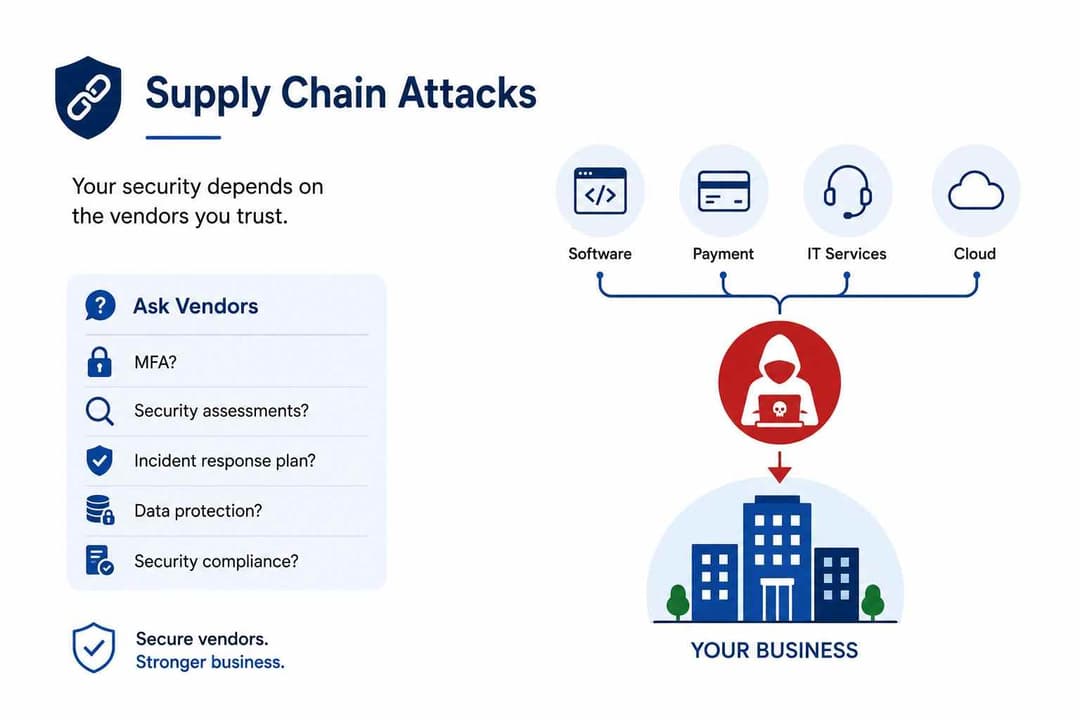
Your business security is only as strong as the vendors you trust.
Modern organizations rely on software providers, payment processors, managed service providers, and cloud vendors. If one of those partners is compromised, attackers may gain access to your systems.
Supply chain attacks have become increasingly common because they allow criminals to target many organizations through a single vulnerable supplier.
Ask Vendors These Questions
- Do you use multi factor authentication?
- How often do you perform security assessments?
- Do you have an incident response plan?
- How do you protect customer data?
- Are you compliant with relevant security standards?
Choosing vendors that prioritize cybersecurity reduces your overall risk.





