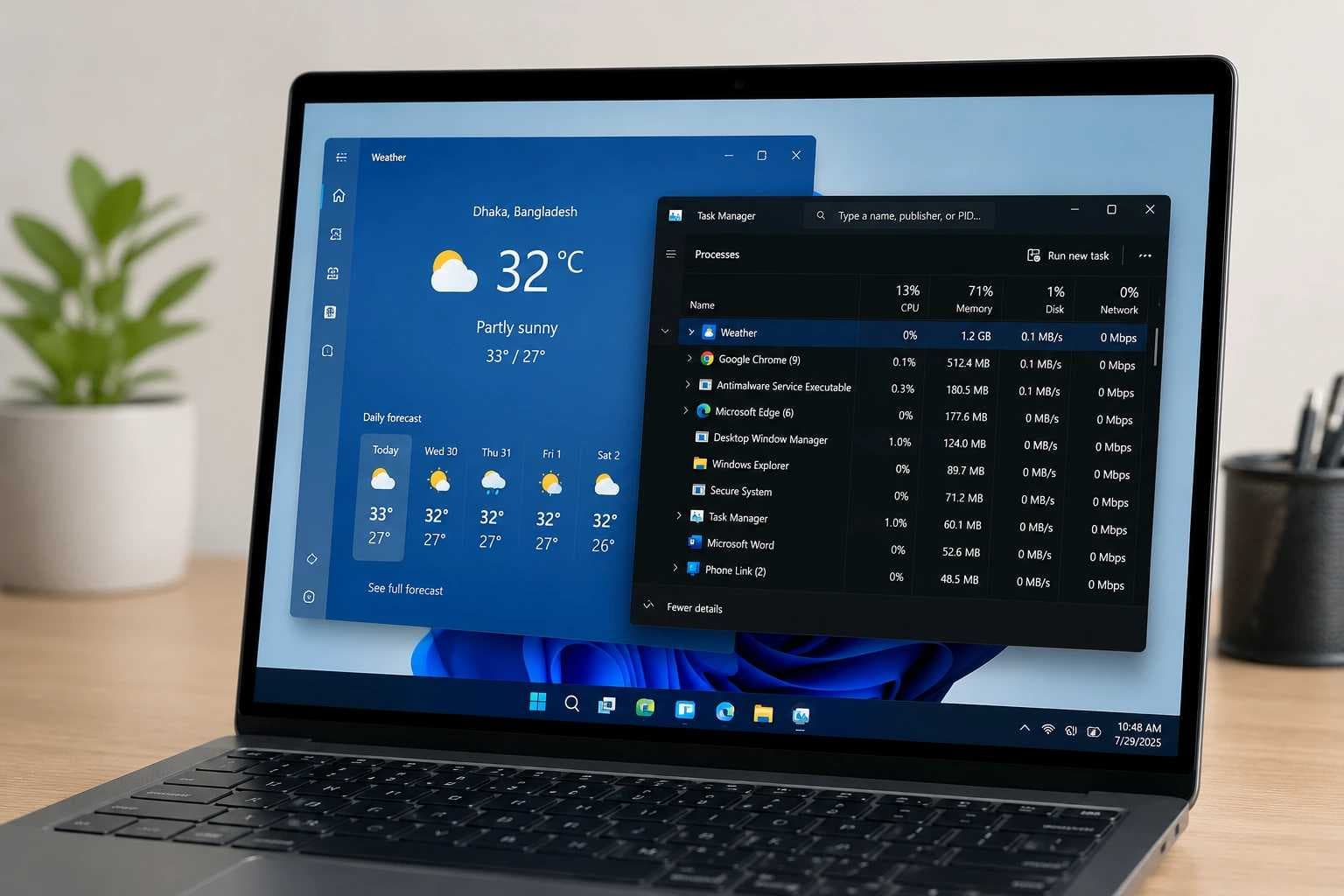
The Windows 11 Weather app has been reported to use more than 1GB of RAM under certain conditions. While high memory usage alone does not indicate malware or a cyberattack, unexpected resource consumption is something users and security teams should understand and monitor.
For businesses, unusual memory, CPU, process, or network activity can sometimes be an early sign that an endpoint needs further investigation. The key is knowing the difference between legitimate application behavior and genuinely suspicious activity.
Is High RAM Usage a Cybersecurity Risk?
High RAM usage by itself is not a cybersecurity threat. Legitimate applications, including Chromium and WebView2-based software, can use significant system resources during normal operation.
However, security teams should pay attention when high resource usage appears together with other warning signs, such as unknown processes, unusual network connections, unexpected startup programs, disabled security tools, or applications running from suspicious file locations.
This is why endpoint monitoring is important. Instead of looking only at how much memory an application uses, security teams can examine the wider behavior of the process and determine whether the activity is normal or requires investigation.
|
Area |
Key Point |
|
RAM Usage |
Weather app can use 1.2GB–1.6GB RAM |
|
Main Cause |
WebView2 and web-based content may increase memory use |
|
8GB PC Impact |
High RAM use may reduce overall system performance |
|
Memory Leak? |
Not confirmed |
|
User Action |
Monitor usage and close the app when not needed |
Windows 11 Weather App Consumes Over 1.2GB RAM Raising Concerns For 8GB PCs Windows 11 Weather app is grabbing attention for high memory usage.
The Weather app in Windows 11 is getting attention because of its high memory use.
Recent tests found that the app can use more than 1GB of RAM even when users are simply checking the weather forecast or using the weather map.
Windows Latest first reported the issue after seeing the Weather app use more than 1.2GB of memory in Task Manager.
Wccftech later tested the app on a PC with 32GB of RAM and found similar results. After opening the app, memory use reached around 1GB. It increased even more when different parts of the app were used.
Notebookcheck also reported on the issue, mainly covering the results found by Windows Latest and Wccftech.
However, these numbers may not be the same on every Windows 11 PC. RAM use can change depending on the computer, Windows version, Weather app version, and how the app is being used.
So why does a simple Weather app need this much memory?
What is Running Inside the Windows Weather App?
One important reason may be the way the app is built.
The Windows 11 Weather app looks like a normal desktop app, but a large part of it is web-based.
It uses Microsoft's WebView2 technology to show content from MSN Weather.
WebView2 is based on the same Chromium engine used by Microsoft Edge. Because of this, opening the Weather app can start several separate processes instead of running everything under one small process.
During Windows Latest's test, expanding the Weather app in Task Manager showed as many as nine separate subprocesses.
This is not unusual for Chromium-based apps. Different processes can handle things such as page display, graphics, internet connections, and other tasks.
But this does not mean that multiple Chromium processes are the only reason the Weather app can use more than 1.2GB of RAM.
WebView2 itself can add some memory use, but other parts of the app may also play a role. These can include web content, maps, animations, ads, and the way the app is optimized.
So WebView2 may be an important part of the problem, but it would be wrong to blame everything on Chromium alone.
Normal WebView2 Activity vs Suspicious Processes
Multiple WebView2 processes are not automatically suspicious. They are commonly used by legitimate Windows applications.
Users and IT teams should instead verify whether the process belongs to a trusted application, check its file location and digital signature, and look for unusual network or background activity.
A process using a large amount of memory becomes more concerning when its behavior does not match the application that supposedly created it.
RAM Usage Can Reach Around 1.6GB
Windows Latest saw the Weather app use more than 1.2GB of memory during testing.
Wccftech also tested the app on a PC with 32GB of RAM. After opening it, memory use increased to around 1GB.
When the app was left unused for some time, memory use dropped to around 500MB to 600MB.
But the numbers increased again when the tester started using the weather map, zooming in and out, switching between forecast sections, and moving around the app.
During the test, memory use reached around 1.5GB and briefly came close to 1.6GB.
This does not mean that the Weather app always needs 1.2GB or 1.6GB of RAM.
The tests simply show that under some conditions, its memory use can grow from a few hundred megabytes to more than 1GB.
What Does This Mean for PCs With 8GB of RAM?
This may matter more for people using Windows 11 PCs with only 8GB of RAM.
So far, there has not been a detailed performance test of the Weather app on an 8GB PC. Wccftech carried out its test on a system with 32GB of RAM.
Because of that, we cannot say that opening the Weather app will always make an 8GB computer slow.
Still, the numbers are worth paying attention to.
If the Weather app uses around 1.6GB of memory, that is about 20% of the total physical RAM in an 8GB computer.
The problem may become more noticeable if the user is also running Chrome or Edge with several tabs, Microsoft Teams, Office apps, or other programs that use a lot of memory.
When physical RAM starts running low, Windows can use part of the computer's storage as virtual memory.
This can help keep apps running, but storage is slower than RAM. On lower-end laptops with limited memory, users may notice slower app switching or reduced system response.
However, proper tests are still needed to know exactly how much the Weather app affects the performance of an 8GB Windows 11 PC.
How Does It Compare With Apple's Weather App?
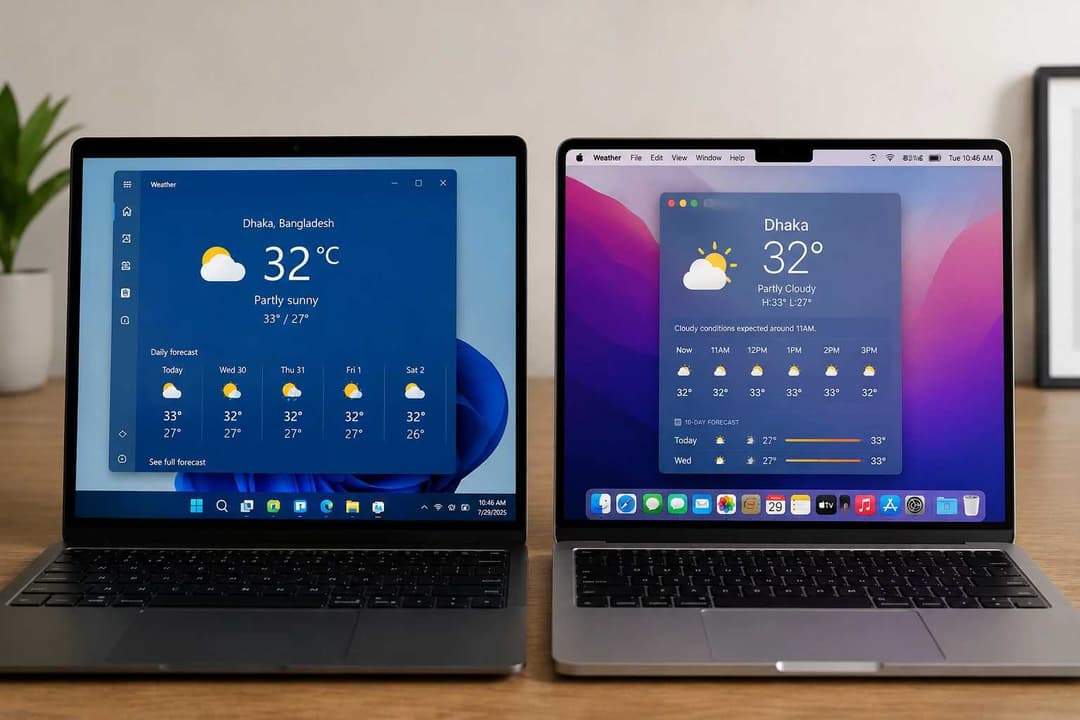
The Windows Weather app has also been compared with Apple's Weather app on macOS.
During testing by Windows Latest, Apple's native Weather app reportedly used around 246.7MB of memory during normal use.
In the same report, the Windows Weather app used more than 1.2GB.
That is a large difference.
However, this is not a perfect one-to-one comparison.
Windows and macOS are different operating systems. They also manage memory differently and use different hardware and app designs.
Apple's Weather app is a native macOS application.
The Windows Weather experience, on the other hand, uses WebView2 to display web-based content.
This design difference may help explain some of the gap in memory use.
But the available tests do not prove that the entire difference comes only
from Windows using WebView2 while Apple uses a native app.
The Windows Weather App Also Shows Ads
Another issue that some users may not like is advertising.
Along with forecasts and weather information, some parts of the Windows Weather experience may show sponsored content or ads.
This has caused some users to question why a built-in Windows app needs to use a large amount of system memory while also showing advertisements.
However, there is currently no clear proof that the ads are directly responsible for the high RAM use.
There has also been no controlled test showing how much memory the Weather app would use with ads compared with the same app without them.
So ads may be a user experience concern, but they should not yet be treated as the confirmed reason behind the 1.2GB to 1.6GB memory use.
Is This a Memory Leak?
Seeing many Weather and WebView2 processes in Task Manager may make some users think the app has a memory leak.
But the available information does not prove that.
Chromium and WebView2-based apps normally use several processes for different jobs, including graphics, page display, networking, and other tasks.
Seeing several processes in Task Manager is therefore not automatically a problem.
A real memory leak usually means that an app keeps using more and more memory over time and does not properly release that memory when it is no longer needed.
The current tests show that the Windows Weather app can use an unusually high amount of RAM.
But they do not confirm that the app has a memory leak.
Why This Matters for Microsoft
The issue comes at a time when Microsoft has been talking about improving Windows 11 performance and reducing memory use.
The company has been working on making different parts of Windows more memory-efficient, including areas connected to WinUI, Chromium, and WebView2.
Because of this, high memory use in a built-in app like Weather may get more attention.
A simple utility app using more than 1GB of RAM under some conditions can be a concern, especially on PCs with limited memory.
For users with 8GB of RAM, every large app running in the background can reduce the amount of memory available for browsers, work apps, games, and other software.
Is Microsoft Working on a Fix?
There is one important point to understand.
Microsoft has not announced a specific fix or release date for the Weather app's reported 1.2GB to 1.6GB RAM use.
The company is working on improving Windows 11's overall memory use and making WebView2 more efficient.
But there is currently no clear official plan showing exactly when the Weather app will receive a major memory improvement or a different design.
Some reports have discussed the possibility of Microsoft moving more Windows experiences toward native technology in the future.
However, there is no confirmed official announcement saying that the Weather app will completely move away from WebView2 and become a fully native app by the end of 2026.
Any such timeline should therefore not be treated as confirmed information.
What Can 8GB RAM Users Do?
If you use the Windows Weather app and notice unusually high memory use, you can check it yourself in Task Manager.
Open Task Manager and look at how much memory the Weather app and its WebView2 processes are using.
If you do not need the Weather app all the time, closing it after use may help free some memory.
You can also limit Weather or Widgets activity in Windows settings if you do not need them running in the background.
People who never use the Weather app may also consider removing it.
However, you should not remove Microsoft Edge WebView2 Runtime just to reduce the Weather app's RAM use.
Many Windows features and Microsoft apps can depend on WebView2. Removing it could cause problems with other software.
Also, seeing several Weather or WebView2 processes in Task Manager is not automatically a reason to worry.
Multiple processes are normal for Chromium-based apps.
The more important question is how much memory those processes are using and whether they are actually making your PC slower.
With Hoplon InfoSec’s Managed Endpoint Security and 24/7 monitoring, users can keep their systems protected while detecting suspicious processes, malware, and abnormal resource activity before they become a serious security risk.
Why Endpoint Monitoring Matters for Businesses
On a personal PC, a user can open Task Manager and investigate unusual processes manually. In a business environment with dozens or hundreds of endpoints, that approach is not practical.
Endpoint security and continuous monitoring can help organizations identify abnormal resource usage, suspicious processes, unauthorized applications, and unusual network behavior across their devices.
The goal is not to treat every high-memory application as a threat, but to identify abnormal behavior early enough to investigate it before it develops into a larger security incident.
Final Thoughts
Recent tests have shown that the Windows 11 Weather app can use a surprisingly large amount of memory.
Windows Latest saw memory use go above 1.2GB. Wccftech saw the app reach around 1.5GB while being used, with short spikes close to 1.6GB.
However, these results came from specific test systems.
The Weather app may not use the same amount of RAM on every Windows 11 computer.
There is also no detailed controlled test yet showing exactly how much the app slows down a PC with only 8GB of RAM.
Still, a built-in Weather app using anywhere from several hundred megabytes to more than 1GB of memory is something worth watching, especially for users with lower-memory PCs.
Microsoft is working on improving the overall memory efficiency of Windows 11 and WebView2.
But there is currently no confirmed Weather-specific fix or native replacement.
For now, the safest conclusion is simple: the Windows 11 Weather app has shown high memory use in real-world tests, but the exact amount and its effect on performance can change from one PC to another.
There is also not enough evidence yet to call it a confirmed memory leak or a confirmed Windows architecture bug.