
319 Chrome Extensions Found Hijacking Searches, Affecting 13.4 Million Cumulative Users
A browser extension does not need to display alarming pop-ups or install an obvious malware payload to raise security concerns. Sometimes, the problem starts with something as ordinary as a search.
You type a question into Chrome's address bar. The browser opens a familiar search engine, and everything appears normal. But behind the scenes, an extension may have changed where that search goes first.
A new investigation published by Socket on October 29, 2026, describes a large collection of browser extensions associated with this behavior. The researchers identified 319 extensions linked to approximately 13.4 million cumulative users across a decade. Their findings describe extensions that change default search settings, route queries through proxy servers, and generate referral revenue from search providers such as Yahoo and Bing.
The scale is concerning, but one detail matters: 13.4 million is a cumulative user figure associated with the identified extensions over time. It does not mean that 13.4 million people are currently infected or exposed.
The investigation also goes beyond simple search redirection. Socket found that some requests passed through intermediary servers before reaching a search provider. In observed cases, the same extension could send similar searches to different destinations. That behavior gives the server operator control over the route a search takes, even when the browser extension itself remains unchanged.
The report does not establish that every extension delivered malware or sent every user to a phishing page. It does, however, raise important questions about search privacy, browser control, advertising practices, and the security of extensions that offer little value beyond changing a user's search experience.
This article explains what Socket found, how the technique works, what the evidence does and does not prove, and how users and security teams can respond.
Primary source: Socket's Searchjacked investigation, published October 29, 2026.
What You Need to Know
- Socket identified 319 browser extensions associated with search hijacking and approximately 13.4 million cumulative users across a decade.
- The investigation added 264 newly identified extensions associated with about 8.7 million additional users.
- The reported behavior includes changing default search settings, routing queries through proxy servers, and collecting search referral payments.
- Some extensions were promoted through advertisements and distributed through unlisted Chrome Web Store pages.
- Socket attributed 200 extensions, associated with approximately 5.68 million users, to identified operators. The operators behind another 119 extensions, associated with approximately 7.76 million users, remained unknown in the report.
- The investigation observed different destinations for repeated searches sent through one extension's proxy. This demonstrates variable redirect behavior, but it does not prove that every redirect was malicious.
- Users should review installed extensions, check their browser settings, and remove tools they do not recognize or need.
- Organizations should inventory extensions, monitor unexpected browser-setting changes, and investigate suspicious network activity.
Table of Contents
- What Did Socket Discover?
- Key Findings and Operator Breakdown
- How Chrome Search Hijacking Works
- What the Predator Search Example Reveals
- How These Extensions Reached Users
- How the Researchers Traced the Campaigns
- Why Search Hijacking Is a Security Concern
- Confirmed Findings vs. Unproven Claims
- How to Check and Remove Suspicious Chrome Extensions
- How Security Teams Can Detect Suspicious Extensions
- Recommended Mitigation Strategy
- Frequently Asked Questions
What Did Socket Discover?
Socket's report, titled Searchjacked: Hidden Browser Extensions Hijack Searches for 13 Million Users, describes a pattern in which browser extensions change the user's expected search experience while generating revenue from redirected traffic.
The investigation builds on earlier research and adds 264 newly identified extensions associated with approximately 8.7 million additional users. Combined with previously identified extensions, the report lists 319 distinct extensions and approximately 13.4 million cumulative users.
The extensions were associated with several types of advertised tools, including PDF search utilities, manual finders, new-tab features, and products marketed using security or search-related language.
These categories are not inherently malicious. A legitimate extension can change browser settings when that change is necessary for its advertised function. The concern arises when an extension offers little meaningful functionality, hides its search-routing behavior, and sends users' queries through infrastructure they may not expect.
Socket describes a recurring pattern:
- An extension changes Chrome's default search provider.
- The configured search route sends queries through an intermediary server.
- The server forwards the query to a search provider or another destination.
- Partner identifiers may be added to search URLs so that referral traffic can be attributed to an operator.
- Because the request passes through an intermediary, the server operator may have visibility into the query and control over the destination.
The report says that many of the observed redirects ultimately led to ordinary Yahoo or Bing search results with referral identifiers. However, the ability to choose a destination for each request creates a separate security concern.
A familiar search-results page does not tell the whole story. Users may not know which server handled their query, why the browser used that route, or who benefits financially from the referral.
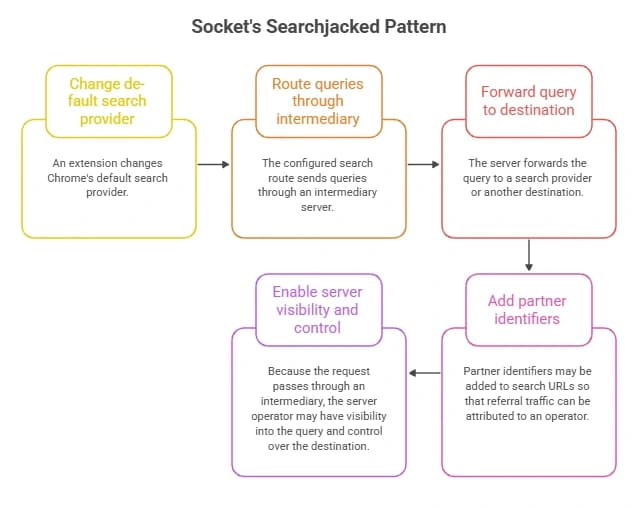
Socket's Searchjacked Pattern
Key Findings and Operator Breakdown
The numbers help explain the scale of the investigation, but they should be read in context.
|
Finding |
Details reported by Socket |
|
Distinct extensions identified |
319 |
|
Approximate cumulative users |
13.4 million |
|
Newly identified extensions |
264 |
|
Additional users associated with the new findings |
Approximately 8.7 million |
|
Time span covered |
About a decade, beginning in 2016 |
|
Extensions attributed to identified operators |
200 |
|
Users associated with those identified-operator extensions |
Approximately 5.68 million |
|
Extensions attributed to unknown operators |
119 |
|
Users associated with those unknown-operator extensions |
Approximately 7.76 million |
|
Main behavior |
Search-provider changes, query routing through proxies, and referral monetization |
The identified and unknown groups are especially important. They show that the researchers could connect some extensions to particular businesses or operators, while attribution remained unresolved for others.
Identified operators
Socket linked 200 extensions, associated with approximately 5.68 million cumulative users, to identified operators. The report includes groups associated with companies such as Intango LTD, Tightrope Interactive, System1, Perion Network, and others.
The presence of a company name in the investigation should not automatically be interpreted as proof that every product or activity associated with that company is malicious. The report's attribution is based on the specific extensions, advertising relationships, search-routing behavior, and monetization identifiers discussed in the research.
One notable group in the report is Intango LTD. Socket associated 111 extensions and approximately 2.19 million users with this group. The report describes multiple extension domains and Yahoo or Bing referral identifiers linked to the activity.
These details help show how extensions that appear to come from separate publishers can share infrastructure or monetization relationships.
Unknown operators
The report attributed another 119 extensions, associated with approximately 7.76 million cumulative users, to operators it could not identify.
Two of the larger groups were:
- SecuryBrowse: 58 extensions associated with approximately 4.9 million users.
- Bing-Search: 37 extensions associated with approximately 2.21 million users.
Socket also identified smaller groups, including extensions associated with HermesTab and Yandex search, as well as other publishers whose ownership remained unclear.
The unknown category is a reminder that identifying an extension's public name is not the same as identifying the person or organization controlling it. Publisher names, domains, and privacy policies may offer clues, but those details do not always establish ownership conclusively.
Why this matters: Security teams should record the extension ID and investigate its actual behavior instead of relying only on the displayed name or publisher label.
How Chrome Search Hijacking Works
Search hijacking can be difficult to notice because the browser may continue displaying familiar results. To understand the concern, it helps to separate three activities: changing the browser's search configuration, routing queries through an intermediary, and monetizing the resulting traffic.
1. The extension changes the default search provider
Chrome extensions can declare a default search provider in their configuration. Socket explains that some of the extensions it analyzed used a manifest setting to change the browser's search destination.
A browser extension manifest is a configuration file that tells the browser about an extension and its capabilities. In the examples discussed by Socket, the configuration for changing the default search provider could be very small.
This is an important technical detail: an extension can alter the browser's search route without necessarily running a background service worker or requesting broad website permissions.
That does not mean every extension that changes the default search provider is malicious. Many legitimate tools need to adjust browser settings. The question is whether the change is clearly disclosed, relevant to the extension's purpose, and consistent with what the user agreed to install.
It also means that checking permissions alone is not a complete security review. An extension that requests few permissions can still change a setting that materially affects the browsing experience.
Google explains how extensions can manage certain browser settings in its official Chrome Web Store Help documentation.
2. Search queries pass through a proxy server
A proxy server sits between a client and another service. Proxies are widely used for legitimate reasons, including network management, privacy tools, and security controls.
In the pattern described by Socket, however, the proxy becomes part of the search route even when the user may expect a direct request to the selected search provider.
A simplified example looks like this:
User enters a search → Chrome uses the extension-configured search route → intermediary proxy receives the request → proxy selects a destination → user receives the resulting page.
When the proxy handles the request, its operator may be able to observe the search query and associated connection information. The precise information available depends on the implementation and how the request is processed.
Search queries can reveal personal interests, work-related questions, or sensitive subjects. That makes undisclosed routing a privacy concern, even when the final destination is a legitimate search engine.
3. Search referrals can generate revenue
Search providers may operate syndication or referral programs in which partners receive compensation for sending traffic that meets the program's conditions.
Socket describes partner identifiers associated with Yahoo and Bing in the extensions it investigated. These identifiers help attribute search traffic to a particular partner or sub-partner.
The report identifies URL parameters such as hspart and hsimp for Yahoo-related referrals, and PC and PTAG for Bing-related referrals.
These parameters are not inherently malicious. Referral identifiers can be used in legitimate advertising and search partnerships. Their presence alone does not prove that a browser extension is malicious.
The concern is the wider pattern: an extension changes a user's expected search route, forwards queries through an intermediary, and may generate revenue from the resulting traffic without providing a meaningful feature or clearly explaining the behavior.
4. The proxy can make redirect decisions per request
If an extension points to an intermediary server, the server can influence where a request goes next. That decision may depend on the query, the visitor's location, or other request details, depending on the implementation.
This is different from a fixed search-provider setting. A fixed configuration directs users to a defined endpoint, while a proxy can potentially choose among different destinations on a request-by-request basis.
Socket observed examples in which repeated searches followed different routes. That behavior is relevant because it shows that the extension's configuration alone may not reveal every destination a user will reach.
However, variable redirects do not automatically prove phishing, malware delivery, or credential theft. Those outcomes require separate evidence.

What the Predator Search Example Reveals
One of the clearest examples in Socket's report involves an extension named Predator Search, identified in the report by the extension ID odkcfoohjiicbelloepgcomekdknchjh and associated with approximately 50,000 users.
Socket reports that six identical searches sent through this extension's proxy ended at four different destinations.
The observed outcomes included:
- A direct redirect to Yahoo with partner identifiers.
- A landing page on searchlio.net.
- A route through searchtosearch.com to another results domain, mcftink.com, before reaching Yahoo.
- A Cloudflare error page that did not respond successfully.
The important observation is that the extension itself did not change between those requests. The proxy selected different destinations as the searches arrived.
This demonstrates that the search route could vary at the server level. It also shows why a single screenshot or one successful search is not enough to establish how an extension behaves across all requests.
Does this prove the extension delivered malware?
No. The observed variation is evidence of different redirect outcomes, not proof that every destination was malicious.
Socket explicitly distinguishes the observed behavior from the possibility that the proxy could later direct selected queries to phishing pages, fake results, or malicious downloads. The report discusses that as a potential risk, rather than a confirmed outcome for every request.
The distinction matters. Accurate security reporting should describe what researchers observed and explain why it raises concern without turning a potential attack path into a claim of confirmed compromise.
For users, the practical lesson is straightforward: if an extension routes searches through an undisclosed proxy and its purpose does not justify that behavior, it deserves investigation.
Source: Socket's Predator Search findings.
How These Extensions Reached Users
The investigation also examines how extensions that were difficult to find through normal store searches could still reach millions of users.
Unlisted Chrome Web Store pages
Chrome Web Store publishers can make an extension unlisted. An unlisted listing can still be accessed through its direct link, but it generally does not appear in ordinary store search results or external indexing in the same way as a listed extension.
There are legitimate reasons for unlisted distribution. For example, a publisher may want to distribute a tool to a specific audience. Being unlisted is not, by itself, proof of malicious intent.
Socket found that many of the extensions in this investigation were unlisted. The researchers describe how users could reach these listings through advertisements and branded landing pages rather than by searching for the extension directly.
This makes the discovery process harder for ordinary users. Someone may encounter an advertisement for a PDF finder or manual-search tool, click through to a landing page, and install an extension without recognizing the wider search-routing behavior.
Advertising and landing pages
Socket describes campaigns promoted through advertising channels, including Google Ads and Bidbrain. The ads often promoted tools such as PDF search utilities, manual finders, or alternative search features.
A typical user journey might look like this:
- A user sees an advertisement for a useful-sounding browser tool.
- The advertisement opens a branded landing page.
- The page encourages the user to install an extension.
- The extension changes the browser's default search configuration.
- Searches follow the configured route, which may include an intermediary server.
The presence of an advertisement does not automatically make an extension unsafe. The concern is the mismatch between the advertised purpose and the behavior that Socket documented.
Similar branding can hide relationships
Socket found cases where extensions used shallow or similar branding across multiple domains. In some groups, separate-looking publishers or websites shared advertising, search-monetization, or infrastructure connections.
These relationships can be difficult to spot by looking at a single store listing. A more complete investigation may need to compare extension IDs, landing pages, publisher details, advertising records, and referral identifiers.
For users, the practical lesson is to avoid installing an extension simply because an advertisement makes it appear useful. Review its publisher, purpose, permissions, and browser-setting behavior first.
How the Researchers Traced the Campaigns
Socket describes using multiple public and commercial data sources to connect individual extensions to larger groups of websites, advertisements, and operators.
The methodology is important because extension names and store listings alone may not reveal who is behind a campaign.
Chrome Web Store listings and landing pages
Researchers examined extension listings and their associated landing pages. These pages can reveal the advertised purpose of an extension, its publisher information, and the route a user follows from an advertisement to installation.
The extension ID is particularly useful because names and branding can change. A stable identifier helps investigators distinguish one extension from another and compare related findings.
The researchers also examined whether an extension could be found through normal store searches. An unlisted page may be accessible through a direct link even when it is difficult to discover through ordinary search.
Censys
Socket describes using Censys to find websites and landing pages containing references to browser extensions and search-provider settings.
Internet-wide indexing can help researchers discover pages that share recognizable features, such as installation instructions or language about changing the default search provider.
Such a match is a lead, not a verdict. Researchers still need to inspect the page and correlate it with other evidence.
urlscan
The investigation also used urlscan to examine website behavior as pages load. This can reveal redirects, connected domains, and the final page shown by a browser during a scan.
That is useful because a landing page's visible text may not tell the whole story. A redirect chain can show which websites a visitor passes through before reaching an extension listing or another destination.
DecryptAds
Socket describes using DecryptAds to examine advertising-related records such as ads.txt, app-ads.txt, and sellers.json.
These records can help investigators understand relationships between advertising sellers, resellers, and websites. When combined with other evidence, they can help connect seemingly separate sites or campaigns.
Socket also notes a limitation: the data it described could help trace the selling side of advertising but could not, by itself, identify every advertiser buying the installation ads.
Why multiple sources matter
No single data source can establish every part of an extension campaign. Store listings can show how an extension presents itself. URL scans can reveal redirect behavior. Advertising records can help connect commercial relationships. Extension configuration can show how browser settings are changed.
When these sources support one another, researchers can build a stronger picture of how the campaign operates.
This is also why the report's operator attribution should be read carefully. Some relationships were identified through correlated evidence, while other extensions remained grouped under unknown operators.
Why Search Hijacking is a Security Concern
Search hijacking is not limited to an annoying change in the default search engine. The risk depends on what the extension does, what information passes through its infrastructure, and whether it can alter the destination of a request.
Search privacy
Search queries can reveal personal interests, business questions, and potentially sensitive information.
If an extension routes queries through a third-party server, the server operator may be able to observe those requests. That does not prove every extension stores a complete search history or associates every query with an identified person. It does mean that the route creates an additional party that users may not expect to handle their searches.
Unexpected redirects
A proxy can potentially send users to different destinations. Some redirects may simply lead to ordinary search results with referral identifiers. Others may lead to an intermediate landing page or an error page.
A harmful destination is a more serious possibility, but it should be treated as a confirmed incident only when the evidence supports that conclusion.
Browser integrity
An extension that changes the default search provider can alter how a browser behaves even if it does not request broad permissions or run a large amount of code.
That is why a security review should consider browser settings and extension configuration as well as permissions and network activity.
Enterprise exposure
On a work device, searches may contain internal project terms, product names, or business-sensitive questions. A third-party route can introduce a data-handling concern even if the user ultimately sees a familiar search provider.
Organizations should therefore include browser extensions in their endpoint and application security policies.
A relevant MITRE ATT&CK technique
MITRE ATT&CK documents browser extensions under T1176.001: Browser Extensions, describing how adversaries may abuse extensions in broader attack scenarios.
This is useful context for security teams, but it does not mean that every extension in Socket's investigation used every behavior covered by the technique.
Confirmed Findings vs. Unproven Claims
Security articles should make it easy for readers to separate observations from assumptions.
|
Claim |
Evidence status |
|
Socket identified 319 extensions associated with search hijacking |
Reported by Socket |
|
The extensions were associated with approximately 13.4 million cumulative users |
Reported by Socket |
|
Some extensions changed default search settings |
Reported by Socket |
|
Some search requests passed through proxy servers |
Reported by Socket |
|
Some referrals used Yahoo or Bing partner identifiers |
Reported by Socket |
|
Socket attributed 200 extensions to identified operators and 119 to unknown operators |
Reported by Socket |
|
Predator Search produced different destinations across six repeated searches |
Reported by Socket |
|
Every listed extension is still active |
Not established |
|
All 13.4 million users are currently affected |
Not established |
|
Every extension stole credentials |
Not established by this investigation |
|
Every extension delivered malware or phishing pages |
Not established |
|
Every company or publisher mentioned in the report knowingly engaged in criminal activity |
Not established by the extension findings alone |
|
Variable redirect behavior could be used to serve harmful destinations |
A potential risk, not proof of a malicious outcome for every request |
There is no single CVE or CVSS score for the entire collection. The report concerns multiple extensions and a pattern of behavior, rather than one vulnerability affecting a single product version.
The right response is to evaluate individual extensions and the available evidence, not to assign one vulnerability score to every item in the report.
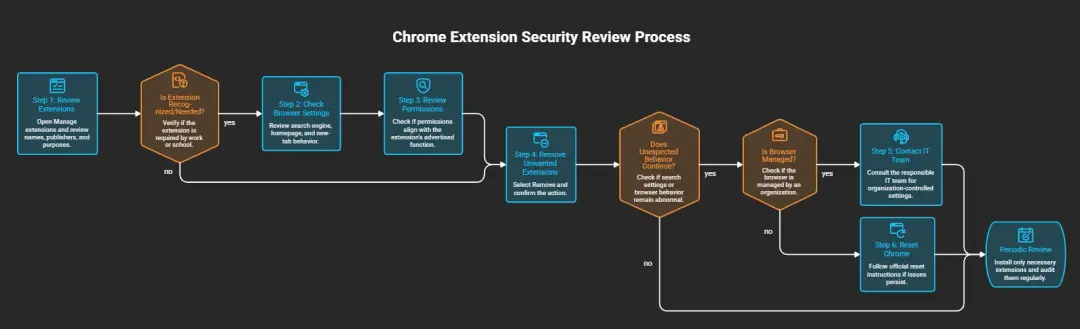
How to Check and Remove Suspicious Chrome Extensions
You do not need to assume that your browser is compromised to perform an extension review. Checking installed tools and their settings is a sensible routine security step.
Step 1: Review your installed extensions
- Open Chrome.
- Select the three-dot menu in the upper-right corner.
- Open Extensions, then Manage extensions.
- Review each extension's name, publisher, purpose, and permissions.
- Remove extensions you do not recognize or no longer need, after checking whether they are required by your workplace or school.
An unfamiliar name is not proof of malicious activity. Check whether the extension has a clear purpose and whether you remember installing it.
Official instructions: Install and manage Chrome extensions.
Step 2: Check browser settings
Open Chrome's settings and review the default search engine, homepage, and new-tab behavior.
If a setting has changed unexpectedly, check whether Chrome identifies an extension as controlling it. Investigate the extension rather than assuming that the search provider itself is responsible.
Google provides guidance on extensions that change browser settings.
Step 3: Review permissions and purpose
Open an extension's Details page and look at the permissions it requests.
Ask whether those permissions make sense for its advertised function. An extension that only provides a simple feature but requests broad access to unrelated website data deserves closer scrutiny.
However, do not rely on permissions alone. As Socket explains, changing a default search provider can be possible through configuration without broad permissions.
Step 4: Remove unwanted extensions
On the Manage extensions page, select Remove for an extension you have decided not to keep, then confirm the action.
Afterward, check your search settings again. If unexpected behavior continues, review other extensions and look for unwanted software.
Google's guide explains how to remove unwanted ads, pop-ups, and malware.
Step 5: Investigate recurring changes
If the search provider changes again after you remove an extension, do not assume that the first removal resolved the issue.
Review the remaining extensions and check whether the browser is managed by an employer, school, or administrator. On a managed device, contact the responsible IT team before changing organization-controlled settings.
If the browser continues behaving unexpectedly, consider Google's Chrome reset instructions. Review the consequences before resetting, because this can change browser settings and disable extensions.
Step 6: Review your extensions periodically
Install extensions only when there is a clear need. Check the publisher and permissions before installation, and remove tools you no longer use.
An extension being available in an official store does not guarantee that every aspect of its behavior is safe. Listings, publishers, and software can change over time.
Important: Removing an extension can stop its future browser behavior, but it does not prove that no search data was previously exposed. If you suspect a work-related incident, preserve relevant evidence and follow your organization's security procedures.
How Security Teams Can Detect Suspicious Extensions
For organizations, the goal is not necessarily to block every extension. It is to understand which extensions are installed, what they can change, and whether their behavior matches their approved purpose.
MITRE's DET0044 detection strategy describes opportunities to detect malicious browser-extension activity through related events, including extension installation and subsequent suspicious behavior.
The following steps provide a practical starting point.
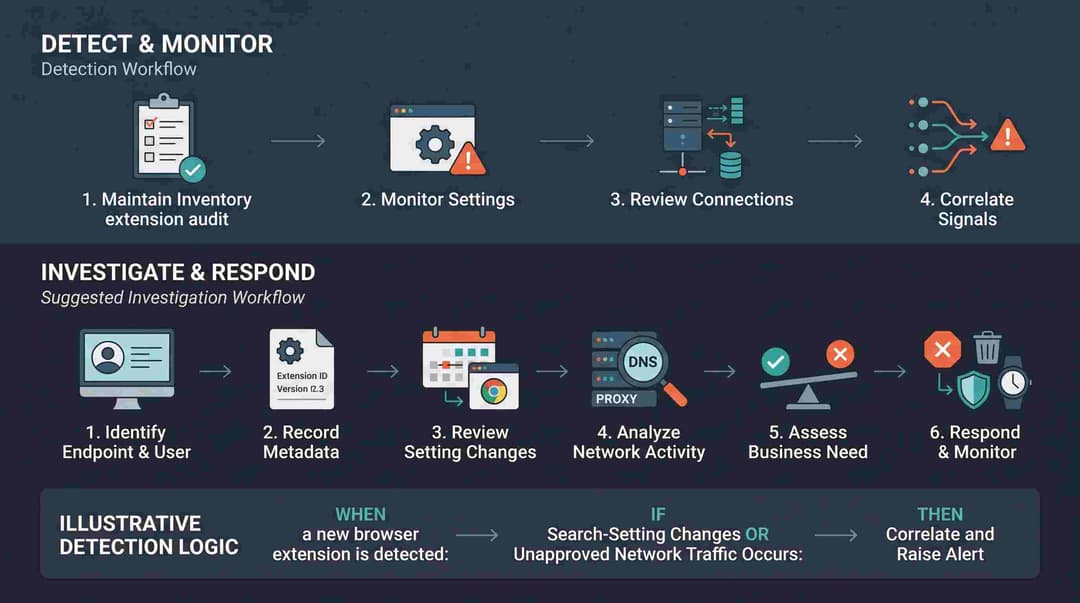
1. Maintain an extension inventory
Collect available details such as:
- Extension ID, name, and version.
- Installation and update times.
- User and device information.
- Requested permissions and configuration.
- Whether the extension is approved for business use.
Compare the inventory against an approved list. Investigate extensions that appear without a clear business need or that change settings unexpectedly.
2. Monitor search-setting changes
Unexpected changes to the default search provider, homepage, or new-tab page can be useful investigation signals.
A change alone is not conclusive. It may result from a legitimate user action or approved software. The value comes from correlating the change with extension installation, permissions, and subsequent network activity.
3. Review unusual network connections
Where the required telemetry is available, examine browser-related DNS, proxy, firewall, or endpoint network events for new destinations associated with unexpected search behavior.
An unfamiliar domain is not automatically malicious. Investigators should consider its reputation, the timing of the connection, the extension involved, and whether the traffic matches the organization's normal browser behavior.
4. Correlate multiple signals
A stronger alert may combine several observations:
- A new extension appears on a managed device.
- The extension's purpose does not explain its permissions or configuration.
- The browser's search settings change unexpectedly.
- The browser begins connecting to an unapproved destination.
- The behavior continues after the user reports that they did not request the change.
This approach reduces reliance on a single indicator and gives analysts more context for deciding whether an incident needs further investigation.
Illustrative detection logic
The following is conceptual pseudocode. It is not a tested SIEM query, and it assumes the organization has telemetry capable of identifying extension installations and browser-setting changes.
WHEN a new browser extension is detected:
record extension ID, user, device, and timestamp
IF an unexpected search-setting change occurs
OR a related connection to an unapproved destination is observed:
create an investigation alert
correlate:
extension ID
installation time
affected user and device
browser-setting change
relevant network events
approved-extension policy
send the correlated evidence for analyst review
A production detection rule needs a defined time window, event sources, approved-destination criteria, exclusions, severity, and testing against normal activity. Without those details, the logic is a starting point rather than a deployable detection.
Suggested investigation workflow
- Identify the affected user and endpoint.
- Record the extension ID, version, permissions, and installation time.
- Review browser-setting changes around the same period.
- Examine relevant DNS, proxy, firewall, or endpoint network records.
- Determine whether the extension is approved and whether its behavior matches its stated purpose.
- Preserve relevant evidence according to the organization's procedures.
- Remove or block the extension if the findings support that decision.
- Monitor the endpoint for recurring behavior or related activity.
Security teams should avoid treating every search redirect as an incident. The goal is to identify unexplained or unauthorized behavior and make decisions based on correlated evidence.
Recommended Mitigation Strategy
Organizations can reduce extension-related risk by combining installation controls, browser monitoring, and user awareness.
|
Control |
Recommended action |
Main benefit |
Implementation consideration |
|
Extension inventory |
Track installed extensions and versions |
Improves visibility |
Requires reliable endpoint data |
|
Approved-extension policy |
Restrict installations to justified tools where practical |
Reduces unnecessary exposure |
Must support legitimate work requirements |
|
Permission review |
Compare requested access with the extension's purpose |
Helps identify excessive access |
Broad permissions are not automatically malicious |
|
Browser-setting monitoring |
Alert on unexplained search-provider or homepage changes |
Helps identify unwanted changes |
Establish a baseline to reduce false positives |
|
Network monitoring |
Investigate unexpected browser destinations |
Adds context to extension alerts |
Requires relevant DNS, proxy, firewall, or endpoint telemetry |
|
User awareness |
Teach users to check publishers, purposes, and permissions |
Reduces risky installations |
Keep guidance practical and easy to follow |
|
Incident response |
Define investigation and removal procedures |
Supports consistent handling |
Preserve evidence when required |
Apply the principle of least privilege
The principle of least privilege means granting only the access required for a task. For browser extensions, that means avoiding unnecessary tools and limiting access wherever the browser and organizational controls allow it.
NIST includes least privilege in its security and privacy control guidance, including AC-6 in NIST SP 800-53 Rev. 5.
For additional browser-specific guidance, see the OWASP Browser Extension Vulnerabilities Cheat Sheet.
Include browser extensions in endpoint security reviews
Browser extensions should be part of routine endpoint security reviews, especially on devices used to access business applications or sensitive information.
Organizations looking to strengthen their security processes can review Hoplon InfoSec's endpoint security services and incident response and recovery services.
These links describe relevant service areas. They do not imply that Hoplon independently investigated or tested the extensions discussed in the Socket report.
Frequently Asked Questions
What are Chrome extensions hijacking searches?
They are browser extensions that change a user's expected search behavior. Depending on the implementation, this can include changing the default search provider or routing queries through an intermediary server.
How many users were associated with the extensions in the Socket report?
Socket reported approximately 13.4 million cumulative users associated with 319 extensions over about a decade. This is not a count of confirmed current infections.
How many operators did Socket identify?
Socket attributed 200 extensions, associated with approximately 5.68 million users, to identified operators. The other 119 extensions, associated with approximately 7.76 million users, were grouped under unknown operators.
Can an extension hijack searches without broad permissions?
Yes. Socket describes examples where the extension manifest's default search-provider configuration was enough to change the browser's search route. That is why permission review should be combined with configuration and behavior checks.
Does the report prove that every extension contained malware?
No. The investigation documents search-setting changes, proxy routing, referral monetization, and variable redirects. It does not establish that every listed extension delivered malware or phishing pages.
Can an extension change where my searches go without changing its own code?
Potentially, yes. If the extension routes requests through an intermediary server, the server can influence the next destination. Socket's Predator Search example showed different destinations across repeated searches, although that observation does not prove every redirect was malicious.
Why were some extensions unlisted in the Chrome Web Store?
Unlisted listings can be accessed through direct links but are generally harder to find through ordinary store searches. Socket found that many extensions in the investigation were promoted through advertisements and landing pages. Unlisted status alone is not proof of malicious activity.
Is there a CVE for these 319 extensions?
There is no single CVE for the entire collection. The report describes multiple extensions and a pattern of search-routing behavior, rather than one software vulnerability shared by all of them.
Does removing an extension guarantee that my search data was never exposed?
No. Removing an extension can stop its future behavior in the browser, but it cannot establish whether earlier queries were observed or retained. If you suspect a security incident, investigate the relevant evidence and follow appropriate response procedures.
What should an organization do after finding a suspicious extension?
Record its ID, version, permissions, installation time, and affected endpoint. Review browser-setting changes and relevant network events, then follow the organization's incident-response procedures. Remove or block the extension if the evidence supports that decision.
Conclusion
The Socket investigation shows why browser extensions deserve closer attention. A tool can appear useful while changing how a browser handles searches behind the scenes.
The report identifies 319 extensions associated with approximately 13.4 million cumulative users across a decade. It links some extensions to identified operators, while the ownership behind others remains unknown. The investigation also documents proxy-based search routing and cases where repeated requests reached different destinations.
Those findings raise legitimate concerns about search privacy, browser control, and undisclosed referral monetization. They do not mean every listed extension is currently active or that every associated user experienced a malicious redirect.
For individual users, the best starting point is to review installed extensions, check browser settings, and remove tools that are unnecessary or cannot be trusted after review. For organizations, an extension inventory, sensible installation policies, and monitoring for unexplained browser changes can help identify suspicious activity.
Browser security is not about avoiding every extension. It is about understanding what each extension does, why it needs access, and whether its behavior matches what users and administrators expect.
For more information about related security services, visit Hoplon InfoSec or contact the team.
Author: Mohammed Talukder is the Co-Founder and CEO of Hoplon InfoSec, with over 16 years of experience in cybersecurity and technology. His expertise includes offensive security, vulnerability management, cyber risk management, and incident response. His professional credentials include CISM, CISA, CEH, and CompTIA PenTest+. He has also received Infosys recognition awards for his professional contributions. He shares practical cybersecurity insights to help organizations strengthen their security posture.
Technical reviewer: Gazi Mahmud, Co-Founder and CIO of Hoplon InfoSec LLC, cybersecurity leader, and CISM & CISA certified professional with expertise in cyber risk management, security governance, compliance, and incident response.
Publication Date: October 29, 2026
Last Updated: October 29, 2026





