Google Search Services History: New Privacy Controls 2026
ByMohammed Talukder
Published25 Jun, 2026
Mohammed Talukder25 Jun, 2026
Content Summary: In June 2026, Google quietly retired the old Web & App Activity control for Search and replaced it with two new independent settings: Search Services History and Personalized Recommendations. The bigger story most users missed is that a nested sub-toggle called Save Media now automatically stores your Google Lens photos, voice recordings, Search Live audio, and uploaded files by default. Any media already selected for AI training is kept for up to four years, even after you delete it. This article breaks down exactly what changed, what Google is collecting, how AI training actually works with your data, and the precise steps to lock everything down : whether you want maximum privacy or just want to stop feeding the AI pipeline without losing your search convenience.
Google Search Services History: What Every User Must Know About the 2026 Privacy Overhaul
If you got an email from Google in early June 2026 with the subject line "New privacy settings for Search services" and skimmed past it, you are not alone. Most people did. And that is exactly the problem.
What Google changed is not a minor interface refresh. It is a structural overhaul of how your search history and personalization preferences are controlled. Buried inside it is a brand new setting that automatically stores your photos, voice recordings, and uploaded files so Google can use them to train its AI models. That setting was turned on for you without any action on your part, assuming you already had Web & App Activity enabled.
Here is everything you need to know, explained plainly, without the PR language.
What Actually Changed: The Old System vs. The New
For years, Google gave users one main switch for managing search data. Web & App Activity controlled whether Google saved what you searched, and Search Personalization controlled whether Google used that data to tailor your results. The two settings were deeply connected. Touch one and you often affected the other.
Starting June 2026, Google split that into four distinct controls:
Setting
Before (Pre-June 2026)
After (June 2026+)
History saving
Web & App Activity
Search Services History
Personalization
Search Personalization
Personalized Recommendations
Media saving (Lens, voice, video)
Not separately tracked
New "Save Media" sub-toggle
Google Play
Bundled under W&AA
Separate Play History and Play Personalization
Cross-setting dependency
One switch affected both
Fully independent; changes to one do not affect the other
The separation sounds like more control, and in theory it is. But it also means you now have more settings to review, and each one defaults to whatever your previous preferences were. For most users who had Web & App Activity turned on, means most of these new controls are already active.
What Google Search Services History Actually Saves
Let us be specific here, because most coverage of this update is frustratingly vague.
Text-Based Activity
Search Services History saves your standard text interactions across a wide range of Google products. That includes search queries typed into Google Search, activity in Maps, Shopping searches, hotel and flight lookups, Translate usage, and News browsing. It also captures info from websites you visit via Search services and the full text of generative AI responses you receive, including AI Mode conversations. Your approximate location is tied to many of these interactions as well.
None of that is new. Google has saved this kind of data for years. What is new is the next category.
Media: The New and Critical Addition
This is where the June 2026 update crosses into genuinely different territory.
Search Services History now includes media from your interactions. That word "media" covers more ground than most people realize. Specifically:
Google Lens images: any photo you point your camera at to identify an object, read text, or look up a product. Circle to Search screenshots: when you highlight something on your phone screen and search it without leaving the app. Voice search recordings : the audio captured when you speak a query instead of typing it. Search Live sessions : real-time audio and video conversations with Google's live search feature. Translate speaking practice recordings : audio from voice-based language translation sessions. Uploaded files and documents : any file you submit during a search interaction.
That is essentially every non-text input method Google Search accepts, captured and stored in your account history by default.
What is NOT Included
Equally important is what Search Services History does not touch:
Your Gmail, Google Drive, and Google Photos content is confirmed by Google to never be used for advertising, and it is not part of Search Services History. Media you generate or modify using AI tools is excluded. Photos you add publicly to Maps reviews are excluded. YouTube watch history is governed by a separate YouTube History setting. Chrome browsing history remains under Web & App Activity. Gemini Apps and Google Assistant have their own independent history settings.
This distinction matters for trust. If you share sensitive documents via Drive or communicate through Gmail, those are genuinely walled off from this particular pipeline.
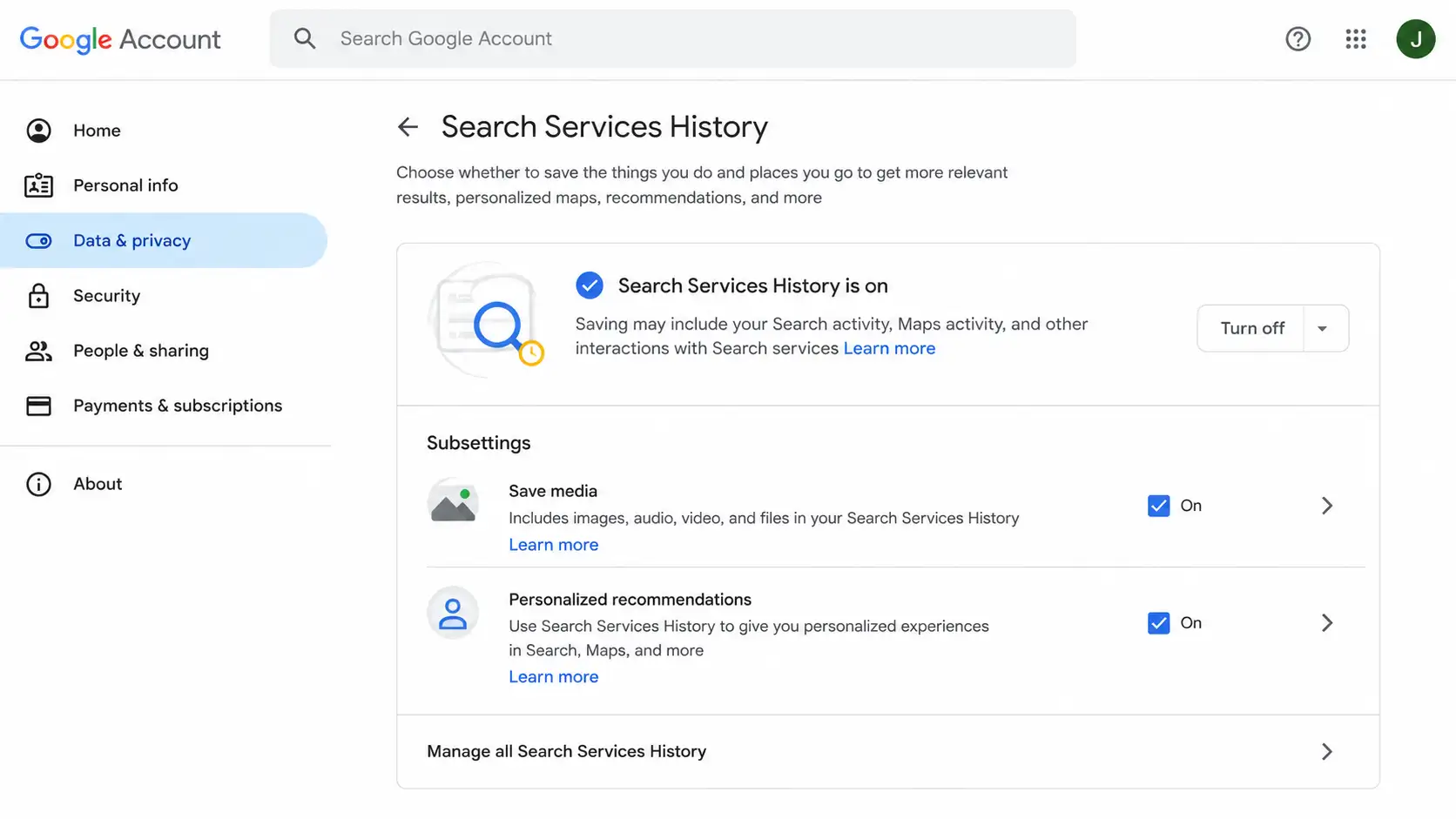
The Save Media Sub-Toggle: The Most Important Setting Most Users Do Not Know Exists
Inside Search Services History sits a nested control called Save Media. This is the most consequential detail in the entire June 2026 update, and it was barely mentioned in the email Google sent users.
Here is what you need to understand about how it works.
Save Media is turned on automatically for any account where Web & App Activity was already enabled before the transition. You did not opt into it. It was carried over from your existing preference and applied to a new category of data you were never specifically asked about.
The bigger issue is what happens after you turn it off or delete your saved media.
Save Media State
What Stops
What Continues
Turned OFF
Future Lens images, voice recordings, uploaded files no longer saved
Text searches, transcripts, AI responses still saved under SSH
Deleted from history
Removes from visible activity log at activity.google.com
Media already selected for AI training is retained for up to 4 years
Account deleted
Removes account-linked data
Disconnected AI training data retained per Google policy
That four-year retention window is buried in Google's own support documentation and was not mentioned in the email sent to users. Once your media has been selected for AI training, it is disconnected from your account and kept in Google's training pipeline for up to four years, even if you delete it from your visible history the next day.
Turning off Save Media does not turn off Search Services History. Your text-based search history, transcripts, and AI responses continue to be saved. Save Media only controls the media layer specifically.
How Google Uses Your Data for AI Training
Google states this plainly in its own documentation, even if the phrasing is easy to gloss over: Search Services History data is used to "provide, develop, and improve its services," and that explicitly includes training generative AI models.
The mechanics work like this. When your saved data is used for AI training, Google says it is disconnected from your Google Account before it enters the training process. Automated filters are applied to remove identifying information and sensitive personal data. Before any media is shared with human reviewers for model improvement, Google states it will seek your permission.
There are two important carve-outs most coverage has missed.
The first is the educational account exemption. If your Google Account was provisioned through a school or university, Google does not use your Search Services History data to train generative AI models. This applies automatically. No action needed for students and faculty.
The second is the feedback exception. When SSH is turned off, your future activity is not used for AI training, unless you explicitly provide feedback to Google. This carve-out is written into Google's policy and means that submitting a "thumbs up" or sending feedback on a search result can still contribute data to AI training even with history disabled.
Personalized Recommendations: History and Personalization Are Now Decoupled
Many users confuse saving history with being personalized. They are now two completely separate things, and understanding the difference changes how you configure your settings.
SSH ON, Personalized Recommendations OFF. Your history is saved for your own convenience. You can revisit past searches, but Google does not use it to tailor your results, ads, or Discover feed. Think of it as a private notebook.
SSH ON, Personalized Recommendations ON. Saved data feeds ad targeting, curated Google Discover articles, Maps route shortcuts, and personalized shopping results. This is the full personalization experience.
SSH OFF, Personalized Recommendations OFF. No history saved, no personalization. Every session starts fresh. Maximum privacy, minimum convenience.
SSH OFF, Personalized Recommendations ON. The personalization setting is active but has no saved data to work from. Effectively neutral. Personalization cannot function without the history it draws from.
Calli Schroeder, Senior Counsel at the Electronic Privacy Information Center (EPIC), raised a concern worth noting here. She warned that personalized recommendations can include personalized pricing, where different users are shown different prices for the same product based on their behavioral profile. Google specifically denied that Search Services History is used for this purpose in Search, but the concern reflects a broader pattern in how personalization data gets applied across platforms.
Her other observation is worth quoting in spirit: when an algorithm personalizes your answers too narrowly, it can actually cut you off from opportunities you would have benefited from, including scholarships, neighborhoods, products, and grants. based on assumptions the algorithm made about you that may not be accurate.
Google Play Privacy Settings: The Change Most People Missed
The June 2026 update also touched Google Play, and almost no one is talking about it.
Google Play now has two independent settings: Play History and Personalization in Play. These settings appear in your Google Account even if you have never opened the Play Store. Your previous auto-delete preferences from Web & App Activity carry over automatically.
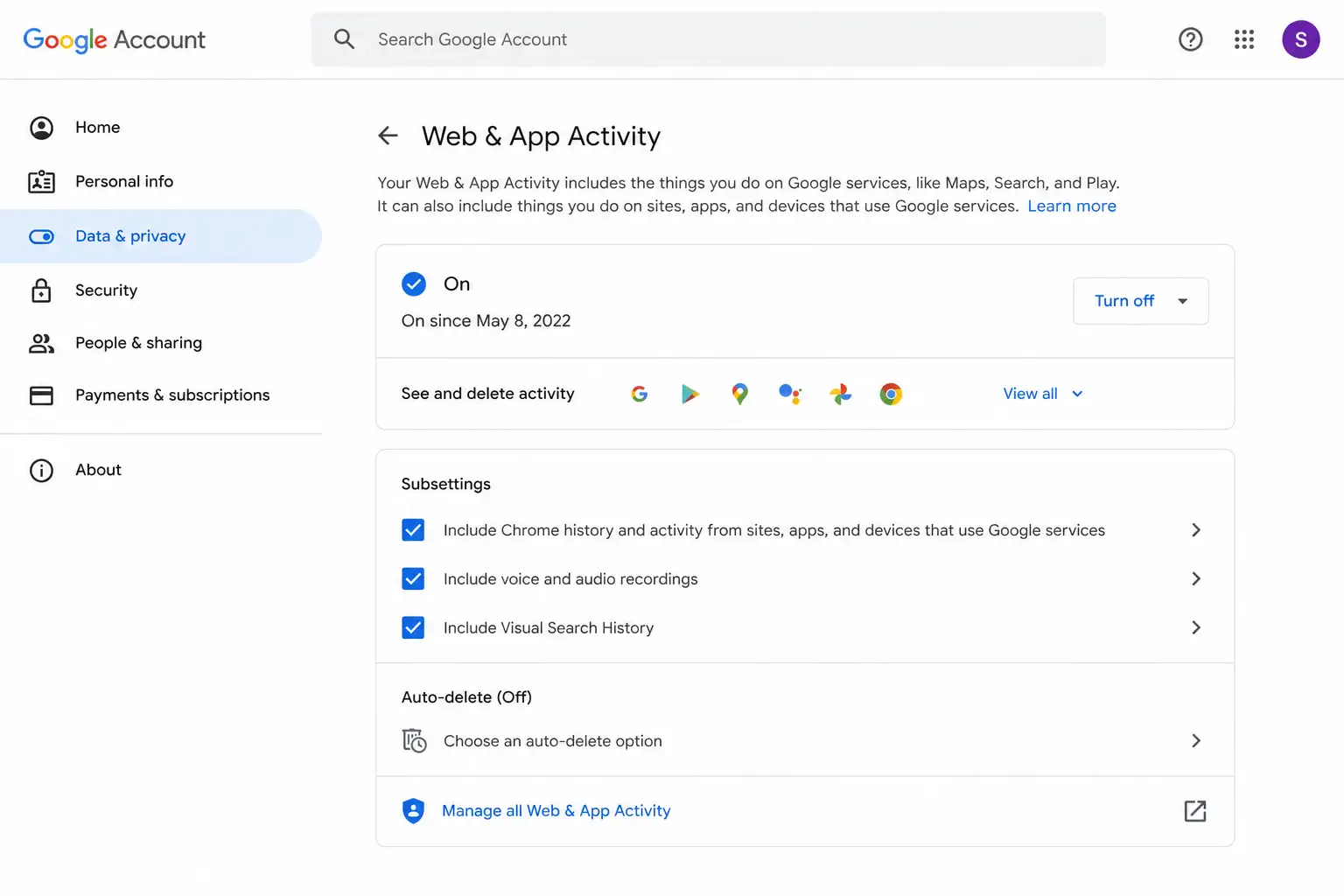
Like the Search settings, Play History and Play Personalization are independent of each other. Turning one off does not affect the other. And Web & App Activity still governs personalization for some Google services not covered by these new settings, so Play's new settings do not replace W&AA entirely.
If you have never actively managed your Google Play data, this is worth checking. The settings are live and may be enabled by default.
Google Account settings page overview
The Settings Migration: How Google Translated Your Old Preferences
The most practical question for existing users is simple: what happened to my old settings when Google made this switch?
Here is the exact mapping:
Previous Setting State
New Search Services History
New Personalized Recommendations
W&AA ON and Search Personalization ON
ON
ON
W&AA ON and Search Personalization OFF
ON
OFF
W&AA OFF and Search Personalization OFF
OFF
OFF
W&AA OFF and Search Personalization ON
OFF
ON
Your auto-delete interval, whether you had it set to 3 months, 18 months, or 36 months, carries over automatically to Search Services History. You can verify and change this at any time.
To confirm your current state: open account.google.com, go to Data & Privacy, then Activity Controls. If you are on mobile, update your Google app to the latest version first, since some users saw outdated settings displays on older app versions during the rollout.
GDPR and Regulatory Context: Why Google Actually Made This Change
The source article and most news coverage of this update treat it as a voluntary product improvement. It is more accurate to describe it as a calculated regulatory alignment.
Google's granular control rollout directly mirrors requirements under GDPR's purpose limitation principle, codified in Article 5 of the regulation. The rule is straightforward: data collected for one purpose (in this case, search convenience) cannot be silently repurposed for AI training without a separate, distinct lawful basis. Bundling history saving and AI training under one broad "Web & App Activity" toggle was always a questionable arrangement under that standard.
GDPR's data minimisation requirement further pushes companies toward per-category controls rather than single broad switches. Offering separate toggles for history, personalization, and media is precisely the kind of granular architecture regulators want to see.
The tension with Google's four-year AI training retention window is real. EU users have the right to erasure under GDPR, the right to be forgotten.. But when media is disconnected from an account and retained in an AI training pipeline for up to four years after deletion, "erasure" becomes a more complicated concept. This is an unsettled legal grey area that EU regulators have not yet formally addressed in the context of AI training data specifically.
Google's move may also be preemptive positioning ahead of the EU AI Act's transparency obligations for AI model training data. Organizations that train AI systems on personal data will face increasing disclosure and consent requirements as those obligations take effect. Building the consent architecture now, before enforcement begins, is the kind of strategic compliance planning that enterprise security teams should recognize immediately.
For organizations managing security compliance programs, this pattern of proactive regulatory architecture ahead of formal enforcement. This is worth tracking as a model for how large platforms will respond to AI governance requirements.
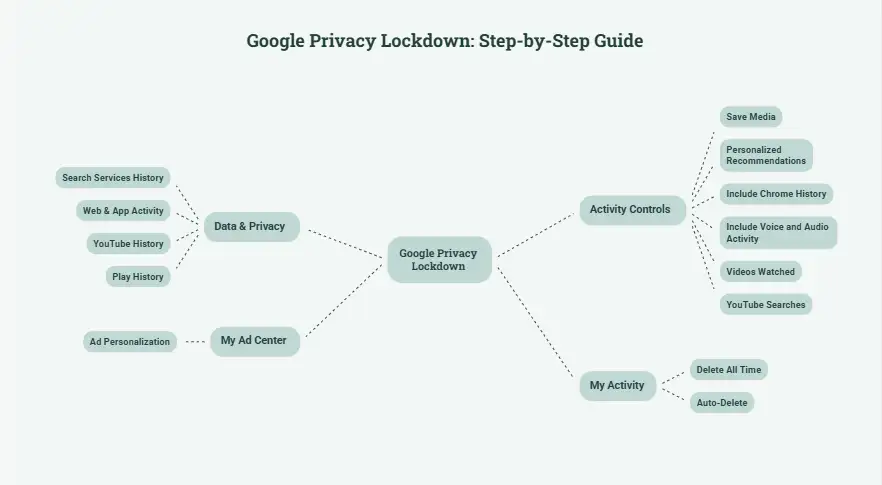
Step-by-Step: How to Review and Lock Down All Your Settings Right Now
There are two reasonable approaches here, depending on how much you use Google's personalization features day to day.
Full Privacy Lockdown: Maximum Protection
Open account.google.com, navigate to Data & Privacy, then Activity Controls
Find Search Services History and turn it OFF
Inside SSH, find Save Media and turn it OFF. Verify this sub-toggle even if SSH is already off
Find Personalized Recommendations in Search Services and turn it OFF
Find Web & App Activity and turn it OFF; uncheck "Include Chrome history" and "Include voice and audio activity"
Find YouTube History and turn it OFF; uncheck both sub-options (videos watched and YouTube searches)
Find Play History and turn it OFF
Find Personalization in Play and turn it OFF
Go to My Ad Center and turn off Ad Personalization
Go to myactivity.google.com, select Delete, then Delete all time to clear all previously saved data
On any settings you leave active, enable Auto-Delete and set it to 3 months
Balanced Middle Ground: Keep Convenience, Minimize AI Training Exposure
Not everyone wants to go dark. If you rely on Google Discover, Maps personalization, or search history for your own convenience, there is a pragmatic middle path.
Keep SSH ON but turn off only the Save Media sub-toggle. This one action, which takes about 30 seconds, stops Google from storing your Lens photos, voice recordings, and uploaded files while leaving your text history intact. Turn off Personalized Recommendations if you do not want ad targeting based on your searches. Keep Web & App Activity ON so Google Discover and Maps shortcuts continue to work. Set Auto-Delete to 3 months so old data does not accumulate indefinitely.
This approach is particularly relevant for users who regularly use Google Lens or Circle to Search on their phones. Those features generate a steady stream of visual and audio data that most users never think of as "data."
What This Change Means for Enterprise and Corporate Users
This section is almost entirely absent from current coverage. For organizations where employees use Google services on any device, it is arguably the most important part of the update.
Employees who use personal Google accounts on corporate devices, even casually to search something quickly, may be inadvertently feeding sensitive work data into Search Services History. An employee who photographs a whiteboard with Google Lens, searches a document reference, or uses voice search in a conference room is potentially storing that interaction in a personal Google account.
The specific risk vectors worth flagging to your security team:
Google Lens and Circle to Search on mobile phones. These features are designed for quick, spontaneous visual searches. Point your camera at something and search it. That makes them natural candidates for capturing photos of internal documents, meeting notes, screens, badges, and physical security information without the user ever thinking of it as a data upload.
Search Live sessions. Real-time audio and video search interactions are now stored by default. Any conversation held near an active Search Live session is potentially captured.
Uploaded files during searches. Users who upload documents to search or translate them are storing those files in their SSH account history.
Google does confirm that this data is disconnected from the account before entering AI training pipelines, and PII filters are applied. But corporate data appearing in any third-party AI training pipeline, even in anonymized form, raises data sovereignty concerns that most organizations have not yet formally addressed in their policies.
Security teams running mobile security and threat defense programs should add Google SSH settings to their BYOD policy documentation. If your organization uses Google Workspace, verify your admin-level settings separately. Enterprise Workspace policies may differ from personal account defaults, but individual employee behavior on personal accounts on corporate devices falls outside admin control entirely.
For organizations conducting a cyber resilience assessment or reviewing their attack surface management posture, employee data leakage through consumer-grade AI-connected applications is an underrated exposure category. The Google SSH change is a concrete, current example of why consumer app settings belong in enterprise threat modeling.
Organizations investing in AI-driven security programs should also recognize the irony: the same AI training pipelines your data feeds into are the same systems competitors and threat actors may use as research. Understanding what flows into those pipelines is basic online threat exposure monitoring.
If your team needs structured guidance on managing this kind of exposure across your organization's environment, virtual CISO services can help build the policy framework to address it systematically rather than reactively.
Frequently Asked Questions
What is Google Search Services History?
Google Search Services History is a new account setting, introduced in June 2026, that saves your searches, media uploads, and interactions across Google Search, Maps, Shopping, Hotels, Flights, Translate, and News. It replaces the Web & App Activity control specifically for Search-related data. It is managed separately from personalization and from history in other Google products like YouTube or Chrome.
Is Google Search Services History turned on by default?
If your Web & App Activity was already turned on before the June 2026 rollout, Search Services History, including the Save Media sub-toggle, is turned on automatically. If Web & App Activity was off, the new setting defaults to off. The transition mirrors your most recent preference as closely as possible.
Does turning off Save Media also turn off Search Services History?
No. Save Media is a nested sub-setting inside Search Services History. Turning it off stops Google from storing your images, audio recordings, and video, but text-based searches, transcripts, and AI-generated responses continue to be saved under Search Services History.
Can I delete my saved media to stop it from being used for AI training?
Partially. You can delete media from your visible activity log at activity.google.com. However, any media that was already selected for AI model training before you deleted it is retained by Google for up to four years in a form that is disconnected from your account. Deleting it from your visible history does not remove it from Google's training pipeline.
Does Google use Gmail or Drive content for ads or AI training through this system?
No. Google has confirmed that content from Gmail, Drive, and Google Photos is never used for advertising, and it is not part of Search Services History. Only activity from Search services, including Search, Maps, Lens, Shopping, and similar products : falls under this setting.
How is Search Services History different from Web & App Activity?
Web & App Activity was a broad switch that covered all Google services, including Chrome, YouTube, and other apps. Search Services History is a dedicated control covering only Search-related services. Critically, changes to one no longer affect the other. They are fully independent.
What happens to my auto-delete preferences after the migration?
Your previous auto-delete interval carries over automatically to the new Search Services History setting. If you had it set to delete activity every 3 months, that preference is preserved. You can review and change it at any time from your Google Account settings.
Are Google Workspace or school accounts affected?
School and university accounts provisioned through educational institutions are automatically exempt from AI training. Google does not use SSH data from these accounts to train generative AI models. Enterprise Google Workspace accounts should check their organization's admin-level policy settings separately, as individual account behavior on personal Google accounts used on corporate devices is not governed by Workspace admin controls.
What is the risk of using Google Lens on a corporate device?
Google Lens photos are now stored in Search Services History by default if Save Media is enabled. On corporate devices, this means photos taken with Lens, including photos of documents, whiteboards, or screens : may be stored in a personal Google account and potentially used for AI training. Security teams should include Google SSH settings in BYOD policies to address this exposure.
Does turning off SSH affect Google Discover or Maps personalization?
Turning off SSH itself does not immediately break Discover or Maps personalization. That is controlled by the Personalized Recommendations setting. However, with no saved history to draw from, personalized features become less accurate over time. If you want to keep Discover and Maps working well while reducing AI training exposure, the recommended middle-ground approach is to keep SSH on, keep Personalized Recommendations off, and disable only the Save Media sub-toggle.
Key Takeaways
Google's June 2026 privacy overhaul is bigger than most coverage suggests. The old Web & App Activity single-switch model has been replaced with four independent controls: Search Services History, Personalized Recommendations, Play History, and Personalization in Play : giving users more granular control but also more settings to actively manage.
The most critical detail is the Save Media sub-toggle, which was automatically enabled for users who had Web & App Activity turned on. It stores Lens images, voice recordings, Search Live sessions, and uploaded files. Media already selected for AI training is retained for up to four years after deletion.
For enterprise security teams, the change introduces a concrete, underappreciated risk: employees using Google Lens, Circle to Search, or voice search on personal Google accounts on corporate devices may be inadvertently feeding sensitive work data into Google's AI training pipeline.
For individual users, the fix is straightforward. Turn off Save Media at a minimum, and review all four settings at account.google.com.
acSync malware abuses public iCloud calendars to deliver macOS payloads. See how the attack works, what it steals, how it persists, and how to respond.
CLOSEDQUORUM malware uses four AI models to vote on attack actions. See how multi-LLM C2 works, what it steals, and how defenders can detect attacks early.
Fake T-Mobile rewards expiry texts are leading users to phishing sites. Learn how the scam works, red flags to spot, and what to do if you clicked one.




-20260925120840.webp&w=3840&q=75)

-20260918120903.webp&w=3840&q=75)