Windows 11 KB5124008 VPN Issue: Always-On VPN Problems
Enterprise IT administrators waking up after the September 2026 Patch Tuesday cycle have encountered an unexpected headache: remote laptops deploying cumulative update KB5124008 are abruptly losing corporate connectivity. The emerging KB5124008 VPN issue specifically targets Always-On VPN configurations that rely on machine certificates for automated tunnel establishment. When remote machines receive the update and restart, the automated tunnel refuses to negotiate.
This leaves off-site employees unable to access intranet applications, file shares, or internal network services. The situation puts systems administrators in a difficult spot. Removing the package restores access, but doing so leaves devices exposed to several high-severity security vulnerabilities that were resolved in this exact release.
| KB5124008 ENTERPRISE IMPACT SUMMARY | |
|---|---|
| Release Date: | September 8, 2026 |
| Impacted OS Versions: | Windows 11 24H2 (26100.9445) & 25H2 (26200.9445) |
| Primary Symptom: | Always-On VPN authentication drops silently |
| Common Protocol: | IKEv2 using machine certificate authentication |
| Infrastructure: | Microsoft Intune + RRAS + Network Policy Server |
| Confirmed Workaround: | Rollback KB5124008 (trades off zero-day patches) |
What is the KB5124008 VPN Issue?
The KB5124008 VPN issue is an enterprise networking regression where Windows 11 clients running builds 26100.9445 or 26200.9445 fail to establish automated, certificate-authenticated virtual private network connections. In typical enterprise environments, Always-On VPN is configured to start before the user even types their password. It creates a trusted channel back to head office resources through Microsoft Routing and Remote Access Service (RRAS) backed by Network Policy Server (NPS).
Following the rollout of KB5124008 on September 8, 2026, administrators noticed that client devices running these specific builds failed during the handshake phase. The failure occurs during the exchange of cryptographic credentials between the Windows RasClient and the authentication gateway.
Instead of an active connection, end users are greeted with generic network timeouts or error messages stating that the connection attempt failed. Because this feature operates behind the scenes as a core infrastructure component, remote employees often have no idea why their company resources suddenly became unreachable.
This is particularly disruptive for organizations that rely on continuous management connectivity to update policies, maintain compliance monitoring, and manage remote domain assets. Once the client tunnel stops negotiating, central management tools like Intune and MECM lose their persistent connection to remote devices, exposing the perimeter to broader network security threats and boundary risks.
Does KB5124008 Break Always-On VPN?
Evidence indicates that KB5124008 Always On VPN deployments using machine certificate authentication are vulnerable to sudden connection failures. The first detailed case was documented on Microsoft Q&A on September 9, 2026. A network administrator noted that multiple enterprise laptops on Windows 11 24H2 and 25H2 stopped connecting to remote gateways immediately after applying the update.
| AUTHENTICATION REPRODUCIBILITY CYCLE | |
|---|---|
| Before Update | Connected (Certificate Validated) |
| Install KB5124008 | Disconnected (IKEv2 Handshake Fails) |
| Uninstall Patch | Connected (Immediate Recovery Post-Reboot) |
| Conclusion | Client-side regression within Windows networking binaries. |
The issue follows a clear, repeatable cycle. A computer that connects without trouble before the patch loses connectivity after the update installs. Once an engineer uninstalls the update and restarts the system, the VPN reconnects right away.
This clean cycle of working, breaking, and working again points directly to changes inside the client operating system rather than an issue with the Intune profile or the back-end NPS server. When multiple test devices show identical behavior under controlled conditions, it rules out transient carrier hiccups or local configuration drift.
So, does KB5124008 break Always On VPN across every single environment? Not universally. Setups relying purely on username and password authentication, or those using third-party software agents like Cisco Secure Client or Palo Alto GlobalProtect that bypass the native Windows RasClient service, appear largely unaffected. The trouble is concentrated in environments relying on native Windows IPsec and IKEv2 tunnels with machine-level certificates.
Why is Always-On VPN Not Working After the Windows 11 Update?
A common question in technical forums over the last few days has been: why is Always On VPN not working Windows 11 systems that ran fine for months? While Microsoft has not yet published an official post-mortem, independent networking analysts and community engineers have isolated the breakdown to the IPsec cryptographic handling layer.
| TECHNICAL FAILURE TRACE (EVENT VIEWER) | |
|---|---|
| Event Source: | RasClient |
| Event ID: | 20227 |
| Error Code: | 0x8007274C / Error 809 |
| Description: | The network connection between your computer and the VPN server could not be established because the remote server is not responding. |
| Root Failure: | Failure in Cryptographic Provider during client certificate chain validation in IKEv2 stack. |
When an Always-On device initializes an automated tunnel, it calls upon the Windows cryptographic providers to read the machine certificate from the local computer store and present it during the IKEv2 security negotiation.
In this update, subtle modifications made to the Windows networking stack seem to interfere with how these local machine certificates are handled during the handshake. This behavior shares similarities with past service crashes observed in our analysis of the Windows Remote Access Connection Manager vulnerability.
The ironic detail is that the release notes for KB5124008 explicitly highlighted performance and stability improvements for background networking processes, specifically targeting VPN reliability. In attempting to harden network processes and close vulnerabilities, changes introduced into the core communications stack appear to have created an unintended regression in certificate validation routines.
Who is Affected by the KB5124008 VPN Problem?
The scope of this issue is specific to corporate and managed environments. Everyday home users playing games, streaming video, or using consumer commercial VPN apps rarely encounter this bug. Instead, it hits organizations that manage remote workforces using enterprise infrastructure.
| Segment | Configuration | Impact Level |
|---|---|---|
| Home Users | Commercial VPNs (WireGuard) | None (Unaffected) |
| Remote Workforce | Native IKEv2 / Cert Auth | High (Total Lockout) |
| Mixed Enterprises | Third-Party Vendor Agents | Low (Isolated cases) |
| Managed Fleets | Intune / RRAS Integration | Critical (High Queue) |
Organizations likely to encounter issues share a few common traits:
- Endpoints running Windows 11 version 24H2 or version 25H2.
- Tunnel deployment managed via Microsoft Intune or Configuration Manager.
- Authentication relying on machine certificates managed through a Public Key Infrastructure (PKI) using SCEP or NDES.
- Gateway termination handled by Windows Server Routing and Remote Access Service (RRAS) with Network Policy Server (NPS).
If your environment uses standalone third-party VPN apps or relies solely on modern zero-trust network access (ZTNA) agents running outside the native Windows dialer, your endpoints will likely continue operating without issue.
How to Check If KB5124008 is Installed
Before making configuration changes or planning rollbacks, verify whether the target endpoint has actually applied the update. Because this release installs automatically during active deployment windows, many machines might have completed the installation overnight.
Method 1: Using Windows Settings
- Open the Settings app on your Windows 11 device.
- Select Windows Update from the left navigation sidebar.
- Click on Update history.
- Review the entries listed under Quality Updates. Look for 2026-09 Security Update (KB5124008).
Method 2: Command Line or PowerShell
For systems administrators running remote discovery across dozens or hundreds of devices, checking status via command line is far faster.
Run this command in an elevated PowerShell session:
Get-HotFix -Id KB5124008If the system returns an entry showing the HotFixID, installation date, and description, the update is active on that machine. If the query returns a blank line or an error stating the update was not found, the endpoint is still on an earlier build.
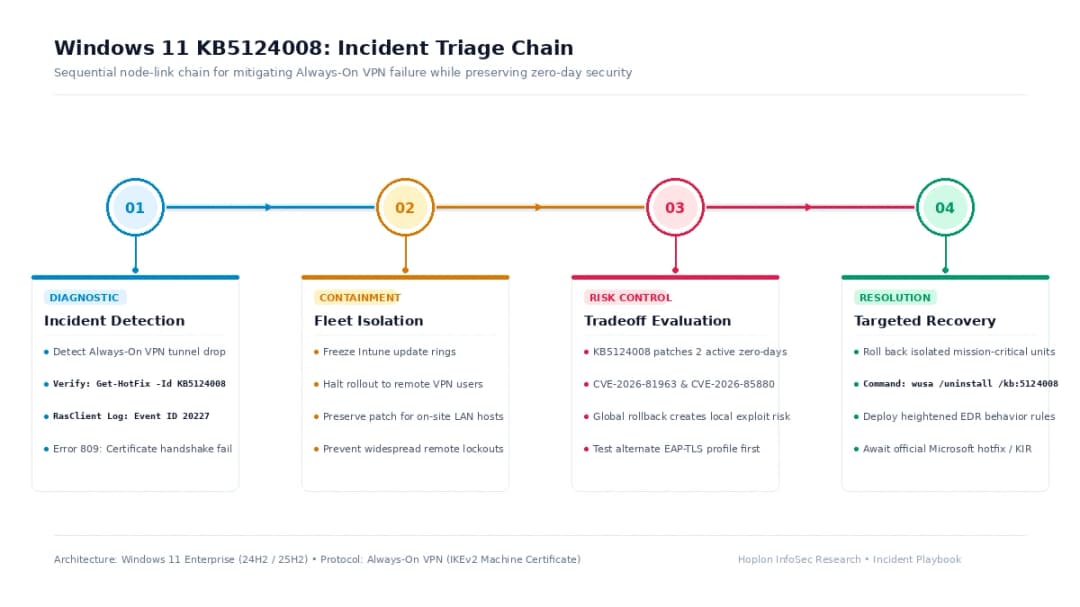
How to Fix KB5124008 VPN Connection Issues
When remote employees report that their Windows 11 VPN not working after update installation, support teams need a clear troubleshooting process. Dealing with a KB5124008 VPN connection failed error requires a measured approach that balances connectivity with overall security.
| INCIDENT TRIAGE DECISION TABLE | ||
|---|---|---|
| Step 1: Initial Report | Client reports Always-On VPN connection drop. | |
| Step 2: Check Hotfix | If KB5124008 is NOT installed: Proceed with standard helpdesk connectivity triage. | If KB5124008 IS installed: Proceed to inspect RasClient event logs. |
| Step 3: Event Log Inspection | If Event ID 20227 / Error 809 is present: Target profile workaround or freeze deployment ring. | If logs show other errors: Examine local DNS, routing, and corporate gateway health. |
Step 1: Examine the Client Event Logs
Start by looking through the local Event Viewer. Navigate to:
Applications and Services Logs > Microsoft > Windows > RasClient > Operational
Look for Event ID 20227. Pay attention to whether the log shows error code 809 or 0x8007274C. If the error explicitly mentions that the security negotiation timed out or the certificate validation could not complete, your device is running into this specific update conflict.
Step 2: Test Protocol Adjustments in Intune
Some enterprise teams have tested temporary configuration updates in Intune, shifting tunnel profiles from raw IKEv2 certificate handshakes to alternate authentication parameters like EAP-TLS.
Treat this adjustment as an unverified workaround rather than standard Microsoft guidance. While it has helped re-establish tunnels in isolated enterprise test environments, modifying network authentication across an entire fleet requires thorough testing before broad deployment. Understanding baseline system posture through structured vulnerability assessments and penetration testing is critical before pushing unvetted authentication changes estate-wide.
Step 3: Halt Further Rollouts in Deployment Rings
If you manage your updates through Windows Update for Business or Microsoft Intune, pause quality updates for your remote cohorts. By stopping rollout on devices that depend on Always-On VPN to connect to internal resources, you prevent additional machines from losing connectivity while investigation continues.
Should You Uninstall KB5124008?
Finding an immediate KB5124008 VPN fix often leads administrators to consider a straightforward rollback. While removing the update reliably restores Always-On VPN functionality, it comes with a major security trade-off.
| Operational Benefit of Rollback | Security Risks Incurred |
|---|---|
| Restores Always-On VPN access | Leaves device open to CVE-2026-81963 |
| Unblocks remote employees | Leaves ALPC flaw CVE-2026-85880 open |
| Restores domain policy sync | Misses critical zero-day mitigations |
| Reduces helpdesk support volume | Increases risk on public networks |
The September 2026 release addresses multiple critical vulnerabilities, including two zero-day elevation-of-privilege bugs exploited in the wild:
- CVE-2026-81963: An elevation-of-privilege flaw within the Windows Update Stack.
- CVE-2026-85880: A privilege escalation vulnerability in Windows Advanced Local Procedure Call (ALPC).
When a team decides that a Windows 11 update broke VPN capabilities and uninstalls the update, they re-expose those devices to local elevation exploits. Tracking active exploitation patterns through regular review of Hoplon InfoSec threat intelligence reports helps security teams determine if local users are actively in the crosshairs of these CVEs.
| THE DECISION MATRIX (KB5124008 INSTALLED) | ||
|---|---|---|
| Device Fleet Type | Operational Condition | Recommended Action |
| Remote Fleet | VPN failure blocks critical work | Uninstall Patch: Apply strict local EDR/MDR monitoring. |
| VPN failure does NOT block critical work | Keep Patch: Wait for official out-of-band fix. | |
| On-Site Office | Endpoint relies on Always-On VPN | Keep Patch: Transition to physical ethernet or office Wi-Fi. |
| Endpoint does NOT rely on Always-On VPN | Keep Patch: Ensure 100% patch compliance. | |
If an employee works entirely off-site and cannot perform basic job responsibilities without VPN access, uninstalling the update may be your only short-term option. If you must take this route, run the following command in an elevated prompt:
wusa /uninstall /kb:5124008 /quiet /norestartOnce rebooted, the computer will reconnect normally. Make sure your security operations team monitors those devices closely with endpoint detection and response (EDR) tools until an official fix is released.
Has Microsoft Confirmed the KB5124008 VPN Issue?
As of September 11, 2026, Microsoft's official health dashboard lists KB5124008 with a status stating that the vendor is not currently aware of any issues with the update. This standard initial status often appears in the first few days following a Patch Tuesday release, while incident support cases are being gathered and categorized.
When complex networking regressions emerge, vendor acknowledgement typically takes between forty-eight and seventy-two hours. Support teams must collect detailed network traces, reproduce the error in lab environments, and verify that the issue stems from an OS code defect rather than misconfigured third-party infrastructure.
Community technical advisories, such as the report from Cybersecurity News, highlight why IT teams should open formal support cases with Microsoft immediately. Providing RasClient operational logs, rasphone.pbk files, and NPS radius logs helps engineering teams isolate the failure faster and speeds up the delivery of a resolution.
Frequently Asked Questions
How do I know if my Always-On VPN failure is caused by update KB5124008?
Review the system event logs under Applications and Services Logs > Microsoft > Windows > RasClient > Operational. If your connections were stable prior to September 8, 2026, and you now see recurring Event ID 20227 errors pointing to failed IKEv2 negotiations right after KB5124008 was applied, you are likely experiencing this regression.
What is the safest way to fix VPN after KB5124008 without exposing my network?
The safest method is to pause updates only for remote cohorts using Always-On VPN profiles, leaving internal office workstations updated. If remote endpoints are already broken, evaluate whether alternate authentication profiles can be piloted in Intune. Avoid estate-wide rollbacks so that your wider organization remains protected against active zero-day vulnerabilities.
Does this issue affect other VPN clients like OpenVPN, Fortinet, or WireGuard?
The problem is primarily isolated to native Windows Always-On VPN configurations using machine certificate handshakes through IKEv2 and IPsec protocols. Third-party VPN clients that operate their own virtual network adapters, proprietary services, and custom encryption modules generally function normally.
Will Microsoft release an emergency out-of-band hotfix for this VPN bug?
When a cumulative update causes widespread disruption to corporate connectivity, Microsoft frequently issues an out-of-band update or deploys a Known Issue Rollback (KIR) via the cloud. Systems administrators should monitor the Windows release health dashboard over the coming days for new advisories.
| HOPLON INFOSEC RESEARCH INSIGHT |
|---|
"Balancing patch velocity against operational continuity remains the single greatest challenge in modern fleet administration. When a cumulative update addresses actively exploited privilege escalations while concurrently destabilizing remote access conduits, IT leaders must resist the impulse to execute a knee-jerk global rollback. The prudent strategy isolates the affected cohort, deploys targeted network monitoring, and maintains patch integrity everywhere else." Core Recommendations:
|
Managing modern enterprise operating systems requires a careful balance between security requirements and everyday connectivity. While this update provides necessary protection against active zero-day vulnerabilities, the resulting network regression illustrates why staged deployment rings remain essential.
For IT teams troubleshooting this KB5124008 VPN issue, taking a measured approach, isolating affected endpoints rather than rolling back the entire estate,ensures your organization stays secure without cutting remote employees off from the tools they need to work. For ongoing patch intelligence and incident playbooks, explore our latest updates across the Hoplon InfoSec Security Research hub.