Can Attackers Bypass SonicWall VPN MFA?
Can CVE-2026-19868 bypass MFA on a SonicWall VPN? Yes. On November 6, 2026, the U.S. Cybersecurity and Infrastructure Security Agency (CISA) added this SonicOS SSL VPN vulnerability to its Known Exploited Vulnerabilities (KEV) Catalog. The flaw can allow someone with valid credentials for an alternative authentication method to bypass SAML authentication controls, including SAML-enforced multi-factor authentication (MFA).
This is a serious concern for organizations that rely on remote access to connect employees, administrators, and business systems. An active MFA policy does not automatically mean every available login method enforces it.
SonicWall released security updates on November 6. CISA assigned November 20, 2026, as the remediation deadline for affected U.S. federal civilian executive branch agencies. Other organizations should also treat the update as urgent.
The immediate priority is to identify affected firewalls, review authentication settings, install the correct firmware, and investigate unusual VPN sessions.
TL;DR: What SonicWall Administrators Need to Know
- CVE-2026-19868 affects SonicOS Gen7 and Gen8 SSL VPN services when SAML authentication is enabled.
- A user with valid credentials for an alternative authentication method may bypass SAML controls and the MFA enforced through SAML.
- SonicWall has released fixed firmware. Administrators should identify their appliance generation, apply the appropriate update, and review VPN and identity provider logs.
Table of Contents
- SonicWall SSL VPN Vulnerability: What Happened?
- How CVE-2026-19868 Affects Authentication
- Which SonicWall Firewalls Are Vulnerable?
- How to Check Your Firewall's Exposure
- Why MFA May Not Protect Every VPN Login
- How to Fix CVE-2026-19868
- How to Detect Suspicious VPN Activity
- What to Do If You Cannot Patch Immediately
- How to Verify Your Firewall After Patching
- Frequently Asked Questions
SonicWall SSL VPN Vulnerability: What Happened?
The latest security advisory from SonicWall addresses seven vulnerabilities in its SonicOS firewall software. One of them, CVE-2026-19868, affects the authentication enforcement process in the SSL VPN service.
The issue is particularly important because organizations often use SAML to connect VPN authentication with an external identity provider. This allows businesses to manage employee access through a central identity platform.
However, the vulnerability creates a potential gap between the authentication method an organization expects and the method the firewall actually accepts.
What is CVE-2026-19868?
CVE-2026-19868 is an authentication enforcement vulnerability in SonicOS SSL VPN.
According to its published description, a user with valid credentials for an alternative authentication method may bypass SAML authentication controls. Successful exploitation may also bypass MFA enforced through SAML.
The vulnerability is associated with CWE-308: Use of Single-Factor Authentication.
In simple terms, the problem involves accepting an authentication path that does not enforce the security requirements expected from the SAML login process.
This distinction matters. The vulnerability does not mean every SonicWall firewall automatically allows unauthorized access. The documented condition involves alternative authentication credentials and the relevant SAML-enabled SSL VPN configuration.
What Did CISA Confirm?
CISA added CVE-2026-19868 to its KEV Catalog on November 6, 2026.
The KEV Catalog tracks vulnerabilities for which credible evidence of exploitation exists. Its purpose is to help organizations prioritize vulnerabilities that attackers are already using.
The published entry includes:
|
Security detail |
Verified information |
|
Vulnerability |
CVE-2026-19868 |
|
Vendor |
SonicWall |
|
Product |
SonicOS SSL VPN |
|
Public listing date |
November 6, 2026 |
|
CISA KEV addition |
November 6, 2026 |
|
CISA remediation deadline |
November 20, 2026 |
|
Weakness category |
CWE-308 |
|
Authentication impact |
SAML and SAML-enforced MFA bypass |
|
Exploitation status |
Listed in CISA KEV |
Important: The November 20 deadline applies to the federal agencies covered by CISA's binding operational requirements. It is not a universal legal deadline for every private business.
Nevertheless, the KEV listing provides a strong reason for private organizations to prioritize remediation.
How Serious is the Vulnerability?
There are two published severity assessments worth distinguishing.
SonicWall's reported CVSS 3.1 score is 7.1, while CISA's assessment recorded in the NVD enrichment is 7.5. Both classify the vulnerability as High.
|
Assessment |
CVSS 3.1 score |
Severity |
|
SonicWall |
7.1 |
High |
|
CISA assessment |
7.5 |
High |
The difference comes from the underlying scoring assumptions. Organizations should not dismiss the issue because the scores differ.
The confirmed KEV listing and the vendor's security advisory are more important operational signals when deciding how quickly to patch.
How CVE-2026-19868 Affects SonicWall VPN Authentication
Understanding the authentication process helps explain why this vulnerability matters.
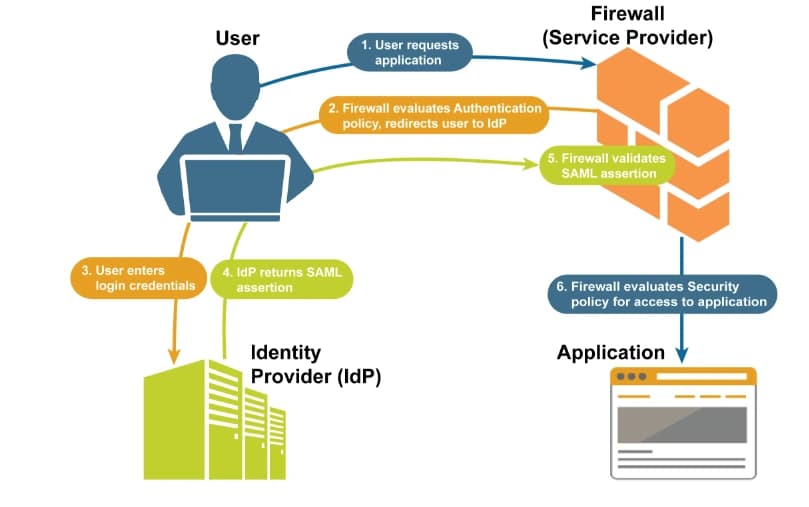
A typical SAML-based VPN login involves several components:
- A user opens the organization's remote access portal.
- The VPN service directs the user through the configured SAML authentication process.
- The identity provider checks the user's identity.
- The identity provider applies the required MFA policy.
- The authentication result returns to the VPN service.
- The VPN service establishes access if the authentication requirements are satisfied.
The vulnerability affects the enforcement of these authentication controls when an alternative authentication method is available.
How the SAML Authentication Bypass Works
SAML stands for Security Assertion Markup Language. It allows an application to rely on an external identity provider to authenticate users.
For example, a business may use a centralized identity service to manage employee accounts and MFA requirements.
The SonicWall SSL VPN service then relies on that authentication process before granting remote access.
CVE-2026-19868 concerns an alternative authentication method that may allow a user with valid credentials to bypass the intended SAML controls.
This can undermine MFA when the organization relies on SAML to enforce the second authentication factor.
The available vulnerability description does not document the exact internal software defect or provide a complete exploitation sequence. Administrators should avoid assuming that every possible authentication configuration is affected.
Why Alternative Authentication Methods Matter
Many organizations maintain more than one authentication method for operational reasons.
For example:
- SAML authentication for employees.
- Local user accounts for specific administrative purposes.
- Directory-based authentication through LDAP.
- Other configured authentication services.
These methods may have different security requirements.
If one method enforces MFA while another does not, the organization may have an inconsistent authentication policy.
The important lesson is that administrators must assess every enabled login method, not only the preferred SAML option.
A Practical Security Scenario-1
Consider a company with 150 employees and a SonicWall firewall providing remote access.
The IT team configures SAML authentication and requires MFA through its identity provider. Employees normally complete both authentication steps before accessing internal applications.
However, the firewall also has an alternative authentication method enabled for a separate user group.
The security team now has to establish whether that alternative method is covered by the same authentication requirements.
If the affected firmware and vulnerable configuration are present, the organization may face an authentication enforcement weakness.
This is an illustrative scenario, not a documented victim case or proof that a particular organization has been compromised.
It demonstrates why checking only whether MFA is enabled can produce an incomplete security assessment.
A Practical Security Scenario-2
Imagine an organization that uses SonicWall SSL VPN to provide employees with secure remote access to internal business resources. The organization relies on SAML-based authentication and multi-factor authentication (MFA) to protect employee accounts.
After learning about CVE-2026-19868, the organization wants to understand whether its existing VPN authentication controls are properly configured.
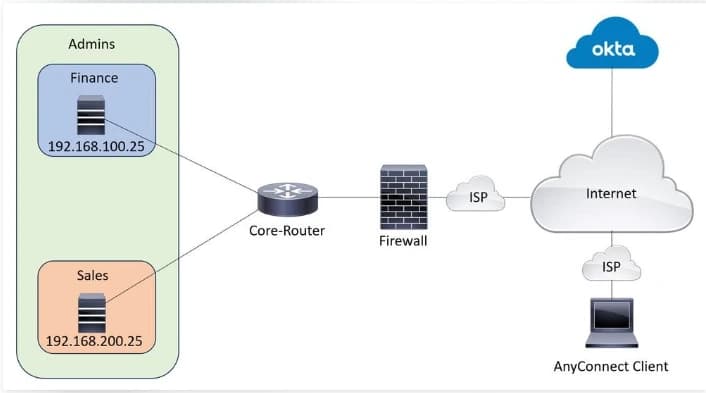
To demonstrate how this type of security concern can be assessed, Hoplon InfoSec uses a simulated virtual lab environment.
How the Assessment Works
The virtual environment includes a SonicWall virtual firewall, a test Identity Provider, MFA-enabled test accounts, and a client machine for remote access testing.
The assessment begins with a review of the firewall's firmware version and authentication configuration. The team then examines how SAML authentication interacts with MFA requirements and whether alternative authentication methods follow the intended security policies.
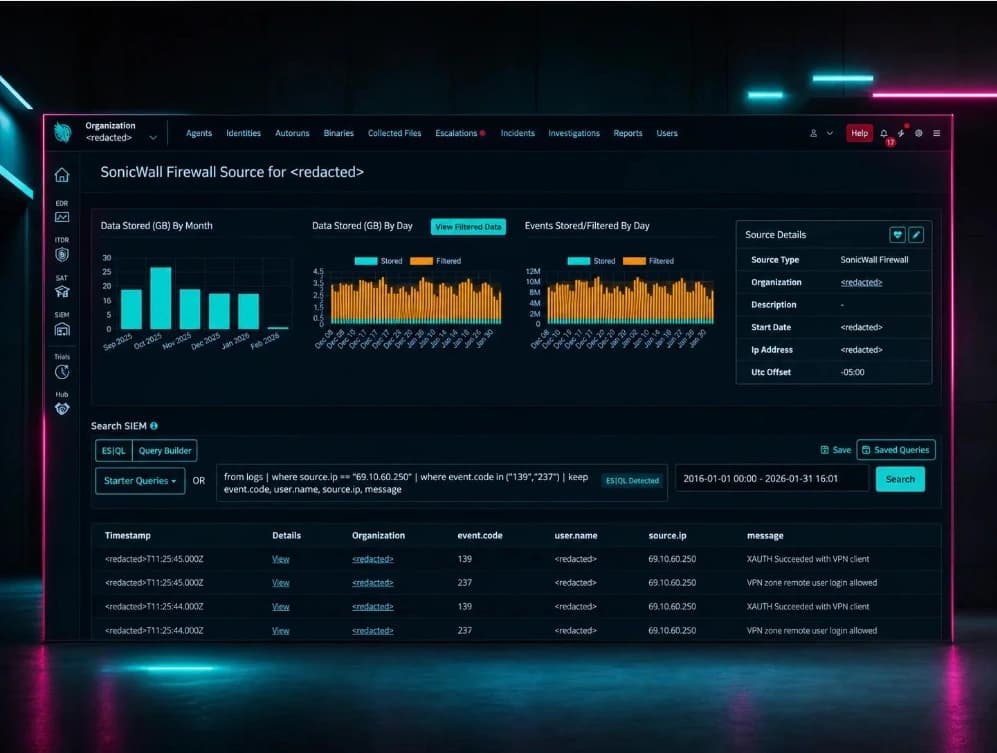
The team also reviews authentication logs to understand how successful and unsuccessful login events are recorded.
Finally, the assessment considers the vendor-recommended security update and the steps required to verify that authentication controls continue to work as expected after patching.
Why This Matters
This simulated assessment demonstrates why VPN security involves more than checking whether MFA is enabled. Organizations also need to review authentication pathways, access policies, firmware status, and security monitoring.
By using a controlled virtual environment, security teams can demonstrate an assessment methodology without exposing real customer environments or sensitive business information.
What a Suspicious Authentication Record Might Look Like
Security teams can compare firewall authentication records with identity provider events.
The following is a simplified, fictional example for investigation planning. It is not an actual SonicWall log format or a published indicator of compromise.
|
Field |
Example observation |
|
Event |
Successful SSL VPN login |
|
Account |
employee-account |
|
Authentication source |
Alternative authentication method |
|
SAML event |
No matching event identified |
|
MFA event |
No matching MFA verification identified |
|
Session status |
Established |
|
Investigation status |
Requires validation |
A missing identity provider event does not automatically prove exploitation.
There may be logging delays, retention gaps, incorrect timestamps, or differences in event naming. Investigators should correlate the records before drawing conclusions.
Which SonicWall Firewalls Are Vulnerable to CVE-2026-19868?
The published vulnerability record identifies affected SonicOS Gen7 and Gen8 firmware versions.
The affected version ranges are important because a firewall can continue running an older firmware release even when the organization has enabled MFA.
Affected and Fixed SonicOS Versions
|
Firewall generation |
Affected firmware |
Fixed firmware |
|
Gen7 |
7.3.3-7015 and earlier |
7.3.4-7013 and later |
|
Gen8 |
8.2.2-8015 and earlier |
8.2.3-8015 and later |
These version ranges are based on the published vulnerability record and reported vendor advisory information.
Administrators should check the official SonicWall advisory for the exact appliance model and supported firmware before upgrading. Do not assume that every build is available for every hardware or virtual platform at the same time.
Which Devices Should Administrators Review?
The published advisory information covers applicable Gen7 and Gen8 physical and virtual firewall platforms.
Relevant product families include:
- TZ firewalls.
- NSa firewalls.
- NSsp firewalls.
- NSv virtual firewalls.
The exact supported models and firmware availability depend on the platform.
A device running an affected version requires additional assessment if it provides SSL VPN access and uses SAML authentication.
Does a Firewall Without SAML Have the Same Exposure?
The documented vulnerability specifically concerns SSL VPN authentication using SAML.
Therefore, a firewall that does not use SAML for SSL VPN authentication does not match the documented configuration condition for this particular flaw.
However, that does not establish that the firewall is secure against every other vulnerability covered by the same SonicWall advisory.
The November 6 advisory addresses six additional vulnerabilities. Administrators should review the complete advisory rather than treating CVE-2026-19868 as the only issue.
How to Check Your SonicWall Firewall's Exposure
A useful exposure assessment should consider firmware, authentication configuration, remote accessibility, and available security logs.
Checking only the firewall's software version is not enough to understand the full security situation.
1. Identify the Installed SonicOS Version
Log in to the firewall's administrative interface using an authorized administrator account.
Locate the system information or firmware details page. Record:
- Firewall model.
- Hardware generation.
- Installed SonicOS version.
- Current firmware build.
- Available vendor security updates.
Compare the installed version with the affected and fixed version table.
If the device runs an affected version, move it into the organization's priority patch queue.
2. Check Whether SAML Authentication Is Enabled
Review the SSL VPN authentication configuration.
Identify whether the firewall uses SAML for remote user authentication.
Also document the identity provider connected to the firewall and the MFA policy applied to the relevant user groups.
Do not assume that a company-wide MFA policy automatically covers every firewall authentication method.
3. Review Alternative Authentication Methods
Create an inventory of all authentication methods available to SSL VPN users.
For each method, record:
|
Assessment item |
Question to answer |
|
SAML |
Is it enabled for SSL VPN? |
|
Local accounts |
Are local users permitted to connect? |
|
LDAP |
Is directory authentication enabled? |
|
MFA |
Does the method enforce the required MFA policy? |
|
User groups |
Which groups can access the VPN? |
|
Exceptions |
Are any accounts excluded from normal authentication requirements? |
The purpose is to identify inconsistent access controls.
Do not remove authentication methods without checking application dependencies and business requirements.
4. Review Internet Exposure
An internet-facing VPN service deserves priority during vulnerability management.
Check:
- Whether SSL VPN access is enabled on the WAN zone.
- Whether remote access is required for all current users.
- Whether unnecessary public access can be restricted.
- Whether the configured VPN service port is exposed.
- Whether administrative management access is separately restricted.
The configured sonicwall ssl vpn port should be documented as part of the exposure assessment.
Changing the port alone does not fix CVE-2026-19868. It should not be treated as a substitute for installing the security update.
5. Record the Exposure Assessment
Use a simple assessment table to document the result.
|
Configuration |
Risk assessment |
|
Affected firmware with SAML SSL VPN |
Vulnerable configuration condition |
|
Affected firmware without SAML SSL VPN |
Documented CVE condition not established |
|
Fixed firmware with SAML SSL VPN |
Firmware vulnerability addressed |
|
Alternative authentication methods enabled |
Review enforcement requirements |
|
Internet-facing SSL VPN |
Prioritize exposure review |
|
Unusual VPN login records |
Investigate and correlate |
This process gives security teams a consistent way to assess multiple firewalls.
Why SonicWall MFA May Not Protect Every VPN Login
MFA is one of the most important controls for remote access. It requires users to provide additional proof of identity beyond a password.
However, MFA protection depends on how authentication is enforced.
An organization may have a strong identity provider, a well-designed MFA policy, and a secure VPN configuration. Yet an alternative authentication path can create a gap if it does not follow the same requirements.
The Difference Between Enabling MFA and Enforcing MFA
Enabling MFA means configuring an additional authentication requirement for a particular login process.
Enforcing MFA means making sure users cannot complete that login process without satisfying the requirement.
These are related, but they are not identical.
Consider a company that requires MFA through its SAML identity provider. If another authentication method remains available, administrators must verify whether it also enforces the required controls.
This is why a successful MFA configuration test should cover every enabled authentication path.
How Authentication Gaps Affect Business Security
A VPN provides a connection between a remote device and permitted internal resources.
Depending on its access rules, that connection may expose:
- Internal business applications.
- File servers.
- Administrative systems.
- Directory services.
- Sensitive company information.
If an attacker gains unauthorized remote access, the potential impact depends on the account's permissions and the resources available through the VPN.
A standard employee account should not automatically have access to administrative systems. Network segmentation and user-specific access rules can limit the damage from a compromised account.
Why Valid Credentials Do Not Always Mean Authorized Access
Authentication answers one question: who is attempting to sign in?
Authorization answers another: what is that account allowed to access?
A valid password does not establish that the person using it is the legitimate account owner.
Similarly, a successful authentication event does not automatically prove that the expected MFA process occurred.
Security teams should review the complete authentication record before treating a VPN session as trustworthy.
How to Fix CVE-2026-19868 on SonicWall Firewalls
Vendor security updates available
The primary remediation is to install the appropriate fixed SonicOS firmware.
SonicWall's November 6, 2026, security advisory addresses CVE-2026-19868 alongside six other vulnerabilities. The reported fixed releases are SonicOS 7.3.4-7013 for applicable Gen7 platforms and 8.2.3-8015 for Gen8 platforms.
The following process provides a practical framework for administrators.
Step 1: Identify the Correct Firmware Update
Start with the official SonicWall security advisory:
SonicWall Security Advisory SNWLID-2026-0014
Confirm the following details before selecting an update:
- Exact firewall model.
- Hardware generation.
- Current SonicOS version.
- Supported fixed firmware release.
- Platform-specific release notes.
Do not install firmware intended for another appliance model.
For virtual firewalls, check the supported release for the relevant hypervisor or cloud platform.
Step 2: Back Up the Firewall Configuration
Before upgrading, create a configuration backup.
A backup helps administrators restore the intended network and security settings if an upgrade creates an unexpected problem.
The backup process should include:
- Exporting the current firewall configuration.
- Confirming that the backup file is available.
- Recording important network and VPN settings.
- Documenting current authentication configurations.
- Following the organization's recovery procedure.
Store configuration backups in an access-controlled location.
A backup should not replace a tested recovery plan. Administrators should understand how to restore the configuration if the upgrade fails.
Step 3: Install the Applicable Fixed Firmware
Schedule the upgrade during an approved maintenance window.
Use SonicWall's official firmware instructions for the specific model. Follow the applicable release notes and vendor recommendations.
After installation, verify that:
- The firewall boots normally.
- The correct firmware build is displayed.
- Network interfaces operate as expected.
- Firewall rules remain intact.
- SSL VPN services operate correctly.
- Remote users can connect through the approved authentication process.
If the required firmware is unavailable for the appliance, contact SonicWall support before making assumptions about an alternative release.
Step 4: Review SSL VPN Authentication Settings
After upgrading, review the authentication configuration.
Pay particular attention to:
- SAML authentication settings.
- Alternative authentication methods.
- Local user accounts.
- LDAP integration.
- User group permissions.
- MFA requirements.
- Exceptions for service or administrative accounts.
Remove unnecessary authentication options only after confirming that business applications and authorized users do not depend on them.
The goal is to maintain a consistent authentication policy.
Step 5: Review VPN Access Permissions
Firmware updates address software vulnerabilities, but they do not automatically correct every access control weakness.
Review which users and groups can access the SSL VPN service.
Check whether remote users can reach only the internal resources required for their work.
For example, an employee who needs access to a document management application should not automatically receive access to firewall administration or unrelated server networks.
Use least-privilege access rules to reduce unnecessary exposure.
Step 6: Verify MFA Enforcement
Test the approved login process with authorized test accounts.
Confirm that the identity provider records the expected authentication event and MFA result.
Also review whether alternative login methods remain enabled.
A successful login test through SAML alone is insufficient if other authentication paths are still available.
SonicWall SSL VPN Setup: Security Checks Administrators Should Not Skip
A secure sonicwall ssl vpn setup requires more than making the remote access portal available.
The organization must also define who can connect, which authentication methods are permitted, and what internal resources remote users can reach.
SonicWall's official setup documentation explains the SSL VPN configuration process, including server settings, client settings, user group membership, and VPN access permissions.
For administrators maintaining an existing deployment, the following areas deserve attention.
Review the SSL VPN Server Settings
SonicWall's documentation identifies the following SonicOS 7 navigation path:
Network | SSL VPN | Server Settings
Administrators can review SSL VPN access status for configured zones and check the server settings.
Confirm that SSL VPN access is enabled only where required.
Check the SSL VPN Port
The sonicwall ssl vpn port is the network port used by the SSL VPN service.
Administrators should document the configured port and confirm that firewall rules allow only the intended remote access traffic.
A port change may reduce unwanted discovery or simplify network access management, but it does not correct an authentication enforcement vulnerability.
The security update remains necessary.
Review Client Settings and Network Access
Client settings determine how remote users connect and which network resources they can reach.
Check:
- Client address range.
- Permitted network routes.
- DNS settings.
- VPN user group membership.
- Access permissions for internal networks.
Avoid giving every remote user broad access to the entire internal network.
Use the Official SonicWall SSL VPN Setup Guide
For platform-specific configuration details, consult:
SonicWall SSL VPN Setup Guide: Official Configuration Instructions
This documentation covers the relevant setup areas for SonicOS 7 and earlier releases. Administrators should follow the instructions that match their installed firmware.
How to Detect Suspicious SonicWall SSL VPN Authentication Activity
Patching is essential, but organizations should also investigate whether suspicious access occurred before the update.
This is particularly important for internet-facing firewalls that used an affected configuration.
A successful VPN login without a corresponding identity provider authentication record deserves attention. However, it does not independently establish exploitation.
Review SonicWall SSL VPN Login Logs
Start by reviewing authentication and VPN session records.
Look for:
- Successful logins outside expected working hours.
- Accounts connecting from unfamiliar locations.
- Unexpected authentication methods.
- Unusual session durations.
- Accounts accessing resources outside their normal duties.
- Repeated authentication failures followed by successful access.
An unfamiliar IP address is not automatically malicious. Employees may connect through mobile networks, home internet connections, or corporate gateways.
Compare each observation with known user activity.
Compare VPN Records With Identity Provider Logs
This is one of the most useful investigation steps for SAML-enabled deployments.
For each successful VPN session, compare the available information with the identity provider's authentication records.
Useful fields include:
|
VPN information |
Identity provider information |
|
Username |
Account identity |
|
Login timestamp |
Authentication timestamp |
|
Source IP |
Recorded source IP |
|
Session result |
Authentication result |
|
Authentication method |
SAML authentication method |
|
Session identifier, if available |
Related event or correlation identifier |
Allow for clock differences and logging delays.
Where possible, use synchronized timestamps and consistent account identifiers to improve correlation.
Identify Unexpected Authentication Behavior
Pay special attention to successful sessions that do not have an expected SAML or MFA event.
Investigate:
- Whether the user actually initiated the session.
- Whether an alternative authentication method was used.
- Whether the account has valid business access.
- Whether the identity provider recorded a failed or incomplete authentication.
- Whether another logging system contains the missing event.
A missing event can result from logging configuration or retention issues. Investigators should not label every discrepancy as a confirmed attack.
Investigate Suspicious Successful Sessions
If an account appears to have accessed the VPN unexpectedly, the investigation should extend beyond the login event.
Review the resources accessed during that session.
Check for unusual internal connections, unexpected administrative activity, and changes to account permissions.
If compromise is suspected:
- Follow the organization's incident response process.
- Preserve relevant firewall and identity provider logs.
- Revoke affected sessions where supported.
- Reset credentials through the organization's approved identity management process.
- Review access to sensitive systems.
- Check for additional unauthorized account activity.
Neither the publicly available vulnerability description nor the sources reviewed provide a confirmed list of unique indicators of compromise for CVE-2026-19868.
Do not treat unrelated SonicWall attack indicators as proof of exploitation of this specific CVE.
What to Do If You Cannot Patch Your SonicWall Firewall Immediately
Sometimes an organization cannot install an update immediately because of maintenance restrictions, compatibility concerns, or operational dependencies.
That does not mean the organization should leave the issue unattended.
The following measures can reduce exposure while administrators arrange the required update.
Important: These are general defensive risk-reduction recommendations. They are not confirmed vendor workarounds for CVE-2026-19868. Reporting on SonicWall's advisory indicates that no workaround was provided.
Restrict Unnecessary Remote Access
Review which users need SSL VPN access.
Remove access for inactive accounts and users who no longer require remote connectivity.
Where operationally possible, restrict remote access to approved users, networks, or trusted source ranges.
These controls can reduce exposure, but they do not correct the underlying vulnerability.
Review Alternative Authentication Methods
Identify authentication methods that are no longer required.
Document any local or directory-based login options that operate separately from the primary SAML process.
Do not assume disabling one authentication method is a confirmed workaround. Follow vendor guidance and test business dependencies before changing authentication settings.
Monitor Remote Access Activity
Increase monitoring of SSL VPN authentication events.
Correlate firewall logs with identity provider records. Investigate unexpected successful logins and access patterns.
Ensure that relevant logs are retained and available to incident responders.
Prepare an Emergency Patch Plan
An emergency patch plan should include:
- An identified maintenance owner.
- A tested configuration backup.
- A confirmed firmware package.
- A recovery procedure.
- A post-update verification plan.
- A communication process for affected users.
If the organization cannot safely maintain the remote access service, its security and IT leadership should assess whether temporary suspension is appropriate.
Compare the Available Risk-Reduction Options
|
Approach |
Security value |
Limitation |
|
Install fixed firmware |
Primary remediation |
Requires supported update |
|
Restrict VPN access |
Reduces exposure |
Does not fix the flaw |
|
Review authentication methods |
Helps identify policy gaps |
Does not replace patching |
|
Monitor login activity |
Helps identify suspicious sessions |
Detection is not prevention |
|
Disable unnecessary remote access |
Removes an unnecessary entry point |
May affect business operations |
|
Reset potentially affected credentials |
Reduces risk from exposed credentials |
Does not fix vulnerable firmware |
The priority should remain clear: install the vendor-provided security update as soon as the correct supported release is available.
How to Verify Your SonicWall Firewall After Patching
An upgrade should not be considered complete simply because the firewall restarts successfully.
Administrators need evidence that the correct firmware is running and the expected authentication controls are working.
This is where a formal post-patch verification process becomes useful.
Confirm the Installed Firmware Version
Reopen the firewall's system information page.
Check the displayed SonicOS version against the applicable fixed release.
Record the model, firmware build, update date, and administrator responsible for the change.
If the firewall displays an unexpected version, investigate before declaring the vulnerability remediated.
Test SAML Authentication With Authorized Accounts
Use approved test accounts to verify the normal remote access process.
Confirm that the identity provider records the authentication event and the required MFA result.
Check that the firewall grants access only after the expected authentication process completes.
Verify All Enabled Authentication Methods
This is especially important for organizations that use multiple login methods.
Review every method that remains available to SSL VPN users.
Confirm that authentication policies match the organization's requirements.
Do not rely on a successful SAML login test as evidence that alternative authentication methods are also secure.
Review Authentication Logs
Compare the firewall's VPN session records with the identity provider's logs.
Investigate successful sessions that lack expected authentication evidence.
Also review any unusual account or network access events recorded before the firmware update.
Document the Verification Results
A security verification record should contain:
|
Verification item |
Expected result |
|
Firmware version |
Applicable fixed release |
|
Firewall model |
Correct platform identified |
|
SAML authentication |
Expected process works |
|
MFA enforcement |
Required checks are recorded |
|
Alternative login methods |
Reviewed and approved |
|
VPN user permissions |
Appropriate access |
|
Firewall logs |
No unexplained authentication events |
|
Identity provider logs |
Expected authentication records |
|
Recovery documentation |
Backup and upgrade records retained |
Verification progress
Confirmed firewall model and generation
Verified the installed fixed firmware
Reviewed SAML authentication settings
Reviewed all alternative authentication methods
Tested MFA with authorized accounts
Compared VPN sessions with identity provider records
Reviewed suspicious sessions and historical logs
Checked VPN user permissions and network access
Saved the backup and upgrade records
Documented the final security assessment
Use this checklist to track the assessment. Completion does not independently prove that a firewall is free from compromise.
A documented verification process gives security teams a clearer record of what changed, what was tested, and what still needs attention.
Frequently Asked Questions About SonicWall VPN MFA Bypass
1. Is CVE-2026-19868 actively exploited?
Yes. CISA added CVE-2026-19868 to its Known Exploited Vulnerabilities Catalog on November 6, 2026. SonicWall also reported investigating potential exploitation and urged customers to upgrade.
2. Can SonicWall MFA be bypassed without valid credentials?
The published vulnerability description specifies that exploitation may allow a user with valid credentials for an alternative authentication method to bypass SAML authentication controls. It does not establish that the flaw allows unrestricted access without credentials.
3. Which SonicWall firmware versions are affected?
The documented affected versions are SonicOS Gen7 7.3.3-7015 and earlier, and Gen8 8.2.2-8015 and earlier. The reported fixes are Gen7 7.3.4-7013 and Gen8 8.2.3-8015. Always verify compatibility with the exact appliance model.
4. Does updating SonicOS completely resolve the vulnerability?
Installing the applicable fixed firmware addresses the known software vulnerability. However, organizations should still review authentication policies, investigate suspicious historical sessions, and verify MFA enforcement across all enabled login methods.
Secure Remote Access Before an Authentication Gap Becomes a Business Problem
CVE-2026-19868 highlights an important weakness in remote access security: an MFA policy is only effective when the authentication process consistently enforces it.
For organizations using affected SonicWall firewalls, the priority is straightforward. Identify the firmware, review SAML and alternative authentication methods, install the correct security update, and investigate unusual VPN sessions.
Small businesses should pay particular attention to internet-facing firewalls. They often provide access to systems that employees need every day, which makes their authentication controls an important part of business security.
A proper remediation process should also include evidence. Keep firmware records, authentication logs, configuration backups, and post-patch verification results.
If your organization is unsure whether its remote access configuration is affected, consult a qualified network security professional. A structured assessment can help establish exposure, validate remediation, and identify authentication gaps that a firmware update alone may not address.
The most important takeaway: Do not assume your remote access is protected simply because MFA is enabled. Verify that every permitted authentication method enforces the security policy you intended.
References and Further Reading
The following sources support the technical and remediation information in this article.
Primary sources
- SonicWall PSIRT: Security Advisory SNWLID-2026-0014. Vendor vulnerability advisory.
- CISA: Known Exploited Vulnerabilities Catalog. Official exploitation tracking.
- CISA: November 6, 2026, KEV Announcement. Vulnerability listing announcement.
- SonicWall: How to Set Up SSL VPN. Official configuration documentation.
Hoplon Insight Box: Security Recommendations
Security team assessment priorities
- Prioritize internet-facing firewalls running affected firmware.
- Verify that all VPN authentication methods follow the required MFA policy.
- Correlate successful VPN sessions with identity provider records.
- Investigate unexplained access before and after patching.
- Document firmware changes and post-update verification.
These recommendations are defensive security guidance, not additional vendor-confirmed mitigations.
Final editorial assessment: This article covers the news, vulnerability background, affected versions, exposure assessment, remediation, detection, temporary risk reduction, and post-patch verification. It avoids unsupported attack statistics, fabricated case studies, and unverified indicators of compromise.
The most important publishing step
is to recheck the SonicWall advisory and platform-specific firmware
availability immediately before publication.
Author Bio and Review
Author: Mohammed Talukder is the Co-Founder and CEO of Hoplon InfoSec, with over 16 years of experience in cybersecurity and technology. His expertise includes offensive security, vulnerability management, cyber risk management, and incident response. His professional credentials include CISM, CISA, CEH, and CompTIA PenTest+. He has also received Infosys recognition awards for his professional contributions. He shares practical cybersecurity insights to help organizations strengthen their security posture.
Technical reviewer: Gazi Mahmud, Co-Founder and CIO of Hoplon InfoSec LLC, cybersecurity leader, and CISM & CISA certified professional with expertise in cyber risk management, security governance, compliance, and incident response.
Published: November 9, 2026
Last Updated: November 9, 2026