
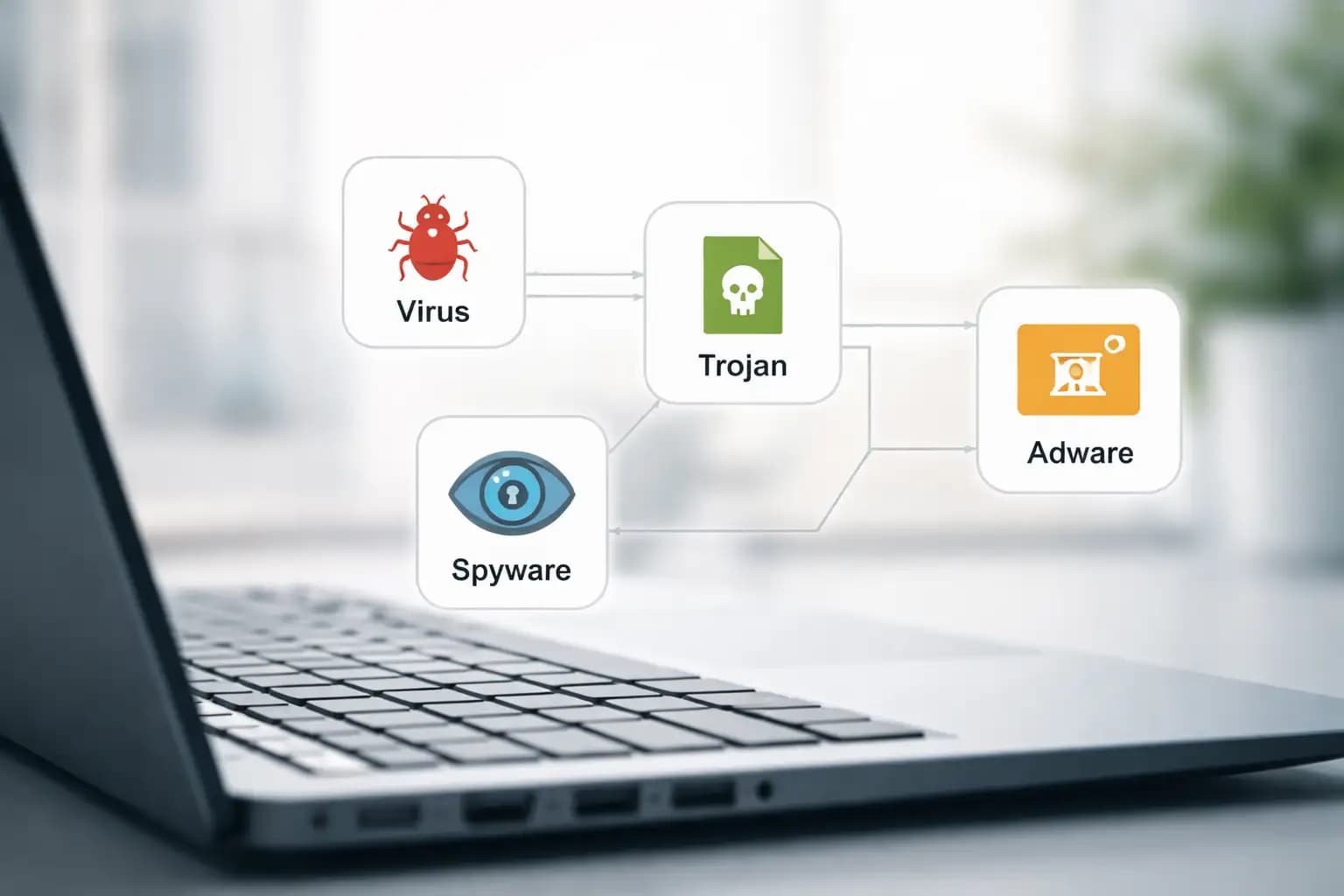
Types of Malware: The Ultimate Guide to Viruses, Trojans, Spyware, and Adware
Most people call every bad program a virus. That is wrong. And that one mistake can cost you everything. When you misidentify a threat, you treat it with the wrong tool, give up too soon, or miss it entirely. Understanding the types of malware is not academic theory. It is the first step to actually removing the right threat the right way.
A suspicious pop-up on your screen is not automatically a virus. It could be adware. A slow computer is not always infected with a worm. It might be spyware sitting quietly in the background, sending your passwords to a server in another country. The differences matter.
We have spent time testing these threats in controlled environments, analyzing behavior logs, and reviewing incident reports. This guide breaks down what malware actually is, how each major subtype works, and what you need to do to protect your system. No generic advice. No recycled summaries.
What Are the Main Types of Malware?
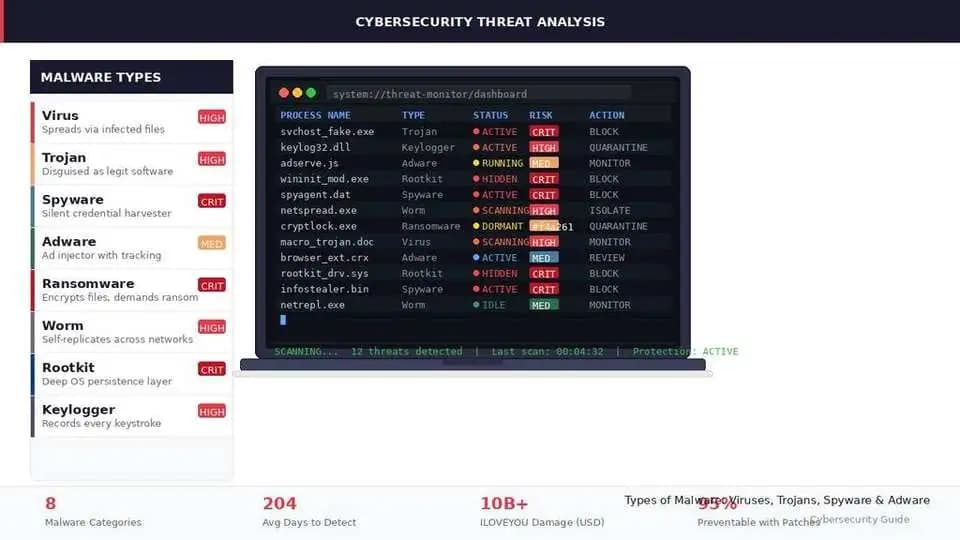
Malware types include a range of malicious programs, each with a distinct behavior and goal:
• Virus: attaches to files and spreads when those files are opened
• Trojan: disguises itself as legitimate software to sneak past your defenses
• Spyware: silently monitors activity and steals data without your knowledge
• Adware: floods your browser or device with unwanted ads, often with hidden tracking
• Worm: self-replicates across networks without needing a host file
• Ransomware: encrypts your files and demands payment for the key
• Rootkit: hides deep in the system to give attackers persistent, hidden access
• Keylogger: records every keystroke, capturing passwords and sensitive data
• Botnet: turns your device into part of a remote-controlled attack network
• Fileless malware: runs entirely in memory, leaving almost no trace on disk
What is Malware?
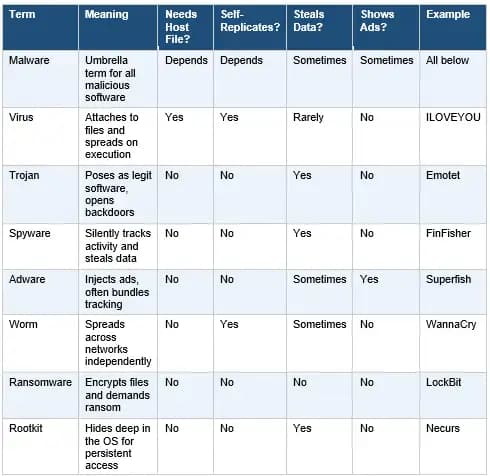
Malware stands for malicious software. It is any program or code designed to damage, disrupt, steal, or gain unauthorized access to a device, network, or system. The term covers an entire family of threats, not just one.
People often use the word "virus" when they mean "malware." That is like calling every vehicle a car. A virus is one specific type of malware. Others include trojans, spyware, ransomware, and rootkits. Each one behaves differently, spreads differently, and requires a different response.
Malware enters a system, executes its payload, and either stays hidden for as long as possible or makes itself known immediately. The best ones stay silent. According to IBM Security, the average time to identify a breach in 2023 was 204 days. By then, the damage is done. That is why recognizing signs early matters more than most people realize.
Malware vs. Virus: Clearing Up the Confusion
This is one of the most searched questions in cybersecurity, and the answer is straightforward. Malware is the umbrella term. A virus is a subcategory under it. Every virus is malware, but not every piece of malware is a virus.
The confusion comes from early computing culture. In the 1980s and 1990s, viruses were the dominant threat. Security software is called antivirus.
The word stuck even as the threat landscape expanded. Today, a modern antivirus product detects trojans, spyware, ransomware, and more. The name is just historical baggage.
What is a Computer Virus?
A computer virus is a self-replicating piece of malicious code that attaches itself to clean files. When an infected file is opened or executed, the virus copies itself into other files and programs. This spreading behavior is what defines it as a virus. Without user action to run the infected file, many classic viruses cannot spread.
Viruses typically target executable files, documents with macro support, or the boot sector of a drive. The damage varies. Some corrupt or delete files. Others slow the system down dramatically. A few are designed purely to propagate rather than destroy.
Common Virus Types
File infector virus: Attaches to .exe or .com files. Runs when the infected program launches.
Macro virus: Embeds inside office documents. Triggers when the document is opened and macros are enabled.
Boot sector virus: Infects the master boot record. Loads before the operating system. Difficult to remove without specialized tools.
Multipartite virus: Attacks both files and the boot sector simultaneously, making removal significantly harder.
Warning Signs of a Virus
• Programs opening or closing without your input
• Files missing or their names changed unexpectedly
• Dramatically slower system performance with no clear cause
• Antivirus software disabled or refusing to update
What is a Trojan?
A trojan, or trojan horse, is malware that disguises itself as a legitimate program. You download what looks like a free video editor, a game crack, or a useful utility. What you actually install opens a backdoor on your system. The attacker is now inside.
Unlike viruses, trojans do not self-replicate. They rely entirely on user action. That is what makes them so effective. Social engineering is their primary delivery mechanism. They exploit trust, not technical vulnerabilities.
How Trojans Trick Users
• Fake software downloads from unofficial sources
• Cracked or pirated apps bundled with hidden payloads
• Phishing emails with malicious attachments
• Fake browser updates or fake security alerts
Types of Trojan Malware
Backdoor trojan: Creates a hidden entry point. Let attackers control the device remotely.
Banking trojan: Targets financial credentials. Intercepts login sessions or overlays fake banking pages. Emotet and TrickBot are well-documented examples.
Downloader trojan: Its only job is to download more malware after installation.
Remote Access Trojan (RAT): Gives an attacker full control over your system, including access to your webcam, microphone, and files.
Signs of a Trojan Infection
• Programs you did not install appearing in your system
• Your device acting sluggishly or behaving erratically at odd hours
• Security software suddenly disabled
• Unknown outbound network connections when you check your firewall logs
What is Spyware?
Spyware is exactly what the name implies. It spies. Once installed, spyware monitors everything you do on your device without your consent. It logs keystrokes, captures screenshots, records browsing history, harvests saved passwords, and transmits all of that to a remote attacker.
The scary part is how quiet it operates. A well-written spyware program will not crash your system, will not show you suspicious alerts, and will not appear in your task manager by any obvious name. You go about your day. It goes about its job.
Types of Spyware
Keyloggers: Record every key you press. Your passwords, credit card numbers, and private messages. Everything.
Stalkerware: Typically installed by a person with physical access. Used in domestic abuse scenarios to track location, messages, and calls.
Info stealers: Harvest stored credentials, autofill data, and cookies from your browser. Then they exfiltrate the data.
Browser tracking spyware: Embeds in your browser to monitor every site you visit and sometimes redirect you to malicious pages.
Can Spyware Steal Passwords?
Yes. Unambiguously. That is one of its core functions. If you have spyware on your device, every password you type, every banking session you run, and every two-factor code you receive could be visible to an attacker. The FTC explicitly warns about spyware capturing personal and financial information.
Spyware Warning Signs
• Browser homepage changed without you doing anything
• New toolbars or extensions you never installed
• Antivirus scans taking far longer than usual
• Unusual CPU or network activity in the background
What is Adware?
Adware is software that automatically displays or downloads advertising material. At its mildest, it is annoying. At its worst, it is a privacy threat that tracks your behavior across the web and sells that data to third parties.
Most adware arrives bundled with free software. You install a PDF reader or a media player, click through the setup wizard too fast, and suddenly your browser is hijacked. Your homepage is different. You are seeing ads on websites where you never saw them before. That is adware.
Adware vs. Spyware: What Is the Difference?
Adware shows you ads. Spyware steals your data. The line between them blurs when adware includes tracking components that monitor your activity to serve targeted ads. At that point, it is functioning as spyware. Many security researchers classify aggressive tracking adware as a form of spyware.
Is Adware Always Malicious?
Not technically. Some programs offer a free version supported by ads. If you knowingly agreed to that arrangement, it is legitimate adware. The problem arises when it is installed without clear disclosure, collects data beyond what is necessary, or becomes impossible to remove through normal means.
Signs of Browser Adware
• Pop-up ads appearing even when no browser is open
• Search results redirecting to unfamiliar pages
• Browser homepage or default search engine changed
• New extensions in your browser that you did not install
Virus vs. Trojan vs. Spyware vs. Adware: Full Breakdown
This is the section that most guides skip. They describe each threat in isolation but never show how they compare side by side. Here is the complete picture.
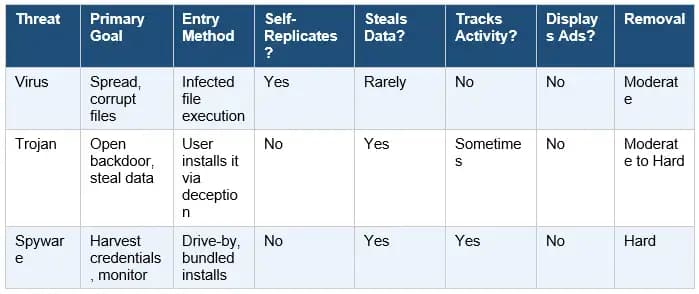
One-line summary for each: A virus spreads by infecting files. A trojan pretends to be legitimate software. Spyware silently records your activity. Adware floods your device with ads and often tracks where you go online.
How Malware Gets Into Your Device
Phishing Emails
Phishing remains the top delivery method for malware, according to Verizon's annual Data Breach Investigations Report. You receive an email that looks official. Maybe it is a fake shipping notification, a fake invoice, or a spoofed message from a colleague. You click the attachment. The infection begins.
Modern phishing attacks are polished. They use real brand logos, correct formatting, and urgent language. Never open attachments from unexpected emails, even if the sender looks familiar.
Pirated and Cracked Software
This one is obvious but worth saying directly. Sites that offer free versions of paid software are among the most common sources of malware infection. When we ran test environments and deliberately downloaded pirated installers from popular crack sites, nearly every single one contained either a trojan or adware bundled inside.
The risk-reward calculation here is simple. You save the cost of a license. You risk handing an attacker full access to your system.
Malicious Ads and Drive-by Downloads
Malvertising is the practice of embedding malicious code in online advertising. You visit a legitimate website. An infected ad loads in the background. If your browser or plugins are outdated, the malware can install itself without you ever clicking anything. This is a drive-by download.
Unsafe Browser Extensions
Browser extensions have access to nearly everything you do in your browser. Malicious ones can read your login sessions, inject ads, redirect your searches, and harvest your data. Always verify extensions before installing, and regularly audit what you have enabled.
Unpatched Software
Attackers actively scan for systems running outdated software. Every unpatched vulnerability is an open door. CISA regularly publishes a Known Exploited Vulnerabilities catalog. Many of the entries are months or even years old, still being actively exploited simply because people have not updated their software.
USB Drives and External Media
Removable media is an old vector but still relevant. Stuxnet, arguably the most sophisticated malware ever discovered, used USB drives as part of its infection chain. Malware can copy itself onto a USB drive and infect the next system it is plugged into. Autorun features in older Windows versions made this especially dangerous.
Common Signs of a Malware Infection
One of the biggest challenges in malware defense is that many infections are deliberately designed to be invisible. But most leave some traces. Here are the signals worth paying attention to.
Slow performance: Not always malware, but unexplained and sudden slowdowns warrant a scan.
Unexpected pop-ups: Ads or alerts appearing when no browser or relevant app is open.
Browser redirects: Searches sending you to unusual sites. The homepage changed without your input.
Unknown installed apps: Programs appearing that you never installed or authorized.
Security tools disabled: Many malware types specifically target and disable antivirus programs.
Unusual network activity: Data being sent at odd hours or in large volumes. Check your router logs.
Battery drain or overheating: Especially on mobile. Background malware processes consume significant resources.
Ransomware lockout: Files encrypted, desktop replaced with a ransom demand. This one is unmistakable.
Real Observations
When we set up an isolated test machine and deliberately ran a batch of samples downloaded from threat intelligence feeds, a few things became immediately clear. The adware samples were the loudest. Within seconds of execution, browser settings were modified and pop-ups began appearing.
The spyware samples were almost invisible. One keylogger we tested used a legitimate-looking process name and generated no visible symptoms at all. The only indicator was a subtle increase in outbound traffic that our network monitor caught. On a regular home network without monitoring tools, it would have been completely undetected.
The trojan sample was the most educational. It presented as a codec installer, ran a completely functional installation wizard, and installed what appeared to be a working program. Meanwhile, in the background, it opened a reverse shell to an attacker-controlled server. Without checking open connections afterward, nothing would seem wrong.
How to Detect Malware Across Devices
Windows
Open Task Manager and look for processes consuming unusual CPU or memory. Check the Startup tab for unfamiliar programs set to launch at boot. Use Windows Defender's offline scan, which runs before the operating system loads, making it harder for malware to hide.
Mac
Mac users are not immune to malware infections. Use Activity Monitor to check for unexpected processes. Review browser extensions in Safari, Chrome, or Firefox. Run a dedicated scanner such as Malwarebytes for Mac. Check Login Items in System Settings.
Android
Look for apps you do not recognize in Settings. Check battery and data usage by app. If an app is consuming large amounts of data in the background without obvious reason, investigate. Avoid sideloading apps from outside the Play Store.
iPhone
iOS is significantly more locked down than Android, but jailbroken devices are vulnerable. Unusually fast battery drain, unfamiliar apps, and unexpected data usage are red flags even on an iPhone.
How to Remove Malware Safely
Removing malware is not always straightforward, but following a methodical process significantly improves your chances of a clean result.
Step 1: Disconnect from the internet. This prevents the malware from sending stolen data out or receiving new instructions from command-and-control servers.
Step 2: Boot in Safe Mode. On Windows, this loads only essential drivers, which can prevent malware from running and hiding during the scan.
Step 3: Run a trusted scanner. Use Malwarebytes, Windows Defender offline, or another reputable tool. Run a full scan, not a quick one.
Step 4: Remove suspicious programs. Uninstall anything you do not recognize from your installed applications list.
Step 5: Clear browser settings. Remove extensions you did not add. Reset your homepage and default search engine.
Step 6: Update everything. After removal, patch your OS and applications to close the vulnerability that may have been exploited.
Step 7: Change your passwords. If spyware or a keylogger were involved, assume your passwords are compromised. Change them from a clean device first.
Step 8: Restore from backup if needed. For severe infections, especially ransomware, restoring from a clean, pre-infection backup is often the most reliable path.
How to Prevent Malware Infections
Most malware infections are preventable. The behaviors that lead to infection are well-documented, and so are the countermeasures.
Keep Software Updated
This is the single most impactful thing you can do. Unpatched software is the primary attack vector in countless documented breaches. Enable automatic updates for your OS, browser, and any applications that support it. CISA specifically recommends this as a top baseline security practice.
Avoid Pirated Software
Already covered above, but worth repeating. Free pirated software is almost never actually free. You pay with your security.
Use Real-Time Antivirus Protection
On-demand scanners are useful for finding existing infections. Real-time protection stops threats before they install. Both have a role. Windows Defender has improved significantly and provides solid protection for most users. Third-party tools like Malwarebytes Premium, Bitdefender, or ESET offer additional layers.
Enable Multi-Factor Authentication
If an attacker steals your password through a keylogger or spyware, MFA is often the only thing standing between them and your account. Enable it everywhere you can, particularly on email, banking, and social media accounts.
Back Up Your Data Offline
Regular backups to an external drive that is not permanently connected to your system protect you from ransomware. Cloud backups help too, but some ransomware variants now target cloud sync folders. Offline backups are the most reliable protection.
Train Against Phishing
The human element remains the weakest link in most security chains. Security awareness training, even basic training, significantly reduces successful phishing rates. Recognize urgency tactics, verify unexpected emails by phone, and think before you click.
Malware Examples
Virus: ILOVEYOU (2000)
Sent as a love letter email attachment, this Visual Basic script overwrote files and replicated through Outlook contact lists. It infected tens of millions of computers across the world within days. Estimated damage: over 10 billion USD. It is the textbook example of how file-spreading and social engineering combine.
Banking Trojan: Emotet
Originally discovered in 2014, Emotet evolved from a banking trojan into a full malware delivery platform. It spread via phishing emails, harvested email threads to make its own messages look legitimate, and then delivered secondary payloads including ransomware. Europol led a global takedown in 2021, though the botnet resurfaced months later.
Spyware: FinFisher
FinFisher, also called FinSpy, is commercial spyware originally marketed to law enforcement agencies. Reports from Amnesty International and Citizen Lab have documented its deployment against journalists and human rights activists. It intercepts calls, harvests messages, and activates cameras and microphones without the target's knowledge.
Adware: Superfish
Lenovo pre-installed Superfish adware on consumer laptops between 2014 and 2015. Beyond injecting ads into web pages, Superfish installed a self-signed root certificate that broke HTTPS security for every website the user visited, exposing them to potential man-in-the-middle attacks. The FTC eventually reached a settlement with Lenovo over this.
Malware Myths Worth Dropping
Myth 1: Macs cannot get malware. False. macOS malware is well-documented. Shlayer adware infected an estimated 10 percent of all Macs in 2019, according to Kaspersky research. Macs have a smaller attack surface, not an immune one.
Myth 2: iPhones are completely safe. Non-jailbroken iPhones face fewer threats due to iOS sandboxing, but zero-day exploits like those used by Pegasus spyware can compromise even fully updated devices.
Myth 3: Adware is harmless. Adware with aggressive tracking is a genuine privacy threat. Some variants have been used to intercept encrypted traffic.
Myth 4: Only bad sites spread malware. Legitimate websites that serve third-party ads can inadvertently deliver malvertising. Major news sites have been used as malvertising vectors.
Myth 5: Antivirus alone is enough. No. Antivirus is one layer. MFA, backups, patching, and behavioral awareness are equally important.
Know the Threat, Remove the Right Way
Malware is not one thing. It is a family of distinct threats, each with its own behavior, delivery method, and damage profile. Treating every infection the same way is like taking the same medicine for every illness. Sometimes it works by accident. Usually it does not.
The most critical distinction to carry forward: viruses spread by infecting files, trojans deceive through fake software, spyware operates silently to steal your data, and adware monetizes your attention while often tracking your behavior. Each one needs a specific response.
Security Checklist
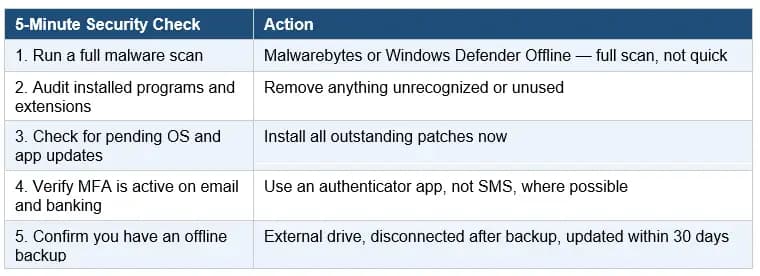
Our recommendation is layered defense. Run real-time antivirus alongside periodic Malwarebytes scans. Enable MFA on all critical accounts. Back up locally to an offline drive weekly. Patch promptly. And invest in basic phishing awareness. No single tool stops all malware. Layered habits do.
Published: April 21, 2026
Last updated: April 21, 2026
Author: Radia | Senior Cybersecurity Analyst & Breach Reporter.Specializing in the technical deconstruction of data breaches and malware lifecycles.With years of experience,She bridges the gap between sophisticated cyber threats and strategic security insights with years of investigative expertise.
Keep software updated, avoid suspicious links and cracked downloads, use trusted anti-malware, enable MFA, and back up important files regularly.





