-20260729102805.webp&w=3840&q=75)
I nearly missed the announcement on July 28, 2026, because it looked like just another routine WhatsApp update in my feed. It was not routine at all. Meta had finally closed a gap that IT teams have been quietly annoyed about for years: WhatsApp Web could not make or take calls without the desktop app installed.
Now it can, calls are end to end encrypted by default, and that single change has real consequences for anyone who manages security policy on a corporate network. This guide breaks down what actually shipped, how the underlying encryption works, and what a security team should be checking before employees start dialing in from a browser tab.
Quick Summary
| Item | Detail |
|---|---|
| Feature | Web Calling on WhatsApp Web (voice and video, 1:1 and group) |
| Announced | July 28, 2026, via Meta Newsroom |
| Encryption | End to end encrypted using the Signal Protocol, same standard applied to WhatsApp messages and calls since 2016 |
| New capabilities bundled with the launch | Call Transfer between devices, Waiting Room for link based group calls, QuickHD faster video ramp up, background noise suppression |
| Rollout status | Gradual global rollout, not yet available to every account |
| Primary enterprise concern | Browser attack surface, unmanaged extensions, and NAT and firewall traversal for WebRTC media |
| Underlying transport | Standard WebRTC architecture, which relies on ICE, STUN and TURN, alongside DTLS SRTP for media protection |
What Actually Launched
On July 28, 2026, Meta added end to end encrypted voice and video calling directly to WhatsApp Web, removing the previous requirement to install the desktop app. The rollout also bundled Call Transfer, Waiting Room, QuickHD, and background noise suppression.
Meta's own announcement describes the update in plain terms. Employees can now make and receive audio and video calls, both one on one and group, directly inside WhatsApp Web with no app download required, and Meta explicitly frames this as useful for people on shared computers, restricted work laptops, or anyone who simply prefers a browser tab over a desktop client.
When a host creates a call link with Require approval to join enabled, participants land in a waiting room until the host admits them. The company also confirmed that calls made through the web carry the same end to end encryption as calls made elsewhere on the platform, with no time limits and no cost attached.
Four smaller features shipped alongside the headline update, and each one matters for a security review, not just a product review. Call Transfer lets a user move an active group call between phone, tablet, desktop, and browser without dropping the connection.
Waiting Room adds host controlled admission to link based group calls, aimed at preventing the kind of uninvited join that plagued early Zoom deployments. QuickHD is a video quality improvement that gets a call to high definition faster after it connects. Background noise suppression filters ambient sound so a caller in a noisy office or a coffee shop still sounds clear on the other end.
None of this is speculative. It comes directly from Meta's own product announcement and was independently corroborated by multiple technology outlets within the same news cycle, which is a healthy signal that the feature set is real and not an early rumor or a misconfigured test rolling out to a narrow group.
What is WhatsApp Web Calling Security
WhatsApp Web calling security is the combined strength of WhatsApp's end to end encrypted call content and the browser environment that content now travels through. The encryption is strong and proven; the browser layer around it is the new variable enterprises need to assess.
WhatsApp Web calling security refers to the set of protections, and the set of exposures, that come with running voice and video calls through a browser session rather than a native mobile or desktop application. The calls themselves inherit WhatsApp's standard end to end encryption. The browser environment they run inside does not automatically inherit the hardened sandboxing that a mobile operating system provides. That distinction is the entire story for a security team evaluating this rollout.
WhatsApp's own security architecture is well documented and has been independently reviewed. The platform has used a modified implementation of the Signal Protocol for messages and calls since 2016, a design built specifically so that neither Meta nor any third party in the network path can read call content.
Academic researchers at Oxford and McMaster formally analyzed the underlying Signal Protocol and published their results without finding major structural flaws in the cryptography itself. That earlier scrutiny is one reason security teams can reasonably trust the encryption layer even while treating the browser delivery mechanism as a new variable worth assessing on its own.
-20260729103144.webp&w=1080&q=75 "WhatsApp Web calling security")
How The Encryption Actually Works
WhatsApp calls are protected by the Signal Protocol, which combines an initial key agreement called X3DH with continuous key rotation called the Double Ratchet. This gives every call and message forward secrecy, meaning a stolen key cannot unlock past communications.
WhatsApp's encryption for calls and messages rests on the Signal Protocol, which uses an initial key agreement step followed by continuous key rotation for every message or call segment exchanged.
The protocol establishes a session using a combination of an Identity Key, a Signed Pre Key, and One Time Pre Keys from each participant's device, a scheme cryptographers refer to as X3DH. Once the session exists, every subsequent message or call packet is protected by keys derived from a Root Key and a Chain Key, both regenerated continuously through what is known as the Double Ratchet.
The practical effect is forward secrecy. Even if an attacker somehow captured a device's current encryption keys, they could not use those keys to decrypt communications that were exchanged earlier, because the keys that protected those earlier exchanges no longer exist anywhere on the device.
Multi device support, which is what makes a browser session possible at all, works through a companion device linking process. A primary phone remains the anchor for the account, and a companion device such as WhatsApp Web is added by scanning a QR code that exchanges identity key material between the two. WhatsApp's published security whitepaper documents this linking flow along with the specific key types involved, and independent researchers have reviewed the protocol's forward secrecy and post compromise security properties using formal verification tools.
For call transport specifically, WhatsApp calls use the standard building blocks of real time browser communication. That means WebRTC style peer connections, ICE for negotiating a path between two devices, STUN and TURN servers to handle NAT and firewall traversal, and DTLS SRTP to protect the media stream itself at the transport layer, on top of the Signal Protocol encryption already applied to the call content.
Meta has not published implementation level specifics about exactly how key material is scoped inside the WhatsApp Web browser runtime, so any claim about precise in memory storage mechanics, exact port numbers, or packet level behavior inside this specific web client would be speculation rather than confirmed fact, and this article is not going to present it as anything more than that.
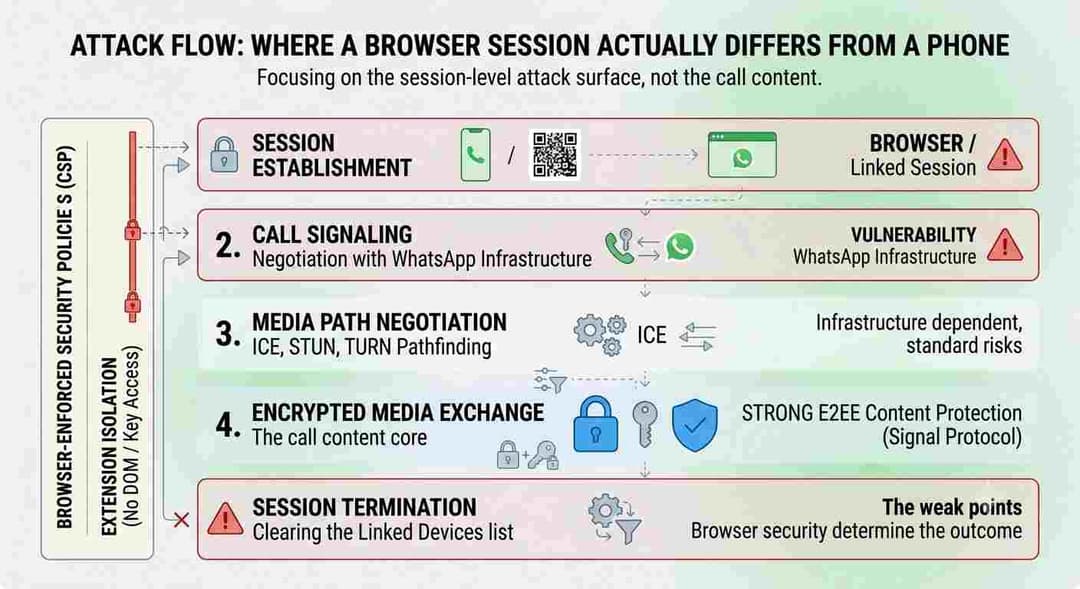
The call content itself stays encrypted end to end at every stage. The actual risk in a browser sits around that encrypted core, at session setup, signaling, and session cleanup, where browser permissions and extensions can matter more than WhatsApp's cryptography.
A useful way to think about the risk is to trace the attack surface end to end rather than treating it as a single yes or no question about encryption.
- Session establishment: user scans a QR code or approves a linked session, which creates a companion device tied to the account.
- Call signaling: the browser negotiates the call setup with WhatsApp's infrastructure.
- Media path negotiation: ICE, STUN, and TURN determine how the audio and video packets will actually travel between participants.
- Encrypted media exchange: the call content itself is protected end to end for the duration of the session.
- Session termination: the linked browser session should be cleared from the account's Linked Devices list when work is done.
The content protection in step four is strong and well tested. The weak points that a security team should actually worry about sit in steps one, two, and five, because those are the points where the browser's own security posture, not WhatsApp's cryptography, determines the outcome.
Real World Risk Scenario
Picture a mid sized company that just adopted WhatsApp Web calling because field staff wanted an option that did not require installing another desktop app on locked down laptops. A well meaning employee installs an unvetted browser extension for a completely unrelated reason, maybe a coupon finder or a productivity tracker, and that extension has been granted broad tab access.
WhatsApp's call encryption does nothing to stop that extension from reading what is rendered on screen or interacting with the page DOM, because the extension is running inside the same browser context the user granted it access to. This is not a flaw in WhatsApp's cryptography. It is a browser permission problem, and it is exactly the kind of gap that a formal browser extension policy and an endpoint security posture are designed to close.
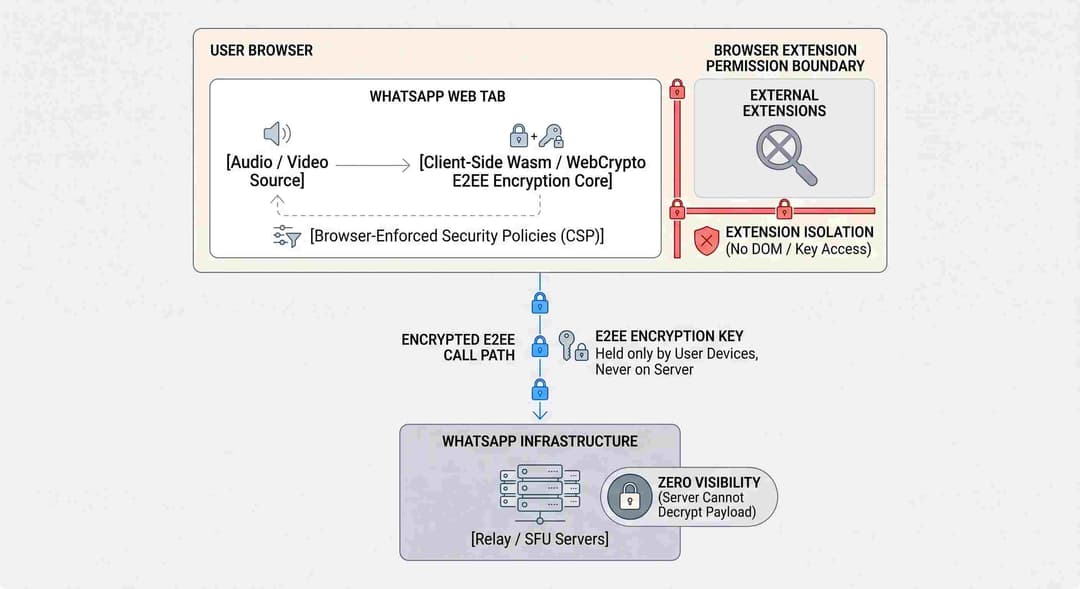
Industry And Business Impact
Web Calling shifts WhatsApp from a blockable native install to a browser feature reachable from any device with network access, which changes how regulated organizations need to think about device management, shadow IT, and consumer app policy.
For regulated industries, the shift from a mandatory desktop install to a zero install browser option changes the compliance conversation. A native app can be centrally managed, version locked, and restricted through mobile device management. A browser tab is only as controlled as the browser itself and whatever extension and network policies the organization enforces around it.
Security teams that previously blocked the WhatsApp desktop app outright, assuming that blocking the installer was sufficient, now need to account for the fact that the same functionality is reachable from any managed or unmanaged browser with network access.
There is also a workforce behavior angle. Because Web Calling removes the friction of an app install, adoption inside organizations is likely to rise quickly, particularly among contractors, shared workstation users, and staff on tightly locked down images. That is precisely the population least likely to have consistent browser hardening applied, which makes this a good moment for a policy review rather than a wait and see approach.
Hoplon Insight Box
Before rolling out or informally tolerating WhatsApp Web calling across your environment, run through these checks:
- Confirm your endpoint policy addresses browser extension installation, not just native application installation
- Verify your firewall rules do not force WebRTC media through inspection proxies that will silently degrade call quality or block connectivity entirely
- Add WhatsApp Web session activity to the review scope during your next mobile and endpoint threat assessment, an area covered under mobile security and threat defense
- Treat any browser based communication tool as part of your overall attack surface management inventory, since new zero install features expand what your organization exposes without anyone submitting a change request
Mitigation And Security Best Practices
Enterprises should focus on browser extension allowlisting, WebRTC firewall rules, and Linked Devices hygiene rather than trying to block the encryption layer, since the encryption itself is not the weak point in this rollout.
For enterprise security administrators, the practical checklist looks like this. Enforce a browser extension allowlist through group policy or your endpoint management platform, rather than relying on employees to self police what they install. Keep WebRTC UDP traffic on an allowlist in your firewall so calls are not silently broken by inspection proxies, while confirming that any SSL inspection layer is not attempting to intercept traffic it structurally cannot decrypt anyway.
Extend your existing endpoint security controls to explicitly cover browser based communication tools, since these tools now carry the same organizational risk profile as a native chat client. Periodically review Linked Devices lists tied to corporate accounts and remove stale browser sessions, particularly on shared machines.
For end users, the guidance is simpler. Verify a contact's security code before a sensitive call if you have any doubt about who is on the other end. Keep Waiting Room enabled for any link based group call where uninvited participants would be a problem. Log out of the WhatsApp Web session from your phone's Linked Devices menu when you finish using a shared or public computer. Keep your browser's own security features, such as enhanced safe browsing warnings, switched on rather than dismissed.
| Mitigation | Applies To | Priority |
|---|---|---|
| Browser extension allowlist policy | Enterprise IT and security teams | High |
| WebRTC traffic allowlist in firewall rules | Network security teams | High |
| Linked Devices session review cadence | End users and IT admins | Medium |
| Waiting Room enforced for external links | Meeting or call hosts | Medium |
| Security code verification for sensitive calls | Individual users | Situational |
Organizations that have never formally assessed how consumer messaging tools intersect with their network policy may find this is a good trigger point for a broader cyber resilience assessment rather than a one off fix.
Frequently Asked Questions
Is WhatsApp Web calling actually end to end encrypted? Yes. Meta has stated directly that calls made through WhatsApp Web carry the same end to end encryption as calls made on mobile or desktop, using the platform's existing Signal Protocol based architecture.
Can a malicious browser extension listen to my WhatsApp Web calls? The call content itself travels encrypted and an extension cannot decrypt that stream. An extension with broad permissions could still capture what is displayed or interact with the page, which is a browser permission risk rather than a flaw in the call encryption.
Does moving a call from my phone to WhatsApp Web create a security gap? Meta has not published implementation level detail on the exact key handling during a Call Transfer between devices, so specific claims about that moment would be unverified. What is confirmed is that the destination session remains end to end encrypted once transferred.
How does the Waiting Room feature control who joins a group call? When a host creates a call link with Require approval to join enabled, anyone using that link is held in a waiting room until the host manually admits them, giving the host direct control over participation.
Is background noise suppression sending my audio to a server for processing? Meta has not published technical detail confirming or denying local versus server side processing for this specific feature, so that claim should be treated as unconfirmed until WhatsApp documents it directly.
What ports does my company firewall need open for WhatsApp Web calls to work reliably? WhatsApp has not published an official list of required ports for this new web client. Organizations should expect standard WebRTC requirements around UDP media traffic and HTTPS signaling, and should validate actual behavior in their own network before writing firewall exceptions based on assumption.
Hoplon Technical Takeaway
WhatsApp Web calling security comes down to a simple split. The cryptography protecting call content is mature, independently reviewed, and unchanged by this update. What changed is the delivery surface, and browsers carry a different risk profile than a locked down mobile operating system.
Security teams should treat this launch as a prompt to formalize browser extension policy, confirm firewall behavior around WebRTC traffic, and fold consumer messaging tools into existing endpoint and web application security testing review cycles rather than assuming encrypted content means the whole channel is automatically low risk.
If your organization needs help translating this into an actual policy and testing plan, Hoplon InfoSec's virtual CISO services can help you build that out without waiting for an incident to force the conversation.