

CVE-2026-85706: A Serious GitLab Bug Was Used in Attacks
A very serious GitLab problem, called CVE-2026-85706, has been added to the CISA Known Exploited Vulnerabilities list.
GitLab says this flaw has a CVSS score of 10.0.
When the conditions described by the company are met, an unauthenticated user can read any file from a vulnerable GitLab server.This happens because the system fails to properly limit file paths and doesn’t check for authentication when using the repository commits API.
GitLab fixed the issue in versions 19.1.8, 19.2.6, and 19.3.2 on September 10, 2026.
GitLab.com was already fixed when the warning was released, and Dedicated customers were told they didn’t need to take any action.
CISA added CVE-2026-85706 to the KEV list on September 11, 2026, and set a federal deadline for fixing it by September 14, 2026.
The list notes that ransomware attacks using this flaw are currently unknown, and federal agencies are advised to do a forensic check as per BOD 26-04.
If you’re running affected self-managed GitLab systems, the steps you should take are: find which systems are at risk, update them using a supported method, keep records of what happened during the time they were vulnerable, and look into any suspicious activity if there was exposure.
Key Points:
• CVE-2026-85706 impacts both GitLab Community and Enterprise editions.
• GitLab rates this flaw as CVSS 10.0.
• The part of GitLab that is affected is the repository commits API.
• This bug can be used without needing a user to log in.
• The main effect is that attackers can read any file on the system.
• The fixes came out in versions 19.1.8, 19.2.6, and 19.3.2.
• CISA added this flaw to the KEV list on September 11, 2026.
• The deadline for federal agencies to fix this is September 14, 2026.
• CISA hasn’t confirmed if this flaw was used in ransomware attacks.
• Federal agencies are required to do a forensic review based on BOD 26-04.
• Security researchers at watchTowr noticed suspicious activity targeting honeypot setups right after the flaw was made public.
CISA Known Exploited Vulnerabilities Catalog
CVE-2026-85706 at a Glance
|
Detail |
Information |
|
CVE |
CVE-2026-85706 |
|
Vendor |
GitLab |
|
Products |
Community Edition and Enterprise Edition |
|
Vulnerability class |
Path traversal / improper path confinement |
|
Affected component |
Repository commits API |
|
Authentication |
Not required under affected conditions |
|
Confirmed impact |
Arbitrary file read |
|
CVSS |
10.0 Critical |
|
CVSS vector |
CVSS:3.1/AV:N/AC:L/PR:N/UI:N/S:C/C:H/I:H/A:N |
|
CISA KEV |
Yes |
|
Date added |
September 11, 2026 |
|
CISA due date |
September 14, 2026 |
|
Ransomware use |
Unknown |
|
Forensic triage |
Required under applicable BOD 26-04 guidance |
|
Fixed releases |
19.1.8, 19.2.6, 19.3.2 |
A Note About the CWE Classification
There's an important difference to keep in mind based on where the information comes from.
CISA's KEV entry lists CWE-35, but the CVE record assigned by GitLab refers to the weakness as CWE-22: Improper Limitation of a Pathname to a Restricted Directory, which is often called path traversal.
These classifications should not be automatically combined into one.
For practical purposes, the key point remains the same: the flaw allows a file path to escape its intended restriction under specific conditions.
What is CVE-2026-85706?
CVE-2026-85706 is a path traversal vulnerability in GitLab CE and EE related to the repository commits API.
GitLab explains that the issue involves both improper path confinement and a lack of authentication checks.
Under certain conditions, an unauthenticated user could make the application read files that shouldn't be accessible via the API.
Path traversal vulnerabilities occur when an application doesn't properly restrict a file path to a specific directory or allowed location.
The confirmed impact from GitLab's advisory is that an attacker could read arbitrary files.
This doesn't automatically mean the attacker gains full control over the operating system.
-20260914152331.webp&w=1080&q=75 "CVE-2026-85706")
CVE-2026-85706
The actual impact on an organization depends on several factors, such as:
• what files the GitLab process can access;
• local permissions;
• how the system is configured;
• whether sensitive secrets are stored locally;
• and what other systems the GitLab environment can reach.
This is important because vulnerability severity should not be overestimated based on limited or incomplete evidence.
Why is the CVSS Score 10.0?
GitLab assigned the following CVSS 3.1 vector:
CVSS:3.1/AV:N/AC:L/PR:N/UI:N/S:C/C:H/I:H/A:N
The score reflects several serious characteristics.
Network attack vector: the vulnerability can be exploited remotely.
Low attack complexity: GitLab's scoring doesn't require highly complex conditions to exploit.
No privileges required: the attacker doesn't need to already have privileged access.
No user interaction: the attack doesn't depend on a user taking any action.
High confidentiality and integrity impact: GitLab's assessment shows both of these areas are severely affected.
A CVSS 10.0 score shows technical severity.
It does not prove that a particular GitLab server has been hacked.
Which GitLab Versions Are Affected?
GitLab lists these affected ranges:
|
Release Line |
Vulnerable Versions |
Fixed Release |
|
18.7 through 19.1 |
18.7 up to, but not including, 19.1.8 |
19.1.8 |
|
19.2 |
Earlier than 19.2.6 |
19.2.6 |
|
19.3 |
Earlier than 19.3.2 |
19.3.2 |
Administrators should verify the actual installed version instead of assuming that a recent update means the server is safe.
A system may have been updated recently and still be running one of the affected releases.
A Familiar GitLab Flaw, but With a Much Broader Exposure Profile
CVE-2026-85706 is not the first maximum-severity GitLab vulnerability involving unauthenticated path traversal and arbitrary file access.
In May 2023, GitLab fixed CVE-2023-2825, another path traversal flaw rated CVSS 10.0. That vulnerability also allowed an unauthenticated attacker to read arbitrary files from the server. Interestingly, GitLab assigned both vulnerabilities the same CVSS 3.1 vector: AV:N/AC:L/PR:N/UI:N/S:C/C:H/I:H/A:N.
The similarities, however, hide an important difference in practical exposure.
CVE-2023-2825 affected only GitLab 16.0.0 and required an attachment to exist inside a public project nested within at least five groups. CVE-2026-85706 affects a much wider range of GitLab releases, beginning with 18.7 and extending across multiple 18.x and 19.x release lines before the fixed versions.
This means the severity score itself does not tell the full story.
Both vulnerabilities reached CVSS 10.0, but the newer issue potentially affects a much broader population of installations. For defenders, that distinction matters because exposure depends not only on how severe a vulnerability is, but also on how many deployed versions fall inside the vulnerable range and how easily the required conditions can exist in real environments.
The comparison is also a useful reminder that two vulnerabilities with identical CVSS scores can create very different operational risks.
How to Check Your GitLab Version
For a self-managed Linux package installation, GitLab documents this command:
sudo gitlab-rake gitlab:env:info
Look under GitLab information for the Version field.
In a multi-node deployment, GitLab says this task should be run on a node running GitLab Rails.
After confirming the version, compare it with the affected ranges above.
Patch Through a Supported GitLab Upgrade Path
An important detail is easy to miss: the fixed release is not always the same thing as the next safe upgrade step from an old installation.
GitLab uses required upgrade stops when administrators move across certain minor and major releases.
For GitLab 18, required stops occur at:
18.2 → 18.5 → 18.8 → 18.11
For GitLab 19, the documented pattern includes:
19.2 → 19.5 → 19.8 → 19.11
Only the updates between the current version and the desired version are allowed.
For example, if a company is using GitLab 18.7, they shouldn't try to jump straight to a newer 19.x version.
GitLab needs administrators to follow the proper upgrade steps and let any necessary background tasks complete before moving to the next version.
If a company is already on an affected 19.2.x or 19.3.x release, the way to get to the fixed version is much easier.
GitLab Upgrade Path Documentation
Before Installing the Update
Urgent matters, but getting ready for an upgrade is still very important.
GitLab suggests looking at the upgrade notes for every version you're considering, and checking the type of installation, if your operating system is supported, what upgrade stops are needed, and other things you need to know before changing versions.
A good way to prepare is to:
• Make sure you have a backup and a plan to recover it;
• Confirm the correct path to upgrade;
• Review the upgrade notes for the specific version you're moving to;
• Let any background migrations finish;
• Check that your platform is compatible;
• Run GitLab health checks before and after the upgrade.
For Linux installations using packages, GitLab has this command:
sudo gitlab-rake gitlab:check
Admins can also check if encrypted database values can still be decrypted using GitLab's tools for checking secrets.GitLab Before You Upgrade Guidance
Is GitLab.com Affected?
GitLab said that GitLab.com was already using the fixed version when the security warning was made public.
GitLab also mentions that customers who use the Dedicated service do not need to do anything about this problem.
The main action needed by customers is to fix affected self-managed GitLab CE and EE setups.
Organizations should check their setup type instead of assuming someone else is handling the update.
Is CVE-2026-85706 Being Used Actively?
CISA decided to include CVE-2026-85706 in the Known Exploited Vulnerabilities list, so defenders should treat this as a real threat, not just a possible risk.
CISA added the entry on September 11, which is just one day after GitLab released the security fix.
The KEV entry does not tell us:
• how many companies were affected;
• which specific groups were targeted;
• who is behind the attacks;
• whether all the attempts were successful;
• whether ransomware groups are using this flaw.
CISA currently says it's unknown if ransomware campaigns are using the vulnerability.
This is important.
A flaw can be being used without clear proof that a specific criminal or state-backed group is behind the attacks.
Why Exploitation Signals Should Be Tracked Over Time
A CVSS score describes the technical severity of a vulnerability, but it does not measure how likely exploitation is at a particular moment.
That is where exploitation-focused signals such as EPSS can add useful context.
FIRST's Exploit Prediction Scoring System provides historical daily scores for individual CVEs, which makes it possible to examine how predicted exploitation risk changes as new information becomes available.
For CVE-2026-85706, the useful question is therefore not simply:
“What is the EPSS score today?”
A more meaningful question is:
“How did the score change as public exploitation signals appeared?”
The timeline around this vulnerability includes several important events: GitLab released the security fix, CISA added the issue to the Known Exploited Vulnerabilities catalog, researchers reported suspicious probing, and public technical information became available.
Tracking the EPSS score across those dates can show whether predicted exploitation risk increased before, during, or after those signals became widely visible.
This kind of timeline is more useful than presenting a single static EPSS number because the score can change as new threat intelligence enters the model.
For security teams, the broader lesson is important: vulnerability prioritization should not rely on CVSS alone.
A better assessment combines:
Technical severity + known exploitation + exposure + exploitability signals + asset importance.
For internet-facing GitLab systems, those factors together provide a much clearer picture of urgency than any single score.
What Has Been Seen in the Wild?
watchTowr said that its Attacker Eye system noticed behavior linked to CVE-2026-85706 right after the problem was made public.
The researchers also tested the flaw and told companies running public-facing self-managed GitLab systems to apply the fix quickly.
For security teams, watchTowr suggests checking logs for odd HTTP POST requests sent to the repository commits API that include file.path parameters.
A strange request alone doesn’t mean the system was hacked.
It could be a scan, a failed try, or something that needs more checking.watchTowr Technical Analysis of CVE-2026-85706
Why CISA's Forensic-Triage Requirement Matters
CISA's KEV entry says that forensic triage is needed under BOD 26-04 for federal assets.
Hoplon Security Analysis: What Defenders Should Take From This Vulnerability
CVE-2026-85706 should not be treated as a simple patch-management issue.
The immediate technical problem is clear: affected self-managed GitLab installations need to move to a fixed release. But for security teams, the more important question is whether the vulnerable system was exposed long enough for unauthorized access to be possible.
Several factors should be considered together.
Internet exposure matters.
A vulnerable GitLab instance that was publicly reachable presents a different
level of operational risk from one restricted to a tightly controlled internal network.
The vulnerable period matters.
Installing the patch fixes the current software state, but it does not
establish whether suspicious activity occurred before remediation.
Available evidence matters.
HTTP logs, GitLab application logs, reverse-proxy records, WAF events,
authentication data, endpoint telemetry, and SIEM records can help determine
whether observed activity was routine scanning, attempted exploitation, or
something requiring deeper investigation.
Accessible data matters.
The practical impact depends on what the GitLab process could access in that
specific environment. Sensitive configuration files, credentials, CI/CD
secrets, tokens, and connected services should be evaluated based on evidence
rather than assumed to be compromised automatically.
This leads to an important distinction:
Vulnerability severity tells defenders what
could happen.
Incident evidence helps determine what actually happened.
For affected internet-facing GitLab environments, Hoplon recommends treating remediation as two connected tasks:
1. Remove the vulnerability.
Verify the exact version and upgrade through GitLab's supported path.
2. Assess the exposure window.
Preserve relevant evidence and investigate suspicious activity that occurred
while the system was vulnerable.
This approach avoids two common mistakes: assuming that a CVSS 10.0 vulnerability automatically means compromise, and assuming that installing the patch proves nothing happened before the update.
The appropriate response should therefore be based on the combination of vulnerability severity, actual exposure, available telemetry, and evidence of suspicious activity.
This changes the way we think about the question:
Instead of asking, “Did we install the patch?”
We now need to ask, “Was this system exposed while it had a vulnerability, and is there proof that someone exploited it?”
These rules apply based on how broad the federal directive is.
Private companies aren’t required to follow this same federal rule by default.
But the idea behind it is still helpful for any company that runs an internet-facing GitLab server: applying a patch fixes the problem in the software, but it doesn’t show what happened before the patch was added.
What GitLab Administrators Should Do Now
The most useful way to respond is by following seven steps:
Identify → Verify → Upgrade → Preserve → Investigate → Respond → Validate
1.Identify All Self-Managed GitLab Instances
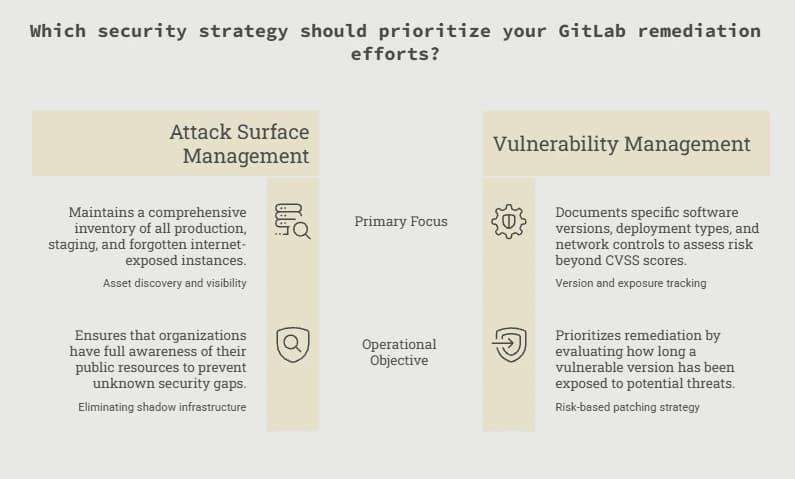
Make a list of all your GitLab setups, including production, staging, testing, disaster recovery, migration, and any forgotten ones that are open to the internet.
You can't fix a security problem properly if your team doesn't know about the instance.
Companies that have trouble keeping track of their public resources should also look at their overall situation. Attack Surface Management process.
2. Verify Version and Internet Exposure
For each instance, document:
- GitLab version;
- CE or EE;
- deployment type;
- whether the server is publicly reachable;
- what network controls restrict access;
- how long the vulnerable version may have been exposed.
This is where a risk-based Vulnerability Management program becomes more useful than prioritizing vulnerabilities by CVSS alone.
3.Upgrade to a Fixed Release
Installations that are affected should update to one of these fixed versions: 19.1.8, 19.2.6, or 19.3.2.
Use the upgrade path that GitLab officially supports, and don’t skip any required intermediate releases.
Make sure any necessary background migrations finish before starting the next upgrade step.
4.Keep Evidence From the Vulnerable Time
If the system was open to risk before it was fixed, keep the logs needed to look into that time period.
Important logs may include:
• GitLab application logs;
• HTTP access logs;
• reverse-proxy logs;
• WAF logs;
• load-balancer logs;
• authentication logs;
• endpoint telemetry;
• network telemetry;
• SIEM events.
Make sure to save these logs before they get deleted by normal retention policies or other system activity.
5.Check for Strange API Activity Related to Repository Commits
Look for unusual requests that involve the affected API, especially if they are:
• not logged in;
• coming from outside the system;
• repeated too often;
• different from regular development activity;
• connected to strange behavior in the app.
Don’t assume the system is hacked based on one log entry alone.
When investigating, make sure to tell the difference between scanning, checking, failed attacks, and real unauthorized access.
6.Look at Possible File and Credential Exposure
If there’s evidence that an attack worked, find out what the GitLab system could actually access.
Check these areas:
• application settings;
• saved access tokens;
• API keys;
• SSH keys;
• database connections;
• service account keys;
• CI/CD secrets;
• cloud credentials.
These are places to look, not the idea that every affected GitLab server had or shared these.
Development repositories may also connect to other secure systems.Hoplon has previously discussed separate incidents involving GitLab token exposure at Pearson and the Red Hat Consulting GitLab breach.
Those incidents are unrelated to CVE-2026-85706 and should only be treated as broader repository-security context.
7. Respond and Validate
If exposed credentials are identified, evaluate whether they should be revoked, rotated, replaced, or monitored.
If successful exploitation is confirmed, review connected systems for evidence of follow-on activity rather than assuming the incident remained limited to the GitLab host.
Organizations that cannot confidently determine the scope may need professional Incident Response and Recovery support.
After remediation, verify:
- the new GitLab version;
- all relevant nodes;
- migration completion;
- application health;
- expected CI/CD operation;
- that old containers or servers are no longer serving traffic;
- that vulnerability-management systems recognize the corrected version.
Broader Network Security controls can also help reduce unnecessary exposure and improve visibility around sensitive development infrastructure.
Response Matrix
|
Situation |
Recommended Response |
|
Vulnerable and publicly exposed |
Patch immediately, preserve evidence, assess exposure, perform triage |
|
Vulnerable but internally restricted |
Patch promptly and evaluate realistic attack paths |
|
Patched after public exposure |
Investigate the vulnerable exposure window |
|
Already running a fixed release |
Verify deployment and document status |
|
GitLab.com |
GitLab says the service was already patched |
|
GitLab Dedicated |
GitLab says no customer action is required |
|
Suspicious exploitation evidence exists |
Escalate investigation and scope files, credentials, and connected systems |
Common Mistakes to Avoid
Assuming the patch shows there was no earlier problem
It doesn't.
Fixing the flaw stops future attacks but doesn't show what happened before.
Assuming a CVSS 10 score means an attack definitely happened
It doesn't.
CVSS shows how bad the flaw is, not whether it was used.
Assuming CISA KEV means ransomware is involved
CISA currently says it's unknown if this vulnerability is used in ransomware attacks.
Treating every probe as a real attack
Scanning and trying to exploit are different things.
Skipping GitLab's upgrade steps
Older setups may need to stop at certain points and complete background updates.
Changing all credentials without checking where they are used
Credential changes should be based on real evidence and understanding of what depends on them to avoid unnecessary disruptions.
Frequently Asked Questions
What is CVE-2026-85706?
CVE-2026-85706 is a serious GitLab CE/EE flaw that lets an unauthenticated user read files from the server through the repository commits API.
This happens because the system doesn't properly limit file paths and doesn't enforce authentication.
What is the CVSS score?
GitLab gave this flaw a CVSS 10.0 score, which is the highest.
Which GitLab versions are affected?
Versions from GitLab CE/EE 18.7 before 19.1.8, 19.2 before 19.2.6, and 19.3 before 19.3.2 are affected.
Which versions have the fix?
GitLab says 19.1.8, 19.2.6, and 19.3.2 are fixed.
Does an attacker need a GitLab account?
Under the conditions GitLab described, an attacker doesn't need an account to exploit the flaw.
Is CVE-2026-85706 being actively used?
CISA has added the flaw to its Known Exploited Vulnerabilities list.
Is it linked to ransomware?
CISA currently doesn't know if this flaw is used in ransomware attacks.
Is GitLab.com affected?
GitLab says GitLab.com was already fixed when the advisory was released.
Do GitLab Dedicated customers need to act?
GitLab says Dedicated customers don't need to take action for this issue.
How do I check my GitLab version?
For Linux installations:
Use the command `sudo gitlab-rake gitlab:env:info`
Look at the Version line under GitLab information.
Can I jump directly from an old version to a fixed one?
Not always.
Some upgrade paths require stops.Administrators should plan the correct upgrade path from the current version to the target.
Should I investigate after fixing the issue?
If the system was exposed while vulnerable, especially if it's internet-facing, reviewing the vulnerable period is a good idea.
CISA’s KEV entry also recommends forensic checks for federal systems.
Practical Administrator Checklist
• Find every self-managed GitLab instance.
• Check the exact version.
• Find out if each instance is internet-accessible.
• Compare versions with the affected ranges.
• Look at GitLab’s upgrade steps.
• Make sure you have backups and can roll back if needed.
• Check for any background migrations that are relevant.
• Run health checks before upgrading.
• Upgrade step by step to a fixed version.
• Test the system after the upgrade
• Save logs from the time the system was vulnerable.
• Look for unusual activity in the repository commits API.
• If an attack is suspected, find out which files were accessed.
• Check for any secrets or credentials that might have been exposed.
• Change or remove credentials if there's evidence they were used.
• If an attack is confirmed, check connected systems.
• Keep records of what was done to fix the problem and what was found.Organizations following GitLab security issues may also review Hoplon Infosec's earlier GitLab vulnerability coverage. Those vulnerabilities are separate from CVE-2026-85706.
When Professional Incident Response Makes Sense
Not every vulnerable installation requires a large forensic engagement.
Professional incident-response assistance becomes more relevant when the affected GitLab server was publicly exposed, suspicious requests appear in logs, sensitive files may have been read, credentials may have been disclosed, or internal teams cannot reliably determine the scope.
The objective should not be to create fear around a critical CVE.
It should be to answer four questions:
Was exploitation attempted?
Did it succeed?
What could have been exposed?
Was that access used anywhere else?
Hoplon Infosec provides Incident Response and Recovery services for organizations that need support answering those questions and containing confirmed incidents.
Final Takeaway
CVE-2026-85706 deserves immediate attention from organizations operating affected self-managed GitLab servers.
GitLab has released fixed versions, CISA has added the vulnerability to its Known Exploited Vulnerabilities catalog, and evidence of probing appeared quickly after disclosure.
The strongest response is not simply “patch and move on.”
It is:
Identify → Verify → Upgrade → Preserve → Investigate → Respond → Validate
For an affected internet-facing server, applying the security update is the immediate priority.
Determining what happened during the vulnerable exposure period is the next one.





