

What happened this week in cybersecurity, who is affected, and why does it matter right now?
This cybersecurity weekly recap is about a rare but serious OpenSSL remote code execution risk that pushed teams into patch mode, a high-severity Chrome bug tied to the Background Fetch API, Windows 11 devices failing to boot after a January update, and a fresh wave of confusion around WhatsApp privacy claims. If you use Chrome, Windows 11, Microsoft Office, WhatsApp, or a Mac, you are close to at least one of these stories, and the fixes only help after updates are applied and devices are restarted.
Quick weekly recap
Here is the fast version of this cybersecurity weekly recap before we go deeper.
OpenSSL shipped a security update on January 27, 2026, addressing 12 issues, including a high-severity flaw that could, in certain real setups, lead to remote code execution. The key takeaway is not panic; it is patching the systems that parse untrusted cryptographic content like CMS, S/MIME, or PKCS formats. Read more
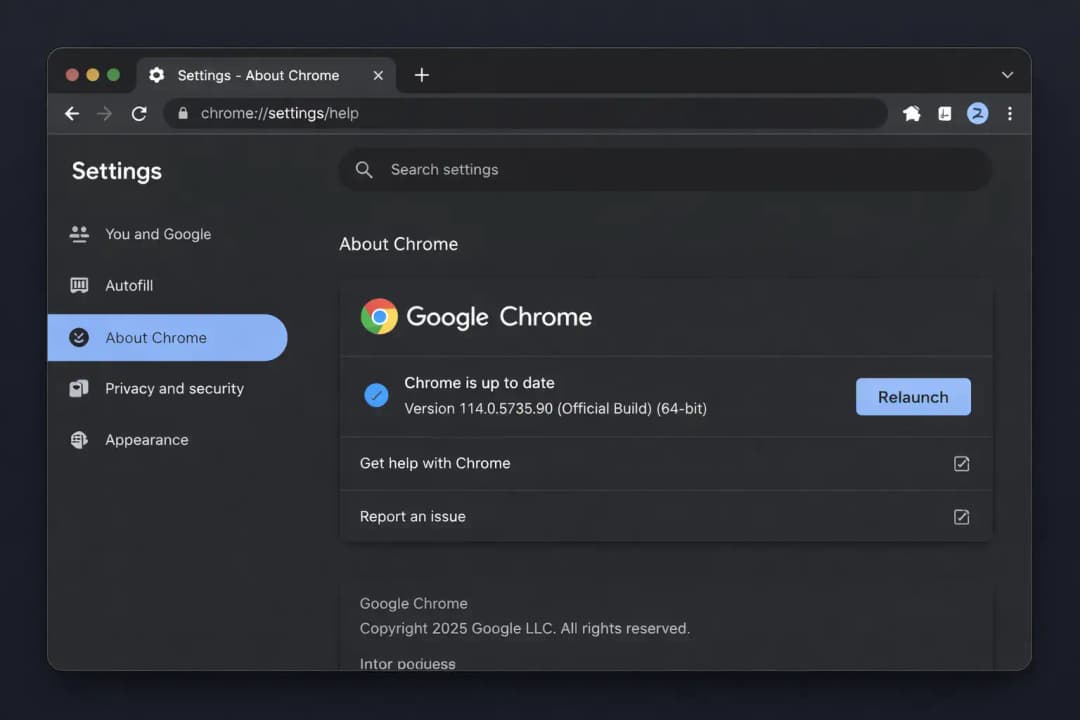
Google pushed a Chrome Stable update (Chrome 144) on January 27, 2026, fixing CVE-2026-1504, described as an “inappropriate implementation” in the Background Fetch API. The important part is simple: update Chrome and restart it. Read more
Microsoft is investigating Windows 11 boot failures after January 2026 updates, with reports of the UNMOUNTABLE_BOOT_VOLUME stop error, often tied to KB5074109. If you are affected, recovery steps may be needed; if you are not, backups and a short pause on updates can be a reasonable move until Microsoft ships clearer guidance. Read more
Microsoft issued an emergency patch for an actively exploited Office zero-day, tracked as CVE-2026-21509 (a security feature bypass). A few days ago, the story was cloudy; now there are official patches and multiple reputable reports. Read more
A lawsuit reignited the “Can Meta read WhatsApp messages?” debate. Right now, there is no public proof that Meta routinely reads message content, and Meta has publicly pushed back. The real-world privacy risk for most people is usually backups and metadata, not a movie-style “someone reads every chat live.” Read more
Mac users saw another social-engineering style trap: the ClickFix pattern that talks you into pasting a Terminal command, linked to a MacSync infostealer campaign. The trick is less about a “Mac virus” and more about someone politely convincing you to run the attacker’s code yourself. Read more
Ransomware services are trending again because attacks keep hitting the same boring entry points: exploited vulnerabilities, compromised credentials, and email-based lures. A Sophos survey foundthat exploited vulnerabilities were the top technical root cause, cited in 32% of cases. Read more
Why this week felt different
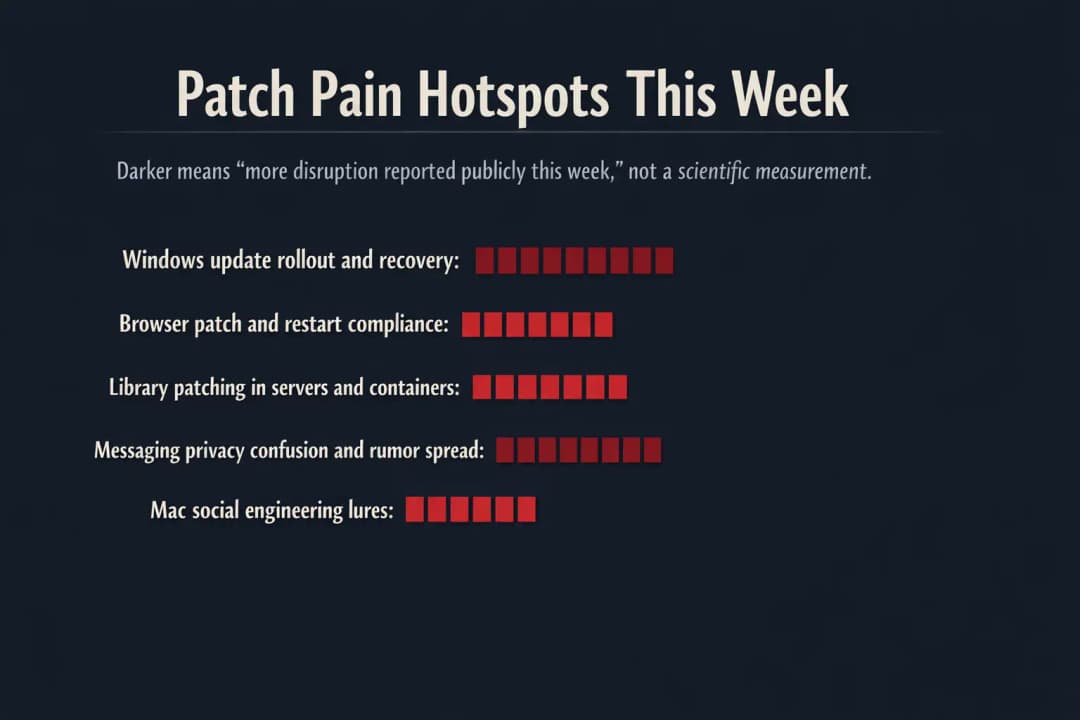
This cybersecurity weekly recap had a theme: the security news was not about one blockbuster breach. It was about the stuff that quietly runs everything.
OpenSSL sits under a huge chunk of the internet’s “lock icon” world. Chrome is where work and personal life happen now. Windows updates are supposed to be routine, but when an update breaks booting, it turns security into a very human problem: missed meetings, lost time, and frantic recovery screens.
If you work in IT, you probably recognize the vibe. One team is pushing patches. Another is begging people not to click sketchy links. Someone else is trying to recover a laptop that will not start. And in the background, there is always the same question from leadership: “Is this real, and does it hit us?”
That last part matters because misinformation spreads fast, especially around “zero-day” claims. Hoplon’s guidance gets this right: if a claim has no CVE, no vendor advisory, and no reproducible details, it is fair to say, “This appears to be unverified or misleading information, and no official sources confirm its authenticity.” In the Office case, the story moved quickly from uncertainty to confirmed patching.
OpenSSL: the rare “patch it now” moment, without the doom posting
Let’s start the deep dive in this cybersecurity weekly recap with OpenSSL, because it is the kind of dependency people forget until it lights up every scanner on earth.
On January 27, 2026, OpenSSL published updates addressing a dozen vulnerabilities, including a high-severity issue that can create a pre-auth stack overflow in specific parsing paths. The practical risk is highest where systems process untrusted CMS AuthEnvelopedData (often associated with S/MIME and related workflows).
Here is the part that makes this story easy to misunderstand: most systems using OpenSSL for standard TLS web traffic are not automatically in crisis. The sharper risk comes from applications that accept and parse complex cryptographic objects from outside parties. Email security gateways, document verification services, and any backend pipeline that automatically processes signed or encrypted blobs are the places where “boring library bug” becomes “real incident.”
-20260130160543.webp&w=1080&q=75)
This matches the “layered view” approach described in Hoplon’s coverage, and it lines up with deeper technical breakdowns from researchers who reviewed affected code paths and versions.
What to do next, if you own systems:
Identify where OpenSSL is actually used, including containers and statically linked binaries.
Prioritize systems that parse untrusted CMS, PKCS#7, and PKCS#12.
Patch to the vendor-recommended fixed versions, then restart services so the new library is actually loaded.
Chrome: the “update and restart” vulnerability most people ignore
The Chrome item in this cybersecurity weekly recap is a classic example of how modern browser features create new edge cases.
Google’s Chrome Releases blog confirmed a Stable Channel update for desktop on January 27, 2026, fixing CVE-2026-1504 in the Background Fetch API. Public details were limited, which is normal when vendors want more users patched before attackers get a clean blueprint.
If the words “Background Fetch API” mean nothing to you, that is fine. Think of it like this: the browser can keep moving data even when you are not actively staring at the page. That convenience is useful, but it raises the bar on isolation and permission handling. When implementation details go wrong, attackers look for ways to chain the bug with other tricks.
What to do as a normal human, not a security engineer:
Update Chrome.
Restart Chrome.
If you manage a fleet, verify version rollouts on endpoints, because “auto-update” often means “eventually.”
Windows 11: When patching collides with boot failure
This cybersecurity weekly recap includes a story that is not purely security but still belongs on a security site because it changes user behavior fast: people stop updating when updates hurt them.
Microsoft acknowledged reports of Windows 11 devices failing to boot with UNMOUNTABLE_BOOT_VOLUME after January 2026 Patch Tuesday updates. Coverage consistently points to KB5074109 and notes Microsoft is investigating a limited number of cases.
A boot failure is not a minor inconvenience. It turns routine patching into a high-stakes choice for small businesses and families alike. Nobody wants to be the person who tells a team, “Install the update,” and then half the laptops end up stuck in recovery mode.
If you are affected, many guides recommend uninstalling the update via Windows Recovery Environment steps. If you are not affected, short-term caution can look like this: back up first, pause updates briefly, and follow Microsoft’s next official guidance.
Microsoft Office: from rumor swirl to confirmed zero-day patch
The Office story is one reason this cybersecurity weekly recap feels urgent for everyday users.
Early reporting around an “Office zero-day” left a lot of people asking whether the threat was real or just another fear cycle. Hoplon called out the uncertainty clearly at the time, noting the lack of public CVE and the lack of an official emergency bulletin at that moment.
Then the situation moved. Microsoft released an emergency out-of-band patch for an actively exploited Office zero-day, tracked as CVE-2026-21509, described as a security feature bypass. Multiple reputable outlets reported it, including SecurityWeek and BleepingComputer.
This is a good example of how to talk about “zero-day” claims without embarrassing yourself later. The honest flow is
“We are seeing reports.”
“Here is what is not confirmed yet.”
“Now it is confirmed and patched; do this.”
WhatsApp lawsuit: what the claim is and what most people should worry about instead
This cybersecurity weekly recap would be incomplete without the WhatsApp privacy story, because it affects billions of users, and it triggers real fear.
Hoplon’s coverage frames it carefully: a lawsuit alleges Meta can read WhatsApp messages “in some ways,” but there is no proof that Meta regularly reads private WhatsApp chats, and the case is ongoing. Meta has also publicly denied having access to WhatsApp chats, reaffirming end-to-end encryption.
Here is the practical nuance most headlines skip.
End-to-end encryption protects message content in transit so only the sender and recipient can read it. But privacy can still leak through other doors: device compromise, cloud backups, and metadata. Even the Electronic Frontier Foundation has pointed out that backups are a long-running friction point for encrypted messaging apps because people want convenience and portability, and those desires create new places where data can live.
Real-world example:
A small business owner uses WhatsApp for client orders. Nobody has to “break encryption” to cause harm. If the owner’s phone account gets taken over or their chat backup is exposed, the attacker does not need to read every message live. They just need enough to impersonate the owner or steal invoices.
What to do next:
Review your WhatsApp backup settings and consider end-to-end encrypted backups where available.
Treat “Meta reads every message” claims carefully until courts and technical evidence confirm specifics.
macOS ClickFix and MacSync: The scam is the conversation, not the code.
The Mac story in this cybersecurity weekly recap is one of the most relatable because it mirrors how real people get compromised.
Hoplon describes the ClickFix pattern bluntly: a page tells you to copy and paste a Terminal command to “finish installing” something. You do it, and the attacker’s code runs in a way that can bypass typical protections like Gatekeeper, because you ran it yourself.
This is not a “Macs are unsafe now” story. It is a “humans are busy” story.
A developer rushing to install a tool. A freelancer is trying to open a shared file. Someone is trying to fix a login problem. The attacker wraps the trap in a tone that sounds helpful, almost customer-service friendly. That is why these campaigns work.
Ransomware protection services: Why the market is heating up again
This cybersecurity weekly recap ends where budgets usually end up: ransomware readiness.
Hoplon’s ransomware piece leans into the uncomfortable truth that ransomware often starts with boring things: exploited vulnerabilities, compromised credentials, and phishing. Sophos found that exploited vulnerabilities were the most common technical root cause cited by victims in its 2025 survey, at 32%.
The “services” angle is heating up because many organizations learned the hard way that tools alone do not run incident response at 2 a.m. That is also why government guidance like CISA’s ransomware response checklist emphasizes sequencing and rapid isolation as first moves.
A research-flavored data point that fits here: Forrester wrote that, in its 2024 Security Survey, 25% of CISOs cite preventing and protecting against ransomware as a top strategic priority. That number is not shocking if you have ever watched a company try to operate with half its files encrypted.
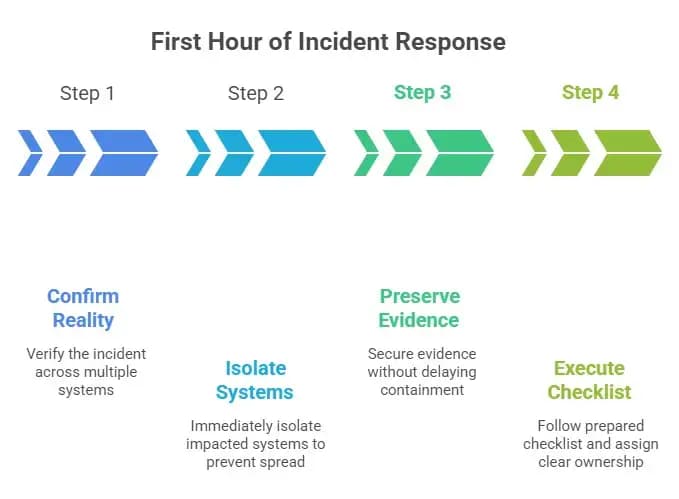
Step-by-step: what “good” looks like in the first hour
Confirm it is real, check more than one system.
Isolate impacted systems immediately to stop the spread.
Preserve evidence, but do not let “perfect forensics” delay containment.
Use a prepared response checklist and clear ownership, not a group chat debate.
People Also Ask
1) Is OpenSSL vulnerable right now?
If you run affected versions and use the vulnerable parsing features, you may be exposed. The fix is to update to patched releases and restart affected services.
2) What is CVE-2026-1504 in Chrome?
Google lists it as an inappropriate implementation in the Background Fetch API, fixed in Chrome 144 Stable for desktop. Update and relaunch Chrome to apply it.
3) Why is Windows 11 showing UNMOUNTABLE_BOOT_VOLUME after an update?
Microsoft is investigating reports tied to January 2026 updates, with KB5074109 often mentioned. Affected users may need WinRE recovery steps to remove the update.
4) Can Meta read WhatsApp messages?
A lawsuit alleges access scenarios, but there is no public proof that Meta routinely reads private message content, and Meta has denied having access to chats. Practical privacy risks often involve backups, device compromise, or metadata.
Hoplon Insight Box
If you only do a few things after reading this cybersecurity weekly recap, make them these:
Update Chrome and relaunch it so the fix is actually active.
If you manage servers, patch OpenSSL where it matters most, especially systems parsing untrusted CMS, S/MIME, and PKCS content.
On Windows 11, back up before patching, and if you are seeing boot issues, follow Microsoft-aligned recovery guidance from reputable outlets while Microsoft investigates.
Treat “paste this Terminal command” pages as a red flag on macOS. Legit vendors rarely require that flow for basic installs.
For ransomware readiness, print a checklist and practice the first-hour actions. CISA’s response checklist is a solid starting point.
Final takeaway
This cybersecurity weekly recap is not a “the sky is falling” week. It is a “do the boring things” week.
Patch the browser you live in. Patch the libraries your infrastructure leans on. Treat update-related system instability as a reason to be careful, not a reason to give up on security forever. And when a headline screams that a platform is secretly reading everything, slow down and separate what is proven from what is alleged.
Related Blogs:
Cybersecurity Threats Weekly Recap: Malware, AI, Extensions Risk





