
Parrot OS 7.0 “Echo” is a major Debian 13-based rebuild featuring KDE Plasma 6, Wayland by default, new AI-focused pentesting tools, improved performance, and official RISC-V support, making it a strong upgrade for ethical hackers and security professionals.
What is different about Parrot OS 7.0 compared to earlier versions?
Kali Linux has always been a little more popular than Parrot OS. People respected it, but it was often seen as the second choice instead of the first. With the release of Parrot 7.0, that position changes quietly.
This update isn't about adding more tools just to have more of them. It's about making penetration testing faster, cleaner, and more like real threats in today's world. The developers clearly thought about how professionals do their jobs during assessments, red team exercises, and internal audits.
Another big change is growing up. The features of Parrot OS 7.0 don't feel as experimental and are more ready for business. That matters if you're testing for real clients and not just in a lab.
A Security OS Built Around Thinking About Privacy First
One of the most obvious differences between Parrot OS penetration testing and other Linux pentesting distributions is that privacy is built in, not added on.
It's easier to set up network anonymization options. Handling secure DNS is cleaner. System services don't show as many unnecessary surfaces right away. These details may seem boring, but anyone who has done long external assessments knows how important operational stealth is.
Here, the reliability of Parrot OS also gets better. Fewer background services mean that scans and payload tests will have fewer surprises. That gives you confidence, especially when you're working with clients.
Performance Without Too Many Tools
A lot of pentesters feel burned out because they have too many tools. Kali is strong, but it can feel heavy. The focus of Parrot OS 7.0 penetration testing tools is on balance.
Parrot doesn't just dump hundreds of utilities. Instead, it focuses on: • Commonly used offensive security tools • Stable versions over experimental builds • Clean dependency management.
The result is a system that starts up faster, uses less memory, and stays responsive even when it's doing a lot of recon or exploitation.
AI Tools in Parrot OS 7.0: Are They Useful or Just Marketing Hype?
There is a lot of AI in cybersecurity right now, and it's good to be skeptical. The real question is whether the Parrot 7.0 AI tools really make pentesters better at their jobs.
Yes, but only if you know what those limits are.
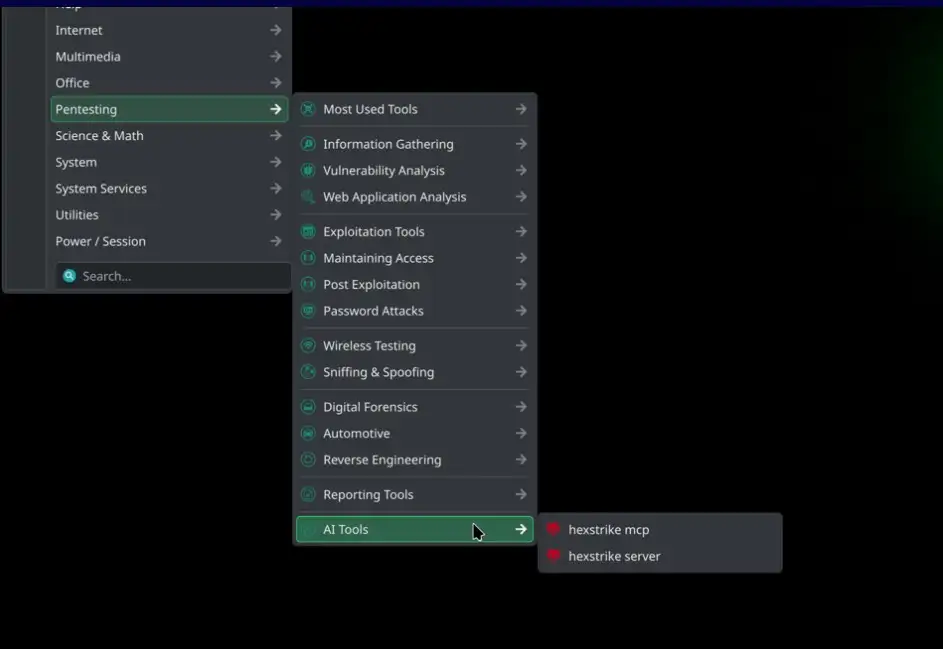
AI tools in Parrot OS 7.0 are not taking the place of experts. They help with organizing data, recognizing patterns, and doing the same tasks over and over. That's where AI makes sense.
When AI Really Helps with Penetration Testing
In real life, time is the enemy. It takes hours to do reporting, recon analysis, and log review. AI-assisted parts of Parrot OS help by:
• pointing out strange things in scan outputs
• suggesting possible misconfigurations based on patterns
• speeding up the process of linking recon results.
This is especially helpful when mapping the attack surface for the first time. Testers get structured hints instead of staring at endless output. You still check everything by hand, but it doesn't take as much mental effort.
When AI Doesn't Take the Place of Human Judgment
Let's be clear. Parrot OS 7.0 AI tools don't magically find zero days. They don't turn junior testers into senior testers overnight. They don't know how to spot mistakes in business logic or social engineering.
Professionals who know what they're doing will see AI as a co-pilot, not an autopilot. That difference is important, and it looks like the people who make Parrot OS get it.
An Honest Look at Parrot OS 7.0 and Kali Linux
This comparison comes up all the time, and for good reason. Both are Linux distributions for pentesting. People respect both. But they help people think in different ways.
The Philosophy of Tools
• Kali Linux puts the most important tools at the top of the list.
• Parrot OS 7.0 penetration testing tools put ease of use and stability at the top of the list.
Default Privacy
• Kali needs more manual privacy hardening.
• Parrot OS has better default privacy settings.
Learning Curve: Kali can be hard for new users to get used to, while Parrot OS is easier to use without losing depth. Enterprise Readiness:
Kali is the leader in training ecosystems, while Parrot OS's enterprise penetration testing is slowly catching up.
There is no clear winner between the two. The right choice depends on how things work, not how popular they are.
Why Experts Are Taking Parrot OS 7.0 Seriously in 2026
In red team circles, something interesting is going on. More professionals are trying out Parrot OS, not because they don't like Kali, but because they want to have choices.
Parrot OS for professional penetration testing has:
• Cleaner system behavior during long engagements
• Fewer unexpected conflicts during updates
• A better balance between automation and control.
This is important when your reputation is at stake, and downtime costs money.
Parrot OS 7.0 in the Real World: Enterprise Penetration Testing
In business settings, stability is more important than newness. Parrot OS's security features work well with compliance-driven testing, where accuracy and documentation are more important than flashy exploits.
Red Team Work
Red teams can take advantage of the OS's stealthy defaults and low noise footprint. Less background noise means cleaner engagement artifacts.
Students and people who want to change careers
Is Parrot OS a good choice for new users? Yes, surprisingly. The interface is easier to use without being too simple. Parrot for learning paths is becoming more and more common in conversations about ethical hack, ing OS 2026.
Common Problems Parrot OS 7.0 fixes:
• Too many tools to use
• Reporting cycles that take too lonwrong Privacy settings
• AI integrations that are hard to understand
The penetration testing tools in Parrot OS 7.0 are all about fixing these problems quietly, without making a big deal about it.
Responsible Use and Mitigations
No OS is a magic bullet. Organizations that use Parrot OS still need to:
• Follow the law when getting permission
• Check AI-assisted results by hand
• Keep tools up to date in a responsible way.
Businesses that use Parrot OS still have to follow ethical rules. It makes them stronger.
Questions that are asked a lot
What are the new features in Parrot OS 7.0?
The biggest changes are better performance, stronger privacy settings by default, and useful AI-powered features that are based on real pentesting workflows.
Is Kali Linux better than Parrot OS?
It depends on what you need. Kali has more tools and training options, while Parrot OS is lighter and focuses more on privacy.
Do AI tools work with Parrot OS 7.0?
Yes. Parrot OS AI tools help with data handling and recon analysis, but they don't take the place of human knowledge.
Is Parrot OS good for professional penetration testing?
Yes. More and more real clients are using Parrot OS 7.0 penetration testing tools because they are stable and easy to use.
In the end, should you switch to Parrot OS 7.0?
Parrot OS 7.0 is not meant to take the place of Kali Linux. It is trying to help professionals who want to be in charge, understand things clearly, and stay calm during difficult tests.
If you do a lot of serious penetration testing, compliance-driven audits, or red team operations, you should really look into the Parrot OS 7.0 penetration testing tools. Not because they're cool, but because they know how people really work when they're under pressure.
In 2025, the best thing to do is not to pick the most popular OS, but to pick the one that works best for how you think and what you have to do.
You can also read these importantcybersecurityy news articles on our website.
· Apple Update,
· Windows Fix,




-20260925120840.webp&w=3840&q=75)
