Content Summary
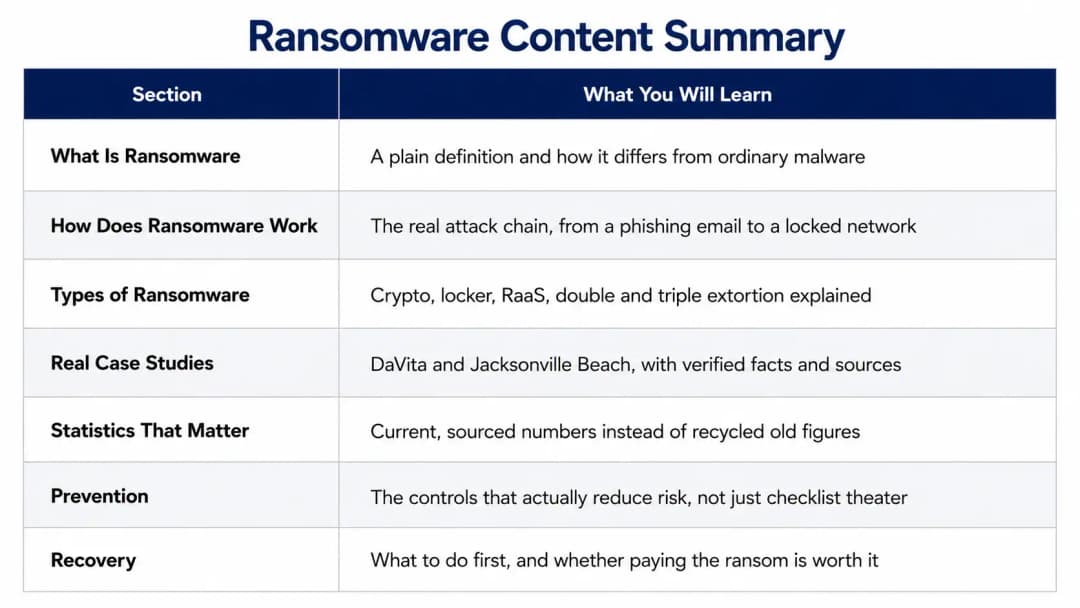
If you only have thirty seconds, here is the short version. Ransomware is malicious software that blocks or steals access to your data and then demands payment to give it back. Modern ransomware rarely stops at encryption anymore, most gangs steal your files first and threaten to leak them even if you restore everything from backup. The single most effective defense is not antivirus, it is a combination of patched systems, multi factor authentication, and backups the attacker cannot reach or delete. If you are already mid attack, disconnect the affected device from the network before you do anything else and call an incident response team.
Now let's actually get into it, because the short version leaves out the part that matters most, which is how any of this happens to you in the first place.
What is Ransomware, Really
Ransomware is a type of malware, but calling it "just malware" undersells what it actually does to an organization. Once it gets a foothold, ransomware denies you access to your own systems, files, or entire network, and the attacker holds that access hostage until you pay them, usually in cryptocurrency because it is harder to trace than a bank wire.
Here is the part most definitions skip. The word "ransomware" used to mean one thing: your files get scrambled with an encryption key you don't have. That is still true today, but it is only half the story. Somewhere around 2019, ransomware gangs figured out that encryption alone wasn't scary enough, because organizations with good backups could just restore everything and ignore the ransom note.
So the gangs added a second threat. Before they encrypt anything, they quietly copy your most sensitive files out to their own servers. Now even if you never pay for the decryption key, they can still threaten to publish your customer data, your financial records, or your employee files on the open internet.
That shift is why a modern ransomware definition has to include both halves, it is malware that denies access to data through encryption, and increasingly, it is also a data theft and extortion operation running in parallel.
What is Ransomware in Simple Terms
Think of it like someone breaking into your house, changing every lock in the building, and also photographing your filing cabinet on the way out. You get a note taped to the door telling you how much it costs to get the new keys, and a separate warning that copies of your private paperwork are already sitting on a stranger's laptop.
What is a Ransomware Attack
A ransomware attack is the full event, not just the moment the files lock up. It starts the second an attacker gets a foothold in your network, whether that is a clicked phishing link or a stolen VPN password, and it does not end until the encryption is deployed and the ransom demand lands in your inbox. Understanding that the attack is really a days or weeks long process, not an instant event, changes how you think about defending against it.
Ransomware vs Other Cyber Threats
People use the words virus, malware, and ransomware interchangeably, and that sloppiness causes real confusion during incident response.
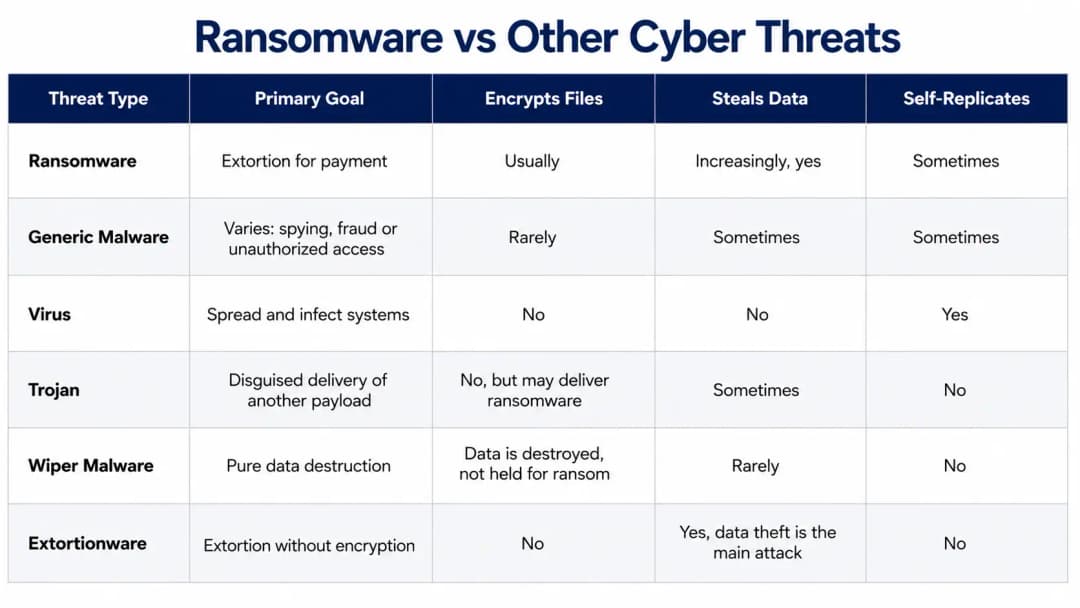
Every ransomware attack is a malware attack, but not every malware attack is ransomware. A virus wants to spread. A trojan wants to sneak something else in the door, and ransomware is very often that something else. Wiper malware sometimes disguises itself as ransomware with a fake ransom note, except there is no decryption key at all, the goal was destruction from the start. Extortionware, also called leakware or doxware, skips encryption entirely and just threatens to publish stolen data.
A Brief History of Ransomware
Ransomware is not a new idea, it just got a lot better at making money.
The first documented case was the AIDS Trojan of 1989, created by a Harvard trained biologist named Joseph Popp. He mailed floppy disks to attendees of a World Health Organization AIDS conference, and the malware hid file directories until the victim mailed 189 dollars to a post office box in Panama. It was clumsy by today's standards and researchers found a fix within days, but the core idea, denying access and demanding payment, was already there.
Ransomware stayed a minor nuisance for over two decades because collecting anonymous payment was hard. That changed with CryptoLocker in 2013, which paired strong public key encryption with Bitcoin payments, and suddenly attackers had a reliable way to get paid without getting caught. WannaCry followed in 2017 and showed the world what happens when ransomware gets worm like self spreading behavior, it hit roughly 150 countries in a matter of hours by exploiting a Windows vulnerability that had a patch available but unapplied on hundreds of thousands of machines.
From there, ransomware became a business. Ransomware as a Service arrived, letting developers rent out their malware to affiliates who did the actual hacking. Extortion evolved in stages, single extortion where you pay for your decryption key, then double extortion where you pay or they leak your data too, and now triple extortion, where attackers add a third pressure point like contacting your customers directly or launching a denial of service attack against your public website while negotiations stall.
How Does Ransomware Work
This is the part every business owner actually needs to understand, because knowing the stages is what lets you catch an attack before it finishes.
Reconnaissance. Attackers pick targets based on who is likely to pay fast. Organizations that cannot tolerate downtime, healthcare, logistics, local government, manufacturing, get scanned and profiled first. They check for exposed remote desktop ports, outdated VPN appliances, and employee email addresses they can phish.
Initial access. This is where almost every attack actually begins, and it is rarely dramatic. A phishing email with a malicious attachment. A stolen VPN password bought from an initial access broker on a dark web forum. An exposed RDP service with a weak password. A vulnerability in a public facing application that has not been patched. Occasionally a supply chain compromise through a trusted vendor. If you want to understand ransomware risk, start here, because this is the stage every prevention control is trying to block, and it is a natural fit for regular penetration testing to find these gaps before an attacker does.
Execution and persistence. Once inside, the malware runs and the attacker sets up ways to keep access even if you reboot the machine, often through scheduled tasks or by abusing legitimate remote access tools that do not trigger antivirus alerts because they are supposed to be there.
Privilege escalation. The attacker is not happy with one compromised laptop. They want domain administrator rights, because that is what lets them touch every machine on the network at once.
Credential theft. Browser saved passwords, cached VPN credentials, service account passwords, anything that helps them move further and faster.
Network discovery. Now they are mapping your environment. Where are the file servers? Where is the backup server? What security tools are running that they will need to disable later?
Lateral movement. This is the stage that turns one infected laptop into the entire company being down. Attackers use stolen administrator credentials and legitimate remote management tools to spread across the network, often undetected for days or weeks. This is exactly the kind of internal movement that extended detection and response is built to catch, because it looks for unusual east west traffic between systems, not just a single bad file.
Defense evasion. Antivirus gets disabled. Logs get deleted. Backup jobs get quietly sabotaged. This is deliberate and it happens before encryption, not after, because attackers know a good backup makes their ransom demand worthless.
Data exfiltration. Before a single file gets encrypted, the valuable data is already compressed, staged, and uploaded to an attacker controlled server or cloud storage account. This is why the phrase "we restored from backup, no harm done" stopped being true for most modern ransomware incidents.
Encryption. Files, network shares, databases, virtual machines, all get locked with an attacker controlled key. Backups and shadow copies get targeted specifically, because a working backup is the one thing that lets a victim say no to the ransom.
Ransom note and negotiation. A note appears, usually with a deadline, a payment amount in cryptocurrency, and a threat to leak stolen data if the deadline passes. Sophisticated groups run private negotiation portals with individualized login credentials for each victim.
How Ransomware Encryption Actually Works
This is where a lot of guides get vague, so let's be specific.
Ransomware typically uses hybrid encryption, combining two methods. Symmetric encryption uses the same key to lock and unlock data, and it is fast, which matters when you are trying to encrypt an entire company's file server before anyone notices. Asymmetric encryption uses a public key and private key pair, where the public key can lock files but only the matching private key, held by the attacker, can unlock them.
Here is why attackers combine both. They use the fast symmetric method to actually encrypt your files, then encrypt that symmetric key itself with their own asymmetric public key before sending it home. That way, even if a defender captures network traffic, they cannot recover the symmetric key without the attacker's private key.
Some ransomware generates a unique key per victim, or even per device, which is why a decryptor built for one company's infection often does not work for another company hit by the same ransomware family.
Newer ransomware strains also use partial or intermittent encryption, scrambling only chunks of each file instead of the whole thing. It is faster, and it can slip past detection tools that are watching for the telltale signs of full file rewrites.
Common targets include Office documents, PDFs, databases, source code repositories, email archives, virtual machine files, and anything on a mapped network drive. Backups get hit first and hardest, on purpose, specifically to remove the victim's ability to say no.
Can a Ransomware Attack Use a Zero Day Vulnerability
Yes, it can, though it is less common than most headlines suggest. A zero day vulnerability is a flaw the vendor does not know about yet, so no patch exists. When ransomware operators do use one, it is usually against internet facing infrastructure like VPN appliances, firewalls, email servers, or file transfer software, because compromising one of those can open the door to hundreds of downstream victims at once, which is exactly what happened with the Clop group's mass exploitation of file transfer software vulnerabilities.
But here is the uncomfortable truth. The overwhelming majority of ransomware attacks do not need a zero day at all. They use known, already patched vulnerabilities that simply have not been applied yet. CVE identifiers track specific vulnerabilities, CVSS scores measure severity, EPSS estimates the actual probability a flaw will be exploited, and CISA's Known Exploited Vulnerabilities catalog lists which ones are being actively used in the wild right now.
If your organization is not tracking that last list, you are gambling on obscurity rather than security. Reducing this exposure comes down to fast patching, network segmentation, and knowing what is exposed to the internet in the first place, which is the core purpose of ongoing attack surface management and vulnerability management.
Types of Ransomware
Crypto ransomware encrypts your files while leaving the system itself technically usable, you just cannot open anything that matters.
Locker ransomware locks the entire device or screen instead of individual files, more common on mobile devices.
Scareware relies on fear rather than actual encryption, fake antivirus alerts pressuring you to pay for a fix to a problem that may not even exist.
Leakware or doxware skips encryption and threatens to publish sensitive data publicly.
Double extortion combines file encryption with data theft, so restoring from backup no longer makes the threat go away.
Triple extortion adds a third pressure point on top of double extortion, often direct outreach to customers or partners, or a denial of service attack timed to coincide with negotiations.
Pure extortion skips encryption entirely, the attacker just steals data and threatens to leak it, which is faster and harder for some detection tools to catch since there is no obvious file encryption event.
Mobile ransomware targets Android devices most often, frequently through malicious apps that lock the screen rather than encrypt files. Organizations protecting a mobile fleet typically pair this with dedicated mobile security and threat defense.
Ransomware as a Service is the business model behind most large scale attacks today. A core developer builds and maintains the malware, affiliates actually break into networks and deploy it, access brokers sell stolen credentials to get affiliates in the door, and profits get split, often through a proprietary money laundering network. It is a criminal supply chain, not a single actor.
Wiperware disguised as ransomware shows a ransom note, but there was never a working decryption key to begin with, the actual goal is destruction.
Human Operated vs Automated Ransomware
Not all ransomware behaves the same way once it is inside. Automated ransomware executes fast, often within minutes of a malicious attachment being opened, with limited human involvement on the attacker's side.
Human operated ransomware is a different animal entirely. Real people sit inside your network for days or sometimes weeks, quietly escalating privileges, mapping your backup infrastructure, disabling security tools, and choosing exactly when to pull the trigger on encryption, usually a weekend or holiday when your security team is thin. This is why human operated attacks are so much more damaging, the attacker adapts to your specific environment instead of running a generic script. Catching this kind of slow moving intrusion is almost entirely a detection and monitoring problem, which is why organizations investing in endpoint security paired with round the clock monitoring catch these intrusions weeks earlier than those relying on antivirus alone.
Ransomware Across Windows, Linux, VMware and Cloud
Ransomware does not stay in one lane anymore. Windows environments remain the most targeted because of Active Directory's central role in corporate networks, but Linux servers running critical applications are squarely in scope too. VMware ESXi has become a favorite target specifically because encrypting the hypervisor datastore takes down every virtual machine running on it at once, turning one successful attack into dozens of down systems simultaneously.
Cloud environments carry their own version of this risk. Stolen AWS, Azure, or Google Cloud credentials can lead to deleted snapshots, encrypted storage buckets, or data extortion pulled straight from SaaS applications through compromised OAuth tokens and API keys. Protecting cloud backups specifically means keeping them in a separate account from production, using immutable storage with retention locks, enforcing multi factor authentication, and restricting who can actually delete anything, which is the foundation of solid cloud storage and disaster recovery planning.
Real Ransomware Attack Examples and Case Studies
WannaCry, 2017. Spread across roughly 150 countries in hours by exploiting a Windows vulnerability that already had a patch available. The lesson was not about the malware's sophistication, it was about how much damage unpatched systems can enable at scale.
Colonial Pipeline, 2021. An attack attributed to the DarkSide ransomware group forced a shutdown of a pipeline supplying a significant share of fuel to the United States east coast, showing how ransomware against critical infrastructure creates consequences far beyond a single company's IT department.
LockBit. One of the longest running and most prolific Ransomware as a Service operations, built around an affiliate model that survived multiple law enforcement disruption attempts, including Operation Cronos, before resurfacing with newer versions of its malware.
DaVita dialysis ransomware attack, 2025. Kidney care provider DaVita disclosed that attackers gained initial access to its network on March 24, 2025, and were not detected until April 12, 2025, nearly three weeks of undetected lateral movement. The Interlock ransomware group claimed responsibility and alleged it stole roughly 1.5 terabytes of data from DaVita's dialysis labs database.
By August 2025, the United States Department of Health and Human Services confirmed the protected health information of approximately 2,689,826 individuals had been compromised, including names, Social Security numbers, dates of birth, insurance details, and clinical treatment information. DaVita reported around 13.5 million dollars in incident related expenses in the following quarter.
Patient care continued throughout, but the healthcare specific lesson stands out clearly, attackers deliberately target industries where downtime is not an acceptable option, and dwell time, the gap between initial access and detection, was the deciding factor in how much data left the building. Source: HIPAA Journal and Healthcare Dive reporting, verified against DaVita's SEC filings.
Jacksonville Beach, Florida ransomware and data breach, 2024. Worth clarifying up front, this incident affected the City of Jacksonville Beach specifically, a coastal municipality, not the larger City of Jacksonville. The city first detected system issues on January 29, 2024, and its investigation later determined that unauthorized access and data theft occurred between January 22 and January 29, 2024.
The attack was claimed by the LockBit ransomware group. City officials confirmed they did not pay the ransom, and approximately 48,949 individuals, including city employees and customers of the city owned Beaches Energy Services utility, had personal information exposed, including Social Security numbers, driver's license numbers, and bank account details.
Because the city refused payment, LockBit published the stolen data publicly. This case is a clean example of double extortion in action against local government, where the refusal to pay did not stop the leak, it just delayed it. Source: City of Jacksonville Beach official notice and Recorded Future News reporting.
Current Ransomware Groups and the Threat Landscape
The ransomware ecosystem reshuffles constantly as law enforcement takedowns push affiliates toward new groups. As of mid 2026, Qilin has emerged as one of the most active operations, reportedly growing its victim count dramatically year over year and absorbing affiliates from groups that collapsed or went dark. LockBit remains active despite repeated law enforcement pressure, having released newer versions of its ransomware after its infrastructure was disrupted.
DragonForce has expanded rapidly, reportedly operating a franchise style model where affiliates run their own branded ransomware under a shared umbrella. Interlock, the group behind the DaVita attack, has specifically been called out in a joint advisory from the FBI, CISA, HHS and MS-ISAC for targeting critical infrastructure and healthcare across North America and Europe.
The reality worth internalizing here is that group names change constantly, but the underlying tactics do not. Tracking which specific gang is active this month matters less for your defense than making sure the fundamentals, patching, MFA, segmentation, and tested backups, are solid regardless of who is currently at the top of the leaderboard.
Staying current on which groups are actively targeting your sector is still valuable, which is where ongoing cyber threat intelligence and dark web monitoring earn their keep, spotting your organization's name on a leak site before a customer or journalist does.
Ransomware Statistics That Actually Matter in 2026
Numbers in this space get stale fast and recycled constantly, so treat every statistic below as tied to its specific source and year, not as a permanent fact.

On the claim that a ransomware attack is forecasted to occur every certain number of seconds, be careful here.
That number originates from older industry forecasts, some dating back several years, predicting attack frequency for a specific future year, and it gets copy pasted as if it is a live, current statistic. It almost never is. If you see this claim without an attributed source and year attached, treat it as outdated marketing language rather than verified data, and look for a sourced, dated figure instead, like the ones in the table above.
Who is Most at Risk
Small and medium sized businesses get hit hardest relative to their ability to recover, since they typically run leaner security budgets and weaker backup practices than large enterprises. Healthcare organizations are targeted because downtime is genuinely dangerous, which makes them more likely to feel pressure to pay quickly.
Manufacturing has topped IBM's most targeted sector list for five consecutive years, partly because legacy operational technology often cannot be patched without halting production. Education, government and municipalities, financial services, legal and professional services, and managed service providers round out the list, the last group being particularly dangerous to compromise since one breached provider can expose dozens of downstream customers at once.
Why Organizations Become Victims
It is rarely one single mistake. Unpatched software, weak or reused passwords, missing multi factor authentication, exposed RDP ports facing the open internet, flat networks with no segmentation between departments, excessive administrator privileges handed out by default, phishing susceptibility, unsecured or untested backups, uncontrolled third party vendor access, and a general lack of asset inventory, you cannot protect what you do not know you have, all compound on top of each other.
Early Warning Signs of a Ransomware Attack
Attacks rarely come out of nowhere if someone is watching for the right signals. Unusual failed login attempts, logins from impossible travel locations, a new administrator account nobody remembers creating, unexpected remote access software appearing on a machine, security tools suddenly disabled, backup jobs failing without explanation, large unexplained file compression activity, unusual outbound data transfers late at night, mass file renaming, and sudden PowerShell or command line activity across multiple endpoints at once are all classic precursors.
Catching these early is the entire point of continuous threat exposure monitoring, because the difference between catching an intrusion at hour six versus day sixteen is often the difference between a contained incident and a company wide shutdown.
How to Prevent Ransomware Attacks
Prevention is not one silver bullet tool, it is a stack of overlapping controls, and skipping any one of them leaves a gap attackers will eventually find. If you are searching for how to protect against ransomware in practical terms, the answer is always this same layered stack, not a single product.
Keep an accurate inventory of every device, server, application, and cloud resource you actually own, since unknown assets are unmonitored assets. Patch vulnerabilities on a risk based schedule, prioritizing anything internet facing. Enforce multi factor authentication everywhere, especially VPN, email, cloud, and administrator accounts, since stolen passwords alone should not be enough to get in.
Apply least privilege access so a compromised regular employee account cannot touch the whole network. Lock down remote access, close exposed RDP to the public internet, and use proper zero trust access instead. Segment your network so a compromised user workstation cannot reach your backup infrastructure directly.
Deploy behavior based endpoint detection rather than relying on signature based antivirus alone, since modern ransomware is built specifically to slip past traditional definitions. Strengthen email security and anti phishing controls, since phishing remains one of the most common entry points. Use application allowlisting to stop unauthorized scripts and tools from running in the first place. Harden Active Directory with tiered administration and close monitoring of privileged accounts. Secure cloud environments with MFA, restricted API access, and proper audit logging.
None of this works without people, so run regular phishing simulations and give employees a fast, low friction way to report something suspicious. And build, then actually test, an incident response plan with clear roles and an escalation path, because a plan nobody has rehearsed falls apart the moment a real attack starts. Combining these controls with independent cyber resilience assessment and a proper gap assessment shows you exactly where your specific weak points sit before an attacker finds them for you.
Ransomware Backup Strategy
Backups do not prevent an attack, but they determine whether you have any leverage at all once one succeeds.
The three two one rule is the baseline, three copies of your data, on two different types of storage, with one copy offsite. The stronger three two one one zero version adds one immutable or fully offline copy and a standard of zero unverified backup errors, meaning you actually test restores rather than assuming they will work. Immutable backups use retention locks or object lock settings that prevent deletion or modification even by an attacker holding administrator credentials. Air gapped backups are physically or logically disconnected from your primary network entirely.
A detail people miss constantly, do not use your domain administrator account to manage backup infrastructure. If that account gets compromised, which is exactly what attackers are hunting for during lateral movement, your backups go down with everything else.
Keep backup credentials separate, encrypt backup data at rest, and run recovery tests on a real schedule, not once a year when someone remembers. Knowing your actual recovery time objective and recovery point objective before an incident, not during one, is what separates a controlled recovery from a panicked one, and it is the core value behind proper cloud storage and disaster recovery planning.
What to Do During a Ransomware Attack
If you are reading this section because it is happening right now, move fast and in this order.
Isolate the affected device from the network immediately, pull the ethernet cable or disable WiFi rather than shutting the machine down completely, since powering off can sometimes destroy forensic evidence and in memory data useful for investigation. Disconnect shared storage and mapped drives from that device. Activate your incident response team or call in outside help if you do not have one internally.
Protect your backup systems specifically, since attackers often have follow up scripts designed to reach backups if the initial encryption gets interrupted. Reset privileged credentials across the environment, do not assume only one account was touched. Determine whether the attack is still actively spreading before you start remediation. Preserve the ransom note and any other evidence rather than deleting it.
Check for signs of data exfiltration, not just encryption. Loop in legal counsel, your regulatory compliance team, and your cyber insurance provider early, not after the fact. Report the incident to law enforcement or your national cyber authority. Then, and only then, start building a clean recovery environment.
This is exactly the sequence a dedicated incident response and recovery team walks through, and having that relationship in place before an attack, not during one, saves hours that genuinely matter.
Investigation, Forensics and Identifying the Strain
After containment, someone needs to answer the harder questions, how did they get in, what did they touch, and what did they take. That means identifying patient zero, building a full attack timeline, figuring out which accounts were compromised, separating what was merely encrypted from what was actually exfiltrated, and preserving logs, memory, and disk evidence before they are overwritten. This work is what digital forensic investigation exists for, and it matters for more than curiosity, regulators and insurers will often ask for exactly this evidence.
Identifying the specific ransomware strain matters too, based on the ransom note's language, the encrypted file extension, and hash based indicators, since it determines whether a public decryptor already exists. A word of caution though, the same file extension does not always mean the same ransomware family, some groups deliberately mimic others to confuse attribution.
Can Ransomware Be Removed, and Can You Recover Files Without Paying
Removing the malware itself, killing the process, eliminating persistence mechanisms, resetting compromised credentials, patching the entry point, is achievable and often necessary regardless of what you decide about the ransom. But removal alone does not decrypt your files. Those are two entirely separate problems.
For recovery without paying, start with a clean backup if you have one that was not touched. Check whether volume shadow copies survived, though attackers frequently delete these deliberately. Search the No More Ransom initiative and major security vendors for a public decryptor matching your specific strain, since law enforcement operations occasionally recover private keys from seized ransomware infrastructure.
Cloud file version history can sometimes recover individual files even without a formal backup system. When none of that works, a clean system rebuild from scratch, while painful, is often safer than trying to clean an infected environment and hoping nothing was missed.
Should You Pay the Ransom
Paying is genuinely risky on multiple fronts. There is no guarantee you will actually receive a working decryption key, decryptors themselves are sometimes slow or defective even when provided in good faith, and there is no guarantee stolen data gets deleted rather than sold or leaked anyway later. Organizations that pay are frequently targeted again, since paying signals you are a viable revenue source. On top of that, paying certain sanctioned groups can carry real legal exposure depending on your jurisdiction, and some regions, including parts of the United States, restrict or outright ban ransom payments by government entities.
That said, the decision is not always purely rational when human safety or critical operations are on the line, which is exactly why professional negotiators exist, and why paying, if it happens at all, should be a last resort decision made with legal counsel and law enforcement guidance rather than a panicked wire transfer on day one.
The Business Impact of Ransomware
The financial cost extends far past the ransom demand itself, covering incident response, forensic investigation, system rebuilding, and legal fees. Operational downtime halts production and drains employee productivity for weeks in serious cases. Data breach fallout means exposed personal information and stolen intellectual property, which triggers regulatory consequences including mandatory notification requirements, investigations, and potential fines under frameworks like GDPR and HIPAA, plus SEC disclosure obligations for material incidents at public companies. Reputational damage lingers longest of all, customer trust and partner relationships take real time to rebuild, and long term costs like increased insurance premiums and security overhauls continue well after the headlines fade.
Legal, Regulatory and Reporting Requirements
Requirements vary meaningfully by jurisdiction and industry, so treat the following as general context rather than legal advice specific to your situation. In the United States, HIPAA governs healthcare data breach notification timelines, the SEC requires material cybersecurity incident disclosure from public companies, and a growing number of states have enacted their own breach notification laws with different thresholds and deadlines. GDPR imposes notification requirements for organizations handling EU resident data.
Critical infrastructure operators frequently face sector specific reporting obligations to national cyber authorities. Cyber insurance policies typically require prompt notification too, and missing that window can jeopardize coverage entirely. Given how much this varies by country and sector, confirming your specific obligations with legal counsel before an incident happens, not during one, is worth the time. Organizations formalizing this readiness often lean on structured security compliance support to stay ahead of these obligations.
The Role of Artificial Intelligence in Ransomware
AI is reshaping both sides of this fight. On the attacker side, generative AI produces far more convincing phishing emails with natural language and localized targeting, speeds up reconnaissance on potential victims, and enables deepfake voice impersonation used in executive fraud schemes designed to trick employees into wiring money or granting access.
On the defense side, AI powered anomaly detection, email classification, and behavioral analytics are what let security teams catch unusual patterns across thousands of endpoints that no human could realistically watch manually, and it is a core part of why services like AI driven automated red teaming exist, to proactively find the gaps an AI powered attacker would exploit before they do.
Ransomware Protection Checklist
Critical assets inventoried and documented
Multi factor authentication enabled organization wide
Internet facing services kept current with patches
RDP not exposed directly to the public internet
Endpoint detection and response deployed
Network properly segmented
Administrator privileges restricted and monitored
Email filtering and sandboxing enabled
Immutable backup copy in place
Offline or air gapped backup copy in place
Backup restore tested on a real schedule, not assumed to work
Cloud audit logging enabled
Third party and vendor access monitored
Incident response plan documented and rehearsed
Employee phishing training completed regularly
Tabletop exercise conducted at least annually
Ransomware Readiness Assessment Questions
Which systems are genuinely critical to keep running. How fast does each one need to be restored. If your backups themselves were compromised, what is the actual fallback plan. Does everyone know every administrator account that exists across your environment. How long would it realistically take you to detect an active intrusion today.
Who makes the final call during an active incident, and do they know it is them. Who handles customer and regulator notification. Is your law enforcement and cyber insurance contact information actually accessible, not buried in someone's inbox. When was your last real recovery test, not a tabletop discussion but an actual restore. Working through these honestly, ideally with outside virtual CISO guidance, tends to surface gaps that internal teams miss simply because they are too close to their own environment.
Frequently Asked Questions
What is ransomware?
Ransomware is malicious software that blocks access to data or systems, and increasingly steals that data too, then demands payment to restore access or prevent public exposure.
What is a ransomware attack?
It is the full sequence of events from an attacker's initial access into a network through to the ransom demand, often spanning days or weeks rather than happening instantly.
How does ransomware work?
It typically moves through initial access, privilege escalation, lateral movement, data theft, encryption, and finally a ransom demand, with attackers deliberately targeting backups along the way.
How does a ransomware attack usually start?
Most often through phishing emails, stolen credentials, or an exposed and unpatched internet facing service like RDP or a VPN appliance.
Can ransomware exploit a zero day vulnerability?
Yes, though it is less common than exploiting already known, unpatched vulnerabilities, which account for the majority of successful attacks.
What files does ransomware encrypt?
Office documents, databases, source code, email archives, virtual machine files, and anything reachable on network shares, with backups specifically targeted first.
Can ransomware infect a backup?
Yes, if the backup is reachable from the compromised network and not properly isolated or immutable, which is exactly why air gapped and immutable backups matter so much.
What is double extortion ransomware?
An attack that combines file encryption with data theft, so restoring from backup no longer removes the threat since stolen data can still be leaked.
What is Ransomware as a Service?
A criminal business model where a core group develops the ransomware and rents it out to affiliates who carry out the actual attacks, splitting the profits.
Can ransomware be removed?
The malware itself can be removed and the entry point patched, but removal alone does not decrypt already encrypted files, those are separate problems.
Should a company pay a ransomware demand?
It is genuinely risky and offers no guarantees, and should only be considered as a last resort with legal counsel and law enforcement involved, not a first response.
How can ransomware attacks be prevented?
Through layered defenses, patching, multi factor authentication, network segmentation, endpoint detection, email security, employee training, and tested, isolated backups.
How often does a ransomware attack happen?
Frequently cited every so many seconds figures are usually outdated forecasts recycled without their original source or year, so rely on sourced, dated statistics instead.
Which industries are most targeted by ransomware?
Manufacturing, healthcare, and energy currently top the list, alongside education, government, and financial services.
Key Takeaways
Ransomware today is rarely just about encrypted files, data theft and extortion are now standard parts of the playbook. Most attacks start through ordinary means like phishing or stolen credentials rather than exotic zero days. Multi factor authentication, fast patching, network segmentation, and tested immutable backups are what actually move the needle on risk.
Detecting an intrusion early, ideally within hours rather than weeks, is often the single biggest factor separating a contained incident from a company wide shutdown. And paying the ransom guarantees nothing, not the decryption key, and not the deletion of your stolen data.
Conclusion
Ransomware is not going away, and pretending your organization is too small or too boring to be a target is exactly the mindset attackers count on. The good news is that the fundamentals genuinely work. Patch consistently, lock down remote access, segment your network, train your people, and keep backups an attacker literally cannot reach.
Prevention, detection, and recovery all have to work together, because no single control catches everything on its own. If you want an outside, honest look at where your specific environment stands, a proper cyber resilience assessment is the most direct way to find out before an attacker does it for you.
Official References
Verizon 2025 Data Breach Investigations Report
IBM 2026 X-Force Threat Intelligence Index
IBM Cost of a Data Breach Report 2025