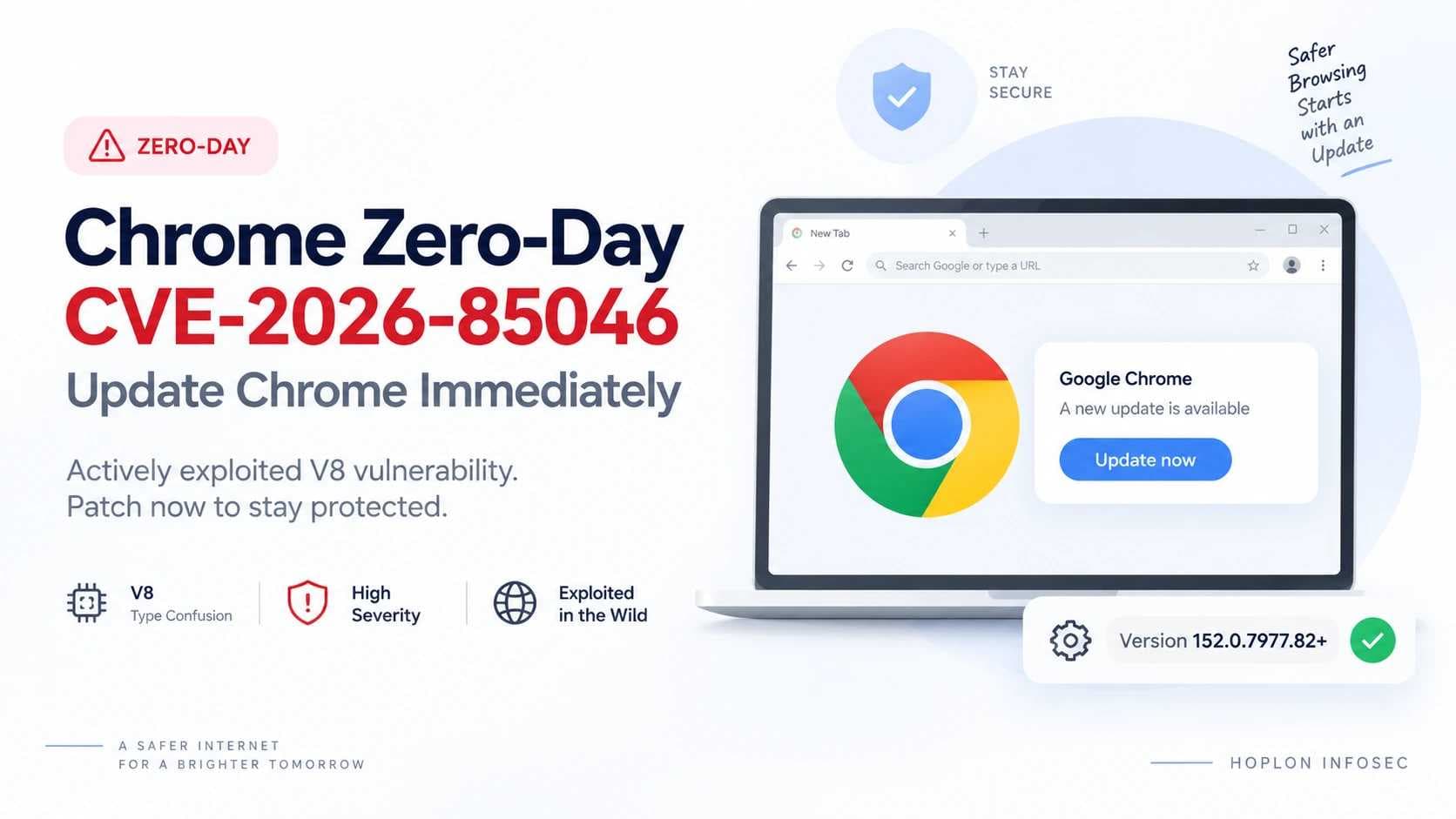
Chrome Zero-Day CVE-2026-85046: Update Chrome Immediately
Google has patched CVE-2026-85046, a High-severity type confusion vulnerability in Chrome's V8 JavaScript engine after confirming that an exploit exists in the wild.
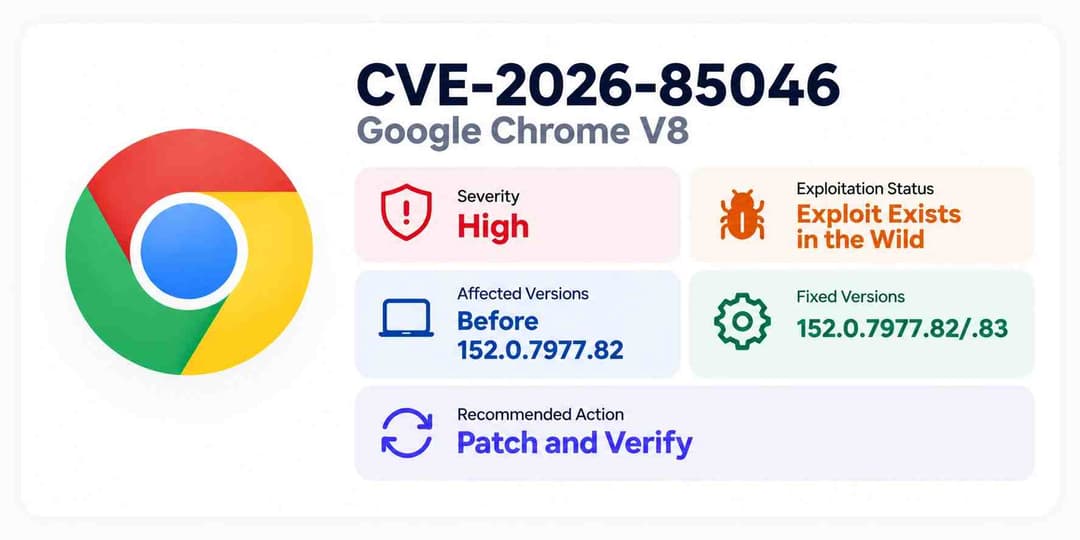
The September 3, 2026 Stable Channel update moves Chrome to 152.0.7977.82/.83 for Windows and macOS and 152.0.7977.82 for Linux. Google says this release contains 12 security fixes. CVE-2026-85046 stands out because it is the flaw Google specifically identifies as having a known exploit in real-world use.
The standardized vulnerability record describes the issue as a V8 type confusion flaw that affects Chrome before version 152.0.7977.82 and can allow a remote attacker to execute arbitrary code inside the Chrome sandbox through a crafted HTML page.
For users, the immediate task is to install the current Chrome security update and make sure the patched build is actually running.
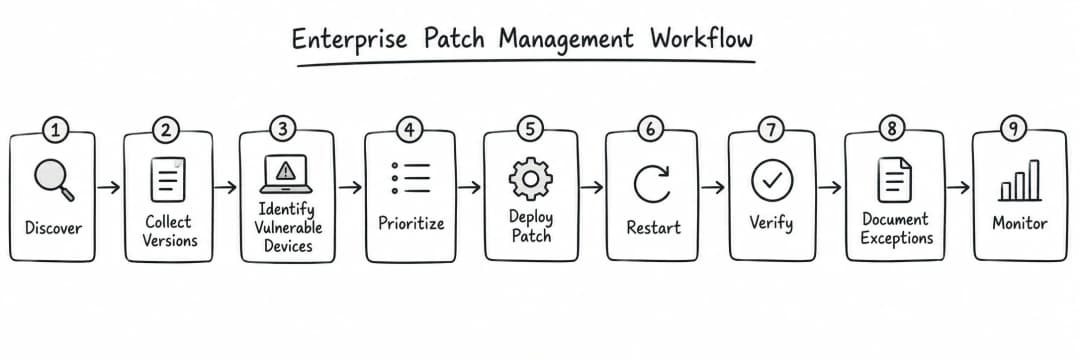
For businesses, the problem is broader. Security teams need to identify vulnerable installations, deploy the update, confirm browser restarts where required, and verify that affected systems are no longer running an older build.
Organizations that recently deployed the broader Chrome 152 security update should check the complete browser version again. Chrome 152 is a major release family. CVE-2026-85046 was fixed in a later Chrome 152 maintenance build, so simply seeing “Chrome 152” does not prove the vulnerability is patched.
Key Findings
|
Item |
Verified Detail |
|
CVE |
CVE-2026-85046 |
|
Product |
Google Chrome |
|
Component |
V8 |
|
Weakness |
Type confusion, CWE-843 |
|
Google severity |
High |
|
Active exploitation |
Confirmed by Google |
|
Affected version |
Chrome before 152.0.7977.82 |
|
Windows fix |
152.0.7977.82/.83 |
|
macOS fix |
152.0.7977.82/.83 |
|
Linux fix |
152.0.7977.82 |
|
Documented attack path |
Crafted HTML page |
|
Documented impact |
Arbitrary code execution inside the sandbox |
|
Researcher |
Salvatore Gulizia, nickname Serotav |
|
Reported |
August 4, 2026 |
|
Google reward |
$1,000 |
|
Main action |
Patch and verify the running version |
Google also states that access to some bug details may remain restricted until most users have received the fix.
What is CVE-2026-85046?
CVE-2026-85046 is a type confusion vulnerability in Google's V8 engine. In affected Chrome versions, maliciously crafted HTML can cause unsafe behavior that may lead to arbitrary code execution inside Chrome's sandbox.
V8 is one of the most security-sensitive components inside Chrome because it processes JavaScript and WebAssembly used by websites and web applications.
Modern web pages do much more than display text. They run application logic, manipulate data, communicate with APIs, render complex interfaces, and execute large amounts of JavaScript. V8 is responsible for turning that JavaScript into instructions the computer can execute efficiently.
That makes correctness inside V8 critical.
A mistake in how V8 understands an object's type or memory representation can become more serious than a normal application bug because the engine is processing code and data supplied by websites.
The weakness is categorized as CWE-843: Type Confusion.
Why V8 is a High-Value Attack Surface
JavaScript is dynamically typed.
A value might represent:
- A number
- A string
- An array
- An object
- A function
- Another specialized internal structure
V8 must process these values quickly while preserving the rules of the JavaScript language.
To improve performance, modern JavaScript engines do not interpret every operation from scratch forever. They collect information about how code behaves and may optimize frequently executed code based on patterns they have already observed.
For example, if the engine repeatedly sees a function receiving the same kind of object, it may optimize later operations based on assumptions about that object's structure.
Those optimizations are normally safe because the engine performs checks designed to make sure its assumptions remain valid.
A type confusion vulnerability can occur when software incorrectly treats one object, value, or memory structure as though it were another.
The security risk comes from what the program does after making that incorrect assumption.
How Type Confusion Can Become a Security Vulnerability
A simple programming error involving types might only cause an application to crash.
A type confusion bug inside a browser engine can be more serious because the mistaken type may change how memory is interpreted.
Consider a simplified example.
Suppose the browser expects an object with this conceptual layout:
[Object Type A]
Field 1
Field 2
Pointer
But due to a flaw, the engine handles the same memory as:
[Object Type B]
Length
Address
Data
The program may then interpret one value as a memory address, size, object reference, or another security-sensitive field when that value was never intended to have that meaning.
Depending on the specific bug, the result could include:
- Reading unintended memory
- Writing to unintended memory
- Accessing an object through an incorrect structure
- Incorrect pointer interpretation
- Memory corruption
- Browser-process crashes
- Manipulation of execution state
These are general consequences of type confusion vulnerabilities. Google has not publicly disclosed enough technical information to state which exact memory-corruption primitive is used by the in-the-wild CVE-2026-85046 exploit.
For additional background on browser memory flaws, see Hoplon Infosec's overview of Google Chrome vulnerabilities.

What We Know About the CVE-2026-85046 Attack Path
The official vulnerability description says a remote attacker can trigger the flaw through a crafted HTML page.
That tells us several useful things.
First, the vulnerability is reachable through web content processed by Chrome.
Second, exploitation is not described as requiring local administrative access to the target machine.
Third, the browser must encounter attacker-controlled content designed to exercise the vulnerable V8 behavior.
What the public description does not tell us is equally important.
It does not establish:
- The exact JavaScript sequence used in active attacks
- The precise corrupted V8 object
- The memory primitive obtained by the attacker
- Whether attackers combine it with another Chrome vulnerability
- Whether a sandbox escape is being used
- How real victims are being directed to malicious content
- Whether a specific exploit kit is involved
Google is intentionally restricting access to some technical bug details while patch deployment continues.
That means defenders should resist two opposite mistakes.
The first mistake is dismissing the flaw because the full exploit is not public.
The second is filling those gaps with speculation.
The correct response is to patch based on what is already confirmed.
Why “Exploit Exists in the Wild” Changes the Risk
Google's statement that an exploit exists in the wild is one of the most important facts in this disclosure.
A vulnerability can exist for years without evidence that attackers are successfully using it.
Active exploitation changes the operational question.
Instead of asking:
“Could somebody theoretically exploit this?”
security teams must consider:
“Someone already has an exploit. Are any of our systems still vulnerable?”
This is why vulnerability prioritization should not be based only on a severity label.
Consider two hypothetical vulnerabilities.
Vulnerability A
- Critical technical severity
- No known exploitation
- Difficult attack conditions
- Located on an isolated system
- Several compensating controls
Vulnerability B
- High severity
- Working exploit exists
- Browser processes untrusted web content
- Patch is available
- Widely deployed endpoints may be exposed
An organization could reasonably prioritize Vulnerability B first.
That is the core logic behind risk-based vulnerability management.
Hoplon's guide to vulnerability management strategy explains why active exploitation, asset importance, exposure, and business context need to be considered alongside severity.
A Note About CVSS and Exploitation Data
Vulnerability databases can contain several different kinds of information:
- Vendor severity
- CVSS scoring
- CISA enrichment
- Exploitation status
- Weakness classifications
- Product/version information
These fields may come from different organizations and may update at different times.
Google rates CVE-2026-85046 as High.
Current vulnerability enrichment also associates an 8.8 CVSS v3.1 score with the issue.
Those two statements are not contradictory. “High” is a severity category, while 8.8 is a numerical CVSS score from vulnerability enrichment rather than Google's own Chrome severity scoring system.
There is another important lesson.
If a downstream vulnerability database temporarily shows an exploitation field that conflicts with Google's current Chrome bulletin, use the primary vendor statement for the specific question of whether Google has observed or knows about exploitation.
Google explicitly says an exploit for CVE-2026-85046 exists in the wild.
Fast-moving vulnerability records can take time to synchronize.
What is Confirmed and What is Still Unknown?
Keeping these categories separate prevents inaccurate security reporting.
Confirmed
The currently available official information establishes that:
- The vulnerability is CVE-2026-85046.
- It affects V8.
- Google rates it High severity.
- It is a type confusion vulnerability.
- Chrome before 152.0.7977.82 is affected.
- Crafted HTML can trigger the vulnerable condition.
- Arbitrary code execution inside the sandbox is possible.
- Google knows of an exploit in the wild.
- Salvatore Gulizia, known as Serotav, reported the issue on August 4, 2026.
- Google released the desktop patch on September 3, 2026.
Not Publicly Established
not establish:
- A named threat actor
- A government sponsor
- A spyware vendor
- Victim identities
- Number of victims
- Countries targeted
- A specific malware family
- An exploit kit
- A phishing campaign
- The complete technical exploit chain
- A confirmed sandbox escape used with this vulnerability
- Public incident-specific indicators of compromise
Until then, they should remain unknown rather than being presented as assumptions.

What Does “Arbitrary Code Execution Inside the Sandbox” Actually Mean?
The phrase needs to be read as a whole.
Arbitrary code execution means an attacker may be able to make the compromised process execute instructions the software developer did not intend.
That is serious.
But the vulnerability description adds a boundary:
inside the sandbox.
Chrome's sandbox is designed to limit what compromised browser processes can access.
A simplified model looks like this:
Internet
↓
Web Content
↓
Renderer and V8
↓
Chrome Sandbox Boundary
↓
Operating System Resources
The sandbox is intended to restrict the renderer's ability to freely interact with sensitive operating-system resources.
If an attacker gains code execution in a sandboxed browser process, the sandbox still represents another security boundary.
Why This Distinction Matters
Security headlines sometimes shorten:
“code execution inside the sandbox”
into:
“hackers can completely control your computer.”
The available CVE description does not justify that stronger claim by itself.
To move from sandboxed code execution to broader host compromise, an attacker may need another capability, such as:
- A sandbox escape
- A privilege escalation vulnerability
- Another browser bug
- An operating-system vulnerability
- A security misconfiguration
That does not make CVE-2026-85046 harmless.
Sandboxed code execution is still a serious browser compromise and can be an important component of an exploit chain.
Hoplon's previous analysis of Chrome arbitrary code execution vulnerabilities provides additional context on why browser code-execution flaws need careful impact assessment.

Browser Exploit Chain and Sandbox Boundary
Which Chrome Versions Are Affected?
The affected-version boundary is precise.
Chrome versions before 152.0.7977.82 are vulnerable according to the CVE record.
Google's September 3 Stable Channel release provides:
|
Platform |
Patched Version |
|
Windows |
152.0.7977.82/.83 |
|
macOS |
152.0.7977.82/.83 |
|
Linux |
152.0.7977.82 |
Google says the release will roll out over the coming days and weeks.
Why the Full Build Number Matters
Chrome uses several version components.
For example:
152.0.7977.82
The first number identifies the major Chrome generation.
The later numbers identify progressively more specific builds and revisions.
That means these two systems are not necessarily equally secure:
Chrome 152.0.7977.64
Chrome 152.0.7977.82
They belong to the same major Chrome 152 family, but the latter contains newer fixes.
This is especially relevant because Hoplon's earlier Chrome 152 security update coverage discussed an earlier Chrome 152 Stable build.
For this CVE, administrators should verify the complete version, not only the major version.
How to Update Chrome and Verify the Fix
For normal desktop installations:
- Open Google Chrome.
- Open the three-dot menu.
- Select Help.
- Open About Google Chrome.
- Allow Chrome to check for updates.
- Install the available update.
- Relaunch Chrome if prompted.
- Return to the version page and confirm the running build.
You can also enter:
chrome://version
in the address bar to inspect the full Chrome version.
For the September 3 patch, you should see at least the relevant fixed build:
- Windows: 152.0.7977.82/.83
- macOS: 152.0.7977.82/.83
- Linux: 152.0.7977.82
A later Chrome version that includes the fix is also acceptable.
Why Verification is Part of Patching
There are several stages between Google releasing an update and a device actually running protected code:
Patch released
→
Device checks for update
→
Update downloaded
→
Update installed
→
Browser relaunched
→
New build running
An administrator who stops at “the package was deployed” may not know whether the final state was reached.
This is why mature vulnerability management includes verification after remediation.
Enterprise Response: From Discovery to Verified Remediation
Updating one laptop is simple.
Updating an organization is an asset-management and verification problem.
A strong enterprise response should follow this sequence.
1. Discover Chrome Installations
Identify where Chrome is installed across:
- Employee laptops
- Workstations
- Developer systems
- Administrative devices
- Shared computers
- Virtual desktops
- Remote devices
- Servers where browsers are installed
- Kiosk environments
The first question is not:
“Did we send the patch?”
It is:
“Do we know every affected asset?”
2. Collect Exact Versions
Collect the complete Chrome version from each managed device.
Do not group everything under “Chrome 152.”
Create a vulnerable set containing installations below the patched version boundary.
3. Prioritize Based on Exposure and Business Context
Not all endpoints have equal business impact.
Examples of devices that may deserve earlier attention include systems used for:
- Identity administration
- Cloud-management consoles
- Security platforms
- Source-code repositories
- Financial applications
- Sensitive customer systems
This is a prioritization framework, not evidence that CVE-2026-85046 specifically targets those services.
4. Deploy the Fixed Build
Use the organization's existing software-management or endpoint-management platform.
Check whether:
- Updates are deferred
- Versions are pinned
- Testing rings delay rollout
- Remote systems are offline
- Browser restarts are being postponed
5. Verify Remediation
Collect the version again after deployment.
Compare:
Expected fixed build
with:
Actual running build
A successful deployment event is useful evidence, but the strongest evidence is the state of the endpoint itself.
6. Document Exceptions
Some systems may not patch immediately because of:
- Application compatibility requirements
- Locked-down kiosk workflows
- Testing constraints
- Unsupported operating systems
- Offline devices
Record those exceptions explicitly.
Temporary mitigation should not silently become permanent exposure.
7. Investigate Only When Evidence Justifies It
If endpoint telemetry indicates suspicious browser activity, security teams may review:
- Process behavior
- Child processes
- Browser crashes
- Endpoint alerts
- Network connections
- Authentication events
- Other correlated activity
The Google bulletin does not publish CVE-specific indicators of compromise.
Generic browser activity should therefore not be labeled CVE-2026-85046 exploitation without supporting evidence.
For broader device visibility and detection concepts, see what endpoint security is and how it works.
What If the Fixed Build is Not Available Yet?
Google says the Stable Channel update is rolling out over the following days and weeks.
If a device does not yet receive the expected build:
- Manually check Chrome's update page.
- Confirm whether the browser is centrally managed.
- Review update-deferral policies.
- Check version-pinning rules.
- Confirm the operating system remains supported.
- Use a confirmed patched device for especially sensitive web administration where practical.
- Recheck availability as the rollout progresses.
These measures can reduce unnecessary exposure.
They are not substitutes for the vendor patch.
What About Microsoft Edge, Brave, Opera, Vivaldi, and Other Chromium Software?
V8 is part of the broader Chromium ecosystem.
That makes the vulnerability relevant beyond users who have Google Chrome installed.
However, Chrome's version number cannot be applied directly to another browser.
Each vendor controls its own:
- Release process
- Product version
- Security advisory
- Patch distribution
- Enterprise-management behavior
Therefore:
Do not assume that updating Google Chrome patches every Chromium-based application on the same endpoint.
Organizations should inventory their wider browser fleet and check each vendor's security guidance separately.
This distinction is especially important in environments where employees are free to install multiple browsers.
Hoplon previously covered another actively exploited Chrome V8 zero-day, CVE-2026-11645, which illustrates why Chromium-related vulnerabilities can require browser-fleet-wide review rather than a single-product response.
The September 3 Update Contains More Than One Security Fix
Google says the September 3 desktop release includes 12 security fixes.
CVE-2026-85046 is not the only vulnerability in the build.
The release bulletin lists security issues involving several components, including:
- V8
- CrashReporting
- Transactions Platform
- Mobile
- Network
- Compositing
- WebGL
- CacheStorage
- DevTools
- Skia
Disclosure Timeline
|
Date |
Event |
|
August 4, 2026 |
Salvatore Gulizia, also known as Serotav, reports CVE-2026-85046 |
|
September 3, 2026 |
Google publishes patched Stable Channel builds |
|
September 3, 2026 |
Google states that an exploit exists in the wild |
|
September 4, 2026 |
Patch rollout and enterprise remediation continue |
The roughly one-month interval between the researcher report and the public Stable patch should not be interpreted as proof that active attacks began on August 4.
Google's bulletin confirms the existence of an exploit in the wild but does not disclose when exploitation began.
Why Browser Zero-Days Matter to Businesses
Browsers are now a primary interface to business systems.
A typical employee may use Chrome to access:
- Identity platforms
- CRM systems
- Cloud storage
- Financial software
- HR platforms
- Internal dashboards
- Project-management services
- Customer portals
- Administrative consoles
The browser sits at the boundary between untrusted internet content and authenticated business sessions.
That does not mean a V8 vulnerability automatically exposes all of those systems.
It means browser compromise deserves serious attention because browsers operate in a high-value context.
Strong browser security therefore depends on several layers:
- Rapid patching
- Endpoint monitoring
- Least privilege
- Secure authentication
- Browser policy management
- Extension governance
- Vulnerability tracking
- Threat intelligence
For teams that need to follow changing exploitation activity, Hoplon's cyber threat intelligence service provides related context on turning current threat information into security decisions.
Common Response Mistakes
Checking Only the Major Chrome Version
“Chrome 152” is not precise enough.
The fixed maintenance build matters.
Assuming Automatic Updating Equals Completed Remediation
Automatic updates help, but deployment status and running version are different things.
Waiting for Public Exploit Code
Google already confirms that an exploit exists.
Defenders do not need a public proof-of-concept before applying the patch.
Treating Sandbox Code Execution as Confirmed Full-System Compromise
The public vulnerability description does not establish that outcome.
Inventing Attribution
There is currently no official basis in the three sources used here to name the attacker.
Ignoring Other Chromium-Based Products
A Chrome patch does not automatically update another vendor's browser.
Treating Endpoint Security as a Substitute for Patching
Detection and response tools can provide another defense layer, but they do not remove the underlying vulnerable code.
Patch Management and Vulnerability Management Are Not the Same
CVE-2026-85046 illustrates the difference clearly.
Patch Management
Patch management focuses on software updates:
- Receive the vendor patch
- Test it where required
- Deploy it
- Confirm installation
Vulnerability Management
Vulnerability management asks broader questions:
- Which assets are affected?
- How important are those assets?
- Is exploitation occurring?
- Which systems should be remediated first?
- Who owns the fix?
- Which exceptions exist?
- Has remediation actually removed the exposure?
The Chrome update is the patch.
Finding all vulnerable Chrome installations and proving that they are fixed is vulnerability management.
This is why active-exploitation information can materially change remediation priority even when the technical severity category itself has not changed.
Does Endpoint Security Replace the Chrome Update?
No.
Endpoint security can help organizations:
- Detect suspicious behavior
- Investigate processes
- Correlate alerts
- Contain affected devices
- Support incident response
It does not correct the V8 software flaw.
The best order is:
Patch known vulnerability
then
Use layered security controls to detect and limit other risks
Organizations evaluating broader device protection can review Hoplon Infosec's endpoint security protection services.
CVE-2026-85046 Enterprise Response Checklist
|
Task |
Status |
|
Identify every managed Chrome installation |
☐ |
|
Collect complete version numbers |
☐ |
|
Flag builds below the fixed version |
☐ |
|
Prioritize important endpoints |
☐ |
|
Review update-deferral policies |
☐ |
|
Deploy the patched build |
☐ |
|
Ensure required browser restart/relaunch |
☐ |
|
Verify actual running versions |
☐ |
|
Record devices that cannot patch |
☐ |
|
Review suspicious activity only where evidence exists |
☐ |
|
Check other Chromium-based browsers separately |
☐ |
|
Monitor authoritative updates |
☐ |
Frequently Asked Questions
What is CVE-2026-85046?
CVE-2026-85046 is a High-severity type confusion vulnerability in Google Chrome's V8 engine. The vulnerability affects Chrome before version 152.0.7977.82 and can allow code execution inside the browser sandbox through crafted HTML.
Is CVE-2026-85046 being actively exploited?
Google states that it is aware of an exploit for CVE-2026-85046 existing in the wild.
What version of Chrome fixes CVE-2026-85046?
Google's September 3 Stable release provides 152.0.7977.82/.83 for Windows and macOS and 152.0.7977.82 for Linux.
Is every Chrome 152 installation safe?
No. Chrome 152 is the major version family. Systems should be checked against the complete patched build number.
What is V8?
V8 is Google's JavaScript and WebAssembly engine used by Chrome to execute web application code.
What is type confusion?
Type confusion occurs when software handles data or an object as the wrong type. In memory-sensitive software, that mistake can result in unsafe memory access or corruption.
Does this vulnerability automatically give an attacker full control of Windows, macOS, or Linux?
The official description says arbitrary code execution occurs inside the Chrome sandbox. The public information does not establish a complete operating-system takeover from this vulnerability alone.
Who is exploiting the vulnerability?
The official sources used here do not identify a threat actor.
Are there public CVE-specific indicators of compromise?
The three official sources used for this article do not provide incident-specific IoCs.
Should organizations wait for more exploit details?
No. A vendor patch exists and Google confirms that an exploit exists in the wild. Additional technical disclosure is not required to justify remediation.
Key Takeaway
CVE-2026-85046 is not important merely because it carries a High severity rating.
It matters because three conditions exist at the same time:
- Chrome versions before 152.0.7977.82 contain a remotely reachable V8 vulnerability.
- Google confirms that an exploit exists in the wild.
- A vendor patch is available.
That gives defenders a clear decision.
Patch affected Chrome installations and verify the running version.
For individual users, the task is straightforward.
For organizations, the quality of the response depends on asset visibility, prioritization, deployment, and verification.