Microsoft 365 Service Degradation and Driver Update Risks
ByMd Saiful Islam
Published05 Jun, 2026
Md Saiful Islam05 Jun, 2026
Incident Summary: Microsoft 365 Service Degradation temporarily caused some managed Windows devices to install drivers even when enterprise policies were configured to prevent automatic driver updates.
Did Microsoft 365 Service Degradation Really Bypass Windows Driver Controls?
Yes. Microsoft 365 service degradation affected some Windows devices with policies configured to prevent automatic driver updates. During the incident, certain managed devices were treated as if they were not enrolled under enterprise management. Because of that, normal driver approval controls were not applied correctly.
The issue was tracked under Microsoft reference MO1332784 and NHSmail reference INC46841357. It was reported on June 3, 2026, and marked as resolved on June 4, 2026. Microsoft said the installed drivers were Microsoft-approved and signed, so the event was not described as a direct malware threat. Still, for IT and security teams, the incident was not a small operational hiccup. It exposed how much organizations rely on cloud-side policy signals to keep endpoints predictable, compliant, and stable.
Think of it like an office building where employees normally need badge approval to enter a restricted room. For a short time, the badge system forgot who belonged to the managed employee list. The people entering were not criminals, but the approval process still failed. That is why this Microsoft 365 service degradation matters.
Quick Facts About the Incident
Detail
Information
Incident
Microsoft 365 Service Degradation
Microsoft Reference
MO1332784
NHSmail Reference
INC46841357
Reported
June 3, 2026
Resolved
June 4, 2026
Affected Area
Windows driver update behavior on managed devices
Root Cause
Windows Update caching service issue that dropped device
enrollment information
Security Status
Drivers were reported as Microsoft-approved and signed
What is Microsoft 365 Service Degradation?
"Microsoft 365 Service Degradation" means a Microsoft cloud service is still running, but part of its behavior is not working as expected. It is different from a full outage. Users may still access services, but specific functions can behave slowly, inconsistently, or incorrectly.
In this case, Microsoft 365 service degradation did not simply affect email, Teams, or document access. It affected how Windows devices were recognized for update policy enforcement. That is why the incident became important for endpoint security teams, Intune administrators, compliance teams, and IT operations leaders.
Organizations often use Microsoft Intune, mobile device management, Group Policy, and Windows Update for Business to control how updates reach devices. These controls help prevent surprise changes. When a driver installs outside the expected workflow, even if it is signed, it can create business risk.
What Happened During the Microsoft 365 Service Degradation?
The Microsoft 365 Service Degradation caused some Windows devices to lose the policy context that normally tells Windows Update whether the device is enterprise-managed. The affected devices were configured to prevent automatic driver updates, but some drivers were still installed without the usual administrative approval process.
Microsoft’s investigation pointed to a caching service used by Windows Update. That caching service temporarily dropped device enrollment information. Enrollment information is important because it helps Microsoft services recognize whether a device is controlled by an organization through Intune, MDM, or another enterprise management solution.
When that information disappeared, affected devices were briefly treated as non-enrolled. Once that happened, the driver approval restrictions were not applied as expected. The result was a Windows driver update policy bypass, not because attackers broke into systems, but because a trusted service dependency failed.
Why Windows Driver Auto-Update Controls Matter
Driver updates are not ordinary software updates. A driver sits close to the operating system and controls how hardware works. Graphics cards, network adapters, storage controllers, printers, biometric devices, and chipsets all depend on drivers. A bad or unexpected driver can break performance, connectivity, or compatibility.
That is why many enterprises do not allow automatic driver deployment across all devices. They test drivers in smaller groups first. They check whether the update causes crashes, conflicts with business software, or creates support problems. This is basic change management, but in large environments, it is also a security control.
Common controls include:
Microsoft Intune update policies
Mobile device management settings
Group Policy configurations
Windows Update for Business brings
Driver approval workflows
Endpoint compliance monitoring
The Microsoft 365 Driver Update Issue showed that even well-configured policies depend on correct device identity and enrollment data. If that identity layer fails, policy enforcement can become unreliable.
How Device Enrollment Information Works
Device enrollment information tells cloud services that a Windows device belongs to an organization and should follow organization-level rules. In a simple home environment, Windows Update can apply recommended updates based on consumer settings. In an enterprise environment, organizations typically impose restrictions on that freedom.
For instance, a hospital may prefer to test a new driver on a workstation connected to patient care equipment before installation. A bank may need approval records for every system change. A manufacturing company may have devices connected to industrial software where one driver mismatch can stop production.
Enrollment status separates managed devices from unmanaged devices. Managed devices receive stricter controls. Unmanaged devices follow more general update behavior. During this Microsoft 365 Service Degradation, some managed devices temporarily appeared as unmanaged. That small classification error had a large operational meaning.
Root Cause: What Failed Inside Windows Update?
The root cause was linked to a Windows Update caching service. A cache is normally used to speed up systems by temporarily storing information that services need repeatedly. In this situation, the cache should have helped Windows Update understand device enrollment status quickly and consistently.
But the caching service temporarily dropped enrollment information. Once that happened, the update system did not apply the expected restrictions for enterprise driver approval. The affected devices were not correctly recognized as controlled endpoints.
Technical Flow of the Issue
Windows devices were enrolled and managed under enterprise policies.
A Windows Update caching service temporarily lost enrollment data.
Some devices were treated as non-enrolled systems.
Driver approval controls were not applied correctly.
Drivers were installed automatically on affected devices.
Organizations noticed unexpected driver activity.
Microsoft restored normal behavior after mitigation and validation.
This was not reported as a CVE, exploit campaign, malware incident, or threat actor activity. There is no confirmed public evidence that attackers abused this specific event. The more accurate way to describe it is a cloud service dependency failure that affected endpoint update governance.
Were the Installed Drivers Dangerous?
Microsoft stated that the drivers installed during the incident were Microsoft-approved and signed. A signed driver has passed Microsoft’s validation and signing process. That reduces the chance of malicious driver installation through this specific issue.
But "signed" does not always mean "risk-free." A signed driver can still cause compatibility issues. It may conflict with older software, change device behavior, affect performance, or create support tickets across a large company. In regulated environments, even approved changes can become audit concerns if they happen outside the approved change window.
That is the real lesson. The concern is not only malware. The concern is control. Security teams care about who changed what, when it changed, why it changed, and whether the change followed policy.
Why This Approach Matters in Cybersecurity
Cybersecurity is not only about blocking hackers. It is also about maintaining trust boundaries. A trust boundary defines where one system, identity, or process should stop and another should begin. In enterprise update management, the boundary is clear: Microsoft can provide updates, but the organization decides how and when those updates are deployed.
The Microsoft 365 service incident blurred that boundary for a short time. Windows Update still delivered Microsoft-approved drivers, but some organizations lost the enforcement layer they expected. That can create a serious governance question for security teams.
Security teams should care because endpoint integrity depends on predictable behavior. When endpoints change unexpectedly, defenders must investigate. Was it normal? Was it policy drift? Was it a misconfiguration? Was it malicious? Even when the final answer is harmless, the investigation still consumes time and attention.
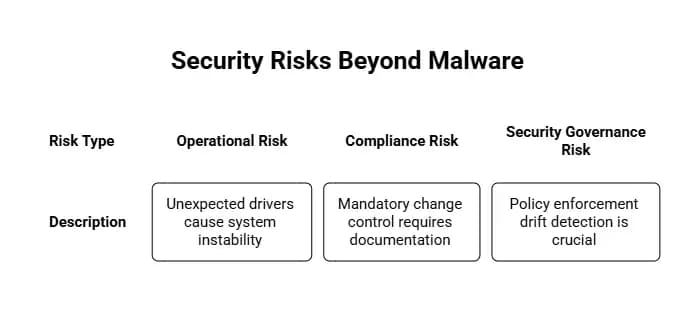
Security Risks Beyond Malware
Operational Risk
Unexpected drivers can create system instability. A network adapter driver could affect connectivity. A graphics driver could break display behavior. A storage controller driver could create performance issues. These are not dramatic attack stories, but they are real IT problems.
Compliance Risk
In healthcare, finance, government, and critical infrastructure, change control is often mandatory. Teams must document system changes, approval paths, and rollback plans. A driver-installed outside process may require review, even if it were safe.
Security Governance Risk
The Windows Driver Auto Update Controls issue also raises a bigger question. If device enrollment data can temporarily disappear, how quickly can organizations detect that policy enforcement has drifted? That question matters far beyond this single incident.
Real-World Example: Why a Signed Driver Can Still Cause Trouble
Imagine a financial company with 5,000 laptops. The IT team blocks automatic driver updates because one trading application depends on a specific graphics driver version. Normally, the company tests new drivers in a pilot group before wider rollout.
Now imagine that a service degradation causes a small percentage of those laptops to receive a new driver without approval. The driver is legitimate. It is signed. It is not malware. Still, a few users start reporting display glitches during market hours. The issue becomes urgent because the business depends on stable workstations.
This is why Microsoft 365 Update Management is more than a technical setting. It is part of business continuity, risk management, and user trust.
Impact on Regulated Industries
Healthcare organizations rely on controlled updates because clinical systems must remain available. A driver issue on a workstation used for patient workflows may not be a cybersecurity breach, but it can still become a service reliability concern.
Financial institutions face another layer of pressure. They often need proof that updates were approved, tested, and logged. Unexpected driver installation can create questions during audits or internal risk reviews.
Government agencies and critical infrastructure operators also need predictable endpoint behavior. In these environments, security and operational reliability are equally important, leading to careful treatment of system changes.
How Organizations Should Assess for Impact
Security and IT teams should review activity during the affected timeframe. The goal is not to panic. The goal is to confirm whether any drivers were installed unexpectedly and whether those changes affected stability, compliance, or business operations.
Investigation Checklist
Review Windows Update logs for driver installation events.
Check Intune reports for device compliance and enrollment status changes.
Look for unexpected driver versions across high-risk device groups.
Compare installed drivers against approved deployment records.
Review helpdesk tickets from June 3 to June 4, 2026.
Confirm whether affected systems returned to normal policy behavior.
Organizations using SIEM, XDR, or endpoint monitoring should also look for policy deviation signals. If you already use Extended Detection and Response, the system is a good use case for correlation between device changes, update activity, and user impact.
Mitigation and Response Steps for IT Teams
Because Microsoft marked the issue as resolved, most organizations do not need emergency remediation unless they observed specific device problems. Still, a measured review is smart.
Start with visibility. Identify devices that received drivers during the incident window. Then verify whether those driver versions are approved for your environment. If they are acceptable, please document the event and close the loop. If they are not acceptable, plan a controlled rollback.
Recommended Actions
Please validate the Microsoft 365 Service Health messages in the admin center.
Review the status of Intune policies and the health of device enrollment.
Audit Windows Update for Business and driver update settings.
Create alerts for unexpected driver installations.
Document any out-of-process changes for compliance records.
Prepare rollback steps for drivers that cause instability.
If your organization has weak endpoint visibility, this is a beneficial moment to review endpoint security protection services and vulnerability management. The goal is not only to block threats. It is also to understand what has changed across your environment.
Common Misconceptions About This Incident
Misconception 1: This Was a Malware Attack
There is no verified evidence that this Microsoft 365 service degradation was caused by malware or threat actors. Microsoft said the drivers involved were approved and signed. Calling it a cyberattack would be misleading based on the available information.
Misconception 2: Signed Drivers Can Never Cause Problems
Signed drivers are safer than unknown drivers, but they can still cause operational issues. A driver can be legitimate and still be wrong for a specific business environment.
Misconception 3: Update Policies Always Work Once Configured
Policies need monitoring. A setting may look correct in the console, but real-world enforcement can depend on identity, enrollment, network conditions, cloud services, and update infrastructure.
Hoplon Insight Box
Expert Recommendation
Do not treat this incident as a reason to distrust Microsoft updates. Treat it as an opportunity to verify updated governance. Security teams should monitor endpoint changes, compare them against approved baselines, and build alerting for policy deviation.
The best response is calm and practical: check logs, confirm driver activity, validate Intune enrollment health, and document what happened. If your environment is regulated, please involve compliance early to ensure the event is recorded properly.
Best Practices to Prevent Similar Issues
No organization can fully control every cloud service dependency. But organizations can reduce the impact of unexpected behavior by improving monitoring and response readiness.
1. Strengthen Update Governance
Review update rings, driver approval settings, and Intune policies. Ensure critical device groups have stricter controls than general user devices. Sensitive systems should not follow the same update path as ordinary office laptops.
2. Monitor for Policy Drift
Policy drift happens when actual device behavior no longer matches intended configuration. This can happen through misconfiguration, service issues, admin error, or device state changes. Monitoring helps teams detect drift early.
3. Build Driver Inventory Visibility
Keep a record of important driver versions across business-critical devices. This makes investigation much faster when unexpected updates occur.
4. Improve Incident Response Playbooks
Your playbook should include steps for update-related incidents, not only malware incidents. Include log review, device grouping, rollback instructions, user communication, and compliance documentation.
For organizations that need structured readiness, a cyber resilience assessment or gap assessment can help identify weak points before an incident creates pressure.
Future Implications for Microsoft 365 Enterprise Security
This event will likely push more organizations to think about updated governance as a security topic, not only an IT operations topic. The line between operations and cybersecurity is getting thinner every year. A misapplied update can look like suspicious activity. A policy failure can become an audit issue. A driver change can affect availability.
Microsoft stated that it is conducting an internal review to enhance the detection, prevention, and management of similar service issues in the future. That is important because enterprise trust depends on reliability. When organizations configure policies, they expect those policies to hold even when supporting services experience problems.
The long-term lesson is simple: trusted systems still need verification. A healthy security program does not assume everything is working. It checks, measures, alerts, and documents.
How Hoplon Infosec Can Help
Hoplon Infosec helps organizations understand and reduce risks across Microsoft 365, endpoint environments, and security operations. Incidents like these are a reminder that visibility and governance matter even when no attacker is involved.
If your organization needs support reviewing endpoint logs, updating governance, or Microsoft 365 security posture, Hoplon Infosec can help you assess the risk, document findings, and strengthen controls before the next service issue creates business impact.
Microsoft 365 Service Degradation did not appear to create a direct malware threat, but it did reveal something important about enterprise security. Update controls are only as strong as the systems that enforce them. When enrollment data failed, some managed Windows devices briefly received driver updates outside expected policy controls.
For security teams, the right response is not fear. It is verification. Review affected devices, confirm driver activity, validate policy enforcement, and improve monitoring for future deviations. In modern enterprise environments, trust is useful, but evidence is better.
Need help reviewing Microsoft 365, endpoint security, or update governance? Contact Hoplon Infosec for a practical security assessment and expert guidance tailored to your environment.
PHP Security Vulnerabilities:PHP2Shell flaws are patched, but another RCE risk remains in some setups. See affected versions and fixes. Check your server.
SBI data breach claim: A group alleges access to 375,000 accounts and 2,722 PDF files. Here is what is verified, what remains unknown,and how to respond.
Ledger hardware wallet spy chip investigation: What Ledger confirmed, how an implant may expose recovery phrases, and what affected owners should do next.
Apple macOS Full Disk Access AI agents face tighter controls. Learn 7 critical privacy risks, Apple's changes, and what Mac users should do to stay secure.