CVE-2026-67401 cPanel Vulnerability: How to Check and Secure Your Server
cPanel disclosed CVE-2026-67401 on September 8, 2026. The vulnerability affects its EmailTrack functionality and can allow an authenticated cPanel user with mail-related privileges to create arbitrary files on the server.
The most serious part is what can happen next. According to cPanel, successful exploitation can lead to code execution as root, giving an attacker full control of the affected server.
cPanel has already released patched versions.
If you manage a cPanel or WHM server, your priority should now be simple:
Check your version → Install the patch → Verify the update → Review account access → Check for suspicious activity.
This guide explains each step and, just as importantly, what to do if you think the server may have been exposed before the patch was installed.
Key Findings
Here is the situation in plain terms:
- CVE-2026-67401 affects cPanel EmailTrack.
- The attacker must already have an authenticated cPanel account with mail-related privileges.
- The flaw can allow arbitrary files to be created on the server.
- Successful exploitation can result in root-level code execution.
- cPanel says all currently supported cPanel & WHM versions are affected.
- Security-fixed builds are available.
- Installing the patch fixes the known vulnerability, but it does not prove that the server was never compromised before the update.
- cPanel has not currently published a CVE-specific list of indicators of compromise or a dedicated detection script.
The main technical details come from the official cPanel CVE-2026-67401 advisory.
What Exactly Happened?
CVE-2026-67401 is an SQL injection vulnerability in cPanel's EmailTrack functionality.
This is not currently described as an attack that any anonymous internet user can launch directly.
The attacker first needs access to a valid cPanel account with the required mail-related privileges.
That requirement reduces the attack surface, but it does not remove the risk.
Once the vulnerable functionality is abused, cPanel says an attacker can create arbitrary files on the system. Successful exploitation can eventually allow code to run as the root user.
-20260909130142.webp&w=1080&q=75 "CVE-2026-67401: SQL Injection in EmailTrack")
A simple way to understand the disclosed attack path is:
Authenticated cPanel account
↓
Mail-related access
↓
EmailTrack vulnerability
↓
Arbitrary file creation
↓
Root code execution
↓
Server takeover
This is only a high-level explanation of the impact confirmed by cPanel. The vendor has not publicly documented the exact vulnerable parameter, SQL payload, or complete exploit chain, so those details should not be guessed.
Why Root Access is Such a Serious Problem
Root is the highest level of administrative access on a typical Linux server.
Once an attacker reaches root, the problem is no longer limited to the cPanel account they started with.
Depending on the server configuration, an attacker with root-level control may be able to reach or modify resources such as:
- website files
- databases accessible from the server
- application configuration files
- stored credentials
- email-related data
- scheduled tasks
- system services
- server configuration
- backups available to the compromised host
The exact impact will depend on how the server is built and what additional security controls are in place.
For example, properly isolated backups or secrets stored outside the compromised server may not be exposed in the same way as files stored locally.
Shared hosting environments need extra attention
This vulnerability matters even more on shared hosting servers.
A normal cPanel user should be restricted to their own account. They should not be able to control the underlying server or access another customer's environment.
Root access changes that security boundary.
If exploitation reaches root, the risk may extend beyond the account originally used in the attack and potentially affect other customers hosted on the same system.
That does not mean every vulnerable shared server has been compromised. It means the potential impact is much wider if exploitation succeeds.
Hoplon Infosec has previously covered other cPanel security problems, including cPanel WHM vulnerability patches and the CVE-2026-41940 cPanel FileManager issue.
CVE-2026-67401 is a separate vulnerability and should be handled according to its own patch requirements.
Who Should Take Action?
You should check your server if you manage or operate a supported cPanel & WHM installation.
This is especially relevant for:
- cPanel and WHM administrators
- web hosting providers
- managed hosting companies
- VPS administrators
- dedicated server owners
- organizations running several cPanel accounts
- shared hosting environments
- teams that delegate email-related access to users
Even if automatic security updates are enabled, do not assume the server is already protected.
Check the installed build and confirm it yourself.
CVE-2026-67401 Patched Versions
According to cPanel's September 8 advisory, the following builds contain the fix:
|
Release Line |
Patched Version |
|
11.110 |
11.110.0.143 |
|
11.134 |
11.134.0.55 |
|
11.136 |
11.136.0.39 |
|
11.138 |
11.138.0.4 |
|
WP2 |
11.138.1.9 |
cPanel currently lists all supported cPanel & WHM versions as affected.
Before making changes, compare your installed version with the appropriate patched build in the official cPanel advisory.
Because release information can change, administrators should recheck the official advisory when applying the fix.
How to Check If Your Server Is Still Affected
You mainly need to answer four questions:
- Which cPanel version is installed?
- Is that build patched?
- Did the latest security update actually install?
- Are there accounts with unnecessary access that could increase risk?
Check the installed cPanel version
If you have root SSH access, run:
/usr/local/cpanel/cpanel -V
This returns the installed cPanel & WHM version.
You can also see the current version from WHM.
cPanel documents both options in its system update documentation.
Compare the version with the security-fixed build
For example, if your server is on the 11.138 release line, cPanel lists 11.138.0.4 as the patched version.
Your goal is to confirm that the server is running the security-fixed build for its release line.
If your version does not clearly match the published table, check cPanel's latest advisory or contact cPanel support rather than making assumptions.
Check through WHM
You can also go to:
WHM → Home → cPanel → Upgrade to Latest Version
The interface shows information about the installed version and available updates.
Review who has access
cPanel says the attacker needs a valid account with mail-related privileges.
That makes account review worthwhile.
Look for:
- accounts that are no longer used
- old employee or contractor accounts
- unnecessary reseller accounts
- users with email-management access they no longer need
- shared credentials
- suspicious or unfamiliar accounts
Account cleanup helps reduce risk, but it does not replace the patch.
How to Fix CVE-2026-67401
The main fix is straightforward:
Update cPanel & WHM to a patched build.
MFA, password changes, permission reviews, and monitoring are useful security improvements, but they cannot fix vulnerable software.
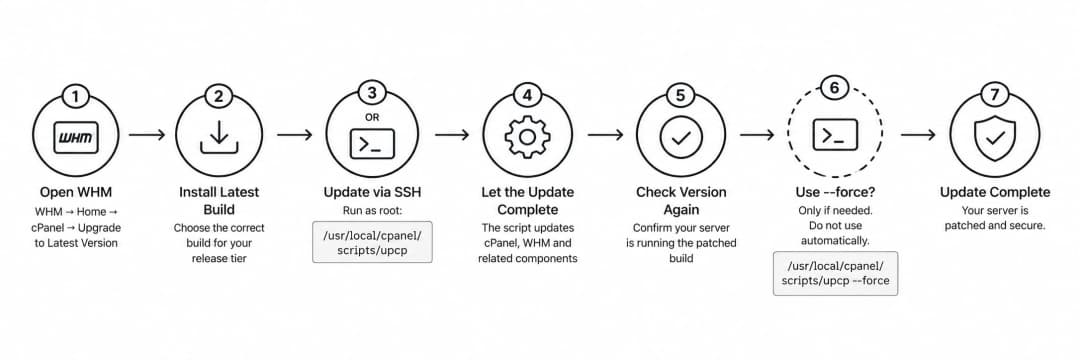
Update through WHM
Open:
WHM → Home → cPanel → Upgrade to Latest Version
Then install the latest appropriate build available for your configured release tier.
cPanel documents this as one of the standard ways to update cPanel & WHM.
Update through SSH
If you prefer the command line, cPanel documents the following update script:
/usr/local/cpanel/scripts/upcp
Run it as root.
The script handles the cPanel & WHM update process and related platform updates.
Do you need --force?
You may see instructions online using:
/usr/local/cpanel/scripts/upcp --force
Do not use --force automatically.
cPanel documents this option as a way to force updates and reinstall files, including situations where normal update preferences would otherwise prevent the update.
That makes it more aggressive than the standard update command.
For most administrators, a cleaner process is:
Check version → Run the normal update → Check version again → Troubleshoot only if the expected build was not installed.
See cPanel's official upcp documentation for details.
-20260909131029.webp&w=1080&q=75)
Verify the Patch After Updating
This step is easy to skip, but it is important.
After the update finishes, run:
/usr/local/cpanel/cpanel -V
Compare the result with cPanel's patched-version table.
Do not treat these two statements as the same thing:
“The update command completed.”
and
“The server is running the patched build.”
The second one is what actually matters.
If the expected version is still not installed, check your update configuration and look for upgrade blockers before assuming the vulnerability has been fixed.
Check Your Automatic Security Update Settings
cPanel includes a separate mechanism for security updates within the current major version.
According to cPanel's current documentation, security updates are normally checked and applied automatically on an hourly basis.
However, certain configurations can stop that behavior.
For example, security updates may not apply normally when the repository is disabled or the server is pinned to a specific numbered release.
Review:
WHM → Home → Server Configuration → Update Preferences
cPanel recommends keeping automatic security updates enabled.
You can review the current behavior in the official Update Preferences documentation.
Automatic patching is useful, but important security incidents should still be verified manually.
Review Accounts and Permissions After Patching
Once you know the vulnerable software has been updated, check the accounts around it.
Remove unused accounts
An account that nobody needs anymore is still another set of valid credentials that could be abused.
Remove or disable accounts that no longer have a business or technical purpose.
Follow least privilege
Users should have only the permissions they genuinely need.
Because CVE-2026-67401 requires mail-related privileges, unnecessary email-management access deserves particular attention.
Review who has that access and whether they still need it.
Enable two-factor authentication
cPanel supports 2FA for cPanel and WHM logins.
With 2FA enabled, possession of a password alone is not enough for a normal interactive login.
You can review the official documentation for WHM two-factor authentication and cPanel two-factor authentication.
Remember that 2FA is another security layer, not a replacement for patching or proper access control.
Rotate credentials when there is a reason
Changing every password simply because a vulnerability exists is not always necessary.
Credential rotation becomes much more important when:
- suspicious login activity is found
- an account may have been exposed
- credentials were shared improperly
- malware is discovered
- unauthorized access is confirmed
- root-level compromise cannot be ruled out
If root access may have been obtained, also consider other secrets stored on the server, including database passwords, API keys, application secrets, and SSH credentials.
How to Check for Possible Exploitation
Installing the patch prevents the known vulnerable path from remaining exposed.
It does not tell you what happened yesterday.
At the time of writing, cPanel has not published a CVE-2026-67401-specific detection script or list of indicators of compromise.
The checks below are therefore general incident-investigation steps, not official signatures for this CVE.
Review cPanel access logs
cPanel documents the following log:
/usr/local/cpanel/logs/access_log
It records access to cPanel and WHM accounts.
Look for activity that does not fit normal behavior, including:
- unknown source addresses
- unusual login times
- unfamiliar users
- unexpected administrative actions
Also review:
/usr/local/cpanel/logs/login_log
This file records login attempts handled by cPanel's cpsrvd service.
The full list is available in cPanel's official log-file documentation.
Review operating-system authentication logs
Depending on the operating system, useful logs may include:
/var/log/secure
or:
/var/log/syslog
Look for root sessions or authentication activity you cannot explain.
Do not treat one unfamiliar log entry as proof of exploitation. Correlate it with other evidence.
Check for unexpected files
This check is particularly relevant because cPanel confirms that the vulnerability can allow arbitrary file creation.
Look for unexplained changes in:
- website directories
- application folders
- configuration files
- scheduled tasks
- startup locations
- privileged scripts
When possible, compare suspicious files with trusted backups, deployment history, package information, or configuration-management records.
Remember that updates and legitimate applications can also modify files.
Review web-server logs
Check relevant Apache, ModSecurity, and application logs for requests that line up with suspicious activity.
Useful questions include:
- Did unusual requests appear at the same time as an unknown login?
- Was a new file accessed immediately after it appeared?
- Did requests come from an unexpected source?
- Was the same account active elsewhere during that period?
Review mail logs
Because the vulnerable component is connected to email functionality, mail logs can provide useful context.
Depending on the server, relevant files may include:
/var/log/exim_mainlog
/var/log/exim_paniclog
/var/log/exim_rejectlog
/var/log/maillog
/var/log/mail.log
These are not direct indicators of CVE-2026-67401 exploitation.
Use them to build a timeline around suspicious users or activity.
Review running processes
Check for:
- unknown root-owned processes
- unexplained services
- suspicious cron jobs
- unexpected startup entries
- unfamiliar executables
A process becomes much more interesting when its timestamp matches suspicious logins, unexpected files, or network traffic.
Check outbound network connections
Unexpected outbound connections may indicate unauthorized tools, command-and-control activity, or data transfer.
But legitimate software also communicates externally.
Look at the full context:
- which process opened the connection
- which user owns it
- where it connected
- when it started
- whether the destination is expected
- whether other suspicious events happened at the same time
One unusual connection alone is not enough to prove compromise.
What to Do If You Suspect Compromise
If you find several signs of unauthorized activity, stop treating this as a simple patching problem.
You may be dealing with an incident.
A sensible response is:
- Preserve evidence.
Keep relevant logs, suspicious files, timestamps, alerts, and other information that may help reconstruct what happened. - Contain the affected system where appropriate.
Restrict unnecessary access or connectivity without destroying evidence or causing avoidable business disruption. - Disable clearly abused accounts.
- Rotate credentials that may have been exposed.
- Look for persistence.
Removing one suspicious file does not prove the attacker has lost access. - Check backup integrity.
Before restoring anything, confirm that the backup represents a trusted state. - Determine the scope of the incident.
On shared hosting, check whether activity reached other accounts. - Recover from a known-good state if system integrity cannot be established.
- Document what happened and what needs to change afterward.
NIST's current incident-response guidance, SP 800-61 Revision 3, provides a broader framework for preparing for, detecting, responding to, and recovering from cybersecurity incidents.
If your team cannot determine whether the server is trustworthy, Hoplon Infosec's Incident Readiness, Response & Recovery service may be relevant for deeper investigation and recovery work.
Patching the Server and Proving It Is Clean Are Different Jobs
This distinction is worth keeping clear.
Is the vulnerability fixed?
Check the installed cPanel build.
If the server is running the correct patched version, the disclosed software vulnerability has been addressed.
Was the server compromised before the patch?
A version number cannot answer that question.
You need to review evidence such as:
- authentication activity
- cPanel logs
- file changes
- running processes
- persistence mechanisms
- network activity
- web and mail logs
This becomes especially important when root-level compromise is possible.
If you cannot establish the integrity of the server, a deeper security review may be necessary.
Organizations that need broader visibility into unresolved weaknesses can also review Hoplon's Vulnerability Management service or Cyber Security Assessment.
How to Reduce the Risk of Similar cPanel Problems
You cannot prevent every future software vulnerability.
What you can do is reduce the number of opportunities an attacker has and limit the damage if an account is compromised.
Keep security updates enabled
Review cPanel Update Preferences regularly.
Avoid configurations that accidentally prevent important security updates from reaching the server.
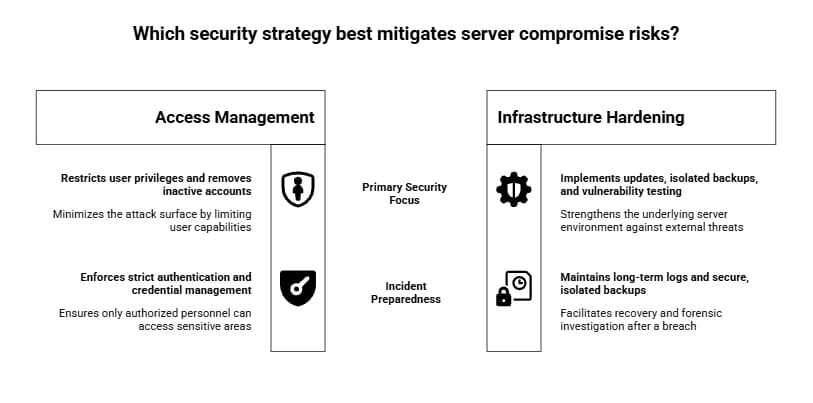
Give users only the access they need
Do not keep unnecessary email, reseller, administrative, or other privileges enabled “just in case.”
Access should follow an actual requirement.
When that requirement ends, remove the permission.
Remove inactive accounts
Old accounts are easy to forget.
Make account cleanup part of normal server maintenance.
Protect privileged access
Use:
- unique passwords
- 2FA where supported
- controlled SSH access
- properly managed administrative credentials
Keep useful logs
Authentication, cPanel, web, mail, and operating-system logs are valuable only if they are still available when an incident happens.
Make sure retention is long enough to investigate meaningful events.
Keep backups isolated
Backups stored in a location that a compromised production server can freely modify may also be at risk.
Use appropriate separation, access control, retention, and restore testing.
For broader recovery planning, see Hoplon's Cloud Storage and Disaster Recovery guidance.
Reassess the wider infrastructure
Fixing CVE-2026-67401 does not tell you whether the rest of the server is secure.
Routine vulnerability management and authorized testing remain useful for finding unrelated weaknesses.
Where deeper validation is needed, Hoplon also provides Penetration Testing services.
CVE-2026-67401 Administrator Checklist
Update
- Check your current cPanel & WHM version.
- Compare it with the official patched build.
- Install the update if needed.
- Verify the version again after updating.
Accounts
- Review active cPanel accounts.
- Remove inactive users.
- Review mail-related permissions.
- Disable suspicious accounts.
- Stop using shared administrative credentials.
Authentication
- Enable 2FA where appropriate.
- Review privileged access.
- Rotate credentials if exposure is suspected.
Investigation
- Review cPanel login activity.
- Review operating-system authentication logs.
- Check for unexpected files.
- Review unusual root processes.
- Investigate unexplained outbound connections.
- Check relevant web and mail logs.
Recovery
- Preserve evidence if compromise is suspected.
- Contain affected systems when necessary.
- Verify backup integrity.
- Determine whether other accounts were affected.
- Escalate to incident response if server integrity is uncertain.
A simple way to remember it:
Update → Verify → Review access → Check activity → Investigate anything you cannot explain.
When Professional Help Makes Sense
If the only problem is an outdated cPanel build, patching and verification may be enough.
The situation becomes more serious when you find things such as:
- unexplained root sessions
- suspicious cPanel logins
- unexpected files
- unknown privileged processes
- strange outbound traffic
- evidence that more than one hosting account may have been affected
At that point, the real question is no longer:
“Did we install the patch?”
It is:
“Can we still trust this server?”
If your team cannot answer that confidently from the available evidence, a structured incident investigation is safer than assuming the patch solved everything.
Hoplon Infosec provides Incident Readiness, Response & Recovery, Vulnerability Management, and broader security assessment services for organizations that need additional support.
Final Takeaway
CVE-2026-67401 deserves attention because the attack can begin from a normal authenticated cPanel account and, according to cPanel, end with code running as root.
The first job is straightforward:
Make sure your server is running the correct patched build.
Then review unnecessary account access, strengthen authentication, and check for anything unusual if the server was exposed before the update.
Most importantly, keep two questions separate:
Is the vulnerability patched now?
and
Was the server compromised before it was patched?
The first can be answered by checking the installed version.
The second requires evidence.
Related Articles:
cPanel WHM Vulnerability Patch: 3 Critical Bugs
Vulnerability Management: Critical Strategy for IT Security
Vulnerability Management Service
Pwn2Own Automotive 2025 Security Research
Plague PAM Backdoor and Linux Credential Theft
Types of Phishing Attacks and Prevention Tips
Tunneling Protocol Vulnerabilities Affecting VPN Hosts
Meta's Legal Victory Against NSO Group Over WhatsApp Spying
Masimo Cyberattack and Medical Technology Security Risks
Libraesva Security Vulnerability